


에이전트 애플리케이션에서 매개변수화된 뷰 사용
AI 에이전트 또는 대규모 언어 모델 (LLM)을 사용하는 Bigtable 애플리케이션에서 매개변수화된 뷰를 안전하게 실행하려면 엄격한 액세스 제어를 설정하고 대역 외로 매개변수를 전달해야 합니다.
액세스 제어 설정
Bigtable 논리적 뷰는 정의자의 권한 보안 모델에서 작동합니다. 즉, 뷰를 쿼리할 때 쿼리를 실행하는 사용자가 아닌 뷰를 정의한 사용자의 권한으로 쿼리가 실행됩니다. 최소 권한의 원칙을 적용하려면 애플리케이션의 서비스 계정에 뷰에만 액세스할 수 있는 권한을 부여하고 기본 소스 테이블에 대한 권한은 보류합니다.
액세스 제어를 설정하려면 다음 단계를 따르세요.
bigtable.reader역할과 같이 최소 권한이 있는 애플리케이션 전용 IAM 역할을 만듭니다.- 이 역할에 뷰에 대한 권한만 부여합니다. IAM 조건을 사용하여
bigtable.logicalViews.readRows권한을 특정 뷰로 제한할 수 있습니다. - 더 엄격한 액세스 제어를 위해 IAM 거부 정책을 사용하여 기본 기본 테이블에 대한 애플리케이션 역할의 모든 권한을 명시적으로 거부합니다.
자세한 내용은 IAM을 사용한 Bigtable 액세스 제어를 참고하세요.
뷰 매개변수 삽입
에이전트 애플리케이션에서 사용자 인증 정보 또는 테넌트 경계와 같은 매개변수화된 논리적 뷰의 매개변수 값은 LLM 또는 최종 사용자가 아닌 신뢰할 수 있는 애플리케이션 코드로 제공해야 합니다. 이렇게 하면 신뢰할 수 없는 사용자 입력과 모델에서 생성된 쿼리 문자열이 데이터베이스 입력에서 격리됩니다.
AI 에이전트를 빌드하려면 에이전트 개발 키트 (ADK) 프레임워크를 사용하면 됩니다. ADK는 매개변수화된 뷰를 통합하는 데 도움이 되는 다음 구성요소를 제공합니다.
BigtableToolset: Bigtable과 통신하는 데이터베이스 지향 도구(특히execute_sql_parameterized)를 구성하고 제공하는 ADK 데이터베이스 도구 모음입니다. 이 도구 모음은 대역 외로 뷰 매개변수를 자동으로 추출하고 데이터에 대해 SQL 쿼리를 실행합니다.ToolContext: 세션별 상태 및 인프라 속성을 샌드박스 처리하여 도구가 LLM에 노출하지 않고도 민감한 필터링 매개변수를 확인할 수 있도록 하는 런타임 메커니즘입니다.
다음 이미지는 구성요소가 함께 작동하여 Bigtable에 매개변수를 삽입하는 방법을 보여줍니다.
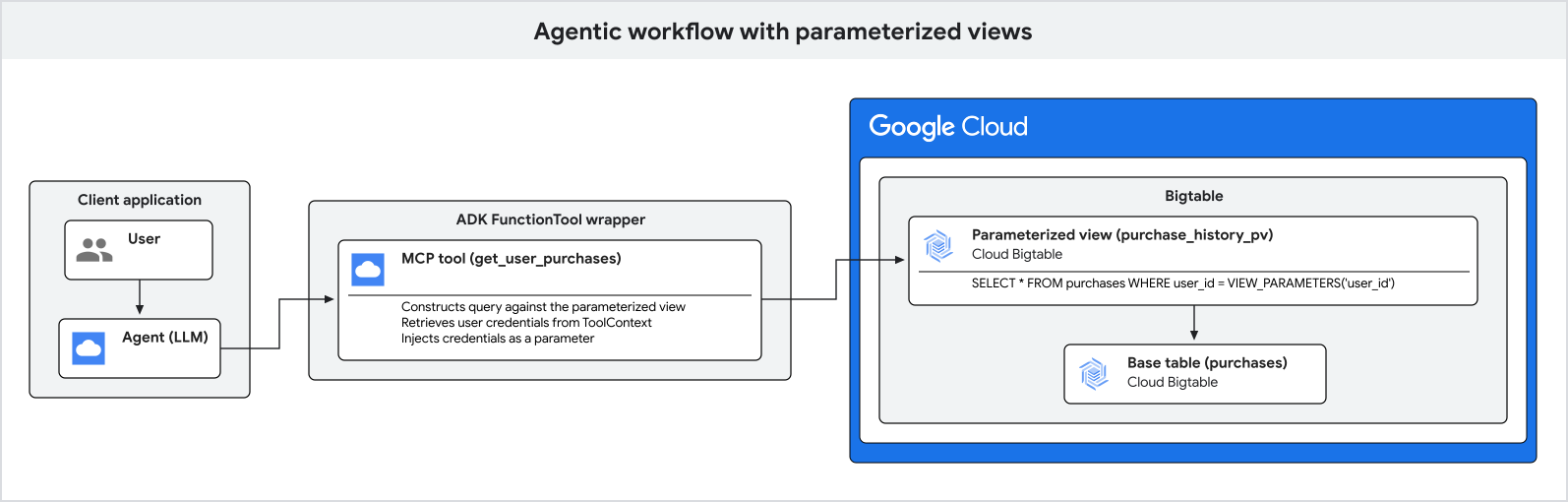
다음 단계에서는 매개변수 삽입 프로세스를 자세히 설명합니다.
- 애플리케이션이 최종 사용자를 인증하고 확인된 사용자 인증 정보와 테넌트 조직을 가져옵니다.
- 애플리케이션이 사용자로부터 자연어 쿼리를 수신합니다.
- 애플리케이션이 보안 세션 상태에서 인증된 사용자 및 테넌트 식별자를 전달하여 ADK 에이전트를 실행합니다.
- 에이전트가 데이터베이스를 쿼리하기로 결정하면 도시와 같은 자연어 필터링 인수만 결정하고
execute_sql_parameterized도구를 호출합니다. - 기본 데이터베이스 도구가
ToolContext에서 민감한 사용자 인증 정보와 테넌트 경계를 안전하게 가져오고 Bigtable에 대해 쿼리를 실행합니다.
다음 예는 ADK를 사용하여 사용자의 구매 내역을 쿼리하는 에이전트 애플리케이션을 설정하는 방법을 보여줍니다.
Bigtable 도구 모음 구성
Python 애플리케이션에서 대역 외로 확인하려는 매개변수 이름 (view_parameter_names)으로 ADK BigtableToolset을 구성합니다. 이렇게 하면 user_id와 같은 프레임워크 인프라 속성과 tenant_id와 같은 애플리케이션 세션 변수가 데이터베이스 쿼리에 직접 매핑됩니다.
import google.auth
from google.adk.agents.llm_agent import LlmAgent
from google.adk.tools.bigtable.bigtable_credentials import BigtableCredentialsConfig
from google.adk.tools.bigtable.bigtable_toolset import BigtableToolset

# 1. Initialize credentials (using Application Default Credentials here)
credentials, _ = google.auth.default()
credentials_config = BigtableCredentialsConfig(credentials=credentials)

# 2. Configure the BigtableToolset
# Passing view_parameter_names=["user_id", "tenant_id"] instructs the toolset
# to automatically extract both parameters from the ToolContext at runtime
# and inject them into the query's view_parameters.
bigtable_toolset = BigtableToolset(
    credentials_config=credentials_config,
    view_parameter_names=["user_id", "tenant_id"],
)
도구 모음으로 에이전트 초기화
도구 모음을 에이전트의 tools 목록에 직접 전달합니다. 에이전트는 강력한 유형의 execute_sql_parameterized 도구를 자동으로 감지하고 노출합니다.
# 3. Create the agent and expose the toolset
agent = LlmAgent(
    model="MODEL_NAME",
    name="purchase_history_agent",
    description="An agent that retrieves multi-tenant purchase history.",
    instruction="You are an assistant that helps users find their purchase history within their tenant.",
    tools=[bigtable_toolset],
)
MODEL_NAME을 사용하려는 모델의 이름(예: gemini-2.5-flash)으로 바꿉니다.
에이전트 애플리케이션 실행
에이전트를 실행할 때 인프라 사용자 ID와 애플리케이션 조직 상태로 활성 세션을 초기화합니다.
import asyncio
from google.adk.runners import Runner
from google.adk.sessions import InMemorySessionService
from google.genai import types

async def main():
    # 4. Initialize session service
    session_service = InMemorySessionService()

    # 5. Create a session for the authenticated user and store their specific
    # organization tenant in the state.
    authenticated_user_id = "user-anwesha-123"
    organization_tenant_id = "tenant-corp-alpha"

    session = await session_service.create_session(
        user_id=authenticated_user_id, # Resolved from tool_context.user_id
        # Resolved from tool_context.state["tenant_id"]
        state={"tenant_id": organization_tenant_id},
        app_name="purchase_history_app",
    )

    runner = Runner(
        app_name="purchase_history_app",
        agent=agent,
        session_service=session_service,
    )

    # 6. Simulate a user query
    user_query = "What did I buy in New York?"
    content = types.Content(role="user", parts=[types.Part(text=user_query)])

    # The runner runs the agent.
    # When the agent calls execute_sql_parameterized, the ADK framework resolves
    # both "user_id" and "tenant_id" out-of-band and passes them to Bigtable
    # as view parameters, completely hidden from the LLM.
    events = runner.run(
        session_id=session.id,
        user_id=session.user_id,
        new_message=content,
    )

    for event in events:
        if event.content and event.content.parts:
            print(f"Agent: {event.content.parts[0].text}")

if __name__ == "__main__":
    asyncio.run(main())
결과는 인증된 사용자의 구매 내역 레코드 목록으로, 쿼리에서 지정한 도시로 필터링되고 테넌트 경계로 제한됩니다.
이 프로세스를 통해 보안 매개변수가 대역 외로 삽입되고 언어 모델 조작에서 완전히 숨겨집니다.