

AlloyDB Omni provides an orchestration platform to deploy and manage AlloyDB Omni in non-Kubernetes environments—for example, on Red Hat Enterprise Linux (RHEL) and compatible systems that use Red Hat Package Manager (RPM) packages. The RPM orchestrator deployment option extends cloud-like flexibility and automation to on-premises and virtual machine (VM) infrastructure.
AlloyDB Omni using the RPM orchestrator lets enterprises install, configure, and manage AlloyDB Omni instances using standard RPM packages. This approach supports organizations that have significant investments in VM infrastructure and established operational practices built around automation tools, for example, Ansible. The RPM orchestrator deployment option runs directly on Linux VMs or bare-metal servers without requiring a containerization layer like Docker or an orchestration system like Kubernetes.
Use cases
The RPM orchestrator deployment option supports the following use cases:
| Use case | Description |
|---|---|
| Enterprises with VM infrastructure | Supports companies where Kubernetes is not standard, or containerized environments with application dependencies that prefer standard VM or bare metal deployments. |
| Simplified operations | Automates database deployment, configuration, and lifecycle management using familiar tools, for example, Ansible. |
| High availability (HA) and disaster recovery (DR) | Sets up resilient AlloyDB Omni clusters with automated failover and recovery mechanisms. |
| Hybrid environments | Ensures consistent database operations across on-premises data centers and cloud VMs. |
| Legacy system integration | Integrates with existing applications and systems designed for non-containerized environments. |
Benefits
The benefits of the RPM orchestrator deployment option include the following:
- Rapid deployment: automates the entire lifecycle from provisioning to verification, which significantly reduces the time and complexity of setting up AlloyDB Omni clusters.
- Seamless integration: integrates natively with standard Linux package management (RPM) and popular automation frameworks, for example, Ansible, which lets teams use existing skills and tool integrations.
- Consistent experience: provides a user experience and feature set for management and operations comparable to the AlloyDB Omni Kubernetes operator, which provides consistency across different deployment models.
- Enterprise-grade high availability (HA) and disaster recovery (DR): supports flexible configurations for high availability and disaster recovery to meet business continuity needs.
- Robust security: Facilitates the implementation of multi-faceted security strategies, including user management, network security with certificates (SSL), and integration with systems, for example, Microsoft Active Directory.
- Centralized management: Uses the AlloyDB Omni service to provide a unified control plane for managing AlloyDB Omni on VMs.
- Observability and auditing: Enables integration with external logging servers—for example, Elastic Stack—using rsyslog for centralized log management, monitoring, and auditing.
- Data protection: Includes features for simplified backup and restore configurations and strategies.
- Connection pooling: Supports deployment of PgBouncer to optimize database connections and improve performance.
- Fleet management: Lets you manage multiple AlloyDB Omni clusters at scale.
Architecture
AlloyDB Omni defines a hierarchy of components that provide flexibility. This flexibility helps you maximize data availability and optimize query performance and throughput. This approach lets you monitor your AlloyDB Omni deployment and adjust its scale and size to suit your workloads.
The top-level resource in the hierarchy is an AlloyDB Omni deployment that features a primary cluster and one or more secondary clusters. An AlloyDB Omni cluster has one or more instances, which are an abstraction of the compute resources that users connect to. The cluster includes a primary instance (read-write) and one or more optional read pool instances (read-only). Each instance has its own access endpoint. You can optionally set up a primary instance with a single node for standalone deployment or multiple nodes for highly available deployment. All nodes have AlloyDB Omni and other related components deployed using the software packages.
The primary instance contains one active (read-write) node designed to handle transactional workloads. For database clusters beyond basic tests, experiments, and development, set up high availability with additional standby nodes. To avoid data loss and achieve a Recovery Point Objective (RPO) of zero in the event of a primary node failure, configure the standby node's in-sync replication mode.
Resilient HA
A resilient HA architecture deploys an active primary node and standby
nodes across separate zones without dedicated load balancer nodes.
Instead, the keepalived service runs directly on the database
nodes to manage a floating virtual IP address that exposes the read-write
endpoint on the active primary node.
The following figure shows the resilient HA deployment architecture in a bare-metal or VM environment:
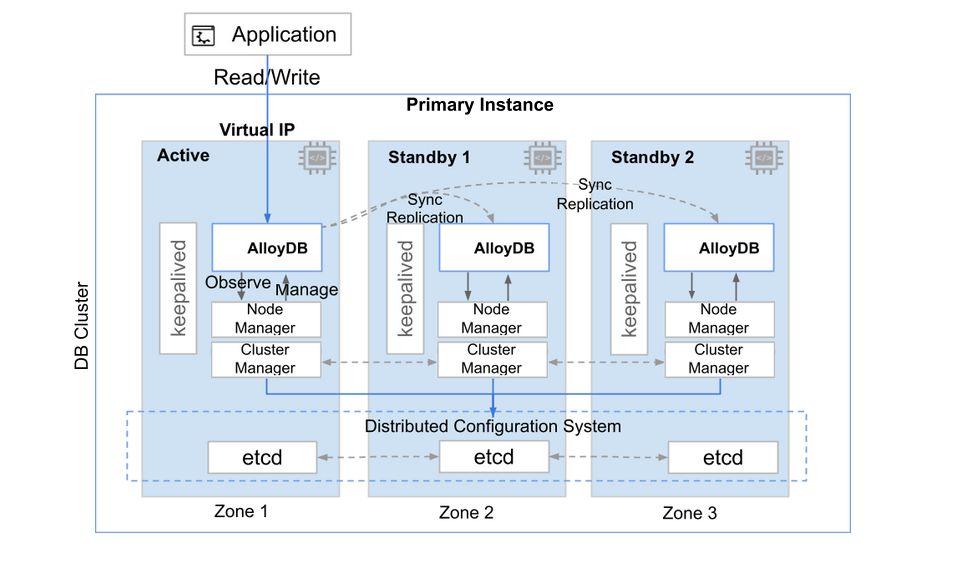
Fig. 1. AlloyDB Omni resilient HA deployment architecture
Scalable HA
A scalable HA architecture deploys an active primary node and standby nodes across separate zones, paired with dedicated HAProxy load balancer nodes. These load balancer nodes expose the read-write and read-only endpoints and route client traffic.
The following figure shows the taxonomy of an AlloyDB Omni scalable HA deployment in a bare-metal or VM environment:
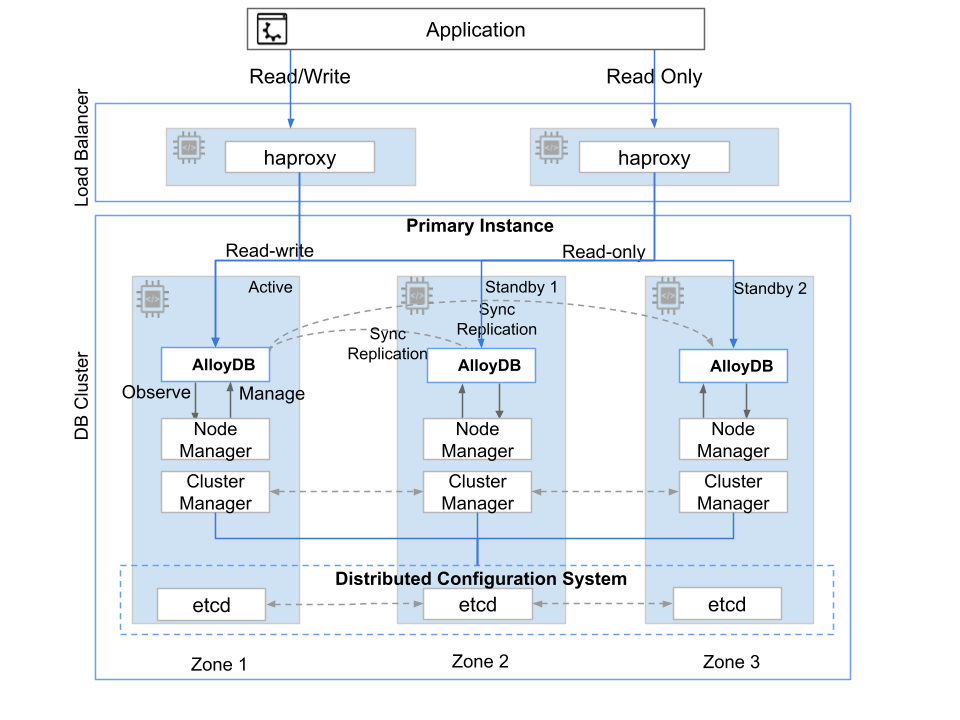
Fig. 2. AlloyDB Omni scalable HA VM deployment architecture
Components
The RPM orchestrator deployment option includes a set of software components, each installed as RPM or Debian packages, for a full-stack, highly available AlloyDB Omni deployment. The reference architecture relies on these components for database operations.
| Component | Description |
|---|---|
| Orchestrator | AlloyDB Omni orchestration provides command-line and Ansible interfaces to help you deploy and manage one or more AlloyDB Omni clusters in a distributed environment. |
| alloydbomni | The AlloyDB Omni core includes PostgreSQL and autopilot features for enhanced performance and capabilities to support modern workloads, for example, online analytical processing (OLAP) and generative AI. |
| alloydbomni_monitor | The AlloyDB Omni monitor lets you pull metrics from AlloyDB Omni. |
| etcd | etcd provides a distributed configuration system that the cluster manager uses to store PostgreSQL configuration and state information. |
| Cluster manager | The central control plane orchestrates cluster-wide operations. This includes bootstrapping the cluster, managing HA, handling failover, coordinating upgrades, and exposing interfaces for automation tools, for example, Ansible and the alloydbctl command-line utility. |
| Node manager | An agent that runs on each node in the AlloyDB Omni cluster. It interacts with the cluster manager to execute tasks on the node, for example, installing and configuring AlloyDB Omni, managing the database service lifecycle (start and stop), monitoring node health, and collecting logs and metrics. |
| HAProxy | HAProxy works as a load balancer for AlloyDB Omni deployments. It exposes the read-write and read-only endpoints. It works with the cluster manager to redirect traffic to appropriate active nodes. |
| keepalived | keepalived can provide HA for the participating nodes, for example, HAProxy, using a floating virtual IP address. |
| PgBouncer | PgBouncer is a lightweight connection pooler for PostgreSQL databases. |
| pgBackRest | pgBackRest is an open source backup and restore tool designed for PostgreSQL. |
This architecture lets you run and operate AlloyDB Omni efficiently in your existing Linux VM environment, combining AlloyDB Omni with the familiarity of their established operational practices.
System requirements
System requirements for the AlloyDB Omni deployment stack include a set of virtual machines preconfigured to run various components. Each AlloyDB Omni virtual machine must have an attached data disk configured with the ext4/xfs file system. The disk size is estimated from the data size. The performance characteristics of the storage affect the performance of AlloyDB Omni. The following table provides minimum and recommended CPU and memory configurations for the VMs.
| VM type | Minimum hardware and operating system (OS) | Recommended hardware and OS |
|---|---|---|
| Controller node |
|
|
| Load balancer nodes |
|
|
| AlloyDB Omni (standalone) |
|
|
| AlloyDB Omni (highly available) |
|
|
| Backup repository node |
|
|
HA deployment reference architecture
The HA architecture provides increased protection against data tier downtime
compared to single-node database setups. Both HA reference architectures use a
multi-node database setup (primary_instance_nodes group) with an active
primary node and synchronous streaming-replicated standby nodes, deployed in
separate zones. If the primary node fails, a standby node takes over as the
primary to handle client queries.
The cluster manager component in the software stack performs the cluster configuration, monitors the AlloyDB Omni server health, and orchestrates automated failover by choosing the new primary with the help of a distributed configuration system such as etcd. Enterprises use RPO and Recovery Time Objective (RTO) as the key measures for availability. The HA architecture setups offer near-zero RPO and RTO for zone-level failure. You can also configure backups and optional read pool instances with asynchronous replication to offload read-only workloads.
Depending on your workload and routing requirements, you can deploy AlloyDB Omni by using either the resilient HA architecture, which operates without dedicated load balancer nodes, or the scalable HA architecture, which includes dedicated load balancer nodes:
Resilient HA
The resilient HA architecture deploys the database nodes
(primary_instance_nodes group) without dedicated load
balancer nodes:
- Virtual IP routing: the
keepalivedservice runs directly on the database nodes and manages a floating virtual IP address that points to the active primary node. This configuration exposes the read-write endpoint directly on the active node. Client applications connect to the database by using the virtual IP address. If a failover occurs and a standby node is promoted to primary, thekeepalivedservice automatically switches the virtual IP address to the new active primary node. - Connection pooling: if you use PgBouncer for connection pooling, it runs directly on the database nodes.
Scalable HA
The scalable HA architecture adds dedicated load balancer nodes
(load_balancer_nodes group) to the database cluster:
- HAProxy load balancing: the dedicated load balancer nodes run HAProxy, which exposes both read-write and read-only endpoints. HAProxy works with the cluster manager to monitor node states, route read-write queries to the active primary node, and distribute read-only queries across healthy standby nodes or optional read pool instances. If failover occurs, HAProxy automatically switches read-write traffic to the new active node.
- Load balancer high availability: the
keepalivedservice runs on the load balancer nodes and manages a floating virtual IP address across them. Clients connect to the HAProxy load balancer by using this virtual IP address to perform database operations. If the active HAProxy service or load balancer node fails, thekeepalivedservice migrates the virtual IP address to another load balancer node. - Connection pooling: if you use PgBouncer for
connection pooling, it runs on the dedicated load balancer nodes
alongside HAProxy and
keepalived.
The following image shows the HA deployment architecture:
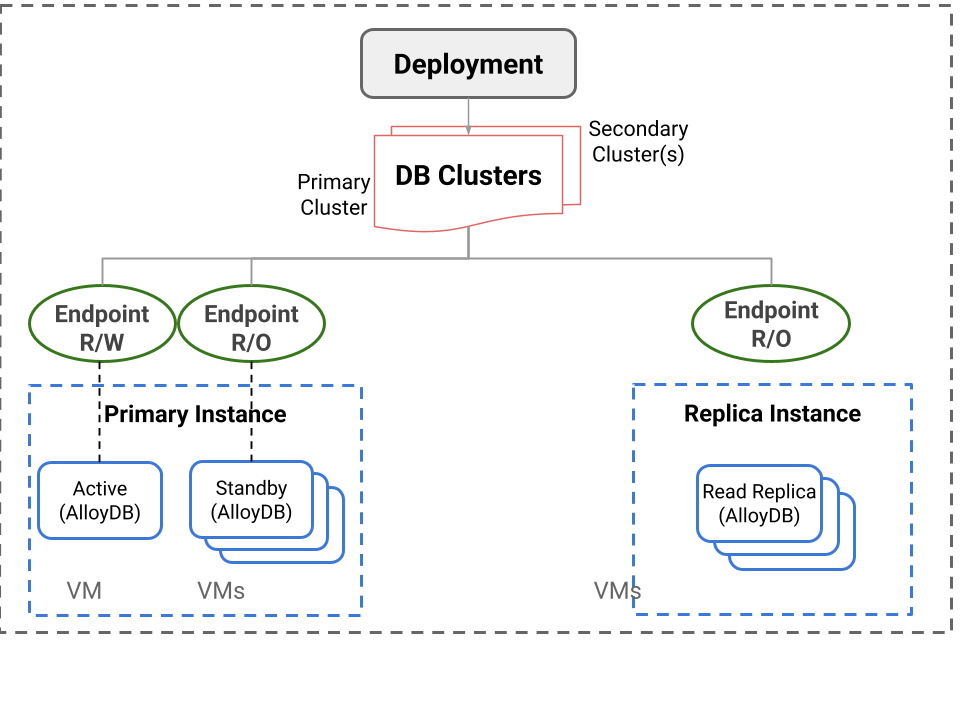
Fig. 3. HA deployment architecture
RPM orchestrator
AlloyDB Omni using the RPM orchestrator provides an automation platform and a control plane for installing, setting up, and managing AlloyDB Omni database clusters on a set of VMs or bare metal servers. This includes various reference architecture configurations, for example, standalone, resilient, and scalable high availability (HA).
The AlloyDB Omni cluster manager provides the control plane. This component is the core service that automates the management and high availability of the AlloyDB Omni cluster to help control the end-to-end lifecycle of an AlloyDB Omni cluster. The control plane itself is highly available and handles various failure scenarios.
The RPM orchestrator deployment option is the remote interface to communicate with the AlloyDB Omni cluster manager service. The orchestrator runs on a dedicated node, called a control node. From this node, you can manage one or more clusters remotely over a secured channel. For compatibility with your environment, multiple AlloyDB Omni orchestrators are available. Choose an orchestrator that is appropriate for your automation needs.
- AlloyDB Omni orchestrator CLI (available as RPM): This is recommended for environments that use shell scripts to automate cluster deployment and management.
- RPM orchestrator Ansible (available as Ansible Collection): This is recommended for environments that use built-in Ansible-based automation and are ready to extend it with calls to additional Ansible roles. Example Ansible playbooks are provided to enable straightforward integration with existing Ansible playbooks.
The AlloyDB Omni orchestrator facilitates the following AlloyDB Omni cluster-related operations. The Ansible-based orchestrator provides Ansible roles for each of these operations. The command line provides a set of commands invoked using a shell prompt or shell scripts.
Installation: Install various cluster components on respective nodes.Bootstrap: Configure and bootstrap all components according to their specifications.Update: Update resources for newer versions or updated configurations.Status: Obtain the status of all components or services in the cluster.Delete: Delete cluster resources.
The orchestrators take a set of specifications as input in YAML format.
- Deployment specification: This is the same as the Ansible Inventory format
that defines the topology of the VM cluster. It contains various VM groups,
for example, the following, along with their configurations.
primary_instance_nodes: Nodes dedicated for AlloyDB Omni database servers.cluster_manager_nodes: Optional. Nodes running AlloyDB Omni cluster manager servers. If no dedicated cluster manager nodes exist, you can deploy the cluster manager on theprimary_instance_nodes.etcd_nodes: The cluster manager stores metadata on etcd. etcd can run on the same nodes as cluster manager nodes if not explicitly specified.load_balancer_nodes: Optional. Additional nodes dedicated for an HAProxy-based load balancer in a scalable HA deployment. If omitted,keepalivedand PgBouncer run directly on the nodes in theprimary_instance_nodesgroup in a resilient HA deployment.
- Resource specification: A cluster consists of one or more cluster resources to be deployed and managed, for example, database clusters and connection poolers. The resource specification is in YAML format and describes the resources to be deployed in the cluster.
Limitations
- The Preview release supports only the following:
- AlloyDB Omni PostgreSQL 18
- RHEL version 9-compatible software packages
- Intel x86 64-bit platform
- Major version upgrades aren't supported.
- Instructions to set up disaster recovery and read pool instances aren't included.
- AlloyDB Omni monitoring doesn't support SSL connections. You must deploy your monitoring dashboard servers on the same private network as the AlloyDB Omni nodes.
- AlloyDB Omni assumes that SELinux, when present, is configured on the host to be permissive, including access to the file system.
What's next
- Choose an AlloyDB Omni download and installation option.
- Install the AlloyDB Omni orchestrator.