


フィルタ付きベクトル検索を使用して類似性検索を絞り込む方法については、AlloyDB Omni でのフィルタ付きベクトル検索をご覧ください。
Vertex AI エンベディングでベクトル検索を行う方法については、AlloyDB Omni AI でベクトル エンベディングを使ってみるをご覧ください。
目標
- AlloyDB Omni クラスタとプライマリ インスタンスを作成します。
- データベースに接続し、必要な拡張機能をインストールします。
productテーブルとproduct inventoryテーブルを作成します。productテーブルとproduct inventoryテーブルにデータを挿入し、基本的なベクトル検索を実行します。- products テーブルに ScaNN インデックスを作成します。
- 基本的なベクトル検索を実行します。
- フィルタと結合を使用して複雑なベクトル検索を実行します。
費用
このドキュメントでは、課金対象である次の Google Cloudコンポーネントを使用します。
料金計算ツールを使うと、予想使用量に基づいて費用の見積もりを生成できます。
新規の Google Cloud ユーザーは無料トライアルをご利用いただける場合があります。
このドキュメントに記載されているタスクの完了後、作成したリソースを削除すると、それ以上の請求は発生しません。詳細については、クリーンアップをご覧ください。
前提条件
ベクトル検索を実行する前に、次の前提条件を満たす必要があります。
- AlloyDB Omni に AlloyDB AI をインストールする
-
postgresユーザーとして AlloyDB Omni を実行して接続します。 -
vector、alloydb_scann、google_ml_integrationの拡張機能をインストールします。CREATE EXTENSION IF NOT EXISTS vector; CREATE EXTENSION IF NOT EXISTS alloydb_scann; CREATE EXTENSION IF NOT EXISTS google_ml_integration CASCADE;
商品と商品在庫データを挿入して基本的なベクトル検索を実行する
次のステートメントを実行して、次の処理を行う
productテーブルを作成します。- 基本的な商品情報を保存します。
- 各商品の商品説明のエンベディング ベクトルを計算して保存する
embeddingベクトル列が含まれています。
CREATE TABLE product ( id INT PRIMARY KEY, name VARCHAR(255) NOT NULL, description TEXT, category VARCHAR(255), color VARCHAR(255), embedding vector(768) GENERATED ALWAYS AS (embedding('text-embedding-005', description)) STORED );必要に応じて、ログを表示してエラーのトラブルシューティングを行うことができます。
次のクエリを実行して、利用可能な在庫と対応する価格に関する情報を保存する
product_inventoryテーブルを作成します。このチュートリアルでは、product_inventoryテーブルとproductテーブルを使用して、複雑なベクトル検索クエリを実行します。CREATE TABLE product_inventory ( id INT PRIMARY KEY, product_id INT REFERENCES product(id), inventory INT, price DECIMAL(10,2) );次のクエリを実行して、商品データを
productテーブルに挿入します。INSERT INTO product (id, name, description,category, color) VALUES (1, 'Stuffed Elephant', 'Soft plush elephant with floppy ears.', 'Plush Toys', 'Gray'), (2, 'Remote Control Airplane', 'Easy-to-fly remote control airplane.', 'Vehicles', 'Red'), (3, 'Wooden Train Set', 'Classic wooden train set with tracks and trains.', 'Vehicles', 'Multicolor'), (4, 'Kids Tool Set', 'Toy tool set with realistic tools.', 'Pretend Play', 'Multicolor'), (5, 'Play Food Set', 'Set of realistic play food items.', 'Pretend Play', 'Multicolor'), (6, 'Magnetic Tiles', 'Set of colorful magnetic tiles for building.', 'Construction Toys', 'Multicolor'), (7, 'Kids Microscope', 'Microscope for kids with different magnification levels.', 'Educational Toys', 'White'), (8, 'Telescope for Kids', 'Telescope designed for kids to explore the night sky.', 'Educational Toys', 'Blue'), (9, 'Coding Robot', 'Robot that teaches kids basic coding concepts.', 'Educational Toys', 'White'), (10, 'Kids Camera', 'Durable camera for kids to take pictures and videos.', 'Electronics', 'Pink'), (11, 'Walkie Talkies', 'Set of walkie talkies for kids to communicate.', 'Electronics', 'Blue'), (12, 'Karaoke Machine', 'Karaoke machine with built-in microphone and speaker.', 'Electronics', 'Black'), (13, 'Kids Drum Set', 'Drum set designed for kids with adjustable height.', 'Musical Instruments', 'Blue'), (14, 'Kids Guitar', 'Acoustic guitar for kids with nylon strings.', 'Musical Instruments', 'Brown'), (15, 'Kids Keyboard', 'Electronic keyboard with different instrument sounds.', 'Musical Instruments', 'Black'), (16, 'Art Easel', 'Double-sided art easel with chalkboard and whiteboard.', 'Arts & Crafts', 'White'), (17, 'Finger Paints', 'Set of non-toxic finger paints for kids.', 'Arts & Crafts', 'Multicolor'), (18, 'Modeling Clay', 'Set of colorful modeling clay.', 'Arts & Crafts', 'Multicolor'), (19, 'Watercolor Paint Set', 'Watercolor paint set with brushes and palette.', 'Arts & Crafts', 'Multicolor'), (20, 'Beading Kit', 'Kit for making bracelets and necklaces with beads.', 'Arts & Crafts', 'Multicolor'), (21, '3D Puzzle', '3D puzzle of a famous landmark.', 'Puzzles', 'Multicolor'), (22, 'Race Car Track Set', 'Race car track set with cars and accessories.', 'Vehicles', 'Multicolor'), (23, 'RC Monster Truck', 'Remote control monster truck with oversized tires.', 'Vehicles', 'Green'), (24, 'Train Track Expansion Set', 'Expansion set for wooden train tracks.', 'Vehicles', 'Multicolor');省略可: 次のクエリを実行して、データが
productテーブルに挿入されていることを確認します。SELECT * FROM product;次のクエリを実行して、在庫データを
product_inventoryテーブルに挿入します。INSERT INTO product_inventory (id, product_id, inventory, price) VALUES (1, 1, 9, 13.09), (2, 2, 40, 79.82), (3, 3, 34, 52.49), (4, 4, 9, 12.03), (5, 5, 36, 71.29), (6, 6, 10, 51.49), (7, 7, 7, 37.35), (8, 8, 6, 10.87), (9, 9, 7, 42.47), (10, 10, 3, 24.35), (11, 11, 4, 10.20), (12, 12, 47, 74.57), (13, 13, 5, 28.54), (14, 14, 11, 25.58), (15, 15, 21, 69.84), (16, 16, 6, 47.73), (17, 17, 26, 81.00), (18, 18, 11, 91.60), (19, 19, 8, 78.53), (20, 20, 43, 84.33), (21, 21, 46, 90.01), (22, 22, 6, 49.82), (23, 23, 37, 50.20), (24, 24, 27, 99.27);次のベクトル検索クエリを実行して、
musicという単語に類似する商品を検索します。つまり、商品の説明にmusicという単語が明示的に記載されていなくても、クエリに関連する商品が結果に表示されます。SELECT * FROM product ORDER BY embedding <=> embedding('text-embedding-005', 'music')::vector LIMIT 3;クエリの結果は次のとおりです。
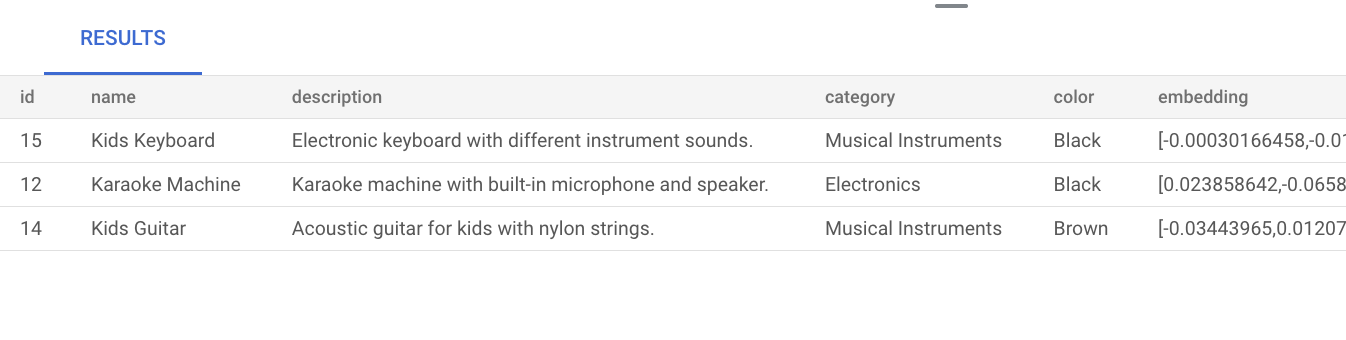
インデックスを作成せずに基本的なベクトル検索を実行すると、正確な最近傍検索(KNN)が使用され、効率的な再現率が得られます。大規模な場合、KNN を使用するとパフォーマンスに影響する可能性があります。クエリのパフォーマンスを向上させるには、近似最近傍検索(ANN)に ScaNN インデックスを使用することをおすすめします。これにより、低レイテンシで高い再現率を実現できます。
インデックスを作成せずに、AlloyDB Omni はデフォルトで正確な最近傍検索(KNN)を使用します。
ScaNN の大規模な使用の詳細については、AlloyDB AI でベクトル エンベディングを使ってみるをご覧ください。
products テーブルに手動でチューニングされた ScaNN インデックスを作成する
次のクエリを実行して、product テーブルに product_index ScaNN インデックスを作成します。
CREATE INDEX product_index ON product
USING scann (embedding cosine)
WITH (mode='MANUAL', num_leaves=4);
ScaNN インデックスの作成の詳細については、ScaNN インデックスを作成するをご覧ください。
ベクトル検索を実行する
次のベクトル検索クエリを実行して、自然言語クエリ music に類似した商品を検索します。商品の説明に music という単語が含まれていなくても、クエリに関連する商品が結果に表示されます。
SET LOCAL scann.num_leaves_to_search = 2;
SELECT * FROM product
ORDER BY embedding <=> embedding('text-embedding-005', 'music')::vector
LIMIT 3;
クエリ結果は次のとおりです。

scann.num_leaves_to_search クエリ パラメータは、類似性検索中に検索されるリーフノードの数を制御します。num_leaves パラメータ値と scann.num_leaves_to_search パラメータ値は、パフォーマンスと再現率のバランスをとるのに役立ちます。
フィルタと結合を使用するベクトル検索を実行する
ScaNN インデックスを使用している場合でも、フィルタ付きベクトル検索クエリを効率的に実行できます。次の複雑なベクトル検索クエリを実行します。フィルタが適用されていても、クエリ条件を満たす関連する結果が返されます。
SET LOCAL scann.num_leaves_to_search = 2;

SELECT * FROM product p
JOIN product_inventory pi ON p.id = pi.product_id
WHERE pi.price < 80.00
ORDER BY embedding <=> embedding('text-embedding-005', 'music')::vector
LIMIT 3;
フィルタ付きベクトル検索を高速化する
カラム型エンジンのコンテンツ ストアを使用すると、データベースで選択性の高い述語フィルタリング(LIKE の使用など)と組み合わせた場合に、ベクトル類似性検索(特に K 最近傍(KNN)検索)のパフォーマンスを向上させることができます。このセクションでは、vector 拡張機能と AlloyDB Omni の google_columnar_engine 拡張機能を使用します。カラム型エンジンの仕組みについて詳しくは、カラム型エンジンの概要をご覧ください。
パフォーマンスの向上は、大規模なデータセットのスキャンとフィルタ(LIKE 述語など)の適用におけるカラム型エンジンの組み込みの効率性と、ベクトル サポートを使用して行を事前フィルタリングする機能によって実現されます。この機能により、以降の KNN ベクトル距離計算に必要なデータ サブセットの数が減り、標準フィルタリングとベクトル検索を含む複雑な分析クエリを最適化できます。
カラム型ストアには、コンテンツを管理する 2 つのオプションが用意されています。
- カラム型ストアのコンテンツを自動的に管理する: 新しい AlloyDB Omni インスタンスでは、デフォルトで自動カラムナ化が使用されます。また、カラム化機能を手動で実行することもできます。
- カラム型ストアのコンテンツを手動で管理する: ワークロードのカラム型ストアの列を手動で管理する必要がある場合は、自動的なカラム化を無効にできます。
カラム型エンジンを有効にする前と後で、LIKE 述語でフィルタされた KNN ベクトル検索の実行時間を比較する手順は次のとおりです。
-
vector拡張機能を有効にして、ベクトルのデータ型と演算をサポートします。次のステートメントを実行して、ID、テキストの説明、512 次元のベクトル エンベディング列を含むサンプル テーブル(items)を作成します。CREATE EXTENSION IF NOT EXISTS vector; CREATE TABLE items ( id SERIAL PRIMARY KEY, description TEXT, embedding VECTOR(512) );
-
データを入力するために、次のステートメントを実行して、サンプル
itemsテーブルに 100 万行を挿入します。-- Simplified example of inserting matching (~0.1%) and non-matching data INSERT INTO items (description, embedding) SELECT CASE WHEN g % 1000 = 0 THEN 'product_' || md5(random()::text) || '_common' -- ~0.1% match ELSE 'generic_item_' || g || '_' || md5(random()::text) -- ~99.9% don't match END, (SELECT array_agg(random()) FROM generate_series(1, 512))::vector FROM generate_series(1, 999999) g;
-
カラム型エンジンを使用しない場合のベクトル類似性検索のベースライン パフォーマンスを測定します。
SELECT id, description, embedding <-> '[...]' AS distance
FROM items
WHERE description LIKE '%product_%_common%'
ORDER BY embedding <-> '[...]'
LIMIT 100;
-
カラム型エンジンとベクトル サポートを有効にします。
-
google_columnar_engine.enabledデータベース フラグとgoogle_columnar_engine.enable_vector_supportデータベース フラグを有効にします。ALTER SYSTEM SET google_columnar_engine.enabled = 'on'; ALTER SYSTEM SET google_columnar_engine.enable_vector_support = 'on';
-
AlloyDB Omni を再起動する
systemctl restart alloydbomni18
-
-
カラム型エンジンに
itemsテーブルを追加します。SELECT google_columnar_engine_add('items');
-
カラム型エンジンを使用して、ベクトル類似性検索のパフォーマンスを測定します。先ほど実行したクエリを再実行して、ベースライン パフォーマンスを測定します。
SELECT id, description, embedding <-> '[...]' AS distance
FROM items
WHERE description LIKE '%product_%_common%'
ORDER BY embedding <-> '[...]'
LIMIT 100;
-
カラム型エンジンを使用してクエリが実行されたかどうかを確認するには、次のコマンドを実行します。
explain (analyze) SELECT id, description, embedding <-> '[...]' AS distance
FROM items
WHERE description LIKE '%product_%_common%'
ORDER BY embedding <-> '[...]'
LIMIT 100;
クリーンアップ
AlloyDB Omni をアンインストールするには、AlloyDB Omni を管理してモニタリングするをご覧ください。
次のステップ
- AlloyDB AI を使用して生成 AI アプリケーションを構築する方法について学習する。
- ScaNN インデックスを作成する。