

Use cases
This reference architecture supports the following scenarios:
- You have databases that can tolerate some downtime and data loss since the last backup.
- You want to protect your AlloyDB Omni database from user error, corruption, or physical failures at the database level, as opposed to server or VM image snapshots.
- You want to recover your database in place or remotely, possibly up to a specific point in time.
How the reference architecture works
The Standard Availability reference architecture covers the backup and recovery of your AlloyDB Omni databases.
While Standard Availability is a basic implementation and minimizes required additional hardware or services, the Recovery Time Objective (RTO) increases as the database gets larger. The more data there is to back up, the longer it takes to restore and recover the database. Data loss depends on the type of backup. If only data files are backed up periodically, then when you restore, you incur data loss since the last backup.
Reducing RPO
The PostgreSQL continuous archiving feature lets you achieve a low Recovery Point Objective (RPO) and enable point-in-time recovery through backups. This process involves archiving Write-Ahead Logging (WAL) files and streaming WAL data, potentially to a remote storage location.
If WAL files are archived only when full or at specific intervals, a complete database loss (including current WAL files) restricts recovery to the last archived WAL file, which means that your RPO must account for potential data loss. Conversely, continuous WAL data transfer minimizes potential data loss.
When you configure continuous backups, you can perform recovery to a specific point in time. Point-in-time recovery lets you restore a database to a state before an error, such as accidental table deletion or incorrect batch updates. However, this recovery method affects both RPO and RTO unless you use a temporary auxiliary database. Restoring an entire database in place rolls back subsequent transactions on unaffected tables and takes the database offline, whereas restoring to a temporary auxiliary database lets you copy only the recovered data.
Backup strategies
AlloyDB Omni supports data protection strategies such as periodic
physical backups, point-in-time recovery, WAL archiving and streaming, and
storing backups in different locations. Alternatively, for small databases, you
can perform a logical backup by using
pg_dump for a
single database or
pg_dumpall for
the entire cluster, and restore by using
pg_restore.
Backup tools
For container and Linux deployments, you can schedule and manage backups using the following PostgreSQL tools:
- pgBackRest: for more information, see Set up pgBackRest for AlloyDB Omni.
- Barman: for more information, see Set up Barman for AlloyDB Omni.
Depending on your deployment option, you can configure AlloyDB Omni to store backups on either local or remote storage, such as Cloud Storage or storage options provided by any cloud vendor. Although local storage might be faster to back up and recover from, remote storage is usually more robust for handling failures when an entire host or VM fails. For more information, see Figure 1, which shows potential backup destinations.
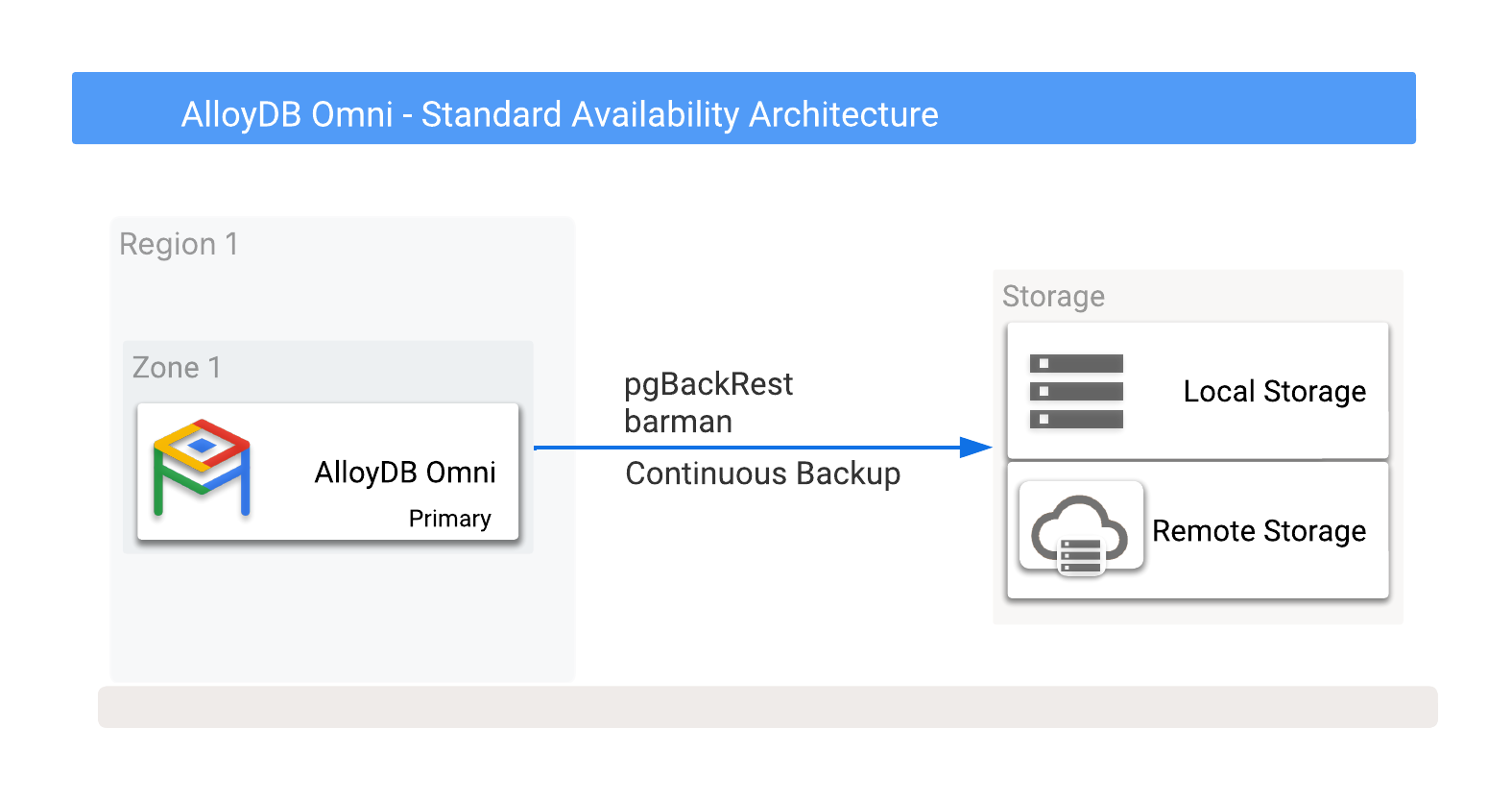
Figure 1. AlloyDB Omni with backup options.
You can take backups to either local or remote storage options. Local backups tend to be quicker because they rely on only I/O throughput, whereas remote backups usually have a higher latency and lower network bandwidth. However, remote backups provide better protection against host and zonal failures than local backups.
You can also split local backups into local or shared storage. While local storage lacks disaster recovery options when a database host fails, shared storage lets you relocate that storage to another server and use it for recovery. This means that shared storage potentially offers a faster RTO.
For local, shared, and remote storage deployments, you can schedule the following types of backups or take them manually on demand:
- Full backups: complete backups of all the database files needed for data recovery.
- Differential backups: backups of only the file changes since the last full backup.
- Incremental backups: backups of only the file changes since the last backup of any kind.
Point-in-time recovery
Continuous backups of the PostgreSQL WAL files support point-in-time recovery. If, after a failure event, the WAL files are intact and usable, then you can use these files to recover to a specific point in time and help minimize data loss.
Stream WAL data to a remote location
Depending on your backup tool (such as Barman), you can configure WAL data to stream in real time to a remote location to help minimize data loss on recovery. Even with real-time streaming, there is a small chance of losing committed transactions because streaming writes to the remote location are asynchronous by default. However, you can configure WAL streaming to use synchronous mode, which stores the WAL data and sends a status response back to the source database. Keep in mind that this approach can slow down transactions if they have to wait for this write to complete before continuing.
Backup schedules
In most environments, backups are usually scheduled on a weekly basis. The following is a typical weekly schedule of backups:
- Sunday: full backup
- Monday, Tuesday: incremental backup
- Wednesday: differential backup
- Thursday, Friday: incremental backup
- Saturday: differential backup
Using this typical schedule, a rolling recovery window of one week requires storage space for up to three full backups plus the required incremental or differential backups. This approach supports recovery for a failure that takes place during the full backup on Sunday, when the database recovery must extend to the previous Sunday before the backup started.
To minimize RTO with a potential for higher RPO, additional databases can operate in continuous recovery mode. This mode involves replaying backups and continuously updating the secondary environment by archiving and replaying new WAL files. The actual RPO, which reflects potential data loss, depends on transaction frequency, WAL file size, and the use of WAL streaming.
Backup restoration
You can restore an AlloyDB Omni database from a stored backup or recover to a specific point in time within your retention window. Depending on your deployment environment and recovery needs, you can either restore data in place or restore the backup into a new database instance or cluster.
For container and Linux deployments, restoring an AlloyDB Omni database typically involves stopping the database service or container and restoring data into the existing data directory, or restoring data to a new location and starting a new database instance by using that restored data. For more information, see Restore an AlloyDB Omni cluster using pgBackRest or Restore an AlloyDB Omni cluster using Barman.
Implementation
When you choose an availability reference architecture, keep in mind the following benefits, limitations, and alternatives.
Benefits
- Is straightforward to use and manage, and is suitable for non-critical databases with lenient RTO and RPO.
- Requires minimal additional hardware.
- Provides the foundational backups required for a disaster recovery plan.
- Supports recovery to any point in time within the recovery window.
Limitations
- Can require more storage space than the database itself, depending on your retention requirements.
- Can be slow to recover and might result in a higher RTO.
- Can result in some data loss, depending on the availability of the current WAL data after a database failure, which might negatively affect RPO.
Alternatives
Consider the Enhanced Availability or Premium Availability reference architecture for improved availability and disaster recovery options.
What's next
- AlloyDB Omni availability reference architecture overview
- AlloyDB Omni Enhanced Availability
- AlloyDB Omni Premium Availability
- Back up and restore AlloyDB Omni
- Set up pgBackRest for AlloyDB Omni
- Set up Barman for AlloyDB Omni
- Restore an AlloyDB Omni cluster using pgBackRest
- Restore an AlloyDB Omni cluster using Barman