

To run real-time queries of analytical data alongside your operational data
without building complex pipelines, you can use lakehouse federation in
AlloyDB for PostgreSQL. Powered by the bigquery_fdw extension, AlloyDB
routes your queries to BigQuery to access live data and open formats
like Apache Iceberg through BigLake external tables, eliminating the need for
complex ETL (extract, transform, load) migrations.
Benefits of lakehouse federation
The lakehouse federation approach offers the following benefits:
- Zero ETL: query analytical data directly without building or maintaining complex pipelines.
- Familiar syntax: use standard PostgreSQL syntax to query BigQuery data.
- Real-time insights: access fresh data alongside your operational tables.
- Offload compute: use the BigQuery distributed engine for heavy lifting through pushdown optimization.
- Authorized access: to ensure that only authorized service accounts can query external data, use Identity and Access Management (IAM) for centralized access control.
Use cases
Lakehouse federation supports the following business and technical use cases:
- Hybrid transactional and analytical processing (HTAP) workloads: You can query real-time operational data in AlloyDB and historical or analytical data in BigQuery or Cloud Storage simultaneously without impacting transactional performance.
- Real-time insights without brittle pipelines: You can avoid the latency and failure modes of traditional ETL processes. Access fresh analytical data instantly to make business decisions based on the most up-to-date information.
- Data materialization for agentic workflows: You can materialize external analytical data into AlloyDB to use the AlloyDB columnar engine and AlloyDB AI capabilities. This enables high-performance vector searches, machine learning embeddings, and advanced AI-driven agentic workflows on your federated data.
Architecture and data flow
The following diagram shows the flow of data and component interactions when you use lakehouse federation:
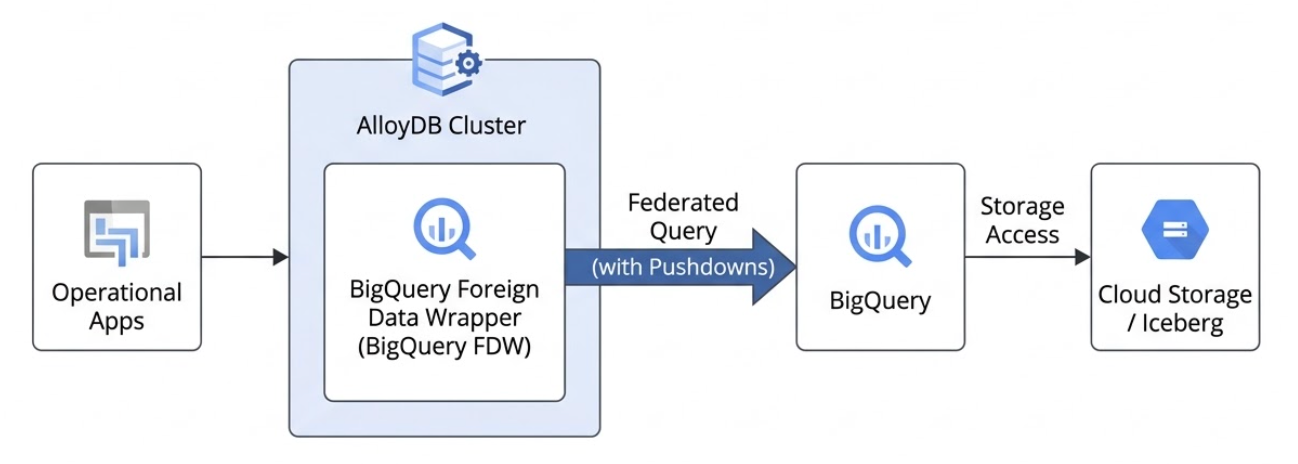
The following describes the data flow process for lakehouse federation in AlloyDB:
- Query submission: you submit a standard PostgreSQL query to your AlloyDB instance.
- Query planning and optimization: the AlloyDB query planner identifies tables that are mapped to external BigQuery datasets using the BigQuery foreign data wrapper (FDW).
- Pushdown optimization: AlloyDB optimizes the query by pushing down specific filters and aggregations directly to BigQuery. This ensures that the network only transfers the relevant, filtered rows or pre-aggregated summaries.
- Execution and retrieval: BigQuery executes its portion of the query—directly scanning BigQuery built-in storage or reading Apache Iceberg tables stored in Cloud Storage—and streams the resulting dataset back to AlloyDB.
- Final processing and response: AlloyDB combines the external data with any local operational tables, completes any remaining query processing, and returns the final result to your application.
Data type considerations for federated queries
When you query an external BigQuery table from
AlloyDB using lakehouse federation, the AlloyDB
query planner interprets the BigQuery data types as corresponding
PostgreSQL data types. Understanding these mappings is crucial for writing
correct queries and for the foreign table definitions used by the bigquery_fdw
extension.
If a BigQuery data type doesn't have a direct mapping or requires
special handling, you might need to use explicit CAST functions within your
queries or create a view in BigQuery that presents the data with
compatible types.
For a list of supported data types and their corresponding PostgreSQL types, see Data type mappings.
Security and access control
Access to BigQuery data from AlloyDB is managed through IAM. You must grant specific IAM roles to the AlloyDB cluster service account to define which datasets and tables can be queried. This helps ensure that federated queries adhere to your organization's centralized data governance policies without compromising security. For more information, see Required roles.
Pushdown
You can use filter and aggregate pushdown techniques, which speed up queries and reduce costs by filtering or summarizing data in BigQuery before it's moved or processed by AlloyDB. This approach minimizes network traffic and memory usage, letting you analyze massive datasets quickly and efficiently without exceeding resource limits.
Filter pushdown
Filter pushdown, also known as predicate pushdown, is an optimization
technique that moves the filtering of data as close to the storage layer as
possible by moving your query filters (using the WHERE clause) from
AlloyDB down to BigQuery.
With filter pushdown, you can use SQL queries with a WHERE clause to access a subset
of data from the remote table. This data can also be materialized on a local table
or attached as a local partition to a PostgreSQL table.
Supported operations for filter pushdown include the following:
- Standard comparison operators:
=,<,>,<=,>=,<> - Logical operators:
AND,OR, andNOT - Pattern matching:
LIKEandNOT LIKE - Null checks:
IS NULLandIS NOT NULL - In-list evaluation:
INandNOT IN
Aggregate pushdown
Aggregate pushdown is an advanced database optimization that performs
calculations—for example, SUM, COUNT, AVG, or GROUP BY—as
close to the storage layer as possible. This pushdown evaluates summary functions
directly in BigQuery, which can significantly reduce the number
of rows returned to AlloyDB.
Supported operations for aggregate pushdown include the following:
SUMCOUNTAVGMINMAX
BigQuery cost and billing
The BigQuery foreign data wrapper depends on the following:
- BigQuery compute pricing
- BigQuery Storage API pricing
For information, see BigQuery pricing.
Limitations
- AlloyDB and BigQuery may use different collations, which can result in different data ordering between the two systems. For any part of a query executed remotely on BigQuery, the collation follows BigQuery's settings.
- Queries that return a very large amount of data from BigQuery, after the pushdown, aren't optimized.
What's next
- Choose how to access BigQuery data.
- Configure access to real-time data.
- Import BigQuery data to AlloyDB.