

Pathways is a system designed to enable the creation of large-scale, multi-task, and sparsely activated machine learning systems. It allows for the use of thousands or tens of thousands of accelerators, with the ability to dynamically allocate varying amounts of compute for different tasks based on their processing requirements.
Pathways simplifies large-scale machine learning computations by enabling a single JAX client to orchestrate workloads across multiple large TPU slices, potentially spanning thousands of TPU chips.
Pathways is used internally at Google to train large models like Gemini. Pathways on Cloud brings the same benefits to Google Cloud customers.
Before you begin
Make sure you have:
This document provides an overview of how to use Pathways managed TPUs on Google Kubernetes Engine (GKE) for batch, real-time and interactive workloads. It assumes you are already familiar with using TPUs with GKE including both single and multi-slice TPUs on Google Kubernetes Engine, as well as general experience with multi-slice TPUs
Single controller and multi-controller
There are primarily two different ways to manage and orchestrate computations across multiple devices:
Feature |
Single-controller (Pathways) |
Multi-controller (JAX Default) |
Control |
Single point of control: A single client program acts as the central controller. |
Distributed control: Multiple processes participate, each with its own Python interpreter instance. |
View |
Unified view: Client sees all devices as a single, unified system. |
Localized view: Each Python process sees only devices connected to it. |
Programming |
Simplified programming: Users interact with a single client, making the system appear as a single large machine with many local accelerators. |
SPMD: Primarily uses the SPMD paradigm, requiring all devices to run the same program. |
Flexibility |
Supports more complex computation patterns beyond SPMD, including asymmetrical pipeline parallelism and computational sparsity. |
Can be less flexible in resource management, especially across different TPU slices. |
Pathways components
The following section outlines the main components of the Pathways architecture.
Pathways resource manager
This is the central control plane of the Pathways system. It manages all the accelerator resources and is responsible for coordinating the allocation of accelerators for user jobs. It monitors the health of workers and handles job scheduling, pausing, and resuming. It serves as a single point of contact for errors and system status. This component only requires CPU resources.
Pathways client
This is an implementation of the Interim Framework Runtime (IFRT) that serves as the entry point into the Pathways system. It receives High-Level Operations (HLOs) from your program. The Pathways client is responsible for coordinating with the Pathways resource manager to determine where to place compiled programs for execution based on the user code. It presents a unified view of the system to a given JAX client. This component only requires CPU resources.
Pathways worker
These are the processes that run on the accelerator machines (TPU VMs). They receive compiled executables of your program from the IFRT proxy server and they perform the computations on the TPUs. Pathways workers send data back to your program over the IFRT proxy server. This component requires accelerator resources.
IFRT proxy client
This is an OSS implementation of the Interim Framework Runtime (IFRT) API which decouples user code from the underlying runtime, and enhances code portability and transparency. JAX uses this implementation as an alternative to its default multi-controller runtime. The IFRT proxy client acts as a communication bridge between your program and the Pathways components. It sends requests to the IFRT proxy server and receives results from it. It is an OSS implementation of the IFRT API. This component only requires CPU resources.
IFRT proxy server
This gRPC server receives requests from the IFRT proxy client and forwards them to the Pathways client, which handles the actual distribution of work. This component only requires CPU resources.
Sidecar server
This gRPC server is co-located with the Pathways worker on the accelerator VM to run user-specified Python code on the accelerator VM directly to reduce data transfer latency from controller to accelerators. The sidecar server interacts with the Pathways worker over a custom versioned protocol on the gRPC transport.
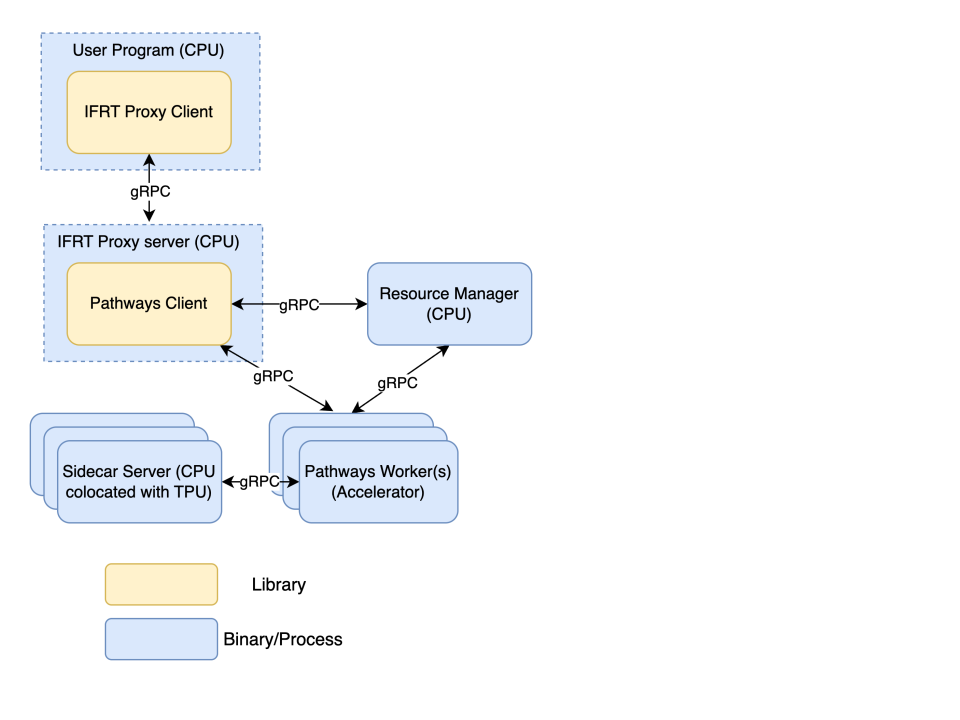
Pathways components on GKE
This section maps Pathways components to Google Kubernetes Engine components like containers and pods.
You can find Pathways container images at the following locations.
Container Type |
Location |
IFRT proxy server |
|
Pathways resource manager/worker |
|
Pathways resource manager
After you create a GKE cluster, you can use the following containerSpec to deploy the pathways resource manager:
  - name: pathways-rm
    image: us-docker.pkg.dev/cloud-tpu-v2-images/pathways/server:latest
    imagePullPolicy: Always
    env:
    - name: HOST_ADDRESS
      valueFrom:
        fieldRef:
          fieldPath: "metadata.labels['jobset.sigs.k8s.io/coordinator']"
    - name: TPU_SKIP_MDS_QUERY
      value: "true"
    args:
    - --server_port=29001
    - --node_type=resource_manager
    - --instance_count=WORKLOAD_NODEPOOL_COUNT
    - --instance_type=SLICE_TOPOLOGY
    - --gcs_scratch_location=gs://BUCKET_NAME
Argument descriptions:
--server_port: the Pathways resource manager uses this port to communicate with other pathways components.--node_type: the node type. This should be set to "resource_manager" for the Pathways resource manager and is not needed for the other containers.--instance_count: the number of TPU slices.--instance_type: the TPU type and topology of the slice. In the format oftpu{TPU type}:{TPU topology}for example,tpuv5e:4x4.--gcs_scratch_location: a Cloud Storage bucket used for temporary files.
IFRT proxy server
You can use the following containerSpec to deploy an IFRT proxy server:
 - name: pathways-proxy
    image: us-docker.pkg.dev/cloud-tpu-v2-images/pathways/proxy_server:latest
    imagePullPolicy: Always
    env:
    - name: PATHWAYS_HEAD
      valueFrom:
        fieldRef:
          fieldPath: "metadata.labels['jobset.sigs.k8s.io/coordinator']"
    args:
    - --resource_manager_address=$(PATHWAYS_HEAD):29001
    - --server_port=29000
    - --gcs_scratch_location=gs://BUCKET_NAME
    ports:
    - containerPort: 29000
Argument descriptions:
--resource_manager_address: the hostname and port that the proxy server uses to communicate with the Pathways resource manager. The port should be the same as the--server_portvalue used for the Pathways resource manager container.--server_port: the IFRT proxy server uses this port to communicate with the IFRT proxy client.--gcs_scratch_location: a Cloud Storage bucket used for temporary files.
Pathways worker
You can use the following containerSpec to deploy Pathways workers:
- name: worker
  image: us-docker.pkg.dev/cloud-tpu-v2-images/pathways/server:latest
  imagePullPolicy: Always
  env:
  - name: PATHWAYS_HEAD
    valueFrom:
      fieldRef:
        fieldPath: "metadata.labels['jobset.sigs.k8s.io/coordinator']"
  - name: MEGASCALE_NUM_SLICES
    valueFrom:
      fieldRef:
        fieldPath: "metadata.labels['jobset.sigs.k8s.io/replicatedjob-replicas']"
  - name: MEGASCALE_SLICE_ID
    valueFrom:
      fieldRef:
        fieldPath: "metadata.labels['jobset.sigs.k8s.io/job-index']"
  - name: MEGASCALE_COORDINATOR_ADDRESS
    value: "$(PATHWAYS_HEAD)"
  args:
  - --server_port=29001
  - --resource_manager_address=$(PATHWAYS_HEAD):29001
  - --gcs_scratch_location=gs://BUCKET_NAME
  ports:
  - containerPort: 29001
  resources:
    limits:
      google.com/tpu: "4"
Argument descriptions:
--resource_manager_address: the hostname and port that the TPU workers use to communicate with the Pathways resource manager. The port should be the same as the--server_portvalue used for the Pathways resource manager container--server_port: the workers use this port to communicate with the proxy server and Pathways resource manager.--gcs_scratch_location: a Cloud Storage bucket used for temporary files.
The Pathways resource manager, IFRT proxy server, and Pathways workers can all have different ports but in this example, the Pathways resource manager and the Pathways worker share the same port.
What's next
- Create a GKE cluster with Pathways
- Run a batch workload with Pathways
- Perform multihost inference using Pathways
- Run an interactive workload with Pathways
- Resilient training with Pathways
- Port JAX workloads to Pathways
- Troubleshoot Pathways on cloud
- Run workloads with Pathways in Cluster Toolkit