

Modern machine learning frameworks often use the NVIDIA Collective Communications Library (NCCL) for GPU-to-GPU communication primitives.
Google's enhanced version of NCCL is called NCCL/gIB and is available on Google Cloud's A5X, A4X Max, A4X, A4, and A3 Ultra instances. NCCL/gIB is often more performant than upstream NCCL on Google infrastructure. Because NCCL performance can affect overall workload performance, we recommend that you use NCCL/gIB.
NCCL/gIB architecture
The NCCL/gIB software stack consists of two separate components that work together:
- NCCL Core (
libnccl.sofrom NVIDIA): provides the standard GPU-to-GPU communication operations, such asAllReduce,AllGather, andBroadcast, that machine learning frameworks call. Google's NCCL/gIB plugins: extend NCCL Core dynamically with Google Cloud network optimizations and telemetry:
gIB network plugin (
libnccl-net.so): balances traffic across multiple network paths by using GPUDirect RDMA over RoCE v2 to deliver high throughput and low latency during collective operations.Custom tuner plugin (
libnccl-tuner.so): selects recommended collective algorithms, protocols, and channel settings for Google Cloud VM topologies.CoMMA profiler plugin (
libnccl-profiler.soandlibGPUViz.so): collects performance metrics and diagnostic data to detect stalled processes and slow nodes.Environment plugin (
libnccl-env-gcp.so): applies platform-specific NCCL environment variables across Google Cloud VMs when you use NCCL 2.28.7 or later.
The following diagram shows how your machine learning framework interacts with NVIDIA GPUs, NCCL Core, and Google's NCCL/gIB plugins:
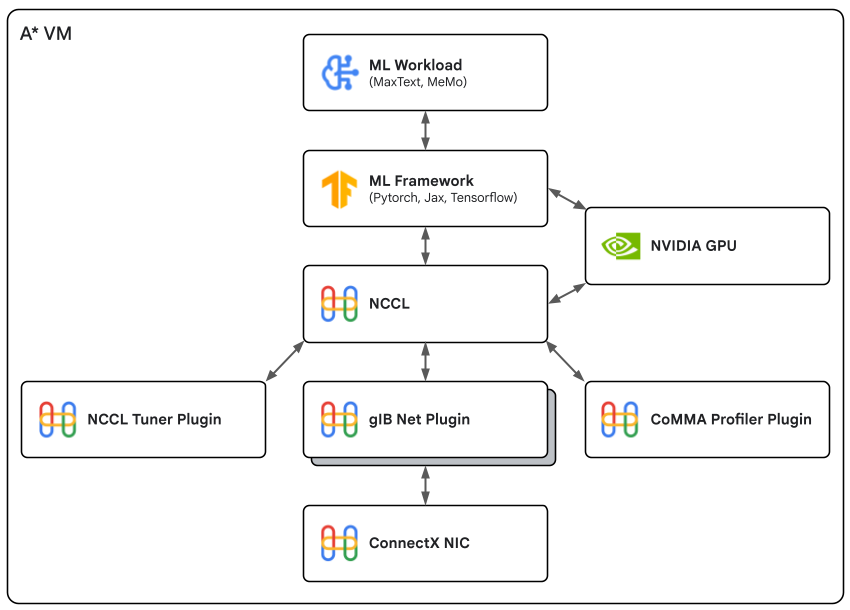
Because Google's plugins load dynamically, you can upgrade NCCL Core independently to use a later CUDA version or meet framework requirements, as long as your NCCL Core version is in the supported range. For supported versions, see the version compatibility tables in the x86 release notes and ARM64 release notes.
Benefits of using NCCL/gIB
Although it's possible to use the upstream NVIDIA Collective Communications Library on Google Cloud VMs without stability problems, NCCL/gIB is better optimized for Google Cloud and the performance disparity can be very significant for certain communication patterns, even with the same NCCL parameters.
For example, the following graph shows a comparison of NCCL/gIB with upstream NCCL on AllReduce performance. NCCL/gIB outperforms upstream NCCL by as much as 12x on certain message sizes.
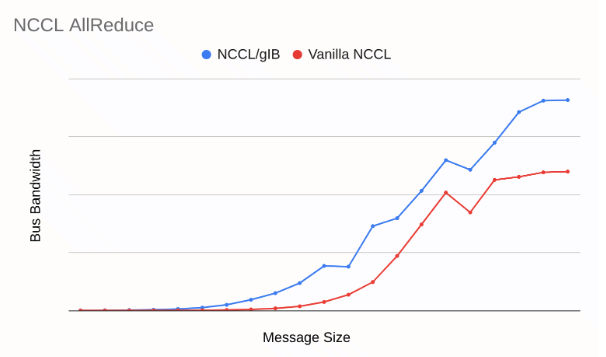
32-node NCCL AllReduce performance using A3 Ultra (H200) with no background traffic.
Similarly in a comparison of NCCL/gIB with upstream NCCL on AllGather performance with background traffic, NCCL/gIB outperforms upstream NCCL by approximately 50% on larger message sizes, as shown in this graph.
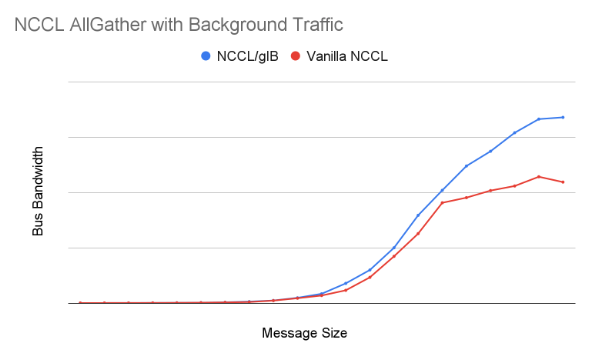
32-node NCCL AllGather performance using A3 Ultra (H200) on a shared fabric with a noisy background.
In addition, the CoMMA profiler plugin provides Google with improved custom telemetry, enabling us to better assist you should a workload-level issue arise.
Install NCCL/gIB
Before you run NCCL tests, you must install NCCL/gIB in your runtime environment.
Use NCCL/gIB
To run NCCL/gIB tests on your cluster, choose the page from the following list that best meets your requirements:
- Use gIB NCCL plugins in NVIDIA NGC containers
- Run NCCL tests on Compute Engine instances
- Run NCCL on GKE clusters that use Cluster Toolkit
- Run NCCL on GKE clusters that use A4X Max
- Run NCCL on GKE clusters that use A4X
- Run NCCL on GKE clusters that use A4 or A3 Ultra
- Run NCCL tests on Slurm clusters
- Run NCCL tests in Cluster Director
For directions on how to run NCCL/gIB on GKE clusters that use A5X, contact your Google Cloud representative.
To learn how to address any issues with your cluster after you've run your tests, see Collect and understand NCCL/gIB logs for troubleshooting.