

You can use the Gen AI evaluation service to evaluate the agent's ability to complete tasks and goals for a given use case.
This page shows you how to create and deploy a basic agent and use the Gen AI evaluation service to evaluate the agent:
Develop an agent: Define an agent with basic tool functions.
Deploy an agent: Deploy the agent to Vertex AI Agent Engine Runtime.
Run agent inference: Define an evaluation dataset and run agent inference to generate responses.
Create evaluation run: Create an evaluation run to perform evaluation.
View evaluation results: View the evaluation results through the evaluation run.
Before you begin
-
Sign in to your Google Cloud account. If you're new to Google Cloud, create an account to evaluate how our products perform in real-world scenarios. New customers also get $300 in free credits to run, test, and deploy workloads.
In the Google Cloud console, on the project selector page, select or create a Google Cloud project.
Roles required to select or create a project
- Select a project: Selecting a project doesn't require a specific IAM role—you can select any project that you've been granted a role on.
-
Create a project: To create a project, you need the Project Creator role
(
roles/resourcemanager.projectCreator), which contains theresourcemanager.projects.createpermission. Learn how to grant roles.
Verify that billing is enabled for your Google Cloud project.
In the Google Cloud console, on the project selector page, select or create a Google Cloud project.
Roles required to select or create a project
- Select a project: Selecting a project doesn't require a specific IAM role—you can select any project that you've been granted a role on.
-
Create a project: To create a project, you need the Project Creator role
(
roles/resourcemanager.projectCreator), which contains theresourcemanager.projects.createpermission. Learn how to grant roles.
Verify that billing is enabled for your Google Cloud project.
Install the Vertex AI SDK for Python:
%pip install google-cloud-aiplatform[adk,agent_engines]
%pip install --upgrade --force-reinstall -q google-cloud-aiplatform[evaluation]
Set up your credentials. If you are running this tutorial in Colaboratory, run the following:
from google.colab import auth
auth.authenticate_user()
For other environments, refer to Authenticate to Vertex AI.
Initialize the GenAI Client in Vertex AI SDK:
import vertexai
from vertexai import Client
from google.genai import types as genai_types

GCS_DEST = "gs://BUCKET_NAME/output-path"
vertexai.init(
    project=PROJECT_ID,
    location=LOCATION,
)

client = Client(
    project=PROJECT_ID,
    location=LOCATION,
    http_options=genai_types.HttpOptions(api_version="v1beta1"),
  )
Replace the following:
BUCKET_NAME: Cloud Storage bucket name. See Create a bucket to learn more about creating buckets.
PROJECT_ID: Your project ID.
LOCATION: Your selected region.
Develop an agent
Develop an Agent Development Kit (ADK) agent by defining the model, instruction, and set of tools. For more information on developing an agent, see Develop an Agent Development Kit agent.
from google.adk import Agent

# Define Agent Tools
def search_products(query: str):
    """Searches for products based on a query."""
    # Mock response for demonstration
    if "headphones" in query.lower():
        return {"products": [{"name": "Wireless Headphones", "id": "B08H8H8H8H"}]}
    else:
        return {"products": []}

def get_product_details(product_id: str):
    """Gets the details for a given product ID."""
    if product_id == "B08H8H8H8H":
        return {"details": "Noise-cancelling, 20-hour battery life."}
    else:
        return {"error": "Product not found."}

def add_to_cart(product_id: str, quantity: int):
    """Adds a specified quantity of a product to the cart."""
    return {"status": f"Added {quantity} of {product_id} to cart."}

# Define Agent
my_agent = Agent(
    model="gemini-2.5-flash",
    name='ecommerce_agent',
    instruction='You are an ecommerce expert',
    tools=[search_products, get_product_details, add_to_cart],
)
Deploy agent
Deploy your agent to Vertex AI Agent Engine Runtime. This can take up to 10 minutes. Retrieve the resource name from the deployed agent.
def deploy_adk_agent(root_agent):
  """Deploy agent to agent engine.
  Args:
    root_agent: The ADK agent to deploy.
  """
  app = vertexai.agent_engines.AdkApp(
      agent=root_agent,
  )
  remote_app = client.agent_engines.create(
      agent=app,
      config = {
          "staging_bucket": gs://BUCKET_NAME,
          "requirements": ['google-cloud-aiplatform[adk,agent_engines]'],
          "env_vars": {"GOOGLE_CLOUD_AGENT_ENGINE_ENABLE_TELEMETRY": "true"}
      }
  )
  return remote_app

agent_engine = deploy_adk_agent(my_agent)
agent_engine_resource_name = agent_engine.api_resource.name
To get the list of agents that are deployed to Vertex AI Agent Engine, see Manage deployed agents.
Generate responses
Generate model responses for your dataset using
run_inference():Prepare your dataset as a Pandas DataFrame. The prompts should be specific to your agent. Session inputs are required for traces. For more information, see Session: Tracking Individual Conversations.
import pandas as pd
from vertexai import types

session_inputs = types.evals.SessionInput(
    user_id="user_123",
    state={},
)
agent_prompts = [
    "Search for 'noise-cancelling headphones'.",
    "Show me the details for product 'B08H8H8H8H'.",
    "Add one pair of 'B08H8H8H8H' to my shopping cart.",
    "Find 'wireless earbuds' and then add the first result to my cart.",
    "I need a new laptop for work, can you find one with at least 16GB of RAM?",
]
agent_dataset = pd.DataFrame({
    "prompt": agent_prompts,
    "session_inputs": [session_inputs] * len(agent_prompts),
})
Generate model responses using
run_inference():agent_dataset_with_inference = client.evals.run_inference( agent=agent_engine_resource_name, src=agent_dataset, )Visualize your inference results by calling
.show()on theEvaluationDatasetobject to inspect the model's outputs alongside your original prompts and references:agent_dataset_with_inference.show()The following image displays the evaluation dataset with prompts and their corresponding generated
intermediate_eventsandresponses: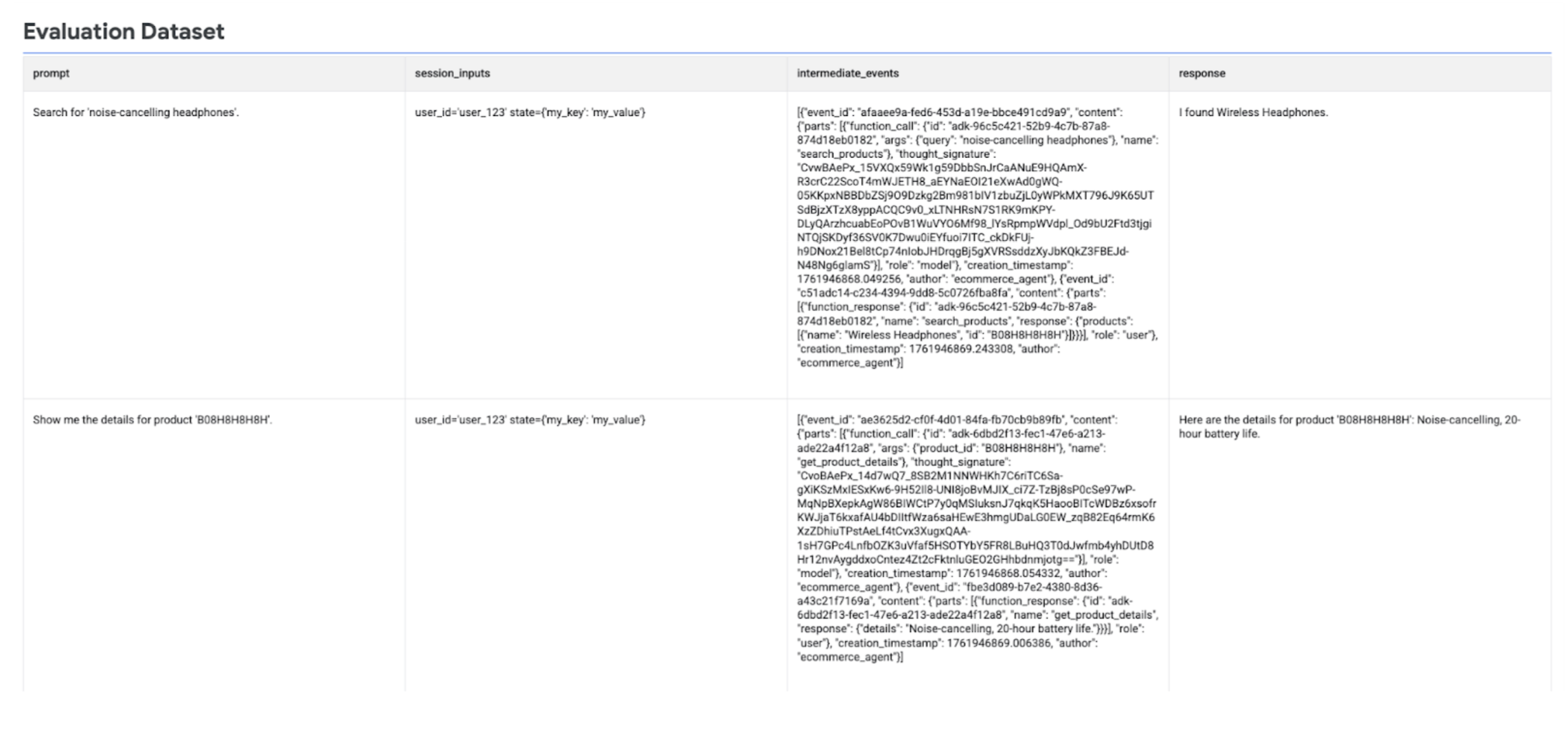
Run the agent evaluation
Run create_evaluation_run() to evaluate the agent responses.
Retrieve the
agent_infousing the built-in helper function:agent_info = types.evals.AgentInfo.load_from_agent( my_agent, agent_engine_resource_name )Evaluate the model responses using agent-specific adaptive rubric-based metrics (
FINAL_RESPONSE_QUALITY,TOOL_USE_QUALITY, andHALLUCINATION):evaluation_run = client.evals.create_evaluation_run( dataset=agent_dataset_with_inference, agent_info=agent_info, metrics=[ types.RubricMetric.FINAL_RESPONSE_QUALITY, types.RubricMetric.TOOL_USE_QUALITY, types.RubricMetric.HALLUCINATION, types.RubricMetric.SAFETY, ], dest=GCS_DEST, )
View the agent evaluation results
You can view the evaluation results using the Vertex AI SDK.
Retrieve the evaluation run and visualize your evaluation results by calling
.show() to display summary metrics and detailed results:
evaluation_run = client.evals.get_evaluation_run(
    name=evaluation_run.name,
    include_evaluation_items=True
)

evaluation_run.show()
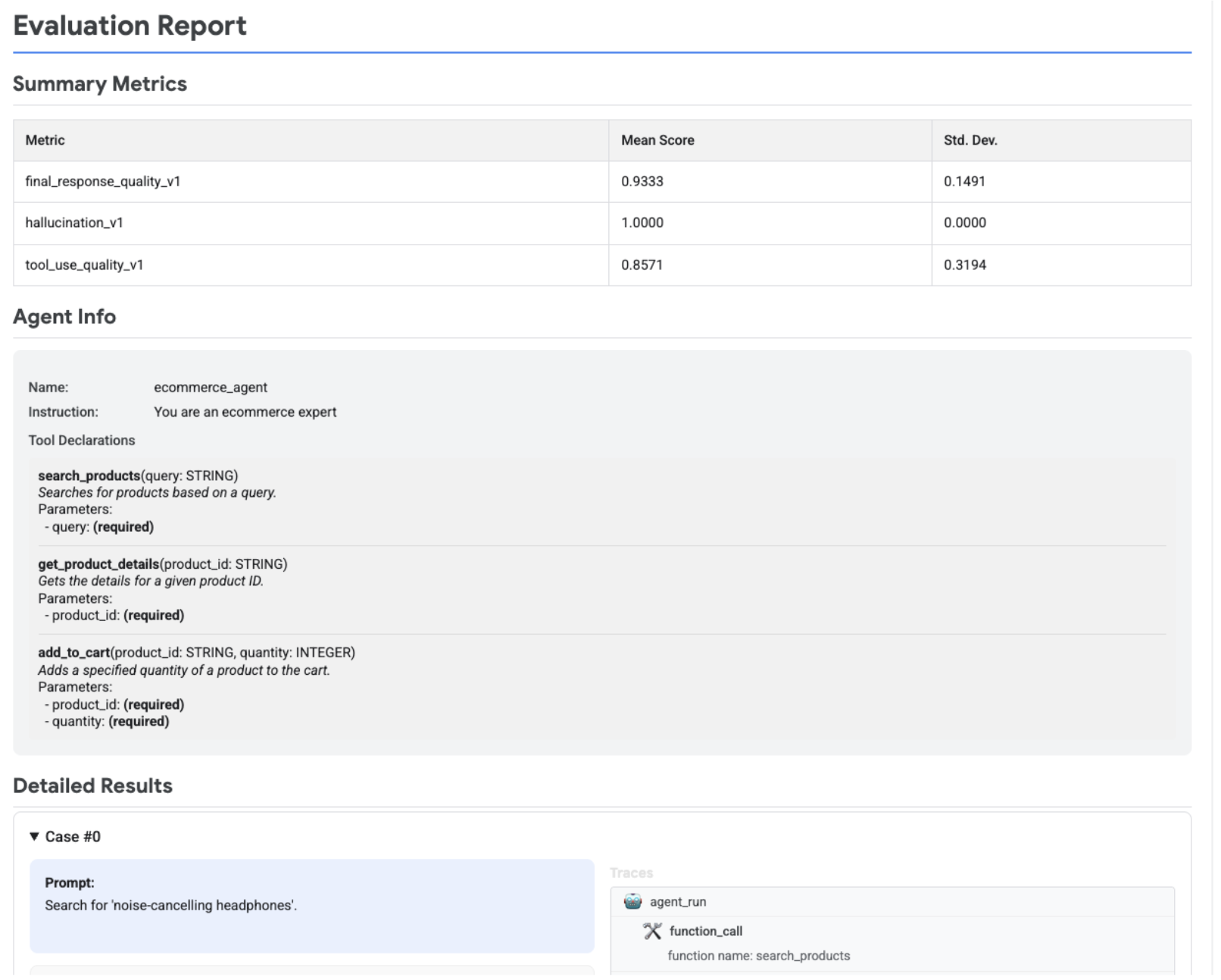
The following image displays an evaluation report, which shows summary metrics, agent information, and detailed results for each prompt-response pair. The detailed results also include traces showing the agent interactions. For more information on traces see Trace an agent.
What's next
- Develop an agent.
- Deploy an agent.
- Use an agent.
- Learn more about the Gen AI evaluation service
Try the following notebooks: