

您可以使用 Gen AI Evaluation Service 评估智能体在给定应用场景中完成任务和实现目标的能力。
本页介绍了如何创建和部署基本智能体,以及如何使用 Gen AI Evaluation Service 评估该智能体:
开发智能体:定义具有基本工具功能的智能体。
部署代理:将代理部署到 Vertex AI Agent Engine 运行时。
运行代理推理:定义评估数据集并运行代理推理以生成回答。
创建评估运行:创建评估运行以执行评估。
查看评估结果:通过评估运行查看评估结果。
准备工作
-
登录您的 Google Cloud 账号。如果您是 Google Cloud新手,请 创建一个账号来评估我们的产品在实际场景中的表现。新客户还可获享 $300 赠金,用于运行、测试和部署工作负载。
In the Google Cloud console, on the project selector page, select or create a Google Cloud project.
Roles required to select or create a project
- Select a project: Selecting a project doesn't require a specific IAM role—you can select any project that you've been granted a role on.
-
Create a project: To create a project, you need the Project Creator role
(
roles/resourcemanager.projectCreator), which contains theresourcemanager.projects.createpermission. Learn how to grant roles.
Verify that billing is enabled for your Google Cloud project.
In the Google Cloud console, on the project selector page, select or create a Google Cloud project.
Roles required to select or create a project
- Select a project: Selecting a project doesn't require a specific IAM role—you can select any project that you've been granted a role on.
-
Create a project: To create a project, you need the Project Creator role
(
roles/resourcemanager.projectCreator), which contains theresourcemanager.projects.createpermission. Learn how to grant roles.
Verify that billing is enabled for your Google Cloud project.
安装 Vertex AI SDK for Python:
%pip install google-cloud-aiplatform[adk,agent_engines]
%pip install --upgrade --force-reinstall -q google-cloud-aiplatform[evaluation]
设置凭据。如果您是在 Colaboratory 中运行本教程,请运行以下命令:
from google.colab import auth auth.authenticate_user()对于其他环境,请参阅向 Vertex AI 进行身份验证。
在 Vertex AI SDK 中初始化生成式 AI 客户端:
import vertexai
from vertexai import Client
from google.genai import types as genai_types

GCS_DEST = "gs://BUCKET_NAME/output-path"
vertexai.init(
    project=PROJECT_ID,
    location=LOCATION,
)

client = Client(
    project=PROJECT_ID,
    location=LOCATION,
    http_options=genai_types.HttpOptions(api_version="v1beta1"),
  )
替换以下内容:
BUCKET_NAME:Cloud Storage 存储桶名称。如需详细了解如何创建存储桶,请参阅创建存储桶。
PROJECT_ID:您的项目 ID。
LOCATION:您选择的区域。
开发代理
通过定义模型、指令和工具集来开发智能体开发套件 (ADK) 代理。如需详细了解如何开发代理,请参阅开发智能体开发套件代理。
from google.adk import Agent

# Define Agent Tools
def search_products(query: str):
    """Searches for products based on a query."""
    # Mock response for demonstration
    if "headphones" in query.lower():
        return {"products": [{"name": "Wireless Headphones", "id": "B08H8H8H8H"}]}
    else:
        return {"products": []}

def get_product_details(product_id: str):
    """Gets the details for a given product ID."""
    if product_id == "B08H8H8H8H":
        return {"details": "Noise-cancelling, 20-hour battery life."}
    else:
        return {"error": "Product not found."}

def add_to_cart(product_id: str, quantity: int):
    """Adds a specified quantity of a product to the cart."""
    return {"status": f"Added {quantity} of {product_id} to cart."}

# Define Agent
my_agent = Agent(
    model="gemini-2.5-flash",
    name='ecommerce_agent',
    instruction='You are an ecommerce expert',
    tools=[search_products, get_product_details, add_to_cart],
)
部署代理
将代理部署到 Vertex AI Agent Engine Runtime。此过程最多可能需要 10 分钟才能完成。从已部署的代理中检索资源名称。
def deploy_adk_agent(root_agent):
  """Deploy agent to agent engine.
  Args:
    root_agent: The ADK agent to deploy.
  """
  app = vertexai.agent_engines.AdkApp(
      agent=root_agent,
  )
  remote_app = client.agent_engines.create(
      agent=app,
      config = {
          "staging_bucket": gs://BUCKET_NAME,
          "requirements": ['google-cloud-aiplatform[adk,agent_engines]'],
          "env_vars": {"GOOGLE_CLOUD_AGENT_ENGINE_ENABLE_TELEMETRY": "true"}
      }
  )
  return remote_app

agent_engine = deploy_adk_agent(my_agent)
agent_engine_resource_name = agent_engine.api_resource.name
如需获取已部署到 Vertex AI Agent Engine 的代理列表,请参阅管理已部署的代理。
生成回答
使用
run_inference()为数据集生成模型回答:以 Pandas DataFrame 的形式准备数据集:提示应针对您的代理明确具体。跟踪记录需要会话输入。如需了解详情,请参阅会话:跟踪个人对话。
import pandas as pd
from vertexai import types

session_inputs = types.evals.SessionInput(
    user_id="user_123",
    state={},
)
agent_prompts = [
    "Search for 'noise-cancelling headphones'.",
    "Show me the details for product 'B08H8H8H8H'.",
    "Add one pair of 'B08H8H8H8H' to my shopping cart.",
    "Find 'wireless earbuds' and then add the first result to my cart.",
    "I need a new laptop for work, can you find one with at least 16GB of RAM?",
]
agent_dataset = pd.DataFrame({
    "prompt": agent_prompts,
    "session_inputs": [session_inputs] * len(agent_prompts),
})
使用
run_inference()生成模型回答:agent_dataset_with_inference = client.evals.run_inference( agent=agent_engine_resource_name, src=agent_dataset, )通过对
EvaluationDataset对象调用.show()来直观呈现推理结果,以便检查模型输出以及原始提示和引用内容:agent_dataset_with_inference.show()下图显示了包含提示及其生成的相应
intermediate_events和responses的评估数据集: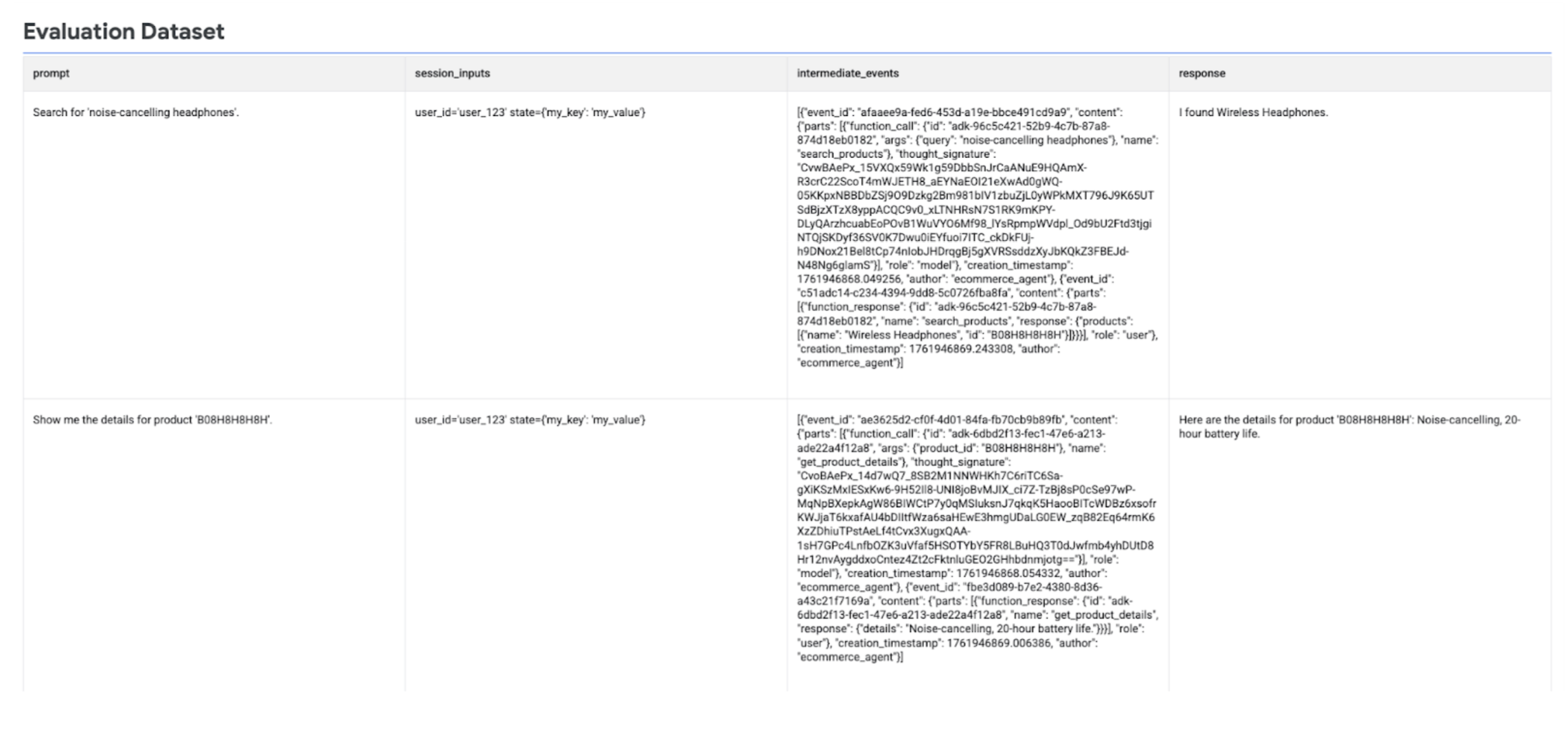
运行代理评估
运行 create_evaluation_run() 以评估代理回答。
使用内置的辅助函数检索
agent_info:agent_info = types.evals.AgentInfo.load_from_agent( my_agent, agent_engine_resource_name )使用特定于智能体的基于自适应评分准则的指标(
FINAL_RESPONSE_QUALITY、TOOL_USE_QUALITY和HALLUCINATION)评估模型回答:evaluation_run = client.evals.create_evaluation_run( dataset=agent_dataset_with_inference, agent_info=agent_info, metrics=[ types.RubricMetric.FINAL_RESPONSE_QUALITY, types.RubricMetric.TOOL_USE_QUALITY, types.RubricMetric.HALLUCINATION, types.RubricMetric.SAFETY, ], dest=GCS_DEST, )
查看代理评估结果
您可以使用 Vertex AI SDK 查看评估结果。
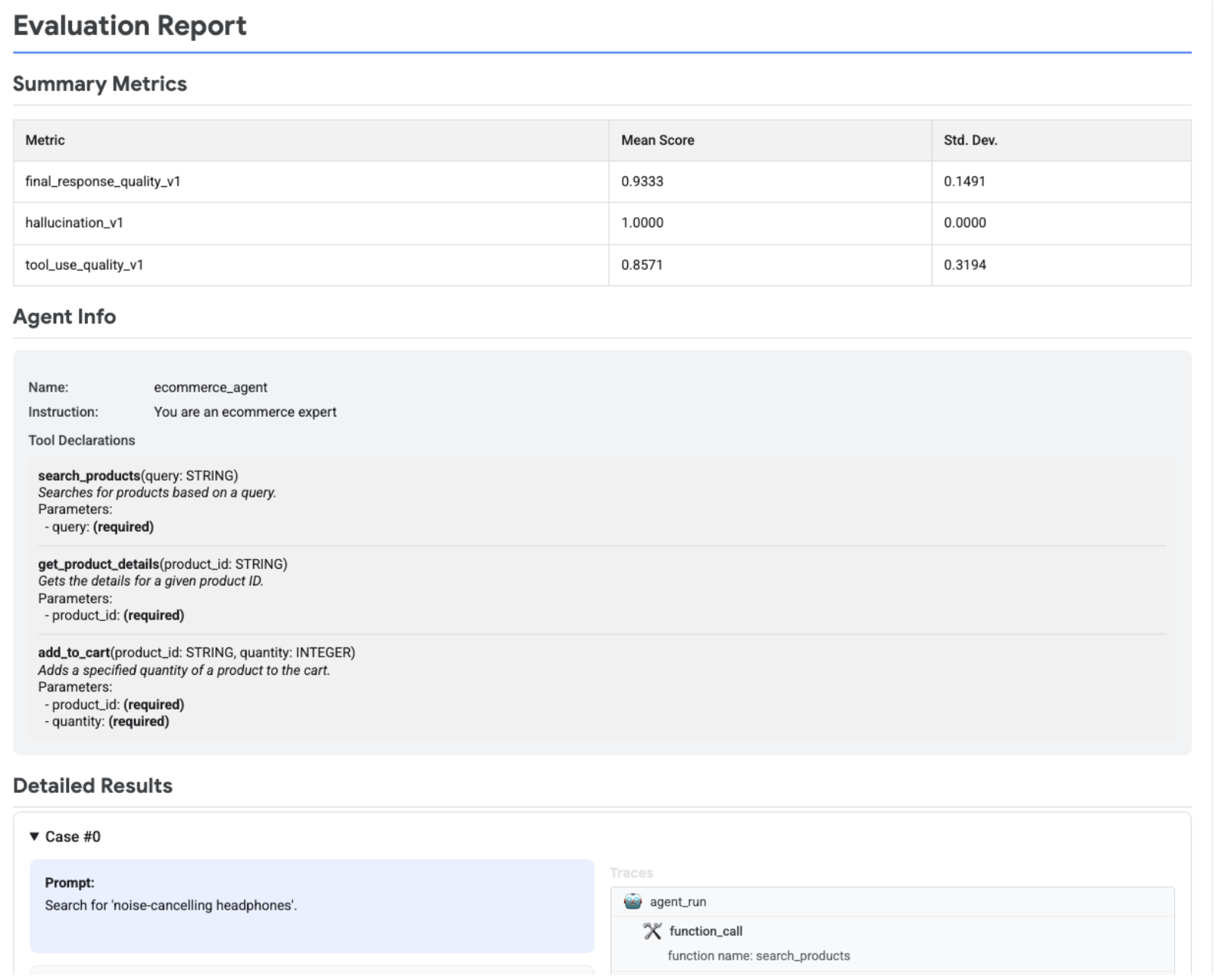
检索评估运行,并通过调用 .show() 来直观呈现评估结果,以显示摘要指标和详细结果:
evaluation_run = client.evals.get_evaluation_run(
    name=evaluation_run.name,
    include_evaluation_items=True
)

evaluation_run.show()
下图显示了一个评估报告,其中显示了摘要指标、代理信息以及每个提示-回答对的详细结果。详细结果还包括显示代理互动的跟踪记录。如需详细了解跟踪记录,请参阅跟踪代理。
后续步骤
- 开发代理。
- 部署代理。
- 使用代理。
- 详细了解 Gen AI Evaluation Service
尝试使用以下笔记本: