语音转写

语音转录功能可让您将流式音频数据实时转换为转录文本。Agent Assist 会根据文本提供建议,因此必须先转换音频数据,然后才能使用。您还可以将转录的 流式音频与 Customer Experience Insights 搭配使用,以收集有关客服人员 对话的实时数据(例如主题 建模)。

您可以通过两种方式转录流式音频以供 Agent Assist 使用:使用 SIPREC 功能,或使用音频 数据作为载荷进行 gRPC 调用。本页面介绍了使用 gRPC 调用转录流式音频数据的过程。

语音转录功能使用 Speech-to-Text 流式语音 识别。 Speech-to-Text 提供多种识别 模型,包括标准模型和 增强型模型。Agent Assist 不限制您在语音 转录中使用哪些模型,但只有在与电话模型或 Chirp 3 模型搭配使用时,语音转录才在正式版 (GA) 级别 受支持。为了获得最佳转录质量,建议使用 Chirp 3 模型,但需视区域可用性而定。

前提条件

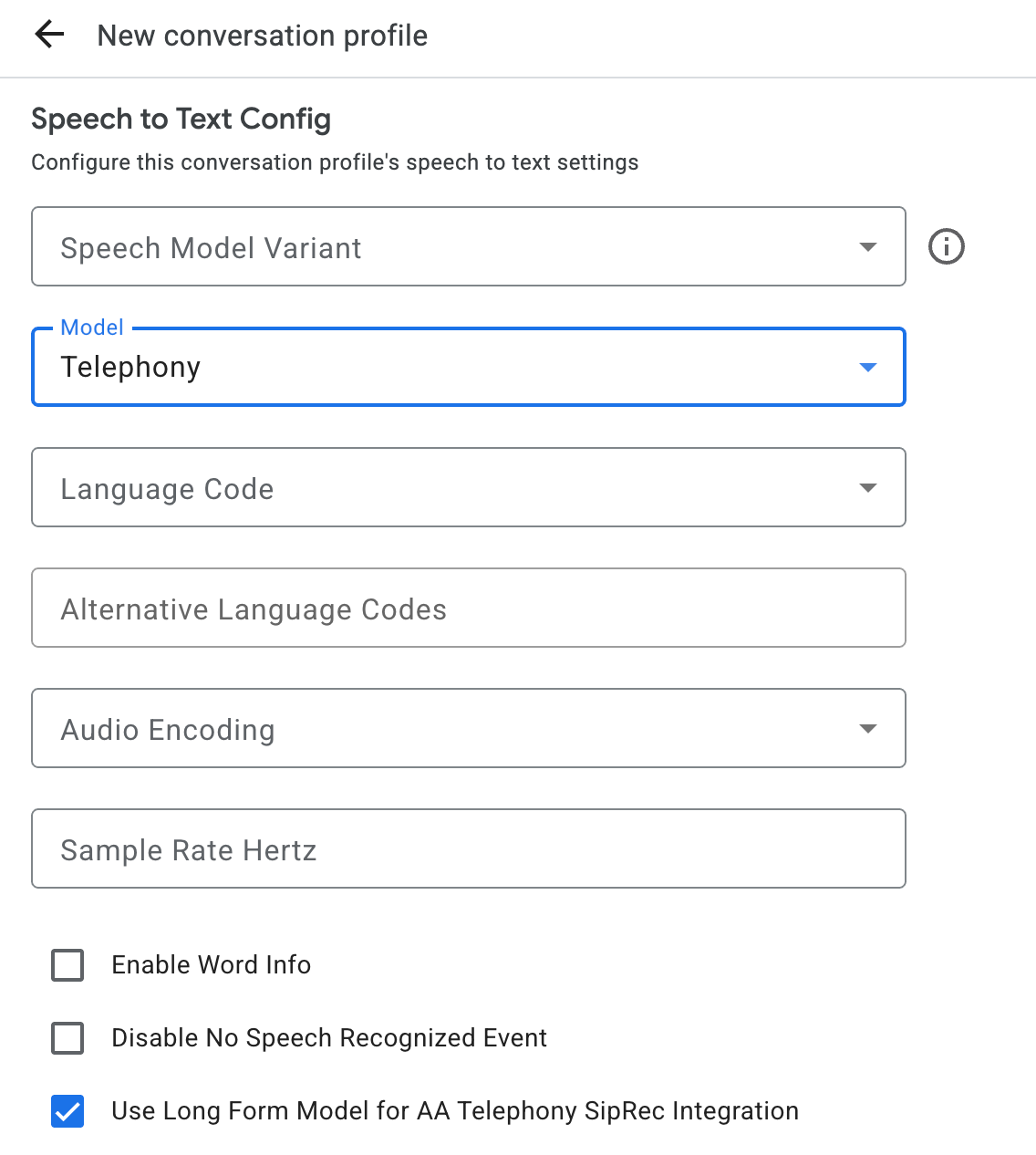
创建对话配置文件

如需创建对话配置文件,请使用 Agent Assist 控制台,或直接对 ConversationProfile 资源调用 create 方法。

对于语音转录,我们建议您在对话中发送音频数据时,将 ConversationProfile.stt_config配置为默认InputAudioConfig,当发送 音频数据

在对话运行时获取转录内容

如需在对话运行时获取转录内容,您需要为对话创建参与者,并为每位参与者发送音频数据。

创建参与者

参与者有三种类型。 如需详细了解其角色,请参阅参考 文档 。对 participant 调用 create 方法,并指定 role。只有 END_USERHUMAN_AGENT 参与者可以调用 StreamingAnalyzeContent,这是获取转录内容所必需的。

发送音频数据并获取转录内容

您可以使用 StreamingAnalyzeContent 将参与者的音频发送给 Google 并获取转录内容,并使用 以下参数:

  • 数据流中的第一个请求必须是 InputAudioConfig。 (此处配置的字段会替换 ConversationProfile.stt_config 中的相应设置。)在第二个请求之前,请勿发送任何音频输入。

    • audioEncoding 需要设置为 AUDIO_ENCODING_LINEAR_16AUDIO_ENCODING_MULAW
    • model:这是您要用于转录音频的 Speech-to-Text model。将此字段设置为 chirp_3。变体不会影响转录质量,因此您可以将语音模型变体 留空,也可以选择使用最佳可用模型
    • 为了获得最佳转录质量,singleUtterance 应设置为 false。如果 singleUtterancefalse,您不应期望 END_OF_SINGLE_UTTERANCE,但您可以依赖 StreamingAnalyzeContentResponse.recognition_result 中的 isFinal==true 来半关闭数据流。
    • 可选的其他参数:以下参数是 可选的。如需访问这些参数,请与您的 Google 代表联系。
      • languageCode:音频的 language_code。默认值为 en-US
      • alternativeLanguageCodes:此功能仅在 Chirp 3 模型中处于正式版 (GA) 级别。 音频中可能检测到的其他语言。 Agent Assist 使用 language_code 字段在音频开头自动检测语言,并在所有后续对话轮次中默认使用该语言。借助 alternativeLanguageCodes 字段,您可以为 Agent Assist 指定更多选项以供选择。
      • phraseSetsSpeech-to-Text 模型 自适应 phraseSet 资源名称。
        • 如需为 Chirp 3 模型配置自适应,请添加以换行符分隔的内嵌短语,不要使用英文逗号。
        • 如需将模型自适应与其他模型(例如 telephony)搭配使用以进行语音转录,您必须先使用 Speech-to-Text API 创建 phraseSet,然后在此处指定资源名称。
  • 在发送包含音频载荷的第二个请求后,您应该会开始从数据流接收一些 StreamingAnalyzeContentResponses

    • 当您在 StreamingAnalyzeContentResponse.recognition_result 中看到 is_final 设置为 true 时,可以半关闭数据流(或在某些语言(例如 Python)中停止发送)。
    • 半关闭数据流后,服务器会发回包含最终转录内容以及潜在 Dialogflow 建议或 Agent Assist 建议的响应。
  • 您可以在以下位置找到最终转录内容:

    • StreamingAnalyzeContentResponse.message.content
    • 如果您启用了 Pub/Sub 通知,还可以在 Pub/Sub 中看到 转录内容。
  • 在前一个数据流关闭后,启动新的数据流。

    • 重新发送音频:对于在响应的最后一个 speech_end_offset(其中 is_final=true)之后生成到新数据流开始时间之间的音频数据,需要重新发送到 StreamingAnalyzeContent,以获得最佳转录质量。
  • 下图说明了数据流的工作原理。

流式识别请求代码示例

以下代码示例说明了如何发送流式转录请求。

Python

如需向 Agent Assist 进行身份验证,请设置应用默认凭据。 如需了解详情,请参阅 为本地开发环境设置身份验证

# Copyright 2023 Google LLC
#
# Licensed under the Apache License, Version 2.0 (the "License");
# you may not use this file except in compliance with the License.
# You may obtain a copy of the License at
#
#     http://www.apache.org/licenses/LICENSE-2.0
#
# Unless required by applicable law or agreed to in writing, software
# distributed under the License is distributed on an "AS IS" BASIS,
# WITHOUT WARRANTIES OR CONDITIONS OF ANY KIND, either express or implied.
# See the License for the specific language governing permissions and
# limitations under the License.

"""Google Cloud Dialogflow API sample code using the StreamingAnalyzeContent
API.

Also please contact Google to get credentials of this project and set up the
credential file json locations by running:
export GOOGLE_APPLICATION_CREDENTIALS=<cred_json_file_location>

Example usage:
    export GOOGLE_CLOUD_PROJECT='cloud-contact-center-ext-demo'
    export CONVERSATION_PROFILE='FnuBYO8eTBWM8ep1i-eOng'
    export GOOGLE_APPLICATION_CREDENTIALS='/Users/ruogu/Desktop/keys/cloud-contact-center-ext-demo-78798f9f9254.json'
    python streaming_transcription.py

Then started to talk in English, you should see transcription shows up as you speak.

Say "Quit" or "Exit" to stop.
"""

import os
import re
import sys

from google.api_core.exceptions import DeadlineExceeded, OutOfRange

import pyaudio

from six.moves import queue

import conversation_management
import participant_management

PROJECT_ID = os.getenv("GOOGLE_CLOUD_PROJECT")
CONVERSATION_PROFILE_ID = os.getenv("CONVERSATION_PROFILE")

# Audio recording parameters
SAMPLE_RATE = 16000
CHUNK_SIZE = int(SAMPLE_RATE / 10)  # 100ms
RESTART_TIMEOUT = 160  # seconds
MAX_LOOKBACK = 3  # seconds
HALF_CLOSE_DURATION_MS = 90 * 1000  # milliseconds

YELLOW = "\033[0;33m"


class ResumableMicrophoneStream:
    """Opens a recording stream as a generator yielding the audio chunks."""

    def __init__(self, rate, chunk_size):
        self._rate = rate
        self.chunk_size = chunk_size
        self._num_channels = 1
        self._buff = queue.Queue()
        self.is_final = False
        self.closed = True
        # Count the number of times the stream analyze content restarts.
        self.restart_counter = 0
        self.last_start_time = 0
        # Time end of the last is_final in millisec since last_start_time.
        self.is_final_offset = 0
        # Save the audio chunks generated from the start of the audio stream for
        # replay after restart.
        self.audio_input_chunks = []
        self.new_stream = True
        self._audio_interface = pyaudio.PyAudio()
        self._audio_stream = self._audio_interface.open(
            format=pyaudio.paInt16,
            channels=self._num_channels,
            rate=self._rate,
            input=True,
            frames_per_buffer=self.chunk_size,
            # Run the audio stream asynchronously to fill the buffer object.
            # This is necessary so that the input device's buffer doesn't
            # overflow while the calling thread makes network requests, etc.
            stream_callback=self._fill_buffer,
        )

    def __enter__(self):
        self.closed = False
        return self

    def __exit__(self, type, value, traceback):
        self._audio_stream.stop_stream()
        self._audio_stream.close()
        self.closed = True
        # Signal the generator to terminate so that the client's
        # streaming_recognize method will not block the process termination.
        self._buff.put(None)
        self._audio_interface.terminate()

    def _fill_buffer(self, in_data, *args, **kwargs):
        """Continuously collect data from the audio stream, into the buffer in
        chunksize."""

        self._buff.put(in_data)
        return None, pyaudio.paContinue

    def generator(self):
        """Stream Audio from microphone to API and to local buffer"""
        try:
            # Handle restart.
            print("restart generator")
            # Flip the bit of is_final so it can continue stream.
            self.is_final = False
            total_processed_time = self.last_start_time + self.is_final_offset
            processed_bytes_length = (
                int(total_processed_time * SAMPLE_RATE * 16 / 8) / 1000
            )
            self.last_start_time = total_processed_time
            # Send out bytes stored in self.audio_input_chunks that is after the
            # processed_bytes_length.
            if processed_bytes_length != 0:
                audio_bytes = b"".join(self.audio_input_chunks)
                # Lookback for unprocessed audio data.
                need_to_process_length = min(
                    int(len(audio_bytes) - processed_bytes_length),
                    int(MAX_LOOKBACK * SAMPLE_RATE * 16 / 8),
                )
                # Note that you need to explicitly use `int` type for substring.
                need_to_process_bytes = audio_bytes[(-1) * need_to_process_length :]
                yield need_to_process_bytes

            while not self.closed and not self.is_final:
                data = []
                # Use a blocking get() to ensure there's at least one chunk of
                # data, and stop iteration if the chunk is None, indicating the
                # end of the audio stream.
                chunk = self._buff.get()

                if chunk is None:
                    return
                data.append(chunk)
                # Now try to the rest of chunks if there are any left in the _buff.
                while True:
                    try:
                        chunk = self._buff.get(block=False)

                        if chunk is None:
                            return
                        data.append(chunk)

                    except queue.Empty:
                        break
                self.audio_input_chunks.extend(data)
                if data:
                    yield b"".join(data)
        finally:
            print("Stop generator")


def main():
    """start bidirectional streaming from microphone input to Dialogflow API"""
    # Create conversation.
    conversation = conversation_management.create_conversation(
        project_id=PROJECT_ID, conversation_profile_id=CONVERSATION_PROFILE_ID
    )

    conversation_id = conversation.name.split("conversations/")[1].rstrip()

    # Create end user participant.
    end_user = participant_management.create_participant(
        project_id=PROJECT_ID, conversation_id=conversation_id, role="END_USER"
    )
    participant_id = end_user.name.split("participants/")[1].rstrip()

    mic_manager = ResumableMicrophoneStream(SAMPLE_RATE, CHUNK_SIZE)
    print(mic_manager.chunk_size)
    sys.stdout.write(YELLOW)
    sys.stdout.write('\nListening, say "Quit" or "Exit" to stop.\n\n')
    sys.stdout.write("End (ms)       Transcript Results/Status\n")
    sys.stdout.write("=====================================================\n")

    with mic_manager as stream:
        while not stream.closed:
            terminate = False
            while not terminate:
                try:
                    print(f"New Streaming Analyze Request: {stream.restart_counter}")
                    stream.restart_counter += 1
                    # Send request to streaming and get response.
                    responses = participant_management.analyze_content_audio_stream(
                        conversation_id=conversation_id,
                        participant_id=participant_id,
                        sample_rate_herz=SAMPLE_RATE,
                        stream=stream,
                        timeout=RESTART_TIMEOUT,
                        language_code="en-US",
                        single_utterance=False,
                        # Uncomment to process multiple utterances detected in the audio stream
                        # individually instead of stitching together to form a single utterance.
                        # output_multiple_utterances=True,
                    )

                    # Now, print the final transcription responses to user.
                    for response in responses:
                        if response.message:
                            print(response)
                        if response.recognition_result.is_final:
                            print(response)
                            # offset return from recognition_result is relative
                            # to the beginning of audio stream.
                            offset = response.recognition_result.speech_end_offset
                            stream.is_final_offset = int(
                                offset.seconds * 1000 + offset.microseconds / 1000
                            )
                            transcript = response.recognition_result.transcript
                            # Half-close upon final results for better streaming experiences
                            # (in Python just stop yielding requests)
                            if stream.is_final_offset > HALF_CLOSE_DURATION_MS:
                                stream.is_final = True
                            # Exit recognition if any of the transcribed phrase could be
                            # one of our keywords.
                            if re.search(r"\b(exit|quit)\b", transcript, re.I):
                                sys.stdout.write(YELLOW)
                                sys.stdout.write("Exiting...\n")
                                terminate = True
                                stream.closed = True
                                break
                except OutOfRange:
                    print("Maximum audio duration exceeded in the stream, restarting.")
                except DeadlineExceeded:
                    print("Deadline Exceeded, restarting.")

            if terminate:
                conversation_management.complete_conversation(
                    project_id=PROJECT_ID, conversation_id=conversation_id
                )
                break


if __name__ == "__main__":
    main()

请按照以下步骤查看 conversation_managementparticipant_management 的 Python 文件。

  1. 前往 Python 文档的 GitHub 代码库。

    前往 GitHub

  2. 点击 Go to file ,然后输入文件名:conversation_managementparticipant_management

  3. 点击 Enter

最佳做法

消息发送时间是指话语开始的时间。使用消息发送时间来确定联络中心显示或分析语音 消息的顺序。