

主动生成式知识助理会跟踪正在进行的对话,并主动提供搜索查询建议和答案。主动生成式知识助理支持搜索上下文、多条建议的查询,并且您可以自定义启动事件。
搜索上下文
主动生成式知识辅助功能会生成搜索查询和上下文。它会从对话中提取信息作为键值对,以改进搜索上下文,并为搜索查询提供更优质的回答。
您还可以停用搜索上下文。在某些情况下,您可以选择不使用搜索上下文,而仅使用查询本身。您可以使用 disable_query_search_context 字段来控制此行为。当此字段设置为 true 时,主动生成式知识助理会生成搜索上下文,但不会将其添加到发送到知识库的搜索查询中。
多条建议的查询
主动生成式知识辅助功能可以针对对话中讨论的不同主题生成多个相关查询。它使用主要查询进行自动知识搜索,并在回答中提供其他查询,供代理在需要时使用。
自定义事件启动
默认情况下,CUSTOMER_MESSAGE 会启动主动生成式知识助理,以提供建议。如需定义哪个事件会触发新的主动生成式知识助理建议,请为 suggestion_trigger_event 字段选择以下值选项之一。
CUSTOMER_MESSAGE:保留从最终用户收到的默认消息。AGENT_MESSAGE:消息由人工客服发送。END_OF_UTTERANCE:主动生成式知识助理可检测用户话语的结束。
实现主动式生成式知识助理
按照以下步骤开始使用主动式生成知识助理。
第 1 步:创建对话资料
使用 Agent Assist 控制台或 API 创建对话配置文件。建议您使用 Agent Assist 控制台创建对话配置文件。
控制台
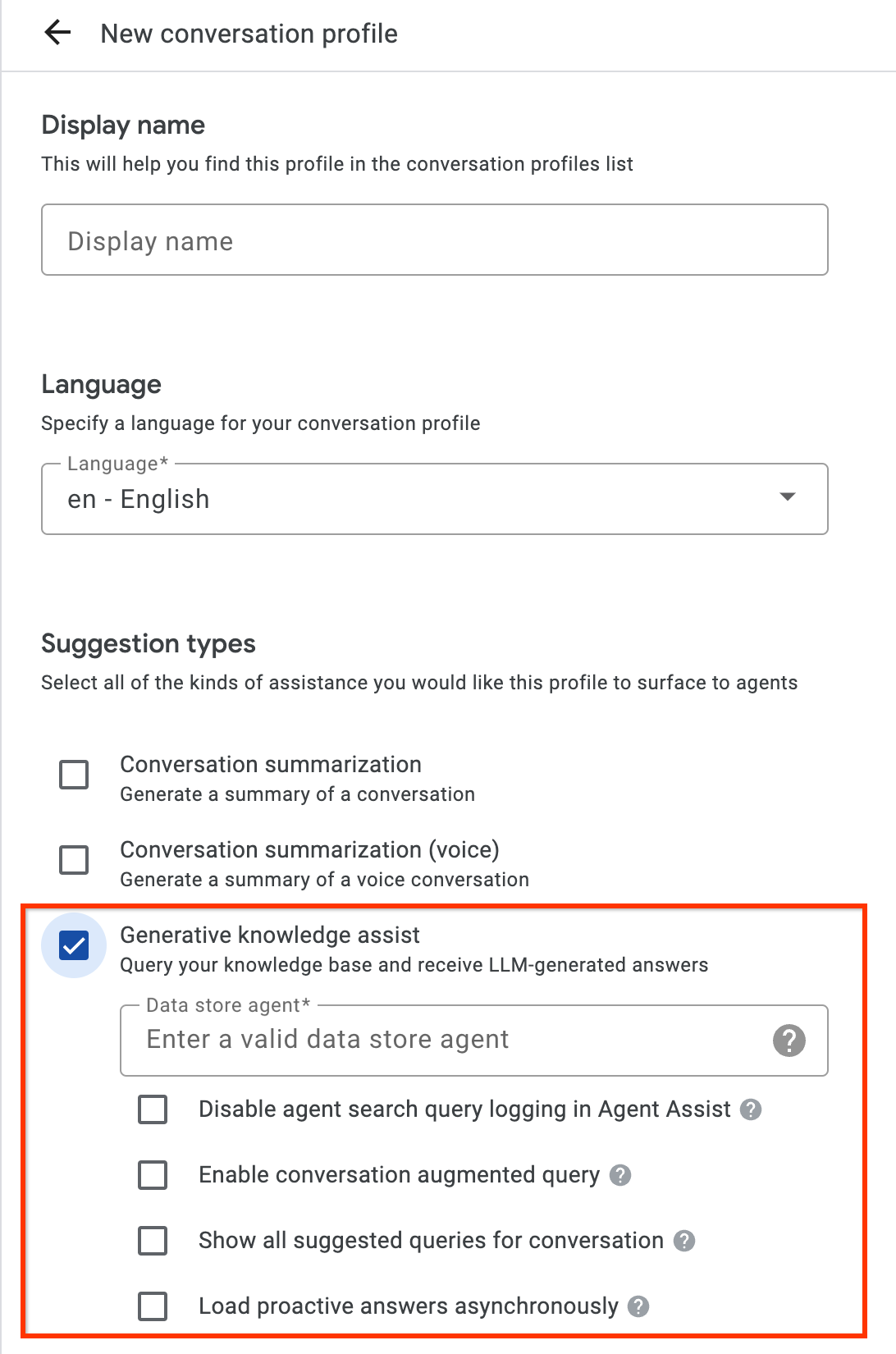
- 启用生成式知识助理建议类型,并将其与上一步中的基于流程的数据存储区智能体或基于 playbook 的数据存储区智能体相关联。这样一来,基于流程的数据存储区智能体或基于 playbook 的数据存储区智能体便可主动提供问答建议,并回答人工客服的手动搜索查询。
- 可选:选中显示对话的所有建议查询复选框,让基于流程的数据存储区智能体或基于剧本的数据存储区智能体显示所有这些查询,即使在知识文档中找不到答案也是如此。此功能旨在测试可以从正在进行的对话中提取哪些查询。
- 可选:选中异步加载主动答案复选框,仅获取查询建议。您可以手动将建议的查询提交到 SearchKnowledge API,也可以在 Agent Assist 控制台模拟器和界面模块中自动提交。
API
以下步骤将创建一个包含 HumanAgentAssistantConfig 对象的 ConversationProfile。您也可以使用 Agent Assist 控制台执行这些操作。
如需创建对话配置文件,请对 ConversationProfile 资源调用 create 方法,并更新 `baseline_model_version`。
在使用任何请求数据之前,请先进行以下替换:- PROJECT_ID:您的项目 ID
- LOCATION_ID:您所在位置的 ID
- AGENT_ID:上一步中的基于流程的数据存储区代理或基于剧本的数据存储区代理 ID
 {
  "name": "projects/PROJECT_ID/locations/LOCATION/conversationProfiles/PROFILE_ID",
  "human_agent_assistant_config": {
    "human_agent_suggestion_config": {
      "feature_configs": [
        {
          "suggestion_feature": {
            "type": "KNOWLEDGE_ASSIST"
          },
          "query_config": {
            "dialogflow_query_source": {
              "agent": "projects/PROJECT_ID/locations/LOCATION/agents/AGENT_ID"
            }
          },
          "conversation_model_config": {
            "baseline_model_version": "2.0"
          }
        "disable_query_search_context": false,
    "enableQuerySuggestionWhenNoAnswer": false,
    "suggestion_trigger_event": "END_OF_UTTERANCE",
        }
      ]
    }
  }
}
第 2 步:在运行时处理对话
主动式生成式知识辅助功能会在运行时处理对话,根据当前对话上下文和答案主动提供搜索查询建议。
创建对话
首先,您必须创建一个对话:
REST
如需创建对话,请对 Conversation 资源调用 create 方法。
在使用任何请求数据之前,请先进行以下替换:
- PROJECT_ID:您的 Cloud 项目 ID
- LOCATION_ID:您的位置 ID
- CONVERSATION_PROFILE_ID:您在创建对话配置文件时收到的 ID
HTTP 方法和网址:
POST https://dialogflow.googleapis.com/v2/projects/PROJECT_ID/locations/LOCATION_ID/conversations
请求 JSON 正文:
{
  "conversationProfile": "projects/PROJECT_ID/locations/LOCATION_ID/conversationProfiles/CONVERSATION_PROFILE_ID",
}
如需发送您的请求,请展开以下选项之一:
您应该收到类似以下内容的 JSON 响应:
{
  "name": "projects/PROJECT_ID/locations/LOCATION_ID/conversations/CONVERSATION_ID",
  "lifecycleState": "IN_PROGRESS",
  "conversationProfile": "projects/PROJECT_ID/locations/LOCATION_ID/conversationProfiles/CONVERSATION_PROFILE_ID",
  "startTime": "2018-11-05T21:05:45.622Z"
}
conversations 后面的路径段包含新对话 ID。
Python
如需了解详情,请参阅 Agent Search Python API 参考文档。
如需向 Agent Search 进行身份验证,请设置应用默认凭据。 如需了解详情,请参阅为本地开发环境设置身份验证。
创建用户参与者
向对话添加用户和客服参与者,即可查看建议。首先,将用户参与者添加到对话中:
REST
如需创建用户参与者,请对 Participant 资源调用 create 方法。
在使用任何请求数据之前,请先进行以下替换:
- PROJECT_ID:您的 Cloud 项目 ID
- LOCATION_ID:您的位置 ID
- CONVERSATION_ID:您的对话 ID
HTTP 方法和网址:
POST https://dialogflow.googleapis.com/v2/projects/PROJECT_ID/locations/LOCATION_ID/conversations/CONVERSATION_ID/participants
请求 JSON 正文:
{
  "role": "END_USER",
}
如需发送您的请求,请展开以下选项之一:
您应该收到类似以下内容的 JSON 响应:
{
  "name": "projects/PROJECT_ID/locations/LOCATION_ID/conversations/CONVERSATION_ID/participants/PARTICIPANT_ID",
  "role": "END_USER"
}
participants 后面的路径段包含新的用户参与者 ID。
Python
如需了解详情,请参阅 Agent Search Python API 参考文档。
如需向 Agent Search 进行身份验证,请设置应用默认凭据。 如需了解详情,请参阅为本地开发环境设置身份验证。
创建代理参与者
将客服参与者添加到对话中:
REST
如需创建代理参与者,请对 Participant 资源调用 create 方法。
在使用任何请求数据之前,请先进行以下替换:
- PROJECT_ID:您的 Cloud 项目 ID
- LOCATION_ID:您的位置 ID
- CONVERSATION_ID:您的对话 ID
HTTP 方法和网址:
POST https://dialogflow.googleapis.com/v2/projects/PROJECT_ID/locations/LOCATION_ID/conversations/CONVERSATION_ID/participants
请求 JSON 正文:
{
  "role": "HUMAN_AGENT",
}
如需发送您的请求,请展开以下选项之一:
您应该收到类似以下内容的 JSON 响应:
{
  "name": "projects/PROJECT_ID/locations/LOCATION_ID/conversations/CONVERSATION_ID/participants/PARTICIPANT_ID",
  "role": "HUMAN_AGENT"
}
participants 后面的路径段包含新的人工客服参与者 ID。
Python
如需了解详情,请参阅 Agent Search Python API 参考文档。
如需向 Agent Search 进行身份验证,请设置应用默认凭据。 如需了解详情,请参阅为本地开发环境设置身份验证。
添加和分析代理的消息
每次任一参与者在对话中输入消息时,您都需要向 API 发送该消息以进行处理。数据存储区智能体的建议基于对人工客服和用户消息的分析。在以下示例中,人工客服通过询问“您需要什么帮助?”来开始对话。
响应中尚未返回任何建议。
REST
如需在对话中添加和分析人工客服消息,请对 Participant 资源调用 analyzeContent 方法。
在使用任何请求数据之前,请先进行以下替换:
- PROJECT_ID:您的项目 ID
- CONVERSATION_ID:您的对话 ID
- PARTICIPANT_ID:您的人工客服参与者 ID
HTTP 方法和网址:
POST https://dialogflow.googleapis.com/v2/projects/PROJECT_ID/conversations/CONVERSATION_ID/participants/PARTICIPANT_ID:analyzeContent
请求 JSON 正文:
{
  "textInput": {
    "text": "How may I help you?",
    "languageCode": "en-US"
  }
}
如需发送您的请求,请展开以下选项之一:
您应该收到类似以下内容的 JSON 响应:
{
  "message": {
    "name": "projects/PROJECT_ID/conversations/CONVERSATION_ID/messages/MESSAGE_ID",
    "content": "How may I help you?",
    "languageCode": "en-US",
    "participant": "PARTICIPANT_ID",
    "participantRole": "HUMAN_AGENT",
    "createTime": "2020-02-13T00:01:30.683Z"
  }
}
Python
如需了解详情,请参阅 Agent Search Python API 参考文档。
如需向 Agent Search 进行身份验证,请设置应用默认凭据。 如需了解详情,请参阅为本地开发环境设置身份验证。
添加用户消息以获取建议
用户针对代理的回答提问:“When can I get my return refund?”(我什么时候可以收到退款?)。这次,API 响应包含建议的查询和基于知识文档的生成式 AI 回答。
REST
如需为对话添加和分析用户消息,请对 Participant 资源调用 analyzeContent 方法。
在使用任何请求数据之前,请先进行以下替换:
- PROJECT_ID:您的项目 ID
- CONVERSATION_ID:您的对话 ID
- PARTICIPANT_ID:最终用户参与者 ID
HTTP 方法和网址:
POST https://dialogflow.googleapis.com/v2/projects/PROJECT_ID/conversations/CONVERSATION_ID/participants/PARTICIPANT_ID:analyzeContent
请求 JSON 正文:
{
  "textInput": {
    "text": "When can I get my return refund?",
    "languageCode": "en-US"
  }
}
如需发送您的请求,请展开以下选项之一:
您应该收到类似以下内容的 JSON 响应:
{
  "message": {
    "name": "projects/PROJECT_ID/conversations/CONVERSATION_ID/messages/MESSAGE_ID",
    "content": "When can I get my return refund?",
    "languageCode": "en-US",
    "participant": "PARTICIPANT_ID",
    "participantRole": "END_USER",
    "createTime": "2020-02-13T00:07:35.925Z"
  },
  "humanAgentSuggestionResults": [
    {
      "suggestKnowledgeAssistResponse": {
        "knowledgeAssistAnswer": {
          "suggestedQuery": {
            "queryText": "Refund processing time"
          },
          "suggestedQueryAnswer": {
            "answerText": "After your return is processed, you receive your refund in 7 days. The refund amount should be for the full value of the items returned, but doesn't include shipping & service fees.",
            "generativeSource": {
              "snippets": [
                {
                  "title": "Returns & refunds - Help",
                  "uri": "https://example.com/",
                  "text": "When the package with your return arrives at the seller's return center, it may take up to 7 additional business days to process. Check the status of your refund with the return tracking number found on your orders page."
                }
              ]
            },
          },
          "answerRecord": "projects/PROJECT_ID/answerRecords/ANSWER_RECORD_ID"
        },
      }
    }
  ]
}
Python
如需了解详情,请参阅 Agent Search Python API 参考文档。
如需向 Agent Search 进行身份验证,请设置应用默认凭据。 如需了解详情,请参阅为本地开发环境设置身份验证。
完成对话
对话结束后,请使用 API 完成对话。
REST
如需完成对话,请对 conversations 资源调用 complete 方法。
在使用任何请求数据之前,请先进行以下替换:
- PROJECT_ID:您的 GCP 项目 ID
- CONVERSATION_ID:您在创建对话时收到的 ID
HTTP 方法和网址:
POST https://dialogflow.googleapis.com/v2/projects/PROJECT_ID/conversations/CONVERSATION_ID:complete
如需发送您的请求,请展开以下选项之一:
您应该收到类似以下内容的 JSON 响应:
{
  "name": "projects/PROJECT_ID/conversations/CONVERSATION_ID",
  "lifecycleState": "COMPLETED",
  "conversationProfile": "projects/PROJECT_ID/conversationProfiles/CONVERSATION_PROFILE_ID",
  "startTime": "2018-11-05T21:05:45.622Z",
  "endTime": "2018-11-06T03:50:26.930Z"
}
Python
如需了解详情,请参阅 Agent Search Python API 参考文档。
如需向 Agent Search 进行身份验证,请设置应用默认凭据。 如需了解详情,请参阅为本地开发环境设置身份验证。
模拟器
您可以在 Agent Assist 模拟器中测试基于流程的数据存储区代理或基于剧本的数据存储区代理。
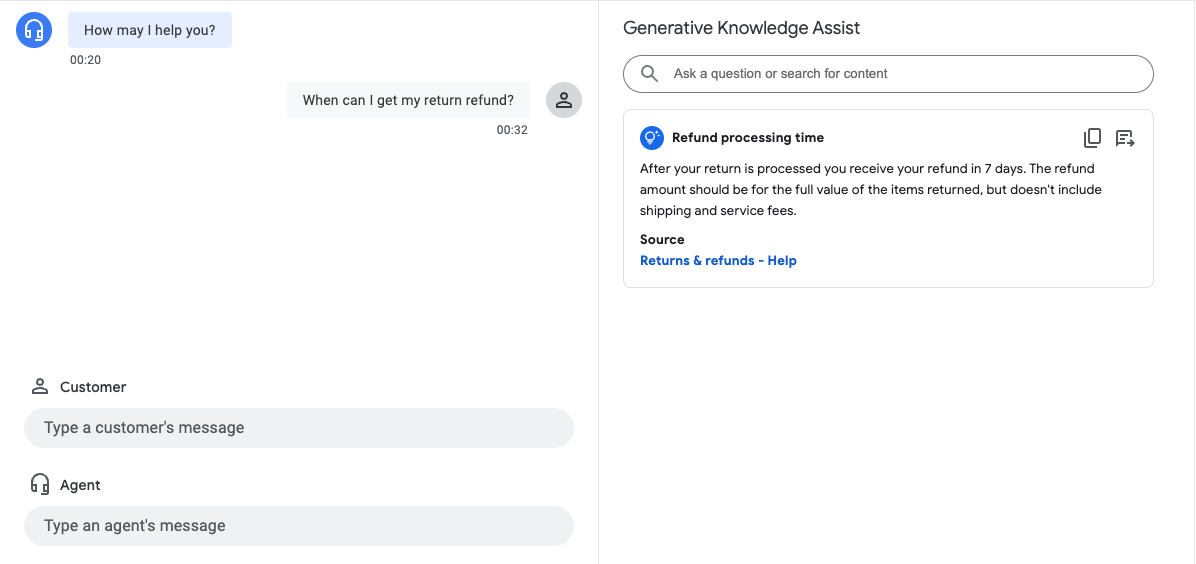
在上述示例中,基于流程的数据存储区代理提供了以下建议:
- 建议的查询内容:退款处理时间。
- 生成式 AI 生成的回答:退货处理完毕后,您会在 7 天内收到退款。退款金额应为退回商品的全额价值,但不包括运费和服务费。
- 相关知识文档的标题:退货和退款 - 帮助。
第 3 步:Pub/Sub 建议通知
您可以在创建对话配置文件时设置 notificationConfig 字段,以接收建议通知。在对话进行且有新建议可用时,此选项会使用 Pub/Sub 向应用发送建议通知。
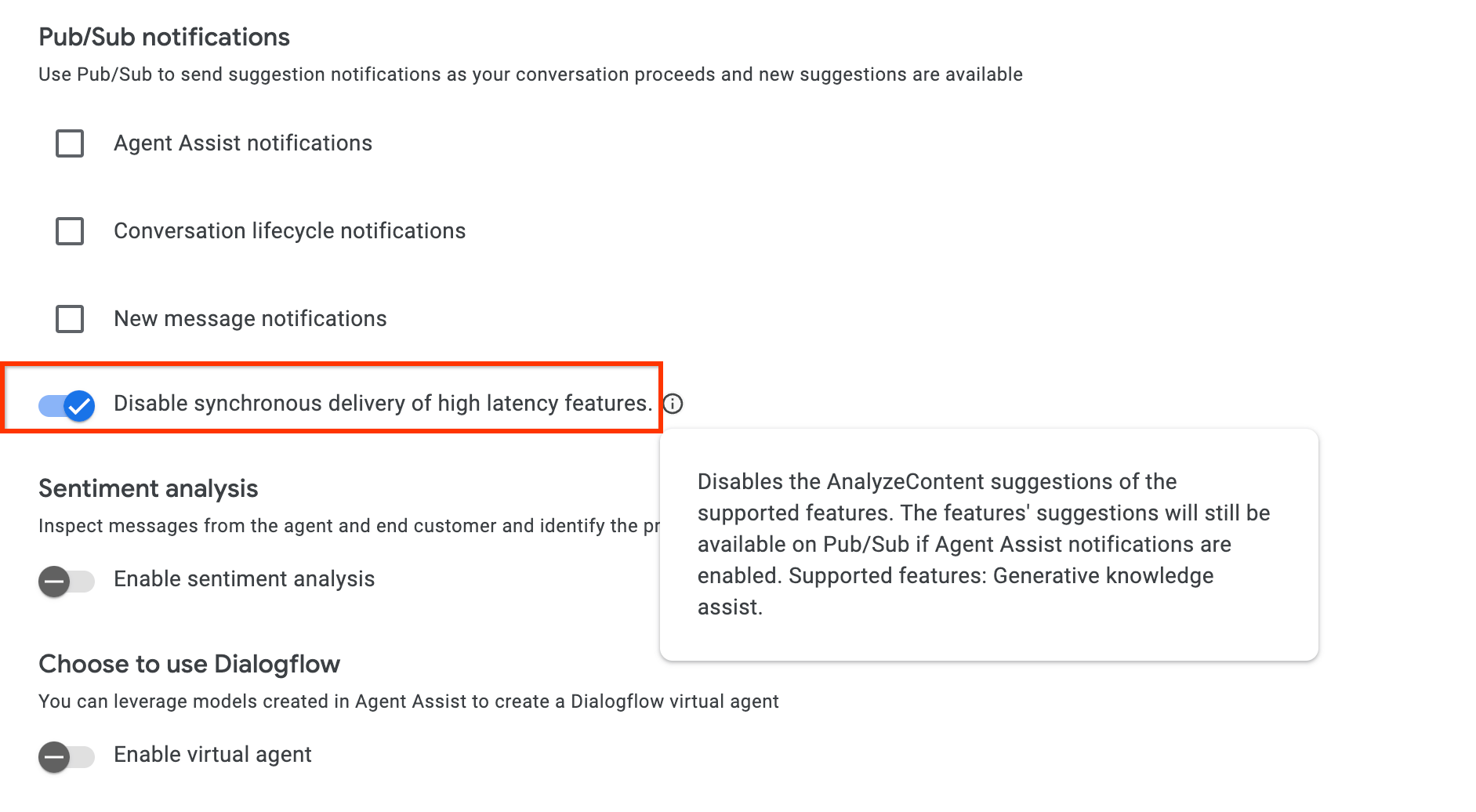
如果您是通过 AnalyzeContent API 进行集成,可以选择在 ConversationProfile 中启用 disable_high_latency_features_sync_delivery 配置,以确保 AnalyzeContent API 会立即响应,而无需等待主动生成式知识助理建议,并通过 Pub/Sub 传送建议。
您还可以通过 Agent Assist 控制台启用此配置。
通过“客户体验分析洞见”访问数据
或者,主动生成式知识助理生成的查询和答案会自动填充到“客户体验数据分析”中。如需访问该数据,请按照启用 Dialogflow 运行时集成中的说明操作。
发送反馈
如需了解发送反馈的步骤,请参阅向 Agent Assist 发送反馈。
回答智能体提出的问题
以下是用于发送有关回答代理问题的反馈的 JSON 请求示例。
{
 "name": "projects/PROJECT_ID/locations/LOCATION_ID/answerRecords/ANSWER_RECORD_ID",
 "answerFeedback": {
   "displayed": true
   "clicked": true
   "correctnessLevel": "FULLY_CORRECT"
   "agentAssistantDetailFeedback": {
     "knowledgeSearchFeedback": {
       "answerCopied": true
       "clickedUris": [
         "url_1",
         "url_2",
         "url_3",
       ]
     }
   }
 }
}
主动建议进行问答
以下是用于发送有关主动建议的反馈的 JSON 请求示例。
{
 "name": "projects/PROJECT_ID/locations/LOCATION_ID/answerRecords/ANSWER_RECORD_ID",
 "answerFeedback": {
   "displayed": true
   "clicked": true
   "correctnessLevel": "FULLY_CORRECT"
   "agentAssistantDetailFeedback": {
     "knowledgeAssistFeedback": {
       "answerCopied": true
       "clickedUris": [
         "url_1",
         "url_2",
         "url_3",
       ]
     }
   }
 }
}