# VPC Network Peering
Google Cloud VPC Network Peering connects two Virtual Private Cloud (VPC)
networks so that resources in each network can communicate with each other.
Peered VPC networks can be in the same project, different
projects of the same organization, or different projects of different
organizations.
## Specifications
VPC Network Peering lets you do the following:
- Publish [software as a service
(SaaS)](https://wikipedia.org/wiki/Software_as_a_service) offerings between VPC networks.
- VPC Network Peering works with [Compute Engine](https://docs.cloud.google.com/compute/docs), [GKE](https://docs.cloud.google.com/kubernetes-engine/docs), and [App Engine
flexible environment](https://docs.cloud.google.com/appengine/docs/flexible).
- VPC Network Peering supports VPC-native GKE clusters by [exchanging subnet
routes](https://docs.cloud.google.com/vpc/docs/vpc-peering#subnet-route-exchange).
- VPC Network Peering supports routes-based GKE clusters when configured to [exchange static
routes](https://docs.cloud.google.com/vpc/docs/vpc-peering#static-route-exchange).
### Connectivity
- VPC Network Peering supports connecting [VPC
networks](https://docs.cloud.google.com/vpc/docs/vpc), not [legacy networks](https://docs.cloud.google.com/vpc/docs/legacy).
- VPC Network Peering provides internal IPv4 and IPv6 connectivity between pairs of VPC networks. Peering traffic (traffic flowing between peered networks) has the same latency, throughput, and availability as traffic within the same VPC network.
- VPC Network Peering does not provide transitive routing. For example, if VPC networks `net-a` and `net-b` are connected using VPC Network Peering, and VPC networks `net-a` and `net-c` are also connected using VPC Network Peering, VPC Network Peering does not provide connectivity between `net-b` and `net-c`.
- You can't connect two auto mode VPC networks by using VPC Network Peering. This is because peered VPC networks always exchange subnet routes that use private internal IPv4 addresses, and each subnet in an auto mode VPC network uses a subnet IP address range that fits within the `10.128.0.0/9` CIDR block.
- You can connect a [custom mode VPC
network](https://docs.cloud.google.com/vpc/docs/vpc#subnet-ranges) to an auto mode VPC network as long as the custom mode VPC network doesn't have any subnet IP address ranges that fit within `10.128.0.0/9`.
- VPC Network Peering also provides certain *external* IPv6 connectivity to the destination external IPv6 address ranges of the following resources when the routes to those destination external IPv6 addresses are exchanged by VPC Network Peering:
- Dual-stack and IPv6-only virtual machine (VM) instance network interfaces
- Forwarding rules for external protocol forwarding
- Forwarding rules for external passthrough Network Load Balancers
- VPC Network Peering supports both IPv4 and IPv6 connectivity. You can configure VPC Network Peering on a VPC network that contains subnets with IPv6 address ranges.
### Administration
Peered VPC networks remain administratively separate. Only
routes are exchanged, according to the peering configuration. For more
information, see
[About peering connections](https://docs.cloud.google.com/vpc/docs/about-peering-connections).
### Network security
VPC networks connected using VPC Network Peering only
exchange routes, based on the [route exchange
options](https://docs.cloud.google.com/vpc/docs/vpc-peering#route-exchange-options) configured by a [network
administrator](https://docs.cloud.google.com/vpc/docs/vpc-peering#spec-iam) of each VPC
network.
VPC Network Peering *doesn't* exchange [VPC firewall
rules](https://docs.cloud.google.com/vpc/docs/firewalls) or [firewall
policies](https://docs.cloud.google.com/firewall/docs/firewall-policies-overview).
For VPC firewall rules:
- Firewall rules whose targets are defined using network tags are only resolved
to instances in the firewall rule's VPC network. Even though a
security administrator of a peered VPC network can use the same
network tag to define targets of firewall rules in a peered VPC
network, the targets of the firewall rules in the peered VPC
network don't include instances in your VPC network. Similarly,
ingress firewall rules whose sources are defined using network tags are only
resolved to instances in the firewall rule's VPC network.
- Firewall rules whose targets are defined using service accounts are only
resolved to instances in the firewall rule's VPC network.
Subject to IAM permissions, a security administrator of a
peered VPC network might be able to use the same service
account to define targets of firewall rules in a peered VPC
network, but the targets of the firewall rules in the peered
VPC network don't include instances in your VPC
network. Similarly, ingress firewall rules whose sources are defined using
service accounts are only resolved to instances in the firewall rule's
VPC network.
Rules in network firewall policies can use secure
[Tags](https://docs.cloud.google.com/resource-manager/docs/tags/tags-overview), which are different from
network tags, to identify targets and sources:
- When used to specify a target for an ingress or egress rule in a network
firewall policy, a Tag can only identify targets in the VPC
network to which the Tag is scoped.
- When used to specify a source for an ingress rule in a network firewall
policy, a Tag can identify sources in both the VPC network to
which the Tag is scoped *and* any peered VPC networks that
are connected to the VPC network to which the Tag is scoped.
For more information, see [Tags for
firewalls](https://docs.cloud.google.com/firewall/docs/tags-firewalls-overview).
Every VPC network contains implied firewall rules. Because of the
[implied deny ingress firewall
rules](https://docs.cloud.google.com/vpc/docs/firewalls#default_firewall_rules), security administrators for
each VPC network *must* create ingress allow firewall rules or
rules in firewall policies. Sources for those rules can include IP address
ranges of a peered VPC network.
Because of the [implied allow egress firewall
rules](https://docs.cloud.google.com/vpc/docs/firewalls#default_firewall_rules), you don't need to create
egress allow firewall rules or rules in firewall policies to permit packets to
destinations in the peered VPC network unless your networks
include egress deny rules.
### DNS support
Resources in a peered VPC network can't use
[Compute Engine internal DNS names](https://docs.cloud.google.com/compute/docs/internal-dns)
created by a local VPC network.
A peered VPC network can't use [Cloud DNS managed
private zones](https://docs.cloud.google.com/dns/docs/zones/zones-overview) that are authorized for only a
local VPC network. To make the DNS names available to resources
in a peered VPC network, use one of the following techniques:
- Use [Cloud DNS peering zones](https://docs.cloud.google.com/dns/docs/zones/zones-overview#peering_zones).
- [Authorize (make visible) the same managed private zone](https://docs.cloud.google.com/dns/docs/zones#update_managed_zones) to all the peered VPC networks.
### Internal load balancer support
Clients in a local VPC network can access internal load balancers
in a peer VPC network. For more information, see the *Use
VPC Network Peering* sections of the following load balancer documentation:
- [Internal passthrough Network Load Balancers and connected
networks](https://docs.cloud.google.com/load-balancing/docs/internal/internal-tcp-udp-lb-and-other-networks)
- [Internal proxy Network Load Balancers and connected
networks](https://docs.cloud.google.com/load-balancing/docs/tcp/internal-proxy-lb-and-other-networks)
- [Internal Application Load Balancers and connected
networks](https://docs.cloud.google.com/load-balancing/docs/l7-internal/internal-https-lb-and-other-networks)
Peered networks can exchange static routes that use internal passthrough Network Load Balancers as
next hops. For more information, see [Route exchange
options](https://docs.cloud.google.com/vpc/docs/vpc-peering#route-exchange-options).
### Peering group \& quotas
The VPC peering quotas depend on a concept called a *peering
group* . Each VPC network has its own peering group consisting of
itself and all other VPC networks connected to it by using
VPC Network Peering. In the simplest scenario, if two VPC
networks, `net-a` and `net-b`, are peered with each other, there are two peering
groups: one from the perspective of `net-a` and the other from the perspective
of `net-b`.
For more information about VPC Network Peering quotas see:
- [Per network quotas](https://docs.cloud.google.com/vpc/docs/quota#per_network)
- [Effective limits for per-peering group
quotas](https://docs.cloud.google.com/vpc/docs/quota#vpc-peering-effective-limit)
## Limitations
VPC Network Peering has the following limitations.
### Subnet IP ranges can't overlap across peered VPC networks
No subnet IP range can exactly match, contain, or fit within another subnet IP
range in a peered VPC network. At the time of peering,
Google Cloud checks if subnets with overlapping IP ranges exist; if they
do, then the peering fails. For already peered networks, if you perform
[an action that results in the creation of a new subnet route](https://docs.cloud.google.com/vpc/docs/routes#subnet-lifecycle),
Google Cloud requires the new subnet route to have a unique destination IP
address range.
Before creating new subnets, you can [list the routes from peering
connections](https://docs.cloud.google.com/vpc/docs/using-vpc-peering#list-peer-routes) to ensure that the
new subnet IPv4 address range is not already used.
This limitation and Google Cloud's corresponding checks also apply to
scenarios such as the following:
- Your VPC network, `network-1`, is peered with a second VPC network, `network-2`.
- `network-2` is also peered with a third VPC network, `network-3`.
- `network-3` is not peered with `network-1`.
In this scenario, you must coordinate with a network administrator for the
`network-2`. Ask the network administrator for `network-2`
to [list peering routes](https://docs.cloud.google.com/vpc/docs/using-vpc-peering#list-peer-routes)
in their VPC network.
For more information about overlap checks, see
[Subnet and peering subnet route interactions](https://docs.cloud.google.com/vpc/docs/vpc-peering#interaction-subnet-subnet).
### Internal DNS names don't resolve in peered networks
[Compute Engine internal DNS](https://docs.cloud.google.com/compute/docs/internal-dns) names created
in a network aren't accessible to peered networks. To reach the VM instances in
the peered network, use the IP address of the VM.
### Tags and service accounts are not usable across peered networks
You cannot reference a tag or service account pertaining to a VM from one
peered network in a firewall rule in the other peered network. For example, if
an ingress rule in one peered network filters its source based on a tag, it will
only apply to VM traffic originating from within that network, not its
peers, *even if* a VM in a peered network has that tag. This situation holds
similarly for service accounts.
## Route exchange options
When a VPC network shares local routes with a peered
VPC network, it *exports* the routes. The peered
VPC network can then *import* the routes. Subnet routes, except
for IPv4 subnet routes using privately used public IPv4 addresses, are always
exchanged.
VPC Network Peering configuration lets you control the following:
- If IPv6 routes are exchanged. Configuring a dual-stack peering connection lets you exchange IPv6 routes from both dual-stack and IPv6-only subnets.
- If routes for subnets that use privately used public IPv4 addresses are exported or imported.
- If static and dynamic routes are exported or imported.
You can update the configuration before the peering has been established or
while the peering connectivity is active.
VPC Network Peering doesn't provide:
- A granular method to control the exchange of specific subnet routes, static routes, and dynamic routes.
- Support for exchanging [policy-based routes](https://docs.cloud.google.com/vpc/docs/policy-based-routes).
### Options for exchanging subnet routes
The following table describes the route exchange options for
[subnet routes](https://docs.cloud.google.com/vpc/docs/routes#subnet-routes):
| Route type | Route export conditions | Route import conditions |
|---|---|---|
| IPv4 subnet routes (primary and secondary IPv4 subnet ranges) using [private IPv4 address ranges](https://docs.cloud.google.com/vpc/docs/subnets#valid-ranges) | Always exported
Can't be disabled | Always imported
Can't be disabled |
| IPv4 subnet routes (primary and secondary IPv4 subnet ranges) using [privately used public IPv4 address ranges](https://docs.cloud.google.com/vpc/docs/subnets#valid-ranges) | Exported by default
Export is controlled using the `--export-subnet-routes-with-public-ip` flag | Not imported by default
Import is controlled using the `--import-subnet-routes-with-public-ip` flag |
| [Internal IPv6 subnet ranges](https://docs.cloud.google.com/vpc/docs/subnets#internal-ipv6) (`ipv6-access-type=INTERNAL`) | Not exported by default
Export is enabled by setting `--stack-type=IPV4_IPV6` | Not imported by default
Import is enabled by setting `--stack-type=IPV4_IPV6` |
| [External IPv6 subnet ranges](https://docs.cloud.google.com/vpc/docs/subnets#external-ipv6) (`ipv6-access-type=EXTERNAL`) | Not exported by default
Export is enabled by setting `--stack-type=IPV4_IPV6` | Not imported by default
Import is enabled by setting `--stack-type=IPV4_IPV6` |
### Options for exchanging static routes
The following table describes the route exchange options for [static
routes](https://docs.cloud.google.com/vpc/docs/static-routes).
| Route type | Route export conditions | Route import conditions |
|---|---|---|
| Static routes with network tags (all [next hop types](https://docs.cloud.google.com/vpc/docs/static-routes#static-route-next-hops)) | Can't be exported | Can't be imported |
| Static routes that use the default internet gateway next hop | Can't be exported | Can't be imported |
| IPv4 static routes---without network tags---that use a next hop different from default internet gateway | Not exported by default
Export is controlled by using the `--export-custom-routes` flag | Not imported by default
Import is controlled by using the `--import-custom-routes` flag |
| IPv6 static routes---without network tags---that use a VM instance as the next hop | Not exported by default
Export is controlled by using the `--export-custom-routes` flag when the stack type of the peering is set to `--stack-type=IPV4_IPV6` | Not imported by default
Import is controlled by using the `--import-custom-routes` flag when the stack type of the peering is set to `--stack-type=IPV4_IPV6` |
### Options for exchanging dynamic routes
The following table describes the route exchange options for
[dynamic routes](https://docs.cloud.google.com/vpc/docs/routes#dynamic_routes).
| Route type | Route export conditions | Route import conditions |
|---|---|---|
| Dynamic IPv4 routes | Not exported by default
Export is controlled by using the `--export-custom-routes` flag | Not imported by default
Import is controlled by using the `--import-custom-routes` flag |
| Dynamic IPv6 routes | Not exported by default
Export is controlled by using the `--export-custom-routes` flag when the stack type of the peering is set to `--stack-type=IPV4_IPV6` | Not imported by default
Import is controlled by using the `--import-custom-routes` flag when the stack type of the peering is set to `--stack-type=IPV4_IPV6` |
### Benefits of exchanging static and dynamic routes
When one VPC network exports static and dynamic routes and the
other VPC network imports those routes, the importing network can
send packets directly to the next hop for each imported static or dynamic route
whose next hop is in the peer VPC network.
A network administrator of a local VPC network controls the
export of that network's static and dynamic routes---together---by using
the `--export-custom-routes` flag. A network administrator of the corresponding
peered VPC network controls the import of those static and
dynamic routes by using the `--import-custom-routes` flag. For more information,
see [Ignored routes](https://docs.cloud.google.com/vpc/docs/vpc-peering#custom-route-import-ignored), [Subnet and peering subnet route
interactions](https://docs.cloud.google.com/vpc/docs/vpc-peering#interaction-subnet-subnet), and [Subnet and static route
interactions](https://docs.cloud.google.com/vpc/docs/vpc-peering#interaction-subnet-static).
Importing static and dynamic routes from a peered VPC network can
be useful in the following scenarios:
- **If the peered VPC network contains [routes-based
GKE
clusters](https://docs.cloud.google.com/kubernetes-engine/docs/how-to/routes-based-cluster), and you need
to send packets to the Pods in those clusters**. Pod IP addresses are
implemented as destination ranges for static routes located in the peered
VPC network.
- **If you need to provide connectivity between an on-premises network and a
peered VPC network** . Suppose a local VPC
network contains dynamic routes with a next hop Cloud VPN tunnel,
Cloud Interconnect attachment (VLAN), or Router appliance that
connects to an on-premises network. To provide a path from the peered
VPC network to the on-premises network, a network
administrator for the local VPC network enables custom route
export, and a network administrator for the peered VPC
network enables custom route import. To provide a path from the on-premises
network to the peered VPC network, a network administrator
for the local VPC network must configure
[Cloud Router custom advertisement
mode](https://docs.cloud.google.com/network-connectivity/docs/router/concepts/advertised-routes#overview-am)
on the Cloud Router that manages the BGP session for the
Cloud VPN tunnel, Cloud Interconnect attachment (VLAN), or
Router appliance that connects to the on-premises network. The content
of those custom advertised routes must include the subnet IP address
ranges of the peered VPC network.
> [!IMPORTANT]
> **Important:** Cloud Routers don't advertise *received* peering subnet routes when using [default advertisement
> mode](https://docs.cloud.google.com/network-connectivity/docs/router/concepts/advertised-routes#overview-am-default). To advertise peering subnet routes or aggregate ranges of peering subnet routes, you must enable custom advertised mode, and ensure that the custom advertised routes include the IP address ranges of the subnets in the peered VPC network.
### Ignored routes
Even when a VPC network imports a route, it can ignore the
imported route in situations like the following:
- When the local VPC network has a route with an identical or a
more specific destination (longer subnet mask), the local VPC network
always uses its local route.
- When the local VPC network doesn't contain the most-specific
route for a packet's destination, but two or more peered VPC
networks contain the same, most-specific destination for the packet,
Google Cloud uses an internal algorithm to select a next hop *from just one of
the peered VPC networks* . This selection takes place *before
route priority is considered*, and you can't configure the behavior. As a best
practice, avoid this configuration because adding or removing peered
VPC networks can lead to unintended changes to the routing order.
For more details about the preceding situations, see
[Routing order](https://docs.cloud.google.com/vpc/docs/routes#routeselection).
For dual-stack peerings, if a local VPC network importing IPv6
routes doesn't have any dual-stack or IPv6-only subnets, none of the IPv6 routes
it receives from peered VPC networks can be used. Further, if the
[`constraints/compute.disableAllIpv6`](https://docs.cloud.google.com/resource-manager/docs/organization-policy/org-policy-constraints)
organization policy constraint has been set, a Network Administrator may not be
able to create subnets with IPv6 address ranges.
### Subnet and peering subnet route interactions
IPv4 subnet routes in peered VPC networks can't overlap:
- Peering prohibits identical IPv4 subnet routes. For example, two peered VPC networks can't both have an IPv4 subnet route whose destination is `100.64.0.0/10`.
- Peering prohibits a subnet route from being *contained within* a peering subnet route. For example, if the local VPC network has a subnet route whose destination is `100.64.0.0/24`, then none of the peered VPC networks can have a subnet route whose destination is `100.64.0.0/10`.
Google Cloud enforces the preceding conditions for IPv4 subnet routes in the
following cases:
- When you connect VPC networks for the first time using VPC Network Peering.
- While the networks are peered.
- When you make a peering configuration change---for example, enabling import of subnet IPv4 routes with privately used public IP addresses.
While you peer networks, Google Cloud returns an error if any of the following
operations result in an overlap:
- [Adding a new subnet](https://docs.cloud.google.com/vpc/docs/create-modify-vpc-networks#add-subnets).
- [Adding a subnet secondary IPv4 address range](https://docs.cloud.google.com/vpc/docs/create-modify-vpc-networks#edit-secondary).
- [Expanding the subnet primary IPv4 address range](https://docs.cloud.google.com/vpc/docs/create-modify-vpc-networks#expand-subnet).
IPv6 subnet routes (both internal and external) are [unique by
definition](https://docs.cloud.google.com/vpc/docs/subnets#ipv6-ranges). No two VPC networks
can use the same internal or external IPv6 subnet ranges. For example, if one
VPC network uses `fc:1000:1000:1000::/64` as an IPv6 subnet range,
no other VPC network in Google Cloud can use
`fc:1000:1000:1000::/64`, regardless of whether the VPC networks
are connected by using VPC Network Peering.
### Subnet and static route interactions
Google Cloud requires that subnet routes and peering subnet routes have the most
specific destination IPv4 or IPv6 ranges. Within any VPC network,
a local static route can't have a destination that exactly matches or fits
within a local subnet route. For a more detailed discussion about this scenario,
see [Interactions with static
routes](https://docs.cloud.google.com/vpc/docs/routes#subnet-static-interactions).
This concept is extended to VPC Network Peering by the following two rules:
- A local static route can't have a destination that exactly matches or
fits within a peering subnet route. If a local static route exists,
Google Cloud enforces the following:
- You can't establish a new peering connection to a VPC network
that already contains a subnet route that exactly matches or contains
the local static route's destination if the peering configuration
results in importing the conflicting subnet route. For example:
- If a local static route with the `10.0.0.0/24` destination exists,
you can't establish a new peering connection to a VPC
network that contains an IPv4 subnet route whose destination exactly
matches `10.0.0.0/24` or contains `10.0.0.0/24` (for example, `10.0.0.0/8`).
- When the intended peering stack type is `IPV4_IPV6`, if a local static route
with the `2001:0db8:0a0b:0c0d::/96` destination exists, you can't establish
a new peering connection to a VPC network that contains an
IPv6 subnet route whose destination exactly matches or contains
`2001:0db8:0a0b:0c0d::/96`. In this situation, the only possible subnet IPv6
address range is `2001:0db8:0a0b:0c0d::/64` because subnet IPv6 address ranges
in Google Cloud must use 64-bit subnet mask lengths.
- You can't update an existing peering connection if the updated peering
configuration results in importing the conflicting subnet route. For example:
- Suppose two VPC networks are already peered, but they
don't export and import IPv4 subnet routes by using privately used public
IPv4 address ranges. A local static route with the `11.0.0.0/24` destination
exists in the first VPC network, and a subnet route with the
destination `11.0.0.0/8` exists in the peered VPC network. You
can't simultaneously configure the peered VPC network to export
subnet routes by using privately used public IPv4 addresses *and* configure the
first VPC network to import subnet routes by using privately used
public IPv4 addresses.
- Suppose two VPC networks are already peered, and the peering
stack type is IPv4 only. A local static route with the
`2001:0db8:0a0b:0c0d::/96` destination exists in the first VPC
network, and an IPv6 subnet route with the destination `2001:0db8:0a0b:0c0d::/64`
exists in the peered VPC network. You can't change the
peering stack type to `IPV4_IPV6`.
- Conversely, if VPC networks *are already connected* by using
VPC Network Peering, you *can't* perform the following operations:
- Create a new local static route whose destination would exactly match or
fit within an imported peering subnet route.
- Create a new subnet address range in the peered VPC network
if that range would exactly match or contain an existing local static route.
- A peering static route can't have a destination that exactly matches
or fits within a local subnet route. If a local subnet route exists,
Google Cloud prohibits the following:
- You can't establish a new peering connection to a VPC
network that already contains a static route that exactly matches or
fits within the destination of the local VPC network's
subnet route, if the peering configuration results in importing the
static route from the peer. As examples:
- If a local subnet route for `10.0.0.0/8` exists, you can't establish a
peering connection to a VPC network with a static route
whose destination exactly matches `10.0.0.0/8` or fits within `10.0.0.0/8`
(for example, `10.0.0.0/24`).
- When the intended peering stack type is `IPV4_IPV6`, if a local subnet route
for `2001:0db8:0a0b:0c0d::/64` exists, you can't establish a peering connection
to a VPC network with a static route whose destination
exactly matches `2001:0db8:0a0b:0c0d::/64` or fits within
`2001:0db8:0a0b:0c0d::/64` (for example, `2001:0db8:0a0b:0c0d::/96`).
- You can't update an existing peering connection if the updated
peering configuration results in importing the conflicting static route.
- Conversely, if VPC networks *are already connected* by using
VPC Network Peering, you *can't* perform the following operations:
- Create a new local subnet route whose destination would exactly match or contain an imported peering static route.
- Create a new static route in the peered VPC network whose destination would exactly match or fit within an existing local subnet route.
### Effects of the dynamic routing mode
The dynamic routing mode of a VPC network determines the regions
in which prefixes learned from Cloud Routers in that network are
applied as local dynamic routes. For details about this behavior, see [Effects
of dynamic routing
mode](https://docs.cloud.google.com/network-connectivity/docs/router/concepts/learned-routes#dynamic-routing-mode-effects-on-learned-routes).
This concept is extended to VPC Network Peering. The dynamic routing mode of
the *exporting* VPC network---the network that contains the
Cloud Routers that learned the prefixes for those dynamic routes---
determines the regions in which the peering dynamic routes can be programmed in
peer networks:
- If the dynamic routing mode of the exporting VPC network is
regional, then that network exports dynamic routes only in the same region
as its Cloud Routers that learned the prefixes.
- If the dynamic routing mode of the exporting VPC network is
global, then that network exports dynamic routes in all regions.
In both cases, the dynamic routing mode of the *importing* VPC
network is not relevant.
For an example illustrating this behavior, see [Local VPC network
and peer VPC network with on-premises
connectivity](https://docs.cloud.google.com/vpc/docs/vpc-peering#vpc-vpc-on-prem-party).
### Subnet and dynamic route interactions
Conflicts between local or peering subnet routes and dynamic routes are
resolved as described in
[Interactions with dynamic routes](https://docs.cloud.google.com/vpc/docs/routes#subnet-dynamic-interactions).
## VPC Network Peering examples
The following examples demonstrate two common VPC Network Peering scenarios.
### Local VPC network and peer VPC network with on-premises connectivity
In this example, the following network peering is set up:
- `network-a` is peered to `network-b`, and `network-b` is peered to `network-a`.
- `network-a` contains two subnets where each subnet is in a separate region. `network-b` contains a single subnet.
- `network-b` is connected to an on-premises network with Cloud VPN tunnels by using dynamic routing. (The same principles hold if the tunnels are replaced with Cloud Interconnect VLAN attachments.)
- The peering connection for `network-b` is configured with the `--export-custom-routes` flag, and the peering connection for `network-a` is configured with the `--import-custom-routes` flag.
[](https://docs.cloud.google.com/static/vpc/images/peering/network-peering-routes-global.svg) Peered network with access to the on-premises network with global dynamic routing (click to enlarge).
To provide connectivity from on-premises to subnets in
`network-a` and `network-b`, the Cloud Router in `network-b` *must* be
configured to use
[custom advertisement mode](https://docs.cloud.google.com/network-connectivity/docs/router/concepts/advertised-routes#overview-am-custom).
For example, the Cloud Router advertises only the custom prefix,
`custom-prefix-1`, which includes the subnet ranges from `network-b` and the
subnet ranges from `network-a`.
The Cloud Router in `us-west1` learns `on-premises-prefix` from
an on-premises router. `on-premises-prefix` does not create any conflict because
it's *broader than* the subnet and peering subnet routes. In other
words, `on-premises-prefix` does not exactly match and does not fit *within* any
subnet or peering subnet route.
The following table summarizes the network configuration specified in the preceding example:
| Network name | Networking component | IPv4 range | IPv6 range | Region |
|---|---|---|---|---|
| network-a | subnet-a | 10.0.0.0/24 | fc:1000:1000:1000::/64 | us-west1 |
| network-a | subnet-b | 10.0.1.0/24 | fc:1000:1000:1001::/64 | europe-north 1 |
| network-b | subnet-c | 10.0.2.0/23 | fc:1000:1000:1002::/64 | us-west1 |
| network-b | Cloud Router | 10.0.0.0/22 | fc:1000:1000:1000::/64 | us-west1 |
| On-premises network | On-premises router | 10.0.0.0/8 | fc:1000:1000:1000::/56 | N/A |
Regardless of the dynamic routing mode of `network-a`, the following routing
characteristics apply:
- When the dynamic routing mode of `network-b` is global, `On-premises prefix`
learned by the Cloud Router in `network-b`
are added as dynamic routes in all regions of `network-b` *and* as peering
dynamic routes in all regions of `network-a`. If firewall rules are
correctly configured, `vm-a1`, `vm-a2`, and `vm-b` can communicate with an
on-premises resource with IPv4 address `10.5.6.7` (or IPv6 address `fc:1000:1000:10a0:29b::`).
- If the dynamic routing mode of `network-b` is changed to regional,
`On-premises prefix` learned by the Cloud Router in `network-b`
are only added as dynamic routes in the `us-west1` region of `network-b` and as
peering dynamic routes in the `us-west1` region of `network-a`. If
the firewall rules are correctly configured, only `vm-a1` and `vm-b` can
communicate with an on-premises resource with IPv4 address `10.5.6.7` (or IPv6
address `fc:1000:1000:10a0:29b::`) because that is the only VM in the same
region as the Cloud Router.
### Transit network with multiple peerings
Consider a scenario in which `network-b` is connected to an on-premises
network and acts as a *transit network* for two other networks, `network-a`
and `network-c`. To let VMs in both of these networks
access `network-b` and its connected on-premises network by using only internal
IP addresses, the following configuration is required:
- `network-a` is peered to `network-b`, and `network-b` is peered to `network-a`.
- `network-c` is peered to `network-b`, and `network-b` is peered to `network-c`.
- `network-b` is connected to an on-premises network with Cloud VPN tunnels using dynamic routing. The same principles hold if the tunnels were replaced with Cloud Interconnect VLAN attachments.
- To provide connectivity from on-premises to subnets in `network-a`, `network-b`, and `network-c`, the Cloud Router in `network-b` is configured to use [custom advertisement mode](https://docs.cloud.google.com/network-connectivity/docs/router/concepts/advertised-routes#overview-am-custom). For example, the Cloud Router advertises subnet routes from `network-b` plus custom prefixes that cover subnet routes in `network-a` and `network-c`.
- Subject to [subnet and dynamic route interactions](https://docs.cloud.google.com/vpc/docs/vpc-peering#interaction-subnet-dynamic), the Cloud Router in `network-b` learns on-premises prefixes and creates dynamic routes in `network-b`.
- The peering connections from `network-b` to `network-a` and from `network-b` to `network-c` are configured with the `--export-custom-routes` flag. The peering connections from `network-a` to `network-b` and from `network-c` to `network-b` are configured with the `--import-custom-routes` flag.
- Subject to [subnet and dynamic route interactions](https://docs.cloud.google.com/vpc/docs/vpc-peering#interaction-subnet-dynamic), the Cloud Router in `network-b` also creates peering dynamic routes in `network-a` and `network-c`.
[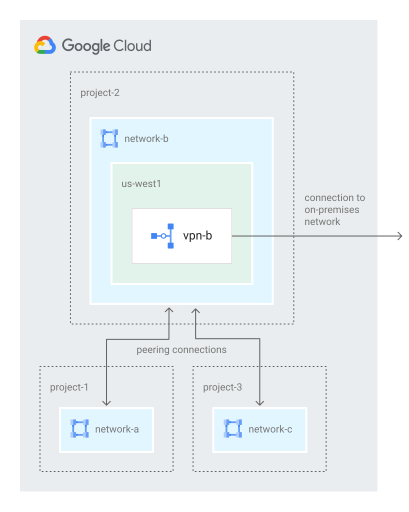](https://docs.cloud.google.com/static/vpc/images/peering/network-peering-vpc-transit.svg) VPC transit network (click to enlarge).
If firewalls are configured correctly, the following connectivity scenarios are possible:
- VM instances in `network-a` can reach other VMs in `network-b` and on-premises systems.
- VM instances in `network-c` can reach other VMs in `network-b` and on-premises systems.
- VM instances in `network-b` can reach other VMs in both `network-a` and `network-c`, as well as systems in the on-premises network.
Because VPC Network Peering isn't transitive, VM instances in `network-a` and
`network-c` can't communicate with each other unless you also connect networks
`network-a` and `network-c` using VPC Network Peering.
## Pricing
Regular [network pricing](https://cloud.google.com/vpc/network-pricing) applies to VPC Network Peering.
## What's next
- To learn about administering VPC Network Peering connections, see [About peering connections](https://docs.cloud.google.com/vpc/docs/about-peering-connections).
- To set up and troubleshoot VPC Network Peering, see [Set up and manage VPC Network Peering](https://docs.cloud.google.com/vpc/docs/using-vpc-peering).