# Private Service Connect security
This page provides an overview of Private Service Connect security.
Private Service Connect provides several controls for managing access
to Private Service Connect resources. You can control who can deploy
Private Service Connect resources, whether connections can be
established between consumers and producers, and which network traffic
is allowed to access those connections.
These controls are implemented by using the following elements:
- [*Identity and Access Management (IAM) permissions*](https://docs.cloud.google.com/vpc/docs/private-service-connect-security.md.txt#iam) determine which IAM *principals* are allowed to deploy Private Service Connect resources, such as endpoints, backends, and services. An IAM principal is a Google Account, service account, Google group, Google Workspace account, or Cloud Identity domain that can access a resource.
- [*Private Service Connect accept and reject lists*](https://docs.cloud.google.com/vpc/docs/private-service-connect-security.md.txt#consumer-lists) and [*organization policies*](https://docs.cloud.google.com/vpc/docs/private-service-connect-security.md.txt#org-policies) determine whether Private Service Connect connections can be established between individual consumers and producers.
- [*VPC firewall rules*](https://docs.cloud.google.com/vpc/docs/private-service-connect-security.md.txt#firewalls) determine whether certain TCP or UDP traffic is allowed to access Private Service Connect connections.
Figure 1 describes how these controls interact on the consumer and producer
sides of a Private Service Connect connection.
[](https://docs.cloud.google.com/static/vpc/images/psc-security-overview.svg) **Figure 1.**
IAM permissions, organization policies, accept and reject
lists, and VPC firewall rules work together to help secure the
consumer and producer sides of a Private Service Connect connection
(click to enlarge).
> [!NOTE]
> **Note:** Private Service Connect documentation distinguishes Private Service Connect connections from TCP connections or UDP datagrams. A Private Service Connect connection is the logical binding between consumer and producer Private Service Connect resources. A TCP connection or UDP datagram refers to the method of data transmission.
## IAM
**Resources**: all
Each Private Service Connect resource is governed by one or more
IAM permissions. These permissions let administrators enforce
which IAM principals can deploy Private Service Connect
resources.
IAM doesn't govern which IAM principals can
connect to or use a Private Service Connect connection. To control
which endpoints or backends can establish a connection with a service, use
organization policies or consumer accept lists. To control which clients can
send traffic to Private Service Connect resources, use
VPC firewalls or firewall policies.
For more information about IAM permissions, see
[IAM permissions](https://docs.cloud.google.com/iam/docs/overview.md.txt).
For information about the permissions that are required to create an enpdoint,
see [Create an endpoint](https://docs.cloud.google.com/vpc/docs/configure-private-service-connect-services.md.txt#expandable-1).
For information about the permissions that are required to create a service
attachment, see [Publish a service with explicit approval](https://docs.cloud.google.com/vpc/docs/configure-private-service-connect-producer.md.txt#expandable-3).
## Connection statuses
**Resources**: endpoints, backends, and service attachments
Service attachments and Private Service Connect endpoints or backends that access
published services or regional Google APIs have connection
statuses that describe the state of their connections. The consumer and producer resources that
form the two sides of a connection always have the same status. Endpoints and backends that
access global Google APIs don't have connection statuses, but in the Google Cloud console
they are displayed with a status of `Accepted`.
You can view connection statuses when you
[view endpoint details](https://docs.cloud.google.com/vpc/docs/configure-private-service-connect-services.md.txt#endpoint-details),
[describe a backend](https://docs.cloud.google.com/vpc/docs/access-apis-managed-services-private-service-connect-backends.md.txt#describe-backends), or
[view details for a published service](https://docs.cloud.google.com/vpc/docs/configure-private-service-connect-producer.md.txt#attachment-details).
The following table describes the possible statuses.
| Connection status | Description |
|---|---|
| **Accepted** | The Private Service Connect connection is accepted by the producer, and the connection is permitted by configuration. However, this status doesn't guarantee that traffic can flow through the connection. |
| **Pending** | The Private Service Connect connection is not established, and network traffic can't travel between the two networks. A connection might have this status for the following reasons: - The service attachment requires [explicit approval](https://docs.cloud.google.com/vpc/docs/configure-private-service-connect-producer.md.txt#publish-service-explicit), and the consumer is not in the consumer accept list. - The number of connections exceeds the service attachment's [connection limit](https://docs.cloud.google.com/vpc/docs/private-service-connect-security.md.txt#connection_limits). Connections that are blocked for these reasons remain in the pending state indefinitely until the underlying issue is resolved. |
| **Rejected** | The Private Service Connect connection is not established. Network traffic can't travel between the two networks. A connection might have this status for the following reasons: - A producer [organization policy](https://docs.cloud.google.com/vpc/docs/private-service-connect-security.md.txt#producer-side-org-policies) rejected the connection. - A [consumer reject list](https://docs.cloud.google.com/vpc/docs/private-service-connect-security.md.txt#producer-side-org-policies) rejected the connection. |
| **Needs attention** | There is an issue on the producer side of the connection. Some traffic might be able to flow between the two networks, but some connections might not be functional. For example, the producer's [NAT subnet](https://docs.cloud.google.com/vpc/docs/about-vpc-hosted-services.md.txt#psc-subnets) might be exhausted and unable to allocate IP addresses for new connections. |
| **Closed** | The service attachment was deleted, and the Private Service Connect connection is closed. Network traffic can't travel between the two networks. A closed connection is a *terminal state*. To restore the connection, you must recreate both the service attachment and the endpoint or backend. |
## Service attachment configuration
You can control which consumers can connect to a service attachment by using
the following features.
### Connection preference
**Resources**: endpoints and backends
Each service attachment has a connection preference that controls whether connections are
automatically accepted.
- **Automatically accept all connections.** The service attachment automatically accepts all inbound connection requests from any consumer.
- **Explicitly accept connections from selected consumers.** The service attachment only accepts inbound connection requests if the consumer is on the service attachment's consumer accept list. You can specify consumers by project, VPC network, or individual Private Service Connect endpoint. You can't include different types of consumers in the same consumer accept or reject list.
For either connection preference, connections that are accepted can be overridden and rejected by
an [organization policy](https://docs.cloud.google.com/vpc/docs/manage-security-private-service-connect-producers.md.txt#block-consumers)
that blocks incoming connections.
We recommend that you explicitly accept connections for selected consumers. Automatically
accepting all connections might be appropriate if you control consumer access through
other means and want to enable permissive access to your service.
### Accept and reject lists
**Resources**: endpoints and backends
*Consumer accept lists* and *consumer reject lists* are a security feature of service
attachments. These lists let
service producers specify which consumers can establish Private Service Connect connections
to their services. When a service attachment is configured for explicit approval, a new connection
is only accepted if the consumer is on the accept list and not on the reject list. Updates to
consumer lists only affect new connections, unless
[Connection reconciliation](https://docs.cloud.google.com/vpc/docs/about-controlling-access-published-services.md.txt#connection-reconciliation)
is enabled.
The consumer accept and reject lists let you specify consumers in one of the following ways:
- Project
- VPC network
- Private Service Connect endpoint
This method does not apply to Private Service Connect backends.
If you add the same consumer to both the accept and reject lists, that consumer is blocked from
connecting to the service attachment. Specifying consumers by folder is not supported.
Both of a service attachment's consumer lists must contain the same type of consumer. For
example, if you add a project to an accept list, you can't add a VPC network or
endpoint URI to either list, unless you replace the project in the accept list with the new type
of consumer.
If you want to publish a service that accepts different types of consumers, you can create
multiple service attachments that connect to the same service. Each service attachment can be
configured with its own connection preference and consumer lists.
You can change the type of consumer in consumer lists without interrupting connections, but you
must make the change in a single update. Otherwise, the operation will fail.
There are limits to how many consumers you can add to the accept and reject lists:
- You can add a maximum of 5,000 values to the consumer accept list.
- You can add a maximum of 64 values to the consumer reject list.
> [!CAUTION]
> **Caution:** Consumer accept lists specify VPC networks by *name*. If a VPC network that's included in an accept list is deleted and recreated with the same name in the same project, connections to consumers that are created in the same network are still accepted.
Consumer lists control whether an endpoint or backend can connect to a published service, but
they don't control who can send requests to that endpoint. For example, say a consumer has a
[Shared VPC network](https://docs.cloud.google.com/vpc/docs/private-service-connect-deployments.md.txt#shared-vpc)
that has two service projects attached to it. If a published service has
`service-project1` in the consumer accept list, and `service-project2` in
the consumer reject list, the following applies:
- A consumer in `service-project1` can create an endpoint that connects to the published service.
- A consumer in `service-project2` can't create an endpoint that connects to the published service.
- A client in `service-project2` can send requests to the endpoint in `service-project1`, if there are no firewall rules or policies preventing that traffic.
When you update a consumer accept or reject list, the effect on existing
connections varies depending on whether connection reconciliation is enabled.
For more information, see [Connection reconciliation](https://docs.cloud.google.com/vpc/docs/about-controlling-access-published-services.md.txt#connection-reconciliation).
For information about how to create a new service attachment that has consumer
accept or reject lists, see
[Publish a service with explicit project approval](https://docs.cloud.google.com/vpc/docs/configure-private-service-connect-producer.md.txt#publish-service-explicit).
For information about how to update consumer accept or reject lists, see
[Manage requests for access to a published service](https://docs.cloud.google.com/vpc/docs/manage-private-service-connect-services.md.txt#access).
### Connection limits
**Resources**: endpoints and backends
Consumer accept lists have connection limits. These limits set the total number of
Private Service Connect endpoint and backend connections
that a service attachment can accept from the specified consumer project or VPC
network. Specifying connection limits for Private Service Connect endpoint-based
accept lists has no effect, because only one endpoint can match a given URI.
Producers can use connection limits to prevent individual consumers from exhausting IP addresses
or resource quotas in the producer VPC network. Each accepted
Private Service Connect connection subtracts from the configured limit for a consumer
project or VPC network. The limits are set when you
[create](https://docs.cloud.google.com/vpc/docs/configure-private-service-connect-producer.md.txt#publish-service-explicit)
or [update](https://docs.cloud.google.com/vpc/docs/manage-private-service-connect-services.md.txt#access)
consumer accept lists. You can view a service attachment's connections when you
[describe](https://docs.cloud.google.com/vpc/docs/configure-private-service-connect-producer.md.txt#attachment-details) a
service attachment.
[Propagated connections](https://docs.cloud.google.com/vpc/docs/about-controlling-access-published-services.md.txt#propagation) don't count
toward these limits.
For example, consider a case where a service attachment has a consumer accept list that includes
`project-1` and `project-2`, both with a limit of one connection. The
project `project-1` requests two connections, `project-2` requests one
connection, and `project-3` requests one connection. Because `project-1` has
a limit of one connection, the first connection is accepted, and the second remains pending.
The connection from `project-2` is accepted, and the connection from
`project-3` remains pending. The second connection from `project-1` can be
accepted by increasing the limit for `project-1`. If
`project-3` is added to the consumer accept list, that connection transitions from
pending to accepted.
## Organization policies
Organization policies let you broadly control which projects can connect
to VPC networks or organizations by using
Private Service Connect.
The organization policies described on this page can block or reject new
Private Service Connect connections, but they don't affect
existing connections.
An organization policy applies to descendants of the resource that it refers to
according to [hierarchy evaluation](https://docs.cloud.google.com/resource-manager/docs/organization-policy/understanding-hierarchy). For example, an organization policy that restricts
access to a Google Cloud organization also applies to the organization's
child folders, projects, and resources. Similarly, listing an organization as an
allowed value also allows access to that organization's children.
For more information about organization policies, see
[Organization policies](https://docs.cloud.google.com/resource-manager/docs/organization-policy/overview#organization_policy).
### Consumer-side organization policies
You can use [list constraints](https://docs.cloud.google.com/resource-manager/docs/organization-policy/using-constraints#list-constraint) to control the deployment of endpoints
and backends. If an endpoint or backend is blocked by a consumer
organization policy, the creation of the resource fails.
- Use the `restrictPrivateServiceConnectProducer` list constraint to control which service attachments endpoints and backends can connect to based on the *producer organization*.
- Use the `disablePrivateServiceConnectCreationForConsumers` list constraint to control the deployment of endpoints based on the endpoint's *connection type*. You can block the deployment of endpoints that connect to Google APIs, or you can block the deployment of endpoints that connect to published services.
#### Block endpoints or backends from connecting to producer organizations
**Resources**: endpoints and backends
Organization policies that use the `restrictPrivateServiceConnectProducer`
list constraint with allowed values block endpoints and backends from connecting
to service attachments unless the service attachments are associated with one of
the policy's allowed values. A policy of this type blocks connections even if
they are allowed by the service attachment's consumer accept list.
For example, the following organization policy applies to an organization named
`Org-A`:
```yaml
name: organizations/Org-A/policies/compute.restrictPrivateServiceConnectProducer
spec:
rules:
-- values:
allowedValues:
- under:organizations/ORG_A_NUMBER
- under:organizations/433637338589
```
Figure 2 shows the result of this organization policy. The policy has allowed
values for `Org-A` (`ORG_A_NUMBER`) and
`Google-org` (`433637338589`).
Endpoints and backends created in `Org-A` can communicate with
service attachments in `Org-A`, but not with service attachments in
`Org-B`.
[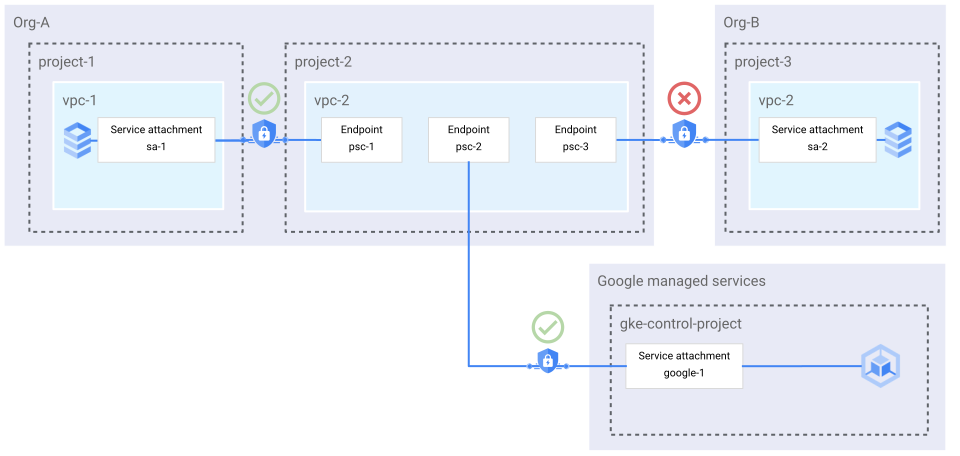](https://docs.cloud.google.com/static/vpc/images/psc-producer-org-policy.svg) **Figure 2.** An organization policy lets the endpoint
`psc-1` connect to the service attachment `sa-1` and
blocks `psc-3` from connecting to service attachments in
`Org-B`. Endpoints and backends in `Org-A` can connect
to service attachments that are owned by Google (click to enlarge).
You can allow instances of the following types of resources to create endpoints
with the `compute.restrictPrivateServiceConnectProducer` constraint:
- Organizations
- Folders
- Projects
For information about how to create an organization policy that uses the
`compute.restrictPrivateServiceConnectProducer` constraint, see
[Block endpoints and backends from connecting to unauthorized service attachments](https://docs.cloud.google.com/vpc/docs/manage-security-private-service-connect-consumers.md.txt#add-org-policy).
#### Block the creation of endpoints by connection type
**Affected resources**: endpoints
You can use the `disablePrivateServiceConnectCreationForConsumers` list
constraint to block the creation of endpoints based on whether they are
connecting to Google APIs or published services (service attachments).
For information about how to create an organization policy that uses the
`disablePrivateServiceConnectCreationForConsumers` constraint, see
[Block consumers from deploying endpoints by connection type](https://docs.cloud.google.com/vpc/docs/manage-security-private-service-connect-consumers.md.txt#connection-type).
### Producer-side organization policies
**Affected resources**: endpoints and backends
You can use [organization policies](https://docs.cloud.google.com/resource-manager/docs/organization-policy/overview#organization_policy) with the
`compute.restrictPrivateServiceConnectConsumer`
[list constraint](https://docs.cloud.google.com/resource-manager/docs/organization-policy/using-constraints#list-constraint) to control which endpoints and backends can
connect to Private Service Connect service attachments within a
producer organization or project. If an endpoint or backend is rejected by a
producer organization policy, the creation of the resource succeeds, but
the connection enters the rejected state.
Controlling access in this way is similar to using accept and reject lists,
except that organization policies apply to all service attachments in a project
or organization rather than an individual service attachment.
You can use organization policies and accept lists together, with organization
policies broadly enforcing access to a managed service and accept lists
controlling access to individual service attachments.
Organization policies that use the
`compute.restrictPrivateServiceConnectConsumer` constraint reject connections
from endpoints and backends unless the endpoint or backend is associated with
one of the policy's allowed values. A policy of this type rejects connections
even if they are allowed by an allowlist.
For example, the following organization policy applies to an organization named
Org-A:
```yaml
name: organizations/Org-A/policies/compute.restrictPrivateServiceConnectConsumer
spec:
rules:
- values:
allowedValues:
- under:organizations/ORG_A_NUMBER
```
Figure 3 shows the result of this organization policy. The policy has an allowed
value for `Org-A` (`ORG_A_NUMBER`). Endpoints
in other VPC networks in `Org-A` can connect to service
attachments in `Org-A`. Endpoints in `Org-B` that try to connect are rejected.
[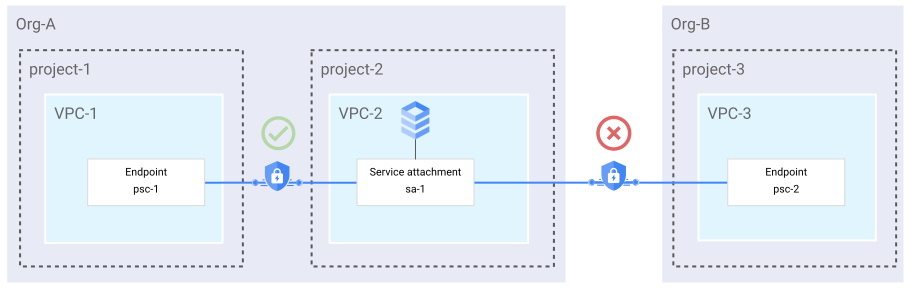](https://docs.cloud.google.com/static/vpc/images/psc-consumer-org-policy.svg) **Figure 3.** An organization policy lets `psc-1`
connect to `sa-1`, while it blocks `psc-2` from
connecting (click to enlarge).
An organization policy applies to descendants of the resource that it refers to
according to [hierarchy evaluation](https://docs.cloud.google.com/resource-manager/docs/organization-policy/understanding-hierarchy). For example, an organization policy that restricts
access to a Google Cloud organization also applies to the organization's
child folders, projects, and resources. Similarly, listing an organization as an
allowed value also allows access to that organization's children.
You can allow instances of the following types of resources to create endpoints
with the `restrictPrivateServiceConnectConsumer` constraint:
- Organizations
- Folders
- Projects
For more information about using organization policies with service producers,
see [Producer organization policies](https://docs.cloud.google.com/vpc/docs/manage-security-private-service-connect-producers.md.txt#organization_policies).
## Interaction between consumer accept lists and organization policies
Both consumer accept lists and organization policies control whether a connection can
be established between two Private Service Connect resources. Connections are blocked
if either an accept list or an organization policy denies the connection.
For example, a policy with the `restrictPrivateServiceConnectConsumer` constraint can
be configured to block connections from outside of the producer's organization. Even if a
service attachment is configured to automatically accept all connections, the organization
policy still blocks connections from outside of the producer's organization. We recommend
using both accept lists and organization policies together to help provide layered
security.
## Firewalls
**Resources**: all
You can use VPC firewall rules and firewall policies to
control network-level access to Private Service Connect resources.
For more information about VPC firewall rules in general, see
[VPC firewall rules](https://docs.cloud.google.com/firewall/docs/firewalls.md.txt).
For more information about using VPC firewall rules to limit
access to endpoints or backends in a consumer VPC network, see
[Use firewall rules to limit access to endpoints or backends](https://docs.cloud.google.com/vpc/docs/manage-security-private-service-connect-consumers.md.txt#firewall_rules).