# About Private Service Connect backends
You can access Google APIs and published services by creating a
[Private Service Connect endpoint (based on a forwarding
rule)](https://docs.cloud.google.com/vpc/docs/configure-private-service-connect-services) or a
[Private Service Connect backend (based on a load
balancer)](https://docs.cloud.google.com/vpc/docs/access-apis-managed-services-private-service-connect-backends).
This guide focuses on Private Service Connect backends.
Private Service Connect backends use a load balancer configured
with Private Service Connect network endpoint group (NEG)
backends. This configuration was previously referred to as a
*Private Service Connect endpoint with consumer HTTP(S) service
controls*.
Accessing APIs and services through a consumer-managed load balancer provides
several benefits. Load balancers can act as a centralized policy enforcement
point where security policies (such as
[Google Cloud Armor policies](https://docs.cloud.google.com/armor/docs/security-policy-overview.md.txt)
and [SSL policies](https://docs.cloud.google.com/load-balancing/docs/ssl-policies-concepts.md.txt)) or
routing policies (such as [Google Cloud URL maps](https://docs.cloud.google.com/load-balancing/docs/url-map-concepts.md.txt))
are enforced. They provide centralized metrics and logging that a published
service might not provide, and they allow consumers to control their own
routing and failover.
Figure 1 shows a load balancer with a
Private Service Connect NEG connecting to a published service.
Client traffic goes to a load balancer that processes the traffic and
then routes it to a Private Service Connect backend that maps to
a published service that runs in a different VPC
network.
[](https://docs.cloud.google.com/static/vpc/images/private-service-connect-xlb-services.png) **Figure 1.**
Using a global external Application Load Balancer lets service consumers with internet access
send traffic to services in the service producer's VPC network
(click to enlarge).
## Deployment overview
To access APIs and services through Private Service Connect
backends, do the following:
1. **Identify the service that you want to connect to.**
- For published services: Ask the service producer for the [service
attachment](https://docs.cloud.google.com/vpc/docs/private-service-connect#service-attachments) URI.
- For Google APIs, do one of the following:
- Choose a [regional service
endpoint](https://docs.cloud.google.com/vpc/docs/regional-service-endpoints).
- Choose a [multi-regional service
endpoint](https://docs.cloud.google.com/vpc/docs/private-service-connect-backends#multiregional-google-apis).
- Choose a [global service
endpoint](https://docs.cloud.google.com/vpc/docs/private-service-connect-backends#global-google-apis).
2. **Deploy a load balancer to send traffic to your published service.**
Choose a
load balancer that fits your requirements, including whether you have
internet clients, internal clients, or require regional isolation. You can
also reuse an existing load balancer.
3. **Deploy the Private Service Connect NEGs and add them
to your load balancer backend service.** Create
Private Service Connect NEGs that reference your published
service. Then add the NEGs to the load balancer's backend service so that
the load balancer can send them traffic.
## Supported load balancers and targets
You can use a backend to access a published service or a supported Google API.
See the load balancing documentation for more information about the load
balancer that you want to add a Private Service Connect backend
to.
- For information about global external Application Load Balancers and regional external Application Load Balancers, see [External Application Load Balancer overview](https://docs.cloud.google.com/load-balancing/docs/https.md.txt).
- For information about internal Application Load Balancers and Cross-region internal Application Load Balancers, see [Internal Application Load Balancer overview](https://docs.cloud.google.com/load-balancing/docs/l7-internal.md.txt).
- For information about regional internal proxy Network Load Balancers, see [Regional internal proxy Network Load Balancer
overview](https://docs.cloud.google.com/load-balancing/docs/tcp/internal-proxy).
- For information about regional external proxy Network Load Balancers, see [Regional external proxy Network Load Balancer overview](https://docs.cloud.google.com/load-balancing/docs/tcp.md.txt).
- For information about global external proxy Network Load Balancers, see [External proxy Network Load Balancer overview](https://docs.cloud.google.com/load-balancing/docs/tcp.md.txt).
### Published service targets
A Private Service Connect backend for published services
requires two load balancers---a consumer load balancer and a producer load
balancer.
#### Consumer configuration
This table describes the consumer load balancers that are supported by
Private Service Connect backends for published services, including
which backend service protocols can be used with each consumer load balancer.
The consumer load balancers can access published services that are hosted on
[supported producer load balancers](https://docs.cloud.google.com/vpc/docs/private-service-connect-backends.md.txt#producer-configuration-backends).
| Consumer load balancer | Protocols | IP version | [Cross-region failover](https://docs.cloud.google.com/vpc/docs/private-service-connect-backends.md.txt#failover) |
|---|---|---|---|
| [Cross-region internal Application Load Balancer](https://docs.cloud.google.com/load-balancing/docs/l7-internal.md.txt) | - HTTP - HTTPS - HTTP2 | IPv4 | Yes |
| [Cross-region internal proxy Network Load Balancer](https://docs.cloud.google.com/load-balancing/docs/tcp/internal-proxy.md.txt) | - TCP | IPv4 | Yes |
| [Global external Application Load Balancer](https://docs.cloud.google.com/load-balancing/docs/https.md.txt) **Note:** - Classic Application Load Balancer isn't supported. - Connecting to producer regional internal proxy Network Load Balancers isn't supported.
| - HTTP - HTTPS - HTTP2 | IPv4 | Yes |
| [Global external proxy Network Load Balancer](https://docs.cloud.google.com/load-balancing/docs/tcp.md.txt) To associate this load balancer with a Private Service Connect NEG, use the Google Cloud CLI or send an API request. **Note:** Classic proxy Network Load Balancer is not supported. | - TCP/SSL | IPv4 | Yes |
| [Regional external Application Load Balancer](https://docs.cloud.google.com/load-balancing/docs/https.md.txt) | - HTTP - HTTPS - HTTP2 | IPv4 | No |
| [Regional external proxy Network Load Balancer](https://docs.cloud.google.com/load-balancing/docs/tcp.md.txt) | - TCP | IPv4 | No |
| [Regional internal Application Load Balancer](https://docs.cloud.google.com/load-balancing/docs/l7-internal.md.txt) | - HTTP - HTTPS - HTTP2 | IPv4 | No |
| [Regional internal proxy Network Load Balancer](https://docs.cloud.google.com/load-balancing/docs/tcp/internal-proxy.md.txt) | - TCP | IPv4 | No |
#### Producer configuration
This table describes the configuration for producer load balancers
that are supported by Private Service Connect backends for
published services.
| Producer type | Producer configuration (published service) ||||||
| Producer type | [Supported producer backends](https://docs.cloud.google.com/load-balancing/docs/backend-service.md.txt#backends) | Forwarding rule protocols | Forwarding rule ports | [PROXY protocol](https://docs.cloud.google.com/vpc/docs/about-vpc-hosted-services.md.txt#proxy-protocol) | IP version | [Composite Health support](https://docs.cloud.google.com/vpc/docs/about-composite-health.md.txt) |
|---|---|---|---|---|---|---|
| [Cross-region internal Application Load Balancer](https://docs.cloud.google.com/load-balancing/docs/l7-internal.md.txt) | - GCE_VM_IP_PORT zonal NEGs - Hybrid NEGs - Serverless NEGs - Private Service Connect NEGs - Instance groups | - TCP - HTTP - HTTPS - HTTP/2 - gRPC | Supports one, multiple, or all ports | No | IPv4 | No |
| [Internal passthrough Network Load Balancer](https://docs.cloud.google.com/load-balancing/docs/internal.md.txt) | - GCE_VM_IP zonal NEGs - Instance groups | - TCP | See [Producer port configuration](https://docs.cloud.google.com/vpc/docs/about-vpc-hosted-services.md.txt#producer-ports) | No | IPv4 | Yes |
| [Regional internal Application Load Balancer](https://docs.cloud.google.com/load-balancing/docs/l7-internal.md.txt) | - GCE_VM_IP_PORT zonal NEGs - Hybrid NEGs - Serverless NEGs - Private Service Connect NEGs - Instance groups - Regional internet NEGs | - HTTP - HTTPS - HTTP/2 | Supports a single port | No | IPv4 | Yes |
| [Regional internal proxy Network Load Balancer](https://docs.cloud.google.com/load-balancing/docs/tcp/internal-proxy.md.txt) **Note:** Connections from consumer global external Application Load Balancers aren't supported. | - GCE_VM_IP_PORT zonal NEGs - Hybrid NEGs - Private Service Connect NEGs - Instance groups | - TCP | Supports a single port | No | IPv4 | Yes |
| [Secure Web Proxy](https://docs.cloud.google.com/secure-web-proxy/docs/deploy-service-attachment.md.txt) | - Not applicable | - Not applicable | Not applicable | No | IPv4 | No |
> [!NOTE]
> **Note:** To support access by a Private Service Connect backend in a global or cross-regional load balancer, the producer load balancer must have [global access turned on](https://docs.cloud.google.com/sdk/gcloud/reference/compute/forwarding-rules/update.md.txt#--allow-global-access) before the service attachment is created. Don't disable global access if there are any global access Private Service Connect NEGs that connect to a producer load balancer [(known issue)](https://docs.cloud.google.com/vpc/docs/configure-private-service-connect-services-controls.md.txt#health-check-failures).
For an example backend configuration that uses a global external Application Load Balancer, see
[Access published services through
backends](https://docs.cloud.google.com/vpc/docs/configure-private-service-connect-services-controls).
### Regional Google API targets
This table describes which load balancers can use a
Private Service Connect backend to access regional Google APIs.
For an example configuration that uses an internal Application Load Balancer, see
[Access Google APIs through
backends](https://docs.cloud.google.com/vpc/docs/configure-private-service-connect-controls).
| Configuration | Details |
|---|---|
| **Consumer configuration (Private Service Connect backend)** ||
| Supported consumer load balancers | - Internal Application Load Balancer Protocols: HTTPS - Regional external Application Load Balancer Protocols: HTTPS |
| IP version | IPv4 |
| **Producer** ||
| Supported services | [Supported regional Google APIs](https://docs.cloud.google.com/vpc/docs/regional-service-endpoints.md.txt) |
### Multi-regional Google API targets
This table describes which load balancers can use a
Private Service Connect backend to access a multi-regional Google
API.
| Configuration | Details |
|---|---|
| **Consumer configuration (Private Service Connect backend)** ||
| Supported consumer load balancers | Cross-region internal Application Load Balancer |
| IP version | IPv4 |
| **Producer** ||
| Supported services | [Supported multi-regional Google APIs](https://docs.cloud.google.com/vpc/docs/regional-service-endpoints.md.txt) |
### Global Google API targets
This table describes which load balancers can use a
Private Service Connect backend to access a global Google API.
| Configuration | Details |
|---|---|
| **Consumer configuration (Private Service Connect backend)** ||
| Supported consumer load balancers | - Global external Application Load Balancer **Note:** Classic Application Load Balancer is not supported. - Cross-region internal Application Load Balancer |
| IP version | IPv4 |
| **Producer** ||
| Supported services | - [Bigtable](https://docs.cloud.google.com/bigtable/docs/apis.md.txt): `bigtable.googleapis.com` and `bigtableadmin.googleapis.com` - [Cloud Logging](https://docs.cloud.google.com/logging/docs/apis.md.txt): `logging.googleapis.com` - [Spanner](https://docs.cloud.google.com/spanner/docs/apis.md.txt): `spanner.googleapis.com` - [Cloud Storage](https://docs.cloud.google.com/storage/docs/apis.md.txt): `storage.googleapis.com` - [Pub/Sub](https://docs.cloud.google.com/pubsub/docs/apis.md.txt): `pubsub.googleapis.com` |
## Connection statuses
Service attachments and Private Service Connect endpoints or backends that access
published services or regional Google APIs have connection
statuses that describe the state of their connections. The consumer and producer resources that
form the two sides of a connection always have the same status. Endpoints and backends that
access global Google APIs don't have connection statuses, but in the Google Cloud console
they are displayed with a status of `Accepted`.
You can view connection statuses when you
[view endpoint details](https://docs.cloud.google.com/vpc/docs/configure-private-service-connect-services.md.txt#endpoint-details),
[describe a backend](https://docs.cloud.google.com/vpc/docs/access-apis-managed-services-private-service-connect-backends.md.txt#describe-backends), or
[view details for a published service](https://docs.cloud.google.com/vpc/docs/configure-private-service-connect-producer.md.txt#attachment-details).
The following table describes the possible statuses.
| Connection status | Description |
|---|---|
| **Accepted** | The Private Service Connect connection is accepted by the producer, and the connection is permitted by configuration. However, this status doesn't guarantee that traffic can flow through the connection. |
| **Pending** | The Private Service Connect connection is not established, and network traffic can't travel between the two networks. A connection might have this status for the following reasons: - The service attachment requires [explicit approval](https://docs.cloud.google.com/vpc/docs/configure-private-service-connect-producer.md.txt#publish-service-explicit), and the consumer is not in the consumer accept list. - The number of connections exceeds the service attachment's [connection limit](https://docs.cloud.google.com/vpc/docs/private-service-connect-security.md.txt#connection_limits). Connections that are blocked for these reasons remain in the pending state indefinitely until the underlying issue is resolved. |
| **Rejected** | The Private Service Connect connection is not established. Network traffic can't travel between the two networks. A connection might have this status for the following reasons: - A producer [organization policy](https://docs.cloud.google.com/vpc/docs/private-service-connect-security.md.txt#producer-side-org-policies) rejected the connection. - A [consumer reject list](https://docs.cloud.google.com/vpc/docs/private-service-connect-security.md.txt#producer-side-org-policies) rejected the connection. |
| **Needs attention** | There is an issue on the producer side of the connection. Some traffic might be able to flow between the two networks, but some connections might not be functional. For example, the producer's [NAT subnet](https://docs.cloud.google.com/vpc/docs/about-vpc-hosted-services.md.txt#psc-subnets) might be exhausted and unable to allocate IP addresses for new connections. |
| **Closed** | The service attachment was deleted, and the Private Service Connect connection is closed. Network traffic can't travel between the two networks. A closed connection is a *terminal state*. To restore the connection, you must recreate both the service attachment and the endpoint or backend. |
## Specifications
Private Service Connect backends have the following
specifications:
- Only the [supported load balancers](https://docs.cloud.google.com/vpc/docs/private-service-connect-backends.md.txt#supported-lb-targets) can use Private Service Connect NEGs as backends.
- Private Service Connect NEGs cannot be mixed with other NEG types in the same backend service. However, self-hosted applications and managed services can both be backends of the same load balancer as long as they are part of separate backend services.
- Backend services with Private Service Connect NEGs don't support health checks. Health check resources are not configured with backend services used for Private Service Connect.
- Backend services with Private Service Connect NEGs don't support [session affinity](https://docs.cloud.google.com/load-balancing/docs/backend-service.md.txt#session_affinity).
- If a Private Service Connect NEG references a service attachment, the service attachment must be in a different VPC network from the NEG and the load balancer.
- Private Service Connect NEGs can't reference service attachments that are configured for [port mapping services](https://docs.cloud.google.com/vpc/docs/about-private-service-connect-port-mapping.md.txt).
- The number of Private Service Connect NEGs that you can associate with a single backend service depends on the backend service's scope and the type of service it accesses:
- Regional backend services can only be associated with one Private Service Connect NEG.
- Global backend services that access global Google APIs can only be associated with one Private Service Connect NEG.
- Global backend services that access published services can be associated with multiple Private Service Connect NEGs, as long as the NEGs are in different regions. You can't add multiple Private Service Connect NEGs from the same region to the same backend service.
- You can take advantage of automatic cross-region failover for published services by associating multiple Private Service Connect NEGs with the same global backend service. For more information, see the following section.
## Automatic cross-region failover
Accessing published services using Private Service Connect
backends that are based on global or cross-regional load balancers lets
you take advantage of automatic cross-region failover.
With automatic failover, if an instance of a published service in one region
becomes unhealthy,
your consumer load balancer stops routing traffic to the unhealthy service and
instead routes traffic to a healthy instance of the service in an alternate
region.
To support automatic failover, both the service producer and the service
consumer must configure their resources for a multi-region deployment, as
described in this section. For information about additional producer
requirements for failover with Composite Health, see
[Composite Health specifications](https://docs.cloud.google.com/vpc/docs/about-composite-health.md.txt#specifications).
**Producer configuration**:
- Deploy the service in each region. Each regional instance of the service must be configured on a regional load balancer that [supports access by a backend](https://docs.cloud.google.com/vpc/docs/private-service-connect-backends.md.txt#backend-support).
- [Create a
service attachment](https://docs.cloud.google.com/vpc/docs/configure-private-service-connect-producer#publish-service) to publish each regional instance of the service.
**Consumer configuration**:
- [Create a
Private Service Connect backend to access published services](https://docs.cloud.google.com/vpc/docs/configure-private-service-connect-services-controls). The backend must be based on a [load balancer that supports cross-region failover](https://docs.cloud.google.com/vpc/docs/private-service-connect-backends.md.txt#consumer-configuration-backends) and includes the following configuration:
- A [Private Service Connect NEG](https://docs.cloud.google.com/vpc/docs/configure-private-service-connect-services-controls.md.txt#create-neg) in each region that points to that region's service attachment
- A global backend service that contains the Private Service Connect NEG backends
The following diagram shows a multi-region deployment:
[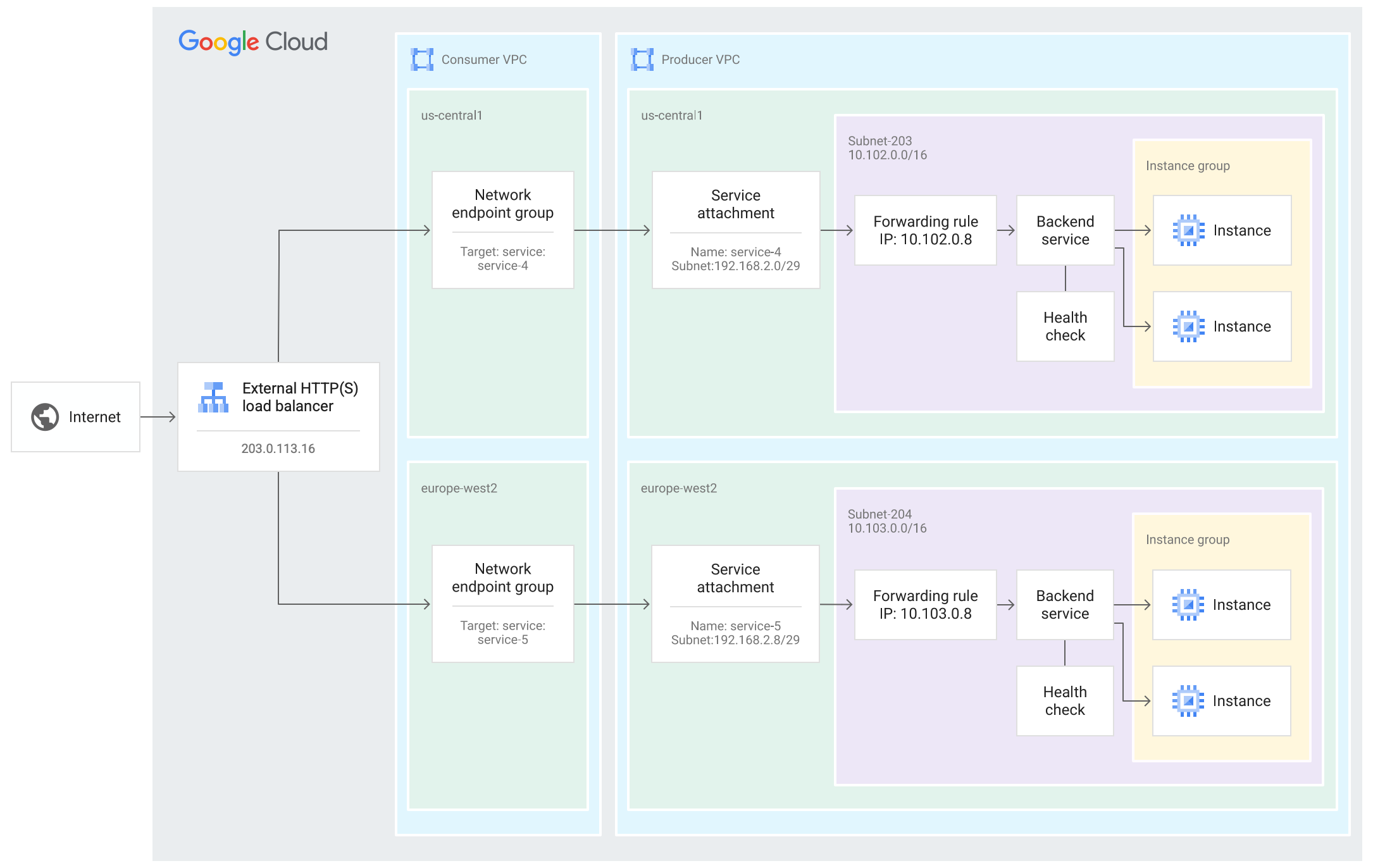](https://docs.cloud.google.com/static/vpc/images/private-service-connect-global-xlb-services.png)
A global external Application Load Balancer with multiple
Private Service Connect NEGs connects to a service that is
published in multiple regions. This multi-region deployment lets the
consumer load balancer fail over when an instance of the service becomes
unhealthy, routing traffic to a healthy instance of the service that
is in an alternate region (click to enlarge).
Automatic failover can be triggered in two ways:
- **Failover with outlier detection:** The load balancer's standard failover
mechanism, which is enabled by default in multi-region deployments. Traffic
is directed away from Private Service Connect NEGs that
receive a high rate of errors from the published service.
- **Enhanced failover with Composite Health:** Service
producers can configure Composite Health to
provide more detailed health signals for their services.
### Failover through outlier detection
When multiple Private Service Connect NEGs are configured in
a global backend service, [outlier detection](https://docs.cloud.google.com/load-balancing/docs/https/traffic-management-global.md.txt#traffic_policies)
is automatically enabled on the backend service.
When outlier detection identifies failures in responses sent by a published
service, such as `5xx` response codes, the consumer load balancer fails over,
temporarily redirecting traffic to a healthy instance of the service that is
in an alternate region.
You can replace the default outlier detection policy by applying your own
[outlier detection configuration to the backend service](https://docs.cloud.google.com/load-balancing/docs/https/setting-up-global-traffic-mgmt.md.txt#configure_outlier_detection),
or you can disable the feature by configuring a single
Private Service Connect NEG in the backend service and routing
100% of your traffic to this NEG.
### Enhanced failover through Composite Health
With Composite Health, a consumer load balancer can fail over
based on a direct health signal that is configured by the service producer.
The producer defines conditions that create a single composite health state for
each instance of the regional published service. The composite health state is
based on the health of the service's backends, such as VM instances or network
endpoints. For example, a producer can specify that their service is considered
healthy only when a certain percentage of its backend instances are healthy.
For supported load balancers in multi-region deployments,
no additional configuration is required from consumers to use health signals
from Composite Health.
You can [view logs](https://docs.cloud.google.com/vpc/docs/monitor-private-service-connect-connections.md.txt#logging-events-for-composite-health)
that record health state transitions
(for example, from `HEALTHY` to `UNHEALTHY`) for published services that
connect to your Private Service Connect backends.
For information about how service producers can configure
Composite Health, see
[About Composite Health](https://docs.cloud.google.com/vpc/docs/about-composite-health.md.txt).
## Pricing
For pricing information, see the following sections of the VPC
pricing page:
- [Using a Private Service Connect backend to access a published service](https://cloud.google.com/vpc/pricing#psc-loadbalancer-services).
- [Using a Private Service Connect backend to access Google APIs](https://cloud.google.com/vpc/pricing#psc-loadbalancer-apis).
## What's next
- [Create a Private Service Connect backend](https://docs.cloud.google.com/vpc/docs/access-apis-managed-services-private-service-connect-backends.md.txt)
- [Access regional Google APIs through backends](https://docs.cloud.google.com/vpc/docs/configure-private-service-connect-controls.md.txt)
- [Access global Google APIs through backends](https://docs.cloud.google.com/vpc/docs/access-global-google-apis-backends.md.txt)
- [Access published services through backends](https://docs.cloud.google.com/vpc/docs/configure-private-service-connect-services-controls.md.txt)