# Bring your own IP addresses
Bring your own IP addresses (BYOIP) lets you provision and use your own public
IP addresses for Google Cloud resources.
After the IP addresses are imported,
Google Cloud manages them in the same way as Google-provided IP addresses,
with these exceptions:
- The IP addresses are available only to the customer who brought them.
- There are no charges for idle or in-use IP addresses.
> [!WARNING]
> **Warning:** Google does not support overlapping BYOIP route announcements. For example, importing `203.0.112.0/23` is not supported if `203.0.112.0/23` or a subset of this prefix, such as `203.0.112.0/24`, is advertised outside Google. If Google and another network advertise the same route with matching or mismatched prefix lengths, you might experience unexpected routing and packet loss.
## Overview
To bring your own IP addresses to Google, you complete the following steps:
- Create a public advertised prefix (PAP), a resource that represents the IP prefix that you are bringing to Google Cloud.
- From the public advertised prefix, create one or more public delegated prefixes (PDPs). Creating a public delegated prefix assigns the associated IP addresses to a specific project and scope (a single region or global).
- [Use the IP addresses with supported Google resources](https://docs.cloud.google.com/vpc/docs/bring-your-own-ip.md.txt#ip-addresses). The way that you can use the addresses depends on the IP version, access type, and mode of the public delegated prefix.
The specific provisioning steps and timelines vary depending on the access type
that you choose.
## BYOIP provisioning
The provisioning process for a public advertised prefix depends on whether
the prefix is intended for external use (the default) or for internal use
(IPv6 only).
For all IPv4 prefixes and external access IPv6 prefixes,
the verification of ownership is done using ROA and reverse DNS validation.
After the verification is complete, Google
configures the announcement of a prefix to the internet, but the prefix
isn't advertised until it is provisioned through a process that takes
approximately two to four weeks.
While you wait for an external access public advertised prefix to provision, you
split the prefix into public delegated prefixes (PDPs). You can then either
divide the public delegated prefix further or use it to create assignable IP
addresses.
For internal access IPv6 prefixes, provisioning time doesn't apply.
Internal access prefixes are not announced to the internet and are ready for use
immediately after passing ROA validation.
[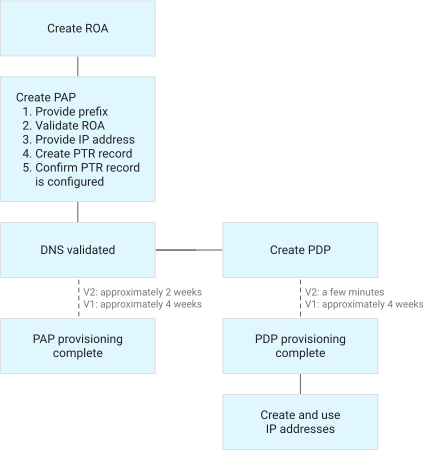](https://docs.cloud.google.com/static/vpc/images/byoip-workflow.svg) **Figure 1.** Workflow for creating external access public advertised
prefixes and public delegated prefixes.
## Public advertised prefixes
A public advertised prefix (PAP) is a resource in Compute Engine that
represents an IP prefix that you bring to Google Cloud. This lets you
allocate IP addresses from your own prefix to Google Cloud resources. A
public advertised prefix is a single unit of route advertisement.
When you create a v2 public advertised prefix, you can specify its
[network tier](https://docs.cloud.google.com/vpc/docs/bring-your-own-ip.md.txt#service-tiers) (for IPv4) or [access type](https://docs.cloud.google.com/vpc/docs/bring-your-own-ip.md.txt#access-type)
(for IPv6). These properties
determine how Google advertises the prefix and its reachability from the
internet or within Google Cloud.
A public advertised prefix can be used to either create global public delegated
prefixes or regional public delegated prefixes, but not both.
If your public advertised prefix was created before July 10, 2023, see [Behavior
changes for BYOIP](https://docs.cloud.google.com/vpc/docs/bring-your-own-ip#behavior-change).
## Public delegated prefixes
Before you can use the IP addresses in a public advertised prefix, you must
delegate the IP addresses to a single project and scope (a specific region or
global). To do this, you create a public delegated prefix (PDP).
Creation of global public delegated prefixes is controlled by an allowlist. For
more information, see [Global public delegated prefixes](https://docs.cloud.google.com/vpc/docs/bring-your-own-ip.md.txt#global-pdp).
You can break up a single public delegated prefix into multiple blocks. These
smaller blocks are public delegated prefixes, but they are
also referred to as sub-prefixes. A sub-prefix must have the same scope as its
parent block, and sub-prefixes that share a parent can be non-contiguous.
For IPv6, creating sub-prefixes is a required step. The first, top-level IPv6
public delegated prefix must be in delegation mode. You must then divide the
delegation mode prefix into sub-prefixes that aren't in delegation mode before
you can use the IP addresses.
### Global public delegated prefixes
To create a global public delegated prefix, you must use a public advertised
prefix that is used to create only global public delegated prefixes. You must
create the public delegated prefix in a project that has been given access to
create global prefixes.
To request access, [file a support case](https://cloud.google.com/support-hub) to request that your
project be added to the allowlist for global public delegated prefix creation.
## Network Service Tiers
When you create a v2 IPv4 public advertised prefix, you can specify a
[network tier](https://docs.cloud.google.com/network-tiers/docs/overview.md.txt) for the prefix. Public delegated
prefixes and sub-prefixes inherit the network tier of their parent public
advertised prefix.
The following network tiers are available for v2 IPv4 prefixes:
- **Premium Tier**: The default network tier for BYOIP, which is optimized for performance. Traffic enters Google's network at a point of presence that's as close as possible to the source of the traffic and travels over Google's global backbone network.
- **Standard Tier** ([Preview](https://cloud.google.com/products#product-launch-stages)): Optimized for cost. Traffic travels over the public internet and enters Google's network at a point of presence near the traffic's destination.
For information about how network tier affects the BGP announcement and
reachability of BYOIP prefxies, see
[Manage BGP announcement (v2)](https://docs.cloud.google.com/vpc/docs/manage-bgp-announcement.md.txt).
## IPv6 access type
IPv6 BYOIP prefixes use global unicast addresses (GUAs). An IPv6 prefix's
*access type* determines if the addresses are advertised to the
internet:
- External access prefixes (the default) are advertised to the internet.
- Internal access prefixes aren't advertised.
You can set access type when you create an IPv6 public advertised prefix.
IPv6 public delegated prefixes and sub-prefixes inherit their access type from
their parent prefix, and it affects
[how you can use a prefix's IP addresses](https://docs.cloud.google.com/vpc/docs/bring-your-own-ip.md.txt#ip-addresses).
IPv4 public delegated prefixes don't have an access type and must be
advertised to the internet.
## IP addresses
The IP version, access type, and
[mode](https://docs.cloud.google.com/vpc/docs/create-ipv6-sub-prefixes.md.txt#modes) of a public delegated prefix
determine how you can use the associated BYOIP addresses.
- **IPv4 addresses** : You can use a public delegated prefix or sub-prefix to [create IPv4 addresses](https://docs.cloud.google.com/vpc/docs/create-sub-prefixes-ip-addresses.md.txt#create-addresses) for use with [supported resources](https://docs.cloud.google.com/vpc/docs/bring-your-own-ip.md.txt#support).
- **IPv6 addresses**: You must divide a public delegated prefix into a
sub-prefix before you can use IPv6 addresses. You can use the sub-prefix's
IP addresses in the following ways:
- **For sub-prefixes created from an external access PAP** : The IP address range is advertised to the internet. When you create the sub-prefix, you must choose one of the following mutually exclusive modes:
- Use the addresses of the sub-prefix to [create forwarding rules for regional external passthrough Network Load Balancers](https://docs.cloud.google.com/vpc/docs/create-ipv6-sub-prefixes.md.txt#create-subprefix-use) and external protocol forwarding.
- Use the sub-prefix to [assign external GUA ranges to subnets](https://docs.cloud.google.com/vpc/docs/create-ipv6-sub-prefixes.md.txt#instance-only-subnet). BYOIP-provided external IPv6 subnet ranges can only be used by virtual machine (VM) instances.
- **For sub-prefixes created from an internal access PAP** : The IP
addresses are configured as privately used GUAs that aren't advertised
to the internet. You can use the sub-prefix to
[assign internal GUA ranges to subnets](https://docs.cloud.google.com/vpc/docs/create-ipv6-sub-prefixes.md.txt#instance-only-subnet).
For information about using addresses in an internal IPv6 range,
see [Internal IPv6 specifications](https://docs.cloud.google.com/vpc/docs/subnets.md.txt#internal-ipv6)
When you create IP addresses
from a public delegated prefix or sub-prefix, the IP addresses can be used only
within the project and scope that they are allocated to. All IP addresses in the
public delegated prefix or sub-prefix are made available; there is no reserved
network address or broadcast address. For example, if you use the entire range
of a `/28` public delegated prefix or sub-prefix to create IP addresses, 16 IP
address resources are created.
Anyone who has the appropriate [IAM permissions](https://docs.cloud.google.com/compute/docs/access/iam.md.txt) in
the project can use the IP addresses:
- `compute.addresses.*` for regional IP addresses
- `compute.globalAddresses.*` for global IP addresses
## Enhanced IP address allocation
BYOIP v2 IPv4 public delegated prefixes and sub-prefixes created after
December 13, 2025 use enhanced IP address allocation. Enhanced IP address
allocation lets you
[create individual IP addresses](https://docs.cloud.google.com/vpc/docs/create-sub-prefixes-ip-addresses.md.txt#create-part)
from a public delegated prefix or sub-prefix. You can
[check if a public delegated prefix uses enhanced IP address allocation](https://docs.cloud.google.com/vpc/docs/create-pdp.md.txt#check-allocation).
## Bring your own IP configurations
The following tables summarize the available bring your own IP configurations.
> [!NOTE]
> **Note:** Public advertised prefixes created before July 2023 can contain both regional *and* global public delegated prefixes. Any public advertised prefixes created after this date can be used to create either global *or* regional public delegated prefixes.
| Configuration | Regional (v2) | Regional internal (v2) | Regional (v1) | Global (v1) |
|---|---|---|---|---|
| Availability | Recommended regional configuration | Used for internal IPv6 addresses | Not recommended for new regional configurations | Must [request adding your project to an allowlist](https://docs.cloud.google.com/vpc/docs/bring-your-own-ip.md.txt#global-pdp) |
| Public advertised prefix provisioning time | Approximately 2 weeks | Immediate | Approximately 4 weeks | Approximately 4 weeks |
| Public delegated prefix provisioning time | A few minutes | Immediate | 4 weeks Can overlap with public advertised prefix provisioning time | 4 weeks Can overlap with public advertised prefix provisioning time |
| Sub-prefix provisioning time | A few minutes | Immediate | A few minutes | A few minutes |
| BGP announcement | The public advertised prefix is not automatically announced when it is provisioned. You decide when to [announce or withdraw](https://docs.cloud.google.com/vpc/docs/manage-bgp-announcement.md.txt) advertisement. | Not announced | The public advertised prefix is automatically announced after provisioning completes. | The public advertised prefix is automatically announced after provisioning completes. |
| Access type | External | Internal | External | External |
| [Network Service Tiers](https://docs.cloud.google.com/network-tiers/docs/overview.md.txt) | - Premium Tier - Standard Tier ([Preview](https://cloud.google.com/products#product-launch-stages)) | Premium Tier | Premium Tier | Premium Tier |
| IP stack | - Premium Tier: IPv4, IPv6 (only for external passthrough Network Load Balancers and subnets that exclusively host VMs) - Standard Tier: IPv4 | IPv6 | IPv4 | IPv4 |
### IPv4 prefixes
The following table summarizes the CIDR range requirements for IPv4 prefixes.
| Configuration | Regional (v2): Premium Tier | Regional (v2): Standard Tier ([Preview](https://cloud.google.com/products#product-launch-stages)) | Regional (v1) | Global (v1) |
|---|---|---|---|---|
| Public advertised prefix | `/16` to `/24` | `/16` to `/23` | `/16` to `/24` | `/16` to `/24` |
| Public delegated prefix (top-level, not sub-prefix) | `/16` to `/28` Can be the same size or smaller (have a longer prefix length) than the public advertised prefix | `/17` to `/24` Must be smaller (have a longer prefix length) than the public advertised prefix | `/17` to `/28` Must be smaller (have a longer prefix length) than the public advertised prefix | `/17` to `/28` Must be smaller (have a longer prefix length) than the public advertised prefix |
| Sub-prefix | Can be the same size or smaller (have a longer prefix length) than the parent public delegated prefix Minimum size (maximum prefix length) is `/28` | Can be the same size or smaller (have a longer prefix length) than the parent public delegated prefix Minimum size (maximum prefix length) is `/28` | Can be the same size or smaller (have a longer prefix length) than the parent public delegated prefix Minimum size (maximum prefix length) is `/28` | Can be the same size or smaller (have a longer prefix length) than the parent public delegated prefix Minimum size (maximum prefix length) is `/28` |
### IPv6 prefixes
The following table summarizes the CIDR range requirements for IPv6 prefixes.
| Sub-prefix mode or setting | Prefix length specifications | IPv6 access type |
|---|---|---|
| **Sub-prefix for delegation** `(--mode=DELEGATION)` | Can be the same size or smaller (have a longer prefix length) than the parent public delegated prefix The difference between the prefix length of a sub-prefix and its parent public delegated prefix can't be greater than 24 Valid lengths: `/32`, `/40`, `/48`, `/56` | - `External` - `Internal` |
| **Sub-prefix for external forwarding rules** `(--mode=EXTERNAL_IPV6_FORWARDING_RULE_CREATION)` | Can be the same size or smaller (have a longer prefix length) than the parent public delegated prefix The difference between the prefix length of a sub-prefix and its parent public delegated prefix can't be greater than 24 Valid lengths: `/32`, `/40`, `/48`, `/56`, `/64`, or `/72` | - `External` |
| **Setting: External forwarding rule allocatable prefix length** Determines the prefix length for IPv6 address ranges that are used by external forwarding rules. Specified when creating an IPv6 sub-prefix for external forwarding rules. | Must be smaller than the associated sub-prefix---the difference between the allocatable prefix length and the sub-prefix length must be at least 8, and can't be greater than 32 Valid lengths: `/48`, `/56`, `/64`, `/72`, `/80`, `/88`, `/96` Default lengths: - If the parent sub-prefix's length is `/64` or `/72`, the default allocatable prefix length is `/96` - Otherwise, the default allocatable prefix length is `/64` | |
| **Sub-prefix for external subnet ranges** `(--mode=EXTERNAL_IPV6_SUBNETWORK_CREATION)` | Can be the same size or smaller (have a longer prefix length) than the parent public delegated prefix The difference between the prefix length of a sub-prefix and its parent public delegated prefix can't be greater than 24 Valid lengths: `/32`, `/40`, `/48`, `/56` | - `External` |
| **Sub-prefix for internal subnet ranges** `(--mode=INTERNAL_IPV6_SUBNETWORK_CREATION)` | Can be the same size or smaller (have a longer prefix length) than the parent public delegated prefix The difference between the prefix length of a sub-prefix and its parent public delegated prefix can't be greater than 24 Valid lengths: `/32`, `/40`, `/48`, `/56` | - `Internal` |
## Limitations
- Provisioning time takes multiple weeks and cannot be accelerated. For more
information about provisioning time, see [Bring your own IP
configurations](https://docs.cloud.google.com/vpc/docs/bring-your-own-ip#comparison).
- A public delegated prefix can be sub-delegated up to three times from a
public advertised prefix. For more information, see [Create
sub-prefixes](https://docs.cloud.google.com/vpc/docs/create-sub-prefixes-ip-addresses#create-subprefix).
- When you create IPv4 addresses from a public delegated prefix, the group of
addresses can have length `/17` to `/28`. You can't create a smaller group of
addresses, for example, a single `/32` address.
- If you use [privately used public IP address
ranges](https://docs.cloud.google.com/vpc/docs/subnets#valid-ranges) for any subnets in your
VPC networks, your imported BYOIP prefixes must not overlap
with these IP address ranges. Don't use any part of an imported BYOIP prefix
as a primary or secondary IPv4 subnet range.
- You can't create global IPv6 BYOIP addresses. IPv6 BYOIP prefixes only
support regional addresses.
- Not all resources support using BYOIP addresses. For more information,
see [Support for BYOIP addresses](https://docs.cloud.google.com/vpc/docs/bring-your-own-ip.md.txt#support).
- You can't move BYOIP addresses between projects.
- The [public delegated prefixes per public advertised prefix limit](https://docs.cloud.google.com/vpc/docs/quota.md.txt#ip_address_limits)
restricts the number of public delegated prefixes that you can create
from a single public advertised prefix. To avoid reaching this limit,
create a small number of large top-level public delegated prefixes, and then
sub-delegate those prefixes into smaller sub-prefixes.
## Support for BYOIP addresses
IPv4 BYOIP addresses can be used with most resources that support static
external IP addresses. However, there are some exceptions:
- Cloud VPN supports using an IPv4 BYOIP address as the peer IP address of
a Classic VPN gateway tunnel. However, you cannot use a BYOIP
address as the peer IP address of an HA VPN gateway tunnel.
- Cloud VPN does not support using an IPv4 BYOIP address as the external IP
address of Classic VPN or HA VPN gateway tunnels.
- You can create IPv4 BYOIP addresses in Shared VPC host projects and
use the host project IP addresses in the service projects. However,
Shared VPC does not support creating BYOIP addresses in service
projects.
- You can use IPv4 BYOIP addresses to create external forwarding rules used
with [GKE ingress for
external Application Load Balancers](https://docs.cloud.google.com/kubernetes-engine/docs/concepts/ingress). However,
Google Kubernetes Engine nodes and Pods don't support BYOIP addresses.
- Stateful managed instance groups (MIGs) support using IPv4 BYOIP addresses
for [configuring static IP addresses on VM creation in a
MIG](https://docs.cloud.google.com/compute/docs/instance-groups/configuring-stateful-ip-addresses-in-migs#configuring_static_ip_addresses_on_vm_creation_in_a_mig).
However, MIGs that automatically allocate IP addresses to VMs don't support
BYOIP.
You can use IPv6 BYOIP addresses in the following ways, depending on the
sub-prefix:
- For external access sub-prefixes, you must choose one of the following mutually exclusive modes:
- Forwarding rules for regional external passthrough Network Load Balancers or external protocol forwarding.
- External IP address ranges for subnets. BYOIP-provided external IPv6 subnet ranges can only be used by VM instances.
- For internal access sub-prefixes, you can use the sub-prefix to assign internal GUA ranges to subnets.
## Public IP Admin role
You can designate an administrator for your BYOIP prefixes and addresses by
assigning them the [Compute Public IP Admin
role](https://docs.cloud.google.com/compute/docs/access/iam#compute.publicIpAdmin)
(`roles/compute.publicIpAdmin`). This role lets them manage publicly routable
IP addresses in your organization.
The Public IP Admin can do the following tasks:
- Configure public advertised prefixes in a project they own.
- Configure the public advertised prefixes into public delegated prefixes in a project they own.
- Delegate sub-prefixes from the public delegated prefixes to specific projects in the organization.
- Revoke sub-prefixes that were previously delegated from the public delegated prefixes to a specific project in the organization.
- Delete public delegated prefixes.
## Open ports on BYOIP addresses
Running a port scan on a BYOIP address might return unexpected results. Global
BYOIP addresses are implemented by an infrastructure service called the
[Google Front End (GFE)](https://docs.cloud.google.com/docs/security/infrastructure/design.md.txt#google_front_end_service).
A BYOIP address, even if it is unused, might appear to have open ports because
those ports are used by other Google services that also share the GFE. Traffic
to these ports is dropped and not logged.
Only supported load balancers can use global IP addresses. For more
information about open ports on load balancers, see the following:
- [Open ports on external Application Load Balancers](https://docs.cloud.google.com/load-balancing/docs/https.md.txt#open_ports)
- [Open ports on external proxy Network Load Balancers](https://docs.cloud.google.com/load-balancing/docs/tcp.md.txt#open_ports)
## Quotas and limits
There are quotas and limits for public delegated prefixes and public
advertised prefixes. For more information, see [VPC quotas
and limits](https://docs.cloud.google.com/vpc/docs/quota).
## What's next
- [Planning your bring your own IP deployment](https://docs.cloud.google.com/vpc/docs/byoip-planning.md.txt)
- [Create a public advertised prefix](https://docs.cloud.google.com/vpc/docs/create-pap.md.txt)