# About published services
This document provides an overview of using
[Private Service Connect](https://docs.cloud.google.com/vpc/docs/private-service-connect.md.txt) to make a
service available to service consumers.
As a service producer, you can use Private Service Connect to publish
services by using internal IP addresses in your VPC network. Your
published services are accessible to service consumers by using internal IP
addresses in their VPC networks.
To make a service available to consumers, you create one or more dedicated
[subnets](https://docs.cloud.google.com/vpc/docs/about-vpc-hosted-services.md.txt#psc-subnets). You then create a [service
attachment](https://docs.cloud.google.com/vpc/docs/about-vpc-hosted-services#service-attachments) that refers to those subnets. The service
attachment can have different [connection preferences](https://docs.cloud.google.com/vpc/docs/about-controlling-access-published-services.md.txt#connection-preference).
## Service consumer types
There are two types of consumers that can connect to a
Private Service Connect service:
- [Private Service Connect endpoints](https://docs.cloud.google.com/vpc/docs/about-accessing-vpc-hosted-services-endpoints.md.txt)
- [Private Service Connect backends](https://docs.cloud.google.com/vpc/docs/private-service-connect-backends.md.txt)
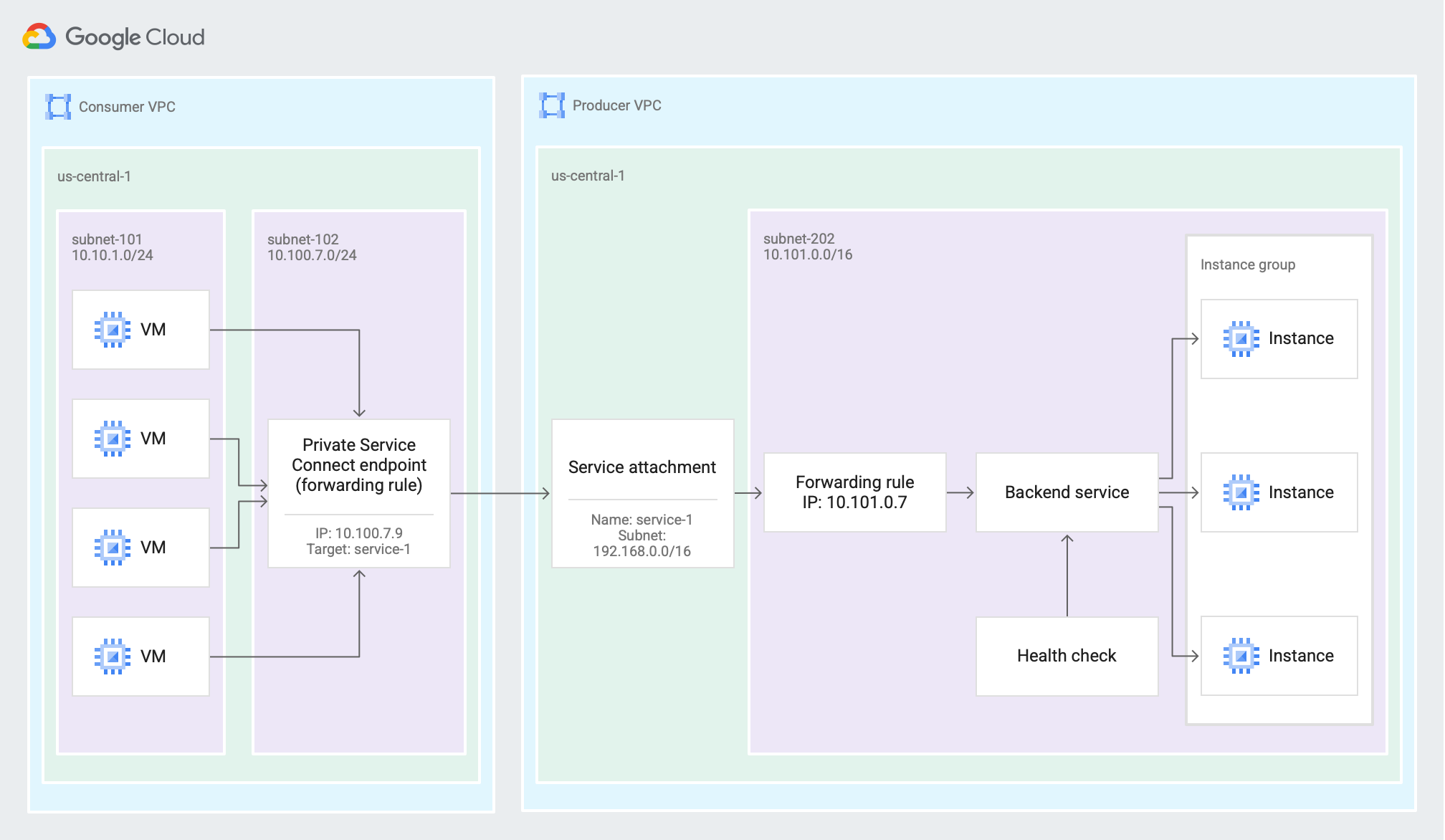
Endpoints are based on a forwarding rule.
[](https://docs.cloud.google.com/static/vpc/images/private-service-connect-services.png)
An endpoint lets service consumers send traffic from the consumer's
VPC network to services in the service producer's
VPC network (click to enlarge).
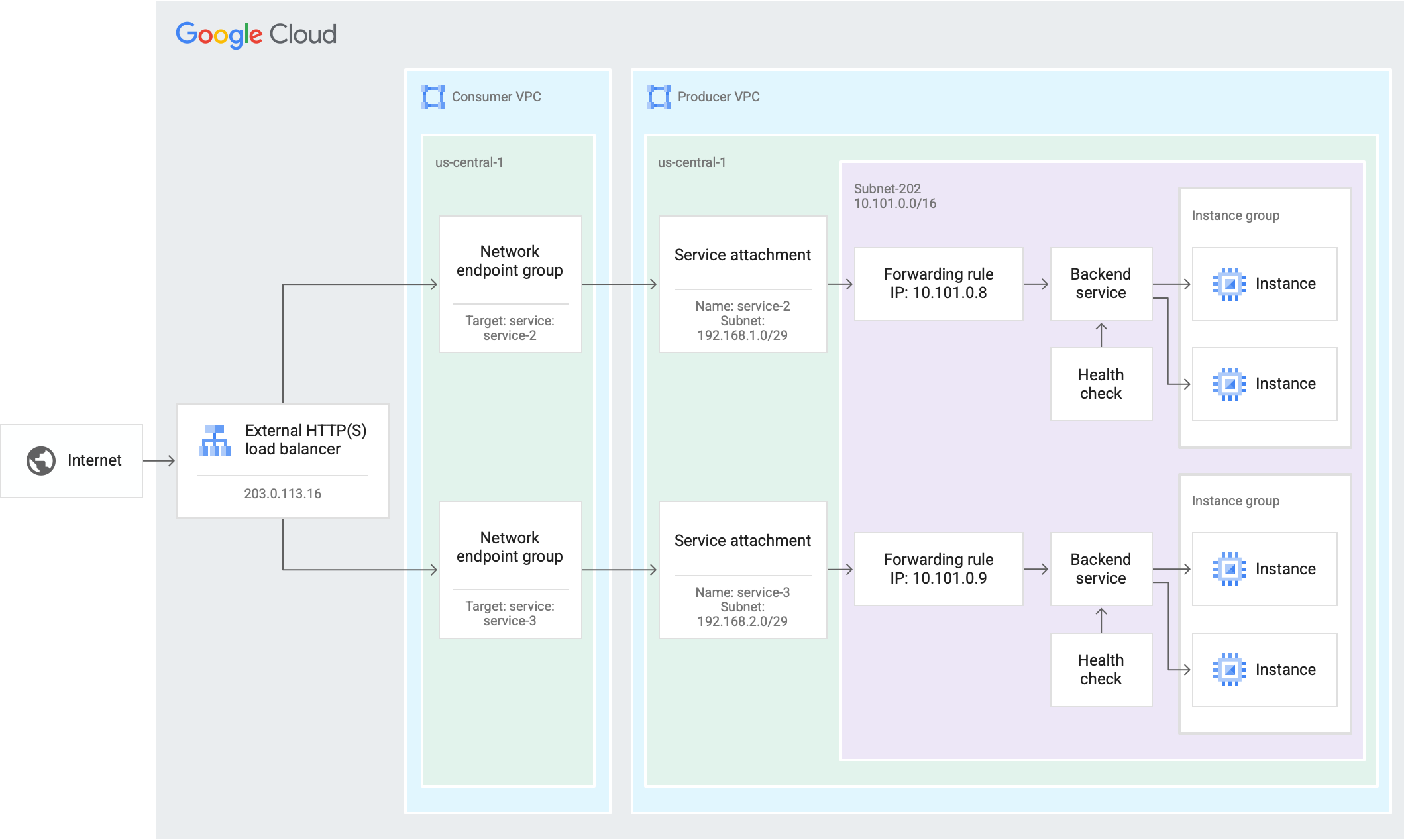
Backends are based on a load balancer.
[](https://docs.cloud.google.com/static/vpc/images/private-service-connect-xlb-services.png)
A backend that uses a global external Application Load Balancer lets service consumers with
internet access send traffic to services in the service producer's
VPC network (click to enlarge).
## NAT subnets
Private Service Connect service attachments are configured with
one or more NAT subnets (also referred to as
Private Service Connect subnets). Packets from the consumer
VPC network are translated using source NAT (SNAT) so that their
original source IP addresses are converted to source IP addresses from the NAT
subnet in the producer's VPC network.
Service attachments can have multiple NAT subnets. Additional [NAT subnets can
be added to the service attachment](https://docs.cloud.google.com/vpc/docs/manage-private-service-connect-services#subnets)
at any time without interrupting traffic.
While a service attachment can have multiple NAT subnets configured, a NAT
subnet cannot be used in more than one service attachment.
Private Service Connect NAT subnets cannot be used for resources
such as virtual machine (VM) instances or forwarding rules. The subnets are used
only to provide IP addresses for SNAT of incoming consumer connections.
### NAT subnet sizing
The subnet size determines how many consumers can connect to your
service---if all of the IP addresses in the NAT subnet are consumed, any
additional Private Service Connect connections fail. Consider the
following:
- By default, one IP address is consumed from the NAT subnet for each
endpoint or backend that is connected to the service attachment.
You can configure a service attachment to assign two NAT IP
addresses from the NAT subnet per endpoint or backend.
The number of TCP or UDP connections, clients, or consumer
VPC networks does not affect the consumption of IP
addresses from the NAT subnet.
- If [connection propagation](https://docs.cloud.google.com/vpc/docs/about-propagated-connections.md.txt)
is used by consumers, an additional one or two IP addresses (matching the
service attachment's configured NAT IP addresses per endpoint) are consumed
for each VPC spoke that connections are propagated to, for
each endpoint.
You can control how many propagated connections are created by configuring
the [propagated connection limit](https://docs.cloud.google.com/vpc/docs/about-controlling-access-published-services.md.txt#propagated-connection-limit).
- When you estimate how many IP addresses you need for endpoints and backends,
account for any [multi-tenant
services](https://docs.cloud.google.com/vpc/docs/private-service-connect-deployments#multi-tenant-services)
or consumers that use [multi-point access for
Private Service Connect](https://docs.cloud.google.com/vpc/docs/private-service-connect-deployments#multi-point).
> [!NOTE]
> **Note:** There are four [unusable IP
> addresses](https://docs.cloud.google.com/vpc/docs/subnets#unusable-ip-addresses-in-every-subnet) in a NAT subnet. For example, a `/29` NAT subnet has four usable IP addresses and a `/24` NAT subnet has 252 usable IP addresses.
### NAT subnet monitoring
To help ensure that Private Service Connect
connections don't fail due to unavailable IP addresses in a NAT subnet,
we recommend the following:
- Monitor the `private_service_connect/producer/used_nat_ip_addresses` [service attachment metric](https://docs.cloud.google.com/vpc/docs/monitor-private-service-connect-published-services#service-attachment-metrics). Ensure that the number of used NAT IP addresses does not exceed the capacity of a service attachment's NAT subnets.
- Monitor the [connection status](https://docs.cloud.google.com/vpc/docs/private-service-connect-security.md.txt#statuses) of service attachment connections. If a connection has a status of **Needs attention**, there might not be any more IP addresses available in the attachment's NAT subnets.
- For multi-tenant services, you can use [Connection limits](https://docs.cloud.google.com/vpc/docs/about-controlling-access-published-services.md.txt#connection-limits) to help ensure that a single consumer doesn't exhaust the capacity of a service attachment's NAT subnets.
If needed, [NAT subnets can be added to the service attachment](https://docs.cloud.google.com/vpc/docs/manage-private-service-connect-services.md.txt#subnets)
at any time without interrupting traffic.
### NAT specifications
Consider the following characteristics of Private Service Connect
NAT when you design the service that you are publishing:
- The UDP Mapping Idle Timeout is 30 seconds and cannot be configured.
- The TCP Established Connection Idle Timeout is 20 minutes and cannot be
configured.
To avoid issues with client connections timing out, do one of the following:
- Ensure that all connections live less than 20 minutes.
- Ensure that some traffic is sent more often than once every 20 minutes.
You can use a heartbeat or keepalive in your application, or TCP
keepalives. For example, you can configure a keepalive in the [target
proxy](https://docs.cloud.google.com/load-balancing/docs/target-proxies) of a
Regional internal Application Load Balancer or a Regional internal proxy Network Load Balancer.
- The TCP Transitory Connection Idle Timeout is 30 seconds and cannot be
configured.
- There is a 65-second delay before any 5-tuple (NAT subnet source IP address
and source port plus destination protocol, IP address, and destination port)
can be reused.
- SNAT for Private Service Connect does not support IP
fragments.
### Maximum connections
The maximum number of simultaneous connections that can be established
through a Private Service Connect endpoint or backend to a
published service is limited by the following factors:
- **Ephemeral source ports on the client** : The maximum number of simultaneous
connections a client VM can open to a given destination IP address and port,
such as a Private Service Connect endpoint or backend, is
limited by the number of ephemeral source ports and source IP addresses the
client might use. On Linux clients, the number of simultaneous connections
that can use the same source IP address, destination IP address, and
protocol is controlled by the `net.ipv4.ip_local_port_range` kernel
parameter. Excluding privileged ports, source ports `1024` through `65535`
are available, for a total of 64,512 simultaneous connections that use the
same source IP address, destination IP address, and protocol. Note that
simultaneous connections for TCP includes connections in the `TIME_WAIT`
state after an active close.
- **NAT IP addresses and source ports per endpoint or backend**:
The maximum number of simultaneous connections for a given destination
IP address, port, and protocol that can use a single
Private Service Connect endpoint or backend is limited by the
number of source ports available on the NAT IP addresses that are assigned
to the endpoint or backend. Excluding privileged ports, each NAT IP address
provides 64,512 source ports.
- By default, a service attachment assigns one NAT IP address per accepted endpoint or backend, limiting each endpoint or backend to 64,512 simultaneous connections.
- For IPv4 connections, you can provide more source ports by
[configuring the service attachment to assign two NAT IP addresses per endpoint or backend](https://docs.cloud.google.com/vpc/docs/manage-private-service-connect-services.md.txt#update-nat-ips-per-endpoint).
This can increase the maximum number of
simultaneous IPv4 connections through a single endpoint or backend to a
service, provided that the maximum isn't constrained by the
other limits described in this section.
The following table describes the potential maximum IPv4 connections
based on the service attachment's NAT IP configuration and the vCPU
count of the producer's backend VMs.
| NAT IP addresses per endpoint | Backend VM vCPUs | Maximum simultaneous IPv4 connections per endpoint |
|---|---|---|
| 1 (default) | Any | 64,512 |
| 2 | 1 to 7 | 65,535 |
| 2 | 8 to 15 | 98,302 |
| 2 | 16 or more | 131,070 |
- **Private Service Connect per-backend connection limit**:
Each producer backend (VM or Envoy proxy) can support a limited number of
simultaneous connections from all clients across all protocols.
The baseline limit is 65,535 connections.
This per-backend connection limit applies because
Private Service Connect uses NAT on the host system that runs
each producer backend.
For IPv4 connections to producer backend VMs, the limit can increase based
on the number of vCPUs of the VM. Even if a backend VM has enough vCPUs to
support a higher per-backend limit,
connections from a single endpoint or backend remain capped at 64,512 by
available NAT source ports, unless the service attachment is configured to
assign two NAT IP addresses per endpoint or backend.
For [services that use Envoy proxies](https://docs.cloud.google.com/load-balancing/docs/proxy-only-subnets.md.txt#envoy-lb),
the producer backend is the Envoy proxy, not the backend VMs that receive
traffic from the proxy. The per-backend connection limit doesn't typically
restrict the maximum connections for these services because
Google Cloud
[automatically adds more proxy instances](https://docs.cloud.google.com/load-balancing/docs/proxy-only-subnets.md.txt#proxy-subnet-size)
to help prevent individual instances from reaching this limit, as long
as the producer's proxy-only subnet has enough available IP addresses.
- **Number of backend VMs or Envoy proxies** : Google Cloud doesn't
enforce an overall limit on the number of simultaneous connections, from all
clients, processed by *all* producer VMs or Envoy proxies collectively.
However, the practical upper bound across the service is the product of the
number of producer VMs or Envoy proxies and the per-backend connection limit.
## Service attachments
A service producer exposes their service through a service attachment.
Service attachments have the following characteristics:
- To expose a service, a service producer creates a service attachment that refers to a target service. The target service can be one of the following:
- The forwarding rule of a load balancer
- A [Secure Web Proxy instance](https://docs.cloud.google.com/secure-web-proxy/docs/overview.md.txt)
- The service attachment URI has this format: `projects/SERVICE_PROJECT/regions/REGION/serviceAttachments/SERVICE_NAME`
- A service attachment can have only one target service.
- Multiple service attachments can share the same target service.
- You can [update a service attachment's target service without recreating the service attachment](https://docs.cloud.google.com/vpc/docs/about-vpc-hosted-services.md.txt#service-mutability).
- Service attachments let you control access to your published service, view connections, and configure connection limits. For more information, see [About controlling access to published services](https://docs.cloud.google.com/vpc/docs/about-controlling-access-published-services.md.txt).
### Connection statuses
Service attachments have connection statuses that describe the state of their
connections. For more information, see [Connection statuses](https://docs.cloud.google.com/vpc/docs/private-service-connect-security.md.txt#statuses).
## DNS configuration
For information about DNS configuration for published services and endpoints
that connect to published services, see
[DNS configuration for services](https://docs.cloud.google.com/vpc/docs/dns-vpc-hosted-services.md.txt).
## Multiple region configuration for failover
You can make a service available in multiple regions by creating the following
configurations.
**Producer configuration**:
- Deploy the service in each region. Each regional instance of the service must be configured on a regional load balancer that [supports access by a backend](https://docs.cloud.google.com/vpc/docs/about-vpc-hosted-services.md.txt#backend-support).
- [Create a
service attachment](https://docs.cloud.google.com/vpc/docs/configure-private-service-connect-producer#publish-service) to publish each regional instance of the service.
**Consumer configuration**:
- [Create a
Private Service Connect backend to access published services](https://docs.cloud.google.com/vpc/docs/configure-private-service-connect-services-controls). The backend must be based on a [load balancer that supports cross-region failover](https://docs.cloud.google.com/vpc/docs/about-vpc-hosted-services.md.txt#consumer-configuration-backends) and includes the following configuration:
- A [Private Service Connect NEG](https://docs.cloud.google.com/vpc/docs/configure-private-service-connect-services-controls.md.txt#create-neg) in each region that points to that region's service attachment
- A global backend service that contains the Private Service Connect NEG backends
This configuration supports automatic cross-region failover. With automatic
failover, if an instance of a published service in one region becomes unhealthy,
the consumer's load balancer stops routing traffic to that service and instead
routes traffic to a healthy published service in an alternate region.
[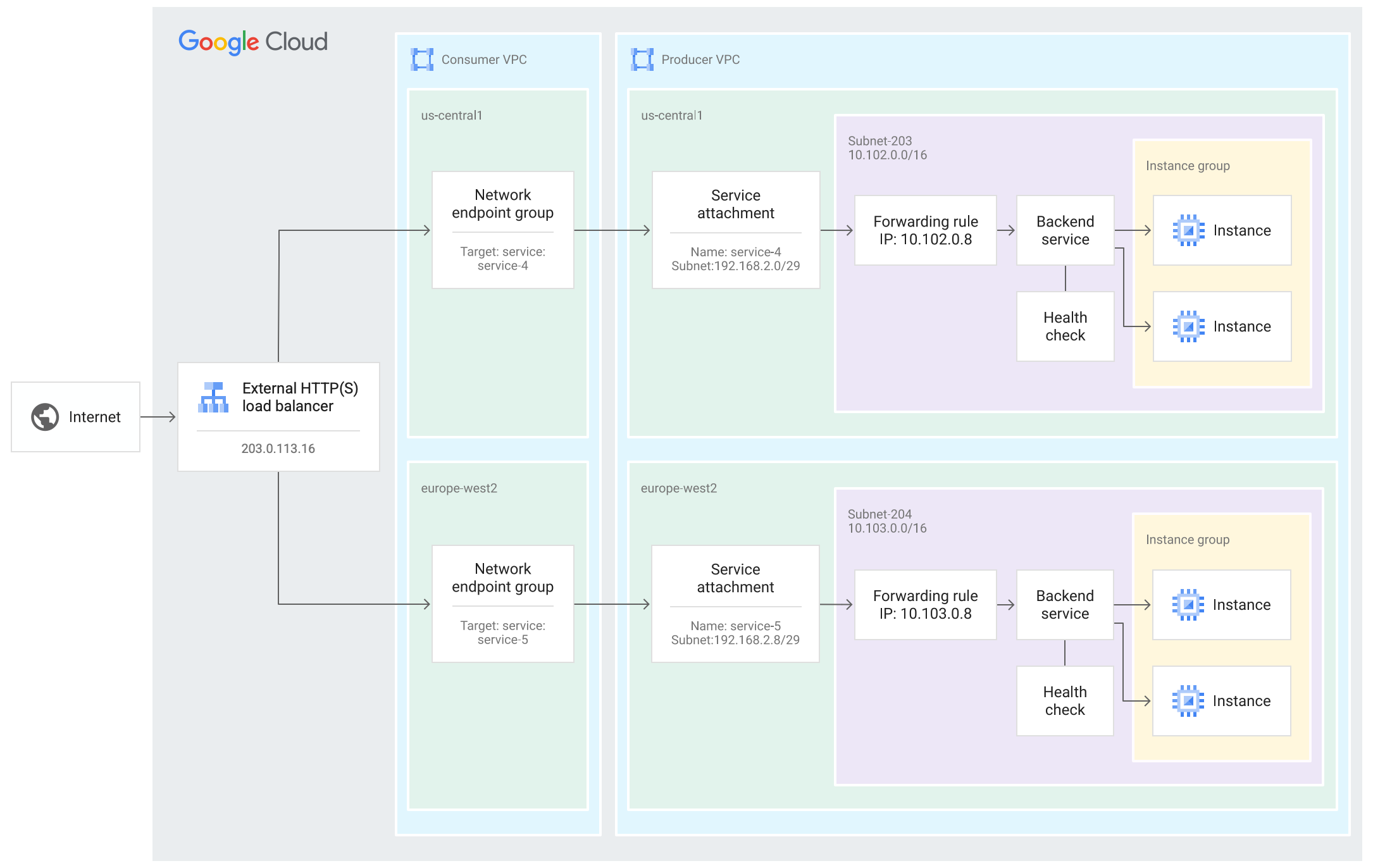](https://docs.cloud.google.com/static/vpc/images/private-service-connect-global-xlb-services.png)
Using a global external Application Load Balancer lets service consumers with internet
access send traffic to services in the service producer's
VPC network.
Because the service is deployed in multiple regions,
the consumer load balancer can route traffic to a healthy instance
of the published service
in an alternate region (click to enlarge).
For more information about cross-region failover, see the following:
- [About Composite Health](https://docs.cloud.google.com/vpc/docs/about-composite-health.md.txt)
- [Automatic cross-region failover for consumers](https://docs.cloud.google.com/vpc/docs/private-service-connect-backends.md.txt#failover)
## IP version translation
For Private Service Connect endpoints that connect to published services
(service attachments), the IP version of the consumer forwarding rule's IP address determines
the IP version of the endpoint and traffic that egresses the endpoint. The IP address can come
from an IPv4-only, IPv6-only, or dual-stack subnet. The IP version of the endpoint can be either
IPv4 or IPv6, but not both.
For published services, the IP version of the service attachment is determined by the IP
address of the associated forwarding rule or Secure Web Proxy instance. This IP address must be
compatible with the stack type of the service attachment's
[NAT subnet](https://docs.cloud.google.com/vpc/docs/about-vpc-hosted-services.md.txt#psc-subnets).
The NAT subnet can be an IPv4-only, IPv6-only, or dual-stack subnet.
If the NAT subnet is a dual-stack subnet, either the IPv4 or IPv6 address range is used, but not
both.
Private Service Connect doesn't support connecting an IPv4 endpoint
with an IPv6 service attachment. In this case, the endpoint creation fails with the following
error message:
`Private Service Connect forwarding rule with an IPv4 address
cannot target an IPv6 service attachment.`
The following combinations are possible for
[supported
configurations](https://docs.cloud.google.com/vpc/docs/private-service-connect-compatibility#endpoints-services):
- IPv4 endpoint to IPv4 service attachment
- IPv6 endpoint to IPv6 service attachment
-
IPv6 endpoint to IPv4 service attachment
In this configuration, Private Service Connect automatically translates
between the two IP versions.
For connections between Private Service Connect backends and
service attachments, the consumer and producer forwarding rules must both use
IPv4.
## Features and compatibility
In the following tables, a Yescheckmark indicates
that a feature is supported, and a Nono symbol
indicates that a feature isn't supported.
Depending on which producer load balancer is chosen, the producer service can
support access by endpoints, backends, or both.
### Support for endpoints
This section summarizes the configuration options that are available for
consumers and producers when using endpoints to access published services.
#### Consumer configuration
This table summarizes the supported configuration options and capabilities of
[endpoints that access published
services](https://docs.cloud.google.com/vpc/docs/about-accessing-vpc-hosted-services-endpoints) based on target producer type.
| Target producer | Consumer configuration (endpoint) |||||||
| Target producer | [Consumer global access](https://docs.cloud.google.com/vpc/docs/about-accessing-vpc-hosted-services-endpoints.md.txt#global-access) | [Hybrid access](https://docs.cloud.google.com/vpc/docs/configure-private-service-connect-services.md.txt#on-premises) | [Automatic DNS configuration](https://docs.cloud.google.com/vpc/docs/dns-vpc-hosted-services.md.txt#auto-dns-consumer) (IPv4-only) | [VPC Network Peering access](https://docs.cloud.google.com/vpc/docs/vpc-peering.md.txt) | [NCC connection propagation](https://docs.cloud.google.com/vpc/docs/about-propagated-connections.md.txt) (IPv4 only) | [Supported target services for IPv4 endpoints](https://docs.cloud.google.com/vpc/docs/about-vpc-hosted-services.md.txt#ip-version-translation) | [Supported target services for IPv6 endpoints](https://docs.cloud.google.com/vpc/docs/about-vpc-hosted-services.md.txt#ip-version-translation) |
|---|---|---|---|---|---|---|---|
| [Cross-region internal Application Load Balancer](https://docs.cloud.google.com/load-balancing/docs/l7-internal.md.txt) | Yes | Yes | Yes | No | Yes | - IPv4 services | - IPv4 services |
| [Internal passthrough Network Load Balancer](https://docs.cloud.google.com/load-balancing/docs/internal.md.txt) | YesOnly if [global access is enabled](https://docs.cloud.google.com/load-balancing/docs/internal/setting-up-internal.md.txt#ilb-global-access) on the load balancer ([known issue](https://docs.cloud.google.com/vpc/docs/configure-private-service-connect-services.md.txt#global-access)) | Yes | Yes | No | Yes | - IPv4 services | - IPv4 services - IPv6 services |
| [Internal protocol forwarding (target instance)](https://docs.cloud.google.com/load-balancing/docs/protocol-forwarding.md.txt) | YesOnly if [global access is enabled](https://docs.cloud.google.com/sdk/gcloud/reference/compute/forwarding-rules/update.md.txt#--allow-global-access) on the producer forwarding rule ([known issue](https://docs.cloud.google.com/vpc/docs/configure-private-service-connect-services.md.txt#global-access)) | Yes | Yes | No | Yes | - IPv4 services | - IPv4 services - IPv6 services |
| [Port mapping services](https://docs.cloud.google.com/vpc/docs/about-private-service-connect-port-mapping.md.txt) | YesOnly if [global access is enabled](https://docs.cloud.google.com/sdk/gcloud/reference/compute/forwarding-rules/update.md.txt#--allow-global-access) on the producer forwarding rule | Yes | Yes | No | Yes | - IPv4 services | - IPv4 services - IPv6 services |
| [Regional internal Application Load Balancer](https://docs.cloud.google.com/load-balancing/docs/l7-internal.md.txt) | YesOnly if [global access is enabled](https://docs.cloud.google.com/load-balancing/docs/l7-internal/setting-up-l7-internal.md.txt#global-access) on the load balancer before the service attachment is created | Yes | Yes | No | Yes | - IPv4 services | - IPv4 services |
| [Regional internal proxy Network Load Balancer](https://docs.cloud.google.com/load-balancing/docs/tcp/internal-proxy.md.txt) | YesOnly if [global access is enabled](https://docs.cloud.google.com/load-balancing/docs/tcp/set-up-int-tcp-proxy-migs.md.txt#global-access) on the load balancer before the service attachment is created | Yes | Yes | No | Yes | - IPv4 services | - IPv4 services |
| [Secure Web Proxy](https://docs.cloud.google.com/secure-web-proxy/docs/deploy-service-attachment.md.txt) | No | Yes | Yes | No | Yes | - IPv4 services | - IPv4 services |
#### Producer configuration
This table summarizes the supported configuration options and capabilities of
published services that are accessed by endpoints.
| Producer type | Producer configuration (published service) ||||
| Producer type | [Supported producer backends](https://docs.cloud.google.com/load-balancing/docs/backend-service.md.txt#backends) | [PROXY protocol](https://docs.cloud.google.com/vpc/docs/about-vpc-hosted-services.md.txt#proxy-protocol) (TCP traffic only) | [IP version](https://docs.cloud.google.com/vpc/docs/about-vpc-hosted-services.md.txt#ip-version-translation) |
|---|---|---|---|---|
| [Cross-region internal Application Load Balancer](https://docs.cloud.google.com/load-balancing/docs/l7-internal.md.txt) | - GCE_VM_IP_PORT zonal NEGs - Hybrid NEGs - Serverless NEGs - Private Service Connect NEGs - Instance groups | No | - IPv4 |
| [Internal passthrough Network Load Balancer](https://docs.cloud.google.com/load-balancing/docs/internal.md.txt) | - GCE_VM_IP zonal NEGs - Instance groups | Yes | - IPv4 - IPv6 |
| [Internal protocol forwarding (target instance)](https://docs.cloud.google.com/load-balancing/docs/protocol-forwarding.md.txt) | - Not applicable | Yes | - IPv4 - IPv6 |
| [Port mapping services](https://docs.cloud.google.com/vpc/docs/about-private-service-connect-port-mapping.md.txt) | - Port mapping NEG | Yes | - IPv4 - IPv6 |
| [Regional internal Application Load Balancer](https://docs.cloud.google.com/load-balancing/docs/l7-internal.md.txt) | - GCE_VM_IP_PORT zonal NEGs - Hybrid NEGs - Serverless NEGs - Private Service Connect NEGs - Instance groups - Regional internet NEGs | No | - IPv4 |
| [Regional internal proxy Network Load Balancer](https://docs.cloud.google.com/load-balancing/docs/tcp/internal-proxy.md.txt) | - GCE_VM_IP_PORT zonal NEGs - Hybrid NEGs - Private Service Connect NEGs - Instance groups | No | - IPv4 |
| [Secure Web Proxy](https://docs.cloud.google.com/secure-web-proxy/docs/deploy-service-attachment.md.txt) | - Not applicable | No | - IPv4 |
Different load balancers support different port configurations; some load
balancers support a single port, some support a range of ports, and some support
all ports. For more information, see [Port
specifications](https://docs.cloud.google.com/load-balancing/docs/forwarding-rule-concepts#port_specifications).
### Support for backends
A
[Private Service Connect backend for published services](https://docs.cloud.google.com/vpc/docs/private-service-connect-backends.md.txt)
requires two load balancers---a consumer load balancer and a producer load
balancer. This section summarizes the configuration options that are available for
consumers and producers when using backends to access published services.
#### Consumer configuration
This table describes the consumer load balancers that are supported by
Private Service Connect backends for published services, including
which backend service protocols can be used with each consumer load balancer.
The consumer load balancers can access published services that are hosted on
[supported producer load balancers](https://docs.cloud.google.com/vpc/docs/about-vpc-hosted-services.md.txt#producer-configuration-backends).
| Consumer load balancer | Protocols | IP version | [Cross-region failover](https://docs.cloud.google.com/vpc/docs/private-service-connect-backends.md.txt#failover) |
|---|---|---|---|
| [Cross-region internal Application Load Balancer](https://docs.cloud.google.com/load-balancing/docs/l7-internal.md.txt) | - HTTP - HTTPS - HTTP2 | IPv4 | Yes |
| [Cross-region internal proxy Network Load Balancer](https://docs.cloud.google.com/load-balancing/docs/tcp/internal-proxy.md.txt) | - TCP | IPv4 | Yes |
| [Global external Application Load Balancer](https://docs.cloud.google.com/load-balancing/docs/https.md.txt) **Note:** - Classic Application Load Balancer isn't supported. - Connecting to producer regional internal proxy Network Load Balancers isn't supported.
| - HTTP - HTTPS - HTTP2 | IPv4 | Yes |
| [Global external proxy Network Load Balancer](https://docs.cloud.google.com/load-balancing/docs/tcp.md.txt) To associate this load balancer with a Private Service Connect NEG, use the Google Cloud CLI or send an API request. **Note:** Classic proxy Network Load Balancer is not supported. | - TCP/SSL | IPv4 | Yes |
| [Regional external Application Load Balancer](https://docs.cloud.google.com/load-balancing/docs/https.md.txt) | - HTTP - HTTPS - HTTP2 | IPv4 | No |
| [Regional external proxy Network Load Balancer](https://docs.cloud.google.com/load-balancing/docs/tcp.md.txt) | - TCP | IPv4 | No |
| [Regional internal Application Load Balancer](https://docs.cloud.google.com/load-balancing/docs/l7-internal.md.txt) | - HTTP - HTTPS - HTTP2 | IPv4 | No |
| [Regional internal proxy Network Load Balancer](https://docs.cloud.google.com/load-balancing/docs/tcp/internal-proxy.md.txt) | - TCP | IPv4 | No |
#### Producer configuration
This table describes the configuration for producer load balancers
that are supported by Private Service Connect backends for
published services.
| Producer type | Producer configuration (published service) ||||||
| Producer type | [Supported producer backends](https://docs.cloud.google.com/load-balancing/docs/backend-service.md.txt#backends) | Forwarding rule protocols | Forwarding rule ports | [PROXY protocol](https://docs.cloud.google.com/vpc/docs/about-vpc-hosted-services.md.txt#proxy-protocol) | IP version | [Composite Health support](https://docs.cloud.google.com/vpc/docs/about-composite-health.md.txt) |
|---|---|---|---|---|---|---|
| [Cross-region internal Application Load Balancer](https://docs.cloud.google.com/load-balancing/docs/l7-internal.md.txt) | - GCE_VM_IP_PORT zonal NEGs - Hybrid NEGs - Serverless NEGs - Private Service Connect NEGs - Instance groups | - TCP - HTTP - HTTPS - HTTP/2 - gRPC | Supports one, multiple, or all ports | No | IPv4 | No |
| [Internal passthrough Network Load Balancer](https://docs.cloud.google.com/load-balancing/docs/internal.md.txt) | - GCE_VM_IP zonal NEGs - Instance groups | - TCP | See [Producer port configuration](https://docs.cloud.google.com/vpc/docs/about-vpc-hosted-services.md.txt#producer-ports) | No | IPv4 | Yes |
| [Regional internal Application Load Balancer](https://docs.cloud.google.com/load-balancing/docs/l7-internal.md.txt) | - GCE_VM_IP_PORT zonal NEGs - Hybrid NEGs - Serverless NEGs - Private Service Connect NEGs - Instance groups - Regional internet NEGs | - HTTP - HTTPS - HTTP/2 | Supports a single port | No | IPv4 | Yes |
| [Regional internal proxy Network Load Balancer](https://docs.cloud.google.com/load-balancing/docs/tcp/internal-proxy.md.txt) **Note:** Connections from consumer global external Application Load Balancers aren't supported. | - GCE_VM_IP_PORT zonal NEGs - Hybrid NEGs - Private Service Connect NEGs - Instance groups | - TCP | Supports a single port | No | IPv4 | Yes |
| [Secure Web Proxy](https://docs.cloud.google.com/secure-web-proxy/docs/deploy-service-attachment.md.txt) | - Not applicable | - Not applicable | Not applicable | No | IPv4 | No |
> [!NOTE]
> **Note:** To support access by a Private Service Connect backend in a global or cross-regional load balancer, the producer load balancer must have [global access turned on](https://docs.cloud.google.com/sdk/gcloud/reference/compute/forwarding-rules/update.md.txt#--allow-global-access) before the service attachment is created. Don't disable global access if there are any global access Private Service Connect NEGs that connect to a producer load balancer [(known issue)](https://docs.cloud.google.com/vpc/docs/configure-private-service-connect-services-controls.md.txt#health-check-failures).
#### Producer port configuration
When an internal passthrough Network Load Balancer is published by using
Private Service Connect, consumers who use
Private Service Connect backends to access the service need to
know which port to use to communicate with the service. Consider the following
when you create the forwarding rule for the producer internal passthrough Network Load Balancer:
- We recommend that you communicate which port is used in the producer forwarding rule to consumers, so that they can specify the port when they [create a
NEG](https://docs.cloud.google.com/vpc/docs/access-apis-managed-services-private-service-connect-backends#neg-published-service).
- If consumers don't specify a producer port when they create their NEGs,
the producer port is determined based on the producer forwarding rule
configuration:
- If the producer forwarding rule uses a single port, the consumer backend uses the same port.
- If the producer forwarding rule uses multiple ports, the following
applies:
- If port `443` is included, the consumer backend uses port `443`.
- If port `443` is not included, the consumer backend uses the first port in the list, after the list is sorted alphabetically. For example, if you specify port `80` and port `1111`, the consumer backend uses port `1111`.
- Changing which ports are used by the producer backends might result
in a service interruption for consumers.
For example, say you create a published service with a forwarding
rule that uses ports `443` and `8443`, and backend VMs that respond
on ports `443` and `8443`. When a consumer backend connects to this
service, it uses port `443` for communication.
If you change the backend VMs to only respond on port `8443`, the
consumer backend can no longer reach the published service.
- If the producer forwarding rule uses all ports, the service consumer *must*
specify a producer port when they create the NEG. If they don't specify a
port, the consumer backend uses port `1`, which doesn't work.
## Service mutability
You can update a service attachment's target service without recreating the
service attachment. To do this, you
[update the service attachment to target the new target service](https://docs.cloud.google.com/vpc/docs/manage-private-service-connect-services.md.txt#change-service).
Consumer connections are not deleted or recreated during this update, and
each connection retains its Private Service Connect connection
ID (`pscConnectionId`). However, during the update, traffic is
disrupted for a short time. Once the update is complete, traffic flow resumes
without requiring further action from the producer or consumer.
When replacing a target service, the following limitations apply:
- A service attachment must be associated with a target service.
- The new target service must have the same VPC network, region, and IP version as the previous one.
- You can't update a port mapping target service if the service attachment has connections from consumers that use [Private Service Connect backends](https://docs.cloud.google.com/vpc/docs/about-vpc-hosted-services.md.txt#backend-support).
- The global access settings (`allow-psc-global-access`) of the new and existing target services must match. If you need to change global access, first update the service attachment to refer to the new target service, and then update the service's global access property in a separate operation.
- To update to or from an internal protocol forwarding target service, you must use the gcloud CLI or send an API request.
The following table lists the supported combinations of original and new target
services. A Yes checkmark indicates that the
replacement is supported, and a No no symbol
indicates that it is not.
| Original target service | New target service |||||||
| Original target service | Internal passthrough Network Load Balancer | Internal protocol forwarding (target instance) | Port mapping services | Regional internal Application Load Balancer | Regional internal proxy Network Load Balancer | Cross-region internal Application Load Balancer | Secure Web Proxy |
|---|---|---|---|---|---|---|---|
| [Internal passthrough Network Load Balancer](https://docs.cloud.google.com/load-balancing/docs/internal.md.txt) | Yes | Yes | Yes | Yes | Yes | No | No |
| [Internal protocol forwarding (target instance)](https://docs.cloud.google.com/load-balancing/docs/protocol-forwarding.md.txt) | Yes | Yes | Yes | Yes | Yes | No | No |
| [Port mapping services](https://docs.cloud.google.com/vpc/docs/about-private-service-connect-port-mapping.md.txt) | Yes | Yes | Yes | Yes | Yes | No | No |
| [Regional internal Application Load Balancer](https://docs.cloud.google.com/load-balancing/docs/l7-internal.md.txt) | Yes | Yes | Yes | Yes | Yes | No | No |
| [Regional internal proxy Network Load Balancer](https://docs.cloud.google.com/load-balancing/docs/tcp/internal-proxy.md.txt) | Yes | Yes | Yes | Yes | Yes | No | No |
| [Cross-region internal Application Load Balancer](https://docs.cloud.google.com/load-balancing/docs/l7-internal.md.txt) | No | No | No | No | No | No | No |
| [Secure Web Proxy](https://docs.cloud.google.com/secure-web-proxy/docs/deploy-service-attachment.md.txt) | No | No | No | No | No | No | No |
## Shared VPC
[Service Project Admins](https://docs.cloud.google.com/vpc/docs/shared-vpc.md.txt#svc_proj_admins) can create
service attachments in Shared VPC service
projects that connect to resources in
[Shared VPC networks](https://docs.cloud.google.com/vpc/docs/shared-vpc.md.txt#shared_vpc_networks).
The configuration is the same as for a regular service attachment,
except for the following:
- The forwarding rule of the producer load balancer is associated with an IP address from the Shared VPC network. The forwarding rule's subnet must be shared with the service project.
- The service attachment uses a Private Service Connect subnet from the Shared VPC network. This subnet must be shared with the service project.
## Logging
You can enable VPC Flow Logs on the subnets that contain the backend VMs.
The logs show flows between the backend VMs and IP addresses in the
Private Service Connect subnet.
> [!NOTE]
> **Note:** It is possible to enable VPC Flow Logs for the Private Service Connect subnet. However, because there are no VMs connected to that subnet, no flows are logged.
## VPC Service Controls
VPC Service Controls and Private Service Connect are
compatible with each other. If the VPC network where the
Private Service Connect endpoint is deployed is in a
VPC Service Controls perimeter, the
endpoint is part of the same perimeter. Any
[VPC Service Controls-supported services](https://docs.cloud.google.com/vpc-service-controls/docs/supported-products.md.txt)
that are accessed through the endpoint
are subject to the policies of that VPC Service Controls perimeter.
When you create an endpoint, control-plane
API calls are made between the consumer and producer projects to establish a
Private Service Connect connection. Establishing a
Private Service Connect connection between consumer and producer
projects that are not in the same VPC Service Controls perimeter does not
require explicit authorization with egress policies. Communication to
VPC Service Controls-supported services through the
endpoint is protected by the
VPC Service Controls perimeter.
## Viewing consumer connection information
By default, Private Service Connect translates the consumer's
source IP address to an address in one of the
Private Service Connect subnets in the service producer's
VPC network. If you want to see the consumer's original source IP
address, you can enable PROXY protocol when you
[publish a service](https://docs.cloud.google.com/vpc/docs/configure-private-service-connect-producer.md.txt#publish-service).
Private Service Connect supports PROXY protocol version 2.
Not all services support PROXY protocol. For more information, see [Features and
compatibility](https://docs.cloud.google.com/vpc/docs/about-vpc-hosted-services#features-compatibility).
If PROXY protocol is enabled, you can
get the consumer's source IP address and PSC connection ID (`pscConnectionId`)
from the [PROXY protocol header](http://www.haproxy.org/download/1.8/doc/proxy-protocol.txt).
The format of PROXY protocol headers depends on the IP version of the consumer
endpoint. If your service attachment's load balancer has an IPv6 address,
consumers can [connect with both IPv4 and IPv6
addresses](https://docs.cloud.google.com/vpc/docs/about-vpc-hosted-services#ip-version-translation). Configure your application to receive and
read PROXY protocol headers for the IP version of traffic that it is to receive.
For consumer traffic that flows through a
[propagated connection](https://docs.cloud.google.com/vpc/docs/about-propagated-connections.md.txt), the
consumer's source IP address and PSC
connection ID refer to the Private Service Connect endpoint
that is propagated.
When you enable PROXY protocol for a service attachment, the change applies to
new connections only.
Existing connections don't include the PROXY protocol header.
If you enable PROXY protocol, check the documentation for your backend web
server software for information about parsing and processing incoming PROXY
protocol headers in the client connection TCP payloads. If PROXY protocol is
enabled on the service attachment, but the backend web server is not configured
to process PROXY protocol headers, web requests might be malformed. If requests
are malformed, the server can't interpret the request.
> [!IMPORTANT]
> **Important:** Enabling PROXY protocol is not a substitute for application-layer security protocols and does not replace standard encryption and authentication mechanisms, for example, end-to-end protocols like TLS.
The Private Service Connect connection ID (`pscConnectionId`) is
encoded in the PROXY protocol header in
[Type-Length-Value (TLV) format](https://wikipedia.org/wiki/Type%E2%80%93length%E2%80%93value).
| Field | Field length | Field value |
|---|---|---|
| Type | 1 byte | `0xE0` (PP2_TYPE_GCP) |
| Length | 2 bytes | `0x8` (8 bytes) |
| Value | 8 bytes | The 8-byte `pscConnectionId` in network order |
You can view the 8-byte `pscConnectionId` value from the [consumer forwarding
rule](https://docs.cloud.google.com/vpc/docs/configure-private-service-connect-services#endpoint-details) or
the [producer service
attachment](https://docs.cloud.google.com/vpc/docs/configure-private-service-connect-producer#attachment-details).
The `pscConnectionId` value is globally unique for all active connections at a
given point in time. However, over time, a `pscConnectionId` might be reused in
these scenarios:
- Within a given VPC network, if you delete an
endpoint (forwarding rule), and create a
new endpoint using the same IP address, the same `pscConnectionId` value might
be used.
- If you delete a VPC network that contains
endpoints (forwarding rules), after a
seven day waiting period, the `pscConnectionId` value that was used for those
endpoints might be used for a different endpoint in another VPC
network.
You can use `pscConnectionId` values for debugging and to trace the sources of
packets.
A separate 16-byte Private Service Connect service attachment ID
(`pscServiceAttachmentId`) ID is available from the [producer service
attachment](https://docs.cloud.google.com/vpc/docs/configure-private-service-connect-producer#attachment-details).
The `pscServiceAttachmentId` value is a globally unique ID that identifies a
Private Service Connect service attachment. You can use the
`pscServiceAttachmentId` value for visibility and debugging. This value is not
included in the PROXY protocol header.
## Pricing
Pricing for Private Service Connect is described in the
[VPC pricing page](https://cloud.google.com/vpc/pricing#psc-service-attachment).
## Quotas
The *total* number of Private Service Connect endpoints and
[propagated connections](https://docs.cloud.google.com/vpc/docs/about-controlling-access-published-services.md.txt#propagation), from any consumer, that can access your
producer VPC network is controlled by the
[`PSC ILB consumer forwarding rules per producer VPC network` quota](https://docs.cloud.google.com/vpc/docs/quota.md.txt#psc-ilb-frs-per-producer-vpc).
Endpoints contribute to this quota until they are deleted, even if the
associated service attachment is deleted or configured to reject the
connection. Propagated connections contribute to this quota until the
associated endpoint is deleted, even if connection propagation is disabled on
the NCC hub or the propagated connection's spoke is deleted.
## On-premises access
Private Service Connect services are made available by using
endpoints. These endpoints can be
accessed from supported connected on-premises hosts. For more information, see
[Access the endpoint from on-premises hosts](https://docs.cloud.google.com/vpc/docs/configure-private-service-connect-services.md.txt#on-premises).
## Limitations
Published services have the following limitations:
- Load balancers that are configured with [multiple protocols](https://docs.cloud.google.com/load-balancing/docs/internal/setting-up-ilb-multiple-protocols.md.txt)---protocol set to `L3_DEFAULT`---are not supported.
- [Packet Mirroring](https://docs.cloud.google.com/vpc/docs/packet-mirroring.md.txt) can't mirror packets for Private Service Connect published services traffic.
- You must use the Google Cloud CLI or the API to create a service attachment that points to a forwarding rule that is used for [internal protocol forwarding](https://docs.cloud.google.com/load-balancing/docs/protocol-forwarding.md.txt).
For issues and workarounds, see
[Known issues](https://docs.cloud.google.com/vpc/docs/configure-private-service-connect-producer.md.txt#known-issues).