# About controlling access to published services
This page describes the features that you can use to control access to
services that are published by using
Private Service Connect.
## Connection preferences
Each service attachment has a connection preference that controls whether connections are
automatically accepted.
- **Automatically accept all connections.** The service attachment automatically accepts all inbound connection requests from any consumer.
- **Explicitly accept connections from selected consumers.** The service attachment only accepts inbound connection requests if the consumer is on the service attachment's consumer accept list. You can specify consumers by project, VPC network, or individual Private Service Connect endpoint. You can't include different types of consumers in the same consumer accept or reject list.
For either connection preference, connections that are accepted can be overridden and rejected by
an [organization policy](https://docs.cloud.google.com/vpc/docs/manage-security-private-service-connect-producers.md.txt#block-consumers)
that blocks incoming connections.
We recommend that you explicitly accept connections for selected consumers. Automatically
accepting all connections might be appropriate if you control consumer access through
other means and want to enable permissive access to your service.
## Consumer accept and reject lists
*Consumer accept lists* and *consumer reject lists* are a security feature of service
attachments. These lists let
service producers specify which consumers can establish Private Service Connect connections
to their services. When a service attachment is configured for explicit approval, a new connection
is only accepted if the consumer is on the accept list and not on the reject list. Updates to
consumer lists only affect new connections, unless
[Connection reconciliation](https://docs.cloud.google.com/vpc/docs/about-controlling-access-published-services.md.txt#connection-reconciliation)
is enabled.
The consumer accept and reject lists let you specify consumers in one of the following ways:
- Project
- VPC network
- Private Service Connect endpoint
This method does not apply to Private Service Connect backends.
If you add the same consumer to both the accept and reject lists, that consumer is blocked from
connecting to the service attachment. Specifying consumers by folder is not supported.
Both of a service attachment's consumer lists must contain the same type of consumer. For
example, if you add a project to an accept list, you can't add a VPC network or
endpoint URI to either list, unless you replace the project in the accept list with the new type
of consumer.
If you want to publish a service that accepts different types of consumers, you can create
multiple service attachments that connect to the same service. Each service attachment can be
configured with its own connection preference and consumer lists.
You can change the type of consumer in consumer lists without interrupting connections, but you
must make the change in a single update. Otherwise, the operation will fail.
There are limits to how many consumers you can add to the accept and reject lists:
- You can add a maximum of 5,000 values to the consumer accept list.
- You can add a maximum of 64 values to the consumer reject list.
> [!CAUTION]
> **Caution:** Consumer accept lists specify VPC networks by *name*. If a VPC network that's included in an accept list is deleted and recreated with the same name in the same project, connections to consumers that are created in the same network are still accepted.
Consumer lists control whether an endpoint or backend can connect to a published service, but
they don't control who can send requests to that endpoint. For example, say a consumer has a
[Shared VPC network](https://docs.cloud.google.com/vpc/docs/private-service-connect-deployments.md.txt#shared-vpc)
that has two service projects attached to it. If a published service has
`service-project1` in the consumer accept list, and `service-project2` in
the consumer reject list, the following applies:
- A consumer in `service-project1` can create an endpoint that connects to the published service.
- A consumer in `service-project2` can't create an endpoint that connects to the published service.
- A client in `service-project2` can send requests to the endpoint in `service-project1`, if there are no firewall rules or policies preventing that traffic.
For information about how consumer accept lists interact with organization
policies, see
[Interaction between consumer accept lists and organization policies](https://docs.cloud.google.com/vpc/docs/private-service-connect-security.md.txt#interaction).
### Consumer accept list limits
Consumer accept lists have connection limits. These limits set the total number of
Private Service Connect endpoint and backend connections
that a service attachment can accept from the specified consumer project or VPC
network. Specifying connection limits for Private Service Connect endpoint-based
accept lists has no effect, because only one endpoint can match a given URI.
Producers can use connection limits to prevent individual consumers from exhausting IP addresses
or resource quotas in the producer VPC network. Each accepted
Private Service Connect connection subtracts from the configured limit for a consumer
project or VPC network. The limits are set when you
[create](https://docs.cloud.google.com/vpc/docs/configure-private-service-connect-producer.md.txt#publish-service-explicit)
or [update](https://docs.cloud.google.com/vpc/docs/manage-private-service-connect-services.md.txt#access)
consumer accept lists. You can view a service attachment's connections when you
[describe](https://docs.cloud.google.com/vpc/docs/configure-private-service-connect-producer.md.txt#attachment-details) a
service attachment.
[Propagated connections](https://docs.cloud.google.com/vpc/docs/about-controlling-access-published-services.md.txt#propagation) don't count
toward these limits.
For example, consider a case where a service attachment has a consumer accept list that includes
`project-1` and `project-2`, both with a limit of one connection. The
project `project-1` requests two connections, `project-2` requests one
connection, and `project-3` requests one connection. Because `project-1` has
a limit of one connection, the first connection is accepted, and the second remains pending.
The connection from `project-2` is accepted, and the connection from
`project-3` remains pending. The second connection from `project-1` can be
accepted by increasing the limit for `project-1`. If
`project-3` is added to the consumer accept list, that connection transitions from
pending to accepted.
### Connection reconciliation
Connection reconciliation determines whether updates to a service attachment's
accept or reject lists can affect existing Private Service Connect
connections. If connection reconciliation is enabled, updating accept or reject
lists can terminate existing connections. Connections that were previously
rejected can become accepted. If connection reconciliation is disabled, updating
the accept or reject lists only affects new and pending connections.
Lowering a consumer's accept list limit doesn't terminate existing connections,
regardless of whether connection reconciliation is enabled.
For example, consider a service attachment that has several accepted
connections from `Project-A`. `Project-A` is on the service attachment's
accept list. The service attachment is updated by removing `Project-A` from
the accept list.
If connection reconciliation is enabled, all existing connections from
`Project-A` transition to `PENDING`, which terminates network connectivity
between the two VPC networks and immediately stops network
traffic.
If connection reconciliation is disabled, existing connections from
`Project-A` are not affected. Network traffic can still flow across the existing
Private Service Connect connections. However, any new
Private Service Connect connections are disallowed.
For information about configuring connection reconciliation for new service
attachments, see [Publish a service with explicit approval](https://docs.cloud.google.com/vpc/docs/configure-private-service-connect-producer.md.txt#publish-service-explicit).
For information about configuring connection reconciliation for existing service
attachments, see
[Configure connection reconciliation](https://docs.cloud.google.com/vpc/docs/manage-private-service-connect-services.md.txt#reconciliation).
### Accept or reject Private Service Connect endpoint connections
You can accept or reject individual Private Service Connect endpoint connections
by
[adding the endpoint's ID-based URI to one of a service attachment's consumer lists](https://docs.cloud.google.com/vpc/docs/manage-private-service-connect-services.md.txt#access).
This approach, which is recommended for
[multi-tenant services](https://docs.cloud.google.com/vpc/docs/private-service-connect-deployments.md.txt#multi-tenant-services),
provides the most granular control for managing connections. Accepting consumers by
Private Service Connect endpoint
only applies to Private Service Connect endpoints and doesn't support
Private Service Connect backends.
Unlike projects or VPC networks, you can only accept or reject an invidual
Private Service Connect endpoint after the consumer creates the endpoint. This is
because an endpoint's unique URI isn't known until after the consumer creates the endpoint.
Adding an endpoint to a consumer accept list involves the following steps:
1. The producer publishes a service that requires explicit approval, without adding any values to the consumer accept list.
2. A consumer creates an endpoint that connects to the published service. The connection is visible in the service attachment with a status of `Pending`.
3. To find the ID-based URI of the pending endpoint, the producer can describe the service attachment, or the consumer can describe the endpoint.
4. The producer adds the endpoint's ID-based URI to the consumer accept list. The connection is established and its status changes to `Accepted`.
## Connection statuses
Service attachments and Private Service Connect endpoints or backends that access
published services or regional Google APIs have connection
statuses that describe the state of their connections. The consumer and producer resources that
form the two sides of a connection always have the same status. Endpoints and backends that
access global Google APIs don't have connection statuses, but in the Google Cloud console
they are displayed with a status of `Accepted`.
You can view connection statuses when you
[view endpoint details](https://docs.cloud.google.com/vpc/docs/configure-private-service-connect-services.md.txt#endpoint-details),
[describe a backend](https://docs.cloud.google.com/vpc/docs/access-apis-managed-services-private-service-connect-backends.md.txt#describe-backends), or
[view details for a published service](https://docs.cloud.google.com/vpc/docs/configure-private-service-connect-producer.md.txt#attachment-details).
The following table describes the possible statuses.
| Connection status | Description |
|---|---|
| **Accepted** | The Private Service Connect connection is accepted by the producer, and the connection is permitted by configuration. However, this status doesn't guarantee that traffic can flow through the connection. |
| **Pending** | The Private Service Connect connection is not established, and network traffic can't travel between the two networks. A connection might have this status for the following reasons: - The service attachment requires [explicit approval](https://docs.cloud.google.com/vpc/docs/configure-private-service-connect-producer.md.txt#publish-service-explicit), and the consumer is not in the consumer accept list. - The number of connections exceeds the service attachment's [connection limit](https://docs.cloud.google.com/vpc/docs/private-service-connect-security.md.txt#connection_limits). Connections that are blocked for these reasons remain in the pending state indefinitely until the underlying issue is resolved. |
| **Rejected** | The Private Service Connect connection is not established. Network traffic can't travel between the two networks. A connection might have this status for the following reasons: - A producer [organization policy](https://docs.cloud.google.com/vpc/docs/private-service-connect-security.md.txt#producer-side-org-policies) rejected the connection. - A [consumer reject list](https://docs.cloud.google.com/vpc/docs/private-service-connect-security.md.txt#producer-side-org-policies) rejected the connection. |
| **Needs attention** | There is an issue on the producer side of the connection. Some traffic might be able to flow between the two networks, but some connections might not be functional. For example, the producer's [NAT subnet](https://docs.cloud.google.com/vpc/docs/about-vpc-hosted-services.md.txt#psc-subnets) might be exhausted and unable to allocate IP addresses for new connections. |
| **Closed** | The service attachment was deleted, and the Private Service Connect connection is closed. Network traffic can't travel between the two networks. A closed connection is a *terminal state*. To restore the connection, you must recreate both the service attachment and the endpoint or backend. |
## Propagated connections
Consumers that connect to your service attachment by using endpoints
can enable [connection propagation](https://docs.cloud.google.com/vpc/docs/about-propagated-connections.md.txt).
Propagated connections let workloads in consumer VPC spokes
access managed services in producer VPC networks as if
the two VPC networks were directly connected through endpoints.
Each propagated connection consumes an IP address from the service attachment's
NAT subnet.
You can view the number of propagated connections that are associated with
a connected endpoint when you [view details for a published service](https://docs.cloud.google.com/vpc/docs/configure-private-service-connect-producer.md.txt#attachment-details). This count
doesn't include propagated connections that are blocked by the producer's
propagated connection limit.
For information about checking the status of propagated connections, see
[Private Service Connect connection propagation status](https://docs.cloud.google.com/network-connectivity/docs/network-connectivity-center/concepts/psc-propagated-connection-overview.md.txt#psc-connection-status).
### Propagated connection limit
Service attachments have a propagated connection limit, which lets service
producers limit how many propagated connections can be established to the
service attachment from a single consumer. If unspecified, the default
propagated connection limit is 250.
- If the connection preference of the service attachment is `ACCEPT_MANUAL`, the limit is applied based on the type of consumer in the consumer accept list:
- For project-based consumer accept lists, the limit applies to each project in the list.
- For VPC network-based consumer accept lists, the limit applies to each network in the list.
- For Private Service Connect endpoint-based consumer accept lists, the limit applies to the project of each endpoint in the list. If multiple endpoints from the same project are on the list, they share a single limit.
- If the connection preference is `ACCEPT_AUTOMATIC`, the limit applies to each project that contains a connected endpoint.
If a consumer exceeds the propagated connection limit, no further propagated
connections are created. Exceeding the limit doesn't change the connection
status of the endpoint that is being propagated. To allow the creation of more
propagated endpoints, you can
[increase the propagated connection limit](https://docs.cloud.google.com/vpc/docs/manage-private-service-connect-services.md.txt#update-propagated-connection-limit).
When you increase this limit, Network Connectivity Center
[creates propagated connections](https://docs.cloud.google.com/vpc/docs/about-propagated-connections.md.txt#connection-propagation)
that were blocked by the limit, as long as the new connections don't exceed the
updated limit. Updating this limit does not affect existing propagated
connections.
You can find out if the propagated connection limit is exceeded by
[viewing the Private Service Connect connection propagation status](https://docs.cloud.google.com/network-connectivity/docs/network-connectivity-center/how-to/working-with-hubs-spokes.md.txt#view-psc-propagation-status).
## Prevention of quota exhaustion
The *total* number of Private Service Connect endpoints and
propagated connections, from any consumer, that can access your producer
VPC network is controlled by the
[`PSC ILB consumer forwarding rules per producer VPC network` quota](https://docs.cloud.google.com/vpc/docs/about-vpc-hosted-services.md.txt#quotas).
Particularly for
[multi-tenant services](https://docs.cloud.google.com/vpc/docs/private-service-connect-deployments.md.txt#multi-tenant-services),
it's important to protect against exhausting this quota.
You can use the following limits to protect against quota exhaustion:
- Consumer accept list [connection limits](https://docs.cloud.google.com/vpc/docs/about-controlling-access-published-services.md.txt#connection-limits) control the total number of Private Service Connect endpoints that can create connections to a service attachment from a single consumer VPC network or project. Lowering these limits doesn't affect existing connections. These limits don't apply to propagated connections.
- [Propagated connection limits](https://docs.cloud.google.com/vpc/docs/about-controlling-access-published-services.md.txt#propagated-connection-limit) control the the total number of propagated connections that can be established to a service attachment from a single consumer. Lowering this limit doesn't affect existing propagated connections.
### Quota and connection limits example
The following example shows how propagated connection limits and consumer
accept list limits work with respect to the
`PSC ILB consumer forwarding rules per producer VPC network` quota.
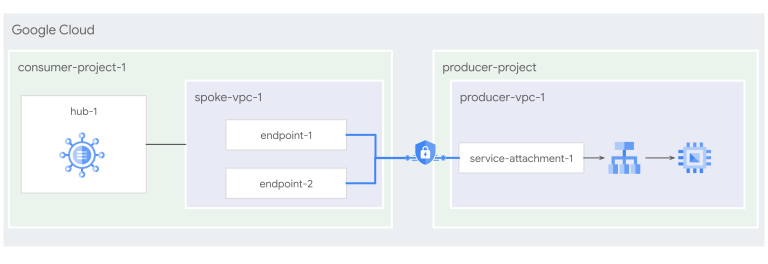
Consider a case where a consumer has created two
endpoints in a spoke VPC network, `spoke-vpc-1`. Both endpoints
connect to `service-attachment-1` in `producer-vpc-1`. The spoke is connected to
a NCC hub that has connection propagation enabled, and there are no other spokes connected to that hub.
The service producer has configured `service-attachment-1` to have a consumer
accept list limit of four for each project in the accept list. The producer has
configured a propagated connection limit of two, specifying that a single
project can have up to two propagated connections.
[](https://docs.cloud.google.com/static/vpc/images/psc-transitivity-producer-limits-1.svg)
This example configuration contains two
endpoints and no propagated connections (click to enlarge).
The quota and limit usage for this configuration is the following:
| Quota / Limit | Usage | Explanation |
|---|---|---|
| PSC ILB consumer forwarding rules per producer VPC network | 2 | one per endpoint |
| Service attachment consumer accept list connection limit for `consumer-project-1` | 2 | one per endpoint |
| Service attachment propagated connection limit for `consumer-project-1` | 0 | no propagated connections |
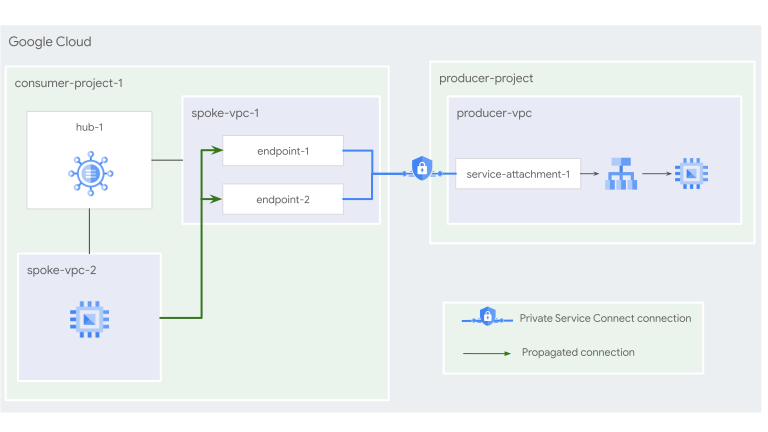
Suppose `consumer-project-1` connects another spoke named `spoke-vpc-2` to the
same NCC hub as `spoke-vpc-1`. This creates two propagated connections in `consumer-project-1`, one for each existing endpoint.
[](https://docs.cloud.google.com/static/vpc/images/psc-transitivity-producer-limits-2.svg)
This example configuration contains
two endpoints and two propagated connections (click to enlarge).
The quota and limit usage for this configuration is the following:
| Quota / Limit | Usage | Explanation |
|---|---|---|
| PSC ILB consumer forwarding rules per producer VPC network | 4 | one per endpoint and one per propagated connection |
| Service attachment consumer accept list connection limit for `consumer-project-1` | 2 | one per endpoint |
| Service attachment propagated connection limit for `consumer-project-1` | 2 | one per propagated connection |
`Consumer-project-1` has exhausted its propagated connection limit. If the
consumer adds another VPC spoke,
Private Service Connect doesn't create any new propagated
connections.
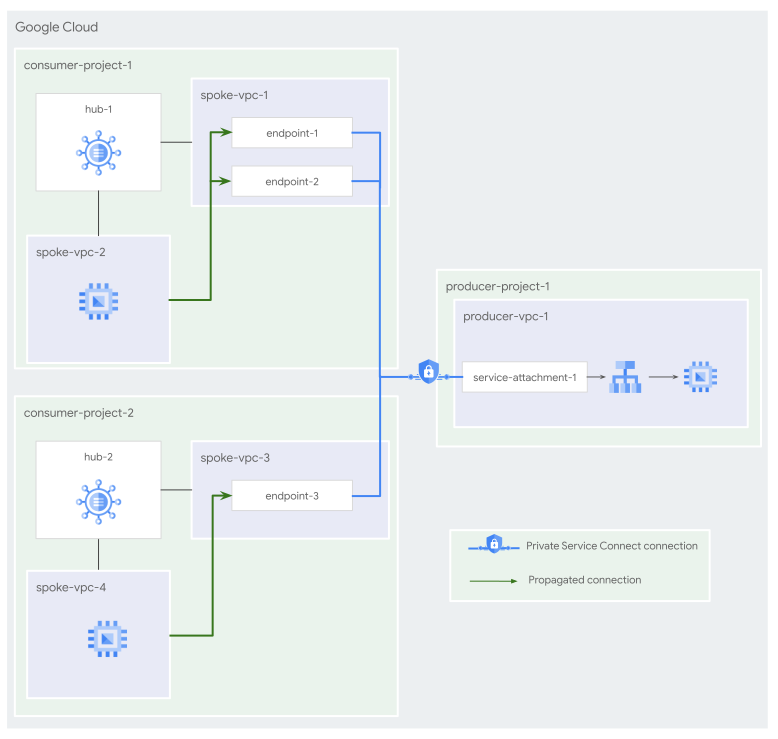
Suppose another consumer has two VPC spokes
in `consumer-project-2`. The spokes connect to a NCC hub with propagated connections
enabled. One of the VPC spokes contains a single endpoint that
connects to `service-attachment-1`.
[](https://docs.cloud.google.com/static/vpc/images/psc-transitivity-producer-limits-3.svg)
This example configuration contains three
endpoints and three propagated connections (click to enlarge).
The quota and limit usage for this configuration is the following:
| Quota / Limit | Usage | Explanation |
|---|---|---|
| PSC ILB consumer forwarding rules per producer VPC network | 6 | four from `consumer-project-1` and two from `consumer-project-2` |
| Service attachment consumer accept list connection limit for `consumer-project-1` | 2 | one per endpoint in `consumer-project-1` |
| Service attachment consumer accept list connection limit for `consumer-project-2` | 1 | one per endpoint in `consumer-project-2` |
| Service attachment propagated connection limit for `consumer-project-1` | 2 | one per propagated connection in `consumer-project-1` |
| Service attachment propagated connection limit for `consumer-project-2` | 1 | one per propagated connection in `consumer-project-2` |