# About accessing global Google APIs through endpoints
This document provides an overview of Private Service Connect
endpoints that are used to access global Google APIs.
By default, if you have an application that uses a Google service, such as
Cloud Storage, your application connects to the default DNS name for that
service, such as `storage.googleapis.com`. The default DNS names for Google services
resolve to publicly routable IP addresses. However, traffic sent from
Google Cloud resources to those IP addresses remains within Google's network.
With Private Service Connect, you can create private endpoints
using global internal IP addresses within your VPC network. You
can assign DNS names to these internal IP addresses with meaningful names like
`storage-vialink1.p.googleapis.com` and `bigtable-adsteam.p.googleapis.com`.
These names and IP addresses are internal to your VPC network and
any on-premises networks that are connected to it using Cloud VPN
tunnels or VLAN attachments. You can control which traffic goes to which
endpoint, and can demonstrate that traffic stays within Google Cloud.
This option gives you access to all Google APIs and services that are
included in the [API bundles](https://docs.cloud.google.com/vpc/docs/about-accessing-google-apis-endpoints.md.txt#supported-apis).
[](https://docs.cloud.google.com/static/vpc/images/private-service-connect-overview.svg) **Figure 1.** Private Service Connect lets you send
traffic to Google APIs by using an
endpoint that is private to your VPC network (click to enlarge).
## Features and compatibility
This table summarizes the features that are supported by endpoints that are used
to access global Google APIs.
| Configuration | Details |
| **Consumer configuration (endpoint)** ||
|---|---|
| Global reachability | Yes Uses an internal global IP address |
| [Cloud Interconnect traffic](https://docs.cloud.google.com/vpc/docs/configure-private-service-connect-apis.md.txt#on-premises) | Yes |
| [Cloud VPN traffic](https://docs.cloud.google.com/vpc/docs/configure-private-service-connect-apis.md.txt#on-premises) | Yes |
| [Access through VPC Network Peering](https://docs.cloud.google.com/vpc/docs/vpc-peering.md.txt) | No |
| [Connection propagation through NCC](https://docs.cloud.google.com/vpc/docs/about-propagated-connections.md.txt) ([Preview](https://cloud.google.com/products#product-launch-stages)) | Yes |
| [Automatic DNS configuration](https://docs.cloud.google.com/vpc/docs/about-accessing-google-apis-endpoints.md.txt#service-directory) | Yes |
| IP version | IPv4 |
| **Producer** ||
| Supported services | [Supported global Google APIs](https://docs.cloud.google.com/vpc/docs/about-accessing-google-apis-endpoints.md.txt#google-apis-global) |
> [!NOTE]
> **Note:** If you [configure
> Private Service Connect endpoints for global Google APIs in VPC Service Controls
> service perimeters](https://docs.cloud.google.com/vpc-service-controls/docs/psc-endpoint), endpoints created before September 1, 2026
> aren't supported and must be recreated.
## Hybrid access
Private Service Connect endpoints that you use to access
Google APIs can be accessed from supported connected on-premises hosts. For
more information, see
[Access the endpoint from on-premises hosts](https://docs.cloud.google.com/vpc/docs/configure-private-service-connect-apis.md.txt#on-premises).
## Automatic DNS configuration through Service Directory
Endpoints are registered with
[Service Directory](https://docs.cloud.google.com/service-directory/docs/overview.md.txt).
Service Directory is a platform to store, manage, and publish
services. When you create an endpoint to
access Google APIs and services, you select a Service Directory
region and a Service Directory namespace.
Service Directory region
: Service Directory is a regional service; the region you select
defines where the Service Directory control plane resides. There
is no functional difference between regions, but you might have a preference for
administrative reasons.
When you create the first endpoint for
Google APIs in a VPC network, the region that you select is
used as the default region for all subsequent endpoints created in that
network. If a region is not already set for a network, and you don't specify a
region, the region is set to `us-central1`. All endpoints
in a network must use the same Service Directory
region.
Service Directory namespace
: When you create the first endpoint for
Google APIs in a VPC network, the namespace that you select is
used as the default namespace for all subsequent endpoints created in that
network. If the namespace is not already set for a network, and you don't
specify a namespace, a system-generated namespace is used. All endpoints in a
network must use the same Service Directory namespace. The
namespace that you choose must be used only for
endpoints that are used to access Google
APIs. You can use the same namespace for endpoints in multiple networks.
When you create an endpoint, the following DNS configurations are created:
- A [Service Directory private DNS
zone](https://docs.cloud.google.com/service-directory/docs/configuring-service-directory-zone) is created for
`p.googleapis.com`.
- [DNS records](https://docs.cloud.google.com/vpc/docs/configure-private-service-connect-apis.md.txt#using-endpoints)
are created in `p.googleapis.com` for some
commonly used Google APIs and services that are available using
Private Service Connect and have default DNS names that end in
`googleapis.com`. For example, if your
endpoint name is `xyz`, DNS records are created for
`storage-xyz.p.googleapis.com`, `compute-xyz.p.googleapis.com`, and other
commonly used APIs in the API bundle.
See
[creating DNS records](https://docs.cloud.google.com/vpc/docs/configure-private-service-connect-apis.md.txt#configure-dns-default)
for instructions to create DNS records for APIs and services that don't have a DNS record in
`p.googleapis.com`.
The available services vary depending on whether you select the `all-apis` or
`vpc-sc` [API bundle](https://docs.cloud.google.com/vpc/docs/about-accessing-google-apis-endpoints.md.txt#supported-apis).
One Service Directory DNS zone is created for each
VPC network that contains an
endpoint.
The DNS names for an endpoint are
accessible in all regions in your VPC network.
### DNS resolution
Clients in the same VPC network as the endpoint can query the
automatically-created private DNS zones when they resolve hostnames, as well as
any [private zones that you create
manually](https://docs.cloud.google.com/vpc/docs/configure-private-service-connect-apis#configure-dns-default).
If a Compute Engine instance sends a request to a service through an
endpoint---for example, to `storage-xyz.p.googleapis.com`---the client
queries the corresponding private DNS zone to resolve the hostname, and receives
the IP address of the Private Service Connect endpoint.
However, if a client looks up a hostname and that hostname doesn't exist in the
private DNS zone, the query is forwarded to Google's public DNS servers. The
public DNS records for `googleapis.com` (and other Google domains) include a
wildcard entry, which means that all hostnames resolve to an IP address.
For example, if you don't have a private DNS zone for `p.googleapis.com` in your
VPC network, and you perform a DNS lookup for
`storage-xyz.p.googleapis.com`, the hostname resolves to public IP addresses
that belong to Cloud Front Ends, *not* the internal IP address of your
Private Service Connect endpoint.
If you're accessing the Private Service Connect endpoint from
clients in hybrid networks, additional configuration is needed so that the
hybrid clients can correctly resolve the hostname of the
Private Service Connect endpoint. For more information, see
[Access endpoints from hybrid
networks](https://docs.cloud.google.com/vpc/docs/configure-private-service-connect-apis#on-premises).
## Supported APIs
When you create an endpoint to access
Google APIs and services, you choose which bundle of APIs you need
access to---**All APIs** (`all-apis`) or
**VPC-SC** (`vpc-sc`):
- The `all-apis` bundle provides access to most Google APIs and services,
including all `*.googleapis.com` service endpoints.
- The `vpc-sc` bundle provides access to
[APIs
and services that support VPC Service Controls.](https://docs.cloud.google.com/vpc-service-controls/docs/supported-products#supported_products)
> [!NOTE]
> **Note:** These bundles provide access to the same APIs that are available through the [Private Google Access VIPs](https://docs.cloud.google.com/vpc/docs/configure-private-google-access.md.txt#domain-options)---`all-apis` is equivalent to `private.googleapis.com` and `vpc-sc` is equivalent to `restricted.googleapis.com`.
The API bundles support only HTTP-based protocols over TCP (HTTP, HTTPS, and HTTP/2). All other
protocols, including MQTT and ICMP are not supported.
| API bundle | Supported services | Example usage |
|---|---|---|
| `all-apis` | Enables API access to most Google APIs and services regardless of whether they are supported by VPC Service Controls. Includes API access to Google Maps, Google Ads, Google Cloud, and most other Google APIs, including the lists below. Does not support Google Workspace web applications such as Gmail and Google Docs. Does not support any interactive websites. Domain names that match: - `accounts.google.com` (only supports paths needed for OAuth authentication of service accounts; user account authentication is interactive and not supported) - `*.aiplatform-notebook.cloud.google.com` - `*.aiplatform-notebook.googleusercontent.com` - `appengine.google.com` - `*.appspot.com` - `*.backupdr.cloud.google.com` - `backupdr.cloud.google.com` - `*.backupdr.googleusercontent.com` - `backupdr.googleusercontent.com` - `*.cloudfunctions.net` - `*.cloudproxy.app` - `*.composer.cloud.google.com` - `*.composer.googleusercontent.com` - `*.datafusion.cloud.google.com` - `*.datafusion.googleusercontent.com` - `*.dataproc.cloud.google.com` - `dataproc.cloud.google.com` - `*.dataproc.googleusercontent.com` - `dataproc.googleusercontent.com` - `*.developerconnect.dev` - `dl.google.com` - `gcr.io` or `*.gcr.io` - `*.googleapis.com` Excludes `*.rep.googleapis.com` [regional and multi-regional endpoints](https://docs.cloud.google.com/vpc/docs/about-accessing-regional-google-apis-endpoints.md.txt). - `*.gke.goog` - `gstatic.com` or `*.gstatic.com` - `*.kernels.googleusercontent.com` - `*.ltsapis.goog` - `*.notebooks.byoid.googleusercontent.com` - `*.notebooks.cloud.google.com` - `notebooks.cloud.google.com` - `*.notebooks.googleusercontent.com` - `packages.cloud.google.com` - `pkg.dev` or `*.pkg.dev` - `pki.goog` or `*.pki.goog` - `*.run.app` - `source.developers.google.com` - `storage.cloud.google.com`
| Choose `all-apis` under these circumstances: - You don't use VPC Service Controls. - You do use VPC Service Controls, but you also need to access Google APIs and services that are not supported by VPC Service Controls. ^[1](https://docs.cloud.google.com/vpc/docs/about-accessing-google-apis-endpoints.md.txt#footnote-1)^
|
| `vpc-sc` | Enables API access to [Google APIs and services that are supported by VPC Service Controls](https://docs.cloud.google.com/vpc-service-controls/docs/supported-products.md.txt). Blocks access to Google APIs and services that do not support [VPC Service Controls](https://docs.cloud.google.com/vpc-service-controls/docs/overview.md.txt). Does not support Google Workspace APIs or Google Workspace web applications such as Gmail and Google Docs. | Choose `vpc-sc` when you *only* need access to Google APIs and services that *are* supported by VPC Service Controls. The `vpc-sc` bundle does not permit access to Google APIs and services that do not support VPC Service Controls. ^[1](https://docs.cloud.google.com/vpc/docs/about-accessing-google-apis-endpoints.md.txt#footnote-1)^ |
^1^ If you need to restrict users to just the Google APIs and services that support [VPC Service Controls](https://docs.cloud.google.com/vpc-service-controls/docs.md.txt), use `vpc-sc`, as it provides additional risk mitigation for data exfiltration. Using `vpc-sc` denies access to Google APIs and services that are not supported by VPC Service Controls. See [Setting up private
connectivity](https://docs.cloud.google.com/vpc-service-controls/docs/set-up-private-connectivity) in the VPC Service Controls documentation for more details.
## IP address requirements
When you configure Private Service Connect for global
Google APIs, you provide an IP address to use for the
endpoint.
The address counts toward the [project's quota](https://docs.cloud.google.com/vpc/docs/quota.md.txt#per_project)
for global internal IP addresses.
The IP address must meet the following specifications:
- It must be a single IP address and not an address range.
- It must be a valid IPv4 address. It can be an RFC 1918 address or a non-RFC
1918 address. IPv6 addresses are not supported.
- It can't be within the range of subnets configured in the VPC
network.
- It can't be within a primary or secondary IP address range of any
subnet in the VPC network or a network connected to the
VPC network using VPC Network Peering.
- It can't overlap with a `/32` custom static route in the local
VPC network. For example, if the VPC network has a
custom static route for `10.10.10.10/32`, you can't reserve address
`10.10.10.10` for Private Service Connect.
- It can't overlap with a `/32` peering custom static route if
you've configured the peered network to [export custom
routes](https://docs.cloud.google.com/vpc/docs/vpc-peering#importing-exporting-routes) and you've
configured your VPC network to import custom routes.
- It can't be within any of the [auto-mode IP ranges](https://docs.cloud.google.com/vpc/docs/subnets.md.txt#ip-ranges)
(in `10.128.0.0/9`) if the local VPC network is an [auto mode
VPC network](https://docs.cloud.google.com/vpc/docs/vpc#subnet-ranges) or if it is peered with
an auto mode VPC network.
- It can't be within an [allocated
IP range](https://docs.cloud.google.com/vpc/docs/configure-private-services-access#allocating-range) in the
local VPC network. However, it can be within an allocated
IP range in a peered VPC network.
- It can't be within an [internal range](https://docs.cloud.google.com/vpc/docs/internal-ranges.md.txt), unless you
[reserve the IP address from an internal range for
Private Service Connect endpoints](https://docs.cloud.google.com/vpc/docs/create-use-internal-ranges#reserve-endpoints-google-apis)
in the same VPC network.
- If an endpoint overlaps with a custom
dynamic route whose destination is the same `/32`, the
endpoint takes priority.
- If an endpoint IP address is located
within the destination range of a [local static
route](https://docs.cloud.google.com/vpc/docs/static-routes), [local dynamic
route](https://docs.cloud.google.com/vpc/docs/routes#dynamic_routes), or [peering custom
route](https://docs.cloud.google.com/vpc/docs/routes#peering-custom-routes), and that route has a subnet mask
shorter than `/32`, the endpoint has
higher priority.
## Use cases
You can create multiple endpoints in the
same VPC network. There is no limit on total bandwidth sent to a
particular endpoint. Because endpoints use
global internal IP addresses, they can be used by any resource in your
VPC network or an on-premises network connected using
Cloud VPN tunnels or Cloud Interconnect attachments.
With multiple endpoints, you can specify different network paths using
Cloud Router and firewall rules.
- You can create firewall rules to prevent some VMs from accessing Google APIs
through an endpoint, while allowing other
VMs to have access.
- You can have a firewall rule on a VM instance that disallows all traffic to
the internet; traffic sent to Private Service Connect
endpoints still reaches Google.
- If you have on-premises hosts that are connected to a VPC using
a Cloud VPN tunnel or a VLAN attachment, you can send some requests
through the tunnel or VLAN while sending other requests over the public
internet. This configuration lets you bypass the tunnel or VLAN for services
such as Google Books that are not supported by Private Google Access.
To create this configuration, create a Private Service Connect
endpoint, advertise the endpoint IP
addresses [using Cloud Router custom route
advertisements](https://docs.cloud.google.com/network-connectivity/docs/router/how-to/advertising-custom-ip),
and enable a [Cloud DNS inbound forwarding
policy](https://docs.cloud.google.com/dns/docs/policies#create-in). The application can send some requests
through the Cloud VPN tunnel or VLAN attachment by using the name of
the endpoint, and it can send other requests over the
internet by using the default DNS name.
- If you connect your on-premises network to your VPC network
using multiple VLAN attachments, you can send some traffic from on-premises over
one VLAN and the rest over others, as shown in figure 2. This lets you use your
own wide-area networking instead of Google's, and to control data movement to
meet geographic requirements.
To create this configuration, create two
endpoints. Create a custom route
advertisement for the first endpoint on the BGP session of the
Cloud Router managing the first VLAN, and create a different custom
route advertisement for the second endpoint on the BGP session of the
Cloud Router managing the second VLAN. On-premises hosts that are
configured to use the endpoint name
send traffic over the corresponding VLAN attachment.
- You can also use multiple VLAN attachments in
an active/active topology. If you advertise the same
endpoint IP address using custom route
advertisements for the BGP sessions on the Cloud Routers managing the
VLANs, packets sent from on-premises systems to the endpoints are routed across
the VLANs using ECMP.
[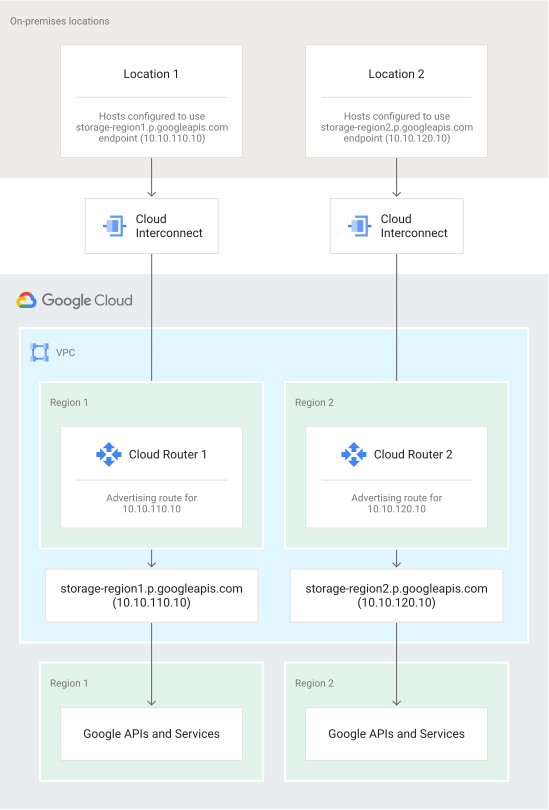](https://docs.cloud.google.com/static/vpc/images/private-service-connect-example-on-premises.svg) **Figure 2.**
By configuring Private Service Connect,
Cloud Router, and on-premises hosts, you can control which
VLAN attachment is used to send traffic to Google APIs (click to enlarge).
## Shared VPC
In general, we recommend that you create forwarding rules and their
corresponding address resources in the same Google Cloud project. Using
the same project helps to avoid issues when a project is deleted.
However, it's not possible to create an address resource in a service project
that reserves an internal global IPv4 address from the host project. This type
of IP address is required to create an endpoint that targets a global Google API
bundle.
You're not prevented from creating an endpoint that targets a global Google API
bundle in a service project, and using an address resource from the host project
in the configuration. However, we don't recommend creating this configuration.
If you do create this configuration, the Service Project Admin needs to be
granted a role such as Compute Network User (`roles/compute.networkUser`) on the
host project. This role contains the required `compute.networks.use` and
`compute.addresses.use` permissions.
You can't create this configuration by using the Google Cloud console; you
must use the Google Cloud CLI or the API.
## Pricing
Pricing for Private Service Connect is described in the
[VPC pricing page](https://cloud.google.com/vpc/pricing#psc-forwarding-rule-apis).
## Quotas
The number of Private Service Connect
endpoints that you can create for accessing Google APIs is controlled by the
`PSC Google APIs Forwarding Rules per VPC Network` quota.
For more information, see [quotas](https://docs.cloud.google.com/vpc/docs/quota.md.txt).
## Organization policy constraints
An Organization Policy Administrator can use the [`constraints/compute.disablePrivateServiceConnectCreationForConsumers`](https://docs.cloud.google.com/resource-manager/docs/organization-policy/org-policy-constraints) constraint
to define the set of endpoint types for
which users can't create forwarding rules.
For information about creating an organization policy that uses this constraint,
see [Block consumers from deploying endpoints by connection type](https://docs.cloud.google.com/vpc/docs/manage-security-private-service-connect-consumers.md.txt#connection-type).
## What's next
- [Configure
Private Service Connect](https://docs.cloud.google.com/vpc/docs/configure-private-service-connect-apis) to access Google APIs and services