

The folder-based membership feature in VPC Service Controls lets you define service perimeters with Google Cloud folders as members. By helping you secure an entire folder hierarchy with a single perimeter configuration, this feature reduces the administrative overhead of perimeter management at scale.
This document explains how folder support in perimeters works and covers the following:
Core concepts, behaviors, and benefits of using folders in perimeters.
Interactions between folder-based membership, nested resources, and resource hierarchy rules such as inheritance and evaluation precedence.
How to look up configured perimeters for projects and folders.
Best practices and known limitations for using this feature.
About folder membership in perimeters
A Google Cloud folder can contain multiple projects, other folders, or a combination of both. Although you can add individual projects within a folder to a service perimeter, we recommend that you add the parent folder instead. When you specify a folder as a protected resource when you create a perimeter, VPC Service Controls includes all resources within that folder, such as projects and nested folders.
When you add projects to a folder that you have configured in a perimeter, VPC Service Controls automatically adds those projects to the same perimeter. You don't need to update the perimeter configuration to include these projects. Similarly, when you remove projects from the folder, VPC Service Controls automatically removes those projects from the perimeter.
Nested folders and inheritance
VPC Service Controls restricts all resources within a folder that you have configured in a perimeter, such as nested folders and their resources. When you add a folder to a perimeter, VPC Service Controls automatically restricts all projects in that folder and its subfolders.
Resource membership evaluation precedence
A Google Cloud resource can be protected by only one regular service perimeter in enforced mode and one in dry run mode. If a resource or its parent folders are associated with multiple perimeters, the lowest-level association in the resource hierarchy determines the effective perimeter.
VPC Service Controls evaluates precedence independently for enforced mode and dry run mode:
- Enforced mode precedence: The effective enforced perimeter is determined by the lowest resource in the hierarchy (the project itself or its closest ancestor folder) that is explicitly assigned to an enforced perimeter.
- Dry run mode precedence: The effective dry run perimeter is determined by the lowest resource in the hierarchy that is explicitly assigned to a dry run perimeter or implicitly inherited from an explicitly assigned enforced resource.
Configuring a dry run perimeter for a project or subfolder does not disable or override an enforced perimeter configured on an ancestor folder.
Precedence examples
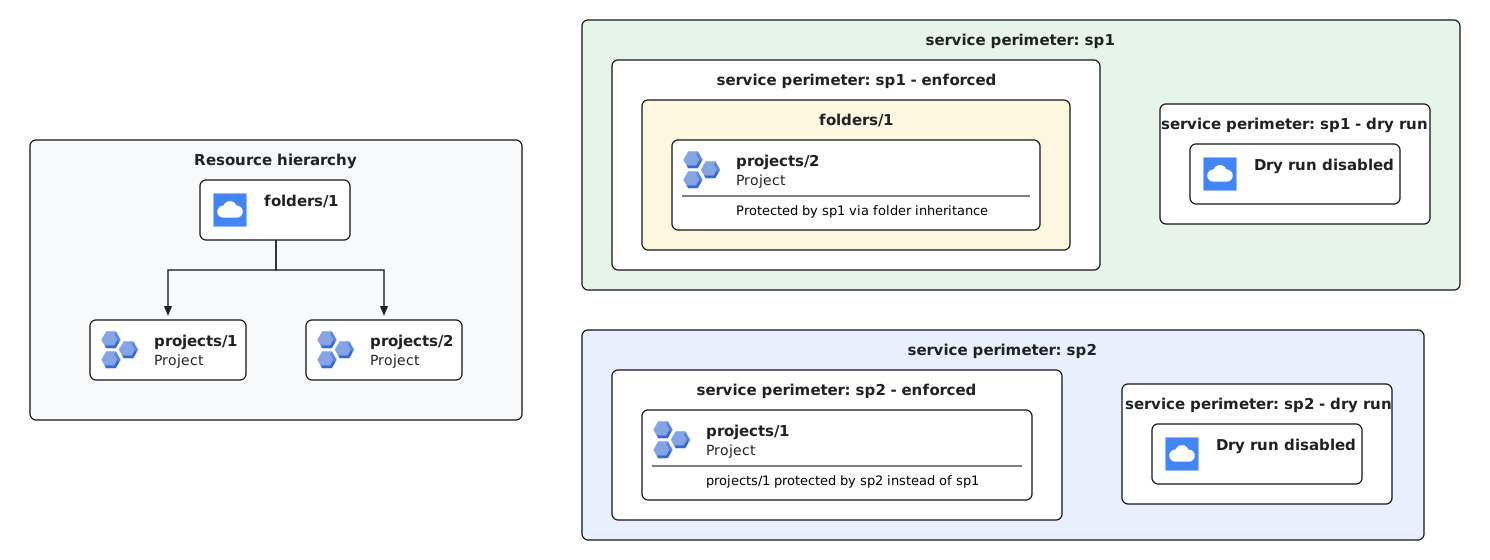
Example 1 (Direct project override in enforced mode): If you configure a parent folder (
folders/1) in an enforced perimeter (sp1) and explicitly configure a project within that folder (projects/1) in a different enforced perimeter (sp2),projects/1is protected bysp2. The direct project assignment takes precedence over folder inheritance. All other projects infolders/1(such asprojects/2) remain protected bysp1through folder inheritance.Example 2 (Folder inheritance in dry run mode): When you configure a folder (
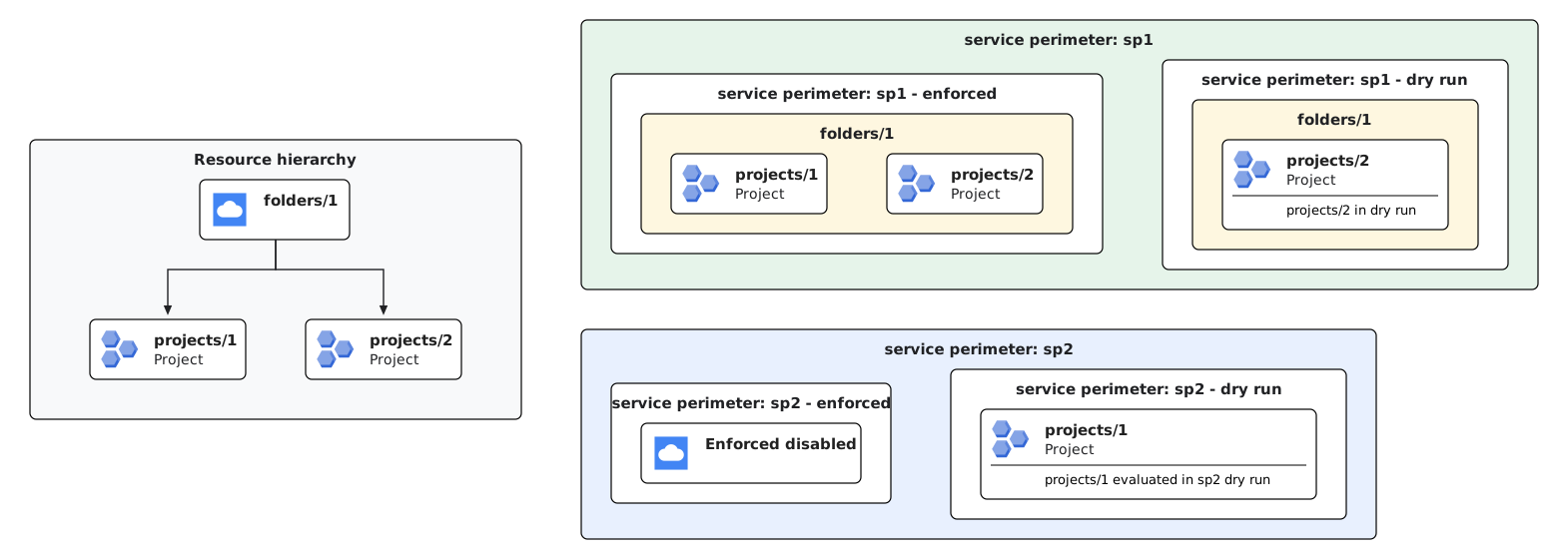
folders/1) in a service perimeter in dry run mode, all projects within that folder (projects/1andprojects/2) inherit the dry run perimeter configuration (sp1) unless explicitly disabled. Dry run inheritance behaves identically to enforced mode inheritance unless a nested resource is explicitly configured with a different dry run perimeter.Example 3 (Independent evaluation of enforced and dry run perimeters): VPC Service Controls evaluates enforced and dry run associations independently. If you configure a parent folder (
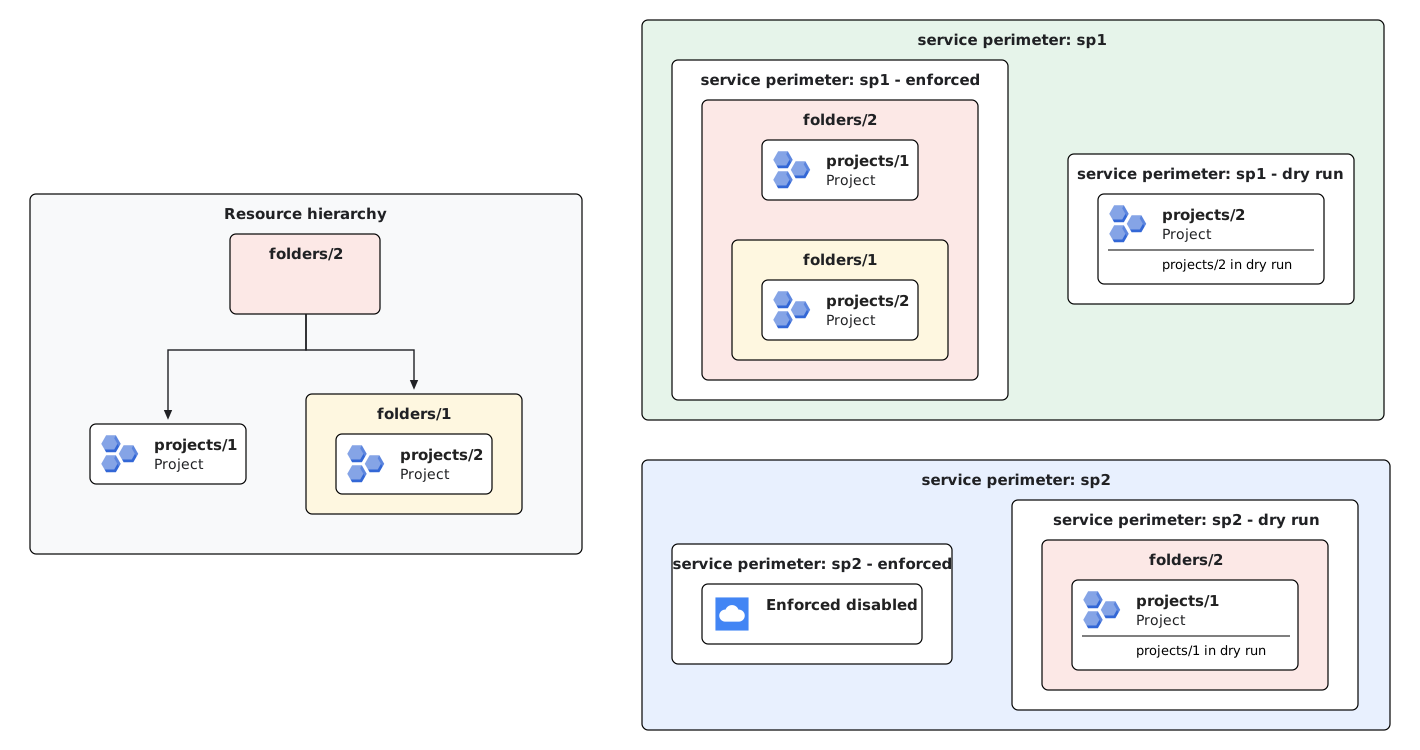
folders/1) in an enforced perimeter (sp1) and explicitly assign a project within that folder (projects/1) to a dry run perimeter (sp2),projects/1remains protected bysp1in enforced mode while simultaneously being evaluated in dry run mode bysp2. Assigning a project to a dry run perimeter does not override or disable the parent folder's enforced perimeter.Example 4 (Multi-level folder hierarchy and subfolder precedence): In a multi-level folder hierarchy, VPC Service Controls evaluates precedence at each level of the hierarchy. If an ancestor folder (
folders/2) is configured in an enforced perimeter (sp1), all contained projects (projects/1andprojects/2) inheritsp1enforcement. When dry run perimeters are assigned at different levels—such as assigning ancestorfolders/2to dry run perimetersp2and projectprojects/2(in subfolderfolders/1) to dry run perimetersp1—each project inherits the dry run configuration from its closest ancestor. As a result,projects/1is evaluated undersp2dry run, butprojects/2is evaluated undersp1dry run.

Look up effective configured perimeters
Because resources can inherit perimeter protection from ancestor folders, you
can use the LookupConfiguredServicePerimeter method to identify which
service perimeters protect a project or folder.
The API returns the following:
servicePerimeter: The fully qualified name of the effective enforced perimeter.servicePerimeterDryRun: The fully qualified name of the effective dry run perimeter.restrictedResource: The specific resource (project or folder) where the enforced perimeter is directly attached.restrictedResourceDryRun: The specific resource where the dry run perimeter is directly attached.
For more information, see Look up configured perimeters.
Exclusion of projects from perimeters
To exclude a project from a folder-level perimeter, explicitly assign that project to a separate perimeter that does not restrict any services and allows all ingress and egress traffic. Because explicit project configurations take precedence over folder-level perimeters, the project is excluded from the folder perimeter.
For information about updating perimeters, see Update a service perimeter.
Scoped policies
Service perimeters within a scoped policy restrict only the resources that exist within the scope of that policy. For a folder to be included as a member in a scoped perimeter, the access policy must be scoped at that folder or an ancestor of that folder (such as a parent folder or the organization).
Best practices
Review the following best practices when managing folder-based perimeters.
Safe migration of projects to folder perimeters
When transitioning from explicit project memberships to folder-based memberships, follow these steps to help prevent unintentional perimeter enforcement interruptions:
- Add the target parent folder to the service perimeter.
- Move the projects under that parent folder in the resource hierarchy.
- Wait at least 48 hours: Retain the explicit project entries in the perimeter configuration for at least 48 hours. This waiting period allows resource hierarchy propagation to complete across all systems.
- Remove the explicit project configurations from the perimeter. The projects remain protected through folder inheritance.
Hierarchy moves
Moving folders or projects changes their effective perimeter protection. To help prevent unexpected access denials, coordinate all hierarchy moves with your Resource Manager administrator.
If you move projects that you have configured in a perimeter into another folder and add that folder to the same perimeter, you must retain the existing explicit project membership configurations in the perimeter for at least 48 hours. This waiting period allows for resource hierarchy propagation and prevents unexpected perimeter enforcement issues when you remove the explicit project configurations from the perimeter.
Limitations
Folder-based membership is not supported in perimeter bridges. Perimeter bridges only accept project resources.
VPC Service Controls does not support folder-level API resources.
Due to a known issue, configuring a VPC network project as a protected resource in a dry run perimeter overrides folder-based enforcement. If a network project is explicitly added to a dry run perimeter, it loses the enforced perimeter protection inherited from its ancestor folders.
Folder membership is not supported for non-Google Cloud APIs and perimeters configured with
allowed_service_patterns. To allow access to these service patterns, the originating projects or VPC networks must be added explicitly to the perimeter, rather than inherited through a folder.
What's next
- Configure folders in service perimeters
- Learn more about VPC Service Controls.
- Learn more about service perimeters.
- Learn more about designing and architecting service perimeters.