偵測多個物件

Vision API 的物件定位功能可偵測並擷取圖片中多個物件的資訊,

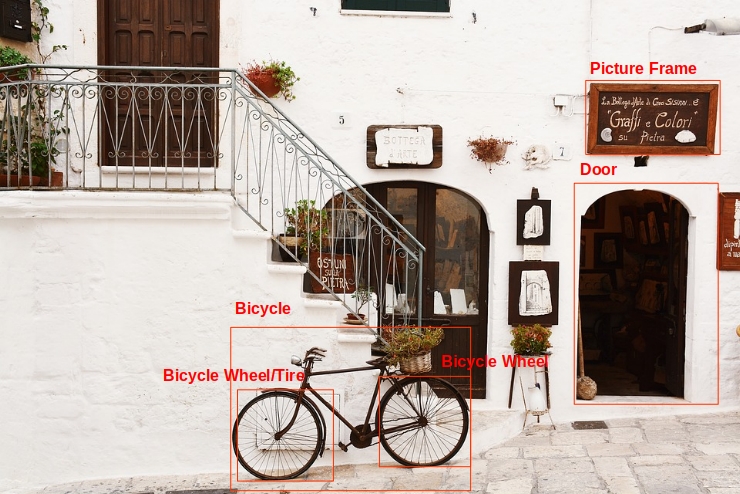
因此能辨識一張圖片中多個物件,並分別提供 LocalizedObjectAnnotation。每個 LocalizedObjectAnnotation 會識別物件資訊、物件位置,以及框住圖中物件的矩形區域。

物件定位功能可用來識別圖片中顯眼和不明顯的物件。

物件資訊僅會以英文傳回,不過您可以用 Cloud Translation 將英文標籤翻譯成多種語言

含有定界框的圖片
圖片來源: Unsplash 的 Bogdan Dada (已新增註解)。

舉例來說,API 會傳回前一張圖片中物件的下列資訊和邊界位置資料:

名稱 mid 分數 範圍
自行車輪 /m/01bqk0 0.89648587 (0.32076266, 0.78941387), (0.43812272, 0.78941387), (0.43812272, 0.97331065), (0.32076266, 0.97331065)
單車 /m/0199g 0.886761 (0.312, 0.6616471)、(0.638353, 0.6616471)、(0.638353, 0.9705882)、(0.312, 0.9705882)
自行車輪 /m/01bqk0 0.6345275 (0.5125398, 0.760708)、(0.6256646, 0.760708)、(0.6256646, 0.94601655)、(0.5125398, 0.94601655)
相框 /m/06z37_ 0.6207608 (0.79177403, 0.16160682), (0.97047985, 0.16160682), (0.97047985, 0.31348917), (0.79177403, 0.31348917)
輪胎 /m/0h9mv 0.55886006 (0.32076266, 0.78941387)、(0.43812272, 0.78941387)、(0.43812272, 0.97331065)、(0.32076266, 0.97331065)
/m/02dgv 0.5160098 (0.77569866, 0.37104446)、(0.9412425, 0.37104446)、(0.9412425, 0.81507325)、(0.77569866, 0.81507325)

mid 包含對應於標籤 Google 知識圖譜項目的機器建立識別碼 (MID)。如要瞭解如何檢查 mid 值,請參閱 Google 知識圖譜搜尋 API 說明文件。

歡迎試用

如果您未曾使用過 Google Cloud,歡迎建立帳戶,親自體驗實際使用 Cloud Vision API 的成效。新客戶還能獲得價值 $300 美元的免費抵免額,用於執行、測試及部署工作負載。

免費試用 Cloud Vision API

物件本地化要求

設定 Google Cloud 專案和驗證

偵測本機圖片中的物件

您可以使用 Vision API 對本機圖片檔執行特徵偵測。

如果是 REST 要求,請在要求主體中,以 base64 編碼字串的形式傳送圖片檔案內容。

如果是 gcloud 和用戶端程式庫要求,請在要求中指定本機圖片的路徑。

REST

使用任何要求資料之前,請先修改下列項目的值:

  • BASE64_ENCODED_IMAGE:二進位圖片資料的 Base64 表示法 (ASCII 字串)。這個字串應類似下列字串:
    • /9j/4QAYRXhpZgAA...9tAVx/zDQDlGxn//2Q==
    詳情請參閱「base64 編碼」主題。
  • RESULTS_INT:(選填) 要傳回的結果整數值。如果省略 "maxResults" 欄位及其值,API 會傳回預設值 (10 個結果)。這個欄位不適用於下列特徵類型:TEXT_DETECTIONDOCUMENT_TEXT_DETECTIONCROP_HINTS
  • PROJECT_ID: Google Cloud 專案 ID。

HTTP 方法和網址:

POST https://vision.googleapis.com/v1/images:annotate

JSON 要求內文:

{
  "requests": [
    {
      "image": {
        "content": "BASE64_ENCODED_IMAGE"
      },
      "features": [
        {
          "maxResults": RESULTS_INT,
          "type": "OBJECT_LOCALIZATION"
        },
      ]
    }
  ]
}

如要傳送要求,請選擇以下其中一個選項:

curl

將要求主體儲存在名為 request.json 的檔案中,然後執行下列指令:

curl -X POST \
-H "Authorization: Bearer $(gcloud auth print-access-token)" \
-H "x-goog-user-project: PROJECT_ID" \
-H "Content-Type: application/json; charset=utf-8" \
-d @request.json \
"https://vision.googleapis.com/v1/images:annotate"

PowerShell

將要求主體儲存在名為 request.json 的檔案中,然後執行下列指令:

$cred = gcloud auth print-access-token
$headers = @{ "Authorization" = "Bearer $cred"; "x-goog-user-project" = "PROJECT_ID" }

Invoke-WebRequest `
-Method POST `
-Headers $headers `
-ContentType: "application/json; charset=utf-8" `
-InFile request.json `
-Uri "https://vision.googleapis.com/v1/images:annotate" | Select-Object -Expand Content

如果要求成功,伺服器會傳回 200 OK HTTP 狀態碼與 JSON 格式的回應。

回覆:

Go

在試用這個範例之前,請先按照「使用用戶端程式庫的 Vision 快速入門導覽課程」中的 Go 設定說明操作。詳情請參閱 Vision Go API 參考文件

如要向 Vision 進行驗證,請設定應用程式預設憑證。詳情請參閱「為本機開發環境設定驗證機制」。


// localizeObjects gets objects and bounding boxes from the Vision API for an image at the given file path.
func localizeObjects(w io.Writer, file string) error {
	ctx := context.Background()

	client, err := vision.NewImageAnnotatorClient(ctx)
	if err != nil {
		return err
	}

	f, err := os.Open(file)
	if err != nil {
		return err
	}
	defer f.Close()

	image, err := vision.NewImageFromReader(f)
	if err != nil {
		return err
	}
	annotations, err := client.LocalizeObjects(ctx, image, nil)
	if err != nil {
		return err
	}

	if len(annotations) == 0 {
		fmt.Fprintln(w, "No objects found.")
		return nil
	}

	fmt.Fprintln(w, "Objects:")
	for _, annotation := range annotations {
		fmt.Fprintln(w, annotation.Name)
		fmt.Fprintln(w, annotation.Score)

		for _, v := range annotation.BoundingPoly.NormalizedVertices {
			fmt.Fprintf(w, "(%f,%f)\n", v.X, v.Y)
		}
	}

	return nil
}

Java

在試用這個範例之前,請先按照使用用戶端程式庫的 Vision API 快速入門導覽課程中的 Java 設定操作說明進行操作。詳情請參閱 Vision API Java 參考文件

/**
 * Detects localized objects in the specified local image.
 *
 * @param filePath The path to the file to perform localized object detection on.
 * @throws Exception on errors while closing the client.
 * @throws IOException on Input/Output errors.
 */
public static void detectLocalizedObjects(String filePath) throws IOException {
  List<AnnotateImageRequest> requests = new ArrayList<>();

  ByteString imgBytes = ByteString.readFrom(new FileInputStream(filePath));

  Image img = Image.newBuilder().setContent(imgBytes).build();
  AnnotateImageRequest request =
      AnnotateImageRequest.newBuilder()
          .addFeatures(Feature.newBuilder().setType(Type.OBJECT_LOCALIZATION))
          .setImage(img)
          .build();
  requests.add(request);

  // Initialize client that will be used to send requests. This client only needs to be created
  // once, and can be reused for multiple requests. After completing all of your requests, call
  // the "close" method on the client to safely clean up any remaining background resources.
  try (ImageAnnotatorClient client = ImageAnnotatorClient.create()) {
    // Perform the request
    BatchAnnotateImagesResponse response = client.batchAnnotateImages(requests);
    List<AnnotateImageResponse> responses = response.getResponsesList();

    // Display the results
    for (AnnotateImageResponse res : responses) {
      for (LocalizedObjectAnnotation entity : res.getLocalizedObjectAnnotationsList()) {
        System.out.format("Object name: %s%n", entity.getName());
        System.out.format("Confidence: %s%n", entity.getScore());
        System.out.format("Normalized Vertices:%n");
        entity
            .getBoundingPoly()
            .getNormalizedVerticesList()
            .forEach(vertex -> System.out.format("- (%s, %s)%n", vertex.getX(), vertex.getY()));
      }
    }
  }
}

Node.js

在試用這個範例之前,請先按照「使用用戶端程式庫的 Vision 快速入門導覽課程」中的 Node.js 設定說明操作。詳情請參閱 Vision Node.js API 參考文件

如要向 Vision 進行驗證,請設定應用程式預設憑證。詳情請參閱「為本機開發環境設定驗證機制」。

// Imports the Google Cloud client libraries
const vision = require('@google-cloud/vision');
const fs = require('fs');

// Creates a client
const client = new vision.ImageAnnotatorClient();

/**
 * TODO(developer): Uncomment the following line before running the sample.
 */
// const fileName = `/path/to/localImage.png`;
const request = {
  image: {content: fs.readFileSync(fileName)},
};

const [result] = await client.objectLocalization(request);
const objects = result.localizedObjectAnnotations;
objects.forEach(object => {
  console.log(`Name: ${object.name}`);
  console.log(`Confidence: ${object.score}`);
  const vertices = object.boundingPoly.normalizedVertices;
  vertices.forEach(v => console.log(`x: ${v.x}, y:${v.y}`));
});

Python

在試用這個範例之前,請先按照「使用用戶端程式庫的 Vision 快速入門導覽課程」中的 Python 設定說明操作。詳情請參閱 Vision Python API 參考文件

如要向 Vision 進行驗證,請設定應用程式預設憑證。詳情請參閱「為本機開發環境設定驗證機制」。

def localize_objects(path):
    """Localize objects in the local image.

    Args:
    path: The path to the local file.
    """
    from google.cloud import vision

    client = vision.ImageAnnotatorClient()

    with open(path, "rb") as image_file:
        content = image_file.read()
    image = vision.Image(content=content)

    objects = client.object_localization(image=image).localized_object_annotations

    print(f"Number of objects found: {len(objects)}")
    for object_ in objects:
        print(f"\n{object_.name} (confidence: {object_.score})")
        print("Normalized bounding polygon vertices: ")
        for vertex in object_.bounding_poly.normalized_vertices:
            print(f" - ({vertex.x}, {vertex.y})")

其他語言

C#:請按照用戶端程式庫頁面上的 C# 設定操作說明完成相關步驟,然後參閱「.NET 適用的 Vision 參考文件」。

PHP:請按照用戶端程式庫頁面上的 PHP 設定操作說明完成相關步驟,然後參閱「PHP 適用的 Vision 參考文件」。

Ruby:請按照用戶端程式庫頁面上的 Ruby 設定操作說明完成相關步驟,然後參閱「Ruby 適用的 Vision 參考文件」。

偵測遠端圖片中的物件

您可以透過 Vision API,對位於 Cloud Storage 或網路上的遠端圖片檔案執行特徵偵測。如要傳送遠端檔案要求,請在要求內文中指定檔案的網址或 Cloud Storage URI。

REST

使用任何要求資料之前,請先修改下列項目的值:

  • CLOUD_STORAGE_IMAGE_URI:Cloud Storage bucket 中有效圖片檔案的路徑。您至少必須具備檔案的讀取權限。範例:
    • https://cloud.google.com/vision/docs/images/bicycle_example.png
  • RESULTS_INT:(選填) 要傳回的結果整數值。如果省略 "maxResults" 欄位及其值,API 會傳回預設值 (10 個結果)。這個欄位不適用於下列特徵類型:TEXT_DETECTIONDOCUMENT_TEXT_DETECTIONCROP_HINTS
  • PROJECT_ID: Google Cloud 專案 ID。

HTTP 方法和網址:

POST https://vision.googleapis.com/v1/images:annotate

JSON 要求內文:

{
  "requests": [
    {
      "image": {
        "source": {
          "imageUri": "CLOUD_STORAGE_IMAGE_URI"
        }
      },
      "features": [
        {
          "maxResults": RESULTS_INT,
          "type": "OBJECT_LOCALIZATION"
        },
      ]
    }
  ]
}

如要傳送要求,請選擇以下其中一個選項:

curl

將要求主體儲存在名為 request.json 的檔案中,然後執行下列指令:

curl -X POST \
-H "Authorization: Bearer $(gcloud auth print-access-token)" \
-H "x-goog-user-project: PROJECT_ID" \
-H "Content-Type: application/json; charset=utf-8" \
-d @request.json \
"https://vision.googleapis.com/v1/images:annotate"

PowerShell

將要求主體儲存在名為 request.json 的檔案中,然後執行下列指令:

$cred = gcloud auth print-access-token
$headers = @{ "Authorization" = "Bearer $cred"; "x-goog-user-project" = "PROJECT_ID" }

Invoke-WebRequest `
-Method POST `
-Headers $headers `
-ContentType: "application/json; charset=utf-8" `
-InFile request.json `
-Uri "https://vision.googleapis.com/v1/images:annotate" | Select-Object -Expand Content

如果要求成功,伺服器會傳回 200 OK HTTP 狀態碼與 JSON 格式的回應。

回覆:

Go

在試用這個範例之前,請先按照「使用用戶端程式庫的 Vision 快速入門導覽課程」中的 Go 設定說明操作。詳情請參閱 Vision Go API 參考文件

如要向 Vision 進行驗證,請設定應用程式預設憑證。詳情請參閱「為本機開發環境設定驗證機制」。


// localizeObjects gets objects and bounding boxes from the Vision API for an image at the given file path.
func localizeObjectsURI(w io.Writer, file string) error {
	ctx := context.Background()

	client, err := vision.NewImageAnnotatorClient(ctx)
	if err != nil {
		return err
	}

	image := vision.NewImageFromURI(file)
	annotations, err := client.LocalizeObjects(ctx, image, nil)
	if err != nil {
		return err
	}

	if len(annotations) == 0 {
		fmt.Fprintln(w, "No objects found.")
		return nil
	}

	fmt.Fprintln(w, "Objects:")
	for _, annotation := range annotations {
		fmt.Fprintln(w, annotation.Name)
		fmt.Fprintln(w, annotation.Score)

		for _, v := range annotation.BoundingPoly.NormalizedVertices {
			fmt.Fprintf(w, "(%f,%f)\n", v.X, v.Y)
		}
	}

	return nil
}

Java

在試用這個範例之前,請先按照使用用戶端程式庫的 Vision API 快速入門導覽課程中的 Java 設定操作說明進行操作。詳情請參閱 Vision API Java 參考文件

/**
 * Detects localized objects in a remote image on Google Cloud Storage.
 *
 * @param gcsPath The path to the remote file on Google Cloud Storage to detect localized objects
 *     on.
 * @throws Exception on errors while closing the client.
 * @throws IOException on Input/Output errors.
 */
public static void detectLocalizedObjectsGcs(String gcsPath) throws IOException {
  List<AnnotateImageRequest> requests = new ArrayList<>();

  ImageSource imgSource = ImageSource.newBuilder().setGcsImageUri(gcsPath).build();
  Image img = Image.newBuilder().setSource(imgSource).build();

  AnnotateImageRequest request =
      AnnotateImageRequest.newBuilder()
          .addFeatures(Feature.newBuilder().setType(Type.OBJECT_LOCALIZATION))
          .setImage(img)
          .build();
  requests.add(request);

  // Initialize client that will be used to send requests. This client only needs to be created
  // once, and can be reused for multiple requests. After completing all of your requests, call
  // the "close" method on the client to safely clean up any remaining background resources.
  try (ImageAnnotatorClient client = ImageAnnotatorClient.create()) {
    // Perform the request
    BatchAnnotateImagesResponse response = client.batchAnnotateImages(requests);
    List<AnnotateImageResponse> responses = response.getResponsesList();
    client.close();
    // Display the results
    for (AnnotateImageResponse res : responses) {
      for (LocalizedObjectAnnotation entity : res.getLocalizedObjectAnnotationsList()) {
        System.out.format("Object name: %s%n", entity.getName());
        System.out.format("Confidence: %s%n", entity.getScore());
        System.out.format("Normalized Vertices:%n");
        entity
            .getBoundingPoly()
            .getNormalizedVerticesList()
            .forEach(vertex -> System.out.format("- (%s, %s)%n", vertex.getX(), vertex.getY()));
      }
    }
  }
}

Node.js

在試用這個範例之前,請先按照「使用用戶端程式庫的 Vision 快速入門導覽課程」中的 Node.js 設定說明操作。詳情請參閱 Vision Node.js API 參考文件

如要向 Vision 進行驗證,請設定應用程式預設憑證。詳情請參閱「為本機開發環境設定驗證機制」。

// Imports the Google Cloud client libraries
const vision = require('@google-cloud/vision');

// Creates a client
const client = new vision.ImageAnnotatorClient();

/**
 * TODO(developer): Uncomment the following line before running the sample.
 */
// const gcsUri = `gs://bucket/bucketImage.png`;

const [result] = await client.objectLocalization(gcsUri);
const objects = result.localizedObjectAnnotations;
objects.forEach(object => {
  console.log(`Name: ${object.name}`);
  console.log(`Confidence: ${object.score}`);
  const veritices = object.boundingPoly.normalizedVertices;
  veritices.forEach(v => console.log(`x: ${v.x}, y:${v.y}`));
});

Python

在試用這個範例之前,請先按照「使用用戶端程式庫的 Vision 快速入門導覽課程」中的 Python 設定說明操作。詳情請參閱 Vision Python API 參考文件

如要向 Vision 進行驗證,請設定應用程式預設憑證。詳情請參閱「為本機開發環境設定驗證機制」。

def localize_objects_uri(uri):
    """Localize objects in the image on Google Cloud Storage

    Args:
    uri: The path to the file in Google Cloud Storage (gs://...)
    """
    from google.cloud import vision

    client = vision.ImageAnnotatorClient()

    image = vision.Image()
    image.source.image_uri = uri

    objects = client.object_localization(image=image).localized_object_annotations

    print(f"Number of objects found: {len(objects)}")
    for object_ in objects:
        print(f"\n{object_.name} (confidence: {object_.score})")
        print("Normalized bounding polygon vertices: ")
        for vertex in object_.bounding_poly.normalized_vertices:
            print(f" - ({vertex.x}, {vertex.y})")

gcloud

如要在圖片中偵測標籤,請使用 gcloud ml vision detect-objects 指令,如下列範例所示:

gcloud ml vision detect-objects https://cloud.google.com/vision/docs/images/bicycle_example.png

其他語言

C#:請按照用戶端程式庫頁面上的 C# 設定操作說明完成相關步驟,然後參閱「.NET 適用的 Vision 參考文件」。

PHP:請按照用戶端程式庫頁面上的 PHP 設定操作說明完成相關步驟,然後參閱「PHP 適用的 Vision 參考文件」。

Ruby:請按照用戶端程式庫頁面上的 Ruby 設定操作說明完成相關步驟,然後參閱「Ruby 適用的 Vision 參考文件」。

試試看

使用下列工具試試物件偵測和定位功能。你可以使用已指定的圖片 (https://cloud.google.com/vision/docs/images/bicycle_example.png),也可以指定自己的圖片。選取「Execute」傳送要求。

不含定界框的圖片
圖片出處: Bogdan Dada,取自 Unsplash

要求主體:

{
  "requests": [
    {
      "features": [
        {
          "maxResults": 10,
          "type": "OBJECT_LOCALIZATION"
        }
      ],
      "image": {
        "source": {
          "imageUri": "https://cloud.google.com/vision/docs/images/bicycle_example.png"
        }
      }
    }
  ]
}