The **Product Recognizer** model helps you recognize and understand what product is in the
provided image. The image should only contain a single product item that you want to recognize.
This model can serve as the primary AI building block for analyzing and
interpreting product image data, which you can capture from retail stores.
## Tag Recognizer and Product Recognizer use cases
The **Product Recognizer** and **Tag Recognizer** models can serve as
the primary AI building blocks for analyzing and interpreting the image data
around products and tags image data, which you might have captured from retail stores.
The Product recognizer and Tag recognizer models incorporate several core Google
AI modeling and data capabilities to help the retailers and/or technical
partners to solve key problems in understanding the product and price-tag
image data, including:
- Recognizing, so understanding what product is in the image.
- Recognizing and parsing the tag (price-tag, for example, or any other text label tags) according to user defined key-value pair entity extraction schema.
In particular, several differentiating Google AI models are included to support
these use-cases problem solving, such as
- Product thumbnail visual embedding model, which turns a product thumbnail image into a numerical feature space representation.
- Google OCR model, which extracts all texts visible in the image.
- Google entity extraction model (that you can customize), which turns the raw texts into the user defined key-value pair named entities.
In addition to these Google AI models, the product recognizer also
leverages Google's large database of product information. The product data in
this Product database includes the product's GTIN / UPC identity, product brand,
title, and cross-language descriptions, product logo, and imagery with various
packaging variations. The Product database with the previously mentioned product
thumbnail visual embedding model enables the Product recognizer model to be able
to recognize many products immediately.
The two major AI features are Product Recognizer and Tag Recognizer models.
## Product Recognizer functionality
This model recognizes individual product identity at the Global Trade Item
Number (GTIN) level or the Universal Product Code (UPC) level. Several
differentiating Google AI models are included in the Product Recognizer to
empower these use-cases problem solving, such as:
- The product visual embedding model, which turns a product image into a numerical feature space representation.
- The Google OCR technology, which extracts all text visible in the image.
- The Google product database used in combination with the product thumbnail visual embedding model enables the Product Recognizer model to recognize many products right away.
### Example Output JSON Object
```
{
"imageUri": "gs://test_bucket/test_image.jpg",
"productRecognitionAnnotations": [
{
"detectedText": "Bolthouse Farms Perfectly Protein Tea & Soy Beverage",
"recognitionResults": [
{
"confidence": 0.9420832,
"productMetadata": {
"brand": "Bolthouse Farms",
"gtins": [
"00071464260804"
],
"locale": "en-US",
"title": "Bolthouse Farms Perfectly Protein Tea & Soy Beverage, Vanilla Chai Tea - 52 fl oz"
},
}
]
}
]
}
```
## API concepts
There are six API resources offered to help build product catalog, product
dataset management, index building, and deployment for Product Recognition
service. There are described as follows:
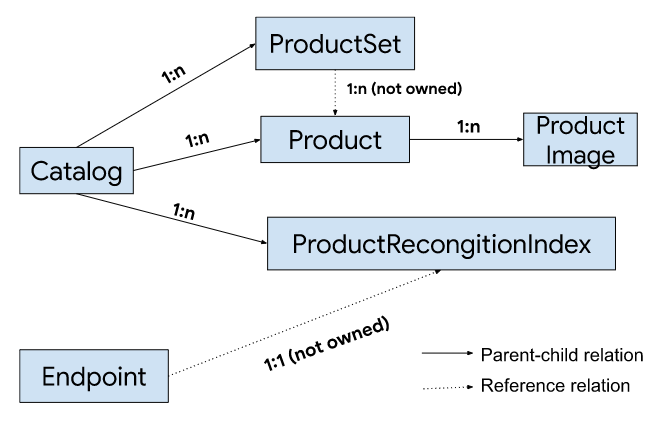
**Catalog**: Root resource which represents the container for all products
offered by the retailer.
**Product** : Represents a product offered by a merchant. `Product` is a child
resource of `Catalog`.
**ProductImage** : The image representing a view of one product. `ProductImage`
is a child resource of `Product`.
**ProductSet** : A finer granularity container to organize and group products in
the same `Catalog`. One `ProductSet` may contain one or many `Product`s but it
does not "own" the containing `Product`s but instead maintains a "link" to them.
**ProductRecognitionIndex** : Contains a list of image embedding used for product
recognition algorithms. `ProductRecognitionIndex` can be created either from the
entire `Catalog` or from a `ProductSet` (a subset of the `Product`s from the
`Catalog`).
**Endpoint** : A placement that carries all the configurations required to
perform Product Recognition or Tag Recognition inference. For Product
Recognition, deploying a `ProductRecognitionIndex` is required.
For Tag Recognition, specifying tag entity parsing models is required.
## Environment setup
This section describes how to interact with Store Vision AI RESTful API.
API_ENDPOINT=visionai.googleapis.com
PROJECT_ID=your project ID
All the `create` methods require specifying the
to-be-created resource name/ID explicitly. You may use a meaningful string
identifier, for example, "product-ABC" or a randomly generated identifier for example,
UUID.
To grant a person role the editor access to use Store Vision API, please run the
following iam binding command:
gcloud projects add-iam-policy-binding PROJECT_ID --member='user:USER_ACCOUNT' --role='roles/visionai.editor'
To grant a service account the editor access, please use the below command:
gcloud projects add-iam-policy-binding PROJECT_ID --member='serviceAccount:SERVICE_ACCOUNT' --role='roles/visionai.editor'
[Learn more about IAM binding](https://docs.cloud.google.com/sdk/gcloud/reference/projects/add-iam-policy-binding).
## Product Recognizer user journey
1. Create a Catalog.
2. Import Products and (optional) `ProductImages` into the `Catalog`.
3. View and modify the `Product` and `ProductImages`, and optionally creates a `ProductSet` to organize products list in a finer granularity.
4. Create an `Index`, either from the entire `Catalog` or from a `ProductSet`.
5. Create an `Endpoint` with desired product recognition config and deploys an `Index` to it.
6. Perform `BatchAnalyze` with `ProductRecognition` feature. In the backend, the system will identify products from each input image and retrieve top K similar products from the specified index using both visual and OCR text signals.
## API resource management (Catalog and Indexset)
### Catalog
##### Create Catalog
- CATALOG_ID=Your catalog id.
curl -sS -X POST -H "Authorization: Bearer $(gcloud auth print-access-token)" -H "Content-Type: application/json" -d '{}' https://visionai.googleapis.com/v1alpha1/projects/PROJECT_ID/locations/us-central1/retailCatalogs?retail_catalog_id=CATALOG_ID
Example output
{
"name": "projects/cloud-store-vision-test/locations/us-central1/operations/operation-1655157982362-5e15b7f95fa6f-d30364c6-dc3a3714",
"done": false
}
##### Pull Operation until done
- OPERATION_ID=Your output operation, for example, operation-1655157982362-5e15b7f95fa6f-d30364c6-dc3a3714
curl -sS -X GET -H "Authorization: Bearer $(gcloud auth print-access-token)" -H "Content-Type: application/json" https://visionai.googleapis.com/v1alpha1/projects/PROJECT_ID/locations/us-central1/operations/OPERATION_ID
Example output
{
"name": "projects/cloud-store-vision-test/locations/us-central1/operations/operation-1655157982362-5e15b7f95fa6f-d30364c6-dc3a3714",
"done": true
}
##### ImportProduct
There are two supported import format:
- TXT: each line is the gtin of a Product to be imported
- JSONL: each line is a JSON format of RetailProductIoFormat, for example,
{"retailProduct":{"name":"00040094314034","gtins":["00040094314034"]},"retailProductImages":[{"name":"1","gcsUri":"gs://shelfchecking-integration-test-data/products-data/00040094314034/1.jpg"}]}
{"retailProduct": {"name":"00123", "thirdPartyIds": {"id": "test-id", "owner": "test-owner"}}}
Please see API reference for more details on RetailProductIoFormat. We currently
support importing a maximum of 10,000 products per ImportProduct operation.
Please also note that the "name" within the "retailProductImages" only needs to
be unique in the scope of parent "retailProduct" resource, meaning there could
be 2 "retailProductImages" with the same "name" as long as they belong to
different "retailProduct" resource.
- IMPORT_FILE_URI=Your import file Cloud Storage URI, for example, gs://mybucket/my_import_file.jsonl
- IMPORT_FORMAT=Your import file format, either FORMAT_JSONL or FORMAT_TXT
curl -sS -X POST -H "Authorization: Bearer $(gcloud auth print-access-token)" -H "Content-Type: application/json" https://visionai.googleapis.com/v1alpha1/projects/PROJECT_ID/locations/us-central1/retailCatalogs/CATALOG_ID:importRetailProducts \
-d '{
"gcs_source": {
"uris": "IMPORT_FILE_URI"
},
"format": "IMPORT_FORMAT"
}'
##### List Catalog
curl -sS -X GET -H "Authorization: Bearer $(gcloud auth print-access-token)" -H "Content-Type: application/json" https://visionai.googleapis.com/v1alpha1/projects/PROJECT_ID/locations/us-central1/retailCatalogs
##### GetCatalog
curl -sS -X GET -H "Authorization: Bearer $(gcloud auth print-access-token)" -H "Content-Type: application/json" https://visionai.googleapis.com/v1alpha1/projects/PROJECT_ID/locations/us-central1/retailCatalogs/CATALOG_ID
##### DeleteCatalog
curl -sS -X DELETE -H "Authorization: Bearer $(gcloud auth print-access-token)" -H "Content-Type: application/json" https://visionai.googleapis.com/v1alpha1/projects/PROJECT_ID/locations/us-central1/retailCatalogs/CATALOG_ID
### Product
##### CreateProduct with GTIN
We support GTIN-8, GTIN-13, GTIN-14 and UPC(also known as GTIN-12) format. Learn
more about GTIN format
[here](https://support.google.com/merchants/answer/6219078).
- PRODUCT_ID=Your product id
- GTIN=gtin of your product, for example, 50735854797459, 00040094314034
curl -sS -X POST -H "Authorization: Bearer $(gcloud auth print-access-token)" -H "Content-Type: application/json" https://visionai.googleapis.com/v1alpha1/projects/PROJECT_ID/locations/us-central1/retailCatalogs/CATALOG_ID/retailProducts?retail_product_id=PRODUCT_ID \
-d '{"gtins": "GTIN"}'
##### CreateProduct with Third-party ID
- PRODUCT_ID=Your product id
- THIRD_PARTY_ID=Third-party ID
- OWNER=The entity that owns the third party identifier
curl -sS -X POST -H "Authorization: Bearer $(gcloud auth print-access-token)" -H "Content-Type: application/json" https://visionai.googleapis.com/v1alpha1/projects/PROJECT_ID/locations/us-central1/retailCatalogs/CATALOG_ID/retailProducts?retail_product_id=PRODUCT_ID \
-d '
{
"third_party_ids": {
"id": "THIRD_PARTY_ID",
"owner": "OWNER",
}
}'
##### ListProducts
curl -sS -X GET -H "Authorization: Bearer $(gcloud auth print-access-token)" -H "Content-Type: application/json" https://visionai.googleapis.com/v1alpha1/projects/PROJECT_ID/locations/us-central1/retailCatalogs/CATALOG_ID/retailProducts
##### GetProducts
curl -sS -X GET -H "Authorization: Bearer $(gcloud auth print-access-token)" -H "Content-Type: application/json" https://visionai.googleapis.com/v1alpha1/projects/PROJECT_ID/locations/us-central1/retailCatalogs/CATALOG_ID/retailProducts/PRODUCT_ID
##### DeleteProduct
curl -sS -X DELETE -H "Authorization: Bearer $(gcloud auth print-access-token)" -H "Content-Type: application/json" https://visionai.googleapis.com/v1alpha1/projects/PROJECT_ID/locations/us-central1/retailCatalogs/CATALOG_ID/retailProducts/PRODUCT_ID
### ProductImage
##### CreateProductImage
- PRODUCT_IMAGE_ID=Your product image id
- IMAGE_GCS_URI=Your image Cloud Storage uri, for example, gs://mybucket/my_img.jpg
curl -sS -X POST -H "Authorization: Bearer $(gcloud auth print-access-token)" -H "Content-Type: application/json" https://visionai.googleapis.com/v1alpha1/projects/PROJECT_ID/locations/us-central1/retailCatalogs/CATALOG_ID/retailProducts/PRODUCT_ID/retailProductImages?retail_product_image_id=PRODUCT_IMAGE_ID \
-d '{
"source_type": "SOURCE_TYPE_HAND_HELD_CAMERA",
"gcs_uri": "IMAGE_GCS_URI"
}'
##### ListProductImages
curl -sS -X GET -H "Authorization: Bearer $(gcloud auth print-access-token)" -H "Content-Type: application/json" https://visionai.googleapis.com/v1alpha1/projects/PROJECT_ID/locations/us-central1/retailCatalogs/CATALOG_ID/retailProducts/PRODUCT_ID/retailProductImages
##### GetProductImages
curl -sS -X GET -H "Authorization: Bearer $(gcloud auth print-access-token)" -H "Content-Type: application/json" https://visionai.googleapis.com/v1alpha1/projects/PROJECT_ID/locations/us-central1/retailCatalogs/CATALOG_ID/retailProducts/PRODUCT_ID/retailProductImages/PRODUCT_IMAGE_ID
##### DeleteProductImage
curl -sS -X DELETE -H "Authorization: Bearer $(gcloud auth print-access-token)" -H "Content-Type: application/json" https://visionai.googleapis.com/v1alpha1/projects/PROJECT_ID/locations/us-central1/retailCatalogs/CATALOG_ID/retailProducts/PRODUCT_ID/retailProductImages/PRODUCT_IMAGE_ID
### ProductSet
##### CreateProductSet
- PRODUCT_SET_ID=Your product set id
curl -sS -X POST -H "Authorization: Bearer $(gcloud auth print-access-token)" -H "Content-Type: application/json" -d '{}' https://visionai.googleapis.com/v1alpha1/projects/PROJECT_ID/locations/us-central1/retailCatalogs/CATALOG_ID/retailProductSets?retail_product_set_id=PRODUCT_SET_ID
##### ListProductSet
curl -sS -X GET -H "Authorization: Bearer $(gcloud auth print-access-token)" -H "Content-Type: application/json" https://visionai.googleapis.com/v1alpha1/projects/PROJECT_ID/locations/us-central1/retailCatalogs/CATALOG_ID/retailProductSets
##### GetProductSet
curl -sS -X GET -H "Authorization: Bearer $(gcloud auth print-access-token)" -H "Content-Type: application/json" https://visionai.googleapis.com/v1alpha1/projects/PROJECT_ID/locations/us-central1/retailCatalogs/CATALOG_ID/retailProductSets/PRODUCT_SET_ID
##### AddProductsToProductSet
curl -sS -X POST -H "Authorization: Bearer $(gcloud auth print-access-token)" -H "Content-Type: application/json" https://visionai.googleapis.com/v1alpha1/projects/PROJECT_ID/locations/us-central1/retailCatalogs/CATALOG_ID/retailProductSets/PRODUCT_SET_ID:add \
-d '{"product_ids": "PRODUCT_ID"}'
##### RemoveProductsFromProductSet
curl -sS -X POST -H "Authorization: Bearer $(gcloud auth print-access-token)" -H "Content-Type: application/json" https://visionai.googleapis.com/v1alpha1/projects/PROJECT_ID/locations/us-central1/retailCatalogs/CATALOG_ID/retailProductSets/PRODUCT_SET_ID:remove \
-d '{"product_ids": "PRODUCT_ID"}'
##### DeleteProductSet
curl -sS -X DELETE -H "Authorization: Bearer $(gcloud auth print-access-token)" -H "Content-Type: application/json" https://visionai.googleapis.com/v1alpha1/projects/PROJECT_ID/locations/us-central1/retailCatalogs/CATALOG_ID/retailProductSets/PRODUCT_SET_ID
### ProductRecognitionIndex
##### Create ProductRecognitionIndex
There are two ways to create a ProductRecognitionIndex, either from Catalog
which will use all the everything contained in this Catalog, or from a
ProductSet which will only use the associated products and product images.
- INDEX_ID=Your index id
- COVERAGE_CSV_OUTPUT_DIRECTORY=\ENDPOINT_ID=Your endpoint id
curl -sS -X POST -H "Authorization: Bearer $(gcloud auth print-access-token)" -H "Content-Type: application/json" https://visionai.googleapis.com/v1alpha1/projects/PROJECT_ID/locations/us-central1/retailEndpoints?retail_endpoint_id=ENDPOINT_ID -d '{
"productRecognitionConfig": {
"recognitionConfidenceThreshold": 0.4
}
}'
##### DeployProductRecognitionIndex
An Endpoint can only be deployed with one ProductRecognitionIndex, but one
ProductRecognitionIndex can be deployed to multiple Endpoints.
curl -sS -X POST -H "Authorization: Bearer $(gcloud auth print-access-token)" -H "Content-Type: application/json" https://visionai.googleapis.com/v1alpha1/projects/PROJECT_ID/locations/us-central1/retailEndpoints/ENDPOINT_ID:deployRetailProductRecognitionIndex \
-d '{
"retail_product_recognition_index": "projects/PROJECT_ID/locations/us-central1/retailCatalogs/'CATALOG_ID'/retailProductRecognitionIndexes/INDEX_ID"
}'
##### GetEndpoint
curl -sS -X GET -H "Authorization: Bearer $(gcloud auth print-access-token)" -H "Content-Type: application/json" https://visionai.googleapis.com/v1alpha1/projects/PROJECT_ID/locations/us-central1/retailEndpoints/ENDPOINT_ID
##### ListEndpoints
curl -sS -X GET -H "Authorization: Bearer $(gcloud auth print-access-token)" -H "Content-Type: application/json" https://visionai.googleapis.com/v1alpha1/projects/PROJECT_ID/locations/us-central1/retailEndpoints
##### UndeployProductRecognitionIndex
Undeploy will only remove the deployed ProductRecognitionIndex from the current
calling Endpoint, and will not affect other Endpoints if this
ProductRecognitionIndex is also deployed to other ones.
curl -sS -X POST -H "Authorization: Bearer $(gcloud auth print-access-token)" -H "Content-Type: application/json" https://visionai.googleapis.com/v1alpha1/projects/PROJECT_ID/locations/us-central1/retailEndpoints/ENDPOINT_ID:undeployRetailProductRecognitionIndex
##### DeleteEndpoint
curl -sS -X DELETE -H "Authorization: Bearer $(gcloud auth print-access-token)" -H "Content-Type: application/json" https://visionai.googleapis.com/v1alpha1/projects/PROJECT_ID/locations/us-central1/retailEndpoints/ENDPOINT_ID
### Batch Analyze Inference (Product Recognition)
Example input file at `gs://my-bucket/input-file.csv`:
gs://my-bucket/my-image1.jpg
gs://my-bucket/my-image2.jpg
gs://my-bucket/my-image3.jpg
- INPUT_FILE_URI=Cloud Storage uri of your input file\> each line in the input file is just a Cloud Storage uri of image to process, for example, gs://my-bucket/my-image.jpg
- OUTPUT_URI_PREFIX=Cloud Storage uri prefix for output results file, for example, gs://my-bucket/my-output-dir
curl -sS -X POST -H "Authorization: Bearer $(gcloud auth print-access-token)" -H "Content-Type: application/json" https://visionai.googleapis.com/v1alpha1/projects/PROJECT_ID/locations/us-central1/retailEndpoints/ENDPOINT_ID:batchAnalyze -d '{
"gcsSource": {
"uris": ["INPUT_FILE_URI"]
},
"features": [
{
"type": "TYPE_PRODUCT_RECOGNITION",
}
],
"outputGcsDestination": {
"outputUriPrefix": "OUTPUT_URI_PREFIX"
}
}'
> [!NOTE]
> **Note:** You can override the `productRecognitionConfig` on the Endpoint by specifying one in the BatchAnalyze request instead.
"features": [
{
"type": "TYPE_PRODUCT_RECOGNITION",
"productRecognitionConfig": {
"recognitionConfidenceThreshold": 0.4
}
}
],
There are also more fields that you can set and configure in the
`productRecognitionConfig`, which is a `RetailProductRecognitionConfig` object.
Please see the resource description in the API reference for more details.
## API reference
### Resource: projects.locations.retailCatalogs
JSON Representation
{
"name": string,
"displayName": string,
"createTime": string,
"updateTime": string,
"resourceState": enum(RetailResourceState),
"labels": {
string: string,
...
}
}
**Fields**
| name | String | Output only. Resource name of the RetailCatalog |
|---|---|---|
| displayName | String | Optional. Display name of the RetailCatalog. |
| createTime | string ([Timestamp](https://developers.google.com/protocol-buffers/docs/reference/google.protobuf#google.protobuf.Timestamp) format) | Output only. Timestamp when this RetailCatalog was created. |
| updateTime | string ([Timestamp](https://developers.google.com/protocol-buffers/docs/reference/google.protobuf#google.protobuf.Timestamp) format) | Output only. The update timestamp. |
| resourceState | enum | Output only. State of the RetailCatalog. |
| labels | map (key: string, value: string) | The labels with user-defined metadata to organize your RetailCatalog.
Label keys and values can be no longer than 64 characters (Unicode codepoints), can only contain lowercase letters, numeric characters, underscores and dashes. International characters are allowed.
See for more information on and examples of labels.
An object containing a list of "key": value pairs. Example: { "name": "wrench", "mass": "1.3kg", "count": "3" }. |
### Method: projects.locations.retailCatalogs.create
HTTP request
POST
https://visionai.googleapis.com/v1alpha1/{parent=projects/\*/locations/us-central1}/retailCatalogs
**Path parameters**
| | | |
|---|---|---|
| parent | string | Required. Parent identifier. |
**Request body**
The request body contains an instance of `RetailCatalog`.
**Response body**
If successful, the response body contains a newly created instance of
`RetailCatalog`.
### Method: projects.locations.retailCatalogs.get
HTTP request
GET
https://visionai.googleapis.com/v1alpha1/{name=projects/\*/locations/us-central1/retailCatalogs/\*}
**Path parameters**
| | | |
|---|---|---|
| name | string | Required. `RetailCatalog` identifier. |
**Request body**
The request body must be empty.
**Response body**
If successful, the response body contains an instance of `RetailCatalog`.
### Method: projects.locations.retailCatalogs.list
HTTP request
GET
https://visionai.googleapis.com/v1alpha1/{parent=projects/\*/locations/us-central1}/retailCatalogs
**Path parameters**
| | | |
|---|---|---|
| parent | string | Required. Parent identifier. |
**Query parameters**
| filter | string | Optional. An expression for filtering the results of the request. |
|---|---|---|
| pageToken | string | Optional. A token identifying a page of results the server should return. |
| pageSize | integer | Optional. Requested page size. Server may return fewer items than requested. If unspecified, server will pick an appropriate default. |
| orderBy | string | Optional. A comma-separated list of fields to order by sorted in ascending order. Use "desc" after a field name for descending. |
**Request body**
The request body must be empty.
**Response body**
If successful, the response body contains data with the following structure:
JSON representation
{
"retailCatalogs": [
{
object (RetailCatalog)
}
],
"nextPageToken": string
}
### Method: projects.locations.retailCatalogs.delete
HTTP request
DELETE
https://visionai.googleapis.com/v1alpha1/{name=projects/\*/locations/us-central1/retailCatalogs/\*}
**Path parameters**
| | | |
|---|---|---|
| name | string | Required. `RetailCatalog` identifier. |
**Request body**
The request body must be empty.
**Response body**
If successful, the response body contains an instance of `Operation`.
### Method: projects.locations.retailCatalogs.importRetailProducts
HTTP request
POST
https://visionai.googleapis.com/v1alpha1/{name=projects/\*/locations/us-central1/retailCatalogs/\*}:importRetailProducts
**Path parameters**
| | | |
|---|---|---|
| name | string | Required. `RetailCatalog` resource name. |
**Request body**
JSON representation
{
"gcsSource": { object(GcsSource) },
"format": enum(Format)
}
**Fields**
|---|---|---|
| gcsSource | object | Required. The Cloud Storage location for the input content. Multiple input locations can be provided. The contents of all input locations will be imported in one batch. Supported file extensions: 1. A JSONL file. Each line is a JSON format of RetailProductIoFormat. 2. A TXT file. Each line is the gtin of a Product to be imported. |
| format | enum | Required. The import file format. |
Format ENUM values
| FORMAT_UNSPECIFIED | Should not be used. |
|---|---|
| FORMAT_TXT | TXT format. |
| FORMAT_JSONL | JSONL format. |
**Response body**
If successful, the response body contains an instance of `Operation`.
### Resource: projects.locations.retailProducts
JSON Representation
{
"name": string,
"gtins": [string],
"normalizedGtins": [string],
"thirdPartyIds": [ { object(ThirdPartyId) }],
"locale": string,
"brand": string,
"title": string,
"productUri": string,
"resourceState": enum(RetailResourceState),
"labels": {
string: string,
...
}
"createTime": string,
"updateTime": string
}
**Fields**
| name | String | Output only. Resource name of the RetailProductImage |
|---|---|---|
| displayName | String | Optional. Display name of the RetailProductImage. |
| sourceType | enum | Optional. Source type |
| gcsUri | string | Optional. Cloud Storage location of the RetailProductImage. It should be set except when the image is provided by Google, for example, when the source type is SOURCE_TYPE_GOOGLE. |
| resourceState | enum | Output only. State of the RetailProductImage. |
| labels | map (key: string, value: string) | The labels with user-defined metadata to organize your RetailProductImage.
Label keys and values can be no longer than 64 characters (Unicode codepoints), can only contain lowercase letters, numeric characters, underscores and dashes. International characters are allowed.
See for more information on and examples of labels.
An object containing a list of "key": value pairs. Example: { "name": "wrench", "mass": "1.3kg", "count": "3" }. |
| createTime | string ([Timestamp](https://developers.google.com/protocol-buffers/docs/reference/google.protobuf#google.protobuf.Timestamp) format) | Output only. The create Timestamp. |
| updateTime | string ([Timestamp](https://developers.google.com/protocol-buffers/docs/reference/google.protobuf#google.protobuf.Timestamp) format) | Output only. The update timestamp. |
**`RetailThirdPartyId` JSON Presentation**
{
"id": string,
"owner": string
}
**Fields**
| | | |
|---|---|---|
| id | string | Third party id used by the retailer or manufacturer (for example,, SKU or MPN). |
| owner | string | The entity that 'owns' the third party identifier, for example, the manufacturer or the retailer selling this product. |
### Method: projects.locations.retailCatalogs.retailProducts.create
HTTP request
POST
https://visionai.googleapis.com/v1alpha1/{parent=projects/\*/locations/\*/retailCatalogs/\*}/retailProducts
**Path parameters**
| | | |
|---|---|---|
| parent | string | Required. Parent identifier. |
**Request body**
The request body contains an instance of `RetailProduct`.
**Response body**
If successful, the response body contains a newly created instance of
`RetailProduct`.
### Method: projects.locations.retailCatalogs.retailProducts.get
HTTP request
GET
https://visionai.googleapis.com/v1alpha1/{name=projects/\*/locations/\*/retailCatalogs/\*/retailProducts/\*
**Path parameters**
| | | |
|---|---|---|
| name | string | Required. `RetailProduct` identifier. |
**Request body**
The request body must be empty.
**Response body**
If successful, the response body contains an instance of `RetailProduct`.
### Method: projects.locations.retailCatalogs.retailProducts.list
HTTP request
GET
https://visionai.googleapis.com/v1alpha1/{parent=projects/\*/locations/\*/retailCatalogs/\*}/retailProducts
**Path parameters**
| | | |
|---|---|---|
| parent | string | Required. Parent identifier. |
**Query parameters**
| filter | string | Optional. An expression for filtering the results of the request. |
|---|---|---|
| pageToken | string | Optional. A token identifying a page of results the server should return. |
| pageSize | integer | Optional. Requested page size. Server may return fewer items than requested. If unspecified, server will pick an appropriate default. |
| orderBy | string | Optional. A comma-separated list of fields to order by sorted in ascending order. Use "desc" after a field name for descending. |
**Request body**
The request body must be empty.
**Response body**
If successful, the response body contains data with the following structure:
JSON representation
{
"retailProducts": [
{
object (RetailProducts)
}
],
"nextPageToken": string
}
### Method: projects.locations.retailCatalogs.retailProducts.delete
HTTP request
DELETE
https://visionai.googleapis.com/v1alpha1/{name=projects/\*/locations/\*/retailCatalogs/\*/retailProducts/\*
**Path parameters**
| | | |
|---|---|---|
| name | string | Required. `RetailProduct` identifier. |
**Request body**
The request body must be empty.
**Response body**
If successful, the response body is empty.
### Resource: projects.locations.retailProductImages
JSON Representation
{
"name": string,
"displayName": string,
"sourceType": enum(SourceType),
"gcsUri": string,
"resourceState": enum(RetailResourceState),
"labels": {
string: string,
...
}
"createTime": string,
"updateTime": string
}
**Fields**
| name | String | Output only. Resource name of the RetailProductImage |
|---|---|---|
| displayName | String | Optional. Display name of the RetailProductImage. |
| sourceType | enum | Optional. Source type |
| gcsUri | string | Optional. Cloud Storage location of the RetailProductImage. It should be set except when the image is provided by Google, for example, when the source type is SOURCE_TYPE_GOOGLE. |
| resourceState | enum | Output only. State of the RetailProductImage. |
| labels | map (key: string, value: string) | The labels with user-defined metadata to organize your RetailProductImage.
Label keys and values can be no longer than 64 characters (Unicode codepoints), can only contain lowercase letters, numeric characters, underscores and dashes. International characters are allowed.
See for more information on and examples of labels.
An object containing a list of "key": value pairs. Example: { "name": "wrench", "mass": "1.3kg", "count": "3" }. |
| createTime | string ([Timestamp](https://developers.google.com/protocol-buffers/docs/reference/google.protobuf#google.protobuf.Timestamp) format) | Output only. The create Timestamp. |
| updateTime | string ([Timestamp](https://developers.google.com/protocol-buffers/docs/reference/google.protobuf#google.protobuf.Timestamp) format) | Output only. The update timestamp. |
SourceType ENUM values
| SOURCE_TYPE_UNSPECIFIED | Unknown data source. Should not be used. |
|---|---|
| SOURCE_TYPE_FIXED_CAMERA | Image is captured from fixed camera. |
| SOURCE_TYPE_HAND_HELD_CAMERA | Image is captured from hand-held camera. |
| SOURCE_TYPE_CRAWLED | Image is crawled from the web. |
| SOURCE_TYPE_SYSTEM_GENERATED | Image is cropped from an original image with human labeling. |
### Method: projects.locations.retailCatalogs.retailProducts.retailProductImages.create
HTTP request
POST
https://visionai.googleapis.com/v1alpha1/{parent=projects/\*/locations/\*/retailCatalogs/\*/retailProducts/\*}/retailProductImages
**Path parameters**
| | | |
|---|---|---|
| parent | string | Required. Parent identifier. |
**Request body**
The request body contains an instance of `RetailProductImage`.
**Response body**
If successful, the response body contains a newly created instance of
`RetailProductImage`.
### Method: projects.locations.retailCatalogs.retailProducts.retailProductImages.get
HTTP request
GET
https://visionai.googleapis.com/v1alpha1/{name=projects/\*/locations/\*/retailCatalogs/\*/retailProducts/\*/retailProductImages/\*
**Path parameters**
| | | |
|---|---|---|
| name | string | Required. `RetailProductImage` identifier. |
**Request body**
The request body must be empty.
**Response body**
If successful, the response body contains an instance of `RetailProductImage`.
### Method: projects.locations.retailCatalogs.retailProducts.retailProductImages.list
HTTP request
GET
https://visionai.googleapis.com/v1alpha1/{parent=projects/\*/locations/\*/retailCatalogs/\*/retailProducts/\*}/retailProductImages
**Path parameters**
| | | |
|---|---|---|
| parent | string | Required. Parent identifier. |
**Query parameters**
| filter | string | Optional. An expression for filtering the results of the request. |
|---|---|---|
| pageToken | string | Optional. A token identifying a page of results the server should return. |
| pageSize | integer | Optional. Requested page size. Server may return fewer items than requested. If unspecified, server will pick an appropriate default. |
| orderBy | string | Optional. A comma-separated list of fields to order by sorted in ascending order. Use "desc" after a field name for descending. |
**Request body**
The request body must be empty.
**Response body**
If successful, the response body contains data with the following structure:
JSON representation
{
"retailProductImages": [
{
object (RetailProductImages)
}
],
"nextPageToken": string
}
### Method: projects.locations.retailCatalogs.retailProducts.retailProductImages.delete
HTTP request
DELETE
https://visionai.googleapis.com/v1alpha1/{name=projects/\*/locations/\*/retailCatalogs/\*/retailProducts/\*/retailProductImages/\*
**Path parameters**
| | | |
|---|---|---|
| name | string | Required. `RetailProductImage` identifier. |
**Request body**
The request body must be empty.
**Response body**
If successful, the response body is empty.
### Resource: projects.locations.retailCatalogs.retailProductSets
JSON representation
{
"name": string,
"displayName": string,
"retailProductIds": [string],
"resourceState": enum(RetailResourceState),
"labels": {
string: string,
...
}
"createTime": string,
"updateTime": string
}
**Fields**
| name | String | Output only. Resource name of the RetailProductSet |
|---|---|---|
| displayName | String | Optional. Display name of the RetailProductSet. |
| retailProductIds \[\] | String | Output only. Resource ids of products belonging to this RetailProductSet. The products in a RetailProductSet should be in the same catalog. |
| resourceState | enum | Output only. State of the RetailProductSet. |
| labels | map (key: string, value: string) | The labels with user-defined metadata to organize your RetailProductSet.
Label keys and values can be no longer than 64 characters (Unicode codepoints), can only contain lowercase letters, numeric characters, underscores and dashes. International characters are allowed.
See for more information on and examples of labels.
An object containing a list of "key": value pairs. Example: { "name": "wrench", "mass": "1.3kg", "count": "3" }. |
| createTime | string ([Timestamp](https://developers.google.com/protocol-buffers/docs/reference/google.protobuf#google.protobuf.Timestamp) format) | Output only. The create Timestamp. |
| updateTime | string ([Timestamp](https://developers.google.com/protocol-buffers/docs/reference/google.protobuf#google.protobuf.Timestamp) format) | Output only. The update timestamp. |
### Method: projects.locations.retailCatalogs.retailProductSets.create
HTTP request
POST
https://visionai.googleapis.com/v1alpha1/{parent=projects/\*/locations/\*/retailCatalogs/\*}/retailProductSets
**Path parameters**
| | | |
|---|---|---|
| parent | string | Required. Parent identifier. |
**Request body**
The request body contains an instance of RetailProductSet.
**Response body**
If successful, the response body contains a newly created instance of
RetailProductSet.
### Method: projects.locations.retailCatalogs.retailProductSets.get
HTTP request
GET
https://visionai.googleapis.com/v1alpha1/{name=projects/\*/locations/\*/retailCatalogs/\*/retailProductSets/\*
**Path parameters**
| | | |
|---|---|---|
| name | string | Required. RetailProductSet identifier. |
**Request body**
The request body must be empty.
**Response body**
If successful, the response body contains an instance of RetailProductSet.
### Method: projects.locations.retailCatalogs.retailProductSets.list
HTTP request
GET
https://visionai.googleapis.com/v1alpha1/{parent=projects/\*/locations/\*/retailCatalogs/\*}/retailProductSets
**Path parameters**
| | | |
|---|---|---|
| parent | string | Required. Parent identifier. |
**Query parameters**
| filter | string | Optional. An expression for filtering the results of the request. |
|---|---|---|
| pageToken | string | Optional. A token identifying a page of results the server should return. |
| pageSize | integer | Optional. Requested page size. Server may return fewer items than requested. If unspecified, server will pick an appropriate default. |
| orderBy | string | Optional. A comma-separated list of fields to order by sorted in ascending order. Use "desc" after a field name for descending. |
**Request body**
The request body must be empty.
**Response body**
If successful, the response body contains data with the following structure:
JSON representation
{
"retailProductSets": [
{
object (RetailProductSets)
}
],
"nextPageToken": string
}
### Method: projects.locations.retailCatalogs.retailProductSets.delete
HTTP request
DELETE
https://visionai.googleapis.com/v1alpha1/{name=projects/\*/locations/\*/retailCatalogs/\*/retailProductSets/\*
**Path parameters**
| | | |
|---|---|---|
| name | string | Required. RetailProductSet identifier. |
**Request body**
The request body must be empty.
**Response body**
If successful, the response body is empty.
### Method: projects.locations.retailCatalogs.retailProductSets.add
HTTP request
POST
https://visionai.googleapis.com/v1alpha1/{name=projects/\*/locations/\*/retailCatalogs/\*/retailProductSets/\*}:remove
**Path parameters**
| | | |
|---|---|---|
| name | string | Required. RetailProductSet resource name. |
**Request body**
JSON representation
{
"productIds": [string],
"productFilter": string
}
**Fields**
| productIds\[ \] | string | Resource id of the RetailProducts to be added. They must all belong to the same RetailCatalog as the specified destination RetailProductSet. Up to 200 RetailProducts ids can be specified in one request. Can not be used together with productFilter. |
|---|---|---|
| productFilter | string | A standard filter that will be applied to all RetailProducts in the parent RetailCatalog, select items which satisfy filter conditions and add them into the RetailProductSet. Cannot be used together with product_ids. Supported filters: |
**Response body**
If successful, the response body contains an instance of `Operation`.
### Method: projects.locations.retailCatalogs.retailProductSets.remove
HTTP request
POST
https://visionai.googleapis.com/v1alpha1/{name=projects/\*/locations/\*/retailCatalogs/\*/retailProductSets/\*}:add
**Path parameters**
| | | |
|---|---|---|
| name | string | Required. RetailProductSet resource name. |
**Request body**
JSON representation
{
"productIds": [string],
"productFilter": string
}
**Fields**
| productIds\[ \] | string | Resource ids of the RetailProducts to be removed. If the specified RetailProducts does not belong to this RetailProductSet, it will be ignored. Up to 200 RetailProducts ids can be specified in one request. Can not be used together with products_filter. |
|---|---|---|
| productFilter | string | A standard filter that will be applied to all RetailProducts in the specified RetailProductSet, select items which satisfy filter conditions and remove them from the RetailProductSet. Cannot be used together with product_ids. Supported filters: |
**Response body**
If successful, the response body contains an instance of `Operation`.
### Resource: projects.locations.retailCatalogs.retailProductRecognitionIndexes
JSON representation
{
"name": string,
"displayName": string,
"description": string,
"retailProductSet": [string],
"resourceState": enum(RetailResourceState),
"labels": {
string: string,
...
}
"createTime": string,
"updateTime": string
}
**Fields**
| name | String | Output only. Resource name of the RetailProductRecognitionIndex resource. |
|---|---|---|
| displayName | String | Optional. Display name of the RetailProductRecognitionIndex. |
| description | String | Optional. The description of the RetailProductRecognitionIndex. |
| retailProductSet\[\] | string | Optional. The resource name of RetailProductSet to use for creating this resource. If set, the RetailProductRecognitionIndex will only contain products in the given RetailProductSet. If not set, all products in the parent catalog will be used. |
| resourceState | enum | Output only. State of the RetailProductRecognitionIndex. |
| labels | map (key: string, value: string) | The labels with user-defined metadata to organize your RetailProductRecognitionIndex.
Label keys and values can be no longer than 64 characters (Unicode codepoints), can only contain lowercase letters, numeric characters, underscores and dashes. International characters are allowed.
See for more information on and examples of labels.
An object containing a list of "key": value pairs. Example: { "name": "wrench", "mass": "1.3kg", "count": "3" }. |
| createTime | string ([Timestamp](https://developers.google.com/protocol-buffers/docs/reference/google.protobuf#google.protobuf.Timestamp) format) | Output only. The create Timestamp. |
| updateTime | string ([Timestamp](https://developers.google.com/protocol-buffers/docs/reference/google.protobuf#google.protobuf.Timestamp) format) | Output only. The update timestamp. |
### Method: projects.locations.retailCatalogs.retailProductRecognitionIndexes.create
HTTP request
POST
https://visionai.googleapis.com/v1alpha1/{parent=projects/\*/locations/\*/retailCatalogs/\*}/retailProductRecognitionIndexes
**Path parameters**
| | | |
|---|---|---|
| parent | string | Required. Parent identifier. |
**Request body**
The request body contains an instance of `RetailProductRecognitionIndex`.
**Response body**
If successful, the response body contains a newly created instance of
`RetailProductRecognitionIndex`.
### Method: projects.locations.retailCatalogs.retailProductRecognitionIndexes.get
HTTP request
GET
https://visionai.googleapis.com/v1alpha1/{name=projects/\*/locations/\*/retailCatalogs/\*/retailProductRecognitionIndexes/\*
**Path parameters**
| | | |
|---|---|---|
| name | string | Required. `RetailProductRecognitionIndex` identifier. |
**Request body**
The request body must be empty.
**Response body**
If successful, the response body contains an instance of
`RetailProductRecognitionIndex`.
### Method: projects.locations.retailCatalogs.retailProductRecognitionIndexes.list
HTTP request
GET
https://visionai.googleapis.com/v1alpha1/{parent=projects/\*/locations/\*/retailCatalogs/\*}/retailProductRecognitionIndexes
**Path parameters**
| | | |
|---|---|---|
| parent | string | Required. Parent identifier. |
**Query parameters**
| filter | string | Optional. An expression for filtering the results of the request. |
|---|---|---|
| pageToken | string | Optional. A token identifying a page of results the server should return. |
| pageSize | integer | Optional. Requested page size. Server may return fewer items than requested. If unspecified, server will pick an appropriate default. |
| orderBy | string | Optional. A comma-separated list of fields to order by sorted in ascending order. Use "desc" after a field name for descending. |
**Request body**
The request body must be empty.
**Response body**
If successful, the response body contains data with the following structure:
JSON representation
{
"retailProductRecognitionIndexes": [
{
object (RetailProductRecognitionIndex)
}
],
"nextPageToken": string
}
### Method: projects.locations.retailCatalogs.retailProductRecognitionIndexes.delete
HTTP request
DELETE
https://visionai.googleapis.com/v1alpha1/{name=projects/\*/locations/\*/retailCatalogs/\*/retailProductRecognitionIndexes/\*
**Path parameters**
| | | |
|---|---|---|
| name | string | Required. ProductRecognitionIndex identifier. |
**Request body**
The request body must be empty.
**Response body**
If successful, the response body contains an instance of `Operation`.
### Resource: projects.locations.retailEndpoints
JSON representation
{
"name": string,
"displayName": string,
"description": string,
"deployedProductRecognitionIndex": string,
"resourceState": enum(RetailResourceState),
"productRecognitionConfig": { object(RetailProductRecognitionConfig) },
"tagRecognitionConfig": { object(RetailTagRecognitionConfig) },
"labels": {
string: string,
...
}
"createTime": string,
"updateTime": string
}
**Fields**
| name | String | Output only. Resource name of the RetailEndpoint resource. |
|---|---|---|
| displayName | String | Optional. Display name of the RetailEndpoint. |
| description | String | Optional. The description of the RetailEndpoint. |
| deployedProductRecognitionIndex | String | Output only. Resource name of the ProductRecognitionIndex deployed to this RetailEndpoint. |
| productRecognitionConfig | object | Optional. Configuration for product recognition. |
| tagRecognitionConfig | object | Optional. Configuration for tag recognition. |
| resourceState | enum | Output only. State of the RetailProductRecognitionIndex. |
| labels | map (key: string, value: string) | The labels with user-defined metadata to organize your RetailProductRecognitionIndex.
Label keys and values can be no longer than 64 characters (Unicode codepoints), can only contain lowercase letters, numeric characters, underscores and dashes. International characters are allowed.
See for more information on and examples of labels.
An object containing a list of "key": value pairs. Example: { "name": "wrench", "mass": "1.3kg", "count": "3" }. |
| createTime | string ([Timestamp](https://developers.google.com/protocol-buffers/docs/reference/google.protobuf#google.protobuf.Timestamp) format) | Output only. The create Timestamp. |
| updateTime | string ([Timestamp](https://developers.google.com/protocol-buffers/docs/reference/google.protobuf#google.protobuf.Timestamp) format) | Output only. The update timestamp. |
### RetailProductRecognitionConfig
JSON representation
{
"productDetectionModel": string,
"detectionConfidenceThreshold": float,
"recognitionConfidenceThreshold": float,
"additionalConfig": { object }
}
**Fields**
\|
| productDetectionModel | string | Required. Model to use to detect products in input images. Supported values: "builtin/stable" (the default) or Vertex AI model resource name. |
|---|---|---|
| detectionConfidenceThreshold | float | Optional. Confidence threshold to filter detection results. If not set, a system default value will be used. |
| recognitionConfidenceThreshold | float | Optional. Confidence threshold to filter recognition results. If not set, a system default value will be used. |
| additionalConfig | object ([Struct](https://developers.google.com/protocol-buffers/docs/reference/google.protobuf#google.protobuf.Struct) format) | Optional. Additional configurations for product recognition. |
### RetailTagRecognitionConfig
JSON representation
{
"tagDetectionModel": string,
"tagParsingModel": string,
"detectionConfidenceThreshold": float,
"parsingConfidenceThreshold": float,
"additionalConfig": { object }
}
**Fields**
| tagDetectionModel | string | Required. Model to use to detect tags in input images. Supported values: Vertex AI model resource. |
|---|---|---|
| tagParsingModel | string | Required. Model to parse text on detected tags. Supported values: Vertex AI model resource. |
| detectionConfidenceThreshold | float | Optional. Confidence threshold to filter detection results. If not set, a system default value will be used. |
| parsingConfidenceThreshold | float | Optional. Confidence threshold to filter text parsing results. If not set, a system default value will be used. |
| additionalConfig | object ([Struct](https://developers.google.com/protocol-buffers/docs/reference/google.protobuf#google.protobuf.Struct) format) | Optional. Additional configurations for tag recognition. |
### Method: projects.locations.retailEndpoints.create
HTTP request
POST
https://visionai.googleapis.com/v1alpha1/{parent=projects/\*/locations/\*}/retailEndpoints
**Path parameters**
| | | |
|---|---|---|
| parent | string | Required. Parent identifier. |
**Request body**
The request body contains an instance of `RetailEndpoint`.
**Response body**
If successful, the response body contains a newly created instance of
`RetailEndpoint`.
### Method: projects.locations.retailEndpoints.get
HTTP request
GET
https://visionai.googleapis.com/v1alpha1/{name=projects/\*/locations/\*/retailEndpoints/\*}
**Path parameters**
| | | |
|---|---|---|
| name | string | Required. `RetailEndpoint` identifier. |
**Request body**
The request body must be empty.
**Response body**
If successful, the response body contains an instance of `RetailEndpoint`.
### Method: projects.locations.retailEndpoints.list
HTTP request
GET
https://visionai.googleapis.com/v1alpha1/{parent=projects/\*/locations/\*}/retailEndpoints
**Path parameters**
| | | |
|---|---|---|
| parent | string | Required. Parent identifier. |
**Query parameters**
| filter | string | Optional. An expression for filtering the results of the request. |
|---|---|---|
| pageToken | string | Optional. A token identifying a page of results the server should return. |
| pageSize | integer | Optional. Requested page size. Server may return fewer items than requested. If unspecified, server will pick an appropriate default. |
| orderBy | string | Optional. A comma-separated list of fields to order by sorted in ascending order. Use "desc" after a field name for descending. |
**Request body**
The request body must be empty.
**Response body**
If successful, the response body contains data with the following structure:
JSON representation
{
"retailEndpoints": [
{
object (RetailEndpoint)
}
],
"nextPageToken": string
}
### Method: projects.locations.retailEndpoints.delete
HTTP request
DELETE
https://visionai.googleapis.com/v1alpha1/{name=projects/\*/locations/\*/retailEndpoints/\*
**Path parameters**
| | | |
|---|---|---|
| name | string | Required. `RetailEndpoint` identifier. |
**Request body**
The request body must be empty.
**Response body**
If successful, the response body is empty.
### Method: projects.locations.retailEndpoints.deployRetailProductRecognitionIndex
HTTP request
POST
https://visionai.googleapis.com/v1alpha1/{retailEndpoint=projects/\*/locations/\*/retailEndpoints/\*}:deployRetailProductRecognitionIndex
**Path parameters**
| | | |
|---|---|---|
| retailEndpoint | string | Required. Resource name of the `RetailEndpoint` resource into where the `RetailProductRecognitionIndex` is deployed. |
**Request body**
JSON representation
{
"retailProductRecognitionIndex": string,
}
**Fields**
| | | |
|---|---|---|
| retailProductRecognitionIndex | string | Required. The resource name of `RetailProductRecognitionIndex` to deploy. |
**Response body**
If successful, the response body contains an instance of `Operation`.
### Method: projects.locations.retailEndpoints.undeployRetailProductRecognitionIndex
HTTP request
POST
https://visionai.googleapis.com/v1alpha1/{retailEndpoint=projects/\*/locations/\*/retailEndpoints/\*}:undeployRetailProductRecognitionIndex
**Path parameters**
| | | |
|---|---|---|
| retailEndpoint | string | Required. Resource name of the `RetailEndpoint` resource on which the undeployment will act. |
**Request body**
The request body must be empty.
**Response body**
If successful, the response body contains an instance of `Operation`.
### Method: projects.locations.retailEndpoints.batchAnalyze
HTTP request
POST
https://visionai.googleapis.com/v1alpha1/{retailEndpoint=projects/\*/locations/\*/retailEndpoints/\*}:batchAnalyze
**Path parameters**
| | | |
|---|---|---|
| retailEndpoint | string | Required. Resource name of the `RetailEndpoint` to serve the inference request. |
**Request body**
JSON representation
{
"gcsSource": string,
"features": { object(Feature) },
// Union field output can be only one of the following:
"outputGcsDestination": string,
"corpus": string,
// End of list of possible types for union field output.
"bigqueryTable": string
}
**Fields**
| gcsSource | string | Required. The Cloud Storage location for the input content. Multiple input locations can be provided. The contents of all input locations will be processed in one batch. Supported content: A TXT file, each line is the full path to an image. A maximum of 50k images can be supported in one request. |
|---|---|---|
| outputGcsDestination | string | Optional. The Cloud Storage location of the directory where the output is to be written to. |
| corpus | string | Optional. Resource name of image warehouse corpus. Not yet supported. |
| bigqueryTable | string | Optional. Resource name of the bigquery table for annotation exports. In the format of "projects/\*/datasets/\*/tables/\*". If set, annotations generated from ML inference will also be exported to the given bigquery table. Not yet supported. |
| features\[\] | Object | Required. The type of ML inference to perform. |
Feature
JSON representation
{
"type": enum(Type),
"productRecognitionConfig": object(RetailProductRecognitionConfig),
"tagRecognitionConfig": object(RetailTagRecognitionConfig)
}
**Fields**
| type | enum | Required. The Feature Type. |
|---|---|---|
| productRecognitionConfig | object | Optional. Per request overrides for product recognition feature. It's effective only if type is set to TYPE_PRODUCT_RECOGNITION. |
| tagRecognitionConfig | object | Optional. Per request overrides for tag recognition feature. It's effective only if type is set to TYPE_TAG_RECOGNITION. |
**Response body**
If successful, the response body contains an instance of `Operation`.
Types
`GcsSource`
JSON representation
{
"uris": [string]
}
**Fields**
| | | |
|---|---|---|
| uris\[\] | string | Required. References to a Cloud Storage paths. |
Type
ENUM values
| TYPE_UNSPECIFIED | The default value. Should not be used. |
|---|---|
| TYPE_PRODUCT_RECOGNITION | Product Recognition. Must be used on a `RetailEndpoint` with deployed `RetailProductRecognitionIndex`. |
| TYPE_TAG_RECOGNITION | Tag Detection and Parsing. Must be used on a `RetailEndpoint` with RetailTagRecognitionConfig. |
### RetailProductIoFormat
JSON representation
{
"retailProduct": { object(RetailProduct) },
"retailProductImages": [ { object(RetailProductImage) }]
}
**Fields**
| retailProduct | object | Required. `RetailProduct` to be imported |
|---|---|---|
| retailProductImages\[ \] | object | Optional. `RetailProductImage`s of the given `RetailProduct` to be imported. |
`RetailResourceState`
ENUM values
| RETAIL_RESOURCE_STATE_UNSPECIFIED | The default value. Should not be used. |
|---|---|
| RETAIL_RESOURCE_STATE_CREATING | State Creating. |
| RETAIL_RESOURCE_STATE_CREATED | State Created. |
| RETAIL_RESOURCE_STATE_UPDATING | State Updating. |
| RETAIL_RESOURCE_STATE_DELETED | State Deleted. |
| RETAIL_RESOURCE_STATE_ERROR | State Error. |