> [!CAUTION]
> **Caution:** MedLM is deprecated. Access to MedLM will no longer be available on or after September 29, 2025.
> [!NOTE]
> **Disclaimer:** MedLM on Vertex AI is [generally available (GA)](https://cloud.google.com/products#product-launch-stages) in the US, Brazil, and Singapore to a limited group of customers, and available in [Preview](https://cloud.google.com/products#product-launch-stages) to a limited group of customers outside the US. This releases focuses on Medical Q\&A and Medical Summarization use. By using the MedLM API, you agree to the [Generative
> AI Prohibited Use Policy](https://policies.google.com/terms/generative-ai/use-policy) and the Google Cloud Platform [Service-Specific Terms](https://cloud.google.com/terms/service-terms), and you agree to notify and coordinate with Google in good faith to address any regulatory inquiries regarding your use of MedLM. For this product, you can process personal data as outlined in the Data Processing Security Terms, subject to the restrictions described in the Google Cloud Platform Terms of Service. For more information, see the [launch stage
> descriptions](https://cloud.google.com/products#product-launch-stages). Provided that you enter into a Business Associate Agreement with Google that covers your use of Google Cloud Platform Services, MedLM API can be used to process Protected Health Information subject to the Health Insurance Portability and Accountability Act (HIPAA) of 1996 and/or any amendments or regulations under HIPAA.
> [!CAUTION]
> **Caution:**
>
> - Before activating Production use for MedLM, customers must reach out to Google Product Team to discuss usage.
> - MedLM has not been designed or developed to be used as a medical device. Any output should be verified by a Healthcare Professional (HCP), and no direct diagnosis should be claimed.
> - The generated output may not always be completely reliable. Due to the nature of LLMs and Generative AI, outputs may have incorrect or biased (for example, stereotypes or other harmful content) information and should be reviewed. All summaries or answers should be considered draft and not final.
> - If Vertex AI detects content that violates our policies, including [Google Cloud Platform Acceptable Use Policy](https://cloud.google.com/terms/aup) and [Generative AI Prohibited Use Policy](https://policies.google.com/terms/generative-ai/use-policy), a response is not returned.
> - When used by HCPs for Q\&A purposes, MedLM is only intended for use as an educational tool for medical training or to reinforce the HCP's prior training.
> - LLM output may not follow the exact format laid out in the prompt. The prompt design to extract information for each field should take into account that the format may deviate from the original (for example, dashes in field names, exact capitalization of letters).
> [!IMPORTANT]
> **Important:** The information in this documentation is provided to the customer on an "as is" and "with all faults" basis without any warranty of any kind, either express or implied. Google does not warrant or guarantee the correctness, accuracy, or reliability of the information in here. In no event will Google or its affiliates or licensors be liable for any damage or harm to customers from customer's use of these materials.
MedLM is a family of foundation models fine-tuned for the healthcare industry.
[Med-PaLM 2](https://sites.research.google/med-palm/) is one of
the text-based models developed by Google Research that
powers MedLM, and was the first AI system to reach human expert level on
answering US Medical Licensing Examination (USMLE)-style questions.
The development of these models has been informed by specific customer needs
such as answering medical questions and drafting summaries.
## MedLM model card
The MedLM model card outlines the model details, such as
MedLM's intended use, data overview, and safety information. Click
the following link to download a PDF version of the MedLM model card:
[Download the MedLM model card](https://docs.cloud.google.com/static/vertex-ai/generative-ai/docs/medlm/MedLM-model-card.pdf)
## Use cases
- **Question answering**: Provide draft answers to medically-related questions, given as text.
- **Summarization**: Draft a shorter version of a document (such as an After Visit Summary or History and Physical Examination note) that incorporates pertinent information from the original text.
For more information on designing text prompts, see [Overview of prompting strategies](https://docs.cloud.google.com/vertex-ai/generative-ai/docs/learn/prompts/prompt-design-strategies).
## HTTP request
**MedLM-medium (`medlm-medium`)**:
POST https://us-central1-aiplatform.googleapis.com/v1/projects/{PROJECT_ID}/locations/us-central1/publishers/google/models/medlm-medium:predict
**MedLM-large (`medlm-large`)**:
POST https://us-central1-aiplatform.googleapis.com/v1/projects/{PROJECT_ID}/locations/us-central1/publishers/google/models/medlm-large:predict
See the [`predict`](https://docs.cloud.google.com/vertex-ai/docs/reference/rest/v1/projects.locations.publishers.models/predict) method for more information.
## Model versions
MedLM provides the following models:
- MedLM-medium (`medlm-medium`)
- MedLM-large (`medlm-large`)
The following table contains the available stable model versions:
| **medlm-medium model** | **Release date** |
|---|---|
| `medlm-medium` | December 13, 2023 |
| **medlm-large model** | **Release date** |
|---|---|
| `medlm-large` | December 13, 2023 |
MedLM-medium and MedLM-large have separate
endpoints and provide customers with additional flexibility for their use
cases. MedLM-medium provides customers with better throughputs and
includes more recent data. MedLM-large is the same
model from the preview phase. Both models will continue to be refreshed over
the product lifecycle. In this page, "MedLM" refers to both
models.
For more information, see [Model versions and lifecycle](https://docs.cloud.google.com/vertex-ai/generative-ai/docs/learn/model-versioning).
## MedLM safety filters and attributes
Content processed through the MedLM API is assessed against a
list of safety attributes, including "harmful categories" and topics that may
be considered sensitive. If you are seeing a fallback response, like
"I'm not able to help with that, as I'm only a language model," it means
that either the prompt or the response is triggering a safety filter.
> [!IMPORTANT]
> **Important:** If Vertex AI detects content that violates the Google [AI Principles](https://ai.google/responsibility/principles/), a response is not returned.
### Safety thresholds
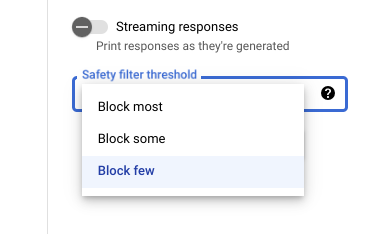
When using Vertex AI Studio, you can use
an adjustable safety filter threshold to determine how likely you are
to see responses that could be harmful. Model responses are blocked based on the
probability that it contains harassment, hate speech, dangerous content, or
sexually explicit content. The safety filter setting is located on the right
side of the prompt field in Vertex AI Studio. You can choose from
three options: `block most`, `block some`, and
`block few`.
### Testing your confidence and severity thresholds
You can test Google's safety filters and define confidence thresholds that
are right for your business. By using these thresholds, you can take
comprehensive measures to detect content that violates Google's usage
policies or terms of service and take appropriate action.
The confidence scores are predictions only, and you shouldn't depend on the
scores for reliability or accuracy. Google is not responsible for
interpreting or using these scores for business decisions.
### Recommended practices
To utilize this technology safely and responsibly, it's important to
consider other risks specific to your use case, users, and business context in
addition to built-in technical safeguards.
We recommend taking the following steps:
1. Assess your application's security risks.
2. Consider adjustments to mitigate safety risks.
3. Perform safety testing appropriate to your use case.
4. Solicit user feedback and monitor content.
To learn more, see Google's recommendations for [Responsible AI](https://docs.cloud.google.com/vertex-ai/generative-ai/docs/learn/responsible-ai).
## Request body
```json
{
"instances": [
{
"content": string
}
],
"parameters": {
"temperature": number,
"maxOutputTokens": integer,
"topK": integer,
"topP": number
}
}
```
Use the following parameters for the `medlm-medium` and `medlm-large` models.
For more information, see [Design text prompts](https://docs.cloud.google.com/vertex-ai/generative-ai/docs/text/text-prompts).
| **Parameter** | **Description** | **Acceptable values** |
|---|---|---|
| `content` | Text input to generate model response. Prompts can include preamble, questions, suggestions, instructions, or examples. | Text |
| `temperature` | The temperature is used for sampling during response generation, which occurs when `topP` and `topK` are applied. Temperature controls the degree of randomness in token selection. Lower temperatures are good for prompts that require a less open-ended or creative response, while higher temperatures can lead to more diverse or creative results. A temperature of `0` means that the highest probability tokens are always selected. In this case, responses for a given prompt are mostly deterministic, but a small amount of variation is still possible. If the model returns a response that's too generic, too short, or the model gives a fallback response, try increasing the temperature. If the model enters infinite generation, increasing the temperature to at least `0.1` may lead to improved results. `1.0` is the recommended starting value for temperature. | `0.0--1.0` `Default: 0.2` |
| `maxOutputTokens` | Maximum number of tokens that can be generated in the response. A token is approximately four characters. 100 tokens correspond to roughly 60-80 words. Specify a lower value for shorter responses and a higher value for potentially longer responses. | `1--8192` for medlm-medium `1--1024` for medlm-large |
| `topK` | Top-K changes how the model selects tokens for output. A top-K of `1` means the next selected token is the most probable among all tokens in the model's vocabulary (also called greedy decoding), while a top-K of `3` means that the next token is selected from among the three most probable tokens by using temperature. For each token selection step, the top-K tokens with the highest probabilities are sampled. Then tokens are further filtered based on top-P with the final token selected using temperature sampling. Specify a lower value for less random responses and a higher value for more random responses. | `1--40` `Default: 40` |
| `topP` | Top-P changes how the model selects tokens for output. Tokens are selected from the most probable to least probable until the sum of their probabilities equals the top-P value. For example, if tokens A, B, and C have a probability of 0.3, 0.2, and 0.1 and the top-P value is `0.5`, then the model will select either A or B as the next token by using temperature and excludes C as a candidate. Specify a lower value for less random responses and a higher value for more random responses. | `0.0--1.0` `Default: 0.8` |
## Sample request
When using the MedLM API, it's important to incorporate prompt engineering.
For example, we strongly recommend providing appropriate,
task-specific instructions at the beginning of each prompt. For more information,
see [Introduction to prompting](https://docs.cloud.google.com/vertex-ai/generative-ai/docs/learn/introduction-prompt-design).
### REST
> [!CAUTION]
> **Caution:** The generated output may not always be completely reliable. Due to the nature of LLMs and Generative AI, outputs may have incorrect or biased information and should be reviewed. All summaries or answers should be considered draft and not final.
Before using any of the request data,
make the following replacements:
- `PROJECT_ID`: Your [project ID](https://docs.cloud.google.com/resource-manager/docs/creating-managing-projects.md.txt#identifiers).
- `MEDLM_MODEL`: The MedLM model, either `medlm-medium` or `medlm-large`.
HTTP method and URL:
```
POST https://us-central1-aiplatform.googleapis.com/v1/projects/PROJECT_ID/locations/us-central1/publishers/google/models/MEDLM_MODEL:predict
```
Request JSON body:
```
{
"instances": [
{
"content": "Question: What causes you to get ringworm?"
}
],
"parameters": {
"temperature": 0,
"maxOutputTokens": 256,
"topK": 40,
"topP": 0.95
}
}
```
To send your request, choose one of these options:
#### curl
> [!NOTE]
> **Note:** The following command assumes that you have logged in to the `gcloud` CLI with your user account by running [`gcloud init`](https://docs.cloud.google.com/sdk/gcloud/reference/init) or [`gcloud auth login`](https://docs.cloud.google.com/sdk/gcloud/reference/auth/login.md.txt) , or by using [Cloud Shell](https://docs.cloud.google.com/shell/docs.md.txt), which automatically logs you into the `gcloud` CLI . You can check the currently active account by running [`gcloud auth list`](https://docs.cloud.google.com/sdk/gcloud/reference/auth/list.md.txt).
Save the request body in a file named `request.json`.
Run the following command in the terminal to create or overwrite
this file in the current directory:
```
cat > request.json << 'EOF'
{
"instances": [
{
"content": "Question: What causes you to get ringworm?"
}
],
"parameters": {
"temperature": 0,
"maxOutputTokens": 256,
"topK": 40,
"topP": 0.95
}
}
EOF
```
Then execute the following command to send your REST request:
```
curl -X POST \
-H "Authorization: Bearer $(gcloud auth print-access-token)" \
-H "Content-Type: application/json; charset=utf-8" \
-d @request.json \
"https://us-central1-aiplatform.googleapis.com/v1/projects/PROJECT_ID/locations/us-central1/publishers/google/models/MEDLM_MODEL:predict"
```
#### PowerShell
> [!NOTE]
> **Note:** The following command assumes that you have logged in to the `gcloud` CLI with your user account by running [`gcloud init`](https://docs.cloud.google.com/sdk/gcloud/reference/init) or [`gcloud auth login`](https://docs.cloud.google.com/sdk/gcloud/reference/auth/login.md.txt) . You can check the currently active account by running [`gcloud auth list`](https://docs.cloud.google.com/sdk/gcloud/reference/auth/list.md.txt).
Save the request body in a file named `request.json`.
Run the following command in the terminal to create or overwrite
this file in the current directory:
```
@'
{
"instances": [
{
"content": "Question: What causes you to get ringworm?"
}
],
"parameters": {
"temperature": 0,
"maxOutputTokens": 256,
"topK": 40,
"topP": 0.95
}
}
'@ | Out-File -FilePath request.json -Encoding utf8
```
Then execute the following command to send your REST request:
```
$cred = gcloud auth print-access-token
$headers = @{ "Authorization" = "Bearer $cred" }
Invoke-WebRequest `
-Method POST `
-Headers $headers `
-ContentType: "application/json; charset=utf-8" `
-InFile request.json `
-Uri "https://us-central1-aiplatform.googleapis.com/v1/projects/PROJECT_ID/locations/us-central1/publishers/google/models/MEDLM_MODEL:predict" | Select-Object -Expand Content
```
## Response body
```json
{
"predictions": [
{
"content": string,
"citationMetadata": {
"citations": [
{
"startIndex": integer,
"endIndex": integer,
"url": string,
"title": string,
"license": string,
"publicationDate": string
}
]
},
"logprobs": {
"tokenLogProbs": [ float ],
"tokens": [ string ],
"topLogProbs": [ { map } ]
},
"safetyAttributes": {
"categories": [ string ],
"blocked": boolean,
"scores": [ float ],
"errors": [ int ]
}
}
],
"metadata": {
"tokenMetadata": {
"input_token_count": {
"total_tokens": integer,
"total_billable_characters": integer
},
"output_token_count": {
"total_tokens": integer,
"total_billable_characters": integer
}
}
}
}
```
| Response element | Description |
|---|---|
| `content` | The result generated from input text. |
| `categories` | The display names of Safety Attribute categories associated with the generated content. Order matches the Scores. |
| `scores` | The confidence scores of the each category, higher value means higher confidence. |
| `blocked` | A flag indicating if the model's input or output was blocked. |
| `errors` | An error code that identifies why the input or output was blocked. For a list of error codes, see [Safety filters and attributes](https://docs.cloud.google.com/vertex-ai/generative-ai/docs/learn/responsible-ai#safety_filters_and_attributes). |
| `startIndex` | Index in the prediction output where the citation starts (inclusive). Must be greater than or equal to `0` and less than `end_index`. |
| `endIndex` | Index in the prediction output where the citation ends (exclusive). Must be greater than `start_index` and less than `len(output)`. |
| `url` | URL associated with this citation. If present, this URL links to the web page of the source of this citation. Possible URLs include news websites, GitHub repos, and so forth. |
| `title` | Title associated with this citation. If present, it refers to the title of the source of this citation. Possible titles include news titles, book titles, and so forth. |
| `license` | License associated with this recitation. If present, it refers to the license of the source of this citation. Possible licenses include code licenses, such as MIT license. |
| `publicationDate` | Publication date associated with this citation. If present, it refers to the date at which the source of this citation was published. Possible formats are YYYY, YYYY-MM, YYYY-MM-DD. |
| `input_token_count` | Number of input tokens. This is the total number of tokens across all prompts, prefixes, and suffixes. |
| `output_token_count` | Number of output tokens. This is the total number of tokens in `content` across all predictions. |
| `tokens` | The sampled tokens. |
| `tokenLogProbs` | The sampled tokens' log probabilities. |
| `topLogProb` | The most likely candidate tokens and their log probabilities at each step. |
| `logprobs` | Results of the `logprobs` parameter. 1-1 mapping to `candidates`. |
## Sample response
```json
{
"predictions": [
{
"citationMetadata": {
"citations": []
},
"content": "\n\nAnswer and Explanation:\nRingworm is a fungal infection of the skin that is caused by a type of fungus called dermatophyte. Dermatophytes can live on the skin, hair, and nails, and they can be spread from person to person through direct contact or through contact with contaminated objects.\n\nRingworm can cause a variety of symptoms, including:\n\n* A red, itchy rash\n* A raised, circular border\n* Blisters or scales\n* Hair loss\n\nRingworm is most commonly treated with antifungal medications, which can be applied to the skin or taken by mouth. In some cases, surgery may be necessary to remove infected hair or nails.",
"safetyAttributes": {
"scores": [
1
],
"blocked": false,
"categories": [
"Health"
]
}
}
],
"metadata": {
"tokenMetadata": {
"outputTokenCount": {
"totalTokens": 140,
"totalBillableCharacters": 508
},
"inputTokenCount": {
"totalTokens": 10,
"totalBillableCharacters": 36
}
}
}
}
```