> [!CAUTION]
> **Caution:** The following table describes image generation endpoints that are deprecated and their replacements. We recommend updating your model endpoints before June 30, 2026, to avoid service disruption.
>
> | Discontinued endpoints | Recommended endpoint migration |
> |---|---|
> | `imagegeneration@002` | `gemini-2.5-flash-image` |
> | `imagegeneration@003` | `gemini-2.5-flash-image` |
> | `imagegeneration@004` | `gemini-2.5-flash-image` |
> | `imagegeneration@005` | `gemini-2.5-flash-image` |
> | `imagegeneration@006` | `gemini-2.5-flash-image` |
> | `imagetext@001` | `gemini-2.5-flash-image` |
> | `imagen-3.0-capability-001` | `gemini-2.5-flash-image` |
> | `imagen-3.0-capability-002` | `gemini-2.5-flash-image` |
> | `imagen-3.0-fast-generate-001` | `gemini-2.5-flash-image` |
> | `imagen-3.0-generate-001` | `gemini-2.5-flash-image` |
> | `imagen-3.0-generate-002` | `gemini-2.5-flash-image` |
> | `imagen-4.0-fast-generate-001` | `gemini-2.5-flash-image` |
> | `imagen-4.0-generate-001` | `gemini-2.5-flash-image` |
> | `imagen-4.0-ultra-generate-001` | `gemini-2.5-flash-image` |
>
> [!WARNING]
> **Preview**
>
>
> This Imagen feature is a Preview offering, subject to the
> "Pre-GA Offerings Terms" of the [Google
> Cloud Service Specific Terms](https://cloud.google.com/terms/service-terms). Pre-GA products and features may have
> limited support, and changes to pre-GA products and features may not be
> compatible with other pre-GA versions. For more information, see the [launch stage descriptions](https://cloud.google.com/products#product-launch-stages).
> Further, by using this Imagen feature, you agree to the
> Generative AI Preview
> [terms and conditions](https://cloud.google.com/trustedtester/aitos) ("Preview Terms").
[Try image generation (Vertex AI Studio)](https://console.cloud.google.com/vertex-ai/studio/media/generate;tab=image)
[Try Imagen in a Colab](https://colab.research.google.com/github/GoogleCloudPlatform/generative-ai/blob/main/vision/getting-started/imagen4_image_generation.ipynb)
This page describes how you can set an optional Imagen on Vertex AI parameter to
specify the prompt language that you use. If you don't specify a language, then
Imagen automatically detects the language.
> [!NOTE]
> **Note:** While Imagen models support only English natively, Imagen uses translation to translate several non-English language prompts to English to feed the model.
|---|---|
| 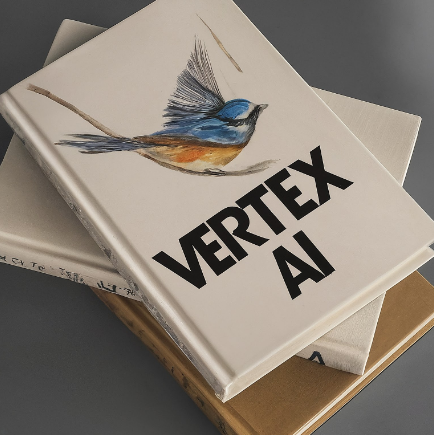 Image generated from prompt: ऊपर से देखा गया किताबों का ढेर। सबसे ऊपरी पुस्तक में एक पक्षी का जलरंग चित्रण है। किताब पर VERTEX AI मोटे अक्षरों में लिखा हुआ है ^1^ ^1^ *A pile of books seen from above. The topmost book contains a watercolor illustration of a bird. **VERTEX AI** is written in bold letters on the book.* |  Image generated from prompt: 어두운 노란색과 청록색으로 이루어진 밝은 색의 옷을입고 귀걸이를 끼고있는 여자 포스트 모던 패션 사진 ^2^ ^2^ *Woman wearing bright colors, in the style of dark yellow and dark cyan, wearing earrings, postmodern fashion photography.* |
## Set text prompt language
The following input values are supported for the text-prompt lanague:
- Chinese (simplified) (`zh`/`zh-CN`)
- Chinese (traditional) (`zh-TW`)
- English (`en`, default value)
- French (`fr`)
- German (`de`)
- Hindi (`hi`)
- Japanese (`ja`)
- Korean (`ko`)
- Portuguese (`pt`)
- Spanish (`es`)
### Console
If your prompt is in one of the supported languages,
Imagen detects and translates your text and
returns your generated or edited images.
If your prompt is in an unsupported language, Imagen uses
the text verbatim for the request. This might result in unexpected output.
### REST
For more information about the Imagen API, see the following:
- [Method:
`endpoints.predict`](https://docs.cloud.google.com/vertex-ai/generative-ai/docs/reference/rest/v1/projects.locations.endpoints/predict)
- [`VisionGenerativeModelInstance`](https://docs.cloud.google.com/vertex-ai/generative-ai/docs/reference/rest/Shared.Types/VisionGenerativeModelInstance)
- [`VisionGenerativeModelParams`](https://docs.cloud.google.com/vertex-ai/generative-ai/docs/reference/rest/Shared.Types/VisionGenerativeModelParams)
- [`VisionGenerativeModelResult`](https://docs.cloud.google.com/vertex-ai/generative-ai/docs/reference/rest/Shared.Types/VisionGenerativeModelResult)
> [!IMPORTANT]
> **Important:** `imagen-3.0-generate-002` doesn't support the text prompt language feature.
Before using any of the request data,
make the following replacements:
- PROJECT_ID: Your Google Cloud [project ID](https://docs.cloud.google.com/resource-manager/docs/creating-managing-projects.md.txt#identifying_projects).
- TEXT_PROMPT: The text prompt that guides what images the model generates. This field is required for both generation and editing.
- PROMPT_LANGUAGE: string. Optional. The language code that corresponds to your text prompt language. In this example it would be `hi`. Available values:
- `auto` - Automatic detection. If Imagen detects a supported language, the prompt (and optionally, a negative prompt), are translated to English. If the language detected is not supported, Imagen uses the input text verbatim, which might result in unexpected output. No error code is returned.
- `en` - English (default value if omitted)
- `es` - Spanish
- `hi` - Hindi
- `ja` - Japanese
- `ko` - Korean
- `pt` - Portuguese
- `zh-TW` - Chinese (traditional)
- `zh` or `zh-CN` - Chinese (simplified)
HTTP method and URL:
```
POST https://us-central1-aiplatform.googleapis.com/v1/projects/PROJECT_ID/locations/us-central1/publishers/google/models/imagegeneration@005:predict
```
Request JSON body:
```
{
"instances": [
{
"prompt": "सूर्यास्त के समय एक समुद्र तट। उड़ते पक्षी, हवा में लहराते नारियल के पेड़। लोग समुद्र तट पर सैर का आनंद ले रहे हैं।"
}
],
"parameters": {
"language": "PROMPT_LANGUAGE"
}
}
```
To send your request, choose one of these options:
#### curl
> [!NOTE]
> **Note:** The following command assumes that you have logged in to the `gcloud` CLI with your user account by running [`gcloud init`](https://docs.cloud.google.com/sdk/gcloud/reference/init) or [`gcloud auth login`](https://docs.cloud.google.com/sdk/gcloud/reference/auth/login.md.txt) , or by using [Cloud Shell](https://docs.cloud.google.com/shell/docs.md.txt), which automatically logs you into the `gcloud` CLI . You can check the currently active account by running [`gcloud auth list`](https://docs.cloud.google.com/sdk/gcloud/reference/auth/list.md.txt).
Save the request body in a file named `request.json`,
and execute the following command:
```
curl -X POST \
-H "Authorization: Bearer $(gcloud auth print-access-token)" \
-H "Content-Type: application/json; charset=utf-8" \
-d @request.json \
"https://us-central1-aiplatform.googleapis.com/v1/projects/PROJECT_ID/locations/us-central1/publishers/google/models/imagegeneration@005:predict"
```
#### PowerShell
> [!NOTE]
> **Note:** The following command assumes that you have logged in to the `gcloud` CLI with your user account by running [`gcloud init`](https://docs.cloud.google.com/sdk/gcloud/reference/init) or [`gcloud auth login`](https://docs.cloud.google.com/sdk/gcloud/reference/auth/login.md.txt) . You can check the currently active account by running [`gcloud auth list`](https://docs.cloud.google.com/sdk/gcloud/reference/auth/list.md.txt).
Save the request body in a file named `request.json`,
and execute the following command:
```
$cred = gcloud auth print-access-token
$headers = @{ "Authorization" = "Bearer $cred" }
Invoke-WebRequest `
-Method POST `
-Headers $headers `
-ContentType: "application/json; charset=utf-8" `
-InFile request.json `
-Uri "https://us-central1-aiplatform.googleapis.com/v1/projects/PROJECT_ID/locations/us-central1/publishers/google/models/imagegeneration@005:predict" | Select-Object -Expand Content
```
The following sample response is for a request with `"sampleCount": 2`. The response returns two prediction objects, with the generated image bytes base64-encoded.
```
{
"predictions": [
{
"bytesBase64Encoded": "BASE64_IMG_BYTES",
"mimeType": "image/png"
},
{
"mimeType": "image/png",
"bytesBase64Encoded": "BASE64_IMG_BYTES"
}
]
}
```
## What's next
- [Use prompt rewriter](https://docs.cloud.google.com/vertex-ai/generative-ai/docs/image/use-prompt-rewriter.md.txt)
- [Configure aspect ratio](https://docs.cloud.google.com/vertex-ai/generative-ai/docs/image/configure-aspect-ratio.md.txt)
- [Omit content using a negative prompt](https://docs.cloud.google.com/vertex-ai/generative-ai/docs/image/omit-content-using-a-negative-prompt.md.txt)
- [Generate deterministic images](https://docs.cloud.google.com/vertex-ai/generative-ai/docs/image/generate-deterministic-images.md.txt)