> [!CAUTION]
> **Caution:** The following table describes image generation endpoints that are deprecated and their replacements. We recommend updating your model endpoints before June 30, 2026, to avoid service disruption.
>
> | Discontinued endpoints | Recommended endpoint migration |
> |---|---|
> | `imagegeneration@002` | `gemini-2.5-flash-image` |
> | `imagegeneration@003` | `gemini-2.5-flash-image` |
> | `imagegeneration@004` | `gemini-2.5-flash-image` |
> | `imagegeneration@005` | `gemini-2.5-flash-image` |
> | `imagegeneration@006` | `gemini-2.5-flash-image` |
> | `imagetext@001` | `gemini-2.5-flash-image` |
> | `imagen-3.0-capability-001` | `gemini-2.5-flash-image` |
> | `imagen-3.0-capability-002` | `gemini-2.5-flash-image` |
> | `imagen-3.0-fast-generate-001` | `gemini-2.5-flash-image` |
> | `imagen-3.0-generate-001` | `gemini-2.5-flash-image` |
> | `imagen-3.0-generate-002` | `gemini-2.5-flash-image` |
> | `imagen-4.0-fast-generate-001` | `gemini-2.5-flash-image` |
> | `imagen-4.0-generate-001` | `gemini-2.5-flash-image` |
> | `imagen-4.0-ultra-generate-001` | `gemini-2.5-flash-image` |
>
Controlled Customization lets you to create new images based on a source image
or a source image signal (canny edge or scribble). This page
shows you how to send two types of Controlled Customization requests:
1. Imagen 3 Controlled Customization (GA feature)
[View Imagen for Editing and Customization model card](https://console.cloud.google.com/vertex-ai/publishers/google/model-garden/imagen-3.0-capability-001)
2. Imagen 2 Controlled Customization - canny edge or scribble source image signal
(Preview feature)
The following models support Controlled Customization:
- [`imagen-3.0-capability-001`](https://docs.cloud.google.com/vertex-ai/generative-ai/docs/models/imagen/3-0-generate.md.txt#3.0-capability-001)
## Use cases
Imagen 3 Controlled Customization offers free-style prompting, which can give
you the impression that the model can do more than it is trained to do. The
following sections describe use cases and examples for
Imagen 3 Controlled Customization.
The model has been trained on use cases that we provide, and we expect good
results when you use Imagen 3 Controlled Customization. If you push the model to
respond in unexpected ways, we don't expect good results.
### Examples of intended use cases
The following are use cases that Imagen 3 Controlled Customization is trained to
do and produces good results for:
- Generate an image that follows the prompt and the canny edge control
images.
- Generate an image that follows the prompt and the scribble images.
- Stylize a photo of a person while preserving the facial expression.
### Examples of unintended use cases
The following are use cases that Imagen 3 Controlled Customization isn't trained
to do and produces poor results for:
- Generate an image using a style specified in the prompt.
- Generate an image from text that follows a specific style provided by a
reference image, with some level of control on the image composition using a
control image.
- Generate an image from text that follows a specific style provided by a
reference image, with some level of control on the image composition using a
control scribble.
- Generate an image from text that follows a specific style provided by the
reference image, with some level of control on the image composition using a
control image. The person in the image has a specific facial expression.
- Stylize a photo of two or more people, and preserve their facial
expressions.
- Stylize a photo of a pet, and turn it into a drawing. Preserve or specify
the composition of the image (for example, watercolor).
## Before you begin
1. Set up authentication for your environment.
Select the tab for how you plan to use the samples on this page:
### Console
When you use the Google Cloud console to access Google Cloud services and
APIs, you don't need to set up authentication.
### REST
To use the REST API samples on this page in a local development environment, you use the
credentials you provide to the gcloud CLI.
1. [Install](https://docs.cloud.google.com/sdk/docs/install) the Google Cloud CLI.
2. If you're using an external identity provider (IdP), you must first [sign in to the gcloud CLI with your federated identity](https://docs.cloud.google.com/iam/docs/workforce-log-in-gcloud.md.txt).
For more information, see
[Authenticate for using REST](https://docs.cloud.google.com/docs/authentication/rest.md.txt)
in the Google Cloud authentication documentation.
## Customization prompt writing
The prompt you use with Imagen 3 Customization might affect the quality
of your generated images. Use the following prompt templates as a starting
point for writing customization prompts. You might need to send several requests
to get your targeted output.
| Use case | Reference images | Prompt template | Example |
|---|---|---|---|
| Controlled customization | Scribble map (1) | Generate an image that aligns with the scribble map \[1\] to match the description: *${STYLE_PROMPT} ${PROMPT}*. | Generate an image that aligns with the scribble map \[1\] to match the description: *The image should be in the style of an impressionistic oil painting with relaxed brushstrokes. It possesses a naturally-lit ambience and noticeable brushstrokes. A side-view of a car. The car is parked on a wet, reflective road surface, with city lights reflecting in the puddles.* |
| Controlled customization | Canny control image (1) | Generate an image aligning with the edge map \[1\] to match the description: *${STYLE_PROMPT} ${PROMPT}* | Generate an image aligning with the edge map \[1\] to match the description: * The image should be in the style of an impressionistic oil painting, with relaxed brushstrokes. It posses a naturally-lit ambience and noticeable brushstrokes. A side-view of a car. The car is parked on a wet, reflective road surface, with city lights reflecting in the puddles.* |
| Person image stylization with FaceMesh input | Subject image (1-3) *** ** * ** *** FaceMesh control image (1) | Create an image about SUBJECT_DESCRIPTION \[1\] in the pose of the CONTROL_IMAGE \[2\] to match the description: a portrait of SUBJECT_DESCRIPTION \[1\] *${PROMPT}* | Create an image about a woman with short hair \[1\] in the pose of the control image \[2\] to match the description: a portrait of a woman with short hair \[1\] *in 3D-cartoon style with a blurred background. A cute and lovely character, with a smiling face, facing the camera, pastel color tone, high quality, 4k, masterpiece, super details, skin texture, texture mapping, soft shadows, soft realistic lighting, vibrant colors* |
| Person image stylization with FaceMesh input | Subject image (1-3) *** ** * ** *** FaceMesh control image (1) | Create a *${STYLE_PROMPT}* image about SUBJECT_DESCRIPTION \[1\] in the pose of the CONTROL_IMAGE \[2\] to match the description: a portrait of SUBJECT_DESCRIPTION \[1\] *${PROMPT}* | Create a *3D-cartoon style* image about a woman with short hair \[1\] in the pose of the control image \[2\] to match the description: a portrait of a woman with short hair \[1\] *in 3D-cartoon style with a blurred background. A cute and lovely character with a smiling face, facing the camera, pastel color tone, high quality, 4k, masterpiece, super details, skin texture, texture mapping, soft shadows, soft realistic lighting, vibrant colors* |
## Send a Imagen 3 Controlled Customization request
> [!NOTE]
> To see an example of Imagen 3 Customization,
> run the "Imagen 3 Customized Images" notebook in one of the following
> environments:
>
> [Open in Colab](https://colab.research.google.com/github/GoogleCloudPlatform/generative-ai/blob/main/vision/getting-started/imagen3_customization.ipynb)
>
>
> \|
>
> [Open in Colab Enterprise](https://console.cloud.google.com/vertex-ai/colab/import/https%3A%2F%2Fraw.githubusercontent.com%2FGoogleCloudPlatform%2Fgenerative-ai%2Fmain%2Fvision%2Fgetting-started%2Fimagen3_customization.ipynb)
>
>
> \|
>
> [Open
> in Vertex AI Workbench](https://console.cloud.google.com/vertex-ai/workbench/deploy-notebook?download_url=https://raw.githubusercontent.com/GoogleCloudPlatform/generative-ai/main/vision/getting-started/imagen3_customization.ipynb)
>
>
> \|
>
> [View on GitHub](https://github.com/GoogleCloudPlatform/generative-ai/blob/main/vision/getting-started/imagen3_customization.ipynb)
Use the following samples to send a Imagen 3 Controlled Customization request:
### REST
For more information about the Imagen API, see the following:
- [Method:
`endpoints.predict`](https://docs.cloud.google.com/vertex-ai/generative-ai/docs/reference/rest/v1/projects.locations.endpoints/predict)
- [`VisionGenerativeModelInstance`](https://docs.cloud.google.com/vertex-ai/generative-ai/docs/reference/rest/Shared.Types/VisionGenerativeModelInstance)
- [`VisionGenerativeModelParams`](https://docs.cloud.google.com/vertex-ai/generative-ai/docs/reference/rest/Shared.Types/VisionGenerativeModelParams)
- [`VisionGenerativeModelResult`](https://docs.cloud.google.com/vertex-ai/generative-ai/docs/reference/rest/Shared.Types/VisionGenerativeModelResult)
Before using any of the request data,
make the following replacements:
- PROJECT_ID: Your Google Cloud [project ID](https://docs.cloud.google.com/resource-manager/docs/creating-managing-projects.md.txt#identifying_projects).
- LOCATION: Your project's region. For example, `us-central1`, `europe-west2`, or `asia-northeast3`. For a list of available regions, see [Generative AI on Vertex AI locations](https://docs.cloud.google.com/vertex-ai/generative-ai/docs/learn/locations-genai). When a regional API endpoint is used, the region from the endpoint's URL determines where the request is processed, and this `LOCATION` in the resource path is ignored if it conflicts.
- TEXT_PROMPT: The text prompt guides what images the model generates. To use Imagen 3 Controlled Customization, include the `referenceId` of the control reference image you provide in the format \[$referenceId\]. For example:
- * Generate an image aligning with the scribble map \[1\] to match the description: \[image description\]. *
- BASE64_CONTROL_IMAGE: The base control image (sketch). The image must be specified as a [base64-encoded](https://docs.cloud.google.com/vertex-ai/generative-ai/docs/image/base64-encode.md.txt) byte string.
For `CONTROL_TYPE_SCRIBBLE`: The expected scribble control image has black background and white scribble line. 
For `CONTROL_TYPE_CANNY`: The expected canny edge control image has black background and white canny edges. 
- CONTROL_TYPE: The type of the control signal. Use `CONTROL_TYPE_CANNY` for canny edge. Use `CONTROL_TYPE_SCRIBBLE` for scribble.
- `enableControlImageComputation`: Set to `false` if you provide your own control image. In this case, `B64_BASE_IMAGE` should be the control signal image. Set to `true` if you want to let Imagen compute the control image from the reference image. In this case, `B64_BASE_IMAGE` should be the raw RGB image.
- IMAGE_COUNT: The number of generated images. Accepted integer values: 1-4. Default value: 4.
HTTP method and URL:
```
POST https://LOCATION-aiplatform.googleapis.com/v1/projects/PROJECT_ID/locations/LOCATION/publishers/google/models/imagen-3.0-capability-001:predict
```
Request JSON body:
```
{
"instances": [
{
"prompt": "TEXT_PROMPT",
"referenceImages": [
{
"referenceType": "REFERENCE_TYPE_CONTROL",
"referenceId": 1,
"referenceImage": {
"bytesBase64Encoded": "BASE64_CONTROL_IMAGE"
},
"controlImageConfig": {
"controlType": "CONTROL_TYPE",
"enableControlImageComputation": false
}
}
]
}
],
"parameters": {
"sampleCount": IMAGE_COUNT
}
}
```
To send your request, choose one of these options:
#### curl
> [!NOTE]
> **Note:** The following command assumes that you have logged in to the `gcloud` CLI with your user account by running [`gcloud init`](https://docs.cloud.google.com/sdk/gcloud/reference/init) or [`gcloud auth login`](https://docs.cloud.google.com/sdk/gcloud/reference/auth/login.md.txt) , or by using [Cloud Shell](https://docs.cloud.google.com/shell/docs.md.txt), which automatically logs you into the `gcloud` CLI . You can check the currently active account by running [`gcloud auth list`](https://docs.cloud.google.com/sdk/gcloud/reference/auth/list.md.txt).
Save the request body in a file named `request.json`,
and execute the following command:
```
curl -X POST \
-H "Authorization: Bearer $(gcloud auth print-access-token)" \
-H "Content-Type: application/json; charset=utf-8" \
-d @request.json \
"https://LOCATION-aiplatform.googleapis.com/v1/projects/PROJECT_ID/locations/LOCATION/publishers/google/models/imagen-3.0-capability-001:predict"
```
#### PowerShell
> [!NOTE]
> **Note:** The following command assumes that you have logged in to the `gcloud` CLI with your user account by running [`gcloud init`](https://docs.cloud.google.com/sdk/gcloud/reference/init) or [`gcloud auth login`](https://docs.cloud.google.com/sdk/gcloud/reference/auth/login.md.txt) . You can check the currently active account by running [`gcloud auth list`](https://docs.cloud.google.com/sdk/gcloud/reference/auth/list.md.txt).
Save the request body in a file named `request.json`,
and execute the following command:
```
$cred = gcloud auth print-access-token
$headers = @{ "Authorization" = "Bearer $cred" }
Invoke-WebRequest `
-Method POST `
-Headers $headers `
-ContentType: "application/json; charset=utf-8" `
-InFile request.json `
-Uri "https://LOCATION-aiplatform.googleapis.com/v1/projects/PROJECT_ID/locations/LOCATION/publishers/google/models/imagen-3.0-capability-001:predict" | Select-Object -Expand Content
```
The following sample response is for a request with `"sampleCount": 2`. The response returns two prediction objects, with the generated image bytes base64-encoded.
```
{
"predictions": [
{
"bytesBase64Encoded": "BASE64_IMG_BYTES",
"mimeType": "image/png"
},
{
"mimeType": "image/png",
"bytesBase64Encoded": "BASE64_IMG_BYTES"
}
]
}
```
## Send an Imagen 2 Controlled Customization request
> [!WARNING]
> **Preview**
>
>
> This Imagen feature is a Preview offering, subject to the
> "Pre-GA Offerings Terms" of the [Google
> Cloud Service Specific Terms](https://cloud.google.com/terms/service-terms). Pre-GA products and features may have
> limited support, and changes to pre-GA products and features may not be
> compatible with other pre-GA versions. For more information, see the [launch stage descriptions](https://cloud.google.com/products#product-launch-stages).
> Further, by using this Imagen feature, you agree to the
> Generative AI Preview
> [terms and conditions](https://cloud.google.com/trustedtester/aitos) ("Preview Terms").
| Input image | Other parameters | Output image |
|---|---|---|
| 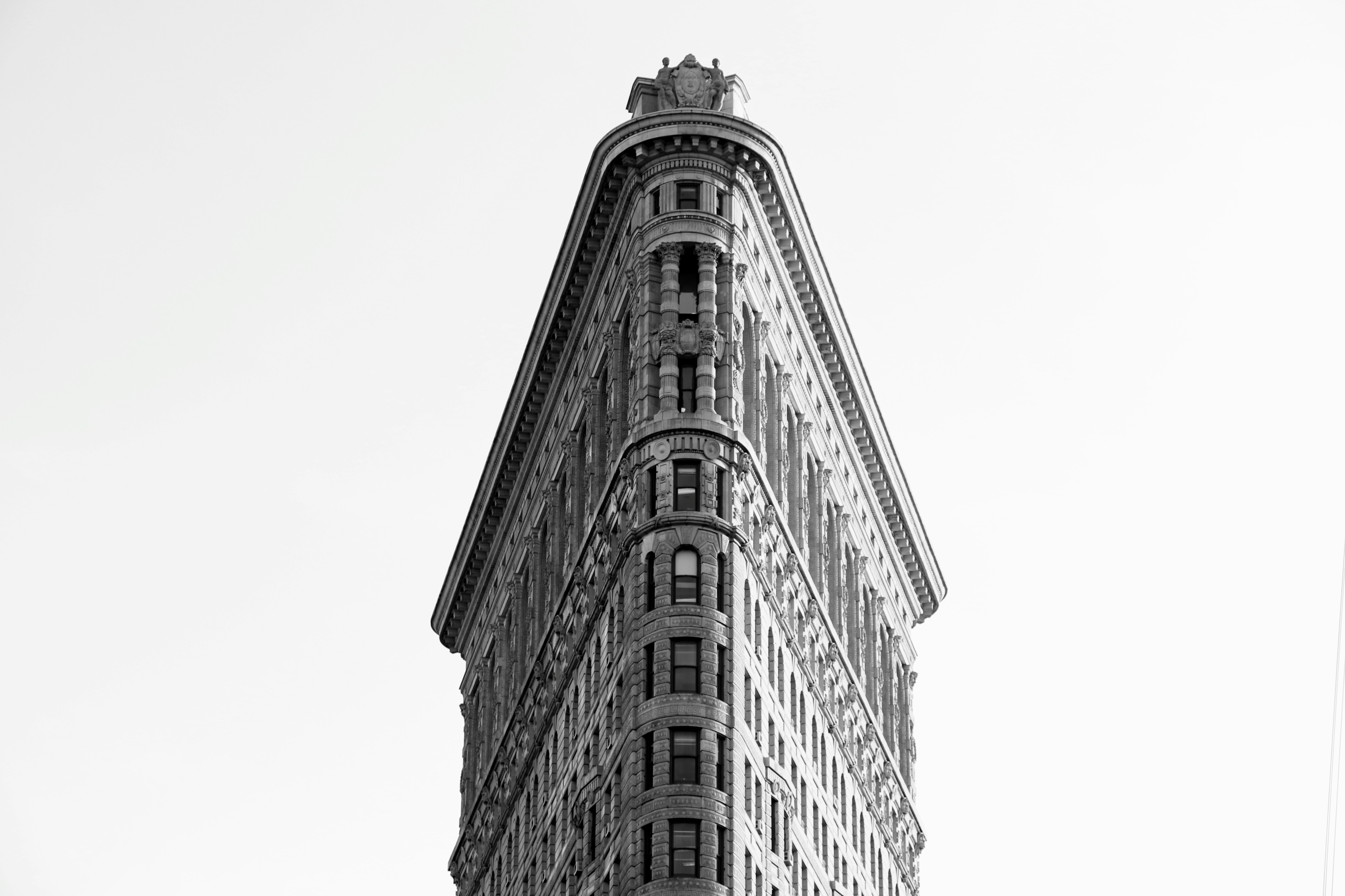 Input image. Image source: [Alec Cutter](https://unsplash.com/photos/flatiron-building-new-york-Sfn8f32ZIj0) on [Unsplash](https://unsplash.com/). | **Prompt:** "digital art version" **Negative prompt:** "black and white" **Guide image type:** Standard RGB **Control condition:** canny edge **Imagen Control scale:** 0.95 | 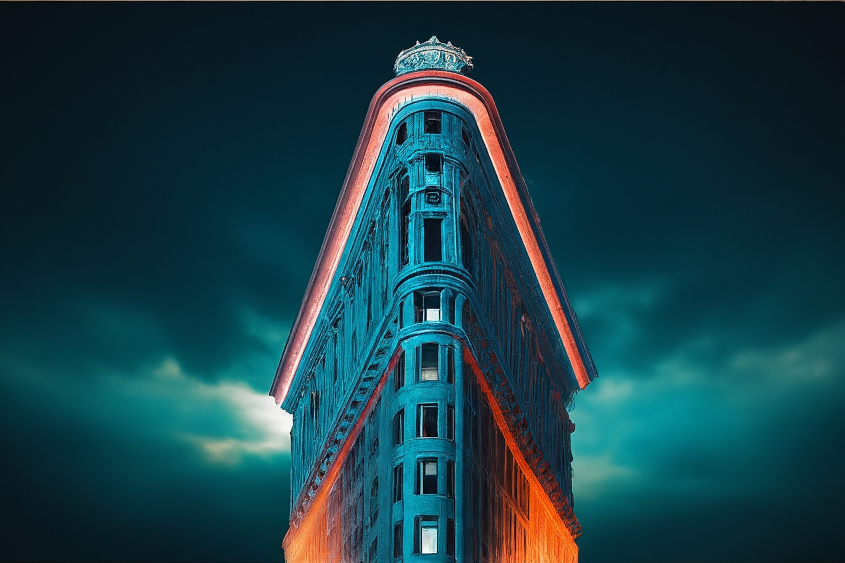 |
| 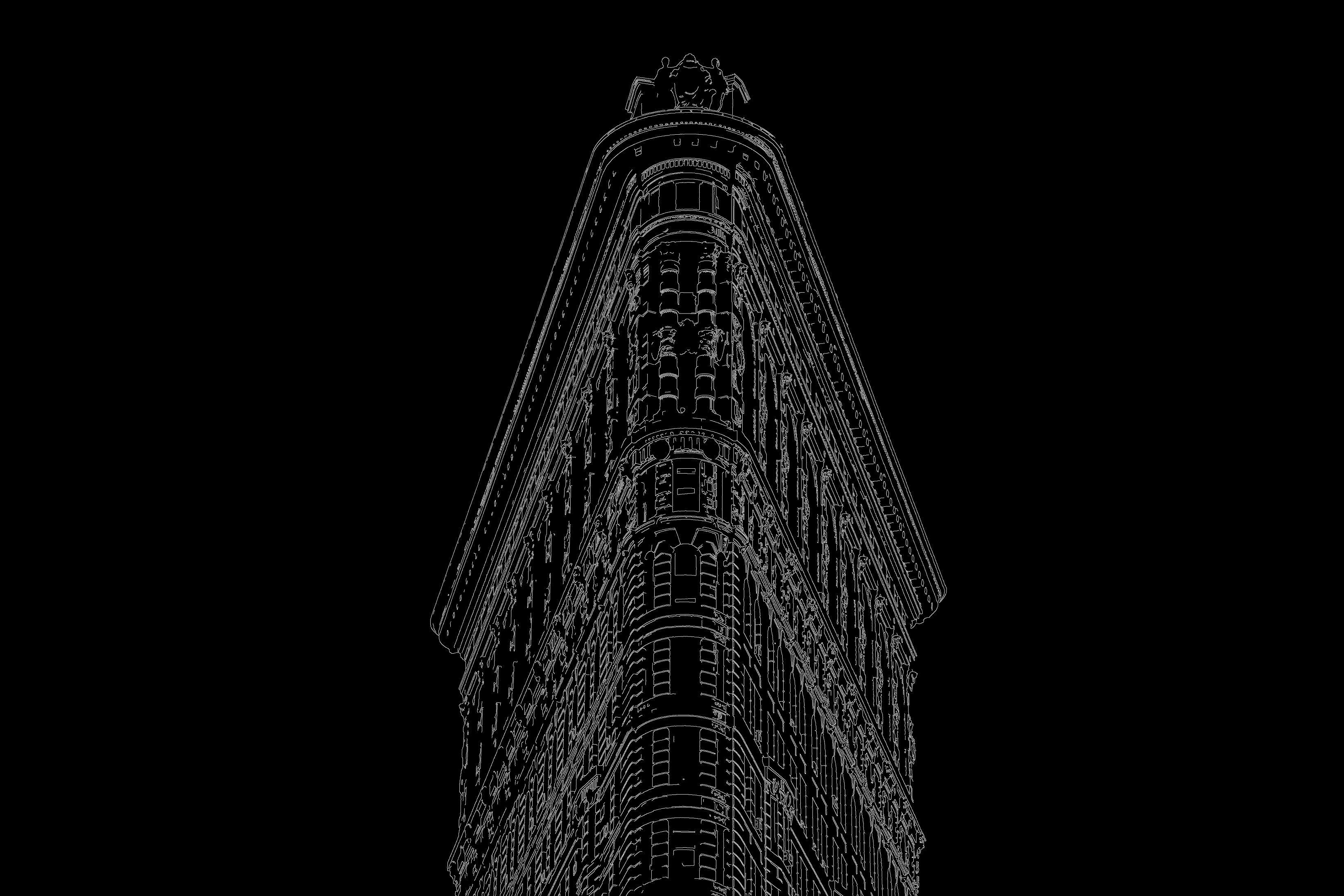 Input image. Image source: [Alec Cutter](https://unsplash.com/photos/flatiron-building-new-york-Sfn8f32ZIj0) on [Unsplash](https://unsplash.com/) (canny edge detection applied). | **Prompt:** "digital art version" **Negative prompt:** "black and white" **Guide image type:** canny edge **Imagen Control scale:** 0.95 | 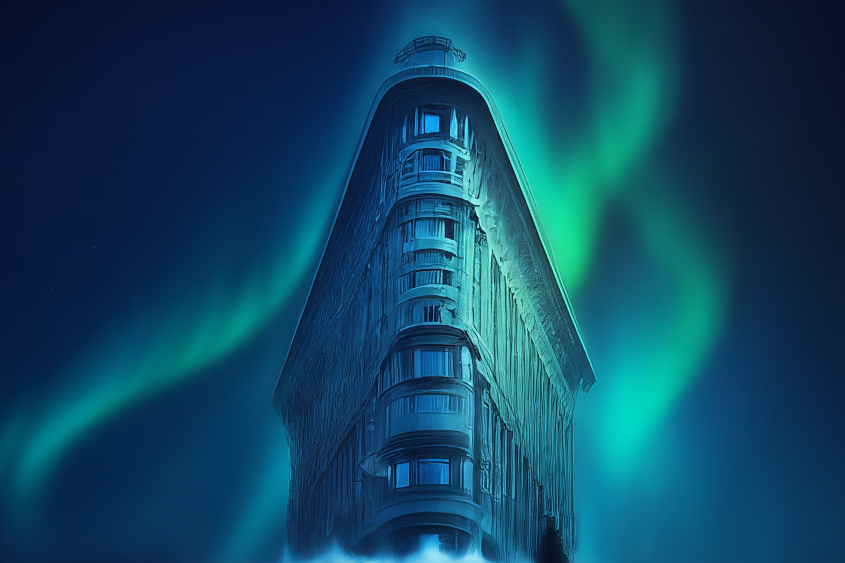 |
Use the following samples to send a Imagen 2 Controlled Customization request:
## Product usage
To view usage standards and content restrictions associated with
Imagen on Vertex AI, see the
[usage guidelines](https://docs.cloud.google.com/vertex-ai/generative-ai/docs/image/responsible-ai-imagen.md.txt#imagen-guidelines).
## Model versions
There are multiple image generation models that you can use. For more
information, see [Imagen
models](https://docs.cloud.google.com/vertex-ai/generative-ai/docs/models#imagen-models).
## What's next
Read articles about Imagen and other Generative AI on Vertex AI
products:
- [A developer's guide to getting started with Imagen 3 on
Vertex AI](https://cloud.google.com/blog/products/ai-machine-learning/a-developers-guide-to-imagen-3-on-vertex-ai?e=0?utm_source%3Dlinkedin)
- [New generative media models and tools, built with and for creators](https://blog.google/technology/ai/google-generative-ai-veo-imagen-3/#veo)
- [New in Gemini: Custom Gems and improved image generation with
Imagen 3](https://blog.google/products/gemini/google-gemini-update-august-2024/)
- [Google DeepMind: Imagen 3 - Our highest quality
text-to-image model](https://deepmind.google/technologies/imagen-3/)