> [!WARNING]
>
> **Preview**
>
>
> This feature is
>
> subject to the "Pre-GA Offerings Terms" in the General Service Terms section of the
> [Service Specific
> Terms](https://docs.cloud.google.com/terms/service-terms#1).
>
> Pre-GA features are available "as is" and might have limited support.
>
> For more information, see the
> [launch stage descriptions](https://cloud.google.com/products/#product-launch-stages).
This document provides an overview of the Tabular Workflow for TabNet
pipelines and components. To train a model with TabNet,
see [Train a model with TabNet](https://docs.cloud.google.com/vertex-ai/docs/tabular-data/tabular-workflows/tabnet-train.md.txt).
[TabNet](https://arxiv.org/abs/1908.07442) uses [sequential attention](https://papers.nips.cc/paper/7181-attention-is-all-you-need.pdf) to choose which
features to reason from at each decision step. This promotes interpretability and
more efficient learning because the learning capacity is used for the most salient features.
## Benefits
- Automatically selects the appropriate hyperparameter search space based on the dataset size, inference type, and training budget.
- Integrated with Vertex AI. The trained model is a Vertex AI model. You can run batch inferences or deploy the model for online inferences right away.
- Provides inherent model interpretability. You can get insight into which features TabNet used to make its decision.
- Supports GPU training.
## TabNet on Vertex AI Pipelines
Tabular Workflow for TabNet is a managed instance of Vertex AI Pipelines.
[Vertex AI Pipelines](https://docs.cloud.google.com/vertex-ai/docs/pipelines/introduction) is a serverless
service that runs Kubeflow pipelines. You can use pipelines to automate
and monitor your machine learning and data preparation tasks. Each step in a
pipeline performs part of the pipeline's workflow. For example,
a pipeline can include steps to split data, transform data types, and train a model. Since steps
are instances of pipeline components, steps have inputs, outputs, and a
container image. Step inputs can be set from the pipeline's inputs or they can
depend on the output of other steps within this pipeline. These dependencies
define the pipeline's workflow as a directed acyclic graph.
Tabular Workflow for TabNet offers two versions:
- [HyperparameterTuningJob](https://docs.cloud.google.com/vertex-ai/docs/tabular-data/tabular-workflows/tabnet.md.txt#hyperparametertuningjob) searches for the best set of hyperparameter values to use for model training.
- [CustomJob](https://docs.cloud.google.com/vertex-ai/docs/tabular-data/tabular-workflows/tabnet.md.txt#customjob) lets you specify the hyperparameter values to use for model training. If you know exactly which hyperparameter values you need, specify them instead of searching for them and save on training resources.
## Overview of TabNet CustomJob pipeline and components
The following diagram illustrates the TabNet CustomJob pipeline:
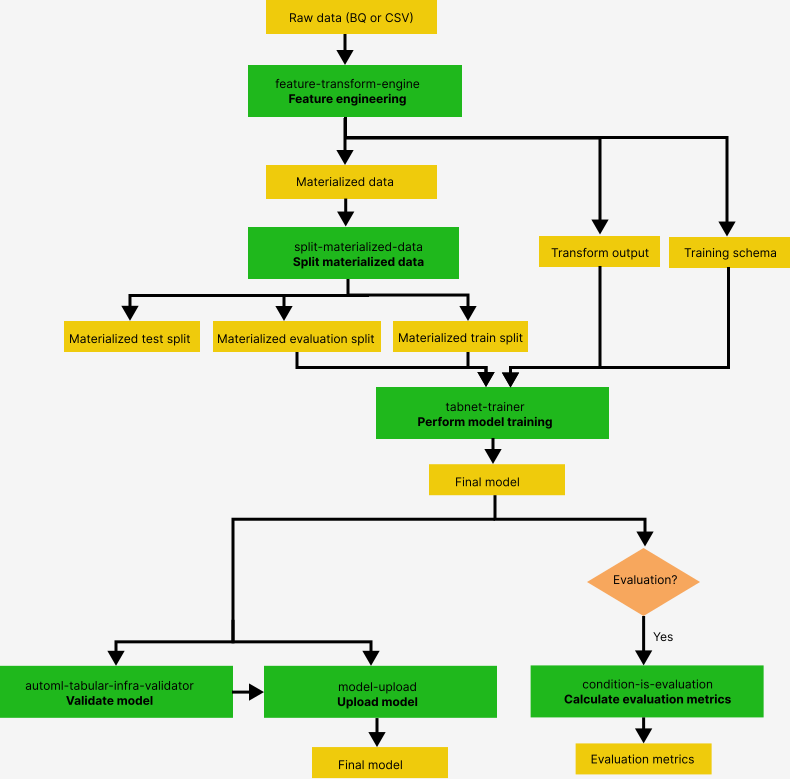
The pipeline components are:
1. **split-materialized-data** : Split the materialized data into a training set, an evaluation set, and a test set.
Input:
- Materialized data `materialized_data`.
Output:
- Materialized training split `materialized_train_split`.
- Materialized evaluation split `materialized_eval_split`.
- Materialized test set `materialized_test_split`.
2. **tabnet-trainer** : Perform model training.
Input:
- Instance baseline `instance_baseline`.
- Training schema `training_schema`.
- Transform output `transform_output`.
- Materialized train split `materialized_train_split`.
- Materialized evaluation split `materialized_eval_split`.
- Materialized test set `materialized_test_split`.
Output:
- Final model
3. **automl-tabular-infra-validator**: Validate the trained model by sending a prediction request and checking whether it completes successfully.
4. **model-upload**: Upload the model from the user's Cloud Storage bucket to Vertex AI as a Vertex AI model.
5. **condition-run-evaluation-2** : **Optional** . Use the test set to calculate evaluation metrics. Runs only when `run_evaluation` is set to `true`.
## Overview of TabNet HyperparameterTuningJob pipeline and components
The following diagram illustrates the TabNet HyperparameterTuningJob pipeline:
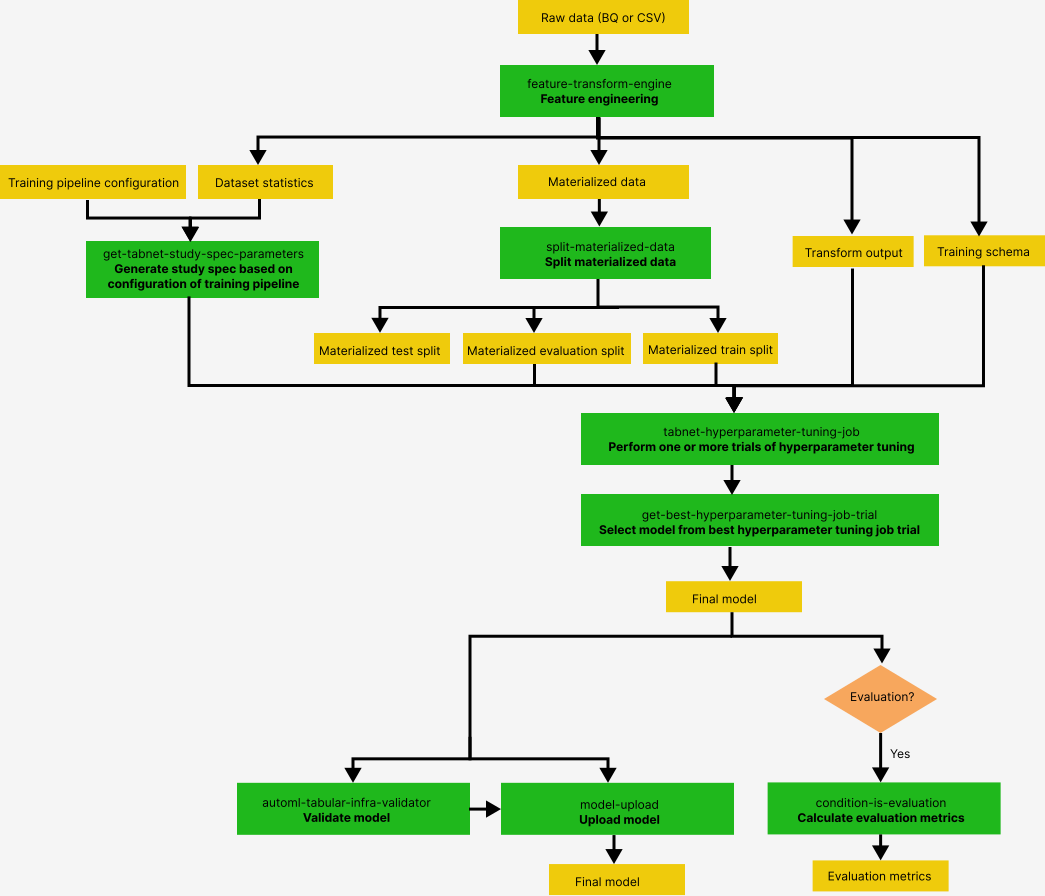
1. **split-materialized-data** : Split the materialized data into a training set, an evaluation set, and a test set.
Input:
- Materialized data `materialized_data`.
Output:
- Materialized training split `materialized_train_split`.
- Materialized evaluation split `materialized_eval_split`.
- Materialized test set `materialized_test_split`.
2. **get-tabnet-study-spec-parameters** : Generate the study spec based on a configuration of the training pipeline. If the user provides values for `study_spec_parameters_override`, use those values to override the study spec values.
Input:
- Training pipeline configuration (`max_trial_count`, `prediction_type`).
- Dataset statistics `dataset_stats`.
- Optional override of study spec parameters `study_spec_parameters_override`.
Output:
- Final list of hyperparameters and their ranges for the hyperparameter tuning job.
3. **tabnet-hyperparameter-tuning-job** : Perform one or more trials of hyperparameter tuning.
Input:
- Instance baseline `instance_baseline`.
- Training schema `training_schema`.
- Transform output `transform_output`.
- Materialized train split `materialized_train_split`.
- Materialized evaluation split `materialized_eval_split`.
- Materialized test set `materialized_test_split`.
- List of hyperparameters and their ranges for the hyperparameter tuning job.
4. **get-best-hyperparameter-tuning-job-trial** : Select the model from the best hyperparameter tuning job trial of the previous step.
Output:
- Final model
5. **automl-tabular-infra-validator**: Validate the trained model by sending a prediction request and checking whether it completes successfully.
6. **model-upload**: Upload the model from the user's Cloud Storage bucket to Vertex AI as a Vertex AI model.
7. **condition-run-evaluation-2** : **Optional** . Use the test set to calculate evaluation metrics. Runs only when `run_evaluation` is set to `true`.
## What's next
- [Train a model with TabNet](https://docs.cloud.google.com/vertex-ai/docs/tabular-data/tabular-workflows/tabnet-train.md.txt).