> [!CAUTION]
>
> Vertex AI Feature Store (Legacy) is
> [deprecated](https://docs.cloud.google.com/vertex-ai/docs/deprecations.md.txt). Beginning on
> May 17, 2026, no new features will be added and only critical
> patches will be provided. On February 17, 2027, the service will be fully sunset and APIs will
> no longer be available.
>
>
> For continued support and faster innovation, migrate to
> [Vertex AI Feature Store (V2)](https://docs.cloud.google.com/vertex-ai/docs/featurestore/latest/overview),
> our integrated platform for machine learning (ML) feature management introduced on November 17,
> 2023.
> [!NOTE]
> To learn more,
> run the "Example Feature Store workflow with sample data" notebook in one of the following
> environments:
>
> [Open in Colab](https://colab.research.google.com/github/GoogleCloudPlatform/vertex-ai-samples/blob/main/notebooks/official/feature_store_legacy/sdk-feature-store.ipynb)
>
>
> \|
>
> [Open in Colab Enterprise](https://console.cloud.google.com/vertex-ai/colab/import/https%3A%2F%2Fraw.githubusercontent.com%2FGoogleCloudPlatform%2Fvertex-ai-samples%2Fmain%2Fnotebooks%2Fofficial%2Ffeature_store_legacy%2Fsdk-feature-store.ipynb)
>
>
> \|
>
> [Open
> in Vertex AI Workbench](https://console.cloud.google.com/vertex-ai/workbench/deploy-notebook?download_url=https://raw.githubusercontent.com/GoogleCloudPlatform/vertex-ai-samples/main/notebooks/official/feature_store_legacy/sdk-feature-store.ipynb)
>
>
> \|
>
> [View on GitHub](https://github.com/GoogleCloudPlatform/vertex-ai-samples/blob/main/notebooks/official/feature_store_legacy/sdk-feature-store.ipynb)
To fetch feature data for model training, use batch serving. If you need to
export feature values for archiving or ad hoc analysis, [export feature
values](https://docs.cloud.google.com/vertex-ai/docs/featurestore/export-features) instead.
## Fetch feature values for model training
For model training, you need a training dataset that contains examples of your
prediction task. These examples consist of *instances* that include their
features and *labels*. The instance is the thing about which you want to make a
prediction. For example, an instance might be a home, and you want to determine
its market value. Its features might include its location, age, and the average
price of nearby homes that were recently sold. A label is an answer for the
prediction task, such as the home eventually sold for $100K.
Because each label is an observation at a specific point in time, you need to
fetch feature values that correspond to that point in time when the observation
was made---for example, the prices of nearby homes when a particular home was
sold. As labels and feature values are collected over time, those feature values
change. Vertex AI Feature Store (Legacy) can perform a point-in-time lookup so
that you can fetch the feature values at a particular time.
## Example point-in-time lookup
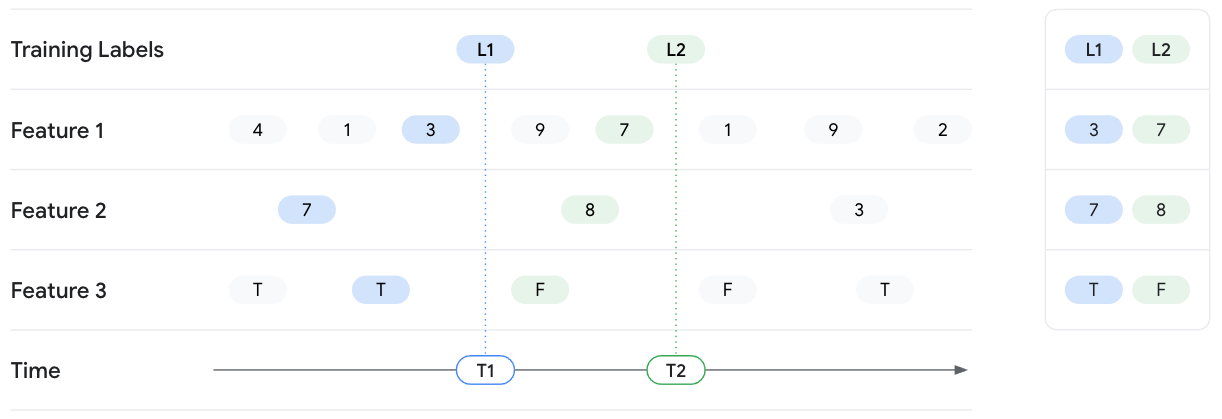
The following example involves retrieving feature values for two training
instances with labels `L1` and `L2`. The two labels are observed at `T1` and
`T2`, respectively. Imagine freezing the state of the feature values at those
timestamps. Hence, for the point-in-time lookup at `T1`,
Vertex AI Feature Store (Legacy) returns the latest feature values up to time `T1`
for `Feature 1`, `Feature 2`, and `Feature 3` and doesn't leak any values past
`T1`. As time progresses, the feature values change and the label also changes. So, at `T2`, Feature Store returns different feature values for that
point in time.
## Batch serving inputs
As part of a batch serving request, the following information is required:
- A list of existing features to get values for.
- A *read-instance list* that contains information for each training example. It lists observations at a particular point in time. This can be either a CSV file or a BigQuery table. The list must include the following information:
- **Timestamps**: the times at which labels were observed or measured. The timestamps are required so that Vertex AI Feature Store (Legacy) can perform a point-in-time lookup.
- **Entity IDs**: one or more IDs of the entities that correspond to the label.
- The destination URI and format where the output is written. In the output, Vertex AI Feature Store (Legacy) essentially joins the table from the read instances list and the feature values from the featurestore. Specify one of the following formats and locations for the output:
- BigQuery table in a regional or multi-regional dataset.
- CSV file in a regional or multi-regional Cloud Storage bucket. But if your feature values include arrays, you must choose another format.
- [Tfrecord](https://www.tensorflow.org/tutorials/load_data/tfrecord) file in a Cloud Storage bucket.
### Region Requirements
For both read instances and destination, the
source dataset or bucket must be in the same region or in the same
multi-regional location as your featurestore. For example, a featurestore in
`us-central1` can only read data from or serve data to Cloud Storage buckets
or BigQuery datasets that are in `us-central1` or in the US
multi-region location. You can't use data from, for example, `us-east1`. Also,
reading or serving data using dual-region buckets isn't supported.
## Read-instance list
The read-instance list specifies the entities and timestamps for the
feature values that you want to retrieve. The CSV file or BigQuery
table must contain the following columns, in any order. Each column requires
a column header.
- You must include a timestamp column, where the header name is `timestamp` and the column values are timestamps in the RFC 3339 format.
- You must include one or more entity type columns, where the header is the entity type ID and the column values are the entity IDs.
- Optional: You can include pass-through values (additional columns), which are passed as-is to the output. This is useful if you have data that isn't in Vertex AI Feature Store (Legacy) but want to include that data in the output.
### Example (CSV)
Imagine a featurestore that contains the entity types `users` and `movies` along
with their features. For example, features for `users` might include `age` and
`gender` while features for `movies` might include `ratings` and `genre`.
For this example, you want to gather training data about users' movie
preferences. You retrieve feature values for the two user entities `alice` and
`bob` along with features from the movies they watched. From a separate dataset,
you know that `alice` watched `movie_01` and liked it. `bob` watched `movie_02`
and didn't like it. So, the read-instance list might look like the following
example:
```
users,movies,timestamp,liked
"alice","movie_01",2021-04-15T08:28:14Z,true
"bob","movie_02",2021-04-15T08:28:14Z,false
```
Vertex AI Feature Store (Legacy) retrieves feature values for the listed
entities at or before the given timestamps. You specify the specific features to
get as part of the batch serving request, not in the read-instance list.
This example also includes a column called `liked`, which indicates whether a
user liked a movie. This column isn't included in the featurestore, but you can
still pass these values to your batch serving output. In the output, these
pass-through values are joined together with the values from the featurestore.
## Null values
If, at a given timestamp, a feature value is null,
Vertex AI Feature Store (Legacy) returns the previous non-null feature value.
If there are no previous values, Vertex AI Feature Store (Legacy) returns
null.
## Batch serve feature values
Batch serve feature values from a featurestore to get data, as determined by
your read instances list file.
If you want to lower offline storage usage costs by reading recent training data and excluding old data, specify a start time. To learn how to lower the offline storage usage cost by specifying a start time, see [Specify a start time to optimize offline storage costs during batch serve and batch export](https://docs.cloud.google.com/vertex-ai/docs/featurestore/best-practices.md.txt#starttime_batch_serving).
### Web UI
Use another method. You cannot batch serve features from the
Google Cloud console.
### REST
To batch serve feature values, send a POST request by using the
[featurestores.batchReadFeatureValues](https://docs.cloud.google.com/vertex-ai/docs/reference/rest/v1/projects.locations.featurestores/batchReadFeatureValues)
method.
The following sample outputs a BigQuery table that contains feature
values for the `users` and `movies` entity types. Note
that each output destination might have some prerequisites before you can submit
a request. For example, if you specify a table name for the
`bigqueryDestination` field, you must have an existing dataset. These
requirements are documented in the API reference.
Before using any of the request data,
make the following replacements:
- LOCATION_ID: Region where the featurestore is created. For example, `us-central1`.
- PROJECT_ID: Your [project ID](https://docs.cloud.google.com/resource-manager/docs/creating-managing-projects.md.txt#identifiers).
- FEATURESTORE_ID: ID of the featurestore.
- DATASET_NAME: Name of the destination BigQuery dataset.
- TABLE_NAME: Name of the destination BigQuery table.
- STORAGE_LOCATION: Cloud Storage URI to the read-instances CSV file.
HTTP method and URL:
```
POST https://LOCATION_ID-aiplatform.googleapis.com/v1/projects/PROJECT_ID/locations/LOCATION_ID/featurestores/FEATURESTORE_ID:batchReadFeatureValues
```
Request JSON body:
```
{
"destination": {
"bigqueryDestination": {
"outputUri": "bq://PROJECT_ID.DATASET_NAME.TABLE_NAME"
}
},
"csvReadInstances": {
"gcsSource": {
"uris": ["STORAGE_LOCATION"]
}
},
"entityTypeSpecs": [
{
"entityTypeId": "users",
"featureSelector": {
"idMatcher": {
"ids": ["age", "liked_genres"]
}
}
},
{
"entityTypeId": "movies",
"featureSelector": {
"idMatcher": {
"ids": ["title", "average_rating", "genres"]
}
}
}
],
"passThroughFields": [
{
"fieldName": "liked"
}
]
}
```
To send your request, choose one of these options:
#### curl
> [!NOTE]
> **Note:** The following command assumes that you have logged in to the `gcloud` CLI with your user account by running [`gcloud init`](https://docs.cloud.google.com/sdk/gcloud/reference/init) or [`gcloud auth login`](https://docs.cloud.google.com/sdk/gcloud/reference/auth/login.md.txt) , or by using [Cloud Shell](https://docs.cloud.google.com/shell/docs.md.txt), which automatically logs you into the `gcloud` CLI . You can check the currently active account by running [`gcloud auth list`](https://docs.cloud.google.com/sdk/gcloud/reference/auth/list.md.txt).
Save the request body in a file named `request.json`,
and execute the following command:
```
curl -X POST \
-H "Authorization: Bearer $(gcloud auth print-access-token)" \
-H "Content-Type: application/json; charset=utf-8" \
-d @request.json \
"https://LOCATION_ID-aiplatform.googleapis.com/v1/projects/PROJECT_ID/locations/LOCATION_ID/featurestores/FEATURESTORE_ID:batchReadFeatureValues"
```
#### PowerShell
> [!NOTE]
> **Note:** The following command assumes that you have logged in to the `gcloud` CLI with your user account by running [`gcloud init`](https://docs.cloud.google.com/sdk/gcloud/reference/init) or [`gcloud auth login`](https://docs.cloud.google.com/sdk/gcloud/reference/auth/login.md.txt) . You can check the currently active account by running [`gcloud auth list`](https://docs.cloud.google.com/sdk/gcloud/reference/auth/list.md.txt).
Save the request body in a file named `request.json`,
and execute the following command:
```
$cred = gcloud auth print-access-token
$headers = @{ "Authorization" = "Bearer $cred" }
Invoke-WebRequest `
-Method POST `
-Headers $headers `
-ContentType: "application/json; charset=utf-8" `
-InFile request.json `
-Uri "https://LOCATION_ID-aiplatform.googleapis.com/v1/projects/PROJECT_ID/locations/LOCATION_ID/featurestores/FEATURESTORE_ID:batchReadFeatureValues" | Select-Object -Expand Content
```
You should see output similar to the following. You can use the
OPERATION_ID in the response to
[get the
status](https://docs.cloud.google.com/vertex-ai/docs/general/long-running-operations) of the operation.
```
{
"name": "projects/PROJECT_NUMBER/locations/LOCATION_ID/featurestores/FEATURESTORE_ID/operations/OPERATION_ID",
"metadata": {
"@type": "type.googleapis.com/google.cloud.aiplatform.v1.BatchReadFeatureValuesOperationMetadata",
"genericMetadata": {
"createTime": "2021-03-02T00:03:41.558337Z",
"updateTime": "2021-03-02T00:03:41.558337Z"
}
}
}
```
### Python
To learn how to install or update the Vertex AI SDK for Python, see [Install the Vertex AI SDK for Python](https://docs.cloud.google.com/vertex-ai/docs/start/use-vertex-ai-python-sdk).
For more information, see the
[Python API reference documentation](https://docs.cloud.google.com/python/docs/reference/aiplatform/latest.md.txt).
from google.cloud import aiplatform
def batch_serve_features_to_bq_sample(
project: str,
location: str,
featurestore_name: str,
bq_destination_output_uri: str,
read_instances_uri: str,
sync: bool = True,
):
aiplatform.init(project=project, location=location)
fs = aiplatform.featurestore.Featurestore(featurestore_name=featurestore_name)
SERVING_FEATURE_IDS = {
"users": ["age", "gender", "liked_genres"],
"movies": ["title", "average_rating", "genres"],
}
fs.batch_serve_to_bq(
bq_destination_output_uri=bq_destination_output_uri,
serving_feature_ids=SERVING_FEATURE_IDS,
read_instances_uri=read_instances_uri,
sync=sync,
)
### Additional languages
You can [install](https://docs.cloud.google.com/vertex-ai/docs/start/client-libraries) and use the
following Vertex AI client libraries to call the
Vertex AI API. Cloud Client Libraries provide an optimized developer
experience by using the natural conventions and
styles of each supported language.
- [Java](https://docs.cloud.google.com/java/docs/reference/google-cloud-aiplatform/latest/overview.md.txt)
- [Node.js](https://docs.cloud.google.com/nodejs/docs/reference/aiplatform/latest.md.txt)
## View batch serving jobs
Use the Google Cloud console to view batch serving jobs in a
Google Cloud project.
### Web UI
1. In the Vertex AI section of the Google Cloud console, go to the **Features** page.
[Go to the
Features page](https://console.cloud.google.com/vertex-ai/features)
2. Select a region from the **Region** drop-down list.
3. From the action bar, click **View batch serving jobs** to list the batch serving jobs for all featurestores.
4. Click the ID of a batch serving job to view its details, such as the read instance source that was used and the output destination.
## What's next
- Learn how to [batch ingest feature values](https://docs.cloud.google.com/vertex-ai/docs/featurestore/ingesting-batch.md.txt).
- Learn how to serve features through [online
serving](https://docs.cloud.google.com/vertex-ai/docs/featurestore/serving-online).
- View the Vertex AI Feature Store (Legacy) [concurrent batch job
quota](https://docs.cloud.google.com/vertex-ai/quotas#featurestore).
- [Troubleshoot](https://docs.cloud.google.com/vertex-ai/docs/general/troubleshooting#feature-store) common Vertex AI Feature Store (Legacy) issues.