This page explains how to generate a spritesheet that contains frames from a
video you transcode. These reduced-sized frames, also known as thumbnails, are
useful for organizing and previewing content. To generate the spritesheet, use
the
[`spriteSheets`](https://docs.cloud.google.com/transcoder/docs/reference/rest/v1/JobConfig)
array in the `JobConfig` template.
You have two options for generating the spritesheet:
- [Generate a set number of thumbnail images](https://docs.cloud.google.com/transcoder/docs/how-to/generate-spritesheet#generate_set_number_of_images) distributed evenly across the input video timeline.
- [Generate a thumbnail image periodically](https://docs.cloud.google.com/transcoder/docs/how-to/generate-spritesheet#generate_image_periodically), that is, every *n* seconds, across the input video timeline.
## Generate a set number of thumbnail images
The following configuration generates a 10x10 spritesheet of large
images and a 10x10 spritesheet of small images, each with 100
thumbnails. Note that spritesheets require at least one `VideoStream` in the job
configuration.
You can add this configuration to a
[job template](https://docs.cloud.google.com/transcoder/docs/how-to/job-templates) or include it in an
[ad-hoc job configuration](https://docs.cloud.google.com/transcoder/docs/how-to/jobs#create_jobs_ad_hoc):
### REST
Before using any of the request data,
make the following replacements:
- `PROJECT_ID`: Your Google Cloud project ID listed in the [IAM Settings](https://console.cloud.google.com/iam-admin/settings/project).
- `LOCATION`: The location where your job will run. Use one of the [supported regions](https://docs.cloud.google.com/transcoder/docs/locations). Show locations
- `us-central1`
- `us-west1`
- `us-west2`
- `us-east1`
- `us-east4`
- `southamerica-east1`
- `northamerica-northeast1`
- `asia-east1`
- `asia-northeast1`
- `asia-northeast3`
- `asia-south1`
- `asia-southeast1`
- `australia-southeast1`
- `europe-west1`
- `europe-west2`
- `europe-west4`
- `me-west1`
- `me-central1`
- `me-central2`
- `STORAGE_BUCKET_NAME`: The name of the Cloud Storage bucket you created.
- `STORAGE_INPUT_VIDEO`: The name of the video in your Cloud Storage bucket that you are transcoding, such as `my-vid.mp4`. This field should take into account any folders that you created in the bucket (for example, `input/my-vid.mp4`).
- `STORAGE_OUTPUT_FOLDER`: The Cloud Storage folder name where you want to save the encoded video outputs. **Note:** You don't need to create the output folder object before creating the job. When processing the job, the Transcoder API automatically prepends the folder name you specify as part of the names of the objects saved to Cloud Storage.
To send your request, expand one of these options:
#### curl (Linux, macOS, or Cloud Shell)
> [!NOTE]
> **Note:** The following command assumes that you have logged in to the `gcloud` CLI with your user account by running [`gcloud init`](https://docs.cloud.google.com/sdk/gcloud/reference/init) or [`gcloud auth login`](https://docs.cloud.google.com/sdk/gcloud/reference/auth/login) , or by using [Cloud Shell](https://docs.cloud.google.com/shell/docs), which automatically logs you into the `gcloud` CLI . You can check the currently active account by running [`gcloud auth list`](https://docs.cloud.google.com/sdk/gcloud/reference/auth/list).
Save the request body in a file named `request.json`.
Run the following command in the terminal to create or overwrite
this file in the current directory:
```
cat > request.json << 'EOF'
{
"config": {
"inputs": [
{
"key": "input0",
"uri": "gs://STORAGE_BUCKET_NAME/STORAGE_INPUT_VIDEO"
}
],
"elementaryStreams": [
{
"key": "video-stream0",
"videoStream": {
"h264": {
"heightPixels": 360,
"widthPixels": 640,
"bitrateBps": 550000,
"frameRate": 60
}
}
},
{
"key": "audio-stream0",
"audioStream": {
"codec": "aac",
"bitrateBps": 64000
}
}
],
"muxStreams": [
{
"key": "sd",
"container": "mp4",
"elementaryStreams": [
"video-stream0",
"audio-stream0"
]
}
],
"output": {
"uri": "gs://STORAGE_BUCKET_NAME/STORAGE_OUTPUT_FOLDER/"
},
"spriteSheets": [
{
"filePrefix": "small-sprite-sheet",
"spriteHeightPixels": 32,
"spriteWidthPixels": 64,
"columnCount": 10,
"rowCount": 10,
"totalCount": 100
},
{
"filePrefix": "large-sprite-sheet",
"spriteHeightPixels": 72,
"spriteWidthPixels": 128,
"columnCount": 10,
"rowCount": 10,
"totalCount": 100
}
]
}
}
EOF
```
Then execute the following command to send your REST request:
```
curl -X POST \
-H "Authorization: Bearer $(gcloud auth print-access-token)" \
-H "Content-Type: application/json; charset=utf-8" \
-d @request.json \
"https://transcoder.googleapis.com/v1/projects/PROJECT_ID/locations/LOCATION/jobs"
```
#### PowerShell (Windows)
> [!NOTE]
> **Note:** The following command assumes that you have logged in to the `gcloud` CLI with your user account by running [`gcloud init`](https://docs.cloud.google.com/sdk/gcloud/reference/init) or [`gcloud auth login`](https://docs.cloud.google.com/sdk/gcloud/reference/auth/login) . You can check the currently active account by running [`gcloud auth list`](https://docs.cloud.google.com/sdk/gcloud/reference/auth/list).
Save the request body in a file named `request.json`.
Run the following command in the terminal to create or overwrite
this file in the current directory:
```
@'
{
"config": {
"inputs": [
{
"key": "input0",
"uri": "gs://STORAGE_BUCKET_NAME/STORAGE_INPUT_VIDEO"
}
],
"elementaryStreams": [
{
"key": "video-stream0",
"videoStream": {
"h264": {
"heightPixels": 360,
"widthPixels": 640,
"bitrateBps": 550000,
"frameRate": 60
}
}
},
{
"key": "audio-stream0",
"audioStream": {
"codec": "aac",
"bitrateBps": 64000
}
}
],
"muxStreams": [
{
"key": "sd",
"container": "mp4",
"elementaryStreams": [
"video-stream0",
"audio-stream0"
]
}
],
"output": {
"uri": "gs://STORAGE_BUCKET_NAME/STORAGE_OUTPUT_FOLDER/"
},
"spriteSheets": [
{
"filePrefix": "small-sprite-sheet",
"spriteHeightPixels": 32,
"spriteWidthPixels": 64,
"columnCount": 10,
"rowCount": 10,
"totalCount": 100
},
{
"filePrefix": "large-sprite-sheet",
"spriteHeightPixels": 72,
"spriteWidthPixels": 128,
"columnCount": 10,
"rowCount": 10,
"totalCount": 100
}
]
}
}
'@ | Out-File -FilePath request.json -Encoding utf8
```
Then execute the following command to send your REST request:
```
$cred = gcloud auth print-access-token
$headers = @{ "Authorization" = "Bearer $cred" }
Invoke-WebRequest `
-Method POST `
-Headers $headers `
-ContentType: "application/json; charset=utf-8" `
-InFile request.json `
-Uri "https://transcoder.googleapis.com/v1/projects/PROJECT_ID/locations/LOCATION/jobs" | Select-Object -Expand Content
```
You should receive a JSON response similar to the following:
```
{
"name": "projects/PROJECT_NUMBER/locations/LOCATION/jobs/JOB_ID",
"config": {
...
},
"state": "PENDING",
"createTime": CREATE_TIME,
"ttlAfterCompletionDays": 30
}
```
### gcloud
1. Create a `request.json` file that defines the job fields. Make the following replacements for the [`gcloud`](https://docs.cloud.google.com/sdk/gcloud/reference/transcoder/jobs/create) command:
- STORAGE_BUCKET_NAME: The name of the Cloud Storage bucket you created.
- STORAGE_INPUT_VIDEO: The name of the video in your Cloud Storage bucket that you are transcoding, such as `my-vid.mp4`. This field should take into account any folders that you created in the bucket (for example, `input/my-vid.mp4`).
- LOCATION: The location where your job will run. Use a location from the following list. Show locations
- `us-central1`
- `us-west1`
- `us-west2`
- `us-east1`
- `us-east4`
- `southamerica-east1`
- `northamerica-northeast1`
- `asia-east1`
- `asia-northeast1`
- `asia-northeast3`
- `asia-south1`
- `asia-southeast1`
- `australia-southeast1`
- `europe-west1`
- `europe-west2`
- `europe-west4`
- `me-west1`
- `me-central1`
- `me-central2`
- STORAGE_OUTPUT_FOLDER: The Cloud Storage folder name where you want to save the encoded video outputs. **Note:** You don't need to create the output folder object before creating the job. When processing the job, the Transcoder API automatically prepends the folder name you specify as part of the names of the objects saved to Cloud Storage.
```bash
{
"config": {
"inputs": [
{
"key": "input0",
"uri": "gs://STORAGE_BUCKET_NAME/STORAGE_INPUT_VIDEO"
}
],
"elementaryStreams": [
{
"key": "video-stream0",
"videoStream": {
"h264": {
"heightPixels": 360,
"widthPixels": 640,
"bitrateBps": 550000,
"frameRate": 60
}
}
},
{
"key": "audio-stream0",
"audioStream": {
"codec": "aac",
"bitrateBps": 64000
}
}
],
"muxStreams": [
{
"key": "sd",
"container": "mp4",
"elementaryStreams": [
"video-stream0",
"audio-stream0"
]
}
],
"output": {
"uri": "gs://STORAGE_BUCKET_NAME/STORAGE_OUTPUT_FOLDER/"
},
"spriteSheets": [
{
"filePrefix": "small-sprite-sheet",
"spriteHeightPixels": 32,
"spriteWidthPixels": 64,
"columnCount": 10,
"rowCount": 10,
"totalCount": 100
},
{
"filePrefix": "large-sprite-sheet",
"spriteHeightPixels": 72,
"spriteWidthPixels": 128,
"columnCount": 10,
"rowCount": 10,
"totalCount": 100
}
]
}
}
```
2. Run the following command:
```bash
gcloud transcoder jobs create --location=LOCATION --file="request.json"
```
You should see a response similar to the following:
```
{
"name": "projects/PROJECT_NUMBER/locations/LOCATION/jobs/JOB_ID",
"config": {
...
},
"state": "PENDING",
"createTime": CREATE_TIME,
"ttlAfterCompletionDays": 30
}
```
### C#
Before trying this sample, follow the C# setup instructions in the
[Transcoder API quickstart using
client libraries](https://docs.cloud.google.com/transcoder/docs/quickstart-client-libraries).
For more information, see the
[Transcoder API C# API
reference documentation](https://docs.cloud.google.com/dotnet/docs/reference/Google.Cloud.Video.Transcoder.V1/latest).
To authenticate to Transcoder API, set up Application Default Credentials.
For more information, see
[Set up authentication for a local development environment](https://docs.cloud.google.com/docs/authentication/set-up-adc-local-dev-environment).
using https://docs.cloud.google.com/dotnet/docs/reference/Google.Api.Gax/latest/Google.Api.Gax.ResourceNames.html;
using https://docs.cloud.google.com/dotnet/docs/reference/Google.Cloud.Video.Transcoder.V1/latest/Google.Cloud.Video.Transcoder.V1.html;
public class CreateJobWithSetNumberImagesSpritesheetSample
{
public const string SmallSpritesheetFilePrefix = "small-sprite-sheet";
public const string LargeSpritesheetFilePrefix = "large-sprite-sheet";
public Job CreateJobWithSetNumberImagesSpritesheet(
string projectId, string location, string inputUri, string outputUri)
{
// Create the client.
https://docs.cloud.google.com/dotnet/docs/reference/Google.Cloud.Video.Transcoder.V1/latest/Google.Cloud.Video.Transcoder.V1.TranscoderServiceClient.html client = https://docs.cloud.google.com/dotnet/docs/reference/Google.Cloud.Video.Transcoder.V1/latest/Google.Cloud.Video.Transcoder.V1.TranscoderServiceClient.html.https://docs.cloud.google.com/dotnet/docs/reference/Google.Cloud.Video.Transcoder.V1/latest/Google.Cloud.Video.Transcoder.V1.TranscoderServiceClient.html#Google_Cloud_Video_Transcoder_V1_TranscoderServiceClient_Create();
// Build the parent location name.
https://docs.cloud.google.com/dotnet/docs/reference/Google.Api.Gax/latest/Google.Api.Gax.ResourceNames.LocationName.html parent = new https://docs.cloud.google.com/dotnet/docs/reference/Google.Api.Gax/latest/Google.Api.Gax.ResourceNames.LocationName.html(projectId, location);
// Build the job config.
https://docs.cloud.google.com/dotnet/docs/reference/Google.Cloud.Video.Transcoder.V1/latest/Google.Cloud.Video.Transcoder.V1.VideoStream.html videoStream0 = new https://docs.cloud.google.com/dotnet/docs/reference/Google.Cloud.Video.Transcoder.V1/latest/Google.Cloud.Video.Transcoder.V1.VideoStream.html
{
H264 = new VideoStream.Types.H264CodecSettings
{
BitrateBps = 550000,
FrameRate = 60,
HeightPixels = 360,
WidthPixels = 640
}
};
https://docs.cloud.google.com/dotnet/docs/reference/Google.Cloud.Video.Transcoder.V1/latest/Google.Cloud.Video.Transcoder.V1.AudioStream.html audioStream0 = new https://docs.cloud.google.com/dotnet/docs/reference/Google.Cloud.Video.Transcoder.V1/latest/Google.Cloud.Video.Transcoder.V1.AudioStream.html
{
Codec = "aac",
BitrateBps = 64000
};
// Generates a 10x10 spritesheet of small images from the input video.
// To preserve the source aspect ratio, you should set the
// SpriteWidthPixels field or the SpriteHeightPixels field, but not
// both (the API will automatically calculate the missing field). For
// this sample, we don't care about the aspect ratio so we set both
// fields.
https://docs.cloud.google.com/dotnet/docs/reference/Google.Cloud.Video.Transcoder.V1/latest/Google.Cloud.Video.Transcoder.V1.SpriteSheet.html smallSpriteSheet = new https://docs.cloud.google.com/dotnet/docs/reference/Google.Cloud.Video.Transcoder.V1/latest/Google.Cloud.Video.Transcoder.V1.SpriteSheet.html
{
FilePrefix = SmallSpritesheetFilePrefix,
SpriteHeightPixels = 32,
SpriteWidthPixels = 64,
ColumnCount = 10,
RowCount = 10,
TotalCount = 100
};
// Generates a 10x10 spritesheet of larger images from the input video.
// input video. To preserve the source aspect ratio, you should set the
// SpriteWidthPixels field or the SpriteHeightPixels field, but not
// both (the API will automatically calculate the missing field). For
// this sample, we don't care about the aspect ratio so we set both
// fields.
https://docs.cloud.google.com/dotnet/docs/reference/Google.Cloud.Video.Transcoder.V1/latest/Google.Cloud.Video.Transcoder.V1.SpriteSheet.html largeSpriteSheet = new https://docs.cloud.google.com/dotnet/docs/reference/Google.Cloud.Video.Transcoder.V1/latest/Google.Cloud.Video.Transcoder.V1.SpriteSheet.html
{
FilePrefix = LargeSpritesheetFilePrefix,
SpriteHeightPixels = 72,
SpriteWidthPixels = 128,
ColumnCount = 10,
RowCount = 10,
TotalCount = 100
};
https://docs.cloud.google.com/dotnet/docs/reference/Google.Cloud.Video.Transcoder.V1/latest/Google.Cloud.Video.Transcoder.V1.ElementaryStream.html elementaryStream0 = new https://docs.cloud.google.com/dotnet/docs/reference/Google.Cloud.Video.Transcoder.V1/latest/Google.Cloud.Video.Transcoder.V1.ElementaryStream.html
{
Key = "video_stream0",
VideoStream = videoStream0
};
https://docs.cloud.google.com/dotnet/docs/reference/Google.Cloud.Video.Transcoder.V1/latest/Google.Cloud.Video.Transcoder.V1.ElementaryStream.html elementaryStream1 = new https://docs.cloud.google.com/dotnet/docs/reference/Google.Cloud.Video.Transcoder.V1/latest/Google.Cloud.Video.Transcoder.V1.ElementaryStream.html
{
Key = "audio_stream0",
AudioStream = audioStream0
};
https://docs.cloud.google.com/dotnet/docs/reference/Google.Cloud.Video.Transcoder.V1/latest/Google.Cloud.Video.Transcoder.V1.MuxStream.html muxStream0 = new https://docs.cloud.google.com/dotnet/docs/reference/Google.Cloud.Video.Transcoder.V1/latest/Google.Cloud.Video.Transcoder.V1.MuxStream.html
{
Key = "sd",
Container = "mp4",
ElementaryStreams = { "video_stream0", "audio_stream0" }
};
https://docs.cloud.google.com/dotnet/docs/reference/Google.Cloud.Video.Transcoder.V1/latest/Google.Cloud.Video.Transcoder.V1.Input.html input = new https://docs.cloud.google.com/dotnet/docs/reference/Google.Cloud.Video.Transcoder.V1/latest/Google.Cloud.Video.Transcoder.V1.Input.html
{
Key = "input0",
Uri = inputUri
};
https://docs.cloud.google.com/dotnet/docs/reference/Google.Cloud.Video.Transcoder.V1/latest/Google.Cloud.Video.Transcoder.V1.Output.html output = new https://docs.cloud.google.com/dotnet/docs/reference/Google.Cloud.Video.Transcoder.V1/latest/Google.Cloud.Video.Transcoder.V1.Output.html
{
Uri = outputUri
};
https://docs.cloud.google.com/dotnet/docs/reference/Google.Cloud.Video.Transcoder.V1/latest/Google.Cloud.Video.Transcoder.V1.JobConfig.html jobConfig = new https://docs.cloud.google.com/dotnet/docs/reference/Google.Cloud.Video.Transcoder.V1/latest/Google.Cloud.Video.Transcoder.V1.JobConfig.html
{
Inputs = { input },
Output = output,
ElementaryStreams = { elementaryStream0, elementaryStream1 },
MuxStreams = { muxStream0 },
SpriteSheets = { smallSpriteSheet, largeSpriteSheet }
};
// Build the job.
https://docs.cloud.google.com/dotnet/docs/reference/Google.Cloud.Video.Transcoder.V1/latest/Google.Cloud.Video.Transcoder.V1.Job.html newJob = new https://docs.cloud.google.com/dotnet/docs/reference/Google.Cloud.Video.Transcoder.V1/latest/Google.Cloud.Video.Transcoder.V1.Job.html();
newJob.https://docs.cloud.google.com/dotnet/docs/reference/Google.Cloud.Video.Transcoder.V1/latest/Google.Cloud.Video.Transcoder.V1.Job.html#Google_Cloud_Video_Transcoder_V1_Job_InputUri = inputUri;
newJob.https://docs.cloud.google.com/dotnet/docs/reference/Google.Cloud.Video.Transcoder.V1/latest/Google.Cloud.Video.Transcoder.V1.Job.html#Google_Cloud_Video_Transcoder_V1_Job_OutputUri = outputUri;
newJob.https://docs.cloud.google.com/dotnet/docs/reference/Google.Cloud.Video.Transcoder.V1/latest/Google.Cloud.Video.Transcoder.V1.Job.html#Google_Cloud_Video_Transcoder_V1_Job_Config = jobConfig;
// Call the API.
https://docs.cloud.google.com/dotnet/docs/reference/Google.Cloud.Video.Transcoder.V1/latest/Google.Cloud.Video.Transcoder.V1.Job.html job = client.https://docs.cloud.google.com/dotnet/docs/reference/Google.Cloud.Video.Transcoder.V1/latest/Google.Cloud.Video.Transcoder.V1.TranscoderServiceClient.html#Google_Cloud_Video_Transcoder_V1_TranscoderServiceClient_CreateJob_Google_Api_Gax_ResourceNames_LocationName_Google_Cloud_Video_Transcoder_V1_Job_Google_Api_Gax_Grpc_CallSettings_(parent, newJob);
// Return the result.
return job;
}
}
### Go
Before trying this sample, follow the Go setup instructions in the
[Transcoder API quickstart using
client libraries](https://docs.cloud.google.com/transcoder/docs/quickstart-client-libraries).
For more information, see the
[Transcoder API Go API
reference documentation](https://pkg.go.dev/cloud.google.com/go/video/transcoder).
To authenticate to Transcoder API, set up Application Default Credentials.
For more information, see
[Set up authentication for a local development environment](https://docs.cloud.google.com/docs/authentication/set-up-adc-local-dev-environment).
import (
"context"
"fmt"
"io"
transcoder "cloud.google.com/go/video/transcoder/apiv1"
"cloud.google.com/go/video/transcoder/apiv1/transcoderpb"
)
// createJobWithSetNumberImagesSpritesheet creates a job from an ad-hoc configuration and generates
// two spritesheets from the input video. Each spritesheet contains a set number of images.
func createJobWithSetNumberImagesSpritesheet(w io.Writer, projectID string, location string, inputURI string, outputURI string) error {
// projectID := "my-project-id"
// location := "us-central1"
// inputURI := "gs://my-bucket/my-video-file"
// outputURI := "gs://my-bucket/my-output-folder/"
ctx := context.Background()
client, err := transcoder.https://docs.cloud.google.com/go/docs/reference/cloud.google.com/go/video/latest/transcoder/apiv1.html#cloud_google_com_go_video_transcoder_apiv1_Client_NewClient(ctx)
if err != nil {
return fmt.Errorf("NewClient: %w", err)
}
defer client.https://docs.cloud.google.com/go/docs/reference/cloud.google.com/go/video/latest/transcoder/apiv1.html#cloud_google_com_go_video_transcoder_apiv1_Client_Close()
req := &transcoderpb.CreateJobRequest{
Parent: fmt.Sprintf("projects/%s/locations/%s", projectID, location),
Job: &transcoderpb.Job{
InputUri: inputURI,
OutputUri: outputURI,
JobConfig: &transcoderpb.Job_Config{
Config: &transcoderpb.JobConfig{
ElementaryStreams: []*transcoderpb.ElementaryStream{
{
Key: "video_stream0",
ElementaryStream: &transcoderpb.ElementaryStream_VideoStream{
VideoStream: &transcoderpb.VideoStream{
CodecSettings: &transcoderpb.VideoStream_H264{
H264: &transcoderpb.VideoStream_H264CodecSettings{
BitrateBps: 550000,
FrameRate: 60,
HeightPixels: 360,
WidthPixels: 640,
},
},
},
},
},
{
Key: "audio_stream0",
ElementaryStream: &transcoderpb.ElementaryStream_AudioStream{
AudioStream: &transcoderpb.AudioStream{
Codec: "aac",
BitrateBps: 64000,
},
},
},
},
MuxStreams: []*transcoderpb.MuxStream{
{
Key: "sd",
Container: "mp4",
ElementaryStreams: []string{"video_stream0", "audio_stream0"},
},
},
SpriteSheets: []*transcoderpb.SpriteSheet{
{
FilePrefix: "small-sprite-sheet",
SpriteWidthPixels: 64,
SpriteHeightPixels: 32,
ColumnCount: 10,
RowCount: 10,
ExtractionStrategy: &transcoderpb.SpriteSheet_TotalCount{
TotalCount: 100,
},
},
{
FilePrefix: "large-sprite-sheet",
SpriteWidthPixels: 128,
SpriteHeightPixels: 72,
ColumnCount: 10,
RowCount: 10,
ExtractionStrategy: &transcoderpb.SpriteSheet_TotalCount{
TotalCount: 100,
},
},
},
},
},
},
}
// Creates the job. Jobs take a variable amount of time to run. You can query for the job state.
// See https://cloud.google.com/transcoder/docs/how-to/jobs#check_job_status for more info.
response, err := client.CreateJob(ctx, req)
if err != nil {
return fmt.Errorf("createJobWithSetNumberImagesSpritesheet: %w", err)
}
fmt.Fprintf(w, "Job: %v", response.GetName())
return nil
}
### Java
Before trying this sample, follow the Java setup instructions in the
[Transcoder API quickstart using
client libraries](https://docs.cloud.google.com/transcoder/docs/quickstart-client-libraries).
For more information, see the
[Transcoder API Java API
reference documentation](https://docs.cloud.google.com/java/docs/reference/google-cloud-video-transcoder/latest/overview).
To authenticate to Transcoder API, set up Application Default Credentials.
For more information, see
[Set up authentication for a local development environment](https://docs.cloud.google.com/docs/authentication/set-up-adc-local-dev-environment).
import com.google.cloud.video.transcoder.v1.https://docs.cloud.google.com/java/docs/reference/google-cloud-video-transcoder/latest/com.google.cloud.video.transcoder.v1.AudioStream.html;
import com.google.cloud.video.transcoder.v1.https://docs.cloud.google.com/java/docs/reference/google-cloud-video-transcoder/latest/com.google.cloud.video.transcoder.v1.CreateJobRequest.html;
import com.google.cloud.video.transcoder.v1.https://docs.cloud.google.com/java/docs/reference/google-cloud-video-transcoder/latest/com.google.cloud.video.transcoder.v1.ElementaryStream.html;
import com.google.cloud.video.transcoder.v1.https://docs.cloud.google.com/java/docs/reference/google-cloud-video-transcoder/latest/com.google.cloud.video.transcoder.v1.Input.html;
import com.google.cloud.video.transcoder.v1.https://docs.cloud.google.com/java/docs/reference/google-cloud-video-transcoder/latest/com.google.cloud.video.transcoder.v1.Job.html;
import com.google.cloud.video.transcoder.v1.https://docs.cloud.google.com/java/docs/reference/google-cloud-video-transcoder/latest/com.google.cloud.video.transcoder.v1.JobConfig.html;
import com.google.cloud.video.transcoder.v1.https://docs.cloud.google.com/java/docs/reference/google-cloud-video-transcoder/latest/com.google.cloud.video.transcoder.v1.LocationName.html;
import com.google.cloud.video.transcoder.v1.https://docs.cloud.google.com/java/docs/reference/google-cloud-video-transcoder/latest/com.google.cloud.video.transcoder.v1.MuxStream.html;
import com.google.cloud.video.transcoder.v1.https://docs.cloud.google.com/java/docs/reference/google-cloud-video-transcoder/latest/com.google.cloud.video.transcoder.v1.Output.html;
import com.google.cloud.video.transcoder.v1.https://docs.cloud.google.com/java/docs/reference/google-cloud-video-transcoder/latest/com.google.cloud.video.transcoder.v1.SpriteSheet.html;
import com.google.cloud.video.transcoder.v1.https://docs.cloud.google.com/java/docs/reference/google-cloud-video-transcoder/latest/com.google.cloud.video.transcoder.v1.TranscoderServiceClient.html;
import com.google.cloud.video.transcoder.v1.https://docs.cloud.google.com/java/docs/reference/google-cloud-video-transcoder/latest/com.google.cloud.video.transcoder.v1.VideoStream.html;
import java.io.IOException;
public class CreateJobWithSetNumberImagesSpritesheet {
public static final String smallSpritesheetFilePrefix = "small-sprite-sheet";
public static final String largeSpritesheetFilePrefix = "large-sprite-sheet";
public static final String spritesheetFileSuffix = "0000000000.jpeg";
public static void main(String[] args) throws IOException {
// TODO(developer): Replace these variables before running the sample.
String projectId = "my-project-id";
String location = "us-central1";
String inputUri = "gs://my-bucket/my-video-file";
String outputUri = "gs://my-bucket/my-output-folder/";
createJobWithSetNumberImagesSpritesheet(projectId, location, inputUri, outputUri);
}
// Creates a job from an ad-hoc configuration and generates two spritesheets from the input video.
// Each spritesheet contains a set number of images.
public static void createJobWithSetNumberImagesSpritesheet(
String projectId, String location, String inputUri, String outputUri) throws IOException {
// Initialize client that will be used to send requests. This client only needs to be created
// once, and can be reused for multiple requests.
try (https://docs.cloud.google.com/java/docs/reference/google-cloud-video-transcoder/latest/com.google.cloud.video.transcoder.v1.TranscoderServiceClient.html transcoderServiceClient = https://docs.cloud.google.com/java/docs/reference/google-cloud-video-transcoder/latest/com.google.cloud.video.transcoder.v1.TranscoderServiceClient.html.create()) {
https://docs.cloud.google.com/java/docs/reference/google-cloud-video-transcoder/latest/com.google.cloud.video.transcoder.v1.VideoStream.html videoStream0 =
https://docs.cloud.google.com/java/docs/reference/google-cloud-video-transcoder/latest/com.google.cloud.video.transcoder.v1.VideoStream.html.newBuilder()
.https://docs.cloud.google.com/java/docs/reference/google-cloud-video-transcoder/latest/com.google.cloud.video.transcoder.v1.VideoStream.Builder.html#com_google_cloud_video_transcoder_v1_VideoStream_Builder_setH264_com_google_cloud_video_transcoder_v1_VideoStream_H264CodecSettings_(
https://docs.cloud.google.com/java/docs/reference/google-cloud-video-transcoder/latest/com.google.cloud.video.transcoder.v1.VideoStream.html.H264CodecSettings.newBuilder()
.setBitrateBps(550000)
.setFrameRate(60)
.setHeightPixels(360)
.setWidthPixels(640))
.build();
https://docs.cloud.google.com/java/docs/reference/google-cloud-video-transcoder/latest/com.google.cloud.video.transcoder.v1.AudioStream.html audioStream0 =
https://docs.cloud.google.com/java/docs/reference/google-cloud-video-transcoder/latest/com.google.cloud.video.transcoder.v1.AudioStream.html.newBuilder().setCodec("aac").setBitrateBps(64000).build();
// Generates a 10x10 spritesheet of small images from the input video. To preserve the source
// aspect ratio, you should set the spriteWidthPixels field or the spriteHeightPixels
// field, but not both.
https://docs.cloud.google.com/java/docs/reference/google-cloud-video-transcoder/latest/com.google.cloud.video.transcoder.v1.SpriteSheet.html smallSpriteSheet =
https://docs.cloud.google.com/java/docs/reference/google-cloud-video-transcoder/latest/com.google.cloud.video.transcoder.v1.SpriteSheet.html.newBuilder()
.https://docs.cloud.google.com/java/docs/reference/google-cloud-video-transcoder/latest/com.google.cloud.video.transcoder.v1.SpriteSheet.Builder.html#com_google_cloud_video_transcoder_v1_SpriteSheet_Builder_setFilePrefix_java_lang_String_(smallSpritesheetFilePrefix)
.https://docs.cloud.google.com/java/docs/reference/google-cloud-video-transcoder/latest/com.google.cloud.video.transcoder.v1.SpriteSheet.Builder.html#com_google_cloud_video_transcoder_v1_SpriteSheet_Builder_setSpriteHeightPixels_int_(32)
.https://docs.cloud.google.com/java/docs/reference/google-cloud-video-transcoder/latest/com.google.cloud.video.transcoder.v1.SpriteSheet.Builder.html#com_google_cloud_video_transcoder_v1_SpriteSheet_Builder_setSpriteWidthPixels_int_(64)
.https://docs.cloud.google.com/java/docs/reference/google-cloud-video-transcoder/latest/com.google.cloud.video.transcoder.v1.SpriteSheet.Builder.html#com_google_cloud_video_transcoder_v1_SpriteSheet_Builder_setColumnCount_int_(10)
.https://docs.cloud.google.com/java/docs/reference/google-cloud-video-transcoder/latest/com.google.cloud.video.transcoder.v1.SpriteSheet.Builder.html#com_google_cloud_video_transcoder_v1_SpriteSheet_Builder_setRowCount_int_(10)
.https://docs.cloud.google.com/java/docs/reference/google-cloud-video-transcoder/latest/com.google.cloud.video.transcoder.v1.SpriteSheet.Builder.html#com_google_cloud_video_transcoder_v1_SpriteSheet_Builder_setTotalCount_int_(100)
.build();
// Generates a 10x10 spritesheet of larger images from the input video.
https://docs.cloud.google.com/java/docs/reference/google-cloud-video-transcoder/latest/com.google.cloud.video.transcoder.v1.SpriteSheet.html largeSpriteSheet =
https://docs.cloud.google.com/java/docs/reference/google-cloud-video-transcoder/latest/com.google.cloud.video.transcoder.v1.SpriteSheet.html.newBuilder()
.https://docs.cloud.google.com/java/docs/reference/google-cloud-video-transcoder/latest/com.google.cloud.video.transcoder.v1.SpriteSheet.Builder.html#com_google_cloud_video_transcoder_v1_SpriteSheet_Builder_setFilePrefix_java_lang_String_(largeSpritesheetFilePrefix)
.https://docs.cloud.google.com/java/docs/reference/google-cloud-video-transcoder/latest/com.google.cloud.video.transcoder.v1.SpriteSheet.Builder.html#com_google_cloud_video_transcoder_v1_SpriteSheet_Builder_setSpriteHeightPixels_int_(72)
.https://docs.cloud.google.com/java/docs/reference/google-cloud-video-transcoder/latest/com.google.cloud.video.transcoder.v1.SpriteSheet.Builder.html#com_google_cloud_video_transcoder_v1_SpriteSheet_Builder_setSpriteWidthPixels_int_(128)
.https://docs.cloud.google.com/java/docs/reference/google-cloud-video-transcoder/latest/com.google.cloud.video.transcoder.v1.SpriteSheet.Builder.html#com_google_cloud_video_transcoder_v1_SpriteSheet_Builder_setColumnCount_int_(10)
.https://docs.cloud.google.com/java/docs/reference/google-cloud-video-transcoder/latest/com.google.cloud.video.transcoder.v1.SpriteSheet.Builder.html#com_google_cloud_video_transcoder_v1_SpriteSheet_Builder_setRowCount_int_(10)
.https://docs.cloud.google.com/java/docs/reference/google-cloud-video-transcoder/latest/com.google.cloud.video.transcoder.v1.SpriteSheet.Builder.html#com_google_cloud_video_transcoder_v1_SpriteSheet_Builder_setTotalCount_int_(100)
.build();
https://docs.cloud.google.com/java/docs/reference/google-cloud-video-transcoder/latest/com.google.cloud.video.transcoder.v1.JobConfig.html config =
https://docs.cloud.google.com/java/docs/reference/google-cloud-video-transcoder/latest/com.google.cloud.video.transcoder.v1.JobConfig.html.newBuilder()
.addInputs(https://docs.cloud.google.com/java/docs/reference/google-cloud-video-transcoder/latest/com.google.cloud.video.transcoder.v1.Input.html.newBuilder().setKey("input0").setUri(inputUri))
.https://docs.cloud.google.com/java/docs/reference/google-cloud-video-transcoder/latest/com.google.cloud.video.transcoder.v1.JobConfig.Builder.html#com_google_cloud_video_transcoder_v1_JobConfig_Builder_setOutput_com_google_cloud_video_transcoder_v1_Output_(https://docs.cloud.google.com/java/docs/reference/google-cloud-video-transcoder/latest/com.google.cloud.video.transcoder.v1.Output.html.newBuilder().setUri(outputUri))
.addElementaryStreams(
https://docs.cloud.google.com/java/docs/reference/google-cloud-video-transcoder/latest/com.google.cloud.video.transcoder.v1.ElementaryStream.html.newBuilder()
.setKey("video_stream0")
.https://docs.cloud.google.com/java/docs/reference/google-cloud-video-transcoder/latest/com.google.cloud.video.transcoder.v1.ElementaryStream.Builder.html#com_google_cloud_video_transcoder_v1_ElementaryStream_Builder_setVideoStream_com_google_cloud_video_transcoder_v1_VideoStream_(videoStream0))
.addElementaryStreams(
https://docs.cloud.google.com/java/docs/reference/google-cloud-video-transcoder/latest/com.google.cloud.video.transcoder.v1.ElementaryStream.html.newBuilder()
.setKey("audio_stream0")
.https://docs.cloud.google.com/java/docs/reference/google-cloud-video-transcoder/latest/com.google.cloud.video.transcoder.v1.ElementaryStream.Builder.html#com_google_cloud_video_transcoder_v1_ElementaryStream_Builder_setAudioStream_com_google_cloud_video_transcoder_v1_AudioStream_(audioStream0))
.addMuxStreams(
https://docs.cloud.google.com/java/docs/reference/google-cloud-video-transcoder/latest/com.google.cloud.video.transcoder.v1.MuxStream.html.newBuilder()
.setKey("sd")
.https://docs.cloud.google.com/java/docs/reference/google-cloud-video-transcoder/latest/com.google.cloud.video.transcoder.v1.MuxStream.Builder.html#com_google_cloud_video_transcoder_v1_MuxStream_Builder_setContainer_java_lang_String_("mp4")
.addElementaryStreams("video_stream0")
.addElementaryStreams("audio_stream0")
.build())
.https://docs.cloud.google.com/java/docs/reference/google-cloud-video-transcoder/latest/com.google.cloud.video.transcoder.v1.JobConfig.Builder.html#com_google_cloud_video_transcoder_v1_JobConfig_Builder_addSpriteSheets_com_google_cloud_video_transcoder_v1_SpriteSheet_(smallSpriteSheet) // Add the spritesheet config to the job config
.https://docs.cloud.google.com/java/docs/reference/google-cloud-video-transcoder/latest/com.google.cloud.video.transcoder.v1.JobConfig.Builder.html#com_google_cloud_video_transcoder_v1_JobConfig_Builder_addSpriteSheets_com_google_cloud_video_transcoder_v1_SpriteSheet_(largeSpriteSheet) // Add the spritesheet config to the job config
.build();
https://docs.cloud.google.com/java/docs/reference/google-cloud-video-transcoder/latest/com.google.cloud.video.transcoder.v1.CreateJobRequest.html createJobRequest =
https://docs.cloud.google.com/java/docs/reference/google-cloud-video-transcoder/latest/com.google.cloud.video.transcoder.v1.CreateJobRequest.html.newBuilder()
.setJob(
https://docs.cloud.google.com/java/docs/reference/google-cloud-video-transcoder/latest/com.google.cloud.video.transcoder.v1.Job.html.newBuilder()
.https://docs.cloud.google.com/java/docs/reference/google-cloud-video-transcoder/latest/com.google.cloud.video.transcoder.v1.Job.Builder.html#com_google_cloud_video_transcoder_v1_Job_Builder_setInputUri_java_lang_String_(inputUri)
.https://docs.cloud.google.com/java/docs/reference/google-cloud-video-transcoder/latest/com.google.cloud.video.transcoder.v1.Job.Builder.html#com_google_cloud_video_transcoder_v1_Job_Builder_setOutputUri_java_lang_String_(outputUri)
.setConfig(config)
.build())
.setParent(https://docs.cloud.google.com/java/docs/reference/google-cloud-video-transcoder/latest/com.google.cloud.video.transcoder.v1.LocationName.html.of(projectId, location).toString())
.build();
// Send the job creation request and process the response.
https://docs.cloud.google.com/java/docs/reference/google-cloud-video-transcoder/latest/com.google.cloud.video.transcoder.v1.Job.html job = transcoderServiceClient.createJob(createJobRequest);
System.out.println("Job: " + job.https://docs.cloud.google.com/java/docs/reference/google-cloud-video-transcoder/latest/com.google.cloud.video.transcoder.v1.Job.html#com_google_cloud_video_transcoder_v1_Job_getName__());
}
}
}
### Node.js
Before trying this sample, follow the Node.js setup instructions in the
[Transcoder API quickstart using
client libraries](https://docs.cloud.google.com/transcoder/docs/quickstart-client-libraries).
For more information, see the
[Transcoder API Node.js API
reference documentation](https://cloud.google.com/nodejs/docs/reference/video-transcoder/latest).
To authenticate to Transcoder API, set up Application Default Credentials.
For more information, see
[Set up authentication for a local development environment](https://docs.cloud.google.com/docs/authentication/set-up-adc-local-dev-environment).
/**
* TODO(developer): Uncomment these variables before running the sample.
*/
// projectId = 'my-project-id';
// location = 'us-central1';
// inputUri = 'gs://my-bucket/my-video-file';
// outputUri = 'gs://my-bucket/my-output-folder/';
// Imports the Transcoder library
const {TranscoderServiceClient} =
require('https://docs.cloud.google.com/nodejs/docs/reference/video-transcoder/latest/overview.html').v1;
// Instantiates a client
const transcoderServiceClient = new https://docs.cloud.google.com/nodejs/docs/reference/video-transcoder/latest/overview.html();
async function createJobWithSetNumberImagesSpritesheet() {
// Construct request
const request = {
parent: transcoderServiceClient.https://docs.cloud.google.com/nodejs/docs/reference/video-transcoder/latest/video-transcoder/v1.transcoderserviceclient.html(projectId, location),
job: {
inputUri: inputUri,
outputUri: outputUri,
config: {
elementaryStreams: [
{
key: 'video-stream0',
videoStream: {
h264: {
heightPixels: 360,
widthPixels: 640,
bitrateBps: 550000,
frameRate: 60,
},
},
},
{
key: 'audio-stream0',
audioStream: {
codec: 'aac',
bitrateBps: 64000,
},
},
],
muxStreams: [
{
key: 'sd',
container: 'mp4',
elementaryStreams: ['video-stream0', 'audio-stream0'],
},
],
spriteSheets: [
{
filePrefix: 'small-sprite-sheet',
spriteHeightPixels: 32,
spriteWidthPixels: 64,
columnCount: 10,
rowCount: 10,
totalCount: 100,
},
{
filePrefix: 'large-sprite-sheet',
spriteHeightPixels: 72,
spriteWidthPixels: 128,
columnCount: 10,
rowCount: 10,
totalCount: 100,
},
],
},
},
};
// Run request
const [response] = await transcoderServiceClient.createJob(request);
console.log(`Job: ${response.name}`);
}
createJobWithSetNumberImagesSpritesheet();
### PHP
Before trying this sample, follow the PHP setup instructions in the
[Transcoder API quickstart using
client libraries](https://docs.cloud.google.com/transcoder/docs/quickstart-client-libraries).
For more information, see the
[Transcoder API PHP API
reference documentation](https://googleapis.github.io/google-cloud-php/#/docs/cloud-video-transcoder/latest/videotranscoder/readme).
To authenticate to Transcoder API, set up Application Default Credentials.
For more information, see
[Set up authentication for a local development environment](https://docs.cloud.google.com/docs/authentication/set-up-adc-local-dev-environment).
use Google\Cloud\Video\Transcoder\V1\AudioStream;
use Google\Cloud\Video\Transcoder\V1\Client\TranscoderServiceClient;
use Google\Cloud\Video\Transcoder\V1\CreateJobRequest;
use Google\Cloud\Video\Transcoder\V1\ElementaryStream;
use Google\Cloud\Video\Transcoder\V1\Job;
use Google\Cloud\Video\Transcoder\V1\JobConfig;
use Google\Cloud\Video\Transcoder\V1\MuxStream;
use Google\Cloud\Video\Transcoder\V1\SpriteSheet;
use Google\Cloud\Video\Transcoder\V1\VideoStream;
/**
* Creates a job that generates two spritesheets from the input video. Each
* spritesheet contains a set number of images.
*
* @param string $projectId The ID of your Google Cloud Platform project.
* @param string $location The location of the job.
* @param string $inputUri Uri of the video in the Cloud Storage bucket.
* @param string $outputUri Uri of the video output folder in the Cloud Storage bucket.
*/
function create_job_with_set_number_images_spritesheet($projectId, $location, $inputUri, $outputUri)
{
// Instantiate a client.
$transcoderServiceClient = new TranscoderServiceClient();
$formattedParent = $transcoderServiceClient->locationName($projectId, $location);
$jobConfig =
(new JobConfig())->setElementaryStreams([
(new ElementaryStream())
->setKey('video-stream0')
->setVideoStream(
(new VideoStream())
->setH264(
(new VideoStream\H264CodecSettings())
->setBitrateBps(550000)
->setFrameRate(60)
->setHeightPixels(360)
->setWidthPixels(640)
)
),
(new ElementaryStream())
->setKey('audio-stream0')
->setAudioStream(
(new AudioStream())
->setCodec('aac')
->setBitrateBps(64000)
)
])->setMuxStreams([
(new MuxStream())
->setKey('sd')
->setContainer('mp4')
->setElementaryStreams(['video-stream0', 'audio-stream0'])
])->setSpriteSheets([
(new SpriteSheet())
->setFilePrefix('small-sprite-sheet')
->setSpriteWidthPixels(64)
->setSpriteHeightPixels(32)
->setColumnCount(10)
->setRowCount(10)
->setTotalCount(100),
(new SpriteSheet())
->setFilePrefix('large-sprite-sheet')
->setSpriteWidthPixels(128)
->setSpriteHeightPixels(72)
->setColumnCount(10)
->setRowCount(10)
->setTotalCount(100)
]);
$job = (new Job())
->setInputUri($inputUri)
->setOutputUri($outputUri)
->setConfig($jobConfig);
$request = (new CreateJobRequest())
->setParent($formattedParent)
->setJob($job);
$response = $transcoderServiceClient->createJob($request);
// Print job name.
printf('Job: %s' . PHP_EOL, $response->getName());
}
### Python
Before trying this sample, follow the Python setup instructions in the
[Transcoder API quickstart using
client libraries](https://docs.cloud.google.com/transcoder/docs/quickstart-client-libraries).
For more information, see the
[Transcoder API Python API
reference documentation](https://docs.cloud.google.com/python/docs/reference/transcoder/latest).
To authenticate to Transcoder API, set up Application Default Credentials.
For more information, see
[Set up authentication for a local development environment](https://docs.cloud.google.com/docs/authentication/set-up-adc-local-dev-environment).
import argparse
from google.cloud.video import transcoder_v1
from google.cloud.video.transcoder_v1.services.transcoder_service import (
TranscoderServiceClient,
)
def create_job_with_set_number_images_spritesheet(
project_id: str,
location: str,
input_uri: str,
output_uri: str,
) -> transcoder_v1.types.resources.Job:
"""Creates a job based on an ad-hoc job configuration that generates two spritesheets.
Args:
project_id: The GCP project ID.
location: The location to start the job in.
input_uri: Uri of the video in the Cloud Storage bucket.
output_uri: Uri of the video output folder in the Cloud Storage bucket.
Returns:
The job resource.
"""
client = TranscoderServiceClient()
parent = f"projects/{project_id}/locations/{location}"
job = transcoder_v1.types.Job()
job.input_uri = input_uri
job.output_uri = output_uri
job.config = transcoder_v1.types.JobConfig(
# Create an ad-hoc job. For more information, see https://cloud.google.com/transcoder/docs/how-to/jobs#create_jobs_ad_hoc.
# See all options for the job config at https://cloud.google.com/transcoder/docs/reference/rest/v1/JobConfig.
elementary_streams=[
# This section defines the output video stream.
transcoder_v1.types.ElementaryStream(
key="video-stream0",
video_stream=transcoder_v1.types.VideoStream(
h264=transcoder_v1.types.VideoStream.H264CodecSettings(
height_pixels=360,
width_pixels=640,
bitrate_bps=550000,
frame_rate=60,
),
),
),
# This section defines the output audio stream.
transcoder_v1.types.ElementaryStream(
key="audio-stream0",
audio_stream=transcoder_v1.types.AudioStream(
codec="aac", bitrate_bps=64000
),
),
],
# This section multiplexes the output audio and video together into a container.
mux_streams=[
transcoder_v1.types.MuxStream(
key="sd",
container="mp4",
elementary_streams=["video-stream0", "audio-stream0"],
),
],
# Generate two sprite sheets from the input video into the GCS bucket. For more information, see
# https://cloud.google.com/transcoder/docs/how-to/generate-spritesheet#generate_set_number_of_images.
sprite_sheets=[
# Generate a 10x10 sprite sheet with 64x32px images.
transcoder_v1.types.SpriteSheet(
file_prefix="small-sprite-sheet",
sprite_width_pixels=64,
sprite_height_pixels=32,
column_count=10,
row_count=10,
total_count=100,
),
# Generate a 10x10 sprite sheet with 128x72px images.
transcoder_v1.types.SpriteSheet(
file_prefix="large-sprite-sheet",
sprite_width_pixels=128,
sprite_height_pixels=72,
column_count=10,
row_count=10,
total_count=100,
),
],
)
response = client.create_job(parent=parent, job=job)
print(f"Job: {response.name}")
return response
### Ruby
Before trying this sample, follow the Ruby setup instructions in the
[Transcoder API quickstart using
client libraries](https://docs.cloud.google.com/transcoder/docs/quickstart-client-libraries).
For more information, see the
[Transcoder API Ruby API
reference documentation](https://docs.cloud.google.com/ruby/docs/reference/google-cloud-video-transcoder/latest).
To authenticate to Transcoder API, set up Application Default Credentials.
For more information, see
[Set up authentication for a local development environment](https://docs.cloud.google.com/docs/authentication/set-up-adc-local-dev-environment).
# project_id = "YOUR-GOOGLE-CLOUD-PROJECT" # (e.g. "my-project")
# location = "YOUR-JOB-LOCATION" # (e.g. "us-central1")
# input_uri = "YOUR-GCS-INPUT-VIDEO" # (e.g. "gs://my-bucket/my-video-file")
# output_uri = "YOUR-GCS-OUTPUT-FOLDER/" # (e.g. "gs://my-bucket/my-output-folder/")
# Require the Transcoder client library.
require "google/cloud/video/transcoder"
# Create a Transcoder client.
client = Google::Cloud::Video::Transcoder.transcoder_service
# Build the resource name of the parent.
parent = client.location_path project: project_id, location: location
# Build the job config.
new_job = {
input_uri: input_uri,
output_uri: output_uri,
config: {
elementary_streams: [
{
key: "video-stream0",
video_stream: {
h264: {
height_pixels: 360,
width_pixels: 640,
bitrate_bps: 550_000,
frame_rate: 60
}
}
},
{
key: "audio-stream0",
audio_stream: {
codec: "aac",
bitrate_bps: 64_000
}
}
],
mux_streams: [
{
key: "sd",
container: "mp4",
elementary_streams: [
"video-stream0",
"audio-stream0"
]
}
],
sprite_sheets: [
{
file_prefix: "small-sprite-sheet",
sprite_width_pixels: 64,
sprite_height_pixels: 32,
column_count: 10,
row_count: 10,
total_count: 100
},
{
file_prefix: "large-sprite-sheet",
sprite_width_pixels: 128,
sprite_height_pixels: 72,
column_count: 10,
row_count: 10,
total_count: 100
}
]
}
}
job = client.create_job parent: parent, job: new_job
# Print the job name.
puts "Job: #{job.name}"
> [!NOTE]
> **Note:** To preserve the source aspect ratio, set the `spriteWidthPixels` field or the `spriteHeightPixels` field, but not both (the API will automatically calculate the missing field).
Use this configuration on the [sample video](https://docs.cloud.google.com/static/transcoder/images/ChromeCast.mp4)
to generate the following spritesheets:
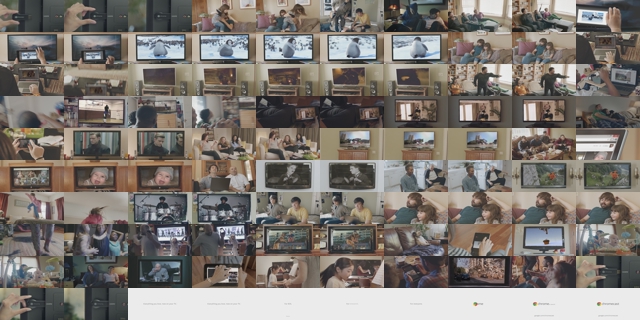
**Figure 1.** Small image spritesheet (100 thumbnails)
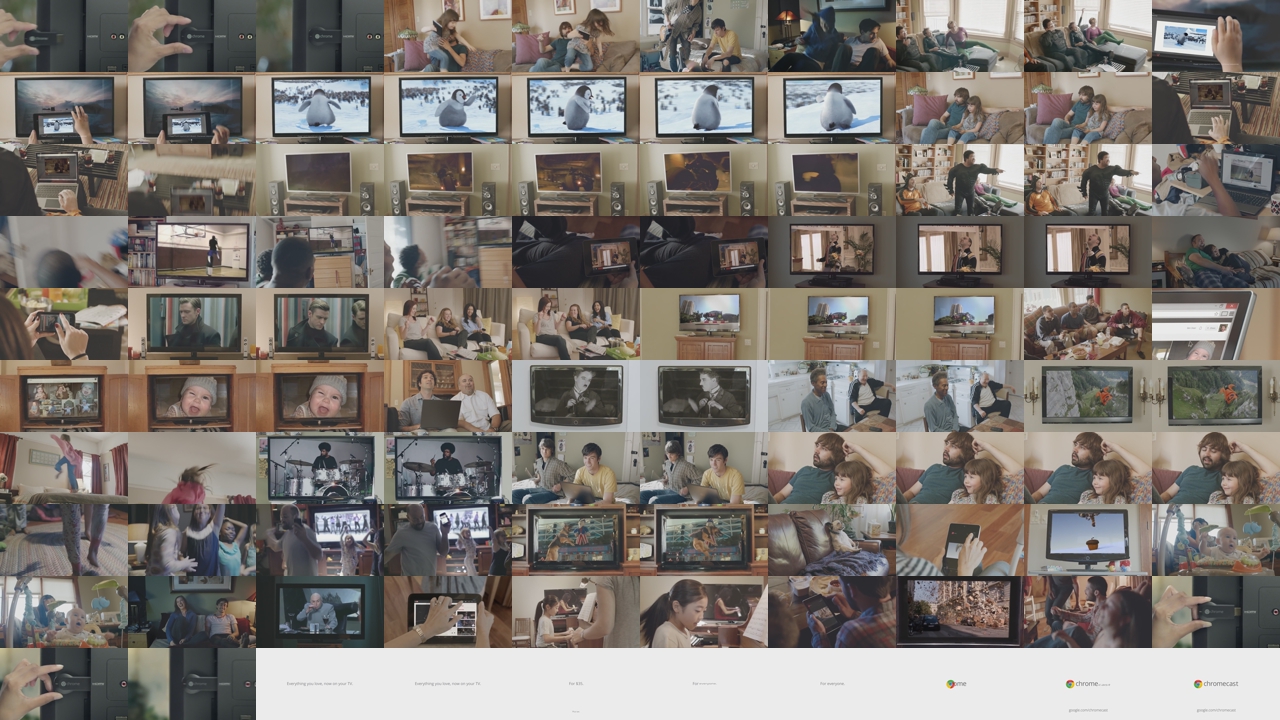
**Figure 2.** Large image spritesheet (100 thumbnails)
## Generate a thumbnail image periodically
The following configuration generates a spritesheet of small images
and a spritesheet of large images. Each spritesheet contains
thumbnails that were generated every 7 seconds from the input video. Note that spritesheets require at least one `VideoStream` in the job
configuration.
You can add this configuration to a
[job template](https://docs.cloud.google.com/transcoder/docs/how-to/job-templates) or include it in an
[ad-hoc job configuration](https://docs.cloud.google.com/transcoder/docs/how-to/jobs#create_jobs_ad_hoc):
### REST
Before using any of the request data,
make the following replacements:
- `PROJECT_ID`: Your Google Cloud project ID listed in the [IAM Settings](https://console.cloud.google.com/iam-admin/settings/project).
- `LOCATION`: The location where your job will run. Use one of the [supported regions](https://docs.cloud.google.com/transcoder/docs/locations). Show locations
- `us-central1`
- `us-west1`
- `us-west2`
- `us-east1`
- `us-east4`
- `southamerica-east1`
- `northamerica-northeast1`
- `asia-east1`
- `asia-northeast1`
- `asia-northeast3`
- `asia-south1`
- `asia-southeast1`
- `australia-southeast1`
- `europe-west1`
- `europe-west2`
- `europe-west4`
- `me-west1`
- `me-central1`
- `me-central2`
- `STORAGE_BUCKET_NAME`: The name of the Cloud Storage bucket you created.
- `STORAGE_INPUT_VIDEO`: The name of the video in your Cloud Storage bucket that you are transcoding, such as `my-vid.mp4`. This field should take into account any folders that you created in the bucket (for example, `input/my-vid.mp4`).
- `STORAGE_OUTPUT_FOLDER`: The Cloud Storage folder name where you want to save the encoded video outputs. **Note:** You don't need to create the output folder object before creating the job. When processing the job, the Transcoder API automatically prepends the folder name you specify as part of the names of the objects saved to Cloud Storage.
To send your request, expand one of these options:
#### curl (Linux, macOS, or Cloud Shell)
> [!NOTE]
> **Note:** The following command assumes that you have logged in to the `gcloud` CLI with your user account by running [`gcloud init`](https://docs.cloud.google.com/sdk/gcloud/reference/init) or [`gcloud auth login`](https://docs.cloud.google.com/sdk/gcloud/reference/auth/login) , or by using [Cloud Shell](https://docs.cloud.google.com/shell/docs), which automatically logs you into the `gcloud` CLI . You can check the currently active account by running [`gcloud auth list`](https://docs.cloud.google.com/sdk/gcloud/reference/auth/list).
Save the request body in a file named `request.json`.
Run the following command in the terminal to create or overwrite
this file in the current directory:
```
cat > request.json << 'EOF'
{
"config": {
"inputs": [
{
"key": "input0",
"uri": "gs://STORAGE_BUCKET_NAME/STORAGE_INPUT_VIDEO"
}
],
"elementaryStreams": [
{
"key": "video-stream0",
"videoStream": {
"h264": {
"heightPixels": 360,
"widthPixels": 640,
"bitrateBps": 550000,
"frameRate": 60
}
}
},
{
"key": "audio-stream0",
"audioStream": {
"codec": "aac",
"bitrateBps": 64000
}
}
],
"muxStreams": [
{
"key": "sd",
"container": "mp4",
"elementaryStreams": [
"video-stream0",
"audio-stream0"
]
}
],
"output": {
"uri": "gs://STORAGE_BUCKET_NAME/STORAGE_OUTPUT_FOLDER/"
},
"spriteSheets": [
{
"filePrefix": "small-sprite-sheet",
"spriteHeightPixels": 32,
"spriteWidthPixels": 64,
"interval": "7s"
},
{
"filePrefix": "large-sprite-sheet",
"spriteHeightPixels": 72,
"spriteWidthPixels": 128,
"interval": "7s"
}
]
}
}
EOF
```
Then execute the following command to send your REST request:
```
curl -X POST \
-H "Authorization: Bearer $(gcloud auth print-access-token)" \
-H "Content-Type: application/json; charset=utf-8" \
-d @request.json \
"https://transcoder.googleapis.com/v1/projects/PROJECT_ID/locations/LOCATION/jobs"
```
#### PowerShell (Windows)
> [!NOTE]
> **Note:** The following command assumes that you have logged in to the `gcloud` CLI with your user account by running [`gcloud init`](https://docs.cloud.google.com/sdk/gcloud/reference/init) or [`gcloud auth login`](https://docs.cloud.google.com/sdk/gcloud/reference/auth/login) . You can check the currently active account by running [`gcloud auth list`](https://docs.cloud.google.com/sdk/gcloud/reference/auth/list).
Save the request body in a file named `request.json`.
Run the following command in the terminal to create or overwrite
this file in the current directory:
```
@'
{
"config": {
"inputs": [
{
"key": "input0",
"uri": "gs://STORAGE_BUCKET_NAME/STORAGE_INPUT_VIDEO"
}
],
"elementaryStreams": [
{
"key": "video-stream0",
"videoStream": {
"h264": {
"heightPixels": 360,
"widthPixels": 640,
"bitrateBps": 550000,
"frameRate": 60
}
}
},
{
"key": "audio-stream0",
"audioStream": {
"codec": "aac",
"bitrateBps": 64000
}
}
],
"muxStreams": [
{
"key": "sd",
"container": "mp4",
"elementaryStreams": [
"video-stream0",
"audio-stream0"
]
}
],
"output": {
"uri": "gs://STORAGE_BUCKET_NAME/STORAGE_OUTPUT_FOLDER/"
},
"spriteSheets": [
{
"filePrefix": "small-sprite-sheet",
"spriteHeightPixels": 32,
"spriteWidthPixels": 64,
"interval": "7s"
},
{
"filePrefix": "large-sprite-sheet",
"spriteHeightPixels": 72,
"spriteWidthPixels": 128,
"interval": "7s"
}
]
}
}
'@ | Out-File -FilePath request.json -Encoding utf8
```
Then execute the following command to send your REST request:
```
$cred = gcloud auth print-access-token
$headers = @{ "Authorization" = "Bearer $cred" }
Invoke-WebRequest `
-Method POST `
-Headers $headers `
-ContentType: "application/json; charset=utf-8" `
-InFile request.json `
-Uri "https://transcoder.googleapis.com/v1/projects/PROJECT_ID/locations/LOCATION/jobs" | Select-Object -Expand Content
```
You should receive a JSON response similar to the following:
```
{
"name": "projects/PROJECT_NUMBER/locations/LOCATION/jobs/JOB_ID",
"config": {
...
},
"state": "PENDING",
"createTime": CREATE_TIME,
"ttlAfterCompletionDays": 30
}
```
### gcloud
1. Create a `request.json` file that defines the job fields. Make the following replacements for the [`gcloud`](https://docs.cloud.google.com/sdk/gcloud/reference/transcoder/jobs/create) command:
- STORAGE_BUCKET_NAME: The name of the Cloud Storage bucket you created.
- STORAGE_INPUT_VIDEO: The name of the video in your Cloud Storage bucket that you are transcoding, such as `my-vid.mp4`. This field should take into account any folders that you created in the bucket (for example, `input/my-vid.mp4`).
- LOCATION: The location where your job will run. Use a location from the following list. Show locations
- `us-central1`
- `us-west1`
- `us-west2`
- `us-east1`
- `us-east4`
- `southamerica-east1`
- `northamerica-northeast1`
- `asia-east1`
- `asia-northeast1`
- `asia-northeast3`
- `asia-south1`
- `asia-southeast1`
- `australia-southeast1`
- `europe-west1`
- `europe-west2`
- `europe-west4`
- `me-west1`
- `me-central1`
- `me-central2`
- STORAGE_OUTPUT_FOLDER: The Cloud Storage folder name where you want to save the encoded video outputs. **Note:** You don't need to create the output folder object before creating the job. When processing the job, the Transcoder API automatically prepends the folder name you specify as part of the names of the objects saved to Cloud Storage.
```bash
{
"config": {
"inputs": [
{
"key": "input0",
"uri": "gs://STORAGE_BUCKET_NAME/STORAGE_INPUT_VIDEO"
}
],
"elementaryStreams": [
{
"key": "video-stream0",
"videoStream": {
"h264": {
"heightPixels": 360,
"widthPixels": 640,
"bitrateBps": 550000,
"frameRate": 60
}
}
},
{
"key": "audio-stream0",
"audioStream": {
"codec": "aac",
"bitrateBps": 64000
}
}
],
"muxStreams": [
{
"key": "sd",
"container": "mp4",
"elementaryStreams": [
"video-stream0",
"audio-stream0"
]
}
],
"output": {
"uri": "gs://STORAGE_BUCKET_NAME/STORAGE_OUTPUT_FOLDER/"
},
"spriteSheets": [
{
"filePrefix": "small-sprite-sheet",
"spriteHeightPixels": 32,
"spriteWidthPixels": 64,
"interval": "7s"
},
{
"filePrefix": "large-sprite-sheet",
"spriteHeightPixels": 72,
"spriteWidthPixels": 128,
"interval": "7s"
}
]
}
}
```
2. Run the following command:
```bash
gcloud transcoder jobs create --location=LOCATION --file="request.json"
```
You should see a response similar to the following:
```
{
"name": "projects/PROJECT_NUMBER/locations/LOCATION/jobs/JOB_ID",
"config": {
...
},
"state": "PENDING",
"createTime": CREATE_TIME,
"ttlAfterCompletionDays": 30
}
```
### C#
Before trying this sample, follow the C# setup instructions in the
[Transcoder API quickstart using
client libraries](https://docs.cloud.google.com/transcoder/docs/quickstart-client-libraries).
For more information, see the
[Transcoder API C# API
reference documentation](https://docs.cloud.google.com/dotnet/docs/reference/Google.Cloud.Video.Transcoder.V1/latest).
To authenticate to Transcoder API, set up Application Default Credentials.
For more information, see
[Set up authentication for a local development environment](https://docs.cloud.google.com/docs/authentication/set-up-adc-local-dev-environment).
using https://docs.cloud.google.com/dotnet/docs/reference/Google.Api.Gax/latest/Google.Api.Gax.ResourceNames.html;
using https://docs.cloud.google.com/dotnet/docs/reference/Google.Cloud.Video.Transcoder.V1/latest/Google.Cloud.Video.Transcoder.V1.html;
using https://docs.cloud.google.com/dotnet/docs/reference/Google.Protobuf/latest/Google.Protobuf.WellKnownTypes.html;
using System;
public class CreateJobWithPeriodicImagesSpritesheetSample
{
public const string SmallSpritesheetFilePrefix = "small-sprite-sheet";
public const string LargeSpritesheetFilePrefix = "large-sprite-sheet";
public Job CreateJobWithPeriodicImagesSpritesheet(
string projectId, string location, string inputUri, string outputUri)
{
// Create the client.
https://docs.cloud.google.com/dotnet/docs/reference/Google.Cloud.Video.Transcoder.V1/latest/Google.Cloud.Video.Transcoder.V1.TranscoderServiceClient.html client = https://docs.cloud.google.com/dotnet/docs/reference/Google.Cloud.Video.Transcoder.V1/latest/Google.Cloud.Video.Transcoder.V1.TranscoderServiceClient.html.https://docs.cloud.google.com/dotnet/docs/reference/Google.Cloud.Video.Transcoder.V1/latest/Google.Cloud.Video.Transcoder.V1.TranscoderServiceClient.html#Google_Cloud_Video_Transcoder_V1_TranscoderServiceClient_Create();
// Build the parent location name.
https://docs.cloud.google.com/dotnet/docs/reference/Google.Api.Gax/latest/Google.Api.Gax.ResourceNames.LocationName.html parent = new https://docs.cloud.google.com/dotnet/docs/reference/Google.Api.Gax/latest/Google.Api.Gax.ResourceNames.LocationName.html(projectId, location);
// Build the job config.
https://docs.cloud.google.com/dotnet/docs/reference/Google.Cloud.Video.Transcoder.V1/latest/Google.Cloud.Video.Transcoder.V1.VideoStream.html videoStream0 = new https://docs.cloud.google.com/dotnet/docs/reference/Google.Cloud.Video.Transcoder.V1/latest/Google.Cloud.Video.Transcoder.V1.VideoStream.html
{
H264 = new VideoStream.Types.H264CodecSettings
{
BitrateBps = 550000,
FrameRate = 60,
HeightPixels = 360,
WidthPixels = 640
}
};
https://docs.cloud.google.com/dotnet/docs/reference/Google.Cloud.Video.Transcoder.V1/latest/Google.Cloud.Video.Transcoder.V1.AudioStream.html audioStream0 = new https://docs.cloud.google.com/dotnet/docs/reference/Google.Cloud.Video.Transcoder.V1/latest/Google.Cloud.Video.Transcoder.V1.AudioStream.html
{
Codec = "aac",
BitrateBps = 64000
};
// Generates a spritesheet of small images taken periodically from the
// input video. To preserve the source aspect ratio, you should set the
// SpriteWidthPixels field or the SpriteHeightPixels field, but not
// both (the API will automatically calculate the missing field). For
// this sample, we don't care about the aspect ratio so we set both
// fields.
https://docs.cloud.google.com/dotnet/docs/reference/Google.Cloud.Video.Transcoder.V1/latest/Google.Cloud.Video.Transcoder.V1.SpriteSheet.html smallSpriteSheet = new https://docs.cloud.google.com/dotnet/docs/reference/Google.Cloud.Video.Transcoder.V1/latest/Google.Cloud.Video.Transcoder.V1.SpriteSheet.html
{
FilePrefix = SmallSpritesheetFilePrefix,
SpriteHeightPixels = 32,
SpriteWidthPixels = 64,
Interval = https://docs.cloud.google.com/dotnet/docs/reference/Google.Protobuf/latest/Google.Protobuf.WellKnownTypes.Duration.html.https://docs.cloud.google.com/dotnet/docs/reference/Google.Protobuf/latest/Google.Protobuf.WellKnownTypes.Duration.html#Google_Protobuf_WellKnownTypes_Duration_FromTimeSpan_System_TimeSpan_(TimeSpan.FromSeconds(7))
};
// Generates a spritesheet of larger images taken periodically from the
// input video. To preserve the source aspect ratio, you should set the
// SpriteWidthPixels field or the SpriteHeightPixels field, but not
// both (the API will automatically calculate the missing field). For
// this sample, we don't care about the aspect ratio so we set both
// fields.
https://docs.cloud.google.com/dotnet/docs/reference/Google.Cloud.Video.Transcoder.V1/latest/Google.Cloud.Video.Transcoder.V1.SpriteSheet.html largeSpriteSheet = new https://docs.cloud.google.com/dotnet/docs/reference/Google.Cloud.Video.Transcoder.V1/latest/Google.Cloud.Video.Transcoder.V1.SpriteSheet.html
{
FilePrefix = LargeSpritesheetFilePrefix,
SpriteHeightPixels = 72,
SpriteWidthPixels = 128,
Interval = https://docs.cloud.google.com/dotnet/docs/reference/Google.Protobuf/latest/Google.Protobuf.WellKnownTypes.Duration.html.https://docs.cloud.google.com/dotnet/docs/reference/Google.Protobuf/latest/Google.Protobuf.WellKnownTypes.Duration.html#Google_Protobuf_WellKnownTypes_Duration_FromTimeSpan_System_TimeSpan_(TimeSpan.FromSeconds(7))
};
https://docs.cloud.google.com/dotnet/docs/reference/Google.Cloud.Video.Transcoder.V1/latest/Google.Cloud.Video.Transcoder.V1.ElementaryStream.html elementaryStream0 = new https://docs.cloud.google.com/dotnet/docs/reference/Google.Cloud.Video.Transcoder.V1/latest/Google.Cloud.Video.Transcoder.V1.ElementaryStream.html
{
Key = "video_stream0",
VideoStream = videoStream0
};
https://docs.cloud.google.com/dotnet/docs/reference/Google.Cloud.Video.Transcoder.V1/latest/Google.Cloud.Video.Transcoder.V1.ElementaryStream.html elementaryStream1 = new https://docs.cloud.google.com/dotnet/docs/reference/Google.Cloud.Video.Transcoder.V1/latest/Google.Cloud.Video.Transcoder.V1.ElementaryStream.html
{
Key = "audio_stream0",
AudioStream = audioStream0
};
https://docs.cloud.google.com/dotnet/docs/reference/Google.Cloud.Video.Transcoder.V1/latest/Google.Cloud.Video.Transcoder.V1.MuxStream.html muxStream0 = new https://docs.cloud.google.com/dotnet/docs/reference/Google.Cloud.Video.Transcoder.V1/latest/Google.Cloud.Video.Transcoder.V1.MuxStream.html
{
Key = "sd",
Container = "mp4",
ElementaryStreams = { "video_stream0", "audio_stream0" }
};
https://docs.cloud.google.com/dotnet/docs/reference/Google.Cloud.Video.Transcoder.V1/latest/Google.Cloud.Video.Transcoder.V1.Input.html input = new https://docs.cloud.google.com/dotnet/docs/reference/Google.Cloud.Video.Transcoder.V1/latest/Google.Cloud.Video.Transcoder.V1.Input.html
{
Key = "input0",
Uri = inputUri
};
https://docs.cloud.google.com/dotnet/docs/reference/Google.Cloud.Video.Transcoder.V1/latest/Google.Cloud.Video.Transcoder.V1.Output.html output = new https://docs.cloud.google.com/dotnet/docs/reference/Google.Cloud.Video.Transcoder.V1/latest/Google.Cloud.Video.Transcoder.V1.Output.html
{
Uri = outputUri
};
https://docs.cloud.google.com/dotnet/docs/reference/Google.Cloud.Video.Transcoder.V1/latest/Google.Cloud.Video.Transcoder.V1.JobConfig.html jobConfig = new https://docs.cloud.google.com/dotnet/docs/reference/Google.Cloud.Video.Transcoder.V1/latest/Google.Cloud.Video.Transcoder.V1.JobConfig.html
{
Inputs = { input },
Output = output,
ElementaryStreams = { elementaryStream0, elementaryStream1 },
MuxStreams = { muxStream0 },
SpriteSheets = { smallSpriteSheet, largeSpriteSheet }
};
// Build the job.
https://docs.cloud.google.com/dotnet/docs/reference/Google.Cloud.Video.Transcoder.V1/latest/Google.Cloud.Video.Transcoder.V1.Job.html newJob = new https://docs.cloud.google.com/dotnet/docs/reference/Google.Cloud.Video.Transcoder.V1/latest/Google.Cloud.Video.Transcoder.V1.Job.html
{
InputUri = inputUri,
OutputUri = outputUri,
Config = jobConfig
};
// Call the API.
https://docs.cloud.google.com/dotnet/docs/reference/Google.Cloud.Video.Transcoder.V1/latest/Google.Cloud.Video.Transcoder.V1.Job.html job = client.https://docs.cloud.google.com/dotnet/docs/reference/Google.Cloud.Video.Transcoder.V1/latest/Google.Cloud.Video.Transcoder.V1.TranscoderServiceClient.html#Google_Cloud_Video_Transcoder_V1_TranscoderServiceClient_CreateJob_Google_Api_Gax_ResourceNames_LocationName_Google_Cloud_Video_Transcoder_V1_Job_Google_Api_Gax_Grpc_CallSettings_(parent, newJob);
// Return the result.
return job;
}
}
### Go
Before trying this sample, follow the Go setup instructions in the
[Transcoder API quickstart using
client libraries](https://docs.cloud.google.com/transcoder/docs/quickstart-client-libraries).
For more information, see the
[Transcoder API Go API
reference documentation](https://pkg.go.dev/cloud.google.com/go/video/transcoder).
To authenticate to Transcoder API, set up Application Default Credentials.
For more information, see
[Set up authentication for a local development environment](https://docs.cloud.google.com/docs/authentication/set-up-adc-local-dev-environment).
import (
"context"
"fmt"
"io"
"github.com/golang/protobuf/ptypes/duration"
transcoder "cloud.google.com/go/video/transcoder/apiv1"
"cloud.google.com/go/video/transcoder/apiv1/transcoderpb"
)
// createJobWithPeriodicImagesSpritesheet creates a job from an ad-hoc configuration and generates
// two spritesheets from the input video. Each spritesheet contains images that are captured
// periodically based on a user-defined time interval.
func createJobWithPeriodicImagesSpritesheet(w io.Writer, projectID string, location string, inputURI string, outputURI string) error {
// projectID := "my-project-id"
// location := "us-central1"
// inputURI := "gs://my-bucket/my-video-file"
// outputURI := "gs://my-bucket/my-output-folder/"
ctx := context.Background()
client, err := transcoder.https://docs.cloud.google.com/go/docs/reference/cloud.google.com/go/video/latest/transcoder/apiv1.html#cloud_google_com_go_video_transcoder_apiv1_Client_NewClient(ctx)
if err != nil {
return fmt.Errorf("NewClient: %w", err)
}
defer client.https://docs.cloud.google.com/go/docs/reference/cloud.google.com/go/video/latest/transcoder/apiv1.html#cloud_google_com_go_video_transcoder_apiv1_Client_Close()
req := &transcoderpb.CreateJobRequest{
Parent: fmt.Sprintf("projects/%s/locations/%s", projectID, location),
Job: &transcoderpb.Job{
InputUri: inputURI,
OutputUri: outputURI,
JobConfig: &transcoderpb.Job_Config{
Config: &transcoderpb.JobConfig{
ElementaryStreams: []*transcoderpb.ElementaryStream{
{
Key: "video_stream0",
ElementaryStream: &transcoderpb.ElementaryStream_VideoStream{
VideoStream: &transcoderpb.VideoStream{
CodecSettings: &transcoderpb.VideoStream_H264{
H264: &transcoderpb.VideoStream_H264CodecSettings{
BitrateBps: 550000,
FrameRate: 60,
HeightPixels: 360,
WidthPixels: 640,
},
},
},
},
},
{
Key: "audio_stream0",
ElementaryStream: &transcoderpb.ElementaryStream_AudioStream{
AudioStream: &transcoderpb.AudioStream{
Codec: "aac",
BitrateBps: 64000,
},
},
},
},
MuxStreams: []*transcoderpb.MuxStream{
{
Key: "sd",
Container: "mp4",
ElementaryStreams: []string{"video_stream0", "audio_stream0"},
},
},
SpriteSheets: []*transcoderpb.SpriteSheet{
{
FilePrefix: "small-sprite-sheet",
SpriteWidthPixels: 64,
SpriteHeightPixels: 32,
ExtractionStrategy: &transcoderpb.SpriteSheet_Interval{
Interval: &duration.Duration{
Seconds: 7,
},
},
},
{
FilePrefix: "large-sprite-sheet",
SpriteWidthPixels: 128,
SpriteHeightPixels: 72,
ExtractionStrategy: &transcoderpb.SpriteSheet_Interval{
Interval: &duration.Duration{
Seconds: 7,
},
},
},
},
},
},
},
}
// Creates the job. Jobs take a variable amount of time to run. You can query for the job state.
// See https://cloud.google.com/transcoder/docs/how-to/jobs#check_job_status for more info.
response, err := client.CreateJob(ctx, req)
if err != nil {
return fmt.Errorf("createJobWithPeriodicImagesSpritesheet: %w", err)
}
fmt.Fprintf(w, "Job: %v", response.GetName())
return nil
}
### Java
Before trying this sample, follow the Java setup instructions in the
[Transcoder API quickstart using
client libraries](https://docs.cloud.google.com/transcoder/docs/quickstart-client-libraries).
For more information, see the
[Transcoder API Java API
reference documentation](https://docs.cloud.google.com/java/docs/reference/google-cloud-video-transcoder/latest/overview).
To authenticate to Transcoder API, set up Application Default Credentials.
For more information, see
[Set up authentication for a local development environment](https://docs.cloud.google.com/docs/authentication/set-up-adc-local-dev-environment).
import com.google.cloud.video.transcoder.v1.https://docs.cloud.google.com/java/docs/reference/google-cloud-video-transcoder/latest/com.google.cloud.video.transcoder.v1.AudioStream.html;
import com.google.cloud.video.transcoder.v1.https://docs.cloud.google.com/java/docs/reference/google-cloud-video-transcoder/latest/com.google.cloud.video.transcoder.v1.CreateJobRequest.html;
import com.google.cloud.video.transcoder.v1.https://docs.cloud.google.com/java/docs/reference/google-cloud-video-transcoder/latest/com.google.cloud.video.transcoder.v1.ElementaryStream.html;
import com.google.cloud.video.transcoder.v1.https://docs.cloud.google.com/java/docs/reference/google-cloud-video-transcoder/latest/com.google.cloud.video.transcoder.v1.Input.html;
import com.google.cloud.video.transcoder.v1.https://docs.cloud.google.com/java/docs/reference/google-cloud-video-transcoder/latest/com.google.cloud.video.transcoder.v1.Job.html;
import com.google.cloud.video.transcoder.v1.https://docs.cloud.google.com/java/docs/reference/google-cloud-video-transcoder/latest/com.google.cloud.video.transcoder.v1.JobConfig.html;
import com.google.cloud.video.transcoder.v1.https://docs.cloud.google.com/java/docs/reference/google-cloud-video-transcoder/latest/com.google.cloud.video.transcoder.v1.LocationName.html;
import com.google.cloud.video.transcoder.v1.https://docs.cloud.google.com/java/docs/reference/google-cloud-video-transcoder/latest/com.google.cloud.video.transcoder.v1.MuxStream.html;
import com.google.cloud.video.transcoder.v1.https://docs.cloud.google.com/java/docs/reference/google-cloud-video-transcoder/latest/com.google.cloud.video.transcoder.v1.Output.html;
import com.google.cloud.video.transcoder.v1.https://docs.cloud.google.com/java/docs/reference/google-cloud-video-transcoder/latest/com.google.cloud.video.transcoder.v1.SpriteSheet.html;
import com.google.cloud.video.transcoder.v1.https://docs.cloud.google.com/java/docs/reference/google-cloud-video-transcoder/latest/com.google.cloud.video.transcoder.v1.TranscoderServiceClient.html;
import com.google.cloud.video.transcoder.v1.https://docs.cloud.google.com/java/docs/reference/google-cloud-video-transcoder/latest/com.google.cloud.video.transcoder.v1.VideoStream.html;
import com.google.protobuf.https://docs.cloud.google.com/java/docs/reference/protobuf/latest/com.google.protobuf.Duration.html;
import java.io.IOException;
public class CreateJobWithPeriodicImagesSpritesheet {
public static final String smallSpritesheetFilePrefix = "small-sprite-sheet";
public static final String largeSpritesheetFilePrefix = "large-sprite-sheet";
public static final String spritesheetFileSuffix = "0000000000.jpeg";
public static void main(String[] args) throws IOException {
// TODO(developer): Replace these variables before running the sample.
String projectId = "my-project-id";
String location = "us-central1";
String inputUri = "gs://my-bucket/my-video-file";
String outputUri = "gs://my-bucket/my-output-folder/";
createJobWithPeriodicImagesSpritesheet(projectId, location, inputUri, outputUri);
}
// Creates a job from an ad-hoc configuration and generates two spritesheets from the input video.
// Each spritesheet contains images that are captured periodically based on a user-defined time
// interval.
public static void createJobWithPeriodicImagesSpritesheet(
String projectId, String location, String inputUri, String outputUri) throws IOException {
// Initialize client that will be used to send requests. This client only needs to be created
// once, and can be reused for multiple requests.
try (https://docs.cloud.google.com/java/docs/reference/google-cloud-video-transcoder/latest/com.google.cloud.video.transcoder.v1.TranscoderServiceClient.html transcoderServiceClient = https://docs.cloud.google.com/java/docs/reference/google-cloud-video-transcoder/latest/com.google.cloud.video.transcoder.v1.TranscoderServiceClient.html.create()) {
https://docs.cloud.google.com/java/docs/reference/google-cloud-video-transcoder/latest/com.google.cloud.video.transcoder.v1.VideoStream.html videoStream0 =
https://docs.cloud.google.com/java/docs/reference/google-cloud-video-transcoder/latest/com.google.cloud.video.transcoder.v1.VideoStream.html.newBuilder()
.https://docs.cloud.google.com/java/docs/reference/google-cloud-video-transcoder/latest/com.google.cloud.video.transcoder.v1.VideoStream.Builder.html#com_google_cloud_video_transcoder_v1_VideoStream_Builder_setH264_com_google_cloud_video_transcoder_v1_VideoStream_H264CodecSettings_(
https://docs.cloud.google.com/java/docs/reference/google-cloud-video-transcoder/latest/com.google.cloud.video.transcoder.v1.VideoStream.html.H264CodecSettings.newBuilder()
.setBitrateBps(550000)
.setFrameRate(60)
.setHeightPixels(360)
.setWidthPixels(640))
.build();
https://docs.cloud.google.com/java/docs/reference/google-cloud-video-transcoder/latest/com.google.cloud.video.transcoder.v1.AudioStream.html audioStream0 =
https://docs.cloud.google.com/java/docs/reference/google-cloud-video-transcoder/latest/com.google.cloud.video.transcoder.v1.AudioStream.html.newBuilder().setCodec("aac").setBitrateBps(64000).build();
// Generates a spritesheet of small images taken periodically from the input video. To
// preserve the source aspect ratio, you should set the spriteWidthPixels field or the
// spriteHeightPixels field, but not both.
https://docs.cloud.google.com/java/docs/reference/google-cloud-video-transcoder/latest/com.google.cloud.video.transcoder.v1.SpriteSheet.html smallSpriteSheet =
https://docs.cloud.google.com/java/docs/reference/google-cloud-video-transcoder/latest/com.google.cloud.video.transcoder.v1.SpriteSheet.html.newBuilder()
.https://docs.cloud.google.com/java/docs/reference/google-cloud-video-transcoder/latest/com.google.cloud.video.transcoder.v1.SpriteSheet.Builder.html#com_google_cloud_video_transcoder_v1_SpriteSheet_Builder_setFilePrefix_java_lang_String_(smallSpritesheetFilePrefix)
.https://docs.cloud.google.com/java/docs/reference/google-cloud-video-transcoder/latest/com.google.cloud.video.transcoder.v1.SpriteSheet.Builder.html#com_google_cloud_video_transcoder_v1_SpriteSheet_Builder_setSpriteHeightPixels_int_(32)
.https://docs.cloud.google.com/java/docs/reference/google-cloud-video-transcoder/latest/com.google.cloud.video.transcoder.v1.SpriteSheet.Builder.html#com_google_cloud_video_transcoder_v1_SpriteSheet_Builder_setSpriteWidthPixels_int_(64)
.https://docs.cloud.google.com/java/docs/reference/google-cloud-video-transcoder/latest/com.google.cloud.video.transcoder.v1.SpriteSheet.Builder.html#com_google_cloud_video_transcoder_v1_SpriteSheet_Builder_setInterval_com_google_protobuf_Duration_(https://docs.cloud.google.com/java/docs/reference/protobuf/latest/com.google.protobuf.Duration.html.newBuilder().setSeconds(7).build())
.build();
// Generates a spritesheet of larger images taken periodically from the input video. To
https://docs.cloud.google.com/java/docs/reference/google-cloud-video-transcoder/latest/com.google.cloud.video.transcoder.v1.SpriteSheet.html largeSpriteSheet =
https://docs.cloud.google.com/java/docs/reference/google-cloud-video-transcoder/latest/com.google.cloud.video.transcoder.v1.SpriteSheet.html.newBuilder()
.https://docs.cloud.google.com/java/docs/reference/google-cloud-video-transcoder/latest/com.google.cloud.video.transcoder.v1.SpriteSheet.Builder.html#com_google_cloud_video_transcoder_v1_SpriteSheet_Builder_setFilePrefix_java_lang_String_(largeSpritesheetFilePrefix)
.https://docs.cloud.google.com/java/docs/reference/google-cloud-video-transcoder/latest/com.google.cloud.video.transcoder.v1.SpriteSheet.Builder.html#com_google_cloud_video_transcoder_v1_SpriteSheet_Builder_setSpriteHeightPixels_int_(72)
.https://docs.cloud.google.com/java/docs/reference/google-cloud-video-transcoder/latest/com.google.cloud.video.transcoder.v1.SpriteSheet.Builder.html#com_google_cloud_video_transcoder_v1_SpriteSheet_Builder_setSpriteWidthPixels_int_(128)
.https://docs.cloud.google.com/java/docs/reference/google-cloud-video-transcoder/latest/com.google.cloud.video.transcoder.v1.SpriteSheet.Builder.html#com_google_cloud_video_transcoder_v1_SpriteSheet_Builder_setInterval_com_google_protobuf_Duration_(https://docs.cloud.google.com/java/docs/reference/protobuf/latest/com.google.protobuf.Duration.html.newBuilder().setSeconds(7).build())
.build();
https://docs.cloud.google.com/java/docs/reference/google-cloud-video-transcoder/latest/com.google.cloud.video.transcoder.v1.JobConfig.html config =
https://docs.cloud.google.com/java/docs/reference/google-cloud-video-transcoder/latest/com.google.cloud.video.transcoder.v1.JobConfig.html.newBuilder()
.addInputs(https://docs.cloud.google.com/java/docs/reference/google-cloud-video-transcoder/latest/com.google.cloud.video.transcoder.v1.Input.html.newBuilder().setKey("input0").setUri(inputUri))
.https://docs.cloud.google.com/java/docs/reference/google-cloud-video-transcoder/latest/com.google.cloud.video.transcoder.v1.JobConfig.Builder.html#com_google_cloud_video_transcoder_v1_JobConfig_Builder_setOutput_com_google_cloud_video_transcoder_v1_Output_(https://docs.cloud.google.com/java/docs/reference/google-cloud-video-transcoder/latest/com.google.cloud.video.transcoder.v1.Output.html.newBuilder().setUri(outputUri))
.addElementaryStreams(
https://docs.cloud.google.com/java/docs/reference/google-cloud-video-transcoder/latest/com.google.cloud.video.transcoder.v1.ElementaryStream.html.newBuilder()
.setKey("video_stream0")
.https://docs.cloud.google.com/java/docs/reference/google-cloud-video-transcoder/latest/com.google.cloud.video.transcoder.v1.ElementaryStream.Builder.html#com_google_cloud_video_transcoder_v1_ElementaryStream_Builder_setVideoStream_com_google_cloud_video_transcoder_v1_VideoStream_(videoStream0))
.addElementaryStreams(
https://docs.cloud.google.com/java/docs/reference/google-cloud-video-transcoder/latest/com.google.cloud.video.transcoder.v1.ElementaryStream.html.newBuilder()
.setKey("audio_stream0")
.https://docs.cloud.google.com/java/docs/reference/google-cloud-video-transcoder/latest/com.google.cloud.video.transcoder.v1.ElementaryStream.Builder.html#com_google_cloud_video_transcoder_v1_ElementaryStream_Builder_setAudioStream_com_google_cloud_video_transcoder_v1_AudioStream_(audioStream0))
.addMuxStreams(
https://docs.cloud.google.com/java/docs/reference/google-cloud-video-transcoder/latest/com.google.cloud.video.transcoder.v1.MuxStream.html.newBuilder()
.setKey("sd")
.https://docs.cloud.google.com/java/docs/reference/google-cloud-video-transcoder/latest/com.google.cloud.video.transcoder.v1.MuxStream.Builder.html#com_google_cloud_video_transcoder_v1_MuxStream_Builder_setContainer_java_lang_String_("mp4")
.addElementaryStreams("video_stream0")
.addElementaryStreams("audio_stream0")
.build())
.https://docs.cloud.google.com/java/docs/reference/google-cloud-video-transcoder/latest/com.google.cloud.video.transcoder.v1.JobConfig.Builder.html#com_google_cloud_video_transcoder_v1_JobConfig_Builder_addSpriteSheets_com_google_cloud_video_transcoder_v1_SpriteSheet_(smallSpriteSheet) // Add the spritesheet config to the job config
.https://docs.cloud.google.com/java/docs/reference/google-cloud-video-transcoder/latest/com.google.cloud.video.transcoder.v1.JobConfig.Builder.html#com_google_cloud_video_transcoder_v1_JobConfig_Builder_addSpriteSheets_com_google_cloud_video_transcoder_v1_SpriteSheet_(largeSpriteSheet) // Add the spritesheet config to the job config
.build();
https://docs.cloud.google.com/java/docs/reference/google-cloud-video-transcoder/latest/com.google.cloud.video.transcoder.v1.CreateJobRequest.html createJobRequest =
https://docs.cloud.google.com/java/docs/reference/google-cloud-video-transcoder/latest/com.google.cloud.video.transcoder.v1.CreateJobRequest.html.newBuilder()
.setJob(
https://docs.cloud.google.com/java/docs/reference/google-cloud-video-transcoder/latest/com.google.cloud.video.transcoder.v1.Job.html.newBuilder()
.https://docs.cloud.google.com/java/docs/reference/google-cloud-video-transcoder/latest/com.google.cloud.video.transcoder.v1.Job.Builder.html#com_google_cloud_video_transcoder_v1_Job_Builder_setInputUri_java_lang_String_(inputUri)
.https://docs.cloud.google.com/java/docs/reference/google-cloud-video-transcoder/latest/com.google.cloud.video.transcoder.v1.Job.Builder.html#com_google_cloud_video_transcoder_v1_Job_Builder_setOutputUri_java_lang_String_(outputUri)
.setConfig(config)
.build())
.setParent(https://docs.cloud.google.com/java/docs/reference/google-cloud-video-transcoder/latest/com.google.cloud.video.transcoder.v1.LocationName.html.of(projectId, location).toString())
.build();
// Send the job creation request and process the response.
https://docs.cloud.google.com/java/docs/reference/google-cloud-video-transcoder/latest/com.google.cloud.video.transcoder.v1.Job.html job = transcoderServiceClient.createJob(createJobRequest);
System.out.println("Job: " + job.https://docs.cloud.google.com/java/docs/reference/google-cloud-video-transcoder/latest/com.google.cloud.video.transcoder.v1.Job.html#com_google_cloud_video_transcoder_v1_Job_getName__());
}
}
}
### Node.js
Before trying this sample, follow the Node.js setup instructions in the
[Transcoder API quickstart using
client libraries](https://docs.cloud.google.com/transcoder/docs/quickstart-client-libraries).
For more information, see the
[Transcoder API Node.js API
reference documentation](https://cloud.google.com/nodejs/docs/reference/video-transcoder/latest).
To authenticate to Transcoder API, set up Application Default Credentials.
For more information, see
[Set up authentication for a local development environment](https://docs.cloud.google.com/docs/authentication/set-up-adc-local-dev-environment).
/**
* TODO(developer): Uncomment these variables before running the sample.
*/
// projectId = 'my-project-id';
// location = 'us-central1';
// inputUri = 'gs://my-bucket/my-video-file';
// outputUri = 'gs://my-bucket/my-output-folder/';
// Imports the Transcoder library
const {TranscoderServiceClient} =
require('https://docs.cloud.google.com/nodejs/docs/reference/video-transcoder/latest/overview.html').v1;
// Instantiates a client
const transcoderServiceClient = new https://docs.cloud.google.com/nodejs/docs/reference/video-transcoder/latest/overview.html();
async function createJobWithPeriodicImagesSpritesheet() {
// Construct request
const request = {
parent: transcoderServiceClient.https://docs.cloud.google.com/nodejs/docs/reference/video-transcoder/latest/video-transcoder/v1.transcoderserviceclient.html(projectId, location),
job: {
inputUri: inputUri,
outputUri: outputUri,
config: {
elementaryStreams: [
{
key: 'video-stream0',
videoStream: {
h264: {
heightPixels: 360,
widthPixels: 640,
bitrateBps: 550000,
frameRate: 60,
},
},
},
{
key: 'audio-stream0',
audioStream: {
codec: 'aac',
bitrateBps: 64000,
},
},
],
muxStreams: [
{
key: 'sd',
container: 'mp4',
elementaryStreams: ['video-stream0', 'audio-stream0'],
},
],
spriteSheets: [
{
filePrefix: 'small-sprite-sheet',
spriteHeightPixels: 32,
spriteWidthPixels: 64,
interval: {
seconds: 7,
},
},
{
filePrefix: 'large-sprite-sheet',
spriteHeightPixels: 72,
spriteWidthPixels: 128,
interval: {
seconds: 7,
},
},
],
},
},
};
// Run request
const [response] = await transcoderServiceClient.createJob(request);
console.log(`Job: ${response.name}`);
}
createJobWithPeriodicImagesSpritesheet();
### PHP
Before trying this sample, follow the PHP setup instructions in the
[Transcoder API quickstart using
client libraries](https://docs.cloud.google.com/transcoder/docs/quickstart-client-libraries).
For more information, see the
[Transcoder API PHP API
reference documentation](https://googleapis.github.io/google-cloud-php/#/docs/cloud-video-transcoder/latest/videotranscoder/readme).
To authenticate to Transcoder API, set up Application Default Credentials.
For more information, see
[Set up authentication for a local development environment](https://docs.cloud.google.com/docs/authentication/set-up-adc-local-dev-environment).
use Google\Cloud\Video\Transcoder\V1\AudioStream;
use Google\Cloud\Video\Transcoder\V1\Client\TranscoderServiceClient;
use Google\Cloud\Video\Transcoder\V1\CreateJobRequest;
use Google\Cloud\Video\Transcoder\V1\ElementaryStream;
use Google\Cloud\Video\Transcoder\V1\Job;
use Google\Cloud\Video\Transcoder\V1\JobConfig;
use Google\Cloud\Video\Transcoder\V1\MuxStream;
use Google\Cloud\Video\Transcoder\V1\SpriteSheet;
use Google\Cloud\Video\Transcoder\V1\VideoStream;
use Google\Protobuf\Duration;
/**
* Creates a job that generates two spritesheets from the input video. Each
* spritesheet contains images that are captured periodically.
*
* @param string $projectId The ID of your Google Cloud Platform project.
* @param string $location The location of the job.
* @param string $inputUri Uri of the video in the Cloud Storage bucket.
* @param string $outputUri Uri of the video output folder in the Cloud Storage bucket.
*/
function create_job_with_periodic_images_spritesheet($projectId, $location, $inputUri, $outputUri)
{
// Instantiate a client.
$transcoderServiceClient = new TranscoderServiceClient();
$formattedParent = $transcoderServiceClient->locationName($projectId, $location);
$jobConfig =
(new JobConfig())->setElementaryStreams([
(new ElementaryStream())
->setKey('video-stream0')
->setVideoStream(
(new VideoStream())
->setH264(
(new VideoStream\H264CodecSettings())
->setBitrateBps(550000)
->setFrameRate(60)
->setHeightPixels(360)
->setWidthPixels(640)
)
),
(new ElementaryStream())
->setKey('audio-stream0')
->setAudioStream(
(new AudioStream())
->setCodec('aac')
->setBitrateBps(64000)
)
])->setMuxStreams([
(new MuxStream())
->setKey('sd')
->setContainer('mp4')
->setElementaryStreams(['video-stream0', 'audio-stream0'])
])->setSpriteSheets([
(new SpriteSheet())
->setFilePrefix('small-sprite-sheet')
->setSpriteWidthPixels(64)
->setSpriteHeightPixels(32)
->setInterval(
(new Duration())
->setSeconds(7)
),
(new SpriteSheet())
->setFilePrefix('large-sprite-sheet')
->setSpriteWidthPixels(128)
->setSpriteHeightPixels(72)
->setInterval(new Duration(['seconds' => 7]))
]);
$job = (new Job())
->setInputUri($inputUri)
->setOutputUri($outputUri)
->setConfig($jobConfig);
$request = (new CreateJobRequest())
->setParent($formattedParent)
->setJob($job);
$response = $transcoderServiceClient->createJob($request);
// Print job name.
printf('Job: %s' . PHP_EOL, $response->getName());
}
### Python
Before trying this sample, follow the Python setup instructions in the
[Transcoder API quickstart using
client libraries](https://docs.cloud.google.com/transcoder/docs/quickstart-client-libraries).
For more information, see the
[Transcoder API Python API
reference documentation](https://docs.cloud.google.com/python/docs/reference/transcoder/latest).
To authenticate to Transcoder API, set up Application Default Credentials.
For more information, see
[Set up authentication for a local development environment](https://docs.cloud.google.com/docs/authentication/set-up-adc-local-dev-environment).
import argparse
from google.cloud.video import transcoder_v1
from google.cloud.video.transcoder_v1.services.transcoder_service import (
TranscoderServiceClient,
)
from google.protobuf import duration_pb2 as duration
def create_job_with_periodic_images_spritesheet(
project_id: str,
location: str,
input_uri: str,
output_uri: str,
) -> transcoder_v1.types.resources.Job:
"""Creates a job based on an ad-hoc job configuration that generates two spritesheets.
Args:
project_id: The GCP project ID.
location: The location to start the job in.
input_uri: Uri of the video in the Cloud Storage bucket.
output_uri: Uri of the video output folder in the Cloud Storage bucket.
Returns:
The job resource.
"""
client = TranscoderServiceClient()
parent = f"projects/{project_id}/locations/{location}"
job = transcoder_v1.types.Job()
job.input_uri = input_uri
job.output_uri = output_uri
job.config = transcoder_v1.types.JobConfig(
# Create an ad-hoc job. For more information, see https://cloud.google.com/transcoder/docs/how-to/jobs#create_jobs_ad_hoc.
# See all options for the job config at https://cloud.google.com/transcoder/docs/reference/rest/v1/JobConfig.
elementary_streams=[
# This section defines the output video stream.
transcoder_v1.types.ElementaryStream(
key="video-stream0",
video_stream=transcoder_v1.types.VideoStream(
h264=transcoder_v1.types.VideoStream.H264CodecSettings(
height_pixels=360,
width_pixels=640,
bitrate_bps=550000,
frame_rate=60,
),
),
),
# This section defines the output audio stream.
transcoder_v1.types.ElementaryStream(
key="audio-stream0",
audio_stream=transcoder_v1.types.AudioStream(
codec="aac", bitrate_bps=64000
),
),
],
# This section multiplexes the output audio and video together into a container.
mux_streams=[
transcoder_v1.types.MuxStream(
key="sd",
container="mp4",
elementary_streams=["video-stream0", "audio-stream0"],
),
],
# Generate two sprite sheets from the input video into the GCS bucket. For more information, see
# https://cloud.google.com/transcoder/docs/how-to/generate-spritesheet#generate_image_periodically.
sprite_sheets=[
# Generate a sprite sheet with 64x32px images. An image is taken every 7 seconds from the video.
transcoder_v1.types.SpriteSheet(
file_prefix="small-sprite-sheet",
sprite_width_pixels=64,
sprite_height_pixels=32,
interval=duration.Duration(
seconds=7,
),
),
# Generate a sprite sheet with 128x72px images. An image is taken every 7 seconds from the video.
transcoder_v1.types.SpriteSheet(
file_prefix="large-sprite-sheet",
sprite_width_pixels=128,
sprite_height_pixels=72,
interval=duration.Duration(
seconds=7,
),
),
],
)
response = client.create_job(parent=parent, job=job)
print(f"Job: {response.name}")
return response
### Ruby
Before trying this sample, follow the Ruby setup instructions in the
[Transcoder API quickstart using
client libraries](https://docs.cloud.google.com/transcoder/docs/quickstart-client-libraries).
For more information, see the
[Transcoder API Ruby API
reference documentation](https://docs.cloud.google.com/ruby/docs/reference/google-cloud-video-transcoder/latest).
To authenticate to Transcoder API, set up Application Default Credentials.
For more information, see
[Set up authentication for a local development environment](https://docs.cloud.google.com/docs/authentication/set-up-adc-local-dev-environment).
# project_id = "YOUR-GOOGLE-CLOUD-PROJECT" # (e.g. "my-project")
# location = "YOUR-JOB-LOCATION" # (e.g. "us-central1")
# input_uri = "YOUR-GCS-INPUT-VIDEO" # (e.g. "gs://my-bucket/my-video-file")
# output_uri = "YOUR-GCS-OUTPUT-FOLDER/" # (e.g. "gs://my-bucket/my-output-folder/")
# Require the Transcoder client library.
require "google/cloud/video/transcoder"
# Create a Transcoder client.
client = Google::Cloud::Video::Transcoder.transcoder_service
# Build the resource name of the parent.
parent = client.location_path project: project_id, location: location
# Build the job config.
new_job = {
input_uri: input_uri,
output_uri: output_uri,
config: {
elementary_streams: [
{
key: "video-stream0",
video_stream: {
h264: {
height_pixels: 360,
width_pixels: 640,
bitrate_bps: 550_000,
frame_rate: 60
}
}
},
{
key: "audio-stream0",
audio_stream: {
codec: "aac",
bitrate_bps: 64_000
}
}
],
mux_streams: [
{
key: "sd",
container: "mp4",
elementary_streams: [
"video-stream0",
"audio-stream0"
]
}
],
sprite_sheets: [
{
file_prefix: "small-sprite-sheet",
sprite_width_pixels: 64,
sprite_height_pixels: 32,
interval: {
seconds: 7
}
},
{
file_prefix: "large-sprite-sheet",
sprite_width_pixels: 128,
sprite_height_pixels: 72,
interval: {
seconds: 7
}
}
]
}
}
job = client.create_job parent: parent, job: new_job
# Print the job name.
puts "Job: #{job.name}"
> [!NOTE]
> **Note:** To preserve the source aspect ratio, set the `spriteWidthPixels` field or the `spriteHeightPixels` field, but not both (the API will automatically calculate the missing field).
Use this configuration on the [sample video](https://docs.cloud.google.com/static/transcoder/images/ChromeCast.mp4)
to generate the following spritesheets:

**Figure 3.** Small image spritesheet (1 thumbnail every 7 seconds)

**Figure 4.** Large image spritesheet (1 thumbnail every 7 seconds)
Eight thumbnails are generated from the sample video, which is 60 seconds in
length.