This page introduces disaster recovery in Cloud SQL.
## Overview
In Google Cloud, database disaster recovery (DR) is about providing
continuity of processing, specifically when a [region](https://docs.cloud.google.com/docs/geography-and-regions)
fails or becomes unavailable.
[Cloud SQL](https://docs.cloud.google.com/sql/docs/features)
is a regional service (when
Cloud SQL is configured for [high availability (HA)](https://docs.cloud.google.com/sql/docs/mysql/high-availability)).
Therefore, if the Google Cloud region that hosts a Cloud SQL
database becomes unavailable, then the Cloud SQL database also becomes
unavailable.
To continue processing, you must make the database available in a secondary
region as soon as possible. The DR plan requires you to configure a cross-region
read replica in Cloud SQL. A failover based on export/import
or backup/restore is also possible, but that approach takes longer,
especially for large databases.
The following business scenarios are examples that warrant a cross-region
failover configuration:
- The service level agreement of the business application is greater than the regional [Cloud SQL Service Level Agreement](https://cloud.google.com/sql/sla) (99.99% availability depending on your Cloud SQL edition). By failing over to another region, you can mitigate an outage.
- All tiers of the business application are already multi-regional and can continue processing when a region outage occurs. The cross-region failover configuration helps support the continued availability of a database.
- The required recovery time objective (RTO) and recovery point objective (RPO) are in minutes rather than in hours. Failing over to another region is faster than recreating a database.
In general, there are two variants for the DR process:
- A database fails over to a secondary region. After the database is ready and used by an application, it becomes the new primary database and remains the primary database.
- A database fails over to a secondary region but falls back to the primary region after the primary region is recovered from its failure.
This Google Cloud SQL database disaster recovery overview describes the
second variant---when a failed database is recovered and falls back to the
primary region. This DR process variant is especially relevant for databases
that must run in the primary region because of network latency, or because some
resources are available only in the primary region. With this variant, the
database runs in the secondary region only for the duration of outage in the
primary region.
Two tutorials are associated with this DR document:
- [Cloud SQL for MySQL disaster recovery: A complete failover and
fallback process](https://docs.cloud.google.com/solutions/cloud-sql-mysql-disaster-recovery-complete-failover-fallback)
- [Cloud SQL for PostgreSQL disaster recovery: A complete failover and
fallback process](https://docs.cloud.google.com/architecture/cloud-sql-postgres-disaster-recovery-complete-failover-fallback)
## Disaster recovery architecture
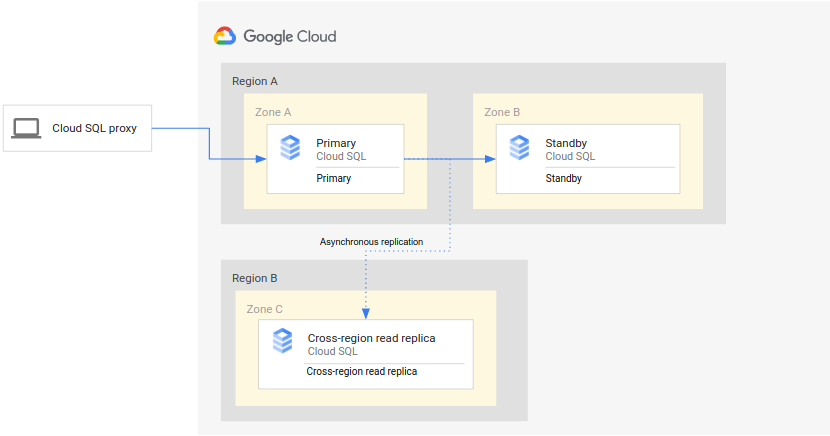
The following diagram shows the minimal architecture that supports database DR
for an HA Cloud SQL instance:
The architecture works as follows:
- Two instances of Cloud SQL (a primary instance and a standby instance) are located in two separate zones within a single region (the primary region). The instances are synchronized by using regional persistent disks.
- One instance of Cloud SQL (the cross-region read replica) is located in a second region (the secondary region). For DR, the cross-region read replica is set up to synchronize (by using asynchronous replication) with the primary instance using a read replica setup.
The primary and standby instances share the same regional disk, so their
states are identical.
Because this setup uses asynchronous replication, it's possible that the
cross-region read replica lags behind the primary instance. As a result, when a failover
occurs, the cross-region read replica RPO is likely non-zero.
## Disaster recovery (DR) process
The disaster recovery (DR) process starts when the primary region becomes
unavailable. To resume processing in a secondary region, you trigger a failover
of the primary instance by promoting a cross-region read replica. The DR process
prescribes the operational steps that must be performed, either manually or
automatically, to mitigate the region failure and establish a running primary
instance in a secondary region.
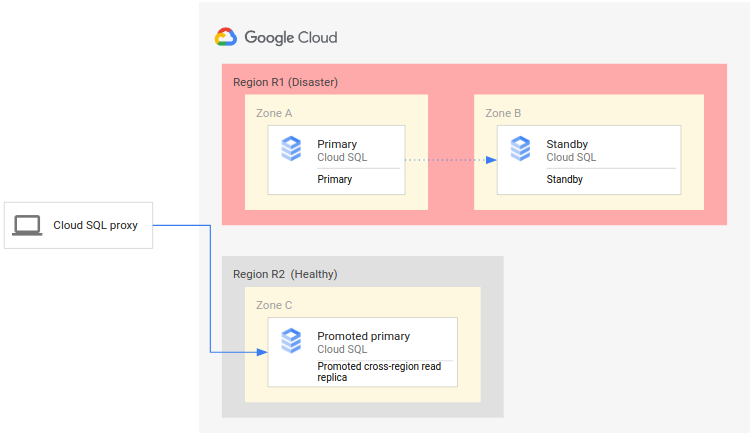
The following diagram shows the DR process:
The DR process consists of the following steps:
1. The primary region (R1), which is running the primary instance, becomes unavailable.
2. The operations team recognizes and formally acknowledges the disaster and decides whether a failover is required.
3. If a failover is required, you can promote the cross-region read replica in the secondary region (R2) to be the new primary instance.
4. Client connections are reconfigured to resume processing on the new primary instance and access the primary instance in R2.
This initial process establishes a working primary database again. However, it
doesn't establish a complete DR architecture, where the new primary instance
itself has a standby instance and a cross-region read replica.
A complete DR process ensures that the single instance, the new primary, is
enabled for HA and has a cross-region read replica. A complete DR process also
provides a fallback to the original deployment in the original primary region.
### Failing over to a secondary region
A complete DR process extends the basic DR process by adding steps to establish
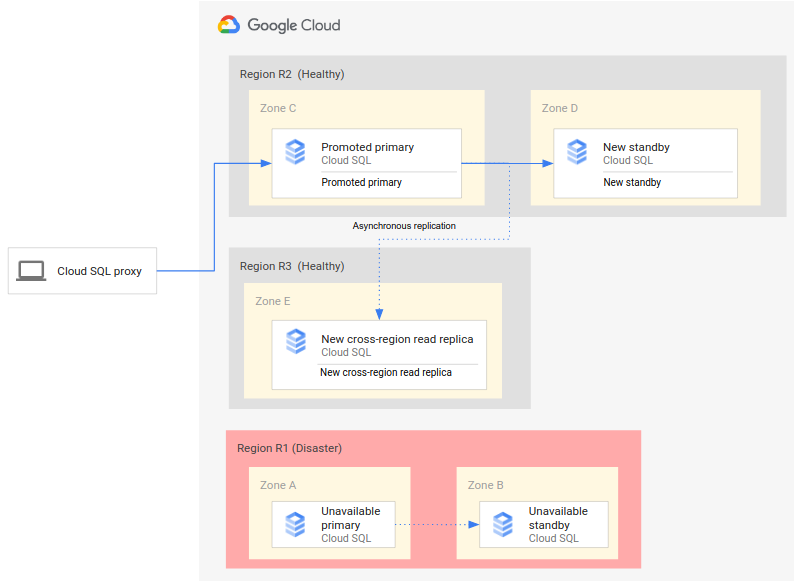
a complete DR architecture after failover. The following diagram shows a
complete database DR architecture after the failover:
The complete database DR process consists of the following steps:
1. The primary region (R1), which is running the primary database, becomes unavailable.
2. The operations team recognizes and formally acknowledges the disaster and decides whether a failover is required.
3. If a failover is required, you can then [promote the cross-region read replica](https://docs.cloud.google.com/sql/docs/mysql/replication/cross-region-replicas#promote-a-replica) in the secondary region (R2) to be the new primary instance.
4. Client connections are reconfigured to access and process on the new primary instance (R2).
5. A new standby instance is created and started in R2 and added to the primary instance. The standby instance is in a different zone from the primary instance. The primary instance is now highly available because a standby instance was created for it.
6. In a third region (R3), a new cross-region read replica is created and attached to the primary instance. At this point, a complete disaster recovery architecture is recreated and operational.
If the original primary region (R1) becomes available before step 6 is
implemented, the cross-region read replica can be placed in region R1, rather
than region R3, right away. In this case, the fallback to the original primary
region (R1) is less complex and requires fewer steps.
> [!NOTE]
> **Note**: You can reduce the RTO for the complete DR process by eliminating steps 5 and 6. To do so, create the cross-region replica in the secondary region (R2) as a HA replica and the cross-region replica in the third region (R3) as a cascading replica with its source as the replica in R2.
### Avoiding a split-brain state
A failure of the primary region (R1) doesn't mean that the original primary
instance and its standby instance are automatically shut down, removed, or
otherwise made inaccessible when R1 becomes available again. If R1 becomes
available, clients might read and write data (even by accident) on the original
primary instance. In this case, a
[split-brain situation](https://wikipedia.org/wiki/Split-brain_(computing))
can develop, where some clients access stale data in the old primary database,
and other clients access fresh data in the new primary database, leading to
problems in your business.
To avoid a split-brain situation, you must ensure that clients can no longer
access the original primary instance after R1 becomes available. Ideally, you
should make the original primary inaccessible before clients start using the new
primary instance, then delete the original primary right after you make it
inaccessible.
### Establishing an initial backup after failover
When you promote the cross-region read replica to be the new primary in a
failover, the transactions in the new primary might not be fully synchronized
with transactions from the original primary. Therefore, those transactions are
unavailable in the new instance.
As a best practice, we recommend that you immediately back up the new primary
instance at the start of the failover and before clients access the database.
This backup represents a consistent, known state at the point of the failover.
Such backups can be important for regulatory purposes or for recovering to a
known state if clients encounter issues when accessing the new primary.
### Falling back to the original primary region
As outlined earlier, this document provides the steps to fall back to the
original region (R1). There are two different versions of the fallback
process.
- If you created the new cross-region read replica in a tertiary region (R3), you must create another (second) cross-region read replica in the primary region (R1).
- If you created the new cross-region read replica in the primary region (R1), you don't need to create another additional cross-region read replica in R1.
After the cross-region read replica in R1 exists, the Cloud SQL
instance can fall back to R1. Because this fallback is manually triggered and
not based on an outage, you can choose an appropriate day and time for this
maintenance activity.
Thus, to achieve a complete DR that has a primary, standby, and cross-region
read replica, you need two failovers. The first failover is triggered by the
outage (a true failover), and the second failover re-establishes the starting
deployment (a fallback).
Fallback to the original primary region (R1) consists of the following steps:
1. Promote the newly created cross-region replica in the original primary region (R1).
2. If the promoted instance wasn't originally created as an HA replica, then enable HA on the instance for protection from zonal failures.
3. Reconfigure your applications to connect to the new primary instance.
4. Create a cross-region replica for the new primary instance in the DR region (R2).
5. (Optional) To avoid running multiple independent primary instances, clean up the primary instance in the DR region (R2).
## Advanced disaster recovery (DR)
If you are using Cloud SQL Enterprise Plus edition, then you can take advantage
of advanced DR. Advanced DR simplifies recovery and fallback after a
cross-regional failover. As described in the
[Disaster recovery process](https://docs.cloud.google.com/sql/docs/mysql/intro-to-cloud-sql-disaster-recovery#dr-process),
when you do DR, you remove the connection between the failed region of the old
primary instance and the operational region of the new primary instance. With
DR, to restore connections to the original deployment region and regain your old
primary instance, you must perform a series of manual fallback steps.
With advanced DR, when a region failure occurs, you can invoke a *replica failover* .
With replica failover, you promote a cross-region read replica similar to performing
regular DR, except that you promote the
*designated disaster recovery (DR) replica*. The promotion of the DR replica is immediate.
Instead of removing the old primary instance, the
instance remains a part of Cloud SQL's asynchronous replication
topology. The old primary instance (instance A) eventually becomes a
replica of its DR replica (instance B) after the DR replica has
been promoted to the new primary instance.
After the old primary instance (A) has been turned into a replica, you
can perform the final step of advanced DR. You can return your Cloud SQL
deployment to its original state and restore the old primary instance (A)
to its former role as the primary instance with zero data loss. To perform this
zero data loss restoration of the old primary instance (A), you can use the
*switchover* operation. When you perform a switchover, there is no data loss
because the primary instance (B) remains in read-only mode until
its designated DR replica (A) catches up with the primary instance (B).
After the DR replica (A) has received all of its replication updates,
then the DR replica (A) assumes the role of the primary instance while the
previous primary instance (B) is automatically reconfigured as the DR replica
of the current primary instance (A). The instances are returned to their original
roles, thus returning the topology to its original state before DR and replica
failover.
Throughout advanced DR, all instances involved in both replica failover and
switchover operations retain their IP addresses.
> [!NOTE]
> **Note:** While switchover results in zero data loss, replica failover can result in data loss if the DR replica experiences replication lag when you start the replica failover operation.
You can also use the switchover operation of advanced DR to perform routine DR
drills to test and prepare your Cloud SQL topology for cross-regional
failover *before* a disaster occurs. If an actual disaster occurs, then you
can perform the cross-regional replica failover that you've already tested.
### Disaster recovery (DR) replica
As a required component of advanced DR, the DR replica has the following
characteristics:
- A DR replica is a directly connected cross-region read replica.
- You can change the DR replica designation multiple times.
- You can change the DR replica designation at any time, except during a switchover or replica failover operation.
In addition, to reduce RTO after using advanced DR, we recommend that you do
the following:
- Configure the DR replica with the same size as the primary instance.
- If the primary instance has HA enabled, then we recommend that you enable HA on the DR replica as well. To do so, first [verify that the
primary has HA enabled](https://docs.cloud.google.com/sql/docs/mysql/configure-ha#verify-ha). Then, perform the switchover to the DR replica. After the switchover operation is complete, enable HA on the new primary instance. Then you can switch back to the old primary instance. The DR replica retains its HA configuration even after it becomes a replica again.
### Replica failover
To summarize, a replica failover consists of the following events:
1. You create and assign a DR replica.
2. The primary region becomes unavailable.
3. You perform the replica failover to the DR replica.
4. The write endpoint is updated and starts pointing to the new primary instance.
5. When the original primary instance comes back online, it becomes a read replica of the new primary instance.
6. You can use the switchover operation to restore your deployment to its original topology.
To see the details and diagrams of a replica failover operation,
click the following tabs.
### Assign DR replica
Before performing a replica failover, you've assigned a DR replica to
the primary instance and possibly have tested the process by performing a
switchover.
 **Figure 1**: All regions are healthy
### Outage occurs
The primary region, which is running the primary database, becomes
unavailable.
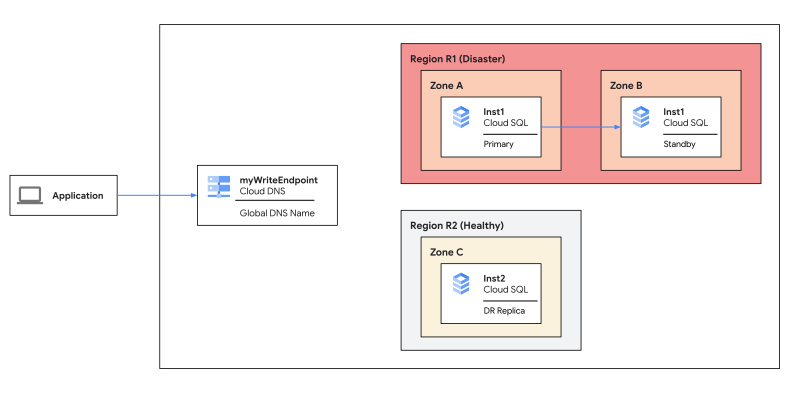 **Figure 2**: Region R1 experiences an outage
### Replica failover
After determining that disaster recovery is required, you perform
a replica failover to your cross-region
designated DR replica.
The
cross-region designated
DR replica
becomes the primary instance immediately and starts accepting incoming
reads and writes. The write endpoint is updated and starts pointing to the
new primary
instance.
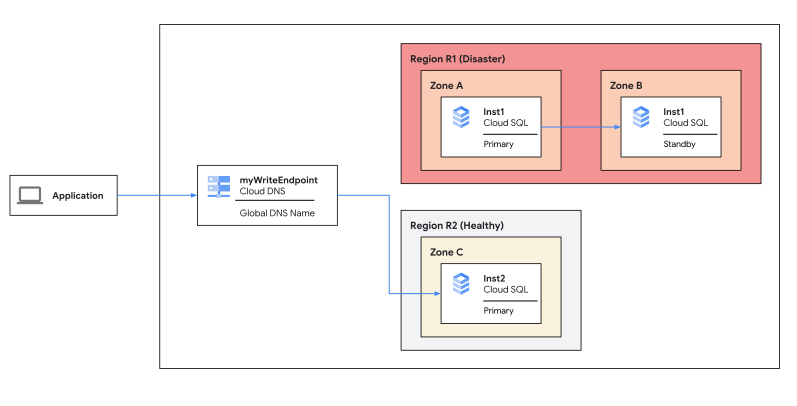 **Figure 3**: Perform replica failover to end the outage
> [!NOTE]
> **Note**: If you're not using a DNS write endpoint, then you must configure applications to point to the new primary instance.
### Original primary becomes replica
After the replica has been promoted, Cloud SQL periodically checks
if the original primary instance is back online. If the original primary
instance is online, then Cloud SQL recreates the old primary as
a replica of the promoted instance. The old primary instance retains its IP address.
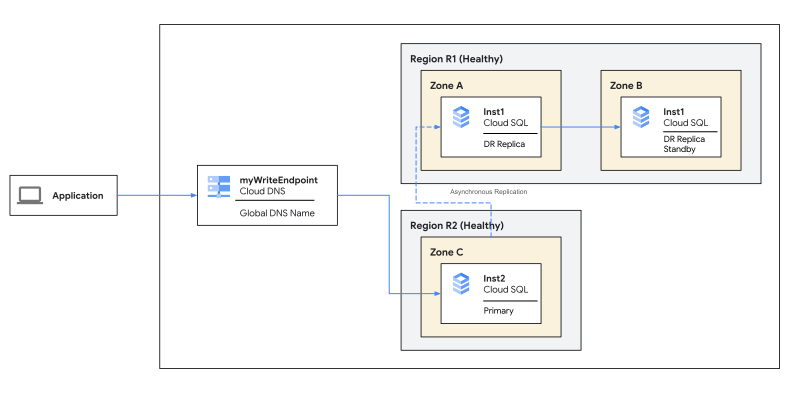 **Figure 4**: Original primary instance becomes DR replica
### Failback to original
After you have performed a replica failover, you can restore the
primary instance in
your original region by performing the switchover operation, reversing the
same DR replica and primary instance pair.
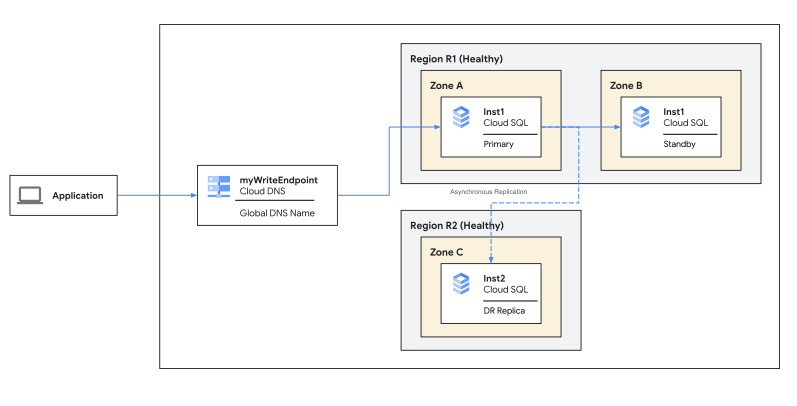 **Figure 5**: Failback using switchover to the original deployment
### Switchover
To summarize, a switchover operation consists of the following events:
1. You create and assign a DR replica.
2. You initiate a switchover.
3. When replication lag goes down to zero, the new primary instances starts accepting incoming connections.
4. The old primary instance becomes a read replica.
5. If a DNS write endpoint is being used, then the DNS write endpoint is updated to point to the new primary instance.
To see the details and diagrams of a switchover operation, click the following tabs.
### Assign DR replica
Before starting the \*switchover\* operation, you must assign a DR
replica to the primary instance.
Verify that the primary instance is healthy. You can only perform a
switchover when both the primary instance and the DR replica are online.
 **Figure 1**: Original deployment
### Initiate switchover
You initiate the switchover. When you initiate a switchover, the primary
instance stops accepting writes and becomes read-only. Cloud SQL
waits for the transaction logs to be copied to Cloud Storage.
The designated DR replica catches up to the primary instance.
When the replication lag goes down to zero, the DR replica is promoted as the new primary instance. The new primary instance starts accepting incoming connections, including application reads and writes.
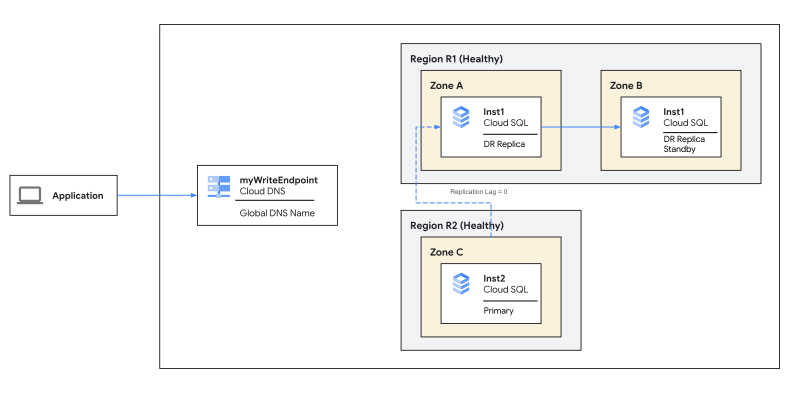 **Figure 2**: Initiate switchover and promote DR replica to primary instance when replication lag = 0
### Endpoint updated
After DR replica is promoted to the new primary instance, the DNS write
endpoint is updated and starts pointing to the new primary
instance.
If you're not using a DNS write endpoint, then you must configure
your applications to point to the IP address of the new primary instance.
The old primary instance is reconfigured as a read replica.
PITR is enabled automatically for the new primary instance. PITR is only
possible after the first automated backup.
 **Figure 3**: Switchover completion
### Write endpoint
A write endpoint is a global domain name service (DNS) name that resolves to the
IP address of the current primary instance automatically. This endpoint redirects
incoming connections to the new primary instance automatically in case of a replica
[failover or switchover](https://docs.cloud.google.com/sql/docs/mysql/replication/cross-region-replicas)
operation. You can use the write endpoint in a SQL connection string instead of
an IP address. By using a write endpoint, you can avoid having to make
application connection changes when a region outage occurs.
A write endpoint requires that the Cloud DNS API is enabled on the project where
you create or have your existing Cloud SQL Enterprise Plus edition primary instance.
When you create a Cloud SQL Enterprise Plus edition instance with a private
IP address and authorized networks, then Cloud SQL generates
a write endpoint for the instance automatically. If you already have
an Cloud SQL Enterprise Plus edition primary instance, then Cloud SQL generates
the write endpoint when you create the DR replica (a cross-region replica
that you designate for the primary instance).
If the primary instance changes due to a switchover or replica failover operation,
then Cloud SQL assigns the write endpoint to the DR replica when
the DR replica becomes the new primary instance.
For more information about using a write endpoint to connect to an instance, see
[Connect to an instance using a write endpoint](https://docs.cloud.google.com/sql/docs/mysql/connect-to-instance-using-write-endpoint).
## What's next
- [Use advanced disaster recovery (DR)](https://docs.cloud.google.com/sql/docs/mysql/use-advanced-disaster-recovery).
- Try the [Cloud SQL for MySQL disaster recovery](https://docs.cloud.google.com/solutions/cloud-sql-mysql-disaster-recovery-complete-failover-fallback) tutorial.
- Explore reference architectures, diagrams, tutorials, and best practices about Google Cloud. Take a look at our [Cloud Architecture Center](https://docs.cloud.google.com/architecture).