


Chirp 3 は、フィードバックと経験に基づいてユーザーのニーズを満たすように設計された、Google の最新世代の多言語自動音声認識(ASR)専用生成モデルです。Chirp 3 は、以前の Chirp モデルよりも精度と速度が向上しており、ダイアライゼーションと自動言語検出が可能です。
モデルの詳細
Chirp 3: 音声文字変換は、Speech-to-Text API V2 でのみ使用できます。
モデル ID
Chirp 3: 音声文字変換は他のモデルと同様に使用できます。API を使用する場合は認識リクエストで適切なモデル ID を指定します。 Google Cloud コンソールではモデル名を指定します。認識で適切な識別子を指定します。
| モデル | モデル ID |
|---|---|
| Chirp 3 | chirp_3 |
API メソッド
Chirp 3 は Speech-to-Text API V2 で使用できるため、次の認識方法がサポートされています。ただし、すべての認識方法で同じ言語のアベイラビリティ セットがサポートされているわけではありません。
| API のバージョン | API メソッド | サポート |
|---|---|---|
| V2 | Speech.StreamingRecognize(ストリーミングとリアルタイム音声に最適) | サポートされている |
| V2 | Speech.Recognize(1 分未満の音声に最適) | サポートされている |
| V2 | Speech.BatchRecognize(通常は 1 分~ 1 時間の長い音声に適していますが、単語レベルのタイムスタンプが有効になっている場合は最大 20 分) | サポート対象 |
ご利用いただけるリージョン
Chirp 3 は、次の Google Cloud リージョンで利用できます。今後さらに追加される予定です。
| Google Cloud ゾーン | 提供状況 |
|---|---|
us (multi-region) |
一般提供 |
eu (multi-region) |
GA |
ここで説明されているように、Location API を使用して、各音声文字変換モデルでサポートされている最新の Google Cloud リージョン、言語とロケール、機能の一覧を確認できます。
音声文字変換の対応言語
Chirp 3 は、次の言語の StreamingRecognize、Recognize、BatchRecognize で音声文字変換をサポートしています。
| 言語 | BCP-47 Code |
提供状況 |
| カタルーニャ語(スペイン) | ca-ES | 一般提供 |
| 中国語(簡体字、中国) | cmn-Hans-CN | 一般提供 |
| クロアチア語(クロアチア) | hr-HR | 一般提供 |
| デンマーク語(デンマーク) | da-DK | 一般提供 |
| オランダ語(オランダ) | nl-NL | 一般提供 |
| 英語(オーストラリア) | en-AU | GA |
| 英語(インド) | en-IN | GA |
| 英語(英国) | en-GB | GA |
| 英語(米国) | en-US | 一般提供 |
| フィンランド語(フィンランド) | fi-FI | 一般提供 |
| フランス語(カナダ) | fr-CA | 一般提供 |
| フランス語(フランス) | fr-FR | 一般提供 |
| ドイツ語(ドイツ) | de-DE | 一般提供 |
| ギリシャ語(ギリシャ) | el-GR | 一般提供 |
| ヒンディー語(インド) | hi-IN | 一般提供 |
| イタリア語(イタリア) | it-IT | 一般提供 |
| 日本語(日本) | ja-JP | 一般提供 |
| 韓国語(韓国) | ko-KR | 一般提供 |
| ポーランド語(ポーランド) | pl-PL | 一般提供 |
| ポルトガル語(ブラジル) | pt-BR | 一般提供 |
| ポルトガル語(ポルトガル) | pt-PT | 一般提供 |
| ルーマニア語(ルーマニア) | ro-RO | 一般提供 |
| ロシア語(ロシア) | ru-RU | 一般提供 |
| スペイン語(スペイン) | es-ES | 一般提供 |
| スペイン語(米国) | es-US | 一般提供 |
| スウェーデン語(スウェーデン) | sv-SE | 一般提供 |
| トルコ語(トルコ) | tr-TR | 一般提供 |
| ウクライナ語(ウクライナ) | uk-UA | 一般提供 |
| ベトナム語(ベトナム) | vi-VN | GA |
| アフリカーンス語(南アフリカ) | af-ZA | プレビュー |
| アルバニア語(アルバニア) | sq-AL | プレビュー |
| アムハラ語(エチオピア) | am-ET | プレビュー |
| アラビア語(アルジェリア) | ar-DZ | プレビュー |
| アラビア語(バーレーン) | ar-BH | プレビュー |
| アラビア語(エジプト) | ar-EG | プレビュー |
| アラビア語(イスラエル) | ar-IL | プレビュー |
| アラビア語(ヨルダン) | ar-JO | プレビュー |
| アラビア語(クウェート) | ar-KW | プレビュー |
| アラビア語(レバノン) | ar-LB | プレビュー |
| アラビア語(モーリタニア) | ar-MR | プレビュー |
| アラビア語(モロッコ) | ar-MA | プレビュー |
| アラビア語(オマーン) | ar-OM | プレビュー |
| アラビア語(カタール) | ar-QA | プレビュー |
| アラビア語(サウジアラビア) | ar-SA | プレビュー |
| アラビア語(パレスチナ国) | ar-PS | プレビュー |
| アラビア語(シリア) | ar-SY | プレビュー |
| アラビア語(チュニジア) | ar-TN | プレビュー |
| アラビア語(アラブ首長国連邦) | ar-AE | プレビュー |
| アラビア語(イエメン) | ar-YE | プレビュー |
| アラビア語 | ar-XA | プレビュー |
| アルメニア語(アルメニア) | hy-AM | プレビュー |
| アッサム語(インド) | as-IN | プレビュー |
| アストゥリアス語(スペイン) | ast-ES | プレビュー |
| アゼルバイジャン語(アゼルバイジャン) | az-AZ | プレビュー |
| バスク語(スペイン) | eu-ES | プレビュー |
| ベンガル語(バングラデシュ) | bn-BD | プレビュー |
| ベンガル語(インド) | bn-IN | プレビュー |
| ブルガリア語(ブルガリア) | bg-BG | プレビュー |
| ビルマ語(ミャンマー) | my-MM | プレビュー |
| 中央クルド語(イラク) | ar-IQ | プレビュー |
| 広東語(繁体字、香港) | yue-Hant-HK | プレビュー |
| 中国語(繁体字、台湾) | cmn-Hant-TW | プレビュー |
| チェコ語(チェコ共和国) | cs-CZ | プレビュー |
| 英語(フィリピン) | en-PH | プレビュー |
| エストニア語(エストニア) | et-EE | プレビュー |
| フィリピン語(フィリピン) | fil-PH | プレビュー |
| ガリシア語(スペイン) | gl-ES | プレビュー |
| ジョージア語(ジョージア) | ka-GE | プレビュー |
| グジャラト語(インド) | gu-IN | プレビュー |
| ハウサ語(ナイジェリア) | ha-NG | プレビュー |
| ヘブライ語(イスラエル) | iw-IL | プレビュー |
| ハンガリー語(ハンガリー) | hu-HU | プレビュー |
| アイスランド語(アイスランド) | is-IS | プレビュー |
| インドネシア語(インドネシア) | id-ID | プレビュー |
| ジャワ語(インドネシア) | jv-ID | プレビュー |
| カンナダ語(インド) | kn-IN | プレビュー |
| カザフ語(カザフスタン) | kk-KZ | プレビュー |
| クメール語(カンボジア) | km-KH | プレビュー |
| キルギス語(キルギスタン) | ky-KG | プレビュー |
| ラオ語(ラオス) | lo-LA | プレビュー |
| ラトビア語(ラトビア) | lv-LV | プレビュー |
| リトアニア語(リトアニア) | lt-LT | プレビュー |
| ルクセングルグ語(ルクセンブルク) | lb-LU | プレビュー |
| マケドニア語(北マケドニア) | mk-MK | プレビュー |
| マレー語(マレーシア) | ms-MY | プレビュー |
| マラヤーラム語(インド) | ml-IN | プレビュー |
| マルタ語(マルタ) | mt-MT | プレビュー |
| マオリ語(ニュージーランド) | mi-NZ | プレビュー |
| マラーティー語(インド) | mr-IN | プレビュー |
| モンゴル語(モンゴル) | mn-MN | プレビュー |
| ネパール語(ネパール) | ne-NP | プレビュー |
| 北ソト語(南アフリカ) | nso-ZA | プレビュー |
| ノルウェー語(ノルウェー) | no-NO | プレビュー |
| オリヤー語(インド) | or-IN | プレビュー |
| ペルシャ語(イラン) | fa-IR | プレビュー |
| パンジャブ語(グルムキー、インド) | pa-Guru-IN | プレビュー |
| セルビア語(セルビア) | sr-RS | プレビュー |
| スロバキア語(スロバキア) | sk-SK | プレビュー |
| スロベニア語(スロベニア) | sl-SI | プレビュー |
| スペイン語(メキシコ) | es-MX | プレビュー |
| スワヒリ語(ケニア) | sw-KE | プレビュー |
| スワヒリ語 | sw | プレビュー |
| タミル語(インド) | ta-IN | プレビュー |
| テルグ語(インド) | te-IN | プレビュー |
| タイ語(タイ) | th-TH | プレビュー |
| ウズベク語(ウズベキスタン) | uz-UZ | プレビュー |
| ウェールズ語(英国) | cy-GB | プレビュー |
| ウォロフ語(セネガル) | wo-SN | プレビュー |
| コーサ語(南アフリカ) | xh-ZA | プレビュー |
| ヨルバ語(ナイジェリア) | yo-NG | プレビュー |
| ズールー語(南アフリカ) | zu-ZA | プレビュー |
ダイアライゼーションの対応言語
Chirp 3 は、次の言語の BatchRecognize と Recognize でのみ音声文字変換とダイアライゼーションをサポートしています。
| 言語 | BCP-47 コード |
| 中国語(簡体字、中国) | cmn-Hans-CN |
| ドイツ語(ドイツ) | de-DE |
| 英語(英国) | en-GB |
| 英語(インド) | en-IN |
| 英語(米国) | en-US |
| スペイン語(スペイン) | es-ES |
| スペイン語(米国) | es-US |
| フランス語(カナダ) | fr-CA |
| フランス語(フランス) | fr-FR |
| ヒンディー語(インド) | hi-IN |
| イタリア語(イタリア) | it-IT |
| 日本語(日本) | ja-JP |
| 韓国語(韓国) | ko-KR |
| ポルトガル語(ブラジル) | pt-BR |
機能のサポートと制限事項
Chirp 3 は、次の機能をサポートしています。
| 機能 | 説明 | リリース ステージ |
|---|---|---|
| 句読点入力の自動化 | モデルによって自動的に生成され、必要に応じて無効にできます。 | 一般提供 |
| 大文字の自動入力 | モデルによって自動的に生成され、必要に応じて無効にできます。 | GA |
| 発話レベルのタイムスタンプ | モデルによって自動的に生成されます。Speech.StreamingRecognize でのみご利用いただけます |
GA |
| 話者ダイアライゼーション | シングル チャンネルの音声サンプル内の複数の話者を自動的に識別します。Speech.BatchRecognize でのみご利用いただけます |
一般提供 |
| 音声適応(バイアス) | フレーズや単語の形式でモデルにヒントを提供することで、特定の用語や固有名詞の認識精度を高めることができます。 | 一般提供 |
| 言語に依存しない音声文字変換 | 最も一般的な言語で自動的に推測して文字起こしを行います。 | GA |
| カスタム プロンプト | モデルにカスタマイズされた文字起こし形式の指示を提供します。 | プレビュー |
Chirp 3 は、次の機能をサポートしていません。
| 機能 | 説明 |
|---|---|
| 単語レベルのタイムスタンプ | モデルによって自動的に生成され、必要に応じて有効にできます。ただし、音声文字変換の精度が低下する可能性があります。Speech.Recognize と Speech.BatchRecognize でのみご利用いただけます |
| 単語レベルの信頼スコア | API は値を返しますが、実際には信頼スコアではありません。 |
Chirp 3 を使用して音声文字変換を行う
音声文字変換タスクに Chirp 3 を使用する方法を確認します。
音声認識ストリーミングを実施する
Python
import os

from google.cloud.speech_v2 import SpeechClient
from google.cloud.speech_v2.types import cloud_speech
from google.api_core.client_options import ClientOptions

PROJECT_ID = os.getenv("GOOGLE_CLOUD_PROJECT")
REGION = "us"

def transcribe_streaming_chirp3(
   audio_file: str
) -> cloud_speech.StreamingRecognizeResponse:
   """Transcribes audio from audio file stream using the Chirp 3 model of Google Cloud Speech-to-Text v2 API.

   Args:
       audio_file (str): Path to the local audio file to be transcribed.
           Example: "resources/audio.wav"

   Returns:
       cloud_speech.RecognizeResponse: The response from the Speech-to-Text API V2 containing
       the transcription results.
   """

   # Instantiates a client
   client = SpeechClient(
       client_options=ClientOptions(
           api_endpoint=f"{REGION}-speech.googleapis.com",
       )
   )

   # Reads a file as bytes
   with open(audio_file, "rb") as f:
       content = f.read()

   # In practice, stream should be a generator yielding chunks of audio data
   chunk_length = len(content) // 5
   stream = [
       content[start : start + chunk_length]
       for start in range(0, len(content), chunk_length)
   ]
   audio_requests = (
       cloud_speech.StreamingRecognizeRequest(audio=audio) for audio in stream
   )

   recognition_config = cloud_speech.RecognitionConfig(
       auto_decoding_config=cloud_speech.AutoDetectDecodingConfig(),
       language_codes=["en-US"],
       model="chirp_3",
   )
   streaming_config = cloud_speech.StreamingRecognitionConfig(
       config=recognition_config
   )
   config_request = cloud_speech.StreamingRecognizeRequest(
       recognizer=f"projects/{PROJECT_ID}/locations/{REGION}/recognizers/_",
       streaming_config=streaming_config,
   )

   def requests(config: cloud_speech.RecognitionConfig, audio: list) -> list:
       yield config
       yield from audio

   # Transcribes the audio into text
   responses_iterator = client.streaming_recognize(
       requests=requests(config_request, audio_requests)
   )
   responses = []
   for response in responses_iterator:
       responses.append(response)
       for result in response.results:
           print(f"Transcript: {result.alternatives[0].transcript}")

   return responses
同期音声認識を行う
Python
import os

from google.cloud.speech_v2 import SpeechClient
from google.cloud.speech_v2.types import cloud_speech
from google.api_core.client_options import ClientOptions

PROJECT_ID = os.getenv("GOOGLE_CLOUD_PROJECT")
REGION = "us"

def transcribe_sync_chirp3(
   audio_file: str
) -> cloud_speech.RecognizeResponse:
   """Transcribes an audio file using the Chirp 3 model of Google Cloud Speech-to-Text V2 API.
   Args:
       audio_file (str): Path to the local audio file to be transcribed.
           Example: "resources/audio.wav"
   Returns:
       cloud_speech.RecognizeResponse: The response from the Speech-to-Text API containing
       the transcription results.
   """

   # Instantiates a client
   client = SpeechClient(
       client_options=ClientOptions(
           api_endpoint=f"{REGION}-speech.googleapis.com",
       )
   )

   # Reads a file as bytes
   with open(audio_file, "rb") as f:
       audio_content = f.read()

   config = cloud_speech.RecognitionConfig(
       auto_decoding_config=cloud_speech.AutoDetectDecodingConfig(),
       language_codes=["en-US"],
       model="chirp_3",
   )

   request = cloud_speech.RecognizeRequest(
       recognizer=f"projects/{PROJECT_ID}/locations/{REGION}/recognizers/_",
       config=config,
       content=audio_content,
   )

   # Transcribes the audio into text
   response = client.recognize(request=request)

   for result in response.results:
       print(f"Transcript: {result.alternatives[0].transcript}")

   return response
一括音声認識を実行する
Python
import os

from google.cloud.speech_v2 import SpeechClient
from google.cloud.speech_v2.types import cloud_speech
from google.api_core.client_options import ClientOptions

PROJECT_ID = os.getenv("GOOGLE_CLOUD_PROJECT")
REGION = "us"

def transcribe_batch_3(
   audio_uri: str,
) -> cloud_speech.BatchRecognizeResults:
   """Transcribes an audio file from a Google Cloud Storage URI using the Chirp 3 model of Google Cloud Speech-to-Text v2 API.
   Args:
       audio_uri (str): The Google Cloud Storage URI of the input audio file.
           E.g., gs://[BUCKET]/[FILE]
   Returns:
       cloud_speech.RecognizeResponse: The response from the Speech-to-Text API containing
       the transcription results.
   """

   # Instantiates a client
   client = SpeechClient(
       client_options=ClientOptions(
           api_endpoint=f"{REGION}-speech.googleapis.com",
       )
   )

   config = cloud_speech.RecognitionConfig(
       auto_decoding_config=cloud_speech.AutoDetectDecodingConfig(),
       language_codes=["en-US"],
       model="chirp_3",
   )

   file_metadata = cloud_speech.BatchRecognizeFileMetadata(uri=audio_uri)

   request = cloud_speech.BatchRecognizeRequest(
       recognizer=f"projects/{PROJECT_ID}/locations/{REGION}/recognizers/_",
       config=config,
       files=[file_metadata],
       recognition_output_config=cloud_speech.RecognitionOutputConfig(
           inline_response_config=cloud_speech.InlineOutputConfig(),
       ),
   )

   # Transcribes the audio into text
   operation = client.batch_recognize(request=request)

   print("Waiting for operation to complete...")
   response = operation.result(timeout=120)

   for result in response.results[audio_uri].transcript.results:
       print(f"Transcript: {result.alternatives[0].transcript}")

   return response.results[audio_uri].transcript
Chirp 3 機能を使用する
最新機能の使用方法とそのコード例です。
言語に依存しない音声文字変換を行う
Chirp 3 は、音声で話されている主要な言語を自動的に識別して文字変換できます。これは、多言語アプリケーションに不可欠です。これを実現するには、コード例に示すように language_codes=["auto"] を設定します。
Python
import os

from google.cloud.speech_v2 import SpeechClient
from google.cloud.speech_v2.types import cloud_speech
from google.api_core.client_options import ClientOptions

PROJECT_ID = os.getenv("GOOGLE_CLOUD_PROJECT")
REGION = "us"

def transcribe_sync_chirp3_auto_detect_language(
   audio_file: str
) -> cloud_speech.RecognizeResponse:
   """Transcribes an audio file and auto-detect spoken language using Chirp 3.
   Please see https://cloud.google.com/speech-to-text/docs/encoding for more
   information on which audio encodings are supported.
   Args:
       audio_file (str): Path to the local audio file to be transcribed.
           Example: "resources/audio.wav"
   Returns:
       cloud_speech.RecognizeResponse: The response from the Speech-to-Text API containing
       the transcription results.
   """
   # Instantiates a client
   client = SpeechClient(
       client_options=ClientOptions(
           api_endpoint=f"{REGION}-speech.googleapis.com",
       )
   )

   # Reads a file as bytes
   with open(audio_file, "rb") as f:
       audio_content = f.read()

   config = cloud_speech.RecognitionConfig(
       auto_decoding_config=cloud_speech.AutoDetectDecodingConfig(),
       language_codes=["auto"],  # Set language code to auto to detect language.
       model="chirp_3",
   )

   request = cloud_speech.RecognizeRequest(
       recognizer=f"projects/{PROJECT_ID}/locations/{REGION}/recognizers/_",
       config=config,
       content=audio_content,
   )

   # Transcribes the audio into text
   response = client.recognize(request=request)

   for result in response.results:
       print(f"Transcript: {result.alternatives[0].transcript}")
       print(f"Detected Language: {result.language_code}")

   return response
言語制限付きの音声文字変換を行う
Chirp 3 は、音声ファイル内の主要な言語を自動的に特定して文字起こしできます。また、["en-US", "fr-FR"] のように、想定される特定のロケールに基づいて条件を設定することもできます。これにより、コード例に示すように、モデルのリソースが最も可能性の高い言語に集中し、より信頼性の高い結果が得られます。
Python
import os

from google.cloud.speech_v2 import SpeechClient
from google.cloud.speech_v2.types import cloud_speech
from google.api_core.client_options import ClientOptions

PROJECT_ID = os.getenv("GOOGLE_CLOUD_PROJECT")
REGION = "us"

def transcribe_sync_3_auto_detect_language(
   audio_file: str
) -> cloud_speech.RecognizeResponse:
   """Transcribes an audio file and auto-detect spoken language using Chirp 3.
   Please see https://cloud.google.com/speech-to-text/docs/encoding for more
   information on which audio encodings are supported.
   Args:
       audio_file (str): Path to the local audio file to be transcribed.
           Example: "resources/audio.wav"
   Returns:
       cloud_speech.RecognizeResponse: The response from the Speech-to-Text API containing
       the transcription results.
   """
   # Instantiates a client
   client = SpeechClient(
       client_options=ClientOptions(
           api_endpoint=f"{REGION}-speech.googleapis.com",
       )
   )

   # Reads a file as bytes
   with open(audio_file, "rb") as f:
       audio_content = f.read()

   config = cloud_speech.RecognitionConfig(
       auto_decoding_config=cloud_speech.AutoDetectDecodingConfig(),
       language_codes=["en-US", "fr-FR"],  # Set language codes of the expected spoken locales
       model="chirp_3",
   )

   request = cloud_speech.RecognizeRequest(
       recognizer=f"projects/{PROJECT_ID}/locations/{REGION}/recognizers/_",
       config=config,
       content=audio_content,
   )

   # Transcribes the audio into text
   response = client.recognize(request=request)

   for result in response.results:
       print(f"Transcript: {result.alternatives[0].transcript}")
       print(f"Detected Language: {result.language_code}")

   return response
音声文字変換と話者ダイアライゼーションを行う
音声文字変換とダイアライゼーションのタスクに Chirp 3 を使用します。
Python
import os

from google.cloud.speech_v2 import SpeechClient
from google.cloud.speech_v2.types import cloud_speech
from google.api_core.client_options import ClientOptions

PROJECT_ID = os.getenv("GOOGLE_CLOUD_PROJECT")
REGION = "us"

def transcribe_batch_chirp3(
   audio_uri: str,
) -> cloud_speech.BatchRecognizeResults:
   """Transcribes an audio file from a Google Cloud Storage URI using the Chirp 3 model of Google Cloud Speech-to-Text V2 API.
   Args:
       audio_uri (str): The Google Cloud Storage URI of the input
         audio file. E.g., gs://[BUCKET]/[FILE]
   Returns:
       cloud_speech.RecognizeResponse: The response from the
         Speech-to-Text API containing the transcription results.
   """

   # Instantiates a client.
   client = SpeechClient(
       client_options=ClientOptions(
           api_endpoint=f"{REGION}-speech.googleapis.com",
       )
   )

   config = cloud_speech.RecognitionConfig(
       auto_decoding_config=cloud_speech.AutoDetectDecodingConfig(),
       language_codes=["en-US"],  # Use "auto" to detect language.
       model="chirp_3",
       features=cloud_speech.RecognitionFeatures(
           # Enable diarization by setting empty diarization configuration.
           diarization_config=cloud_speech.SpeakerDiarizationConfig(),
       ),
   )

   file_metadata = cloud_speech.BatchRecognizeFileMetadata(uri=audio_uri)

   request = cloud_speech.BatchRecognizeRequest(
       recognizer=f"projects/{PROJECT_ID}/locations/{REGION}/recognizers/_",
       config=config,
       files=[file_metadata],
       recognition_output_config=cloud_speech.RecognitionOutputConfig(
           inline_response_config=cloud_speech.InlineOutputConfig(),
       ),
   )

   # Creates audio transcription job.
   operation = client.batch_recognize(request=request)

   print("Waiting for transcription job to complete...")
   response = operation.result(timeout=120)

   for result in response.results[audio_uri].transcript.results:
       print(f"Transcript: {result.alternatives[0].transcript}")
       print(f"Detected Language: {result.language_code}")
       print(f"Speakers per word: {result.alternatives[0].words}")

   return response.results[audio_uri].transcript
モデル適応により精度を向上させる
Chirp 3 では、モデル適応を使用して特定の音声の音声文字変換の精度を高めることができます。これにより、特定の単語やフレーズのリストを指定して、モデルがそれらを認識する可能性を高めることができます。これは、分野固有の用語、固有名詞、独自の語彙に特に役立ちます。
Python
import os

from google.cloud.speech_v2 import SpeechClient
from google.cloud.speech_v2.types import cloud_speech
from google.api_core.client_options import ClientOptions

PROJECT_ID = os.getenv("GOOGLE_CLOUD_PROJECT")
REGION = "us"

def transcribe_sync_chirp3_model_adaptation(
   audio_file: str
) -> cloud_speech.RecognizeResponse:
   """Transcribes an audio file using the Chirp 3 model with adaptation, improving accuracy for specific audio characteristics or vocabulary.
   Args:
       audio_file (str): Path to the local audio file to be transcribed.
           Example: "resources/audio.wav"
   Returns:
       cloud_speech.RecognizeResponse: The response from the Speech-to-Text API containing
       the transcription results.
   """

   # Instantiates a client
   client = SpeechClient(
       client_options=ClientOptions(
           api_endpoint=f"{REGION}-speech.googleapis.com",
       )
   )

   # Reads a file as bytes
   with open(audio_file, "rb") as f:
       audio_content = f.read()

   config = cloud_speech.RecognitionConfig(
       auto_decoding_config=cloud_speech.AutoDetectDecodingConfig(),
       language_codes=["en-US"],
       model="chirp_3",
       # Use model adaptation
       adaptation=cloud_speech.SpeechAdaptation(
         phrase_sets=[
             cloud_speech.SpeechAdaptation.AdaptationPhraseSet(
                 inline_phrase_set=cloud_speech.PhraseSet(phrases=[
                   {
                       "value": "alphabet",
                   },
                   {
                         "value": "cell phone service",
                   }
                 ])
             )
         ]
       )
   )

   request = cloud_speech.RecognizeRequest(
       recognizer=f"projects/{PROJECT_ID}/locations/{REGION}/recognizers/_",
       config=config,
       content=audio_content,
   )

   # Transcribes the audio into text
   response = client.recognize(request=request)

   for result in response.results:
       print(f"Transcript: {result.alternatives[0].transcript}")

   return response
カスタム プロンプトを使用して文字起こしをフォーマットする
Chirp 3 は、モデルのフォーマット指示としてカスタム プロンプトを受け入れます。
Python
import os

from google.cloud.speech_v2 import SpeechClient
from google.cloud.speech_v2.types import cloud_speech
from google.api_core.client_options import ClientOptions

PROJECT_ID = os.getenv("GOOGLE_CLOUD_PROJECT")
REGION = "us"

def transcribe_sync_chirp3_custom_prompt(
 audio_file: str,
 custom_prompt: str,
 ) -> cloud_speech.RecognizeResponse:
     """Transcribes an audio file and auto-detect spoken language using Chirp 3.
     Args:
         audio_file (str): Path to the local audio file to be transcribed.
             Example: "resources/audio.wav"
         custom_prompt: the customized formatting instructions.
             Example: "Capitalize the following special words: GOOGLE, CHIRP."
             Example: "For dates don't use the 'December 23rd, 1939' format!
             But strictly use the '12/23/1939' format."
     Returns:
         cloud_speech.RecognizeResponse: The response from the Speech-to-Text API containing
         the transcription results.
     """
     # Instantiates a client
     client = SpeechClient(
         client_options=ClientOptions(
             api_endpoint=f"{REGION}-speech.googleapis.com",
         )
     )

     # Reads a file as bytes
     with open(audio_file, "rb") as f:
         audio_content = f.read()

     config = cloud_speech.RecognitionConfig(
         auto_decoding_config=cloud_speech.AutoDetectDecodingConfig(),
         language_codes=["en-US"],
         model="chirp_3",
         features=cloud_speech.RecognitionFeatures(
             custom_prompt_config=cloud_speech.CustomPromptConfig(
                 custom_prompt= custom_prompt,
             )
         ),
     )

     request = cloud_speech.RecognizeRequest(
         recognizer=f"projects/{PROJECT_ID}/locations/{REGION}/recognizers/_",
         config=config,
         content=audio_content,
     )

     # Transcribes the audio into text
     response = client.recognize(request=request)
     print(f"Prompt used: {response.metadata.prompt}")

     for result in response.results:
         print(f"Transcript: {result.alternatives[0].transcript}")
         print(f"Detected Language: {result.language_code}")

     return response
ノイズ除去機能を有効にする
Chirp 3 は、バックグラウンド ノイズを低減することで、音声の品質を高めることができます。ノイズの多い環境での結果を改善するには、組み込みのノイズ除去機能を有効にします。
denoiser_audio=true を設定すると、BGM や雨音、交通騒音などのノイズを効果的に軽減できます。
Python
 import os

 from google.cloud.speech_v2 import SpeechClient
 from google.cloud.speech_v2.types import cloud_speech
 from google.api_core.client_options import ClientOptions

 PROJECT_ID = os.getenv("GOOGLE_CLOUD_PROJECT")
 REGION = "us"

def transcribe_sync_chirp3_with_timestamps(
   audio_file: str
) -> cloud_speech.RecognizeResponse:
   """Transcribes an audio file using the Chirp 3 model of Google Cloud Speech-to-Text v2 API, which provides word-level timestamps for each transcribed word.
   Args:
       audio_file (str): Path to the local audio file to be transcribed.
           Example: "resources/audio.wav"
   Returns:
       cloud_speech.RecognizeResponse: The response from the Speech-to-Text API containing
       the transcription results.
   """

   # Instantiates a client
   client = SpeechClient(
       client_options=ClientOptions(
           api_endpoint=f"{REGION}-speech.googleapis.com",
       )
   )

   # Reads a file as bytes
   with open(audio_file, "rb") as f:
       audio_content = f.read()

   config = cloud_speech.RecognitionConfig(
       auto_decoding_config=cloud_speech.AutoDetectDecodingConfig(),
       language_codes=["en-US"],
       model="chirp_3",
       denoiser_config={
           denoise_audio: True,
           snr_threshold: 0.0, # snr_threshold is deprecated in Chirp3; set to 0.0 to maintain compatibility.
       }
   )

   request = cloud_speech.RecognizeRequest(
       recognizer=f"projects/{PROJECT_ID}/locations/{REGION}/recognizers/_",
       config=config,
       content=audio_content,
   )

   # Transcribes the audio into text
   response = client.recognize(request=request)

   for result in response.results:
       print(f"Transcript: {result.alternatives[0].transcript}")

   return response
エンドポイントの感度を調整する
Cloud Speech-to-Text API を使用すると、Chirp 3 のストリーミング アプリケーションとリアルタイム アプリケーションのレイテンシと精度のトレードオフを制御できます。デフォルトでは、認識モデルは音声が検出された後、ユーザーが完全な文やフレーズを言い終えたことを確認するために、短い無音期間を待ちます。これにより、精度は最大限に高まりますが、最終的なレスポンスにわずかな遅延が生じます。
endpointing_sensitivity は、音声コマンドや音声ボットなどの時間依存型アプリケーションに合わせて調整し、結果をより迅速に確定できます。
機密レベル
エンドポイントの感度は、ユースケースに基づいて次のいずれかのレベルに設定できます。
ENDPOINTING_SENSITIVITY_STANDARD(デフォルト): レイテンシと精度をバランスよく確保する標準設定。長い形式の音声入力や自然な会話など、ほとんどのユースケースに最適化されています。モデルは、発話が完了するまで待機してから結果を確定します。ENDPOINTING_SENSITIVITY_SHORT: 「明日は歯医者に電話するようリマインダーを設定して」などの 1 文やコマンドなどの短い発話に最適化されています。この設定では、音声が検出された後の待機時間が短縮されるため、標準設定よりも応答が速くなりますが、文レベルの妥当な精度は維持されます。ENDPOINTING_SENSITIVITY_SUPERSHORT: 「はい」、「いいえ」、「ストップ」などの短いコマンドや単語に最適化されています。この設定では、レイテンシが最も低く、発話の終了が検出されるとすぐに結果が確定します。速度が重要で、発話が短くなることが予想されるアプリケーションでのみ使用することをおすすめします。
Python
import time
from google.api_core.client_options import ClientOptions
from google.cloud import speech_v2

RATE = 16000

def transcribe_streaming(
    project_id: str,
    audio_file: str,
    # 'us' is a multi-region that currently supports the 'chirp_3' model.
    # Other valid regions include 'eu' or specific regions like 'asia-southeast1'.
    region: str = "us"
):
    recognizer_path = f"projects/{project_id}/locations/{region}/recognizers/_"

    # Setup client with the correct regional endpoint
    client = speech_v2.SpeechClient(
        client_options=ClientOptions(
            api_endpoint=f"{region}-speech.googleapis.com",
            quota_project_id=project_id
        )
    )

    recognition_config_obj = speech_v2.RecognitionConfig(
        explicit_decoding_config=speech_v2.ExplicitDecodingConfig(
            encoding=speech_v2.ExplicitDecodingConfig.AudioEncoding.LINEAR16,
            sample_rate_hertz=RATE,
            audio_channel_count=1,
        ),
        language_codes=["en-US"],
        model="chirp_3",
        features=speech_v2.RecognitionFeatures(
            enable_automatic_punctuation=True,
        ),
    )

    config_request = speech_v2.StreamingRecognizeRequest(
        recognizer=recognizer_path,
        streaming_config=speech_v2.StreamingRecognitionConfig(
            config=recognition_config_obj,
            streaming_features=speech_v2.StreamingRecognitionFeatures(
                interim_results=False,
                enable_voice_activity_events=True,
                # Set sensitivity to SUPERSHORT (Low Latency)
                endpointing_sensitivity=speech_v2.StreamingRecognitionFeatures.EndpointingSensitivity.ENDPOINTING_SENSITIVITY_SUPERSHORT,
            ),
        )
    )

    def request_generator():
        yield config_request
        with open(audio_file, "rb") as f:
            while chunk := f.read(4096):
                yield speech_v2.StreamingRecognizeRequest(audio=chunk)

    start_time = time.time()

    print(f"Streaming audio to {region}-speech.googleapis.com...")

    for response in client.streaming_recognize(requests=request_generator()):
        if response.results:
            for result in response.results:
                if result.is_final:
                    print(f"Transcript: {result.alternatives[0].transcript}")
                    print(f"Time taken: {time.time() - start_time:.3f}s")

def main() -> None:
    # TODO: Replace with your Project ID and File Path
    PROJECT_ID = "your-project-id"
    AUDIO_FILE_PATH = "path/to/your/audio.wav"

    transcribe_streaming(
        project_id=PROJECT_ID,
        audio_file=AUDIO_FILE_PATH
    )

if __name__ == "__main__":
    main()
Google Cloud コンソールで Chirp 3 を使用する
- Google Cloud アカウントに登録して、プロジェクトを作成します。
- Google Cloud コンソールで [Speech] に移動します。
- API が有効になっていない場合は、API を有効にします。
STT コンソールのワークスペースがあることを確認します。ワークスペースがない場合は、ワークスペースを作成する必要があります。
[音声文字変換] ページにアクセスし、[新しい音声文字変換] をクリックします。
[ワークスペース] プルダウンを開き、[新しいワークスペース] をクリックして、音声文字変換用のワークスペースを作成します。
[新しいワークスペースの作成] ナビゲーション サイドバーで [参照] をクリックします。
クリックすると新しいバケットが作成されます。
バケットの名前を入力して、[続行] をクリックします。
[作成] をクリックして Cloud Storage バケットを作成します。
バケットが作成されたら、[選択] をクリックして使用するバケットを選択します。
[作成] をクリックして、Speech-to-Text API V2 コンソール用のワークスペースの作成を完了します。
実際の音声に音声文字変換を行います。
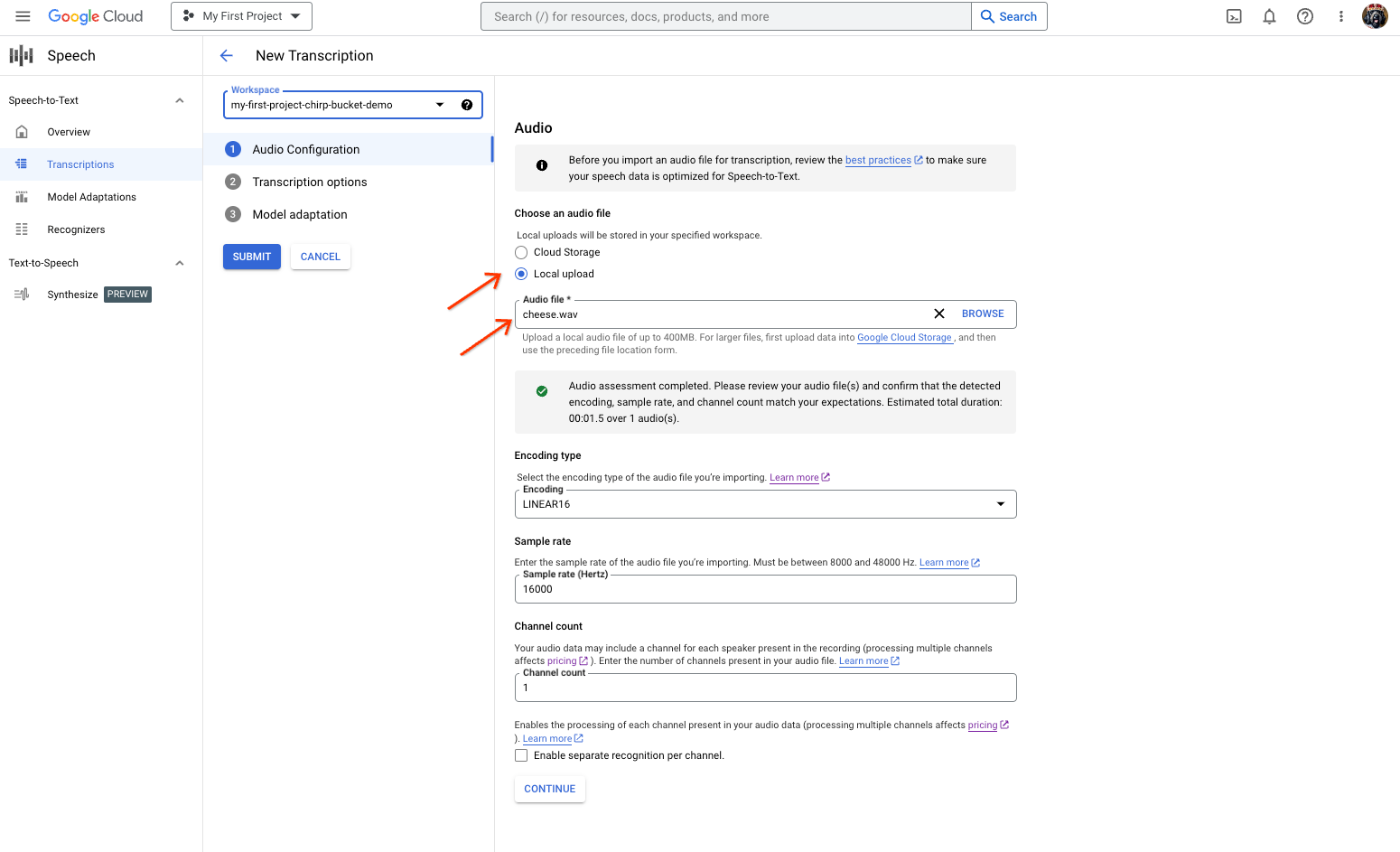
ファイルの選択またはアップロードを行う音声文字変換の作成ページ。 [新しい音声文字変換] ページで、[ローカル アップロード](アップロード)または [Cloud Storage](既存の Cloud Storage ファイルの指定)のいずれかから音声ファイルを選択します。
[続行] をクリックして、[ 音声文字変換のオプション] に移動します。
以前に作成した認識ツールから、Chirp で認識に使用する音声言語を選択します。
[モデル] プルダウンから、[chirp_3] を選択します。
[認識ツール] プルダウンで、新しく作成した認識ツールを選択します。
[送信] をクリックし、
chirp_3を使用して最初の認識リクエストを実行します。
Chirp 3 の音声文字変換の結果を表示します。
[音声文字変換] ページで、音声文字変換の名前をクリックして結果を表示します。
[音声文字変換の詳細] ページで、音声文字変換の結果を表示し、必要に応じてブラウザで音声を再生します。