[Try Chirp 3 in the Google Cloud console](https://console.cloud.google.com/speech) [Try in Colab](https://colab.research.google.com/github/GoogleCloudPlatform/generative-ai/blob/main/audio/speech/getting-started/get_started_with_chirp_3_transcription.ipynb) [View notebook on GitHub](https://github.com/GoogleCloudPlatform/generative-ai/blob/main/audio/speech/getting-started/get_started_with_chirp_3_transcription.ipynb)
Chirp 3 is the latest generation of Google's multilingual Automatic Speech Recognition (ASR)-specific
generative models, designed to meet user needs based on feedback and experience. Chirp 3 provides enhanced accuracy and speed beyond previous Chirp models and provides diarization and automatic language detection.
## Model details
Chirp 3: Transcription, is exclusively available within the Speech-to-Text API V2.
### Model identifiers
You can use Chirp 3: Transcription just like any other model by specifying the appropriate model identifier in your recognition request when using the API or the model name while in the Google Cloud console. Specify the appropriate identifier in your recognition.
| Model | Model identifier |
|---|---|
| Chirp 3 | `chirp_3` |
### API methods
Not all recognition methods support the same language availability sets,
because Chirp 3 is available in the Speech-to-Text API V2, it supports the
following recognition methods:
| API version | API method | Support |
|---|---|---|
| V2 | [Speech.StreamingRecognize](https://docs.cloud.google.com/speech-to-text/docs/reference/rpc/google.cloud.speech.v2.md.txt#google.cloud.speech.v2.Speech.StreamingRecognize) (good for streaming and real-time audio) | Supported |
| V2 | [Speech.Recognize](https://docs.cloud.google.com/speech-to-text/docs/reference/rpc/google.cloud.speech.v2.md.txt#google.cloud.speech.v2.Speech.Recognize) (good for audio shorter than one minute) | Supported |
| V2 | [Speech.BatchRecognize](https://docs.cloud.google.com/speech-to-text/docs/reference/rpc/google.cloud.speech.v2.md.txt#google.cloud.speech.v2.Speech.BatchRecognize) (good for long audio 1 minute to 1 hour in general, but up to 20 minutes with word-level timestamp enabled) | Supported |
> [!NOTE]
> **Note:** You can always find the latest list of supported locales and features for each transcription model, using the locations API as explained here.
### Regional availability
Chirp 3 is available in the following Google Cloud regions, with more planned:
| Google Cloud Zone | Launch Readiness |
|---|---|
| `us (multi-region)` | GA |
| `eu (multi-region)` | GA |
Using the locations API as explained here, you can find the latest list of
supported Google Cloud regions, languages and locales, and features for each transcription model.
### Language availability for transcription
Chirp 3 supports transcription in [`StreamingRecognize`](https://docs.cloud.google.com/speech-to-text/docs/reference/rpc/google.cloud.speech.v2.md.txt#google.cloud.speech.v2.Speech.StreamingRecognize), [`Recognize`](https://docs.cloud.google.com/speech-to-text/docs/reference/rpc/google.cloud.speech.v2.md.txt#google.cloud.speech.v2.Speech.Recognize), and [`BatchRecognize`](https://docs.cloud.google.com/speech-to-text/docs/reference/rpc/google.cloud.speech.v2.md.txt#google.cloud.speech.v2.Speech.BatchRecognize) in the
following languages:
| Language | `BCP-47 Code` | **Launch Readiness** |
|---|---|---|
| Catalan (Spain) | `ca-ES` | GA |
| Chinese (Simplified, China) | `cmn-Hans-CN` | GA |
| Croatian (Croatia) | `hr-HR` | GA |
| Danish (Denmark) | `da-DK` | GA |
| Dutch (Netherlands) | `nl-NL` | GA |
| English (Australia) | `en-AU` | GA |
| English (India) | `en-IN` | GA |
| English (United Kingdom) | `en-GB` | GA |
| English (United States) | `en-US` | GA |
| Finnish (Finland) | `fi-FI` | GA |
| French (Canada) | `fr-CA` | GA |
| French (France) | `fr-FR` | GA |
| German (Germany) | `de-DE` | GA |
| Greek (Greece) | `el-GR` | GA |
| Hindi (India) | `hi-IN` | GA |
| Italian (Italy) | `it-IT` | GA |
| Japanese (Japan) | `ja-JP` | GA |
| Korean (Korea) | `ko-KR` | GA |
| Polish (Poland) | `pl-PL` | GA |
| Portuguese (Brazil) | `pt-BR` | GA |
| Portuguese (Portugal) | `pt-PT` | GA |
| Romanian (Romania) | `ro-RO` | GA |
| Russian (Russia) | `ru-RU` | GA |
| Spanish (Spain) | `es-ES` | GA |
| Spanish (United States) | `es-US` | GA |
| Swedish (Sweden) | `sv-SE` | GA |
| Turkish (Turkey) | `tr-TR` | GA |
| Ukrainian (Ukraine) | `uk-UA` | GA |
| Vietnamese (Vietnam) | `vi-VN` | GA |
| Afrikaans (South Africa) | `af-ZA` | Preview |
| Albanian (Albania) | `sq-AL` | Preview |
| Amharic (Ethiopia) | `am-ET` | Preview |
| Arabic (Algeria) | `ar-DZ` | Preview |
| Arabic (Bahrain) | `ar-BH` | Preview |
| Arabic (Egypt) | `ar-EG` | Preview |
| Arabic (Israel) | `ar-IL` | Preview |
| Arabic (Jordan) | `ar-JO` | Preview |
| Arabic (Kuwait) | `ar-KW` | Preview |
| Arabic (Lebanon) | `ar-LB` | Preview |
| Arabic (Mauritania) | `ar-MR` | Preview |
| Arabic (Morocco) | `ar-MA` | Preview |
| Arabic (Oman) | `ar-OM` | Preview |
| Arabic (Qatar) | `ar-QA` | Preview |
| Arabic (Saudi Arabia) | `ar-SA` | Preview |
| Arabic (State of Palestine) | `ar-PS` | Preview |
| Arabic (Syria) | `ar-SY` | Preview |
| Arabic (Tunisia) | `ar-TN` | Preview |
| Arabic (United Arab Emirates) | `ar-AE` | Preview |
| Arabic (Yemen) | `ar-YE` | Preview |
| Arabic | `ar-XA` | Preview |
| Armenian (Armenia) | `hy-AM` | Preview |
| Assamese (India) | `as-IN` | Preview |
| Asturian (Spain) | `ast-ES` | Preview |
| Azerbaijani (Azerbaijan) | `az-AZ` | Preview |
| Basque (Spain) | `eu-ES` | Preview |
| Bengali (Bangladesh) | `bn-BD` | Preview |
| Bengali (India) | `bn-IN` | Preview |
| Bulgarian (Bulgaria) | `bg-BG` | Preview |
| Burmese (Myanmar) | `my-MM` | Preview |
| Central Kurdish (Iraq) | `ar-IQ` | Preview |
| Chinese, Cantonese (Traditional Hong Kong) | `yue-Hant-HK` | Preview |
| Chinese, Mandarin (Traditional, Taiwan) | `cmn-Hant-TW` | Preview |
| Czech (Czech Republic) | `cs-CZ` | Preview |
| English (Philippines) | `en-PH` | Preview |
| Estonian (Estonia) | `et-EE` | Preview |
| Filipino (Philippines) | `fil-PH` | Preview |
| Galician (Spain) | `gl-ES` | Preview |
| Georgian (Georgia) | `ka-GE` | Preview |
| Gujarati (India) | `gu-IN` | Preview |
| Hausa (Nigeria) | `ha-NG` | Preview |
| Hebrew (Israel) | `iw-IL` | Preview |
| Hungarian (Hungary) | `hu-HU` | Preview |
| Icelandic (Iceland) | `is-IS` | Preview |
| Indonesian (Indonesia) | `id-ID` | Preview |
| Javanese (Indonesia) | `jv-ID` | Preview |
| Kannada (India) | `kn-IN` | Preview |
| Kazakh (Kazakhstan) | `kk-KZ` | Preview |
| Khmer (Cambodia) | `km-KH` | Preview |
| Kyrgyz (Kyrgyzstan) | `ky-KG` | Preview |
| Lao (Laos) | `lo-LA` | Preview |
| Latvian (Latvia) | `lv-LV` | Preview |
| Lithuanian (Lithuania) | `lt-LT` | Preview |
| Luxembourgish (Luxembourg) | `lb-LU` | Preview |
| Macedonian (North Macedonia) | `mk-MK` | Preview |
| Malay (Malaysia) | `ms-MY` | Preview |
| Malayalam (India) | `ml-IN` | Preview |
| Maltese (Malta) | `mt-MT` | Preview |
| Maori (New Zealand) | `mi-NZ` | Preview |
| Marathi (India) | `mr-IN` | Preview |
| Mongolian (Mongolia) | `mn-MN` | Preview |
| Nepali (Nepal) | `ne-NP` | Preview |
| Northern Sotho (South Africa) | `nso-ZA` | Preview |
| Norwegian (Norway) | `no-NO` | Preview |
| Oriya (India) | `or-IN` | Preview |
| Persian (Iran) | `fa-IR` | Preview |
| Punjabi (Gurmukhi India) | `pa-Guru-IN` | Preview |
| Serbian (Serbia) | `sr-RS` | Preview |
| Slovak (Slovakia) | `sk-SK` | Preview |
| Slovenian (Slovenia) | `sl-SI` | Preview |
| Spanish (Mexico) | `es-MX` | Preview |
| Swahili (Kenya) | `sw-KE` | Preview |
| Swahili | `sw` | Preview |
| Tamil (India) | `ta-IN` | Preview |
| Telugu (India) | `te-IN` | Preview |
| Thai (Thailand) | `th-TH` | Preview |
| Uzbek (Uzbekistan) | `uz-UZ` | Preview |
| Welsh (United Kingdom) | `cy-GB` | Preview |
| Wolof (Senegal) | `wo-SN` | Preview |
| Xhosa (South Africa) | `xh-ZA` | Preview |
| Yoruba (Nigeria) | `yo-NG` | Preview |
| Zulu (South Africa) | `zu-ZA` | Preview |
### Language availability for diarization
Chirp 3 supports transcription and diarization only in [`BatchRecognize`](https://docs.cloud.google.com/speech-to-text/docs/reference/rpc/google.cloud.speech.v2.md.txt#google.cloud.speech.v2.Speech.BatchRecognize) and [`Recognize`](https://docs.cloud.google.com/speech-to-text/docs/reference/rpc/google.cloud.speech.v2.md.txt#google.cloud.speech.v2.Speech.Recognize) in the following languages:
| **Language** | BCP-47 Code |
|---|---|
| Chinese (Simplified, China) | cmn-Hans-CN |
| German (Germany) | de-DE |
| English (United Kingdom) | en-GB |
| English (India) | en-IN |
| English (United States) | en-US |
| Spanish (Spain) | es-ES |
| Spanish (United States) | es-US |
| French (Canada) | fr-CA |
| French (France) | fr-FR |
| Hindi (India) | hi-IN |
| Italian (Italy) | it-IT |
| Japanese (Japan) | ja-JP |
| Korean (Korea) | ko-KR |
| Portuguese (Brazil) | pt-BR |
## Feature support and limitations
Chirp 3 supports the following features:
| Feature | Description | Launch stage |
|---|---|---|
| Automatic punctuation | Automatically generated by the model and can be optionally disabled. | GA |
| Automatic capitalization | Automatically generated by the model and can be optionally disabled. | GA |
| Utterance-level timestamps | Automatically generated by the model. Available only in [`Speech.StreamingRecognize`](https://docs.cloud.google.com/speech-to-text/docs/reference/rpc/google.cloud.speech.v2.md.txt#google.cloud.speech.v2.Speech.StreamingRecognize) | GA |
| Speaker Diarization | Automatically identifies the different speakers in a single-channel audio sample. Available only in [`Speech.BatchRecognize`](https://docs.cloud.google.com/speech-to-text/docs/reference/rpc/google.cloud.speech.v2.md.txt#google.cloud.speech.v2.Speech.BatchRecognize) | GA |
| Speech adaptation (Biasing) | Provides hints to the model in the form of phrases or words to improve recognition accuracy for specific terms or proper nouns. | GA |
| Language-agnostic audio transcription | Automatically infers and transcribes in the most prevalent language. | GA |
| Custom prompt | Provide customized transcription formatting instructions to the model. | Preview |
Chirp 3 doesn't support the following features:
| Feature | Description |
|---|---|
| Word-level timestamps | Automatically generated by the model and can be optionally enabled, which some transcription degradation is expected. Available only in [`Speech.Recognize`](https://docs.cloud.google.com/speech-to-text/docs/reference/rpc/google.cloud.speech.v2.md.txt#google.cloud.speech.v2.Speech.Recognize) and [`Speech.BatchRecognize`](https://docs.cloud.google.com/speech-to-text/docs/reference/rpc/google.cloud.speech.v2.md.txt#google.cloud.speech.v2.Speech.BatchRecognize) |
| Word-level confidence scores | The API returns a value, but it isn't truly a confidence score. |
## Transcribe using Chirp 3
Discover how to use Chirp 3 for transcription tasks.
### Perform streaming speech recognition
### Python
```python
import os
from google.cloud.speech_v2 import SpeechClient
from google.cloud.speech_v2.types import cloud_speech
from google.api_core.client_options import ClientOptions
PROJECT_ID = os.getenv("GOOGLE_CLOUD_PROJECT")
REGION = "us"
def transcribe_streaming_chirp3(
audio_file: str
) -> cloud_speech.StreamingRecognizeResponse:
"""Transcribes audio from audio file stream using the Chirp 3 model of Google Cloud Speech-to-Text v2 API.
Args:
audio_file (str): Path to the local audio file to be transcribed.
Example: "resources/audio.wav"
Returns:
cloud_speech.RecognizeResponse: The response from the Speech-to-Text API V2 containing
the transcription results.
"""
# Instantiates a client
client = SpeechClient(
client_options=ClientOptions(
api_endpoint=f"{REGION}-speech.googleapis.com",
)
)
# Reads a file as bytes
with open(audio_file, "rb") as f:
content = f.read()
# In practice, stream should be a generator yielding chunks of audio data
chunk_length = len(content) // 5
stream = [
content[start : start + chunk_length]
for start in range(0, len(content), chunk_length)
]
audio_requests = (
cloud_speech.StreamingRecognizeRequest(audio=audio) for audio in stream
)
recognition_config = cloud_speech.RecognitionConfig(
auto_decoding_config=cloud_speech.AutoDetectDecodingConfig(),
language_codes=["en-US"],
model="chirp_3",
)
streaming_config = cloud_speech.StreamingRecognitionConfig(
config=recognition_config
)
config_request = cloud_speech.StreamingRecognizeRequest(
recognizer=f"projects/{PROJECT_ID}/locations/{REGION}/recognizers/_",
streaming_config=streaming_config,
)
def requests(config: cloud_speech.RecognitionConfig, audio: list) -> list:
yield config
yield from audio
# Transcribes the audio into text
responses_iterator = client.streaming_recognize(
requests=requests(config_request, audio_requests)
)
responses = []
for response in responses_iterator:
responses.append(response)
for result in response.results:
print(f"Transcript: {result.alternatives[0].transcript}")
return responses
```
### Perform synchronous speech recognition
### Python
```python
import os
from google.cloud.speech_v2 import SpeechClient
from google.cloud.speech_v2.types import cloud_speech
from google.api_core.client_options import ClientOptions
PROJECT_ID = os.getenv("GOOGLE_CLOUD_PROJECT")
REGION = "us"
def transcribe_sync_chirp3(
audio_file: str
) -> cloud_speech.RecognizeResponse:
"""Transcribes an audio file using the Chirp 3 model of Google Cloud Speech-to-Text V2 API.
Args:
audio_file (str): Path to the local audio file to be transcribed.
Example: "resources/audio.wav"
Returns:
cloud_speech.RecognizeResponse: The response from the Speech-to-Text API containing
the transcription results.
"""
# Instantiates a client
client = SpeechClient(
client_options=ClientOptions(
api_endpoint=f"{REGION}-speech.googleapis.com",
)
)
# Reads a file as bytes
with open(audio_file, "rb") as f:
audio_content = f.read()
config = cloud_speech.RecognitionConfig(
auto_decoding_config=cloud_speech.AutoDetectDecodingConfig(),
language_codes=["en-US"],
model="chirp_3",
)
request = cloud_speech.RecognizeRequest(
recognizer=f"projects/{PROJECT_ID}/locations/{REGION}/recognizers/_",
config=config,
content=audio_content,
)
# Transcribes the audio into text
response = client.recognize(request=request)
for result in response.results:
print(f"Transcript: {result.alternatives[0].transcript}")
return response
```
### Perform batch speech recognition
### Python
```python
import os
from google.cloud.speech_v2 import SpeechClient
from google.cloud.speech_v2.types import cloud_speech
from google.api_core.client_options import ClientOptions
PROJECT_ID = os.getenv("GOOGLE_CLOUD_PROJECT")
REGION = "us"
def transcribe_batch_3(
audio_uri: str,
) -> cloud_speech.BatchRecognizeResults:
"""Transcribes an audio file from a Google Cloud Storage URI using the Chirp 3 model of Google Cloud Speech-to-Text v2 API.
Args:
audio_uri (str): The Google Cloud Storage URI of the input audio file.
E.g., gs://[BUCKET]/[FILE]
Returns:
cloud_speech.RecognizeResponse: The response from the Speech-to-Text API containing
the transcription results.
"""
# Instantiates a client
client = SpeechClient(
client_options=ClientOptions(
api_endpoint=f"{REGION}-speech.googleapis.com",
)
)
config = cloud_speech.RecognitionConfig(
auto_decoding_config=cloud_speech.AutoDetectDecodingConfig(),
language_codes=["en-US"],
model="chirp_3",
)
file_metadata = cloud_speech.BatchRecognizeFileMetadata(uri=audio_uri)
request = cloud_speech.BatchRecognizeRequest(
recognizer=f"projects/{PROJECT_ID}/locations/{REGION}/recognizers/_",
config=config,
files=[file_metadata],
recognition_output_config=cloud_speech.RecognitionOutputConfig(
inline_response_config=cloud_speech.InlineOutputConfig(),
),
)
# Transcribes the audio into text
operation = client.batch_recognize(request=request)
print("Waiting for operation to complete...")
response = operation.result(timeout=120)
for result in response.results[audio_uri].transcript.results:
print(f"Transcript: {result.alternatives[0].transcript}")
return response.results[audio_uri].transcript
```
## Use Chirp 3 features
Explore how you can use the latest features, with code examples:
### Perform a language-agnostic transcription
Chirp 3, can automatically identify and transcribe in the dominant language spoken in the audio which is essential for multilingual applications. To achieve this set `language_codes=["auto"]` as indicated in the code example:
### Python
```python
import os
from google.cloud.speech_v2 import SpeechClient
from google.cloud.speech_v2.types import cloud_speech
from google.api_core.client_options import ClientOptions
PROJECT_ID = os.getenv("GOOGLE_CLOUD_PROJECT")
REGION = "us"
def transcribe_sync_chirp3_auto_detect_language(
audio_file: str
) -> cloud_speech.RecognizeResponse:
"""Transcribes an audio file and auto-detect spoken language using Chirp 3.
Please see https://cloud.google.com/speech-to-text/docs/encoding for more
information on which audio encodings are supported.
Args:
audio_file (str): Path to the local audio file to be transcribed.
Example: "resources/audio.wav"
Returns:
cloud_speech.RecognizeResponse: The response from the Speech-to-Text API containing
the transcription results.
"""
# Instantiates a client
client = SpeechClient(
client_options=ClientOptions(
api_endpoint=f"{REGION}-speech.googleapis.com",
)
)
# Reads a file as bytes
with open(audio_file, "rb") as f:
audio_content = f.read()
config = cloud_speech.RecognitionConfig(
auto_decoding_config=cloud_speech.AutoDetectDecodingConfig(),
language_codes=["auto"], # Set language code to auto to detect language.
model="chirp_3",
)
request = cloud_speech.RecognizeRequest(
recognizer=f"projects/{PROJECT_ID}/locations/{REGION}/recognizers/_",
config=config,
content=audio_content,
)
# Transcribes the audio into text
response = client.recognize(request=request)
for result in response.results:
print(f"Transcript: {result.alternatives[0].transcript}")
print(f"Detected Language: {result.language_code}")
return response
```
### Perform a language-restricted transcription
Chirp 3 can automatically identify and transcribe the dominant language in an audio file. You can also condition it on specific locales you expect, for example: `["en-US", "fr-FR"]`, which would focus the model's resources on the most probable languages for more reliable results, as demonstrated in the code example:
### Python
```python
import os
from google.cloud.speech_v2 import SpeechClient
from google.cloud.speech_v2.types import cloud_speech
from google.api_core.client_options import ClientOptions
PROJECT_ID = os.getenv("GOOGLE_CLOUD_PROJECT")
REGION = "us"
def transcribe_sync_3_auto_detect_language(
audio_file: str
) -> cloud_speech.RecognizeResponse:
"""Transcribes an audio file and auto-detect spoken language using Chirp 3.
Please see https://cloud.google.com/speech-to-text/docs/encoding for more
information on which audio encodings are supported.
Args:
audio_file (str): Path to the local audio file to be transcribed.
Example: "resources/audio.wav"
Returns:
cloud_speech.RecognizeResponse: The response from the Speech-to-Text API containing
the transcription results.
"""
# Instantiates a client
client = SpeechClient(
client_options=ClientOptions(
api_endpoint=f"{REGION}-speech.googleapis.com",
)
)
# Reads a file as bytes
with open(audio_file, "rb") as f:
audio_content = f.read()
config = cloud_speech.RecognitionConfig(
auto_decoding_config=cloud_speech.AutoDetectDecodingConfig(),
language_codes=["en-US", "fr-FR"], # Set language codes of the expected spoken locales
model="chirp_3",
)
request = cloud_speech.RecognizeRequest(
recognizer=f"projects/{PROJECT_ID}/locations/{REGION}/recognizers/_",
config=config,
content=audio_content,
)
# Transcribes the audio into text
response = client.recognize(request=request)
for result in response.results:
print(f"Transcript: {result.alternatives[0].transcript}")
print(f"Detected Language: {result.language_code}")
return response
```
### Perform transcription and speaker diarization
Use Chirp 3 for transcription and diarization tasks.
### Python
```python
import os
from google.cloud.speech_v2 import SpeechClient
from google.cloud.speech_v2.types import cloud_speech
from google.api_core.client_options import ClientOptions
PROJECT_ID = os.getenv("GOOGLE_CLOUD_PROJECT")
REGION = "us"
def transcribe_batch_chirp3(
audio_uri: str,
) -> cloud_speech.BatchRecognizeResults:
"""Transcribes an audio file from a Google Cloud Storage URI using the Chirp 3 model of Google Cloud Speech-to-Text V2 API.
Args:
audio_uri (str): The Google Cloud Storage URI of the input
audio file. E.g., gs://[BUCKET]/[FILE]
Returns:
cloud_speech.RecognizeResponse: The response from the
Speech-to-Text API containing the transcription results.
"""
# Instantiates a client.
client = SpeechClient(
client_options=ClientOptions(
api_endpoint=f"{REGION}-speech.googleapis.com",
)
)
config = cloud_speech.RecognitionConfig(
auto_decoding_config=cloud_speech.AutoDetectDecodingConfig(),
language_codes=["en-US"], # Use "auto" to detect language.
model="chirp_3",
features=cloud_speech.RecognitionFeatures(
# Enable diarization by setting empty diarization configuration.
diarization_config=cloud_speech.SpeakerDiarizationConfig(),
),
)
file_metadata = cloud_speech.BatchRecognizeFileMetadata(uri=audio_uri)
request = cloud_speech.BatchRecognizeRequest(
recognizer=f"projects/{PROJECT_ID}/locations/{REGION}/recognizers/_",
config=config,
files=[file_metadata],
recognition_output_config=cloud_speech.RecognitionOutputConfig(
inline_response_config=cloud_speech.InlineOutputConfig(),
),
)
# Creates audio transcription job.
operation = client.batch_recognize(request=request)
print("Waiting for transcription job to complete...")
response = operation.result(timeout=120)
for result in response.results[audio_uri].transcript.results:
print(f"Transcript: {result.alternatives[0].transcript}")
print(f"Detected Language: {result.language_code}")
print(f"Speakers per word: {result.alternatives[0].words}")
return response.results[audio_uri].transcript
```
### Improve accuracy with model adaptation
Chirp 3 can improve transcription accuracy for your specific audio using model adaptation. This lets you to provide a list of specific words and phrases, increasing the likelihood that the model will recognize them. It's especially useful for domain-specific terms, proper nouns, or unique vocabulary.
> [!NOTE]
> **Note:** `chirp_3` supports a dictionary of up to 1,000 phrases for adaptation. We recommend using as few entries as possible to prevent degradation on non-adaptation terms.
### Python
```python
import os
from google.cloud.speech_v2 import SpeechClient
from google.cloud.speech_v2.types import cloud_speech
from google.api_core.client_options import ClientOptions
PROJECT_ID = os.getenv("GOOGLE_CLOUD_PROJECT")
REGION = "us"
def transcribe_sync_chirp3_model_adaptation(
audio_file: str
) -> cloud_speech.RecognizeResponse:
"""Transcribes an audio file using the Chirp 3 model with adaptation, improving accuracy for specific audio characteristics or vocabulary.
Args:
audio_file (str): Path to the local audio file to be transcribed.
Example: "resources/audio.wav"
Returns:
cloud_speech.RecognizeResponse: The response from the Speech-to-Text API containing
the transcription results.
"""
# Instantiates a client
client = SpeechClient(
client_options=ClientOptions(
api_endpoint=f"{REGION}-speech.googleapis.com",
)
)
# Reads a file as bytes
with open(audio_file, "rb") as f:
audio_content = f.read()
config = cloud_speech.RecognitionConfig(
auto_decoding_config=cloud_speech.AutoDetectDecodingConfig(),
language_codes=["en-US"],
model="chirp_3",
# Use model adaptation
adaptation=cloud_speech.SpeechAdaptation(
phrase_sets=[
cloud_speech.SpeechAdaptation.AdaptationPhraseSet(
inline_phrase_set=cloud_speech.PhraseSet(phrases=[
{
"value": "alphabet",
},
{
"value": "cell phone service",
}
])
)
]
)
)
request = cloud_speech.RecognizeRequest(
recognizer=f"projects/{PROJECT_ID}/locations/{REGION}/recognizers/_",
config=config,
content=audio_content,
)
# Transcribes the audio into text
response = client.recognize(request=request)
for result in response.results:
print(f"Transcript: {result.alternatives[0].transcript}")
return response
```
### Use custom prompt to format the transcription
Chirp 3 accepts a custom prompt as the formatting instructions to the model.
### Python
```python
import os
from google.cloud.speech_v2 import SpeechClient
from google.cloud.speech_v2.types import cloud_speech
from google.api_core.client_options import ClientOptions
PROJECT_ID = os.getenv("GOOGLE_CLOUD_PROJECT")
REGION = "us"
def transcribe_sync_chirp3_custom_prompt(
audio_file: str,
custom_prompt: str,
) -> cloud_speech.RecognizeResponse:
"""Transcribes an audio file and auto-detect spoken language using Chirp 3.
Args:
audio_file (str): Path to the local audio file to be transcribed.
Example: "resources/audio.wav"
custom_prompt: the customized formatting instructions.
Example: "Capitalize the following special words: GOOGLE, CHIRP."
Example: "For dates don't use the 'December 23rd, 1939' format!
But strictly use the '12/23/1939' format."
Returns:
cloud_speech.RecognizeResponse: The response from the Speech-to-Text API containing
the transcription results.
"""
# Instantiates a client
client = SpeechClient(
client_options=ClientOptions(
api_endpoint=f"{REGION}-speech.googleapis.com",
)
)
# Reads a file as bytes
with open(audio_file, "rb") as f:
audio_content = f.read()
config = cloud_speech.RecognitionConfig(
auto_decoding_config=cloud_speech.AutoDetectDecodingConfig(),
language_codes=["en-US"],
model="chirp_3",
features=cloud_speech.RecognitionFeatures(
custom_prompt_config=cloud_speech.CustomPromptConfig(
custom_prompt= custom_prompt,
)
),
)
request = cloud_speech.RecognizeRequest(
recognizer=f"projects/{PROJECT_ID}/locations/{REGION}/recognizers/_",
config=config,
content=audio_content,
)
# Transcribes the audio into text
response = client.recognize(request=request)
print(f"Prompt used: {response.metadata.prompt}")
for result in response.results:
print(f"Transcript: {result.alternatives[0].transcript}")
print(f"Detected Language: {result.language_code}")
return response
```
### Enable denoiser
Chirp 3 can enhance audio quality by reducing background noise. You can improve results from noisy environments by enabling the built-in denoiser.
Setting `denoiser_audio=true` can effectively help you reduce background music or noises
like rain and street traffic.
> [!NOTE]
> **Note:** The denoiser can't remove background human voices.
### Python
```python
import os
from google.cloud.speech_v2 import SpeechClient
from google.cloud.speech_v2.types import cloud_speech
from google.api_core.client_options import ClientOptions
PROJECT_ID = os.getenv("GOOGLE_CLOUD_PROJECT")
REGION = "us"
def transcribe_sync_chirp3_with_timestamps(
audio_file: str
) -> cloud_speech.RecognizeResponse:
"""Transcribes an audio file using the Chirp 3 model of Google Cloud Speech-to-Text v2 API, which provides word-level timestamps for each transcribed word.
Args:
audio_file (str): Path to the local audio file to be transcribed.
Example: "resources/audio.wav"
Returns:
cloud_speech.RecognizeResponse: The response from the Speech-to-Text API containing
the transcription results.
"""
# Instantiates a client
client = SpeechClient(
client_options=ClientOptions(
api_endpoint=f"{REGION}-speech.googleapis.com",
)
)
# Reads a file as bytes
with open(audio_file, "rb") as f:
audio_content = f.read()
config = cloud_speech.RecognitionConfig(
auto_decoding_config=cloud_speech.AutoDetectDecodingConfig(),
language_codes=["en-US"],
model="chirp_3",
denoiser_config={
denoise_audio: True,
snr_threshold: 0.0, # snr_threshold is deprecated in Chirp3; set to 0.0 to maintain compatibility.
}
)
request = cloud_speech.RecognizeRequest(
recognizer=f"projects/{PROJECT_ID}/locations/{REGION}/recognizers/_",
config=config,
content=audio_content,
)
# Transcribes the audio into text
response = client.recognize(request=request)
for result in response.results:
print(f"Transcript: {result.alternatives[0].transcript}")
return response
```
### Adjust endpointing sensitivity
The Cloud Speech-to-Text API lets you control the trade-off between latency and
accuracy for streaming and real-time applications for Chirp 3. By default, the
recognition model waits for a brief period of silence after speech is detected
to ensure that a user has finished a complete sentence or phrase. This helps to
ensure the highest accuracy but introduces a small delay in the final response.
`endpointing_sensitivity` can be adjusted for time-sensitive applications like
voice commands or voice bots to finalize results more quickly.
> [!NOTE]
> **Note:** If the user pauses briefly while speaking, increasing the bot's sensitivity to minimize latency might result in the system "cutting off" a user.
### Sensitivity levels
Endpointing sensitivity can be configured to one of the following levels
based on the use case:
- `ENDPOINTING_SENSITIVITY_STANDARD` (default): The standard setting that
balances latency and accuracy. It's optimized for most use cases, including
long-form dictation and natural conversation. The model waits to help ensure the
utterance is complete before finalizing the result.
- `ENDPOINTING_SENSITIVITY_SHORT`: Optimized for short utterances, such as
single sentences or commands, such as "Remind me to call the dentist tomorrow".
This setting reduces the wait time after speech is detected, which provides a
faster response than the standard setting while maintaining reasonable
sentence-level accuracy.
- `ENDPOINTING_SENSITIVITY_SUPERSHORT`: Optimized for very short commands or
single words, such as "Yes", "No", or "Stop". This setting offers the lowest
latency and finalizes the result immediately upon detecting the end of speech.
It is recommended only for applications where speed is critical and utterances
are expected to be brief.
### Python
```python
import time
from google.api_core.client_options import ClientOptions
from google.cloud import speech_v2
RATE = 16000
def transcribe_streaming(
project_id: str,
audio_file: str,
# 'us' is a multi-region that currently supports the 'chirp_3' model.
# Other valid regions include 'eu' or specific regions like 'asia-southeast1'.
region: str = "us"
):
recognizer_path = f"projects/{project_id}/locations/{region}/recognizers/_"
# Setup client with the correct regional endpoint
client = speech_v2.SpeechClient(
client_options=ClientOptions(
api_endpoint=f"{region}-speech.googleapis.com",
quota_project_id=project_id
)
)
recognition_config_obj = speech_v2.RecognitionConfig(
explicit_decoding_config=speech_v2.ExplicitDecodingConfig(
encoding=speech_v2.ExplicitDecodingConfig.AudioEncoding.LINEAR16,
sample_rate_hertz=RATE,
audio_channel_count=1,
),
language_codes=["en-US"],
model="chirp_3",
features=speech_v2.RecognitionFeatures(
enable_automatic_punctuation=True,
),
)
config_request = speech_v2.StreamingRecognizeRequest(
recognizer=recognizer_path,
streaming_config=speech_v2.StreamingRecognitionConfig(
config=recognition_config_obj,
streaming_features=speech_v2.StreamingRecognitionFeatures(
interim_results=False,
enable_voice_activity_events=True,
# Set sensitivity to SUPERSHORT (Low Latency)
endpointing_sensitivity=speech_v2.StreamingRecognitionFeatures.EndpointingSensitivity.ENDPOINTING_SENSITIVITY_SUPERSHORT,
),
)
)
def request_generator():
yield config_request
with open(audio_file, "rb") as f:
while chunk := f.read(4096):
yield speech_v2.StreamingRecognizeRequest(audio=chunk)
start_time = time.time()
print(f"Streaming audio to {region}-speech.googleapis.com...")
for response in client.streaming_recognize(requests=request_generator()):
if response.results:
for result in response.results:
if result.is_final:
print(f"Transcript: {result.alternatives[0].transcript}")
print(f"Time taken: {time.time() - start_time:.3f}s")
def main() -> None:
# TODO: Replace with your Project ID and File Path
PROJECT_ID = "your-project-id"
AUDIO_FILE_PATH = "path/to/your/audio.wav"
transcribe_streaming(
project_id=PROJECT_ID,
audio_file=AUDIO_FILE_PATH
)
if __name__ == "__main__":
main()
```
## Use Chirp 3 in the Google Cloud console
1. Sign up for a Google Cloud account, and create a project.
2. Go to [Speech](https://console.cloud.google.com/speech) in the Google Cloud console.
3. If the API isn't enabled, enable the API.
4. Make sure that you have an STT console **Workspace**. If you don't have a workspace, you must create a workspace.
1. Go to the [transcriptions page](https://console.cloud.google.com/speech/transcriptions), and click **New Transcription**.
2. Open the **Workspace** drop-down and click **New Workspace** to create a workspace for transcription.
3. From the **Create a new workspace** navigation sidebar, click **Browse**.
4. Click to create a new bucket.
5. Enter a name for your bucket and click **Continue**.
6. Click **Create** to create your Cloud Storage bucket.
7. After the bucket is created, click **Select** to select your bucket for use.
8. Click **Create** to finish creating your workspace for the Speech-to-Text API V2 console.
5. Perform a transcription on your actual audio.
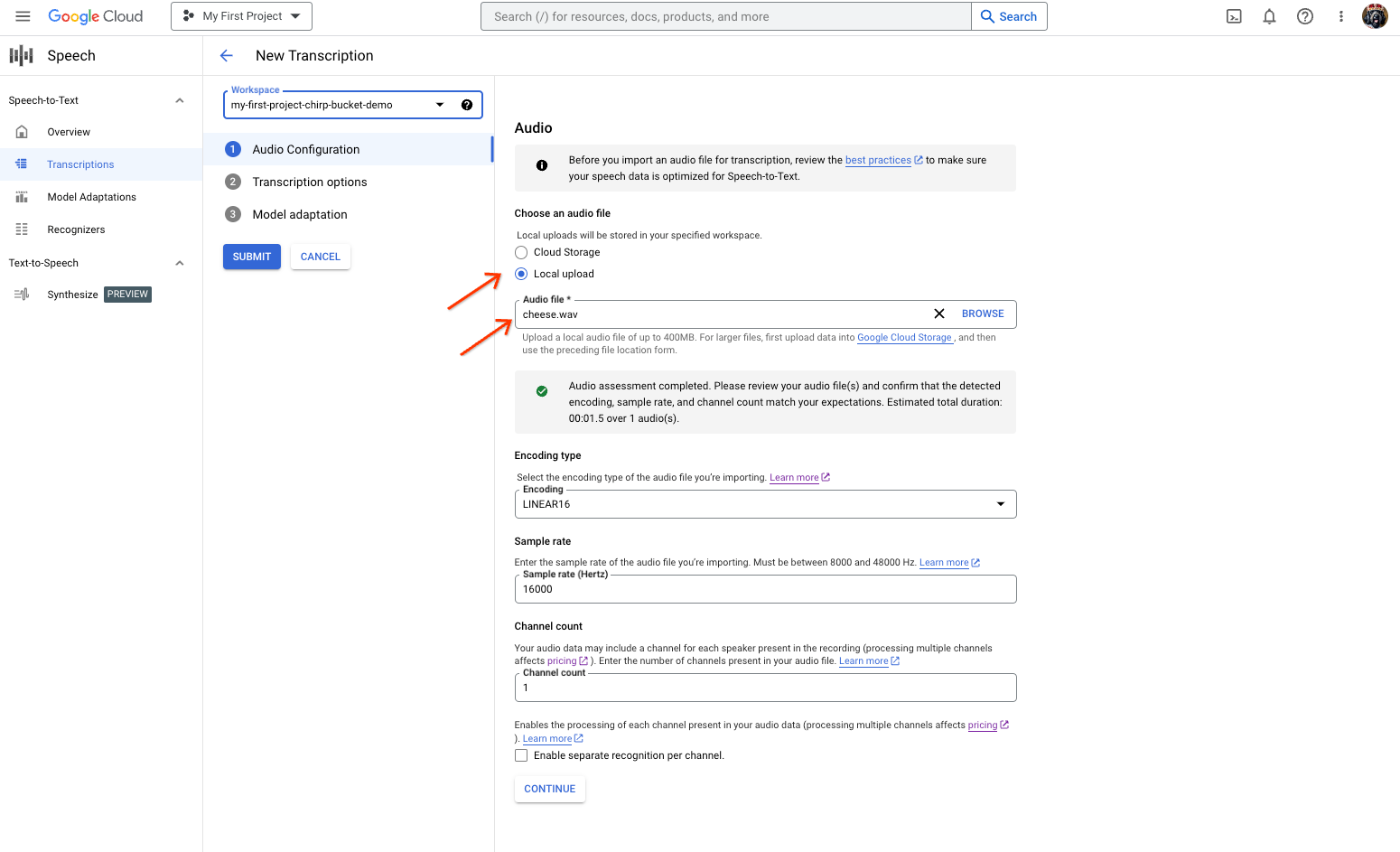 The Speech-to-Text transcription creation page, showing file selection or upload.
From the **New Transcription** page, select your audio file through either upload (**Local upload** ) or specifying an existing Cloud Storage file (**Cloud storage**).
6. Click **Continue** to move to the **Transcription options**.
1. Select the **Spoken language** that you plan to use for recognition with Chirp from your previously created recognizer.
2. In the model drop-down, select **chirp_3**.
3. In the **Recognizer** drop-down, select your newly created recognizer.
4. Click **Submit** to run your first recognition request using `chirp_3`.
7. View your Chirp 3 transcription result.
1. From the **Transcriptions** page, click the name of the transcription to view its result.
2. In the **Transcription details** page, view your transcription result, and optionally playback the audio in the browser.
## What's next
- Learn how to [transcribe short audio files](https://docs.cloud.google.com/speech-to-text/docs/sync-recognize.md.txt).
- Learn how to [transcribe streaming audio](https://docs.cloud.google.com/speech-to-text/docs/streaming-recognize.md.txt).
- Learn how to [transcribe long audio files](https://docs.cloud.google.com/speech-to-text/docs/batch-recognize.md.txt).
- For best performance, accuracy, and other tips, see the [best practices](https://docs.cloud.google.com/speech-to-text/docs/best-practices.md.txt) documentation.