


Chirp 2 הוא הדור האחרון של מודלים ספציפיים ל-ASR רב-לשוניים של Google, שנועדו לענות על צורכי המשתמשים על סמך משוב וניסיון. הוא משפר את המודל המקורי של Chirp מבחינת דיוק ומהירות, וכולל גם תכונות חדשות חשובות כמו חותמות זמן ברמת המילה, התאמת המודל ותרגום דיבור.
פרטי המודל
Chirp 2 זמין באופן בלעדי ב-Speech-to-Text API V2.
מזהי הדגמים
אפשר להשתמש ב-Chirp 2 כמו בכל מודל אחר, על ידי ציון מזהה המודל המתאים בבקשת הזיהוי כשמשתמשים ב-API, או על ידי ציון שם המודל במסוף Google Cloud .
| דגם | מזהה הדגם |
|---|---|
| Chirp 2 | chirp_2 |
שיטות API
Chirp 2 זמין רק ב-Speech-to-Text API V2, ולכן הוא תומך בשיטות הזיהוי הבאות:
| דגם | מזהה הדגם | שפות |
|---|---|---|
V2 |
Speech.StreamingRecognize (מתאים לסטרימינג ולאודיו בזמן אמת) |
מוגבל* |
V2 |
Speech.Recognize (מתאים לאודיו קצר, פחות מדקה) |
ברמה של Chirp |
V2 |
Speech.BatchRecognize (מתאים לאודיו ארוך, מדקה אחת עד 8 שעות) |
ברמה של Chirp |
*אפשר תמיד למצוא את הרשימה העדכנית של השפות והתכונות הנתמכות לכל מודל תמלול באמצעות Locations API.
זמינות אזורית
Chirp 2 נתמך באזורים הבאים:
| Google Cloud אזור | מוכנות להשקה |
|---|---|
us-central1 |
GA |
europe-west4 |
GA |
asia-southeast1 |
GA |
תמיד אפשר למצוא את הרשימה העדכנית של האזורים, השפות והתכונות שנתמכים Google Cloud בכל מודל תמלול, באמצעות API המיקומים, כמו שמוסבר כאן.
השפות שבהן אפשר לתמלל
Chirp 2 תומך בתמלול בשיטות הזיהוי StreamingRecognize, Recognize ו-BatchRecognize. עם זאת, התמיכה בשפות משתנה בהתאם לשיטה שבה משתמשים. בפרט, BatchRecognize מציע את התמיכה בשפות הכי רחבה.
StreamingRecognize תומך בשפות הבאות:
| שפה | קוד BCP-47 |
|---|---|
| סינית (פשוטה, סין) | cmn-Hans-CN |
| סינית (מסורתית, טייוואן) | cmn-Hant-TW |
| סינית (קנטונזית מסורתית; הונג קונג) | yue-Hant-HK |
| אנגלית (אוסטרליה) | en-AU |
| אנגלית (הודו) | en-IN |
| אנגלית (בריטניה) | en-GB |
| אנגלית (ארצות הברית) | en-US |
| צרפתית (קנדה) | fr-CA |
| צרפתית (צרפת) | fr-FR |
| גרמנית (גרמניה) | de-DE |
| איטלקית (איטליה) | it-IT |
| יפנית (יפן) | ja-JP |
| קוריאנית (דרום קוריאה) | ko-KR |
| פורטוגזית (ברזיל) | pt-BR |
| ספרדית (ספרד) | es-ES |
| ספרדית (ארצות הברית) | es-US |
השפות שזמינות לתרגום
אלה השפות הנתמכות לתרגום דיבור. חשוב לדעת שהתמיכה בשפות של Chirp 2 לתרגום היא לא סימטרית. זה אומר שאולי נוכל לתרגם משפה א' לשפה ב', אבל יכול להיות שלא נוכל לתרגם משפה ב' לשפה א'. יש תמיכה בזוגות השפות הבאים לתרגום דיבור.
לתרגום לאנגלית:
| שפת מקור -> שפת יעד | שפת המקור -> קוד שפת היעד |
|---|---|
| ערבית (מצרים) -> אנגלית | ar-EG -> en-US |
| ערבית (מדינות המפרץ) -> אנגלית | ar-x-gulf -> en-US |
| ערבית (לבנטינית) -> אנגלית | ar-x-levant -> en-US |
| ערבית (מגרב) -> אנגלית | ar-x-maghrebi -> en-US |
| קטלאנית (ספרד) -> אנגלית | ca-ES -> en-US |
| וולשית (בריטניה) -> אנגלית | cy-GB -> en-US |
| גרמנית (גרמניה) -> אנגלית | de-DE -> en-US |
| ספרדית (אמריקה הלטינית) -> אנגלית | es-419 -> en-US |
| ספרדית (ספרד) -> אנגלית | es-ES -> en-US |
| ספרדית (ארצות הברית) -> אנגלית | es-US -> en-US |
| אסטונית (אסטוניה) -> אנגלית | et-EE -> en-US |
| צרפתית (קנדה) -> אנגלית | fr-CA -> en-US |
| צרפתית (צרפת) -> אנגלית | fr-FR -> en-US |
| פרסית (איראן) -> אנגלית | fa-IR -> en-US |
| אינדונזית (אינדונזיה) -> אנגלית | id-ID -> en-US |
| איטלקית (איטליה) -> אנגלית | it-IT -> en-US |
| יפנית (יפן) -> אנגלית | ja-JP -> en-US |
| לטבית (לטביה) -> אנגלית | lv-LV -> en-US |
| מונגולית (מונגוליה) -> אנגלית | mn-MN -> en-US |
| הולנדית (הולנד) -> אנגלית | nl-NL -> en-US |
| פורטוגזית (ברזיל) -> אנגלית | pt-BR -> en-US |
| רוסית (רוסיה) -> אנגלית | ru-RU -> en-US |
| סלובנית (סלובניה) -> אנגלית | sl-SI -> en-US |
| שוודית (שוודיה) -> אנגלית | sv-SE -> en-US |
| טמילית (הודו) -> אנגלית | ta-IN -> en-US |
| טורקית (טורקיה) -> אנגלית | tr-TR -> en-US |
| סינית (פשוטה, סין) -> אנגלית | cmn-Hans-CN -> en-US |
לתרגום מאנגלית:
| שפת מקור -> שפת יעד | שפת המקור -> קוד שפת היעד |
|---|---|
| אנגלית -> ערבית (מצרים) | en-US -> ar-EG |
| אנגלית -> ערבית (מדינות המפרץ) | en-US -> ar-x-gulf |
| אנגלית -> ערבית (לבנטינית) | en-US -> ar-x-levant |
| אנגלית -> ערבית מרוקאית | en-US -> ar-x-maghrebi |
| אנגלית -> קטלאנית (ספרד) | en-US -> ca-ES |
| אנגלית -> וולשית (בריטניה) | en-US -> cy-GB |
| אנגלית -> גרמנית (גרמניה) | en-US -> de-DE |
| אנגלית -> אסטונית (אסטוניה) | en-US -> et-EE |
| אנגלית -> פרסית (אירן) | en-US -> fa-IR |
| אנגלית -> אינדונזית (אינדונזיה) | en-US -> id-ID |
| אנגלית -> יפנית (יפן) | en-US -> ja-JP |
| אנגלית -> לטבית (לטביה) | en-US -> lv-LV |
| אנגלית -> מונגולית (מונגוליה) | en-US -> mn-MN |
| אנגלית -> סלובנית (סלובניה) | en-US -> sl-SI |
| אנגלית -> שוודית (שוודיה) | en-US -> sv-SE |
| אנגלית -> טמילית (הודו) | en-US -> ta-IN |
| אנגלית -> טורקית (טורקיה) | en-US -> tr-TR |
| אנגלית -> סינית (פשוטה, סין) | en-US -> cmn-Hans-CN |
תמיכה בתכונות ומגבלות
Chirp 2 תומך בתכונות הבאות:
| תכונה | תיאור |
|---|---|
| פיסוק אוטומטי | הן נוצרות באופן אוטומטי על ידי המודל, ויש אפשרות להשבית אותן. |
| שימוש אוטומטי באותיות רישיות | הן נוצרות באופן אוטומטי על ידי המודל, ויש אפשרות להשבית אותן. |
| התאמת דיבור (הטיה) | אפשר לספק למודל רמזים בצורה של מילים או ביטויים פשוטים כדי לשפר את דיוק הזיהוי של מונחים ספציפיים או שמות עצם. אין תמיכה בטוקנים של כיתות או בכיתות בהתאמה אישית. |
| זמני מילים (חותמות זמן) | הם נוצרים באופן אוטומטי על ידי המודל, ואפשר להפעיל אותם. יכול להיות שאיכות התמלול והמהירות שלו ירדו מעט. |
| מסנן שפה גסה | לזהות מילים גסות ולהחזיר בתמליל רק את האות הראשונה ואחריה כוכביות (לדוגמה, f***). |
| תמלול אודיו ללא תלות בשפה | המודל מסיק אוטומטית את השפה המדוברת בקובץ האודיו ומתמלל בשפה הנפוצה ביותר. |
| תרגום לשפה ספציפית | המודל מתרגם אוטומטית מהשפה המדוברת לשפת היעד. |
| נרמול מאולץ | אם מגדירים את הפרמטר הזה בגוף הבקשה, ה-API יבצע החלפות של מחרוזות במונחים או בביטויים ספציפיים, כדי להבטיח עקביות בתמלול. |
| ציוני סמך ברמת המילה | ה-API מחזיר ערך, אבל הוא לא באמת ציון מהימנות. במקרה של תרגום, לא מוחזרים ציוני מהימנות. |
| סינון רעשים וסינון לפי יחס אות לרעש (SNR) | לפני ששולחים את האודיו למודל, צריך להסיר ממנו רעשים. סינון של קטעי אודיו אם יחס האות לרעש נמוך מהסף שצוין. |
ב-Chirp 2 אין תמיכה בתכונות הבאות:
| תכונה | תיאור |
|---|---|
| Diarization | לא נתמך |
| זיהוי שפה | לא נתמך |
תמלול באמצעות Chirp 2
כאן מוסבר איך להשתמש ב-Chirp 2 לצורכי תמלול ותרגום.
ביצוע זיהוי דיבור בסטרימינג
import os

from google.cloud.speech_v2 import SpeechClient
from google.cloud.speech_v2.types import cloud_speech
from google.api_core.client_options import ClientOptions

PROJECT_ID = os.getenv("GOOGLE_CLOUD_PROJECT")

def transcribe_streaming_chirp2(
    audio_file: str
) -> cloud_speech.StreamingRecognizeResponse:
    """Transcribes audio from audio file stream using the Chirp 2 model of Google Cloud Speech-to-Text V2 API.

    Args:
        audio_file (str): Path to the local audio file to be transcribed.
            Example: "resources/audio.wav"

    Returns:
        cloud_speech.RecognizeResponse: The response from the Speech-to-Text API V2 containing
        the transcription results.
    """

    # Instantiates a client
    client = SpeechClient(
        client_options=ClientOptions(
            api_endpoint="us-central1-speech.googleapis.com",
        )
    )

    # Reads a file as bytes
    with open(audio_file, "rb") as f:
        content = f.read()

    # In practice, stream should be a generator yielding chunks of audio data
    chunk_length = len(content) // 5
    stream = [
        content[start : start + chunk_length]
        for start in range(0, len(content), chunk_length)
    ]
    audio_requests = (
        cloud_speech.StreamingRecognizeRequest(audio=audio) for audio in stream
    )

    recognition_config = cloud_speech.RecognitionConfig(
        auto_decoding_config=cloud_speech.AutoDetectDecodingConfig(),
        language_codes=["en-US"],
        model="chirp_2",
    )
    streaming_config = cloud_speech.StreamingRecognitionConfig(
        config=recognition_config
    )
    config_request = cloud_speech.StreamingRecognizeRequest(
        recognizer=f"projects/{PROJECT_ID}/locations/us-central1/recognizers/_",
        streaming_config=streaming_config,
    )

    def requests(config: cloud_speech.RecognitionConfig, audio: list) -> list:
        yield config
        yield from audio

    # Transcribes the audio into text
    responses_iterator = client.streaming_recognize(
        requests=requests(config_request, audio_requests)
    )
    responses = []
    for response in responses_iterator:
        responses.append(response)
        for result in response.results:
            print(f"Transcript: {result.alternatives[0].transcript}")

    return responses
ביצוע זיהוי דיבור סינכרוני
import os

from google.cloud.speech_v2 import SpeechClient
from google.cloud.speech_v2.types import cloud_speech
from google.api_core.client_options import ClientOptions

PROJECT_ID = os.getenv("GOOGLE_CLOUD_PROJECT")

def transcribe_sync_chirp2(
    audio_file: str
) -> cloud_speech.RecognizeResponse:
    """Transcribes an audio file using the Chirp 2 model of Google Cloud Speech-to-Text V2 API.
    Args:
        audio_file (str): Path to the local audio file to be transcribed.
            Example: "resources/audio.wav"
    Returns:
        cloud_speech.RecognizeResponse: The response from the Speech-to-Text API containing
        the transcription results.
    """

    # Instantiates a client
    client = SpeechClient(
        client_options=ClientOptions(
            api_endpoint="us-central1-speech.googleapis.com",
        )
    )

    # Reads a file as bytes
    with open(audio_file, "rb") as f:
        audio_content = f.read()

    config = cloud_speech.RecognitionConfig(
        auto_decoding_config=cloud_speech.AutoDetectDecodingConfig(),
        language_codes=["en-US"],
        model="chirp_2",
    )

    request = cloud_speech.RecognizeRequest(
        recognizer=f"projects/{PROJECT_ID}/locations/us-central1/recognizers/_",
        config=config,
        content=audio_content,
    )

    # Transcribes the audio into text
    response = client.recognize(request=request)

    for result in response.results:
        print(f"Transcript: {result.alternatives[0].transcript}")

    return response
ביצוע זיהוי דיבור בקבוצה
import os

from google.cloud.speech_v2 import SpeechClient
from google.cloud.speech_v2.types import cloud_speech
from google.api_core.client_options import ClientOptions

PROJECT_ID = os.getenv("GOOGLE_CLOUD_PROJECT")

def transcribe_batch_chirp2(
    audio_uri: str,
) -> cloud_speech.BatchRecognizeResults:
    """Transcribes an audio file from a Google Cloud Storage URI using the Chirp 2 model of Google Cloud Speech-to-Text V2 API.
    Args:
        audio_uri (str): The Google Cloud Storage URI of the input audio file.
            E.g., gs://[BUCKET]/[FILE]
    Returns:
        cloud_speech.RecognizeResponse: The response from the Speech-to-Text API containing
        the transcription results.
    """

    # Instantiates a client
    client = SpeechClient(
        client_options=ClientOptions(
            api_endpoint="us-central1-speech.googleapis.com",
        )
    )

    config = cloud_speech.RecognitionConfig(
        auto_decoding_config=cloud_speech.AutoDetectDecodingConfig(),
        language_codes=["en-US"],
        model="chirp_2",
    )

    file_metadata = cloud_speech.BatchRecognizeFileMetadata(uri=audio_uri)

    request = cloud_speech.BatchRecognizeRequest(
        recognizer=f"projects/{PROJECT_ID}/locations/us-central1/recognizers/_",
        config=config,
        files=[file_metadata],
        recognition_output_config=cloud_speech.RecognitionOutputConfig(
            inline_response_config=cloud_speech.InlineOutputConfig(),
        ),
    )

    # Transcribes the audio into text
    operation = client.batch_recognize(request=request)

    print("Waiting for operation to complete...")
    response = operation.result(timeout=120)

    for result in response.results[audio_uri].transcript.results:
        print(f"Transcript: {result.alternatives[0].transcript}")

    return response.results[audio_uri].transcript
שימוש בתכונות של Chirp 2
כדאי לעיין בדוגמאות קוד כדי ללמוד איך להשתמש בתכונות החדשות:
ביצוע תמלול ללא תלות בשפה
import os

from google.cloud.speech_v2 import SpeechClient
from google.cloud.speech_v2.types import cloud_speech
from google.api_core.client_options import ClientOptions

PROJECT_ID = os.getenv("GOOGLE_CLOUD_PROJECT")

def transcribe_sync_chirp2_auto_detect_language(
    audio_file: str
) -> cloud_speech.RecognizeResponse:
    """Transcribes an audio file and auto-detect spoken language using Chirp 2.
    Please see https://cloud.google.com/speech-to-text/docs/encoding for more
    information on which audio encodings are supported.
    Args:
        audio_file (str): Path to the local audio file to be transcribed.
            Example: "resources/audio.wav"
    Returns:
        cloud_speech.RecognizeResponse: The response from the Speech-to-Text API containing
        the transcription results.
    """
    # Instantiates a client
    client = SpeechClient(
        client_options=ClientOptions(
            api_endpoint="us-central1-speech.googleapis.com",
        )
    )

    # Reads a file as bytes
    with open(audio_file, "rb") as f:
        audio_content = f.read()

    config = cloud_speech.RecognitionConfig(
        auto_decoding_config=cloud_speech.AutoDetectDecodingConfig(),
        language_codes=["auto"],  # Set language code to auto to detect language.
        model="chirp_2",
    )

    request = cloud_speech.RecognizeRequest(
        recognizer=f"projects/{PROJECT_ID}/locations/us-central1/recognizers/_",
        config=config,
        content=audio_content,
    )

    # Transcribes the audio into text
    response = client.recognize(request=request)

    for result in response.results:
        print(f"Transcript: {result.alternatives[0].transcript}")
        print(f"Detected Language: {result.language_code}")

    return response
איך מתרגמים דיבור
import os

from google.cloud.speech_v2 import SpeechClient
from google.cloud.speech_v2.types import cloud_speech
from google.api_core.client_options import ClientOptions

PROJECT_ID = os.getenv("GOOGLE_CLOUD_PROJECT")

def translate_sync_chirp2(
    audio_file: str
) -> cloud_speech.RecognizeResponse:
    """Translates an audio file using Chirp 2.
    Args:
        audio_file (str): Path to the local audio file to be translated.
            Example: "resources/audio.wav"
    Returns:
        cloud_speech.RecognizeResponse: The response from the Speech-to-Text API containing
        the translated results.
    """

    # Instantiates a client
    client = SpeechClient(
        client_options=ClientOptions(
            api_endpoint="us-central1-speech.googleapis.com",
        )
    )

    # Reads a file as bytes
    with open(audio_file, "rb") as f:
        audio_content = f.read()

    config = cloud_speech.RecognitionConfig(
        auto_decoding_config=cloud_speech.AutoDetectDecodingConfig(),
        language_codes=["fr-FR"],  # Set language code to targeted to detect language.
        translation_config=cloud_speech.TranslationConfig(target_language="fr-FR"), # Set target language code.
        model="chirp_2",
    )

    request = cloud_speech.RecognizeRequest(
        recognizer=f"projects/{PROJECT_ID}/locations/us-central1/recognizers/_",
        config=config,
        content=audio_content,
    )

    # Transcribes the audio into text
    response = client.recognize(request=request)

    for result in response.results:
        print(f"Translated transcript: {result.alternatives[0].transcript}")

    return response
הפעלת חותמות זמן ברמת המילה
import os

from google.cloud.speech_v2 import SpeechClient
from google.cloud.speech_v2.types import cloud_speech
from google.api_core.client_options import ClientOptions

PROJECT_ID = os.getenv("GOOGLE_CLOUD_PROJECT")

def transcribe_sync_chirp2_with_timestamps(
    audio_file: str
) -> cloud_speech.RecognizeResponse:
    """Transcribes an audio file using the Chirp 2 model of Google Cloud Speech-to-Text V2 API, providing word-level timestamps for each transcribed word.
    Args:
        audio_file (str): Path to the local audio file to be transcribed.
            Example: "resources/audio.wav"
    Returns:
        cloud_speech.RecognizeResponse: The response from the Speech-to-Text API containing
        the transcription results.
    """

    # Instantiates a client
    client = SpeechClient(
        client_options=ClientOptions(
            api_endpoint="us-central1-speech.googleapis.com",
        )
    )

    # Reads a file as bytes
    with open(audio_file, "rb") as f:
        audio_content = f.read()

    config = cloud_speech.RecognitionConfig(
        auto_decoding_config=cloud_speech.AutoDetectDecodingConfig(),
        language_codes=["en-US"],
        model="chirp_2",
        features=cloud_speech.RecognitionFeatures(
            enable_word_time_offsets=True, # Enabling word-level timestamps
        )
    )

    request = cloud_speech.RecognizeRequest(
        recognizer=f"projects/{PROJECT_ID}/locations/us-central1/recognizers/_",
        config=config,
        content=audio_content,
    )

    # Transcribes the audio into text
    response = client.recognize(request=request)

    for result in response.results:
        print(f"Transcript: {result.alternatives[0].transcript}")

    return response
שיפור הדיוק באמצעות התאמת המודל
import os

from google.cloud.speech_v2 import SpeechClient
from google.cloud.speech_v2.types import cloud_speech
from google.api_core.client_options import ClientOptions

PROJECT_ID = os.getenv("GOOGLE_CLOUD_PROJECT")

def transcribe_sync_chirp2_model_adaptation(
    audio_file: str
) -> cloud_speech.RecognizeResponse:
    """Transcribes an audio file using the Chirp 2 model with adaptation, improving accuracy for specific audio characteristics or vocabulary.
    Args:
        audio_file (str): Path to the local audio file to be transcribed.
            Example: "resources/audio.wav"
    Returns:
        cloud_speech.RecognizeResponse: The response from the Speech-to-Text API containing
        the transcription results.
    """

    # Instantiates a client
    client = SpeechClient(
        client_options=ClientOptions(
            api_endpoint="us-central1-speech.googleapis.com",
        )
    )

    # Reads a file as bytes
    with open(audio_file, "rb") as f:
        audio_content = f.read()

    config = cloud_speech.RecognitionConfig(
        auto_decoding_config=cloud_speech.AutoDetectDecodingConfig(),
        language_codes=["en-US"],
        model="chirp_2",
        # Use model adaptation
        adaptation=cloud_speech.SpeechAdaptation(
          phrase_sets=[
              cloud_speech.SpeechAdaptation.AdaptationPhraseSet(
                  inline_phrase_set=cloud_speech.PhraseSet(phrases=[
                    {
                        "value": "alphabet",
                    },
                    {
                          "value": "cell phone service",
                    }
                  ])
              )
          ]
        )
    )

    request = cloud_speech.RecognizeRequest(
        recognizer=f"projects/{PROJECT_ID}/locations/us-central1/recognizers/_",
        config=config,
        content=audio_content,
    )

    # Transcribes the audio into text
    response = client.recognize(request=request)

    for result in response.results:
        print(f"Transcript: {result.alternatives[0].transcript}")

    return response
פרטים על סינון רעשים וסינון לפי יחס אות לרעש (SNR)
ההגדרה denoiser_audio=true יכולה לעזור לכם להפחית רעשי רקע כמו מוזיקה, גשם ותנועה ברחוב. חשוב לזכור שאי אפשר להשתמש במסנן רעשים כדי להסיר קולות של אנשים ברקע.
אפשר להגדיר את snr_threshold=X כדי לשלוט בעוצמת הקול המינימלית של הדיבור שנדרשת לתמלול. כך אפשר לסנן אודיו של דיבור לא רלוונטי או רעשי רקע, ולמנוע הוספה של טקסט לא רצוי לתוצאות. ערך גבוה יותר של snr_threshold מציין שהמשתמש צריך לדבר בקול רם יותר כדי שהמודל יתמלל את ההצהרות.
אפשר להשתמש בסינון SNR בתרחישי שימוש של סטרימינג בזמן אמת כדי להימנע משליחת צלילים מיותרים למודל לתמלול. ערך גבוה יותר בהגדרה הזו אומר שעוצמת הקול של הדיבור צריכה להיות חזקה יותר ביחס לרעשי הרקע כדי שהיא תישלח למודל התמלול.
ההגדרה של snr_threshold תשפיע על הערך של denoise_audio: true או false. כשמפעילים את denoise_audio=true, רעשי הרקע מוסרים והדיבור נשמע ברור יותר. יחס האות לרעש הכולל של האודיו עולה.
אם תרחיש השימוש שלכם כולל רק את הקול של המשתמש בלי שאנשים אחרים מדברים, כדאי להגדיר את הערך denoise_audio=true כדי להגדיל את הרגישות של סינון יחס אות לרעש, שיכול לסנן רעשים שאינם דיבור. אם בתרחיש השימוש שלכם יש אנשים שמדברים ברקע ואתם רוצים להימנע מתמלול של דיבור ברקע, כדאי להגדיר את denoise_audio=false ולהוריד את סף יחס האות לרעש.
אלה ערכי הסף המומלצים של יחס האות לרעש. אפשר להגדיר ערך סביר של snr_threshold בין 0 ל-1000. הערך 0 מציין שלא יתבצע סינון, והערך 1000 מציין שיתבצע סינון של הכול. אם ההגדרה המומלצת לא מתאימה לכם, כדאי לשנות את הערך.
| הסרת רעשים באודיו | סף יחס אות לרעש | רגישות לדיבור |
|---|---|---|
| TRUE | 10.0 | גבוה |
| TRUE | 20.0 | בינוני |
| TRUE | 40.0 | נמוך |
| TRUE | 100.0 | נמוכה מאוד |
| FALSE | 0.5 | גבוה |
| FALSE | 1.0 | בינוני |
| FALSE | 2.0 | נמוך |
| FALSE | 5.0 | נמוכה מאוד |
הפעלת מסנן רעשים וסינון SNR
import os

from google.cloud.speech_v2 import SpeechClient
from google.cloud.speech_v2.types import cloud_speech
from google.api_core.client_options import ClientOptions

PROJECT_ID = os.getenv("GOOGLE_CLOUD_PROJECT")

def transcribe_sync_chirp2_with_timestamps(
    audio_file: str
) -> cloud_speech.RecognizeResponse:
    """Transcribes an audio file using the Chirp 2 model of Google Cloud Speech-to-Text V2 API, providing word-level timestamps for each transcribed word.
    Args:
        audio_file (str): Path to the local audio file to be transcribed.
            Example: "resources/audio.wav"
    Returns:
        cloud_speech.RecognizeResponse: The response from the Speech-to-Text API containing
        the transcription results.
    """

    # Instantiates a client
    client = SpeechClient(
        client_options=ClientOptions(
            api_endpoint="us-central1-speech.googleapis.com",
        )
    )

    # Reads a file as bytes
    with open(audio_file, "rb") as f:
        audio_content = f.read()

    config = cloud_speech.RecognitionConfig(
        auto_decoding_config=cloud_speech.AutoDetectDecodingConfig(),
        language_codes=["en-US"],
        model="chirp_2",
        denoiser_config={
            denoise_audio: True,
            # Medium snr threshold
            snr_threshold: 20.0,
        }
    )

    request = cloud_speech.RecognizeRequest(
        recognizer=f"projects/{PROJECT_ID}/locations/us-central1/recognizers/_",
        config=config,
        content=audio_content,
    )

    # Transcribes the audio into text
    response = client.recognize(request=request)

    for result in response.results:
        print(f"Transcript: {result.alternatives[0].transcript}")

    return response
שימוש ב-Chirp 2 במסוף Google Cloud
- נרשמים לחשבון Google Cloud ויוצרים פרויקט.
- נכנסים אל Speech במסוף Google Cloud .
- אם ה-API לא מופעל, מפעילים אותו.
מוודאים שיש לכם קונסולת STT של Workspace. אם אין לכם סביבת עבודה, אתם צריכים ליצור סביבת עבודה.
עוברים אל דף התמלילים ולוחצים על תמליל חדש.
פותחים את התפריט הנפתח סביבת עבודה ולוחצים על סביבת עבודה חדשה כדי ליצור סביבת עבודה לתמלול.
בסרגל הצד לניווט יצירת סביבת עבודה חדשה, לוחצים על עיון.
לוחצים כדי ליצור מאגר חדש.
מזינים שם ל-bucket ולוחצים על המשך.
לוחצים על יצירה כדי ליצור את הקטגוריה של Cloud Storage.
אחרי שיוצרים את הקטגוריה, לוחצים על Select כדי לבחור את הקטגוריה לשימוש.
לוחצים על יצירה כדי לסיים את היצירה של סביבת העבודה עבור Speech-to-Text API V2 console.
מבצעים תמלול של האודיו בפועל.
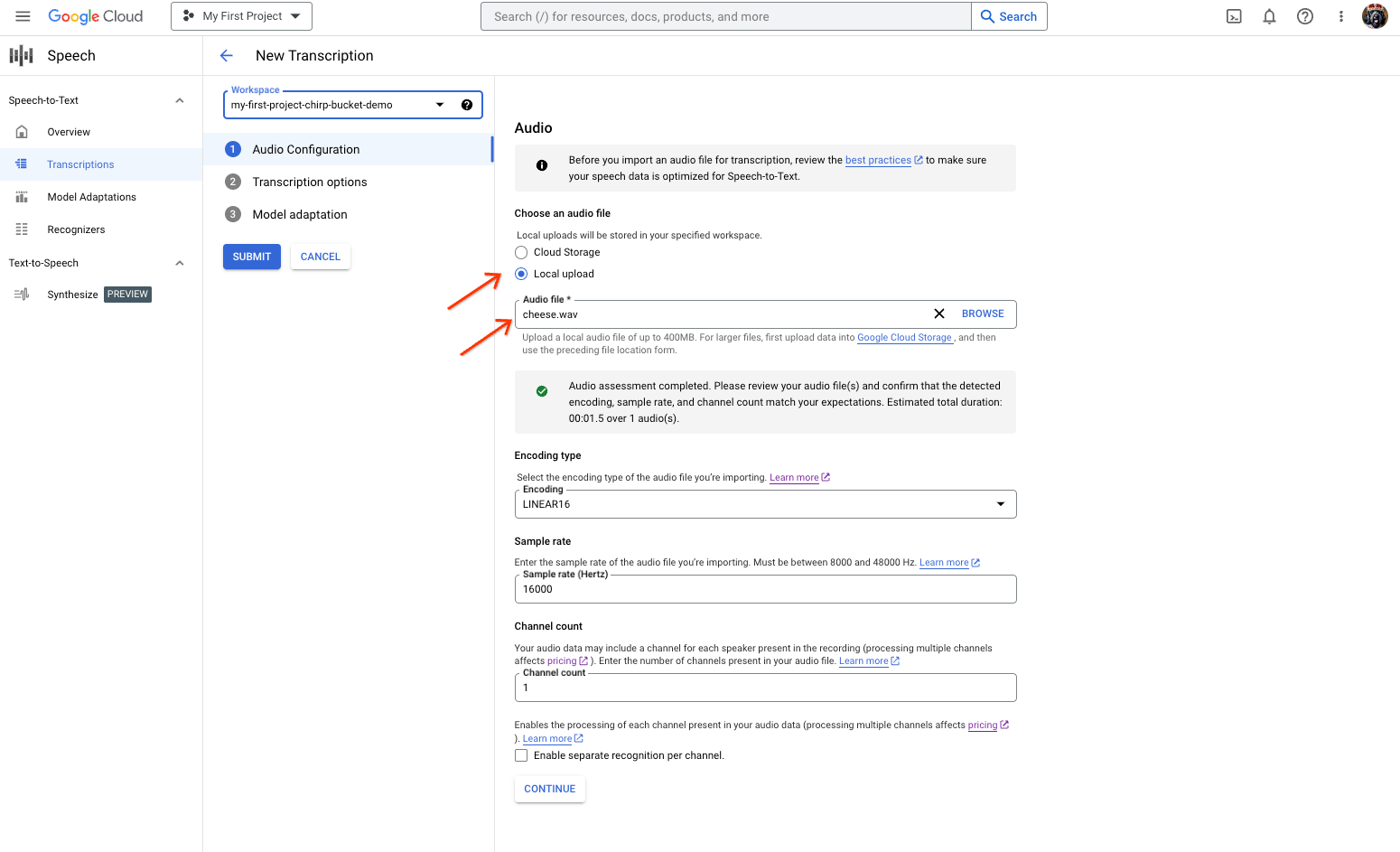
דף יצירת התמליל של המרת דיבור לטקסט, עם אפשרויות לבחירת קובץ או להעלאה. בדף New Transcription (תמלול חדש), בוחרים את קובץ האודיו באמצעות העלאה (Local upload (העלאה מקומית)) או ציון של קובץ קיים ב-Cloud Storage (Cloud storage (אחסון בענן)).
לוחצים על המשך כדי לעבור אל אפשרויות התמלול.
בוחרים את השפה המדוברת שבה מתכננים להשתמש לזיהוי באמצעות Chirp מתוך הכלי לזיהוי שיצרתם קודם.
בתפריט הנפתח לבחירת המודל, בוחרים באפשרות chirp_2.
בתפריט הנפתח Recognizer, בוחרים את רכיב הזיהוי החדש שיצרתם.
לוחצים על Submit כדי להריץ את בקשת הזיהוי הראשונה באמצעות
chirp_2.
צפייה בתוצאת התמלול של Chirp 2.
בדף תמלילים, לוחצים על שם התמליל כדי לראות את התוצאה.
בדף פרטי התמליל, אפשר לראות את תוצאת התמליל, ואם רוצים, להפעיל את האודיו בדפדפן.
הסרת המשאבים
כדי לא לצבור חיובים לחשבון Google Cloud על המשאבים שבהם השתמשתם בדף הזה, פועלים לפי השלבים הבאים.
-
Optional: Revoke the authentication credentials that you created, and delete the local credential file.
gcloud auth application-default revoke
-
Optional: Revoke credentials from the gcloud CLI.
gcloud auth revoke
המסוף
gcloud
המאמרים הבאים
- איך מתמללים אודיו בסטרימינג
- איך מתמללים קובצי אודיו קצרים
- איך מתמללים קובצי אודיו ארוכים
- למידע על שיפור הביצועים והדיוק וטיפים נוספים, אפשר לעיין במסמכי התיעוד בנושא שיטות מומלצות.