A *binary* operator has two relational children. The
following operators are binary operators:
- [Apply join](https://docs.cloud.google.com/spanner/docs/query-operators-binary.md.txt#apply-join)
- [Cross apply](https://docs.cloud.google.com/spanner/docs/query-operators-binary.md.txt#cross-apply)
- [Outer apply](https://docs.cloud.google.com/spanner/docs/query-operators-binary.md.txt#outer-apply)
- [Semi apply](https://docs.cloud.google.com/spanner/docs/query-operators-binary.md.txt#semi-apply)
- [Anti-Semi apply](https://docs.cloud.google.com/spanner/docs/query-operators-binary.md.txt#anti-semi-apply)
- [Hash join](https://docs.cloud.google.com/spanner/docs/query-operators-binary.md.txt#hash-join)
- [Merge join](https://docs.cloud.google.com/spanner/docs/query-operators-binary.md.txt#merge-join)
- [Recursive union](https://docs.cloud.google.com/spanner/docs/query-operators-binary.md.txt#recursive-union)
> [!WARNING]
> **PostgreSQL interface note:** The examples in this topic are intended for GoogleSQL-dialect databases. This feature doesn't support PostgreSQL interface.
## Database schema
The queries and execution plans on this page are based on the following database
schema:
CREATE TABLE Singers (
SingerId INT64 NOT NULL,
FirstName STRING(1024),
LastName STRING(1024),
SingerInfo BYTES(MAX),
BirthDate DATE
) PRIMARY KEY(SingerId);
CREATE INDEX SingersByFirstLastName ON Singers(FirstName, LastName);
CREATE TABLE Albums (
SingerId INT64 NOT NULL,
AlbumId INT64 NOT NULL,
AlbumTitle STRING(MAX),
MarketingBudget INT64
) PRIMARY KEY(SingerId, AlbumId),
INTERLEAVE IN PARENT Singers ON DELETE CASCADE;
CREATE INDEX AlbumsByAlbumTitle ON Albums(AlbumTitle);
CREATE INDEX AlbumsByAlbumTitle2 ON Albums(AlbumTitle) STORING (MarketingBudget);
CREATE TABLE Songs (
SingerId INT64 NOT NULL,
AlbumId INT64 NOT NULL,
TrackId INT64 NOT NULL,
SongName STRING(MAX),
Duration INT64,
SongGenre STRING(25)
) PRIMARY KEY(SingerId, AlbumId, TrackId),
INTERLEAVE IN PARENT Albums ON DELETE CASCADE;
CREATE INDEX SongsBySingerAlbumSongNameDesc ON Songs(SingerId, AlbumId, SongName DESC), INTERLEAVE IN Albums;
CREATE INDEX SongsBySongName ON Songs(SongName);
CREATE TABLE Concerts (
VenueId INT64 NOT NULL,
SingerId INT64 NOT NULL,
ConcertDate DATE NOT NULL,
BeginTime TIMESTAMP,
EndTime TIMESTAMP,
TicketPrices ARRAY
) PRIMARY KEY(VenueId, SingerId, ConcertDate);
You can use the following Data Manipulation Language (DML) statements to add
data to these tables:
```sql
INSERT INTO Singers (SingerId, FirstName, LastName, BirthDate)
VALUES (1, "Marc", "Richards", "1970-09-03"),
(2, "Catalina", "Smith", "1990-08-17"),
(3, "Alice", "Trentor", "1991-10-02"),
(4, "Lea", "Martin", "1991-11-09"),
(5, "David", "Lomond", "1977-01-29");
INSERT INTO Albums (SingerId, AlbumId, AlbumTitle)
VALUES (1, 1, "Total Junk"),
(1, 2, "Go, Go, Go"),
(2, 1, "Green"),
(2, 2, "Forever Hold Your Peace"),
(2, 3, "Terrified"),
(3, 1, "Nothing To Do With Me"),
(4, 1, "Play");
INSERT INTO Songs (SingerId, AlbumId, TrackId, SongName, Duration, SongGenre)
VALUES (2, 1, 1, "Let's Get Back Together", 182, "COUNTRY"),
(2, 1, 2, "Starting Again", 156, "ROCK"),
(2, 1, 3, "I Knew You Were Magic", 294, "BLUES"),
(2, 1, 4, "42", 185, "CLASSICAL"),
(2, 1, 5, "Blue", 238, "BLUES"),
(2, 1, 6, "Nothing Is The Same", 303, "BLUES"),
(2, 1, 7, "The Second Time", 255, "ROCK"),
(2, 3, 1, "Fight Story", 194, "ROCK"),
(3, 1, 1, "Not About The Guitar", 278, "BLUES");
```
> [!NOTE]
> **Note:** You can run queries and retrieve execution plans even if the tables have no data.
## Apply join
An *apply join* is the primary join operator used by Spanner. *Apply
join* operators execute row-oriented processing, unlike operators that execute
set-based processing such as [hash join](https://docs.cloud.google.com/spanner/docs/query-operators-binary.md.txt#hash-join). The apply operator has two
inputs, *input* (left child) and *map* (right child). The apply operator applies
each row on the input side to the map side using an apply method:
[cross](https://docs.cloud.google.com/spanner/docs/query-operators-binary.md.txt#cross-apply), [outer](https://docs.cloud.google.com/spanner/docs/query-operators-binary.md.txt#outer-apply), [semi](https://docs.cloud.google.com/spanner/docs/query-operators-binary.md.txt#semi-apply), or
[anti-semi](https://docs.cloud.google.com/spanner/docs/query-operators-binary.md.txt#anti-semi-apply). Additionally, a variant of an *apply join* also
appears on the map side of a [Distributed apply](https://docs.cloud.google.com/spanner/docs/query-operators-distributed.md.txt#distributed-apply).
The Apply join operator is most efficient when:
- The cardinality of the *input* is low.
- The join key is a prefix of the map-side primary key.
- The query joins two interleaved tables.
#### Properties and execution statistics
A property of an operator describes a trait that is used when the operator is
executed. An execution statistic is a value collected during query execution
to help you assess performance of the operator.
Properties
| Name | Description |
|---|---|
| Execution method | In Row execution, the operator processes one row at a time. In Batch execution, the operator processes a batch of rows at once. |
Execution statistics
| Name | Description |
|---|---|
| Latency | Elapsed time of all the executions done in the operator. |
| Cumulative latency | The total time of the current operator and its descendants. |
| CPU time | Sum of CPU time spent executing the operator. |
| Cumulative CPU time | The total CPU time spent executing the operator and its descendants. |
| Execution time | The total amount of time taken to run the query and process results. |
| Rows returned | The number of rows output by this operator |
| Number of executions | The number of times the operator was executed. Some executions can run in parallel. |
### Cross apply
A *Cross apply* performs an inner join where only matching rows are returned.
The following query demonstrates this operator:
The query requests the first name of each singer, along with the name of only
one of the singer's songs.
```googlesql
SELECT si.firstname,
(SELECT so.songname
FROM songs AS so
WHERE so.singerid = si.singerid
LIMIT 1)
FROM singers AS si;
/*---+---+
| FirstName | Unspecified |
+---+---+
| Alice | Not About The Guitar |
| Catalina | Let's Get Back Together |
| David | NULL |
| Lea | NULL |
| Marc | NULL |
+---+---*/
```
The query populates the first column from the `Singers` table, and the second column
from the `Songs` table. In cases where a `SingerId` existed in the
`Singers` table but there was no matching `SingerId` in the `Songs` table, the
second column contains `NULL`.
The execution plan begins as follows:
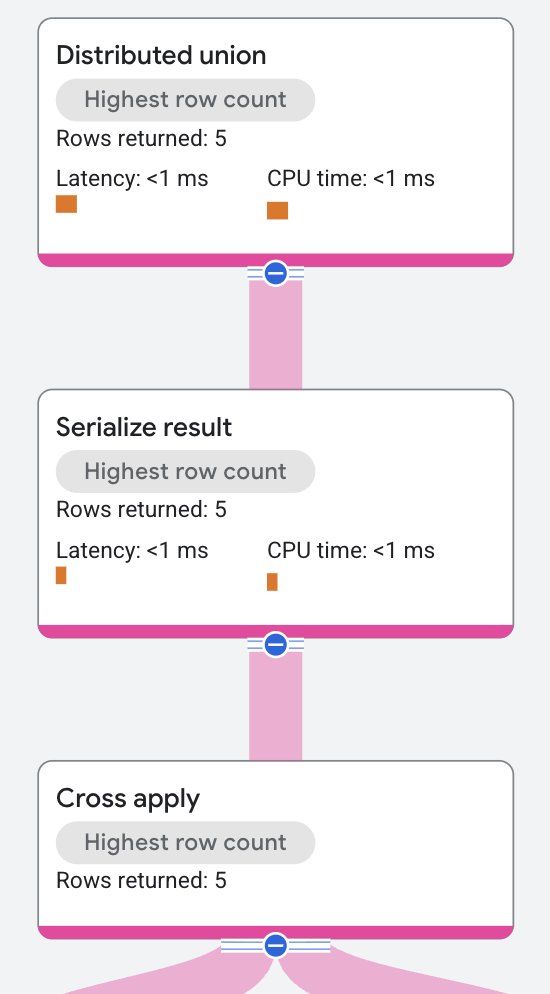
The top-level node is a [distributed union](https://docs.cloud.google.com/spanner/docs/query-operators-distributed.md.txt#distributed-union)
operator. The distributed union operator distributes sub plans to remote servers.
The subplan contains a [serialize result](https://docs.cloud.google.com/spanner/docs/query-operators-unary.md.txt#serialize_result)
operator that computes the singer's first name and the name of one of the
singer's songs and serializes each row of the output.
The serialize result operator receives its input from a cross apply operator.
The input side for the cross apply operator is a table
[scan](https://docs.cloud.google.com/spanner/docs/query-operators-leaf.md.txt#scan) on the
`Singers` table.
The execution plan continues as follows:
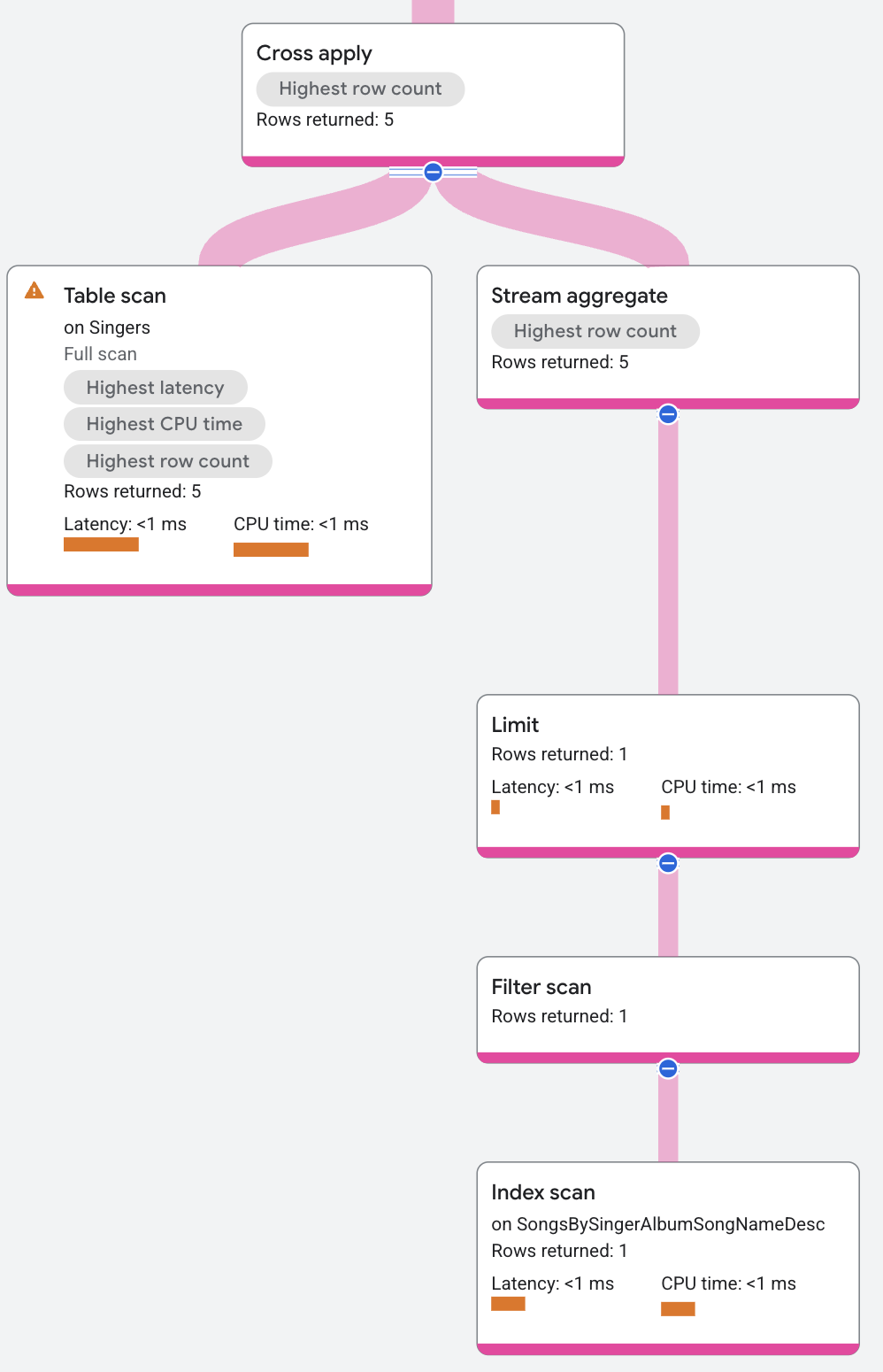
The map side for the cross apply operation contains the following (from top to
bottom):
- An [aggregate](https://docs.cloud.google.com/spanner/docs/query-operators-unary.md.txt#aggregate) operator that returns `Songs.SongName`.
- A [limit](https://docs.cloud.google.com/spanner/docs/query-operators-unary.md.txt#limit) operator that limits the number of songs returned to one per singer.
- An index [scan](https://docs.cloud.google.com/spanner/docs/query-operators-leaf.md.txt#scan) on the `SongsBySingerAlbumSongNameDesc` index.
The cross apply operator maps each row from the input side to a row in the map
side that has the same `SingerId`. The cross apply operator output is the
`FirstName` value from the input row, and the `SongName` value from the map row.
(The `SongName` value is `NULL` if there is no map row that matches on
`SingerId`.) The distributed union operator at the top of the execution plan
then combines all of the output rows from the remote servers and returns them as
the query results.
### Outer apply
An *outer apply* provides left outer join semantics. It ensures that each
execution on the map side returns at least one row by adding NULL-padding if
needed.
### Semi apply
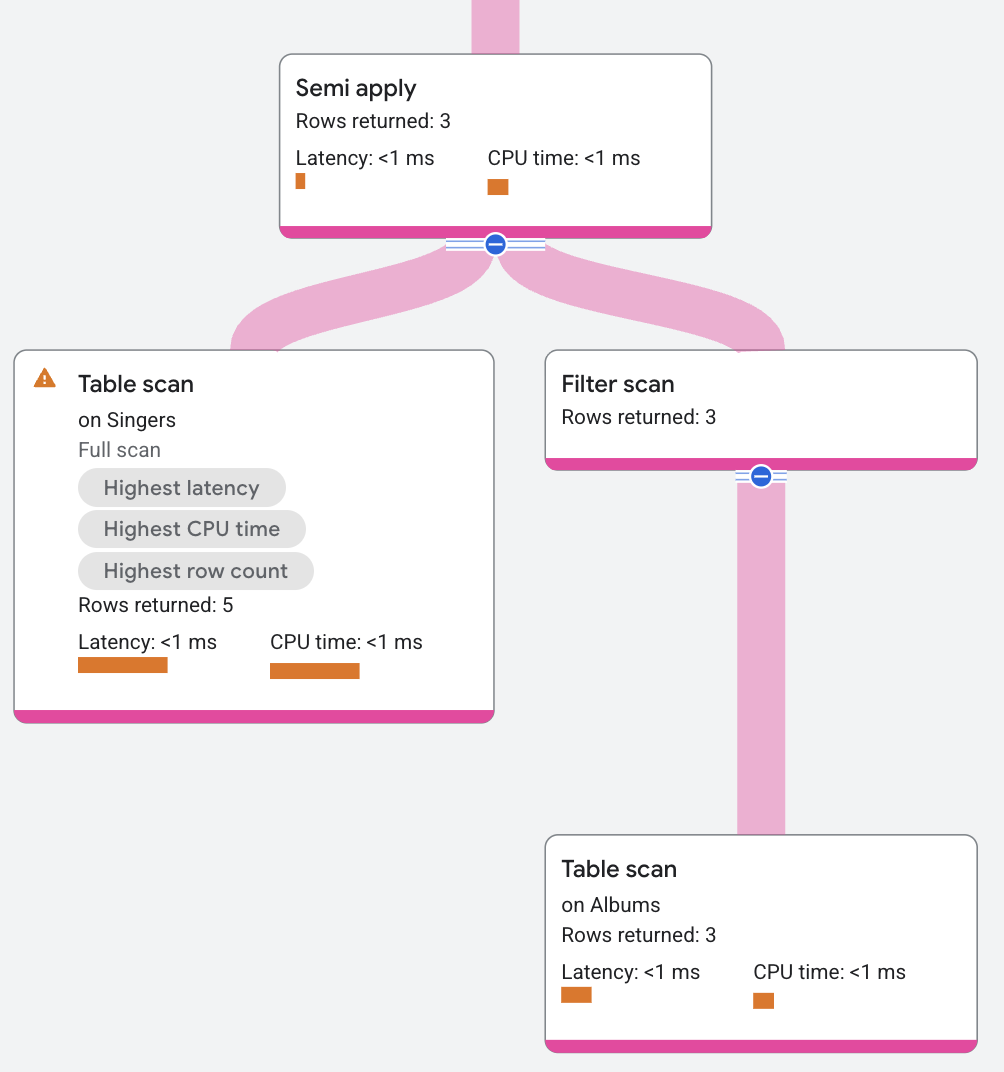
The *semi apply* operator returns input columns only when a match occurs on the
map side.
The following query uses a semi join to find which singers do have an
Album:
```googlesql
SELECT
FirstName,
LastName
FROM
Singers
WHERE
SingerId IN (
SELECT
SingerId
FROM
Albums);
/*---+---+
| FirstName | LastName |
+---+---+
| Marc | Richards |
| Catalina | Smith |
| Alice | Trentor |
| Lea | Martin |
+---+---*/
```
The plan segment appears as follows:
### Anti-semi apply
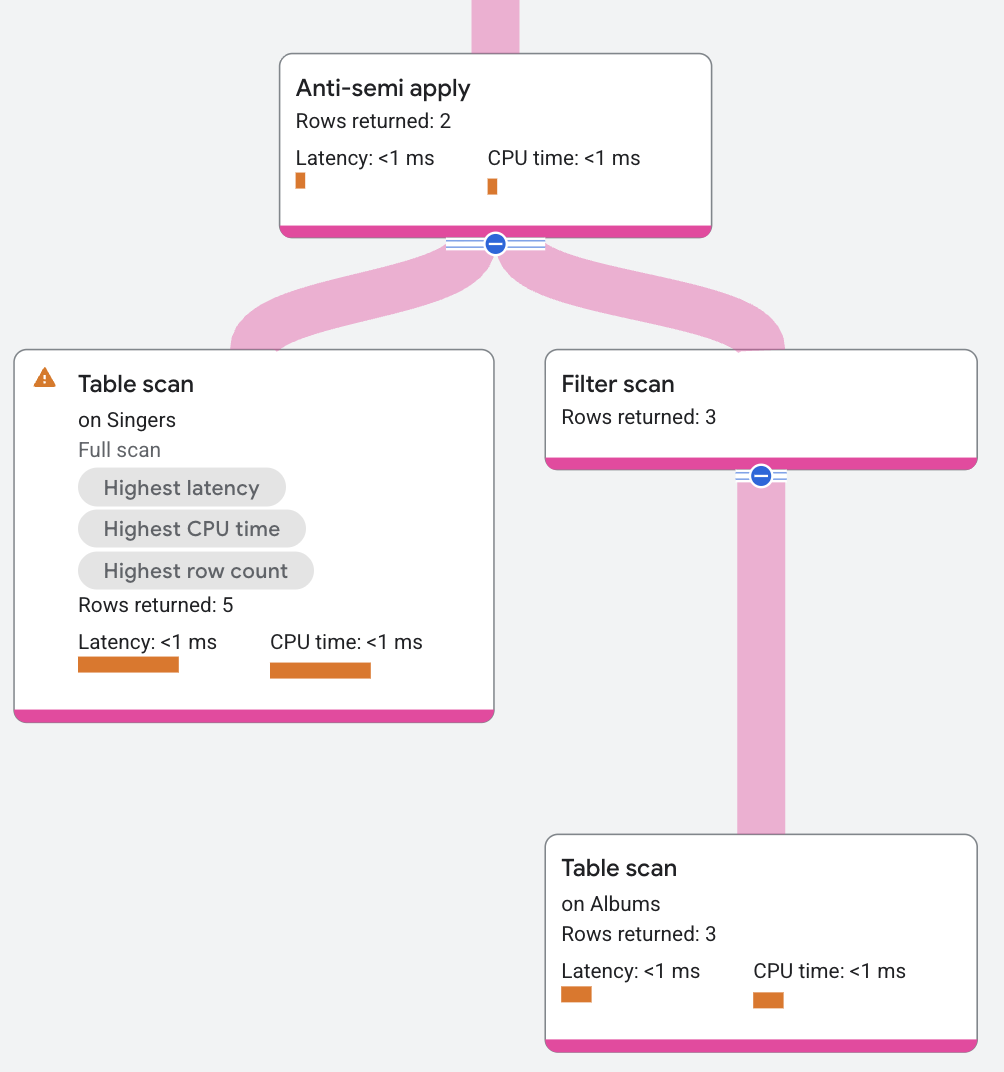
An *Anti-semi apply* operator is similar to a [semi apply](https://docs.cloud.google.com/spanner/docs/query-operators-binary.md.txt#semi-apply)
operator, except that it returns the input table columns only when a match
doesn't occur on the map side.
The following query uses an anti-semi join to find which singers don't have an
Album:
```googlesql
SELECT
FirstName,
LastName
FROM
Singers
WHERE
SingerId NOT IN (
SELECT
SingerId
FROM
Albums);
/*---+---+
| FirstName | LastName |
+---+---+
| David | Lomond |
+---+---*/
```
The plan segment appears as follows:
## Hash join
A *hash join* operator is a hash-based implementation of SQL joins. Hash joins
execute set-based processing. The hash join operator reads rows from input
marked as *build* (left child) and inserts them into a hash table based on a
join condition. The hash join operator then reads rows from input marked as
*probe* (right child). For each row it reads from the probe input, the hash join
operator looks for matching rows in the hash table. The hash join operator
returns the matching rows as its result.
*Hash join* has the following advantages:
- It doesn't require the inputs to be sorted
- It computes a bloom filter when building the hash table. The operator uses the filter to exclude rows from the probe side that have no matches. Note that this is a residual filter, not a seek filter.
The following query demonstrates this operator:
```googlesql
SELECT a.albumtitle,
s.songname
FROM albums AS a join@{join_method=hash_join} songs AS s
ON a.singerid = s.singerid
AND a.albumid = s.albumid;
/*---+---+
| AlbumTitle | SongName |
+---+---+
| Nothing To Do With Me | Not About The Guitar |
| Green | The Second Time |
| Green | Starting Again |
| Green | Nothing Is The Same |
| Green | Let's Get Back Together |
| Green | I Knew You Were Magic |
| Green | Blue |
| Green | 42 |
| Terrified | Fight Story |
+---+---*/
```
The execution plan segment appears as follows:
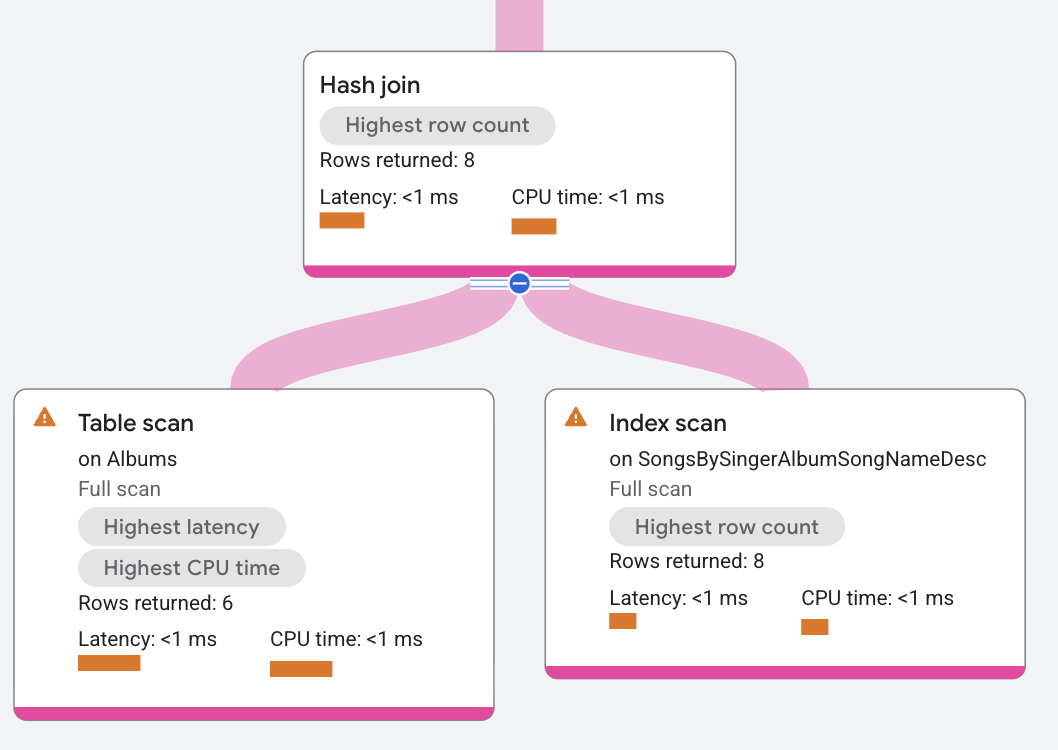
In the execution plan, *build* is a [distributed union](https://docs.cloud.google.com/spanner/docs/query-operators-distributed.md.txt#distributed-union) that
distributes [scans](https://docs.cloud.google.com/spanner/docs/query-operators-leaf.md.txt#scan) on the table `Albums`. *Probe* is a distributed union
operator that distributes scans on the index `SongsBySingerAlbumSongNameDesc`.
The hash join operator reads all rows from the build side. Each build row is
placed in a hash table based on the columns in the condition `a.SingerId =
s.SingerId AND a.AlbumId = s.AlbumId`. Next, the hash join operator reads all
rows from the probe side. For each probe row, the hash join operator looks for
matches in the hash table. The resulting matches are returned by the hash join
operator.
Resulting matches in the hash table might also be filtered by a residual
condition before they're returned. (An example of where residual conditions
appear is in non-equality joins). Hash join execution plans can be complex due
to memory management and join variants. The main hash join algorithm is adapted
to handle inner, semi, anti, and outer join variants.
> [!NOTE]
> **Note:** A [visualized query plan](https://docs.cloud.google.com/spanner/docs/tune-query-with-visualizer.md.txt) renders *build* and *probe* as the left and right children, respectively, of a hash join.
#### Properties and execution statistics
A property of an operator describes a trait that is used when the operator is
executed. An execution statistic is a value collected during query execution
to help you assess performance of the operator.
Properties
| Name | Description |
|---|---|
| Execution method | In Row execution, the operator processes one row at a time. In Batch execution, the operator processes a batch of rows at once. |
Execution statistics
| Name | Description |
|---|---|
| Latency | Elapsed time of all the executions done in the operator. |
| Cumulative latency | The total time of the current operator and its descendants. |
| CPU time | Sum of CPU time spent executing the operator. |
| Cumulative CPU time | The total CPU time spent executing the operator and its descendants. |
| Execution time | The total amount of time taken to run the query and process results. |
| Rows returned | The number of rows output by this operator |
| Number of executions | The number of times the operator was executed. Some executions can run in parallel. |
## Merge join
A *merge join* operator is a merge-based implementation of SQL join. Both sides
of the join produce rows ordered by the columns used in the join condition. The
merge join consumes both input streams concurrently and outputs rows when the
join condition is satisfied. If inputs are not sorted, the optimizer adds
explicit `Sort` operators to the plan.
*Merge join* has the following advantages:
- If the data is already sorted, it doesn't need any memory.
- Even if the data is not sorted, for a distributed join, it can perform the sort on each individual split, rather than creating a large hash table on the root.
*Merge join* isn't selected automatically by the optimizer. To use this
operator, set the join method to [`MERGE_JOIN`](https://docs.cloud.google.com/spanner/docs/reference/standard-sql/query-syntax.md.txt#join-methods) on the query hint, as shown
in the following example:
```googlesql
SELECT a.albumtitle,
s.songname
FROM albums AS a join@{join_method=merge_join} songs AS s
ON a.singerid = s.singerid
AND a.albumid = s.albumid;
/*---+---+
| AlbumTitle | SongName |
+---+---+
| Green | The Second Time |
| Green | Starting Again |
| Green | Nothing Is The Same |
| Green | Let's Get Back Together |
| Green | I Knew You Were Magic |
| Green | Blue |
| Green | 42 |
| Terrified | Fight Story |
| Nothing To Do With Me | Not About The Guitar |
+---+---*/
```
The execution plan appears as follows:
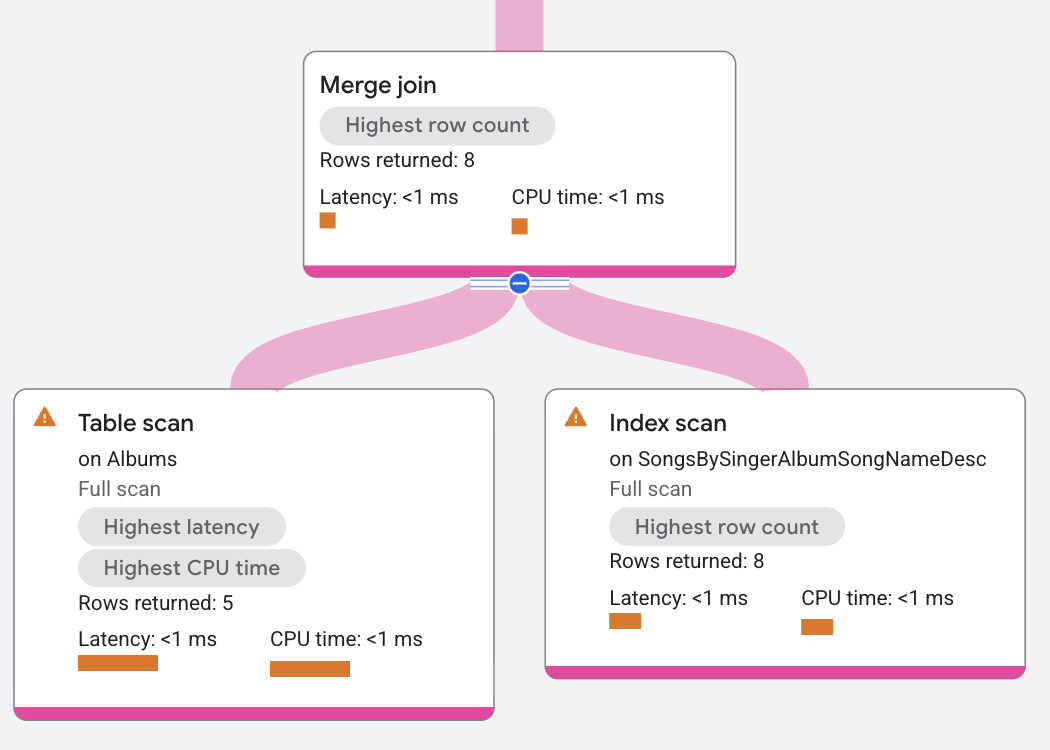
In this execution plan, the merge join is distributed so that the join executes
where the data resides. This also lets the merge join in this example operate
without additional sort operators, because both table scans are already sorted
by `SingerId`, `AlbumId`, which is the join condition. In this plan, the left
scan of the `Albums` table advances whenever its `SingerId`, `AlbumId` is less
than the right scan's `SingerId_1`, `AlbumId_1` values. Similarly, the right
scan advances whenever its values are less than the left scan's values. This
merge advance continues searching for equivalences to return matching rows.
Consider another *merge join* example using the following query:
```googlesql
SELECT a.albumtitle,
s.songname
FROM albums AS a join@{join_method=merge_join} songs AS s
ON a.albumid = s.albumid;
/*---+---+
| AlbumTitle | SongName |
+---+---+
| Total Junk | The Second Time |
| Total Junk | Starting Again |
| Total Junk | Nothing Is The Same |
| Total Junk | Let's Get Back Together |
| Total Junk | I Knew You Were Magic |
| Total Junk | Blue |
| Total Junk | 42 |
| Total Junk | Not About The Guitar |
| Green | The Second Time |
| Green | Starting Again |
| Green | Nothing Is The Same |
| Green | Let's Get Back Together |
| Green | I Knew You Were Magic |
| Green | Blue |
| Green | 42 |
| Green | Not About The Guitar |
| Nothing To Do With Me | The Second Time |
| Nothing To Do With Me | Starting Again |
| Nothing To Do With Me | Nothing Is The Same |
| Nothing To Do With Me | Let's Get Back Together |
| Nothing To Do With Me | I Knew You Were Magic |
| Nothing To Do With Me | Blue |
| Nothing To Do With Me | 42 |
| Nothing To Do With Me | Not About The Guitar |
| Play | The Second Time |
| Play | Starting Again |
| Play | Nothing Is The Same |
| Play | Let's Get Back Together |
| Play | I Knew You Were Magic |
| Play | Blue |
| Play | 42 |
| Play | Not About The Guitar |
| Terrified | Fight Story |
+---+---*/
```
The execution plan appears as follows:
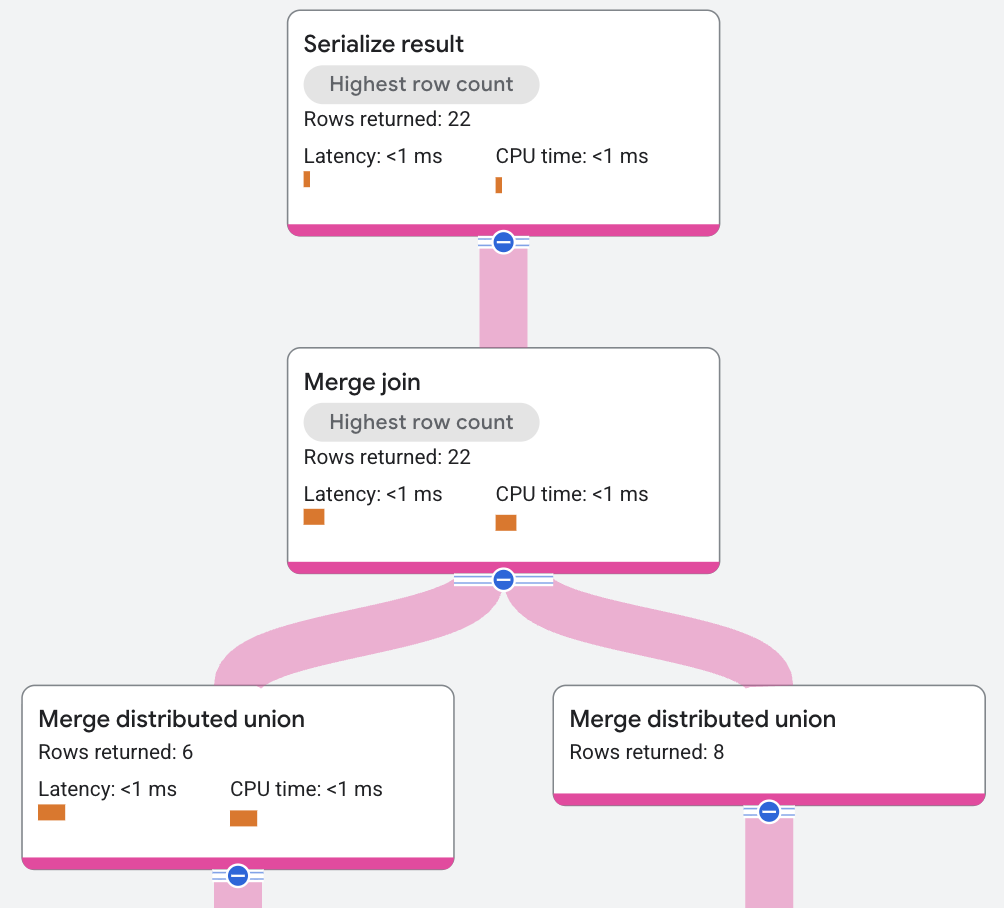
In the preceding execution plan, the query optimizer introduced additional sort
operators to execute the merge join. The `JOIN` condition in this example query
is only on `AlbumId`, which isn't how the data is stored, so a sort must be
added. The query engine supports a Distributed Merge algorithm, which lets the
sort occur locally instead of globally, distributing and parallelizing the CPU
cost.
The resulting matches might also be filtered by a residual condition. For
example, residual conditions appear in non-equality joins. Merge join execution
plans can be complex due to additional sort requirements. The main merge join
algorithm handles inner, semi, anti, and outer join variants.
#### Properties and execution statistics
A property of an operator describes a trait that is used when the operator is
executed. An execution statistic is a value collected during query execution
to help you assess performance of the operator.
Properties
| Name | Description |
|---|---|
| Execution method | In Row execution, the operator processes one row at a time. In Batch execution, the operator processes a batch of rows at once. |
Execution statistics
| Name | Description |
|---|---|
| Latency | Elapsed time of all the executions done in the operator. |
| Cumulative latency | The total time of the current operator and its descendants. |
| CPU time | Sum of CPU time spent executing the operator. |
| Cumulative CPU time | The total CPU time spent executing the operator and its descendants. |
| Execution time | The total amount of time taken to run the query and process results. |
| Rows returned | The number of rows output by this operator |
| Number of executions | The number of times the operator was executed. Some executions can run in parallel. |
## Recursive union
A *recursive union* operator performs a union of two inputs, one that represents
a `base` case, and the other that represents a `recursive` case. It's used in
graph queries with quantified path traversals. The base input is processed first
and exactly once. The recursive input is processed until the recursion
terminates. The recursion terminates when the upper bound, if specified, is
reached, or when the recursion doesn't produce any new results. In the following
example, the `Collaborations` table is added to the schema, and a property graph
called `MusicGraph` is created.
```googlesql
CREATE TABLE Collaborations (
SingerId INT64 NOT NULL,
FeaturingSingerId INT64 NOT NULL,
AlbumTitle STRING(MAX) NOT NULL,
) PRIMARY KEY(SingerId, FeaturingSingerId, AlbumTitle);
CREATE OR REPLACE PROPERTY GRAPH MusicGraph
NODE TABLES(
Singers
KEY(SingerId)
LABEL Singers PROPERTIES(
BirthDate,
FirstName,
LastName,
SingerId,
SingerInfo)
)
EDGE TABLES(
Collaborations AS CollabWith
KEY(SingerId, FeaturingSingerId, AlbumTitle)
SOURCE KEY(SingerId) REFERENCES Singers(SingerId)
DESTINATION KEY(FeaturingSingerId) REFERENCES Singers(SingerId)
LABEL CollabWith PROPERTIES(
AlbumTitle,
FeaturingSingerId,
SingerId),
);
```
The following graph query finds singers who have collaborated with a given
singer or collaborated with those collaborators.
```googlesql
GRAPH MusicGraph
MATCH (singer:Singers {singerId:42})-[c:CollabWith]->{1,2}(featured:Singers)
RETURN singer.SingerId AS singer, featured.SingerId AS featured
```
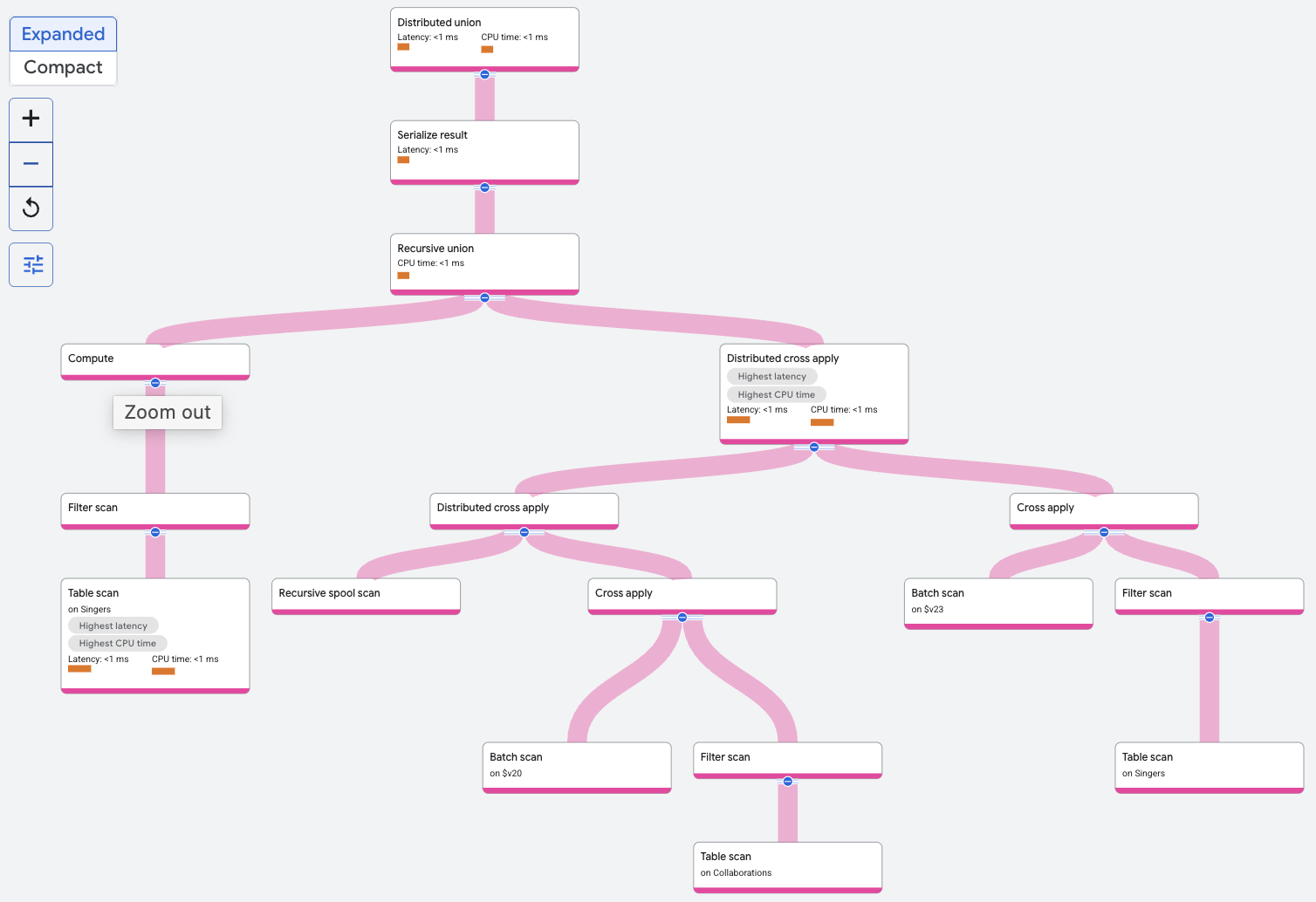
The *recursive union* operator filters the `Singers` table to find the singer
with the given `SingerId`. This is the base input to the *recursive union* . The
recursive input to the *recursive union* comprises a [*distributed cross
apply*](https://docs.cloud.google.com/spanner/docs/query-operators-distributed#distributed-cross-apply) or
other join operator for other queries that repeatedly joins the `Collaborations`
table with the results of the previous
iteration of the join. The rows from the base input form the zeroth iteration.
At each iteration, the output of the iteration is stored by the *recursive spool
scan* . Rows from the *recursive spool scan* are joined with the `Collaborations`
table on `spoolscan.featuredSingerId = Collaborations.SingerId`. Recursion
terminates when two iterations are complete, since that's the specified upper
bound in the query.
#### Properties and execution statistics
A property of an operator describes a trait that is used when the operator is
executed. An execution statistic is a value collected during query execution
to help you assess performance of the operator.
Properties
| Name | Description |
|---|---|
| Execution method | In Row execution, the operator processes one row at a time. In Batch execution, the operator processes a batch of rows at once. |
Execution statistics
| Name | Description |
|---|---|
| Latency | Elapsed time of all the executions done in the operator. |
| Cumulative latency | The total time of the current operator and its descendants. |
| CPU time | Sum of CPU time spent executing the operator. |
| Cumulative CPU time | The total CPU time spent executing the operator and its descendants. |
| Execution time | The total amount of time taken to run the query and process results. |
| Rows returned | The number of rows output by this operator |
| Number of executions | The number of times the operator was executed. Some executions can run in parallel. |