An *array subquery* is similar to a scalar subquery, except that the subquery is
allowed to consume more than one input row. Spanner converts the
consumed rows to a single scalar output array that contains one element per
consumed input row.
> [!WARNING]
> **PostgreSQL interface note:** The examples in this topic are intended for GoogleSQL-dialect databases. This feature doesn't support PostgreSQL interface.
## Database schema
The queries and execution plans on this page are based on the following database
schema:
CREATE TABLE Singers (
SingerId INT64 NOT NULL,
FirstName STRING(1024),
LastName STRING(1024),
SingerInfo BYTES(MAX),
BirthDate DATE
) PRIMARY KEY(SingerId);
CREATE INDEX SingersByFirstLastName ON Singers(FirstName, LastName);
CREATE TABLE Albums (
SingerId INT64 NOT NULL,
AlbumId INT64 NOT NULL,
AlbumTitle STRING(MAX),
MarketingBudget INT64
) PRIMARY KEY(SingerId, AlbumId),
INTERLEAVE IN PARENT Singers ON DELETE CASCADE;
CREATE INDEX AlbumsByAlbumTitle ON Albums(AlbumTitle);
CREATE INDEX AlbumsByAlbumTitle2 ON Albums(AlbumTitle) STORING (MarketingBudget);
CREATE TABLE Songs (
SingerId INT64 NOT NULL,
AlbumId INT64 NOT NULL,
TrackId INT64 NOT NULL,
SongName STRING(MAX),
Duration INT64,
SongGenre STRING(25)
) PRIMARY KEY(SingerId, AlbumId, TrackId),
INTERLEAVE IN PARENT Albums ON DELETE CASCADE;
CREATE INDEX SongsBySingerAlbumSongNameDesc ON Songs(SingerId, AlbumId, SongName DESC), INTERLEAVE IN Albums;
CREATE INDEX SongsBySongName ON Songs(SongName);
CREATE TABLE Concerts (
VenueId INT64 NOT NULL,
SingerId INT64 NOT NULL,
ConcertDate DATE NOT NULL,
BeginTime TIMESTAMP,
EndTime TIMESTAMP,
TicketPrices ARRAY
) PRIMARY KEY(VenueId, SingerId, ConcertDate);
You can use the following Data Manipulation Language (DML) statements to add
data to these tables:
```sql
INSERT INTO Singers (SingerId, FirstName, LastName, BirthDate)
VALUES (1, "Marc", "Richards", "1970-09-03"),
(2, "Catalina", "Smith", "1990-08-17"),
(3, "Alice", "Trentor", "1991-10-02"),
(4, "Lea", "Martin", "1991-11-09"),
(5, "David", "Lomond", "1977-01-29");
INSERT INTO Albums (SingerId, AlbumId, AlbumTitle)
VALUES (1, 1, "Total Junk"),
(1, 2, "Go, Go, Go"),
(2, 1, "Green"),
(2, 2, "Forever Hold Your Peace"),
(2, 3, "Terrified"),
(3, 1, "Nothing To Do With Me"),
(4, 1, "Play");
INSERT INTO Songs (SingerId, AlbumId, TrackId, SongName, Duration, SongGenre)
VALUES (2, 1, 1, "Let's Get Back Together", 182, "COUNTRY"),
(2, 1, 2, "Starting Again", 156, "ROCK"),
(2, 1, 3, "I Knew You Were Magic", 294, "BLUES"),
(2, 1, 4, "42", 185, "CLASSICAL"),
(2, 1, 5, "Blue", 238, "BLUES"),
(2, 1, 6, "Nothing Is The Same", 303, "BLUES"),
(2, 1, 7, "The Second Time", 255, "ROCK"),
(2, 3, 1, "Fight Story", 194, "ROCK"),
(3, 1, 1, "Not About The Guitar", 278, "BLUES");
```
> [!NOTE]
> **Note:** You can run queries and retrieve execution plans even if the tables have no data.
The following query demonstrates the array subquery operator:
```googlesql
SELECT a.albumid,
array
(
select concertdate
FROM concerts
WHERE concerts.singerid = a.singerid)
FROM albums AS a;
```
The subquery is:
```googlesql
SELECT concertdate
FROM concerts
WHERE concerts.singerid = a.singerid;
```
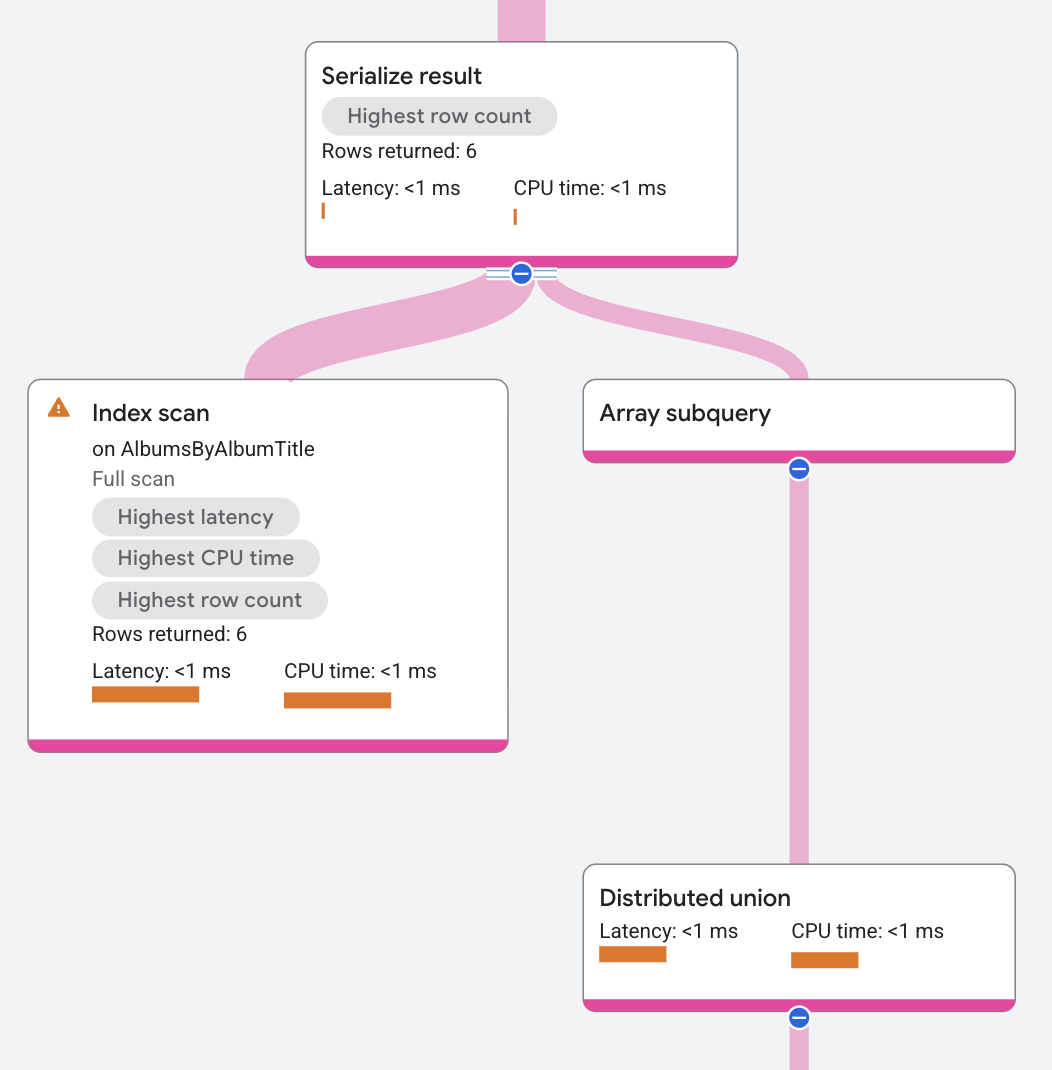
Spanner converts the results of the subquery for each `AlbumId`
into an array of `ConcertDate` rows against that `AlbumId`. The execution plan
displays an array subquery, labeled **Array Subquery**, above a distributed
union operator:
#### Properties and execution statistics
A property of an operator describes a trait that is used when the operator is
executed. An execution statistic is a value collected during query execution
to help you assess performance of the operator.
Properties
| Name | Description |
|---|---|
| Execution method | In Row execution, the operator processes one row at a time. In Batch execution, the operator processes a batch of rows at once. |
Execution statistics
| Name | Description |
|---|---|
| Latency | Elapsed time of all the executions done in the operator. |
| Cumulative latency | The total time of the current operator and its descendants. |
| CPU time | Sum of CPU time spent executing the operator. |
| Cumulative CPU time | The total CPU time spent executing the operator and its descendants. |
| Execution time | The total amount of time taken to run the query and process results. |
| Rows returned | The number of rows output by this operator |
| Number of executions | The number of times the operator was executed. Some executions can run in parallel. |