> [!WARNING]
> **PostgreSQL interface note:** This page applies to migrating an open source PostgreSQL database to Spanner and the GoogleSQL dialect. For information about migrating to Spanner and the PostgreSQL dialect, see [Migrating from PostgreSQL to Spanner (PostgreSQL dialect)](https://docs.cloud.google.com/spanner/docs/migrating-postgres-spanner-pgcompat.md.txt).
This page provides guidance on migrating an open source PostgreSQL
database to Spanner.
Migration involves the following tasks:
- Mapping a PostgreSQL schema to a Spanner schema.
- Creating a Spanner instance, database, and schema.
- Refactoring the application to work with your Spanner database.
- Migrating your data.
- Verifying the new system and moving it to production status.
This page also provides some example schemas using tables from the
[MusicBrainz](https://musicbrainz.org/doc/MusicBrainz_Database)
PostgreSQL database.
## Map your PostgreSQL schema to Spanner
Your first step in moving a database from PostgreSQL to Spanner is to
determine what schema changes you must make. Use
[`pg_dump`](https://www.postgresql.org/docs/current/static/app-pgdump.html)
to create Data Definition Language (DDL) statements that define the objects in
your PostgreSQL database, and then modify the statements as described in the
following sections. After you update the DDL statements, use them
to create your database in a Spanner instance.
### Data types
The following table describes how
[PostgreSQL data types](https://www.postgresql.org/docs/current/static/datatype.html)
map to Spanner data types. Update the data types in your DDL statements
from PostgreSQL data types to Spanner data types.
| PostgreSQL | Spanner |
|---|---|
| `Bigint` `int8` | `INT64` |
| `Bigserial` `serial8` | `INT64` > [!NOTE] > **Note:** There is no auto-increment capability in Spanner. |
| `bit [ (n) ]` | `ARRAY` |
| `bit varying [ (n) ]` `varbit [ (n) ]` | `ARRAY` |
| `Boolean` `bool` | `BOOL` |
| `box` | `ARRAY` |
| `bytea` | `BYTES` |
| `character [ (n) ]` `char [ (n) ]` | `STRING` |
| `character varying [ (n) ]` `varchar [ (n) ]` | `STRING` |
| `cidr` | `STRING`, using standard [CIDR](https://en.wikipedia.org/wiki/Classless_Inter-Domain_Routing) notation. |
| `circle` | `ARRAY` |
| `date` | `DATE` |
| `double precision` `float8` | `FLOAT64` |
| `inet` | `STRING` |
| `Integer` `int` `int4` | `INT64` |
| `interval[ fields ] [ (p) ]` | `INT64` if storing the value in milliseconds, or `STRING` if storing the value in an application-defined interval format. |
| `json` | `STRING` |
| `jsonb` | `JSON` |
| `line` | `ARRAY` |
| `lseg` | `ARRAY` |
| `macaddr` | `STRING`, using standard [MAC address](https://en.wikipedia.org/wiki/MAC_address) notation. |
| `money` | `INT64`, or `STRING` for [arbitrary precision numbers](https://docs.cloud.google.com/spanner/docs/storing-numeric-data.md.txt). |
| `numeric [ (p, s) ]` `decimal [ (p, s) ]` | In PostgreSQL, the `NUMERIC` and `DECIMAL` data types support up to 2^17^ digits of precision and 2^14^-1 of scale, as defined in the column declaration. The Spanner `NUMERIC` data type supports up to 38 digits of precision and 9 decimal digits of scale. If you require greater precision, see [Storing arbitrary precision numeric data](https://docs.cloud.google.com/spanner/docs/storing-numeric-data.md.txt) for alternative mechanisms. |
| `path` | `ARRAY` |
| `pg_lsn` | This data type is PostgreSQL-specific, so there isn't a Spanner equivalent. |
| `point` | `ARRAY` |
| `polygon` | `ARRAY` |
| `Real` `float4` | `FLOAT64` |
| `Smallint` `int2` | `INT64` |
| `Smallserial` `serial2` | `INT64` |
| `Serial` `serial4` | `INT64` |
| `text` | `STRING` |
| `time [ (p) ] [ without time zone ]` | `STRING`, using `HH:MM:SS.sss` notation. |
| `time [ (p) ] with time zone` `timetz` | `STRING`, using `HH:MM:SS.sss+ZZZZ` notation. Alternately, this can be broken up into two columns, one of type `TIMESTAMP` and another one holding the timezone. |
| `timestamp [ (p) ] [ without time zone ]` | No equivalent. You may store as a `STRING` or `TIMESTAMP` at your discretion. |
| `timestamp [ (p) ] with time zone` `timestamptz` | `TIMESTAMP` |
| `tsquery` | No equivalent. Define a storage mechanism in your application instead. |
| `tsvector` | No equivalent. Define a storage mechanism in your application instead. |
| `txid_snapshot` | No equivalent. Define a storage mechanism in your application instead. |
| `uuid` | `STRING` or `BYTES` |
| `xml` | `STRING` |
### Primary keys
For tables in your Spanner database that you frequently append to, avoid
using primary keys that monotonically increase or decrease, as this approach
causes hotspots during writes. Instead, modify the DDL `CREATE TABLE` statements
so that they use
[supported primary key strategies](https://docs.cloud.google.com/spanner/docs/schema-design.md.txt#choosing_a_primary_key_to_prevent_hotspots). If you are using
a PostgreSQL feature such as a `UUID` data type or function, `SERIAL` data
types, `IDENTITY` column, or sequence, you can use the
[auto-generated key migration strategies](https://docs.cloud.google.com/spanner/docs/migrating-primary-keys.md.txt#migrating-auto-generated-keys) that we recommend.
Note that after you designate your primary key, you can't add or remove a
primary key column, or change a primary key value later without deleting and
recreating the table. For more information on how to designate your primary key,
see [Schema and data model - primary
keys](https://docs.cloud.google.com/spanner/docs/schema-and-data-model#primary_keys).
During migration, you might need to keep some existing monotonically increasing
integer keys. If you need to keep these kinds of keys on a frequently updated
table with a lot of operations on these keys, you can avoid creating hotspots by
prefixing the existing key with a pseudo-random number. This technique causes
Spanner to redistribute the rows. See
[What DBAs need to know about Spanner, part 1: Keys and indexes](https://cloudplatform.googleblog.com/2018/06/What-DBAs-need-to-know-about-Cloud-Spanner-part-1-Keys-and-indexes.html)
for more information on using this approach.
### Foreign keys and referential integrity
Learn about [foreign keys support in Spanner](https://docs.cloud.google.com/spanner/docs/foreign-keys/overview.md.txt).
### Indexes
PostgreSQL
[b-tree indexes](https://www.postgresql.org/docs/10/static/indexes-types.html)
are similar to [secondary indexes](https://docs.cloud.google.com/spanner/docs/secondary-indexes.md.txt) in
Spanner. In a Spanner database you use secondary indexes to
index commonly searched columns for better performance, and to replace any
`UNIQUE` constraints specified in your tables. For example, if your PostgreSQL DDL
has this statement:
```postgresql
CREATE TABLE customer (
id CHAR (5) PRIMARY KEY,
first_name VARCHAR (50),
last_name VARCHAR (50),
email VARCHAR (50) UNIQUE
);
```
You would use this statement in your Spanner DDL:
```postgresql
CREATE TABLE customer (
id STRING(5),
first_name STRING(50),
last_name STRING(50),
email STRING(50)
) PRIMARY KEY (id);
CREATE UNIQUE INDEX customer_emails ON customer(email);
```
You can find the indexes for any of your PostgreSQL tables by running the
[`\di`](https://www.postgresql.org/docs/10/static/app-psql.html)
meta-command in `psql`.
After you determine the indexes that you need, add
[`CREATE INDEX`](https://docs.cloud.google.com/spanner/docs/reference/standard-sql/data-definition-language.md.txt#create_index) statements
to create them. Follow the guidance at
[Creating indexes](https://docs.cloud.google.com/spanner/docs/schema-design.md.txt#creating-indexes).
Spanner implements indexes as tables, so indexing monotonically
increasing columns (like those containing `TIMESTAMP` data) can cause a hotspot.
See
[What DBAs need to know about Spanner, part 1: Keys and indexes](https://cloudplatform.googleblog.com/2018/06/What-DBAs-need-to-know-about-Cloud-Spanner-part-1-Keys-and-indexes.html)
for more information on methods to avoid hotspots.
### Check constraints
Learn about [`CHECK` constraint support in Spanner](https://docs.cloud.google.com/spanner/docs/check-constraint/how-to.md.txt).
### Other database objects
You must create the functionality of the following objects in your application
logic:
- Views
- Triggers
- Stored procedures
- User-defined functions (UDFs)
- Columns that use `serial` data types as sequence generators
Keep the following tips in mind when migrating this functionality into
application logic:
- You must migrate any SQL statements that you use from the PostgreSQL SQL dialect to the [GoogleSQL dialect](https://docs.cloud.google.com/spanner/docs/reference/standard-sql/query-syntax.md.txt).
- If you use [cursors](https://www.postgresql.org/docs/current/static/plpgsql-cursors.html), you can rework the query to use [offsets and limits](https://docs.cloud.google.com/spanner/docs/reference/standard-sql/query-syntax.md.txt#limit_and_offset_clause).
## Create your Spanner instance
After you update your DDL statements to conform to Spanner schema
requirements, use it to create your database in Spanner.
1. [Create a Spanner instance](https://docs.cloud.google.com/spanner/docs/create-manage-instances.md.txt#creating_an_instance).
Follow the guidance in [Instances](https://docs.cloud.google.com/spanner/docs/instances.md.txt) to determine the
correct regional configuration and compute capacity to support your
performance goals.
2. Create the database by using either the Google Cloud console or the
[`gcloud`](https://docs.cloud.google.com/spanner/docs/gcloud-spanner) command-line tool:
### Console
1. [Go to the instances page](https://console.cloud.google.com/spanner/instances)
2. Click on the name of the instance that you want to create the example database in to open the **Instance details** page.
3. Click **Create Database**.
4. Type a name for the database and click **Continue**.
5. In the **Define your database schema** section, toggle the **Edit as
text** control.
6. Copy and paste your DDL statements into the **DDL statements** field.
7. Click **Create**.
### gcloud
1. Install the [gcloud CLI](https://docs.cloud.google.com/sdk/downloads).
2. Use the `gcloud spanner databases create` command to [create the database](https://docs.cloud.google.com/spanner/docs/gcloud-spanner#create_databases):
```bash
gcloud spanner databases create DATABASE_NAME --instance=INSTANCE_NAME
--ddl='DDL1' --ddl='DDL2'
```
- DATABASE_NAME is the name of your database.
- INSTANCE_NAME is the Spanner instance that you created.
- DDL*n* are your modified DDL statements.
After you create the database, follow the instructions in
[Apply IAM roles](https://docs.cloud.google.com/spanner/docs/grant-permissions.md.txt) to create user accounts
and grant permissions to the Spanner instance and database.
## Set the transaction isolation level and concurrency control
The default isolation level of transactions in Spanner is
[serializable isolation](https://docs.cloud.google.com/spanner/docs/isolation-levels.md.txt#serializable), which
ensures external consistency of your data. Spanner also offers
[repeatable read isolation](https://docs.cloud.google.com/spanner/docs/isolation-levels.md.txt#repeatable-read). We
recommended that you set the isolation level to repeatable read, and the
concurrency control to
[pessimistic concurrency](https://docs.cloud.google.com/spanner/docs/concurrency-control.md.txt#pessimistic_concurrency_in_repeatable_read_isolation)
as part of the application migration process so that the transaction semantics
of Spanner matches closely with the default transaction semantics
of PostgreSQL. For instructions on how to set the isolation level and
concurrency control in your application, see
[Use repeatable read isolation level](https://docs.cloud.google.com/spanner/docs/use-repeatable-read-isolation.md.txt)
and
[Configure concurrency control](https://docs.cloud.google.com/spanner/docs/concurrency-control.md.txt#configure_concurrency_control).
## Refactor the applications and data access layers
In addition to the code needed to replace the
[preceding database objects](https://docs.cloud.google.com/spanner/docs/migrating-postgres-spanner.md.txt#other-database-objects), you must add application
logic to handle the following functionality:
- Hashing primary keys for writes, for tables that have high write rates to sequential keys.
- Validating data, not already covered by `CHECK` constraints.
- Referential integrity checks not already covered by foreign keys, table interleaving or application logic, including functionality handled by triggers in the PostgreSQL schema.
We recommend using the following process when refactoring:
1. Find all of your application code that accesses the database, and refactor it into a single module or library. That way, you know exactly what code accesses to the database, and therefore exactly what code needs to be modified.
2. Write code that performs reads and writes on the Spanner instance, providing parallel functionality to the original code that reads and writes to PostgreSQL. During writes, update the entire row, not just the columns that have been changed, to ensure that the data in Spanner is identical to that in PostgreSQL.
3. Write code that replaces the functionality of the database objects and functions that aren't available in Spanner.
## Migrate data
After you create your Spanner database and refactor your application
code, you can migrate your data to Spanner.
1. Use the PostgreSQL [`COPY`](https://www.postgresql.org/docs/10/static/sql-copy.html) command to dump data to .csv files.
2. Upload the .csv files to Cloud Storage.
1. [Create a Cloud Storage bucket](https://docs.cloud.google.com/storage/docs/creating-buckets.md.txt).
2. In the Cloud Storage console, click on the bucket name to open the bucket browser.
3. Click **Upload Files**.
4. Navigate to the directory containing the .csv files and select them.
5. Click **Open**.
3. Create an application to import data into Spanner. This application
could use [Dataflow](https://docs.cloud.google.com/spanner/docs/dataflow-connector.md.txt#writing-transforming)
or it could use the [client libraries](https://docs.cloud.google.com/spanner/docs/reference/libraries.md.txt)
directly. Make sure to follow the guidance in
[Bulk data loading best practices](https://docs.cloud.google.com/spanner/docs/bulk-loading.md.txt) to get the
best performance.
## Tests
Test all application functions against the Spanner instance to verify
that they work as expected. Run production-level workloads to ensure the
performance meets your needs.
[Update the compute capacity](https://docs.cloud.google.com/spanner/docs/create-manage-instances.md.txt#changing_the_number_of_nodes)
as needed to meet your performance goals.
## Move to the new system
After you complete the initial application testing, turn up the new system using
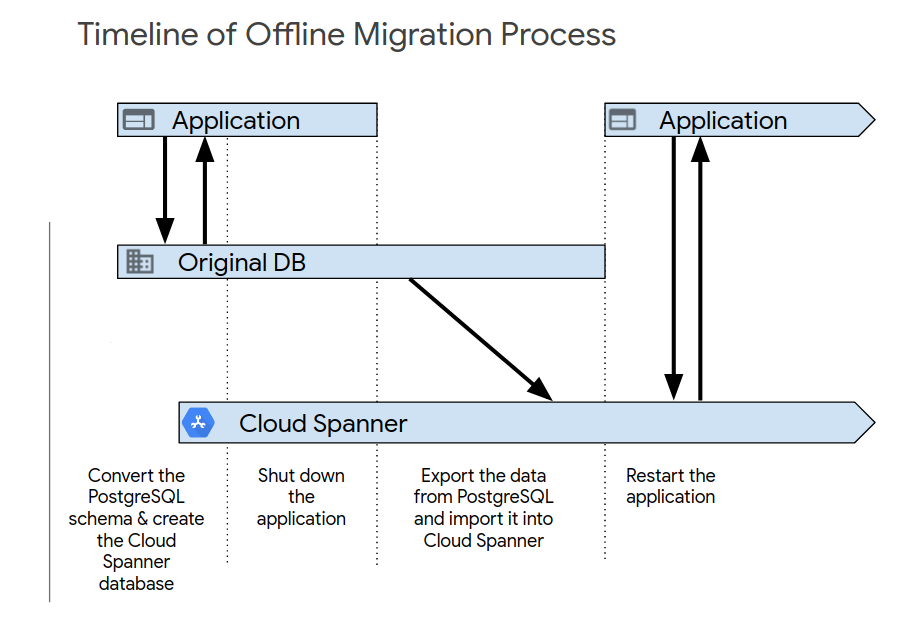
one of the following processes. Offline migration is the simplest way to
migrate. However, this approach makes your application unavailable for a period
of time, and it provides no rollback path if you find data issues later on. To
perform an offline migration:
1. Delete all the data in the Spanner database.
2. Shut down the application that targets the PostgreSQL database.
3. Export all data from the PostgreSQL database and import it into the Spanner database as described in [Migration overview](https://docs.cloud.google.com/spanner/docs/migration-overview.md.txt).
4. Start up the application that targets the Spanner database.
Live migration is possible and requires extensive changes to your application to
support the migration.
## Schema migration examples
These examples show the `CREATE TABLE` statements for several tables in the
[MusicBrainz](https://musicbrainz.org/) PostgreSQL database
[schema](https://musicbrainz.org/doc/MusicBrainz_Database/Schema).
Each example includes both the PostgreSQL schema and the Spanner schema.
### artist_credit table
### GoogleSQL
```googlesql
CREATE TABLE artist_credit (
hashed_id STRING(4),
id INT64,
name STRING(MAX) NOT NULL,
artist_count INT64 NOT NULL,
ref_count INT64,
created TIMESTAMP OPTIONS (
allow_commit_timestamp = true
),
) PRIMARY KEY(hashed_id, id);
```
### PostgreSQL
```postgresql
CREATE TABLE artist_credit (
id SERIAL,
name VARCHAR NOT NULL,
artist_count SMALLINT NOT NULL,
ref_count INTEGER DEFAULT 0,
created TIMESTAMP WITH TIME ZONE DEFAULT NOW()
);
```
### recording table
### GoogleSQL
```googlesql
CREATE TABLE recording (
hashed_id STRING(36),
id INT64,
gid STRING(36) NOT NULL,
name STRING(MAX) NOT NULL,
artist_credit_hid STRING(36) NOT NULL,
artist_credit_id INT64 NOT NULL,
length INT64,
comment STRING(255) NOT NULL,
edits_pending INT64 NOT NULL,
last_updated TIMESTAMP OPTIONS (
allow_commit_timestamp = true
),
video BOOL NOT NULL,
) PRIMARY KEY(hashed_id, id);
```
### PostgreSQL
```postgresql
CREATE TABLE recording (
id SERIAL,
gid UUID NOT NULL,
name VARCHAR NOT NULL,
artist_credit INTEGER NOT NULL, -- references artist_credit.id
length INTEGER CHECK (length IS NULL OR length > 0),
comment VARCHAR(255) NOT NULL DEFAULT '',
edits_pending INTEGER NOT NULL DEFAULT 0 CHECK (edits_pending >= 0),
last_updated TIMESTAMP WITH TIME ZONE DEFAULT NOW(),
video BOOLEAN NOT NULL DEFAULT FALSE
);
```
### recording-alias table
### GoogleSQL
```googlesql
CREATE TABLE recording_alias (
hashed_id STRING(36) NOT NULL,
id INT64 NOT NULL,
alias_id INT64,
name STRING(MAX) NOT NULL,
locale STRING(MAX),
edits_pending INT64 NOT NULL,
last_updated TIMESTAMP NOT NULL OPTIONS (
allow_commit_timestamp = true
),
type INT64,
sort_name STRING(MAX) NOT NULL,
begin_date_year INT64,
begin_date_month INT64,
begin_date_day INT64,
end_date_year INT64,
end_date_month INT64,
end_date_day INT64,
primary_for_locale BOOL NOT NULL,
ended BOOL NOT NULL,
) PRIMARY KEY(hashed_id, id, alias_id),
INTERLEAVE IN PARENT recording ON DELETE NO ACTION;
```
### PostgreSQL
```postgresql
CREATE TABLE recording_alias (
id SERIAL, --PK
recording INTEGER NOT NULL, -- references recording.id
name VARCHAR NOT NULL,
locale TEXT,
edits_pending INTEGER NOT NULL DEFAULT 0 CHECK (edits_pending >=0),
last_updated TIMESTAMP WITH TIME ZONE DEFAULT NOW(),
type INTEGER, -- references recording_alias_type.id
sort_name VARCHAR NOT NULL,
begin_date_year SMALLINT,
begin_date_month SMALLINT,
begin_date_day SMALLINT,
end_date_year SMALLINT,
end_date_month SMALLINT,
end_date_day SMALLINT,
primary_for_locale BOOLEAN NOT NULL DEFAULT false,
ended BOOLEAN NOT NULL DEFAULT FALSE
-- CHECK constraint skipped for brevity
);
```