> [!NOTE]
> **Note:** This feature is available with the Spanner Enterprise edition and Enterprise Plus edition. For more information, see the [Spanner editions overview](https://docs.cloud.google.com/spanner/docs/editions-overview.md.txt).
This document shows you how to set up and query a Spanner Graph database to
model, store, and analyze complex data relationships using the Google Cloud console
and client libraries.
The following topics help you learn how:
- [Create a Spanner instance](https://docs.cloud.google.com/spanner/docs/graph/set-up.md.txt#create-instance).
- [Create a database with a Spanner Graph schema](https://docs.cloud.google.com/spanner/docs/graph/set-up.md.txt#create-database).
- [Insert graph data](https://docs.cloud.google.com/spanner/docs/graph/set-up.md.txt#insert-graph-data).
- [Query the graph you created](https://docs.cloud.google.com/spanner/docs/graph/set-up.md.txt#run-graph-query).
- [Clean up resources](https://docs.cloud.google.com/spanner/docs/graph/set-up.md.txt#clean-up).
To learn about Spanner pricing details, see
[Spanner pricing](https://cloud.google.com/spanner/pricing).
To try out a codelab, see [Getting started with Spanner Graph](https://codelabs.developers.google.com/codelabs/spanner-graph-getting-started).
## Before you begin
1. Enable the Spanner API:
[Go to Enable Spanner API](https://console.cloud.google.com/apis/enableflow?apiid=spanner.googleapis.com)
4.
To get the permissions that
you need to create instances and databases,
ask your administrator to grant you the
[Cloud Spanner Admin](https://docs.cloud.google.com/iam/docs/roles-permissions/spanner.md.txt#spanner.admin) (`roles/spanner.admin`) IAM role on your project.
5.
To get the permissions that
you need to query Spanner graphs if you're not granted the Cloud Spanner Admin role,
ask your administrator to grant you the
[Cloud Spanner Database Reader](https://docs.cloud.google.com/iam/docs/roles-permissions/spanner.md.txt#spanner.databaseReader) (`roles/spanner.databaseReader`) IAM role on your project.
## Create a Spanner instance
> [!NOTE]
> **Note:** To explore Spanner using a 90-day free trial instance, see [Create a Spanner free trial instance](https://docs.cloud.google.com/spanner/docs/free-trial-quickstart.md.txt).
When you first use Spanner, you must create an *instance*, which
allocates resources for Spanner databases. This section shows you
how to create an instance using the Google Cloud console.
1. In the Google Cloud console, go to the **Spanner** page.
[Go to Spanner](https://console.cloud.google.com/spanner)
2. Select or create a Google Cloud project if you haven't already.
3. Do one of the following:
1. If you haven't created a Spanner instance before, on the
**Welcome to Spanner** page, click
**Create a provisioned instance**.
2. If you've created a Spanner instance, on the **Instances**
page, click **Create instance**.
4. On the **Select an edition** page, select **Enterprise Plus** or
**Enterprise**.
Spanner Graph is available only in the Enterprise edition or
Enterprise Plus edition. To compare the different editions, click
**Compare editions** . For more information, see the
[Spanner editions overview](https://docs.cloud.google.com/spanner/docs/editions-overview.md.txt).
5. Click **Continue**.
6. In **Instance name** , enter an instance name, for example, `test-instance`.
7. In **Instance ID**, keep or change the instance ID. Your instance ID
defaults to your instance name, but you can change it. Your instance name
and instance ID can be the same or different.
8. Click **Continue**.
9. In **Choose a configuration**, do the following:
1. Keep **Regional** selected.
2. In **Select a configuration**, select a region. Spanner
stores and replicates your instances in the region you select.
3. Click **Continue**.
10. In **Configure compute capacity**, do the following:
1. In **Select unit** , select **Processing units (PUs)**.
2. In **Choose a scaling mode** , keep **Manual allocation** selected and in
**Quantity**, keep 1000 processing units.
11. Click **Create** . The Google Cloud console shows the **Overview** page
for the instance you created.
## Create a graph database using a schema
This section shows you how to create a Spanner Graph database using a
Spanner Graph schema. You can use either the Google Cloud console or client
libraries.
### Console
1. In the Google Cloud console, go to the **Spanner
Instances** page.
[Go to Spanner instances](https://console.cloud.google.com/spanner/instances)
2. Click the instance you created, for example, `Test Instance`.
3. In **Overview** , under the name of your instance, click **Create
database**.
4. In **Database name** , enter a database name. For example, `example-db`.
5. In **Select database dialect**, choose Google Standard SQL.
Spanner Graph isn't available in the PostgreSQL dialect.
6. Enter the following schema into the **DDL Templates** editor tab.
The schema contains two node table definitions, `Person` and `Account`,
and two edge table definitions, `PersonOwnAccount` and
`AccountTransferAccount`. Spanner Graph uses relational tables to
define graphs, so you see both relational tables and graph statements in
the schema. To learn more about the Spanner Graph schema, see
the [Spanner Graph schema overview](https://docs.cloud.google.com/spanner/docs/graph/schema-overview.md.txt):
```sql
CREATE TABLE Person (
id INT64 NOT NULL,
name STRING(MAX),
birthday TIMESTAMP,
country STRING(MAX),
city STRING(MAX),
) PRIMARY KEY (id);
CREATE TABLE Account (
id INT64 NOT NULL,
create_time TIMESTAMP,
is_blocked BOOL,
nick_name STRING(MAX),
) PRIMARY KEY (id);
CREATE TABLE PersonOwnAccount (
id INT64 NOT NULL,
account_id INT64 NOT NULL,
create_time TIMESTAMP,
FOREIGN KEY (account_id) REFERENCES Account (id)
) PRIMARY KEY (id, account_id),
INTERLEAVE IN PARENT Person ON DELETE CASCADE;
CREATE TABLE AccountTransferAccount (
id INT64 NOT NULL,
to_id INT64 NOT NULL,
amount FLOAT64,
create_time TIMESTAMP NOT NULL,
order_number STRING(MAX),
FOREIGN KEY (to_id) REFERENCES Account (id)
) PRIMARY KEY (id, to_id, create_time),
INTERLEAVE IN PARENT Account ON DELETE CASCADE;
CREATE OR REPLACE PROPERTY GRAPH FinGraph
NODE TABLES (Account, Person)
EDGE TABLES (
PersonOwnAccount
SOURCE KEY (id) REFERENCES Person (id)
DESTINATION KEY (account_id) REFERENCES Account (id)
LABEL Owns,
AccountTransferAccount
SOURCE KEY (id) REFERENCES Account (id)
DESTINATION KEY (to_id) REFERENCES Account (id)
LABEL Transfers
);
```
> [!NOTE]
> **Note:** In the preceding DDL, the edge tables `PersonOwnAccount` and `AccountTransferAccount` use the `INTERLEAVE IN PARENT` clause. Table interleaving is a storage colocation optimization in Spanner that is critical for graph query performance. For details on how interleaving optimizes graph edge traversal, see [Optimize
> edge traversal](https://docs.cloud.google.com/spanner/docs/graph/best-practices-designing-schema#optimize-edge-traversal).
7. Keep the default settings in **Show encryption options**.
8. Click **Create** . Google Cloud console displays the **Overview** page
for the database you created.
### Client libraries
### Python
```python
def create_database_with_property_graph(instance_id, database_id):
"""Creates a database, tables and a property graph for sample data."""
from google.cloud.spanner_admin_database_v1.types import spanner_database_admin
spanner_client = spanner.Client()
database_admin_api = spanner_client.database_admin_api
request = spanner_database_admin.CreateDatabaseRequest(
parent=database_admin_api.instance_path(spanner_client.project, instance_id),
create_statement=f"CREATE DATABASE `{database_id}`",
extra_statements=[
"""CREATE TABLE Person (
id INT64 NOT NULL,
name STRING(MAX),
birthday TIMESTAMP,
country STRING(MAX),
city STRING(MAX),
) PRIMARY KEY (id)""",
"""CREATE TABLE Account (
id INT64 NOT NULL,
create_time TIMESTAMP,
is_blocked BOOL,
nick_name STRING(MAX),
) PRIMARY KEY (id)""",
"""CREATE TABLE PersonOwnAccount (
id INT64 NOT NULL,
account_id INT64 NOT NULL,
create_time TIMESTAMP,
FOREIGN KEY (account_id)
REFERENCES Account (id)
) PRIMARY KEY (id, account_id),
INTERLEAVE IN PARENT Person ON DELETE CASCADE""",
"""CREATE TABLE AccountTransferAccount (
id INT64 NOT NULL,
to_id INT64 NOT NULL,
amount FLOAT64,
create_time TIMESTAMP NOT NULL,
order_number STRING(MAX),
FOREIGN KEY (to_id) REFERENCES Account (id)
) PRIMARY KEY (id, to_id, create_time),
INTERLEAVE IN PARENT Account ON DELETE CASCADE""",
"""CREATE OR REPLACE PROPERTY GRAPH FinGraph
NODE TABLES (Account, Person)
EDGE TABLES (
PersonOwnAccount
SOURCE KEY(id) REFERENCES Person(id)
DESTINATION KEY(account_id) REFERENCES Account(id)
LABEL Owns,
AccountTransferAccount
SOURCE KEY(id) REFERENCES Account(id)
DESTINATION KEY(to_id) REFERENCES Account(id)
LABEL Transfers)""",
],
)
operation = database_admin_api.create_database(request=request)
print("Waiting for operation to complete...")
database = operation.result(OPERATION_TIMEOUT_SECONDS)
print(
"Created database {} on instance {}".format(
database.name,
database_admin_api.instance_path(spanner_client.project, instance_id),
)
)
```
### Java
```java
static void createDatabaseWithPropertyGraph(
DatabaseAdminClient dbAdminClient, InstanceName instanceName, String databaseId) {
CreateDatabaseRequest createDatabaseRequest =
CreateDatabaseRequest.newBuilder()
.setCreateStatement("CREATE DATABASE `" + databaseId + "`")
.setParent(instanceName.toString())
.addAllExtraStatements(
Arrays.asList(
"CREATE TABLE Person ("
+ " id INT64 NOT NULL,"
+ " name STRING(MAX),"
+ " birthday TIMESTAMP,"
+ " country STRING(MAX),"
+ " city STRING(MAX),"
+ ") PRIMARY KEY (id)",
"CREATE TABLE Account ("
+ " id INT64 NOT NULL,"
+ " create_time TIMESTAMP,"
+ " is_blocked BOOL,"
+ " nick_name STRING(MAX),"
+ ") PRIMARY KEY (id)",
"CREATE TABLE PersonOwnAccount ("
+ " id INT64 NOT NULL,"
+ " account_id INT64 NOT NULL,"
+ " create_time TIMESTAMP,"
+ " FOREIGN KEY (account_id)"
+ " REFERENCES Account (id)"
+ ") PRIMARY KEY (id, account_id),"
+ "INTERLEAVE IN PARENT Person ON DELETE CASCADE",
"CREATE TABLE AccountTransferAccount ("
+ " id INT64 NOT NULL,"
+ " to_id INT64 NOT NULL,"
+ " amount FLOAT64,"
+ " create_time TIMESTAMP NOT NULL,"
+ " order_number STRING(MAX),"
+ " FOREIGN KEY (to_id) REFERENCES Account (id)"
+ ") PRIMARY KEY (id, to_id, create_time),"
+ "INTERLEAVE IN PARENT Account ON DELETE CASCADE",
"CREATE OR REPLACE PROPERTY GRAPH FinGraph "
+ "NODE TABLES (Account, Person)"
+ "EDGE TABLES ("
+ " PersonOwnAccount"
+ " SOURCE KEY(id) REFERENCES Person(id)"
+ " DESTINATION KEY(account_id) REFERENCES Account(id)"
+ " LABEL Owns,"
+ " AccountTransferAccount"
+ " SOURCE KEY(id) REFERENCES Account(id)"
+ " DESTINATION KEY(to_id) REFERENCES Account(id)"
+ " LABEL Transfers)"))
.build();
try {
// Initiate the request which returns an OperationFuture.
com.google.spanner.admin.database.v1.Database db =
dbAdminClient.createDatabaseAsync(createDatabaseRequest).get();
System.out.println("Created database [" + db.getName() + "]");
} catch (ExecutionException e) {
// If the operation failed during execution, expose the cause.
System.out.println("Encountered exception" + e.getCause());
throw (SpannerException) e.getCause();
} catch (InterruptedException e) {
// Throw when a thread is waiting, sleeping, or otherwise occupied,
// and the thread is interrupted, either before or during the activity.
throw SpannerExceptionFactory.propagateInterrupt(e);
}
}
```
### Go
```go
import (
"context"
"fmt"
"io"
"regexp"
database "cloud.google.com/go/spanner/admin/database/apiv1"
adminpb "google.golang.org/genproto/googleapis/spanner/admin/database/v1"
)
func createDatabaseWithPropertyGraph(ctx context.Context, w io.Writer, dbId string) error {
// dbId is of the form:
// projects/YOUR_PROJECT_ID/instances/YOUR_INSTANCE_ID/databases/YOUR_DATABASE_NAME
matches := regexp.MustCompile("^(.*)/databases/(.*)$").FindStringSubmatch(dbId)
if matches == nil || len(matches) != 3 {
return fmt.Errorf("Invalid database id %s", dbId)
}
adminClient, err := database.NewDatabaseAdminClient(ctx)
if err != nil {
return err
}
defer adminClient.Close()
var instance = matches[1]
var dbName = matches[2]
// The schema defintion for a database with a property graph comprises table
// definitions one or more `CREATE PROPERTY GRAPH` statements to define the
// property graph(s).
//
// Here, tables are created for 'Person's and 'Account's. The property graph
// definition says that these entities form nodes in the graph. Similarly,
// there are 'PersonOwnAccount' and 'AccountTransferAccount' relationship
// tables defined. The property graph definition maps these to edges in the graph.
var schema_statements = []string{
`CREATE TABLE Person (
id INT64 NOT NULL,
name STRING(MAX),
birthday TIMESTAMP,
country STRING(MAX),
city STRING(MAX),
) PRIMARY KEY (id)`,
`CREATE TABLE Account (
id INT64 NOT NULL,
create_time TIMESTAMP,
is_blocked BOOL,
nick_name STRING(MAX),
) PRIMARY KEY (id)`,
`CREATE TABLE PersonOwnAccount (
id INT64 NOT NULL,
account_id INT64 NOT NULL,
create_time TIMESTAMP,
FOREIGN KEY (account_id)
REFERENCES Account (id)
) PRIMARY KEY (id, account_id),
INTERLEAVE IN PARENT Person ON DELETE CASCADE`,
`CREATE TABLE AccountTransferAccount (
id INT64 NOT NULL,
to_id INT64 NOT NULL,
amount FLOAT64,
create_time TIMESTAMP NOT NULL,
order_number STRING(MAX),
FOREIGN KEY (to_id) REFERENCES Account (id)
) PRIMARY KEY (id, to_id, create_time),
INTERLEAVE IN PARENT Account ON DELETE CASCADE`,
`CREATE OR REPLACE PROPERTY GRAPH FinGraph
NODE TABLES (Account, Person)
EDGE TABLES (
PersonOwnAccount
SOURCE KEY(id) REFERENCES Person(id)
DESTINATION KEY(account_id) REFERENCES Account(id)
LABEL Owns,
AccountTransferAccount
SOURCE KEY(id) REFERENCES Account(id)
DESTINATION KEY(to_id) REFERENCES Account(id)
LABEL Transfers)`,
}
op, err := adminClient.CreateDatabase(ctx, &adminpb.CreateDatabaseRequest{
Parent: instance,
CreateStatement: "CREATE DATABASE `" + dbName + "`",
ExtraStatements: schema_statements,
})
if err != nil {
return err
}
if _, err := op.Wait(ctx); err != nil {
return err
}
fmt.Fprintf(w, "Created database [%s]\n", dbId)
return nil
}
```
### C++
```c++
void CreateDatabaseWithPropertyGraph(
google::cloud::spanner_admin::DatabaseAdminClient client,
std::string const& project_id, std::string const& instance_id,
std::string const& database_id) {
google::cloud::spanner::Database database(project_id, instance_id,
database_id);
google::spanner::admin::database::v1::CreateDatabaseRequest request;
request.set_parent(database.instance().FullName());
request.set_create_statement("CREATE DATABASE `" + database.database_id() +
"`");
request.add_extra_statements(R"""(
CREATE TABLE Person (
id INT64 NOT NULL,
name STRING(MAX),
birthday TIMESTAMP,
country STRING(MAX),
city STRING(MAX),
) PRIMARY KEY (id))""");
request.add_extra_statements(R"""(
CREATE TABLE Account (
id INT64 NOT NULL,
create_time TIMESTAMP,
is_blocked BOOL,
nick_name STRING(MAX),
) PRIMARY KEY (id))""");
request.add_extra_statements(R"""(
CREATE TABLE PersonOwnAccount (
id INT64 NOT NULL,
account_id INT64 NOT NULL,
create_time TIMESTAMP,
FOREIGN KEY (account_id)
REFERENCES Account (id)
) PRIMARY KEY (id, account_id),
INTERLEAVE IN PARENT Person ON DELETE CASCADE)""");
request.add_extra_statements(R"""(
CREATE TABLE AccountTransferAccount (
id INT64 NOT NULL,
to_id INT64 NOT NULL,
amount FLOAT64,
create_time TIMESTAMP NOT NULL,
order_number STRING(MAX),
FOREIGN KEY (to_id) REFERENCES Account (id)
) PRIMARY KEY (id, to_id, create_time),
INTERLEAVE IN PARENT Account ON DELETE CASCADE)""");
request.add_extra_statements(R"""(
CREATE OR REPLACE PROPERTY GRAPH FinGraph
NODE TABLES (Account, Person)
EDGE TABLES (
PersonOwnAccount
SOURCE KEY(id) REFERENCES Person(id)
DESTINATION KEY(account_id) REFERENCES Account(id)
LABEL Owns,
AccountTransferAccount
SOURCE KEY(id) REFERENCES Account(id)
DESTINATION KEY(to_id) REFERENCES Account(id)
LABEL Transfers))""");
auto db = client.CreateDatabase(request).get();
if (!db) throw std::move(db).status();
std::cout << "Database " << db->name() << " created with property graph.\n";
}
```
## Insert graph data
After you create your database, you can add data to it. This section shows you
how to insert data into your graph using the Google Cloud console for a graphical
interface, or by using the client libraries programmatically.
### Console
1. On the **Spanner Studio** page, click
**New tab** or use the
editor tab.
2. Copy and paste the following graph data insert statements into the nodes
and edges.
```sql
INSERT INTO Account
(id, create_time, is_blocked, nick_name)
VALUES
(7,"2020-01-10 06:22:20.222",false,"Vacation Fund"),
(16,"2020-01-27 17:55:09.206",true,"Vacation Fund"),
(20,"2020-02-18 05:44:20.655",false,"Rainy Day Fund");
INSERT INTO Person
(id, name, birthday, country, city)
VALUES
(1,"Alex","1991-12-21 00:00:00","Australia","Adelaide"),
(2,"Dana","1980-10-31 00:00:00","Czech_Republic","Moravia"),
(3,"Lee","1986-12-07 00:00:00","India","Kollam");
INSERT INTO AccountTransferAccount
(id, to_id, amount, create_time, order_number)
VALUES
(7,16,300,"2020-08-29 15:28:58.647","304330008004315"),
(7,16,100,"2020-10-04 16:55:05.342","304120005529714"),
(16,20,300,"2020-09-25 02:36:14.926","103650009791820"),
(20,7,500,"2020-10-04 16:55:05.342","304120005529714"),
(20,16,200,"2020-10-17 03:59:40.247","302290001255747");
INSERT INTO PersonOwnAccount
(id, account_id, create_time)
VALUES
(1,7,"2020-01-10 06:22:20.222"),
(2,20,"2020-01-27 17:55:09.206"),
(3,16,"2020-02-18 05:44:20.655");
```
3. Click **Run** . When the run completes, the **Results** tab shows that 3
rows were inserted.
### Client libraries
### Python
```python
def insert_data(instance_id, database_id):
"""Inserts sample data into the given database.
The database and tables must already exist and can be created using
`create_database_with_property_graph`.
"""
spanner_client = spanner.Client()
instance = spanner_client.instance(instance_id)
database = instance.database(database_id)
with database.batch() as batch:
batch.insert(
table="Account",
columns=("id", "create_time", "is_blocked", "nick_name"),
values=[
(7, "2020-01-10T06:22:20.12Z", False, "Vacation Fund"),
(16, "2020-01-27T17:55:09.12Z", True, "Vacation Fund"),
(20, "2020-02-18T05:44:20.12Z", False, "Rainy Day Fund"),
],
)
batch.insert(
table="Person",
columns=("id", "name", "birthday", "country", "city"),
values=[
(1, "Alex", "1991-12-21T00:00:00.12Z", "Australia", " Adelaide"),
(2, "Dana", "1980-10-31T00:00:00.12Z", "Czech_Republic", "Moravia"),
(3, "Lee", "1986-12-07T00:00:00.12Z", "India", "Kollam"),
],
)
batch.insert(
table="AccountTransferAccount",
columns=("id", "to_id", "amount", "create_time", "order_number"),
values=[
(7, 16, 300.0, "2020-08-29T15:28:58.12Z", "304330008004315"),
(7, 16, 100.0, "2020-10-04T16:55:05.12Z", "304120005529714"),
(16, 20, 300.0, "2020-09-25T02:36:14.12Z", "103650009791820"),
(20, 7, 500.0, "2020-10-04T16:55:05.12Z", "304120005529714"),
(20, 16, 200.0, "2020-10-17T03:59:40.12Z", "302290001255747"),
],
)
batch.insert(
table="PersonOwnAccount",
columns=("id", "account_id", "create_time"),
values=[
(1, 7, "2020-01-10T06:22:20.12Z"),
(2, 20, "2020-01-27T17:55:09.12Z"),
(3, 16, "2020-02-18T05:44:20.12Z"),
],
)
print("Inserted data.")
```
### Java
```java
/** Class to contain sample Person data. */
static class Person {
final long id;
final String name;
final Timestamp birthday;
final String country;
final String city;
Person(long id, String name, Timestamp birthday, String country, String city) {
this.id = id;
this.name = name;
this.birthday = birthday;
this.country = country;
this.city = city;
}
}
/** Class to contain sample Account data. */
static class Account {
final long id;
final Timestamp createTime;
final boolean isBlocked;
final String nickName;
Account(long id, Timestamp createTime, boolean isBlocked, String nickName) {
this.id = id;
this.createTime = createTime;
this.isBlocked = isBlocked;
this.nickName = nickName;
}
}
/** Class to contain sample Transfer data. */
static class Transfer {
final long id;
final long toId;
final double amount;
final Timestamp createTime;
final String orderNumber;
Transfer(long id, long toId, double amount, Timestamp createTime, String orderNumber) {
this.id = id;
this.toId = toId;
this.amount = amount;
this.createTime = createTime;
this.orderNumber = orderNumber;
}
}
/** Class to contain sample Ownership data. */
static class Own {
final long id;
final long accountId;
final Timestamp createTime;
Own(long id, long accountId, Timestamp createTime) {
this.id = id;
this.accountId = accountId;
this.createTime = createTime;
}
}
static final List ACCOUNTS =
Arrays.asList(
new Account(
7, Timestamp.parseTimestamp("2020-01-10T06:22:20.12Z"), false, "Vacation Fund"),
new Account(
16, Timestamp.parseTimestamp("2020-01-27T17:55:09.12Z"), true, "Vacation Fund"),
new Account(
20, Timestamp.parseTimestamp("2020-02-18T05:44:20.12Z"), false, "Rainy Day Fund"));
static final List PERSONS =
Arrays.asList(
new Person(
1,
"Alex",
Timestamp.parseTimestamp("1991-12-21T00:00:00.12Z"),
"Australia",
" Adelaide"),
new Person(
2,
"Dana",
Timestamp.parseTimestamp("1980-10-31T00:00:00.12Z"),
"Czech_Republic",
"Moravia"),
new Person(
3, "Lee", Timestamp.parseTimestamp("1986-12-07T00:00:00.12Z"), "India", "Kollam"));
static final List TRANSFERS =
Arrays.asList(
new Transfer(
7, 16, 300.0, Timestamp.parseTimestamp("2020-08-29T15:28:58.12Z"), "304330008004315"),
new Transfer(
7, 16, 100.0, Timestamp.parseTimestamp("2020-10-04T16:55:05.12Z"), "304120005529714"),
new Transfer(
16,
20,
300.0,
Timestamp.parseTimestamp("2020-09-25T02:36:14.12Z"),
"103650009791820"),
new Transfer(
20, 7, 500.0, Timestamp.parseTimestamp("2020-10-04T16:55:05.12Z"), "304120005529714"),
new Transfer(
20,
16,
200.0,
Timestamp.parseTimestamp("2020-10-17T03:59:40.12Z"),
"302290001255747"));
static final List OWNERSHIPS =
Arrays.asList(
new Own(1, 7, Timestamp.parseTimestamp("2020-01-10T06:22:20.12Z")),
new Own(2, 20, Timestamp.parseTimestamp("2020-01-27T17:55:09.12Z")),
new Own(3, 16, Timestamp.parseTimestamp("2020-02-18T05:44:20.12Z")));
static void insertData(DatabaseClient dbClient) {
List mutations = new ArrayList<>();
for (Account account : ACCOUNTS) {
mutations.add(
Mutation.newInsertBuilder("Account")
.set("id")
.to(account.id)
.set("create_time")
.to(account.createTime)
.set("is_blocked")
.to(account.isBlocked)
.set("nick_name")
.to(account.nickName)
.build());
}
for (Person person : PERSONS) {
mutations.add(
Mutation.newInsertBuilder("Person")
.set("id")
.to(person.id)
.set("name")
.to(person.name)
.set("birthday")
.to(person.birthday)
.set("country")
.to(person.country)
.set("city")
.to(person.city)
.build());
}
for (Transfer transfer : TRANSFERS) {
mutations.add(
Mutation.newInsertBuilder("AccountTransferAccount")
.set("id")
.to(transfer.id)
.set("to_id")
.to(transfer.toId)
.set("amount")
.to(transfer.amount)
.set("create_time")
.to(transfer.createTime)
.set("order_number")
.to(transfer.orderNumber)
.build());
}
for (Own own : OWNERSHIPS) {
mutations.add(
Mutation.newInsertBuilder("PersonOwnAccount")
.set("id")
.to(own.id)
.set("account_id")
.to(own.accountId)
.set("create_time")
.to(own.createTime)
.build());
}
dbClient.write(mutations);
}
```
### Go
```go
import (
"context"
"io"
"time"
"cloud.google.com/go/spanner"
)
func parseTime(rfc3339Time string) time.Time {
t, _ := time.Parse(time.RFC3339, rfc3339Time)
return t
}
func insertGraphData(w io.Writer, db string) error {
ctx := context.Background()
client, err := spanner.NewClient(ctx, db)
if err != nil {
return err
}
defer client.Close()
// Values are inserted into the node and edge tables corresponding to
// using Spanner 'Insert' mutations.
// The tables and columns comply with the schema defined for the
// property graph 'FinGraph', comprising 'Person' and 'Account' nodes,
// and 'PersonOwnAccount' and 'AccountTransferAccount' edges.
personColumns := []string{"id", "name", "birthday", "country", "city"}
accountColumns := []string{"id", "create_time", "is_blocked", "nick_name"}
ownColumns := []string{"id", "account_id", "create_time"}
transferColumns := []string{"id", "to_id", "amount", "create_time", "order_number"}
m := []*spanner.Mutation{
spanner.Insert("Account", accountColumns,
[]interface{}{7, parseTime("2020-01-10T06:22:20.12Z"), false, "Vacation Fund"}),
spanner.Insert("Account", accountColumns,
[]interface{}{16, parseTime("2020-01-27T17:55:09.12Z"), true, "Vacation Fund"}),
spanner.Insert("Account", accountColumns,
[]interface{}{20, parseTime("2020-02-18T05:44:20.12Z"), false, "Rainy Day Fund"}),
spanner.Insert("Person", personColumns,
[]interface{}{1, "Alex", parseTime("1991-12-21T00:00:00.12Z"), "Australia", " Adelaide"}),
spanner.Insert("Person", personColumns,
[]interface{}{2, "Dana", parseTime("1980-10-31T00:00:00.12Z"), "Czech_Republic", "Moravia"}),
spanner.Insert("Person", personColumns,
[]interface{}{3, "Lee", parseTime("1986-12-07T00:00:00.12Z"), "India", "Kollam"}),
spanner.Insert("AccountTransferAccount", transferColumns,
[]interface{}{7, 16, 300.0, parseTime("2020-08-29T15:28:58.12Z"), "304330008004315"}),
spanner.Insert("AccountTransferAccount", transferColumns,
[]interface{}{7, 16, 100.0, parseTime("2020-10-04T16:55:05.12Z"), "304120005529714"}),
spanner.Insert("AccountTransferAccount", transferColumns,
[]interface{}{16, 20, 300.0, parseTime("2020-09-25T02:36:14.12Z"), "103650009791820"}),
spanner.Insert("AccountTransferAccount", transferColumns,
[]interface{}{20, 7, 500.0, parseTime("2020-10-04T16:55:05.12Z"), "304120005529714"}),
spanner.Insert("AccountTransferAccount", transferColumns,
[]interface{}{20, 16, 200.0, parseTime("2020-10-17T03:59:40.12Z"), "302290001255747"}),
spanner.Insert("PersonOwnAccount", ownColumns,
[]interface{}{1, 7, parseTime("2020-01-10T06:22:20.12Z")}),
spanner.Insert("PersonOwnAccount", ownColumns,
[]interface{}{2, 20, parseTime("2020-01-27T17:55:09.12Z")}),
spanner.Insert("PersonOwnAccount", ownColumns,
[]interface{}{3, 16, parseTime("2020-02-18T05:44:20.12Z")}),
}
_, err = client.Apply(ctx, m)
return err
}
```
### C++
```c++
void InsertData(google::cloud::spanner::Client client) {
namespace spanner = ::google::cloud::spanner;
auto insert_accounts =
spanner::InsertMutationBuilder(
"Account", {"id", "create_time", "is_blocked", "nick_name"})
.EmplaceRow(7, spanner::Value("2020-01-10T06:22:20.12Z"), false,
"Vacation Fund")
.EmplaceRow(16, spanner::Value("2020-01-27T17:55:09.12Z"), true,
"Vacation Fund")
.EmplaceRow(20, spanner::Value("2020-02-18T05:44:20.12Z"), false,
"Rainy Day Fund")
.Build();
auto insert_persons =
spanner::InsertMutationBuilder(
"Person", {"id", "name", "birthday", "country", "city"})
.EmplaceRow(1, "Alex", spanner::Value("1991-12-21T00:00:00.12Z"),
"Australia", "Adelaide")
.EmplaceRow(2, "Dana", spanner::Value("1980-10-31T00:00:00.12Z"),
"Czech_Republic", "Moravia")
.EmplaceRow(3, "Lee", spanner::Value("1986-12-07T00:00:00.12Z"),
"India", "Kollam")
.Build();
auto insert_transfers =
spanner::InsertMutationBuilder(
"AccountTransferAccount",
{"id", "to_id", "amount", "create_time", "order_number"})
.EmplaceRow(7, 16, 300.0, spanner::Value("2020-08-29T15:28:58.12Z"),
"304330008004315")
.EmplaceRow(7, 16, 100.0, spanner::Value("2020-10-04T16:55:05.12Z"),
"304120005529714")
.EmplaceRow(16, 20, 300.0, spanner::Value("2020-09-25T02:36:14.12Z"),
"103650009791820")
.EmplaceRow(20, 7, 500.0, spanner::Value("2020-10-04T16:55:05.12Z"),
"304120005529714")
.EmplaceRow(20, 16, 200.0, spanner::Value("2020-10-17T03:59:40.12Z"),
"302290001255747")
.Build();
auto insert_ownerships =
spanner::InsertMutationBuilder("PersonOwnAccount",
{"id", "account_id", "create_time"})
.EmplaceRow(1, 7, spanner::Value("2020-01-10T06:22:20.12Z"))
.EmplaceRow(2, 20, spanner::Value("2020-01-27T17:55:09.12Z"))
.EmplaceRow(3, 16, spanner::Value("2020-02-18T05:44:20.12Z"))
.Build();
auto commit_result = client.Commit(spanner::Mutations{
insert_accounts, insert_persons, insert_transfers, insert_ownerships});
if (!commit_result) throw std::move(commit_result).status();
std::cout << "Insert was successful [spanner_insert_graph_data]\n";
}
```
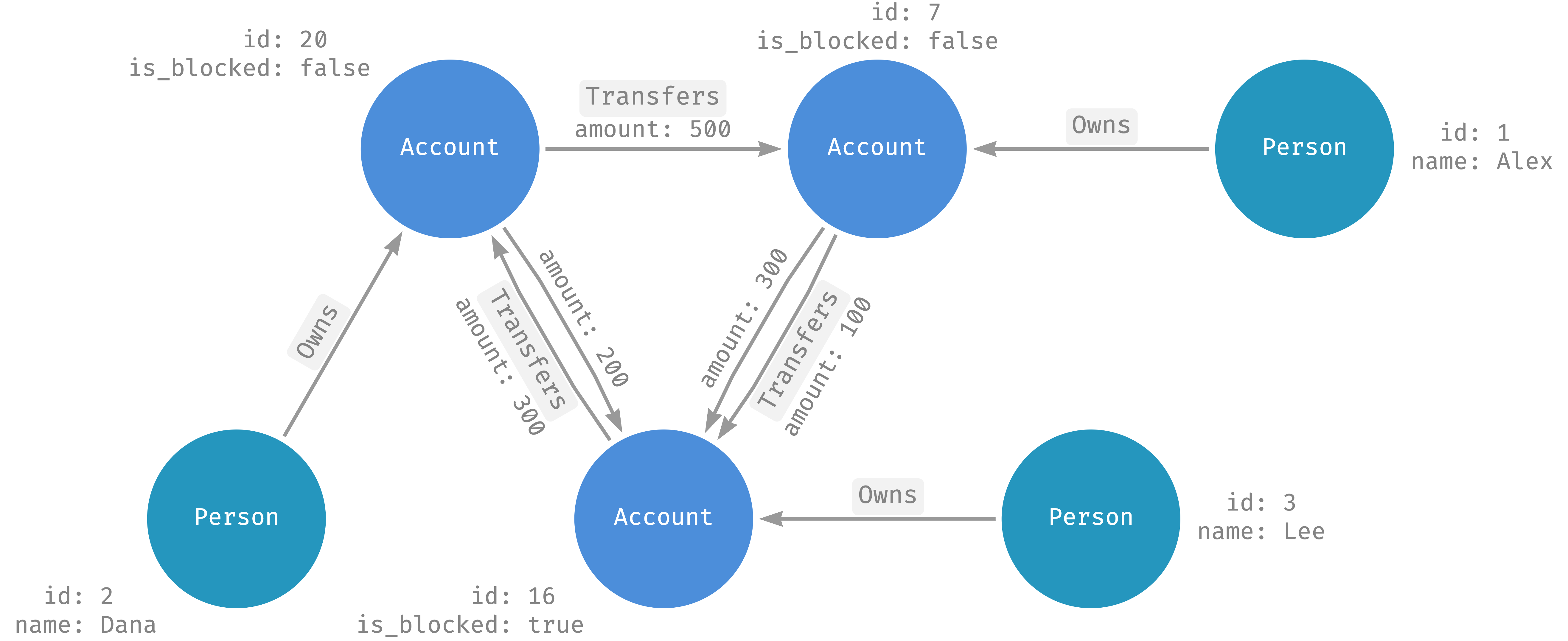
The following graph shows the people, accounts, account ownership, and account
transfers from the inserts:
## Run a graph query
After inserting data into your graph, you can query it to find patterns and
relationships. This section shows you how to run queries using the
Google Cloud console for a graphical interface, or programmatically with
client libraries.
### Console
1. On the database **Overview** page, click **Spanner Studio** in the
navigation menu.
2. On the **Spanner Studio** page, click
**New tab** or use the
editor tab.
3. Enter the following query in the query editor. The query finds everyone
that Dana transferred money to, and the amount of those transfers.
```sql
GRAPH FinGraph
MATCH
(from_person:Person {name: "Dana"})-[:Owns]->
(from_account:Account)-[transfer:Transfers]->
(to_account:Account)<-[:Owns]-(to_person:Person)
RETURN
from_person.name AS from_account_owner,
from_account.id AS from_account_id,
to_person.name AS to_account_owner,
to_account.id AS to_account_id,
transfer.amount AS amount
```
4. Click **Run**.
The **Results** tab displays the following paths from Dana, who owns
account number 20:
- To `Account {id:7}` owned by Alex.
- To `Account {id:16}` owned by Lee.

### Client libraries
### Python
```python
def query_data(instance_id, database_id):
"""Queries sample data from the database using GQL."""
spanner_client = spanner.Client()
instance = spanner_client.instance(instance_id)
database = instance.database(database_id)
with database.snapshot() as snapshot:
results = snapshot.execute_sql(
"""Graph FinGraph
MATCH (a:Person)-[o:Owns]->()-[t:Transfers]->()<-[p:Owns]-(b:Person)
RETURN a.name AS sender, b.name AS receiver, t.amount, t.create_time AS transfer_at"""
)
for row in results:
print("sender: {}, receiver: {}, amount: {}, transfer_at: {}".format(*row))
```
### Java
```java
static void query(DatabaseClient dbClient) {
try (ResultSet resultSet =
dbClient
.singleUse() // Execute a single query against Cloud Spanner.
.executeQuery(
Statement.of(
"Graph FinGraph MATCH"
+ " (a:Person)-[o:Owns]->()-[t:Transfers]->()<-[p:Owns]-(b:Person)RETURN"
+ " a.name AS sender, b.name AS receiver, t.amount, t.create_time AS"
+ " transfer_at"))) {
while (resultSet.next()) {
System.out.printf(
"%s %s %f %s\n",
resultSet.getString(0),
resultSet.getString(1),
resultSet.getDouble(2),
resultSet.getTimestamp(3));
}
}
}
```
### Go
```go
import (
"context"
"fmt"
"io"
"time"
"cloud.google.com/go/spanner"
"google.golang.org/api/iterator"
)
func queryGraphData(w io.Writer, db string) error {
ctx := context.Background()
client, err := spanner.NewClient(ctx, db)
if err != nil {
return err
}
defer client.Close()
// Execute a Spanner query statement comprising a graph query. Graph queries
// are characterized by 'MATCH' statements describing node and edge
// patterns.
//
// This statement finds entities ('Account's) owned by all 'Person's 'b' to
// which transfers have been made by entities ('Account's) owned by any
// 'Person' 'a' in the graph called 'FinGraph'. It then returns the names of
// all such 'Person's 'a' and 'b', and the amount and time of the transfer.
stmt := spanner.Statement{SQL: `Graph FinGraph
MATCH (a:Person)-[o:Owns]->()-[t:Transfers]->()<-[p:Owns]-(b:Person)
RETURN a.name AS sender, b.name AS receiver, t.amount, t.create_time AS transfer_at`}
iter := client.Single().Query(ctx, stmt)
defer iter.Stop()
// The results are returned in tabular form. Iterate over the
// result rows and print them.
for {
row, err := iter.Next()
if err == iterator.Done {
return nil
}
if err != nil {
return err
}
var sender, receiver string
var amount float64
var transfer_at time.Time
if err := row.Columns(&sender, &receiver, &amount, &transfer_at); err != nil {
return err
}
fmt.Fprintf(w, "%s %s %f %s\n", sender, receiver, amount, transfer_at.Format(time.RFC3339))
}
}
```
### C++
```c++
void QueryData(google::cloud::spanner::Client client) {
namespace spanner = ::google::cloud::spanner;
spanner::SqlStatement select(R"""(
Graph FinGraph
MATCH (a:Person)-[o:Owns]->()-[t:Transfers]->()<-[p:Owns]-(b:Person)
RETURN a.name AS sender,
b.name AS receiver,
t.amount,
t.create_time AS transfer_at
)""");
using RowType =
std::tuple;
auto rows = client.ExecuteQuery(std::move(select));
for (auto& row : spanner::StreamOf(rows)) {
if (!row) throw std::move(row).status();
std::cout << "sender: " << std::get<0>(*row) << "\t";
std::cout << "receiver: " << std::get<1>(*row) << "\t";
std::cout << "amount: " << std::get<2>(*row) << "\t";
std::cout << "transfer_at: " << std::get<3>(*row) << "\n";
}
std::cout << "Query completed for [spanner_query_graph_data]\n";
}
```
## Clean up
This section shows you how to clean up the resources that you created to avoid
incurring charges to your Cloud Billing account. If you plan to explore
other Spanner Graph examples in the [What's next](https://docs.cloud.google.com/spanner/docs/graph/set-up.md.txt#whats-next) section,
don't perform these steps yet. Deleting a Spanner instance also
deletes all databases within that instance.
### Delete the database
1. In the Google Cloud console, go to **Spanner Instances**.
[Go to Spanner](https://console.cloud.google.com/spanner/instances)
2. Click the instance name, for example, **Test Instance**.
3. Click the database name, for example, **example-db**.
4. On the **Database details** page, click **Delete database**.
5. Confirm that you want to delete the database by entering the database name
and clicking **Delete**.
### Delete the instance
> [!WARNING]
> **Warning:** Deleting an instance permanently removes the instance and all its databases. You can't undo this action. You can create only one free trial instance per project lifecycle. Deleting it prevents you from creating another.
1. In Google Cloud console, go to the **Spanner Instances** page.
[Go to Spanner Instances](https://console.cloud.google.com/spanner/instances)
2. Click the name of the instance that you want to delete, for example,
**Test Instance**.
3. Click **Delete instance**.
4. Confirm that you want to delete the instance by entering the instance name
and clicking **Delete**.
## What's next
- Learn more about Spanner Graph using a [codelab](https://codelabs.developers.google.com/codelabs/spanner-graph-getting-started).
- [Learn about the Spanner Graph schema](https://docs.cloud.google.com/spanner/docs/graph/schema-overview.md.txt).
- [Create, update, or drop a Spanner Graph schema](https://docs.cloud.google.com/spanner/docs/graph/create-update-drop-schema.md.txt).
- [Insert, update, or delete Spanner Graph data](https://docs.cloud.google.com/spanner/docs/graph/insert-update-delete-data.md.txt).
- [Spanner Graph queries overview](https://docs.cloud.google.com/spanner/docs/graph/queries-overview.md.txt).
- [Migrate to Spanner Graph](https://docs.cloud.google.com/spanner/docs/graph/migrate.md.txt).
- [Learn about best practices for Spanner Graph schema design](https://docs.cloud.google.com/spanner/docs/graph/best-practices-designing-schema.md.txt).
- [Learn about best practices for tuning Spanner Graph queries](https://docs.cloud.google.com/spanner/docs/graph/best-practices-tuning-queries.md.txt).