This page describes how to manage foreign key relationships in your database.
A foreign key is a column that is shared between tables to establish a link
between related data. When you use a foreign key, Spanner ensures
that this relationship is maintained.
The following diagram shows a basic database schema where data in a table has a
relationship to data in another table.

**Figure 1.** Diagram of an order processing database schema
There are three tables in the schema shown in Figure 1:
- The `Customers` table records the names of each customer.
- The `Orders` tables keeps track of all orders made.
- The `Products` table stores the product information for every product.
There are two foreign key relationships between these tables:
- A foreign key relationship is defined between the `Orders` table and the
`Customers` table to ensure that an order can't be created unless there is a
corresponding customer.
- A foreign key relationship between the `Orders` table and the `Products`
table ensures that an order can't be created for a product that doesn't
exist.
Using the previous schema as an example, this topic discusses the Data
Definition Language (*DDL* ) `CONSTRAINT` statements that you can use to manage
relationships between tables in a database.
By default, all foreign keys in Spanner are enforced foreign
keys, which enforce referential integrity. In Spanner you can
also choose to use [informational foreign
keys](https://docs.cloud.google.com/spanner/docs/foreign-keys/overview#informational-foreign-keys), which
don't validate or enforce referential integrity. For more information, see
[Comparison of foreign keys](https://docs.cloud.google.com/spanner/docs/foreign-keys/overview.md.txt#comparison-of-foreign-keys-types)
and [Choose which foreign key type to
use](https://docs.cloud.google.com/spanner/docs/foreign-keys/overview#choose-foreign-key-type). When
unspecified, the foreign keys in examples on this page are enforced foreign
keys.
## Add a foreign key to a new table
Assume that you've created a `Customers` table in your basic product ordering
database. You now need an `Orders` table to store information about the orders
that customers make. To ensure all orders are valid, you don't want to let the
system insert rows into the `Orders` table unless there's also a matching entry
in the `Customers` table. Therefore, you need an enforced foreign key to
establish a relationship between the two tables. One choice is to add a
`CustomerID` column to the new table and use it as the foreign key to create a
relationship with the `CustomerID` column in the `Customers` table.
When you create a new table with a foreign key, you use `REFERENCE` to establish
a relationship to another table. The table that contains the `REFERENCE`
statement is called the *referencing* table. The table named in the `REFERENCE`
statement is the *referenced* table. The column that is named in the `REFERENCE`
statement is called the *referencing* column.
The following example shows how to use the `CREATE TABLE` DDL statement to
create the `Orders` table with a foreign key constraint that references
`CustomerID` in the `Customers` table.
### GoogleSQL
```googlesql
CREATE TABLE Orders (
OrderID INT64 NOT NULL,
CustomerID INT64 NOT NULL,
Quantity INT64 NOT NULL,
ProductID INT64 NOT NULL,
CONSTRAINT FK_CustomerOrder FOREIGN KEY (CustomerID) REFERENCES Customers (CustomerID)
) PRIMARY KEY (OrderID);
```
### PostgreSQL
```postgresql
CREATE TABLE Orders (
OrderID BIGINT NOT NULL,
CustomerID BIGINT NOT NULL,
Quantity BIGINT NOT NULL,
ProductID BIGINT NOT NULL,
CONSTRAINT FK_CustomerOrder FOREIGN KEY (CustomerID) REFERENCES Customers (CustomerID),
PRIMARY KEY (OrderID)
);
```
The previous statement contains a `CONSTRAINT` clause that has the following
characteristics:
- Use of the `CONSTRAINT` syntax to name a constraint, making it easier to
drop the table using the name you've chosen.
- The constraint has the name `FK_CustomerOrder`. Constraint names are scoped
to the schema and must be unique within the schema.
- The `Orders` table, on which you define the constraint, is the referencing
table. The `Customers` table is the referenced table.
- The referencing column in the referencing table is `CustomerID`. It
references the `CustomerID` field in the `Customers` table. If someone tries
to insert a row into `Orders` with a `CustomerID` that doesn't exist in
`Customers`, the insert fails.
> [!NOTE]
> **Note:** Often the referenced columns of the referenced table correspond to the primary key columns, but this is not required. A referencing table may also reference non-primary columns of a referenced table.
The following example shows an alternative table creation statement. Here, the
foreign key constraint is defined without a name. When you use this syntax,
Spanner generates a name for you. To discover the names of all
foreign keys, refer to [View properties of a foreign key
relationship](https://docs.cloud.google.com/spanner/docs/foreign-keys/how-to#view_props).
### GoogleSQL
```googlesql
CREATE TABLE Orders (
OrderID INT64 NOT NULL,
CustomerID INT64 NOT NULL,
ProductID INT64 NOT NULL,
FOREIGN KEY (CustomerID) REFERENCES Customers (CustomerID)
) PRIMARY KEY (OrderID);
```
### PostgreSQL
```postgresql
CREATE TABLE Orders (
OrderID BIGINT NOT NULL,
CustomerID BIGINT NOT NULL,
Quantity BIGINT NOT NULL,
ProductID BIGINT NOT NULL,
FOREIGN KEY (CustomerID) REFERENCES Customers (CustomerID),
PRIMARY KEY (OrderID)
);
```
## Add a foreign key to an existing table
You also want to make sure that customers can only order products that exist. If
your table has existing constraints, you must [drop all of the
constraints](https://docs.cloud.google.com/spanner/docs/foreign-keys/how-to#drop-foreign-key). In Spanner, all enforced
constraints in a table must be implemented at the same time in a single batch
DDL statement.
If your table has no existing constraints, you can use the `ALTER TABLE` DDL
statement to add an [enforced foreign key
constraint](https://docs.cloud.google.com/spanner/docs/foreign-keys/overview#constraint_validation) to the
existing `Orders` table as shown in the following example:
```sql
ALTER TABLE Orders
ADD CONSTRAINT DB_ProductOrder FOREIGN KEY (ProductID) REFERENCES Products (ProductID);
```
The referencing column in `Orders` is `ProductID`, and it references the
`ProductID` column in `Products`. If you are fine with Spanner
naming these constraints for you, use the following syntax:
```sql
ALTER TABLE Orders
ADD FOREIGN KEY (ProductID) REFERENCES Products (ProductID);
```
## Add a foreign key with a delete action to a new table
Recall the previous example where you have a `Customers` table in a product
ordering database that needs an `Orders` table. You want to add a foreign key
constraint that references the `Customers` table. However, you want to ensure
that when you delete a customer record in the future, Spanner
also deletes all orders for that customer. In this case, you want to use the `ON
DELETE CASCADE` action with the foreign key constraint.
The following `CREATE TABLE` DDL statement for the `Orders` table includes the
foreign key constraint that references the `Customers` table with an `ON DELETE
CASCADE` action.
### GoogleSQL
```googlesql
CREATE TABLE Orders (
OrderID INT64 NOT NULL,
CustomerID INT64 NOT NULL,
Quantity INT64 NOT NULL,
ProductID INT64 NOT NULL,
CONSTRAINT FK_CustomerOrder FOREIGN KEY (CustomerID)
REFERENCES Customers (CustomerID) ON DELETE CASCADE
) PRIMARY KEY (OrderID);
```
### PostgreSQL
```postgresql
CREATE TABLE Orders (
OrderID BIGINT NOT NULL,
CustomerID BIGINT NOT NULL,
Quantity BIGINT NOT NULL,
ProductID BIGINT NOT NULL,
FOREIGN KEY (CustomerID)
REFERENCES Customers (CustomerID) ON DELETE CASCADE,
PRIMARY KEY (OrderID)
);
```
The previous statement contains a foreign key constraint with an `ON DELETE
CASCADE` clause. The `CustomerID` column is a foreign key that references the
`CustomerID` field in the `Customers` table. This means that each `CustomerID`
value in the `Orders` table must also exist in the `Customers` table. If someone
tries to delete a row from the `Customers` table, all of the rows in the
`Orders` table that reference the deleted `CustomerID` value are also deleted in
the same transaction.
Similarly, you can use the `ON DELETE SET NULL` action to set the
referencing columns to `NULL` instead of deleting the referencing rows.
To use `ON DELETE SET NULL`, the referencing columns must be nullable (that is,
not marked `NOT NULL`). They can't be part of the referencing table's primary
key or generated columns.
For details on how `ON DELETE SET NULL` and `ON DELETE CASCADE` compare in
mutations, reads, and cascading behavior, see
[Resource usage for foreign key delete actions](https://docs.cloud.google.com/spanner/docs/foreign-keys/overview.md.txt#fk-delete-action-resource-usage).
The following `CREATE TABLE` DDL statement for the `Orders` table includes a
foreign key constraint that references the `Customers` table with an
`ON DELETE SET NULL` action. In this example, `CustomerID` in the `Orders`
table is nullable.
### GoogleSQL
```googlesql
CREATE TABLE Orders (
OrderID INT64 NOT NULL,
CustomerID INT64,
Quantity INT64 NOT NULL,
ProductID INT64 NOT NULL,
CONSTRAINT FK_CustomerOrder FOREIGN KEY (CustomerID)
REFERENCES Customers (CustomerID) ON DELETE SET NULL
) PRIMARY KEY (OrderID);
```
### PostgreSQL
```postgresql
CREATE TABLE Orders (
OrderID BIGINT NOT NULL,
CustomerID BIGINT,
Quantity BIGINT NOT NULL,
ProductID BIGINT NOT NULL,
CONSTRAINT FK_CustomerOrder FOREIGN KEY (CustomerID)
REFERENCES Customers (CustomerID) ON DELETE SET NULL,
PRIMARY KEY (OrderID)
);
```
> [!NOTE]
> **Note:** If you don't specify a foreign key action, the default action is `NO
> ACTION`. This means that if someone tries to delete a row from the `Customers` table, and there are rows in the `Orders` table that reference the deleted `CustomerID` value, the delete operation fails with a foreign key constraint violation error.
## Add a foreign key with a delete action to a table
You also want to make sure that orders are only created for products that exist.
You can use `ALTER TABLE` to add another foreign key constraint with `ON DELETE
CASCADE` action to the orders table as follows:
```sql
ALTER TABLE Orders
ADD CONSTRAINT DB_ProductOrder FOREIGN KEY (ProductID)
REFERENCES Products (ProductID) ON DELETE CASCADE;
```
Deleting a row from the `Products` table deletes all of the rows in the `Orders`
table that reference the deleted `ProductID` value. You can also use
`ON DELETE SET NULL` in an `ALTER TABLE` statement if the referencing column
is nullable, isn't part of the primary key, and isn't a generated column.
> [!NOTE]
> **Note:** Adding or dropping a foreign key action on an existing foreign key constraint isn't supported. You need to add a new foreign key constraint with an action. For more information, see [Long-running schema
> changes](https://docs.cloud.google.com/spanner/docs/foreign-keys/how-to#long-running-schema-changes).
## Use informational foreign keys (GoogleSQL only)
[Informational foreign keys](https://docs.cloud.google.com/spanner/docs/foreign-keys/overview.md.txt#informational-foreign-keys)
let the [query
optimizer](https://docs.cloud.google.com/spanner/docs/foreign-keys/overview#informational-fk-query-optimization)
make use of the foreign key relationship without the overhead incurred from
referential integrity checks performed by [enforced foreign
keys](https://docs.cloud.google.com/spanner/docs/foreign-keys/overview#enforced-foreign-keys). Informational
foreign keys are useful when enforcing strict referential integrity is either
impractical or incurs significant performance overhead.
Continuing with the previous example, imagine you want to model the
relationships between the `Customers`, `Orders`, and `Products` tables. However,
enforcing strict referential integrity in the data of the tables might introduce
performance bottlenecks, especially during peak shopping periods with high order
volumes. Additionally, customers might place orders for products that were
discontinued and removed from the `Products` table.
You can create the `Orders` table using informational foreign keys:
```sql
CREATE TABLE Orders (
OrderID INT64 NOT NULL,
CustomerID INT64 NOT NULL,
Quantity INT64 NOT NULL,
ProductID INT64 NOT NULL,
CONSTRAINT FK_CustomerOrder FOREIGN KEY (CustomerID) REFERENCES Customers (CustomerID) NOT ENFORCED,
CONSTRAINT FK_ProductOrder FOREIGN KEY (ProductID) REFERENCES Products (ProductID) NOT ENFORCED
) PRIMARY KEY (OrderID);
```
By creating an informational foreign key with `NOT ENFORCED`, you allow for the
possibility that an order might reference a non-existent customer or product.
Using an informational foreign key instead of an enforced foreign key constraint
is a good choice if a customer account might be deleted or a product might be
discontinued. With an informational foreign key, Spanner doesn't
perform referential integrity validation. This reduces the write overhead,
potentially improving performance during peak order processing times.
You can allow the query optimizer to use the relationships to generate efficient
query plans. This can improve the performance of queries that join the tables on
foreign key columns. For more information, see [informational foreign key for
query
optimization](https://docs.cloud.google.com/spanner/docs/foreign-keys/overview#informational-fk-query-optimization).
> [!CAUTION]
> **Caution:** If your application logic requires strict referential integrity (for example, preventing orders for products that don't exist), you need to implement additional checks at the application level. Query results might be affected if there are inconsistencies in the data. For example, a query joining `Orders` with `Products` might return an order with a discontinued `ProductID` if the optimizer uses an informational foreign key.
## Query data across foreign key relationships
```sql
SELECT * FROM Orders
INNER JOIN Customers ON Orders.CustomerID = Customers.CustomerID
INNER JOIN Products ON Orders.ProductsID = Products.ProductID;
```
## Referential integrity with enforced foreign keys
The main reason for adding enforced foreign key relationships is so that
Spanner can maintain the [referential
integrity](https://en.wikipedia.org/wiki/Referential_integrity) of your data. If
you modify data in a way that breaks a foreign key constraint, the update fails
with an error.
Consider the data in Figure 2. Some customers have ordered products, as shown in
the `Orders` table. Because of the [enforced foreign key
constraint](https://docs.cloud.google.com/spanner/docs/foreign-keys/overview#enforced-foreign-keys) that are
in place, the data that was inserted into the `Orders` table has referential
integrity.
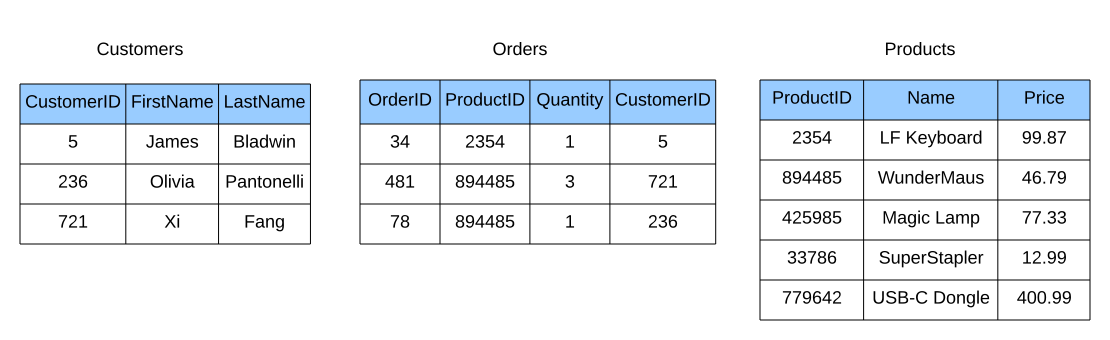
**Figure 2.** Sample data for in our ordering database.
The following examples show what happens when you try to modify the data in a
way that would break referential integrity.
- Add a row into the `Orders` table with a `CustomerID` value that does not
exist in `Customers`
What happens if you try the following modification, given the sample data
from the preceding diagram?
```sql
INSERT INTO Orders (OrderID, ProductID, Quantity, CustomerID)
VALUES (19, 337876, 4, 447);
```
In this case, the system would try to insert a row into `Orders` with a
`CustomerID` (447) that doesn't exist in the `Customers` table. If the
system did this, you would have an invalid order in your system. However,
with the enforced foreign key constraint you added to your `Orders` table,
your table is protected. The `INSERT` fails with the following message,
assuming the constraint is called `FK_CustomerOrder`.
Foreign key constraint `FK_CustomerOrder` is violated on table `Orders`.
Cannot find referenced values in Customers(CustomerID).
Unlike enforced foreign keys, informational foreign keys don't enforce
referential integrity. If `FK_CustomerOrder` is an informational foreign
key, then the insert statement succeeds because Spanner
doesn't validate that the corresponding `CustomerID` exists in the
`Customers` table. Because of this, the data might not conform to the
referential integrity defined by `FK_CustomerOrder`.
- Attempt to delete a row from the `Customers` table when the customer is
referenced in an [enforced foreign key
constraint](https://docs.cloud.google.com/spanner/docs/foreign-keys/overview#constraint_validation).
Imagine a situation where a customer unsubscribes from your online store.
You want to remove the customer from your backend, so you attempt the
following operation.
```sql
DELETE FROM Customers WHERE CustomerID = 721;
```
In this example, Spanner detects through the foreign key
constraint that there are still records in the `Orders` table that reference
the customer row you are trying to delete. The following error is displayed
in this case.
``Foreign key constraint violation when deleting or updating referenced row(s): referencing row(s) found in table `Orders`.``
To fix this issue, you delete all referencing entries in `Orders` first. You
can also define the foreign key with the `ON DELETE CASCADE` action to let
Spanner handle deletion of referencing entries.
Similarly, if `FK_CustomerOrder` is an informational foreign key, then the
delete action succeeds because Spanner doesn't guarantee the
referential integrity of informational foreign keys.
## View properties of a foreign key relationship
Spanner's [INFORMATION_SCHEMA](https://docs.cloud.google.com/spanner/docs/information-schema.md.txt) contains information about foreign
keys and their backing indexes. The following are some examples of the questions
you can answer by querying the INFORMATION SCHEMA.
For more information on backing indexes, see [Foreign keys backing indexes](https://docs.cloud.google.com/spanner/docs/foreign-keys/overview.md.txt#backing-indexes).
*What constraints are defined in my database?*
```sql
SELECT tc.CONSTRAINT_NAME, tc.TABLE_NAME, tc.CONSTRAINT_TYPE
FROM INFORMATION_SCHEMA.TABLE_CONSTRAINTS as tc
WHERE tc.CONSTRAINT_TYPE = 'FOREIGN KEY';
```
*What foreign keys are defined in my database?*
```sql
SELECT rc.CONSTRAINT_NAME, rc.UNIQUE_CONSTRAINT_NAME, rc.SPANNER_STATE
FROM INFORMATION_SCHEMA.REFERENTIAL_CONSTRAINTS as rc;
```
*Which indexes are secondary indexes for foreign keys, also known as backing
indexes?*
Foreign key backing indexes are managed by Spanner , so querying
for `SPANNER_IS_MANAGED` on the `INDEXES` view returns all backing indexes.
```sql
SELECT i.TABLE_NAME, i.INDEX_NAME, i.INDEX_TYPE, i.INDEX_STATE,
i.IS_UNIQUE, i.IS_NULL_FILTERED, i.SPANNER_IS_MANAGED
FROM INFORMATION_SCHEMA.INDEXES as i
WHERE SPANNER_IS_MANAGED = 'YES';
```
*What is the referential action defined with the foreign key constraint?*
```sql
SELECT rc.CONSTRAINT_NAME, rc.UNIQUE_CONSTRAINT_NAME, rc.DELETE_RULE,
rc.UPDATE_RULE
FROM INFORMATION_SCHEMA.REFERENTIAL_CONSTRAINTS as rc;
```
*Is a foreign key [enforced](https://docs.cloud.google.com/spanner/docs/foreign-keys/overview.md.txt#enforced-foreign-keys)
or [not
enforced](https://docs.cloud.google.com/spanner/docs/foreign-keys/overview#informational-foreign-keys)?*
```sql
SELECT tc.CONSTRAINT_NAME, tc.TABLE_NAME, tc.CONSTRAINT_TYPE, tc.ENFORCED
FROM INFORMATION_SCHEMA.TABLE_CONSTRAINTS as tc
WHERE tc.CONSTRAINT_TYPE = 'FOREIGN KEY';
```
For more information, see [Information Schema](https://docs.cloud.google.com/spanner/docs/information-schema.md.txt).
## Remove a foreign key relationship
The following DDL drops a foreign key constraint from the `Orders` table.
```sql
ALTER TABLE Orders
DROP CONSTRAINT FK_CustomerOrder;
```
The foreign key backing indexes are dropped automatically when the constraint
itself is dropped.
## Support for more complex foreign key relationships
The following topics show you how to use foreign keys to enforce more complex
relationships between tables.
### Multiple columns
Foreign keys can reference multiple columns. The list of columns form a key that
corresponds to a table's primary key or to a backing index. The referencing
table contains foreign keys of the referenced table key.
In the following example, the enforced foreign key definitions indicate that:
- Each `SongName` value in the `TopHits` table must have a matching value in
the `Songs` table.
- Each `SingerFirstName` and `SingerLastName` pair of values must have a
matching `FirstName` and `LastName`pair of values in the `Singers` table.
### GoogleSQL
```googlesql
CREATE TABLE TopHits (
Rank INT64 NOT NULL,
SongName STRING(MAX),
SingerFirstName STRING(MAX),
SingerLastName STRING(MAX),
-- Song names must either be NULL or have matching values in Songs.
FOREIGN KEY (SongName) REFERENCES Songs (SongName),
-- Singer names must either be NULL or have matching values in Singers.
FOREIGN KEY (SingerFirstName, SingerLastName)
REFERENCES Singers (FirstName, LastName)
) PRIMARY KEY (Rank);
```
### PostgreSQL
```postgresql
CREATE TABLE TopHits (
Rank BIGINT NOT NULL,
SongName VARCHAR,
SingerFirstName VARCHAR,
SingerLastName VARCHAR,
-- Song names must either be NULL or have matching values in Songs.
FOREIGN KEY (SongName) REFERENCES Songs (SongName),
-- Singer names must either be NULL or have matching values in Singers.
FOREIGN KEY (SingerFirstName, SingerLastName)
REFERENCES Singers (FirstName, LastName),
PRIMARY KEY (Rank)
);
```
### Circular references
Occasionally tables have circular dependencies, perhaps for legacy reasons or
due to denormalization. Spanner foreign keys permit circular
references. Since a referenced table must exist before a foreign key can
reference it, one of the foreign keys must be added with an `ALTER TABLE`
statement. Here's an example
1. Create `TableA`, without a foreign key.
2. Create `TableB` with a foreign key constraint on `TableA`.
3. Use `ALTER TABLE` on `TableA` to create a foreign key reference to `TableB`.
### Self-referencing tables
One special type of circular reference is a table that defines a foreign key
that references the same table. For example, the following snippet shows a
foreign key to enforce that an employee's ManagerId is also an employee.
### GoogleSQL
```googlesql
CREATE TABLE Employees (
EmployeeId INT64 NOT NULL,
EmployeeName STRING(MAX) NOT NULL,
ManagerId INT64,
FOREIGN KEY (ManagerId) REFERENCES Employees (EmployeeId)
) PRIMARY KEY (EmployeeId);
```
### PostgreSQL
```postgresql
CREATE TABLE Employees (
EmployeeId BIGINT NOT NULL,
EmployeeName VARCHAR NOT NULL,
ManagerId BIGINT,
FOREIGN KEY (ManagerId) REFERENCES Employees (EmployeeId),
PRIMARY KEY (EmployeeId)
);
```
## What's next
- Learn more about [foreign keys support in Spanner](https://docs.cloud.google.com/spanner/docs/foreign-keys/overview.md.txt).
- Learn more about Spanner's [INFORMATION SCHEMA](https://docs.cloud.google.com/spanner/docs/information-schema.md.txt).