This page demonstrates how to create Dataflow pipelines that
consume and forward Spanner change data by using
[change streams](https://docs.cloud.google.com/spanner/docs/change-streams.md.txt). You can use the example code on this page to
build custom pipelines.
## Core concepts
The following are some core concepts for Dataflow pipelines for
change streams.
### Dataflow
[Dataflow](https://docs.cloud.google.com/dataflow)
is a serverless, fast, and cost-effective service that supports both stream and
batch processing. It provides portability with processing jobs written using the
open source
[Apache Beam](https://beam.apache.org/)
libraries and automates infrastructure provisioning and cluster management.
Dataflow provides near real-time streaming when reading from change streams.
You can use Dataflow to consume Spanner change
streams with the [SpannerIO
connector](https://beam.apache.org/releases/javadoc/current/org/apache/beam/sdk/io/gcp/spanner/SpannerIO.html), which offers an abstraction
over the Spanner API for querying change streams. With
this connector, you don't have to manage the change streams
partition lifecycle, which is necessary when you [use the
Spanner API directly](https://docs.cloud.google.com/spanner/docs/change-streams/details#query). The connector provides you
with a stream of data change records so that you are free to focus more
on application logic, and less on specific API details and dynamic
change stream partitioning. We recommend using the SpannerIO connector rather
than the Spanner API in most circumstances where you need to read
change stream data.
Dataflow templates are prebuilt Dataflow pipelines
that implement common use cases. See
[Dataflow templates](https://docs.cloud.google.com/spanner/docs/change-streams/use-dataflow.md.txt#dataflow-templates) for an overview.
### Dataflow pipeline
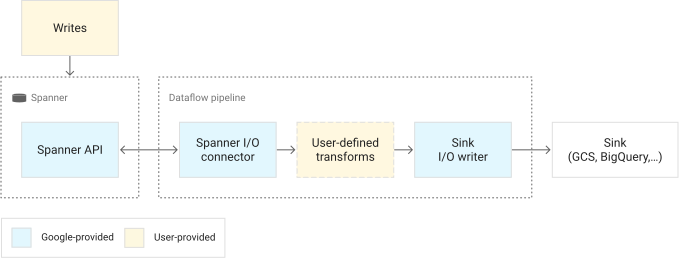
A Spanner change streams Dataflow pipeline is composed
of four main parts:
1. [A Spanner database with a change stream](https://docs.cloud.google.com/spanner/docs/change-streams/use-dataflow.md.txt#cloud-spanner-change-stream)
2. [The SpannerIO connector](https://docs.cloud.google.com/spanner/docs/change-streams/use-dataflow.md.txt#apache-beam-spannerio-connector)
3. [User-defined transforms and sinks](https://docs.cloud.google.com/spanner/docs/change-streams/use-dataflow.md.txt#user-defined-transforms)
4. An [Apache Beam sink I/O writer](https://docs.cloud.google.com/spanner/docs/change-streams/use-dataflow.md.txt#apache-sink-writer)
#### Spanner change stream
For details on how to create a change stream, see [Create
a change stream](https://docs.cloud.google.com/spanner/docs/change-streams/manage#create).
#### Apache Beam SpannerIO connector
This is the SpannerIO connector [described in the earlier Dataflow section](https://docs.cloud.google.com/spanner/docs/change-streams/use-dataflow.md.txt#dataflow).
It is a source I/O connector that emits a `PCollection` of data change records
to later stages of the pipeline. The
[event time](https://beam.apache.org/documentation/programming-guide/#element-timestamps)
for each emitted data change record
will be the commit timestamp. Note that the records emitted are
**unordered** , and that the SpannerIO connector guarantees there will be no
[late records](https://beam.apache.org/documentation/programming-guide/#watermarks-and-late-data).
When working with change streams, Dataflow uses checkpointing.
As a result, each worker might wait for up to the configured checkpoint interval
for buffering changes before sending the changes for further processing.
#### User-defined transforms
A user-defined transform allows a user to aggregate, transform or modify
processing data within a Dataflow pipeline. Common use
cases for this are the removal of personally identifiable information,
satisfying downstream data format requirements, and sorting. See the
official Apache Beam documentation for the programming guide on
[transforms](https://beam.apache.org/documentation/programming-guide/#transforms).
#### Apache Beam sink I/O writer
Apache Beam contains [built-in I/O connectors](https://beam.apache.org/documentation/io/built-in/)
that can be used to write from a Dataflow pipeline into a data
sink like BigQuery. Most common data sinks are natively supported.
### Dataflow templates
[Dataflow
templates](https://docs.cloud.google.com/dataflow/docs/concepts/dataflow-templates) provide a method to
create Dataflow jobs based on prebuilt Docker images for common
use-cases using the Google Cloud console, the Google Cloud CLI, or Rest API calls.
For Spanner change streams, we provide three
Dataflow flex templates:
- [Spanner change streams to BigQuery](https://docs.cloud.google.com/dataflow/docs/guides/templates/provided-streaming#cloud-spanner-change-streams-to-bigquery)
- [Spanner change streams to Google Cloud Storage](https://docs.cloud.google.com/dataflow/docs/guides/templates/provided-streaming#cloud-spanner-change-streams-to-cloud-storage)
- [Spanner change streams to Pub/Sub](https://docs.cloud.google.com/dataflow/docs/guides/templates/provided-streaming#cloud-spanner-change-streams-to-pubsub)
The following restrictions apply when you use the [Spanner
change streams to
Pub/Sub](https://docs.cloud.google.com/dataflow/docs/guides/templates/provided-streaming#cloud-%0Aspanner-change-streams-to-pubsub) template:
- Pub/Sub has a 10 MB message size limitation. For more information, see [Pub/Sub quotas and limits](https://docs.cloud.google.com/pubsub/quotas.md.txt).
- The [Spanner change streams to Pub/Sub](https://docs.cloud.google.com/dataflow/docs/guides/templates/provided-streaming#cloud-spanner-change-streams-to-pubsub) template doesn't support handling of large messages because of Pub/Sub limitations.
#### Set IAM Permissions for Dataflow templates
Before creating a Dataflow job with the three flex templates
listed, ensure that you have the
[required Identity and Access Management (IAM) permissions](https://docs.cloud.google.com/dataflow/docs/concepts/dataflow-templates.md.txt#set-iam-permissions)
for the following service accounts:
- the [Dataflow service account](https://docs.cloud.google.com/dataflow/docs/concepts/security-and-permissions.md.txt#df-service-account)
- the [worker service account](https://docs.cloud.google.com/dataflow/docs/concepts/security-and-permissions.md.txt#worker-service-account)
If you don't have the required IAM permissions, then you must
[specify a user-managed worker service account](https://docs.cloud.google.com/dataflow/docs/concepts/security-and-permissions.md.txt#user-managed)
to create the Dataflow job. For more information, see
[Dataflow security and permissions](https://docs.cloud.google.com/dataflow/docs/concepts/security-and-permissions.md.txt).
When you try to run a job from a Dataflow flex template without
all the required permissions, then your job might fail with a
[failed to read the result file error](https://docs.cloud.google.com/dataflow/docs/guides/troubleshoot-templates.md.txt#read-job-file)
or a
[permission denied on resource error](https://docs.cloud.google.com/dataflow/docs/guides/troubleshoot-templates.md.txt#permission-denied-on-resource).
For more information, see
[Troubleshoot Flex Templates](https://docs.cloud.google.com/dataflow/docs/guides/troubleshoot-templates.md.txt).
## Build a Dataflow pipeline
This section covers the connector's initial configuration, and provides
samples for common integrations with the Spanner change streams
feature.
To follow these steps, you need a Java development environment
for Dataflow. For more information, see
[Create a Dataflow pipeline using Java](https://docs.cloud.google.com/dataflow/docs/quickstarts/create-pipeline-java).
### Create a change stream
For details about how to create a change stream, see [Create a change stream](https://docs.cloud.google.com/spanner/docs/change-streams/manage.md.txt#create).
To continue with the next steps, you must have a Spanner database
with a change stream configured.
### Grant fine-grained access control privileges
If you expect any fine-grained access control users to run the Dataflow job,
ensure that the users are granted access to a database
role that has the `SELECT` privilege on the change stream and the `EXECUTE`
privilege on the change stream's table-valued function. Also ensure that the
principal specifies the database role in the SpannerIO configuration or in
the Dataflow flex template.
For more information, see [About fine-grained access control](https://docs.cloud.google.com/spanner/docs/fgac-about.md.txt).
### Add the SpannerIO connector as a dependency
The Apache Beam SpannerIO connector encapsulates the complexity of consuming the
change streams directly using the Cloud Spanner API, emitting a PCollection of
change stream data records to later stages of the pipeline.
These objects can be consumed in other stages of the user's
Dataflow pipeline. The change stream integration is part of the
SpannerIO connector. To be able to use the SpannerIO connector, the dependency
needs to be added to your `pom.xml` file:
```xml
org.apache.beam
beam-sdks-java-io-google-cloud-platform
${beam-version}
```
### Create a metadata database
The connector needs to keep track of each partition when running the
Apache Beam pipeline. It keeps this metadata in a Spanner
table created by the connector during initialization. You specify the
database in which this table will be created when configuring the
connector.
As described in
[Change streams best practices](https://docs.cloud.google.com/spanner/docs/change-streams/manage.md.txt#why-metadata), we
recommend creating a new database for this purpose, rather than allowing the
connector to use your application's database to store its metadata table.
> [!IMPORTANT]
> **Important:** If you expect fine-grained access control users to run Dataflow jobs, you must create a separate database. For more information, see [About fine-grained
> access control](https://docs.cloud.google.com/spanner/docs/fgac-about).
The owner of a Dataflow job that uses the SpannerIO
connector needs to have the following [IAM
permissions](https://docs.cloud.google.com/spanner/docs/iam) set with this metadata database:
- `spanner.databases.updateDdl`
- `spanner.databases.beginReadOnlyTransaction`
- `spanner.databases.beginOrRollbackReadWriteTransaction`
- `spanner.databases.read`
- `spanner.databases.select`
- `spanner.databases.write`
- `spanner.sessions.create`
- `spanner.sessions.get`
### Configure the connector
The Spanner change streams connector can be configured as follows:
```java
SpannerConfig spannerConfig = SpannerConfig
.create()
.withProjectId("my-project-id")
.withInstanceId("my-instance-id")
.withDatabaseId("my-database-id")
.withDatabaseRole("my-database-role"); // Needed for fine-grained access control only
Timestamp startTime = Timestamp.now();
Timestamp endTime = Timestamp.ofTimeSecondsAndNanos(
startTime.getSeconds() + (10 * 60),
startTime.getNanos()
);
SpannerIO
.readChangeStream()
.withSpannerConfig(spannerConfig)
.withChangeStreamName("my-change-stream")
.withMetadataInstance("my-meta-instance-id")
.withMetadataDatabase("my-meta-database-id")
.withMetadataTable("my-meta-table-name")
.withRpcPriority(RpcPriority.MEDIUM)
.withInclusiveStartAt(startTime)
.withInclusiveEndAt(endTime);
```
The following are descriptions of the `readChangeStream()` options:
#### Spanner Config (Required)
Used for configuring the project, instance and database where the change stream was created and should be queried from.
Also optionally specifies the database role to use when the IAM
principal who is running the Dataflow job is a fine-grained access control user.
The job assumes this database role for access to the change stream. For
more information, see [About fine-grained access control](https://docs.cloud.google.com/spanner/docs/fgac-about.md.txt).
#### Change stream name (Required)
This name uniquely identifies the change stream. The name here must be the same as the one used when creating it.
#### Metadata instance ID (Optional)
This is the instance to store the metadata used by the connector to control the consumption of the change stream API data.
#### Metadata database ID (Required)
This is the database to store the metadata used by the connector to control the consumption of the change stream API data.
#### Metadata table name (Optional)
This should only be used when [updating an existing pipeline](https://docs.cloud.google.com/spanner/docs/change-streams/use-dataflow.md.txt#updating).
This is the pre-existing metadata table name to be used by the
connector. This is used by the connector to store the metadata to
control the consumption of the change stream API data. If this option is
omitted, Spanner creates a new table with a generated
name on connector initialization.
#### RPC priority (Optional)
The [request
priority](https://docs.cloud.google.com/spanner/docs/reference/rest/v1/RequestOptions#Priority) to be
used for the change stream queries. If this parameter is omitted, `high
priority` will be used.
#### InclusiveStartAt (Required)
Changes from the given timestamp are returned to the caller.
#### InclusiveEndAt (Optional)
Changes up to the given timestamp are returned to the caller. If this parameter
is omitted, changes will be emitted indefinitely.
### Add transforms and sinks to process change data
With the previous steps complete, the configured SpannerIO connector is ready
to emit a PCollection of [`DataChangeRecord`](https://github.com/apache/beam/blob/master/sdks/java/io/google-cloud-platform/src/main/java/org/apache/beam/sdk/io/gcp/spanner/changestreams/model/DataChangeRecord.java) objects.
See [Example transforms and sinks](https://docs.cloud.google.com/spanner/docs/change-streams/use-dataflow.md.txt#examples) for several sample
pipeline configurations that process this streamed data in various ways.
Note that change stream records emitted by the SpannerIO connector are unordered.
This is because PCollections don't provide any ordering guarantees. If you need
an ordered stream, you must group and sort the records as transforms in your
pipelines: see [Sample: Order by key](https://docs.cloud.google.com/spanner/docs/change-streams/use-dataflow.md.txt#order-by-key). You can extend this sample
to sort the records based on any fields of the records, such as by transaction IDs.
## Example transforms and sinks
You can define your own transforms and specify sinks to write the data into.
Apache Beam documentation provides a myriad of [transforms](https://beam.apache.org/documentation/programming-guide/#transforms)
that can be applied, as well as ready to use [I/O connectors](https://beam.apache.org/documentation/io/built-in/)
to write the data into external systems.
### Sample: Order by key
This code sample emits data change records ordered by commit timestamp and grouped by primary keys using the Dataflow connector.
```java
pipeline
.apply(SpannerIO
.readChangeStream()
.withSpannerConfig(SpannerConfig
.create()
.withProjectId("my-project-id")
.withInstanceId("my-instance-id")
.withDatabaseId("my-database-id")
.withDatabaseRole("my-database-role")) // Needed for fine-grained access control only
.withChangeStreamName("my-change-stream")
.withMetadataInstance("my-metadata-instance-id")
.withMetadataDatabase("my-metadata-database-id")
.withInclusiveStartAt(Timestamp.now()))
.apply(ParDo.of(new BreakRecordByModFn()))
.apply(ParDo.of(new KeyByIdFn()))
.apply(ParDo.of(new BufferKeyUntilOutputTimestamp(2)))
// Subsequent processing goes here
```
This code sample uses states and timers to buffer records for each key, and sets the expiration time of the timer to some user-configured time `T` in the future (defined in the [BufferKeyUntilOutputTimestamp](https://docs.cloud.google.com/spanner/docs/change-streams/use-dataflow.md.txt#bufferkeyuntiloutputtimestamp) function). When the Dataflow watermark passes time `T`, this code flushes all records in the buffer with timestamp less than `T`, orders these records by commit timestamp, and outputs a key-value pair where:
- The key is the input key, that is the primary key hashed to a bucket array of size 1000.
- The value is the ordered data change records that were buffered for the key.
For each key, we have the following guarantees:
- Timers are guaranteed to fire in order of expiration timestamp.
- Downstream stages are guaranteed to receive the elements in the same order that they were produced.
For example, with a key of the value 100, the timer fires at `T1` and `T10` respectively, producing a bundle of data change records at each timestamp. Because the data change records outputted at `T1` were produced before the data change records outputted at `T10`, the data change records outputted at `T1` are also guaranteed to be received by the next stage before the data change records outputted at `T10`. This mechanism helps us guarantee strict commit timestamp ordering per primary key for downstream processing.
This process will repeat until the pipeline ends and all data change records have been processed (or it will repeat indefinitely if no end time is specified).
Note that this code sample uses states and timers, instead of windows, to perform ordering per key. The rationale is that windows aren't guaranteed
to be processed in order. This means that older windows can be processed later than more recent windows, which could result in out of order processing.
#### BreakRecordByModFn
Each data change record may contain several mods. Each mod represents an insert, update, or delete to a single primary key value. This function breaks each data change record into separate data change records, one per mod.
```java
private static class BreakRecordByModFn extends DoFn {
@ProcessElement
public void processElement(
@Element DataChangeRecord record, OutputReceiver
outputReceiver) {
record.getMods().stream()
.map(
mod ->
new DataChangeRecord(
record.getPartitionToken(),
record.getCommitTimestamp(),
record.getServerTransactionId(),
record.isLastRecordInTransactionInPartition(),
record.getRecordSequence(),
record.getTableName(),
record.getRowType(),
Collections.singletonList(mod),
record.getModType(),
record.getValueCaptureType(),
record.getNumberOfRecordsInTransaction(),
record.getNumberOfPartitionsInTransaction(),
record.getTransactionTag(),
record.isSystemTransaction(),
record.getMetadata()))
.forEach(outputReceiver::output);
}
}
```
#### KeyByIdFn
This function takes in a `DataChangeRecord` and outputs a `DataChangeRecord` keyed by the Spanner primary key hashed to an integer value.
```java
private static class KeyByIdFn extends DoFn> {
// NUMBER_OF_BUCKETS should be configured by the user to match their key cardinality
// Here, we are choosing to hash the Spanner primary keys to a bucket index, in order to have a deterministic number
// of states and timers for performance purposes.
// Note that having too many buckets might have undesirable effects if it results in a low number of records per bucket
// On the other hand, having too few buckets might also be problematic, since many keys will be contained within them.
private static final int NUMBER_OF_BUCKETS = 1000;
@ProcessElement
public void processElement(
@Element DataChangeRecord record,
OutputReceiver> outputReceiver) {
int hashCode = (int) record.getMods().get(0).getKeysJson().hashCode();
// Hash the received keys into a bucket in order to have a
// deterministic number of buffers and timers.
String bucketIndex = String.valueOf(hashCode % NUMBER_OF_BUCKETS);
outputReceiver.output(KV.of(bucketIndex, record));
}
}
```
#### BufferKeyUntilOutputTimestamp
Timers and buffers are per-key. This function buffers each data change record until the watermark passes the timestamp at which we want to output the buffered data change records.
This code utilizes a looping timer to determine when to flush the buffer:
1. When it sees a data change record for a key for the first time, it sets the timer to fire at the data change record's commit timestamp + `incrementIntervalInSeconds` (a user-configurable option).
2. When the timer fires, it adds all data change records in the buffer with timestamp less than the timer's expiration time to `recordsToOutput`. If the buffer has data change records whose timestamp is greater than or equal to the timer's expiration time, it adds those data change records back into the buffer instead of outputting them. It then sets the next timer to the current timer's expiration time plus `incrementIntervalInSeconds`.
3. If `recordsToOutput` is not empty, the function orders the data change records in `recordsToOutput` by commit timestamp and transaction ID and then outputs them.
```java
private static class BufferKeyUntilOutputTimestamp extends
DoFn, KV>> {
private static final Logger LOG =
LoggerFactory.getLogger(BufferKeyUntilOutputTimestamp.class);
private final long incrementIntervalInSeconds;
private BufferKeyUntilOutputTimestamp(long incrementIntervalInSeconds) {
this.incrementIntervalInSeconds = incrementIntervalInSeconds;
}
@SuppressWarnings("unused")
@TimerId("timer")
private final TimerSpec timerSpec = TimerSpecs.timer(TimeDomain.EVENT_TIME);
@StateId("buffer")
private final StateSpec> buffer = StateSpecs.bag();
@StateId("keyString")
private final StateSpec> keyString =
StateSpecs.value(StringUtf8Coder.of());
@ProcessElement
public void process(
@Element KV element,
@StateId("buffer") BagState buffer,
@TimerId("timer") Timer timer,
@StateId("keyString") ValueState keyString) {
buffer.add(element.getValue());
// Only set the timer if this is the first time we are receiving a data change
// record with this key.
String elementKey = keyString.read();
if (elementKey == null) {
Instant commitTimestamp =
new Instant(element.getValue().getCommitTimestamp().toSqlTimestamp());
Instant outputTimestamp =
commitTimestamp.plus(Duration.standardSeconds(incrementIntervalInSeconds));
timer.set(outputTimestamp);
keyString.write(element.getKey());
}
}
@OnTimer("timer")
public void onExpiry(
OnTimerContext context,
@StateId("buffer") BagState buffer,
@TimerId("timer") Timer timer,
@StateId("keyString") ValueState keyString) {
if (!buffer.isEmpty().read()) {
String elementKey = keyString.read();
final List records =
StreamSupport.stream(buffer.read().spliterator(), false)
.collect(Collectors.toList());
buffer.clear();
List recordsToOutput = new ArrayList<>();
for (DataChangeRecord record : records) {
Instant recordCommitTimestamp =
new Instant(record.getCommitTimestamp().toSqlTimestamp());
final String recordString =
record.getMods().get(0).getNewValuesJson().isEmpty()
? "Deleted record"
: record.getMods().get(0).getNewValuesJson();
// When the watermark passes time T, this means that all records with
// event time < T have been processed and successfully committed. Since the
// timer fires when the watermark passes the expiration time, we should
// only output records with event time < expiration time.
if (recordCommitTimestamp.isBefore(context.timestamp())) {
LOG.info(
"Outputting record with key {} and value {} at expiration " +
"timestamp {}",
elementKey,
recordString,
context.timestamp().toString());
recordsToOutput.add(record);
} else {
LOG.info(
"Expired at {} but adding record with key {} and value {} back to " +
"buffer due to commit timestamp {}",
context.timestamp().toString(),
elementKey,
recordString,
recordCommitTimestamp.toString());
buffer.add(record);
}
}
// Output records, if there are any to output.
if (!recordsToOutput.isEmpty()) {
// Order the records in place, and output them. The user would need
// to implement DataChangeRecordComparator class that sorts the
// data change records by commit timestamp and transaction ID.
Collections.sort(recordsToOutput, new DataChangeRecordComparator());
context.outputWithTimestamp(
KV.of(elementKey, recordsToOutput), context.timestamp());
LOG.info(
"Expired at {}, outputting records for key {}",
context.timestamp().toString(),
elementKey);
} else {
LOG.info("Expired at {} with no records", context.timestamp().toString());
}
}
Instant nextTimer = context.timestamp().plus(Duration.standardSeconds(incrementIntervalInSeconds));
if (buffer.isEmpty() != null && !buffer.isEmpty().read()) {
LOG.info("Setting next timer to {}", nextTimer.toString());
timer.set(nextTimer);
} else {
LOG.info(
"Timer not being set since the buffer is empty: ");
keyString.clear();
}
}
}
```
#### Ordering transactions
This pipeline can be changed to order by transaction ID and commit timestamp. To do so, buffer records for each transaction ID / commit timestamp pair, instead of for each Spanner key. This requires modification of the code in [KeyByIdFn](https://docs.cloud.google.com/spanner/docs/change-streams/use-dataflow.md.txt#keybyidfn).
### Sample: Assemble transactions
This code sample reads data change records, assembles all data change records belonging to the same transaction into a single element, and outputs that element. Note that the transactions outputted by this sample code are not ordered by commit timestamp.
This code sample uses buffers to assemble transactions from data change records. Upon receiving a data change record belonging to a transaction for the first time, it reads the `numberOfRecordsInTransaction` field in the data change record, which describes the expected number of data change records belonging to that transaction. It buffers the data change records belonging to that transaction until the number of buffered records matches `numberOfRecordsInTransaction`, upon which it outputs the bundled data change records.
```java
pipeline
.apply(SpannerIO
.readChangeStream()
.withSpannerConfig(SpannerConfig
.create()
.withProjectId("my-project-id")
.withInstanceId("my-instance-id")
.withDatabaseId("my-database-id")
.withDatabaseRole("my-database-role")) // Needed for fine-grained access control only
.withChangeStreamName("my-change-stream")
.withMetadataInstance("my-metadata-instance-id")
.withMetadataDatabase("my-metadata-database-id")
.withInclusiveStartAt(Timestamp.now()))
.apply(ParDo.of(new KeyByTransactionIdFn()))
.apply(ParDo.of(new TransactionBoundaryFn()))
// Subsequent processing goes here
```
#### KeyByTransactionIdFn
This function takes in a `DataChangeRecord` and outputs a `DataChangeRecord` keyed by the transaction ID.
```java
private static class KeyByTransactionIdFn extends DoFn> {
@ProcessElement
public void processElement(
@Element DataChangeRecord record,
OutputReceiver> outputReceiver) {
outputReceiver.output(KV.of(record.getServerTransactionId(), record));
}
}
```
#### TransactionBoundaryFn
`TransactionBoundaryFn` buffers received key-value pairs of
`{TransactionId, DataChangeRecord}` from `KeyByTransactionIdFn` and
buffers them in groups based on `TransactionId`. When the number of
records buffered is equal to the number of records contained in the
entire transaction, this function sorts the `DataChangeRecord` objects
in the group by record sequence and outputs a key-value pair of
`{CommitTimestamp, TransactionId}`, `Iterable`.
Here, we are assuming that `SortKey` is a user-defined class that represents
a `{CommitTimestamp, TransactionId}` pair. For more information about the
`SortKey`, see the [sample implementation](https://github.com/apache/beam/blob/master/sdks/java/io/google-cloud-platform/src/test/java/org/apache/beam/sdk/io/gcp/spanner/changestreams/it/SpannerChangeStreamTransactionBoundariesIT.java#L251).
```java
private static class TransactionBoundaryFn extends DoFn, KV>> {
@StateId("buffer")
private final StateSpec> buffer = StateSpecs.bag();
@StateId("count")
private final StateSpec> countState = StateSpecs.value();
@ProcessElement
public void process(
ProcessContext context,
@StateId("buffer") BagState buffer,
@StateId("count") ValueState countState) {
final KV element = context.element();
final DataChangeRecord record = element.getValue();
buffer.add(record);
int count = (countState.read() != null ? countState.read() : 0);
count = count + 1;
countState.write(count);
if (count == record.getNumberOfRecordsInTransaction()) {
final List sortedRecords =
StreamSupport.stream(buffer.read().spliterator(), false)
.sorted(Comparator.comparing(DataChangeRecord::getRecordSequence))
.collect(Collectors.toList());
final Instant commitInstant =
new Instant(sortedRecords.get(0).getCommitTimestamp().toSqlTimestamp()
.getTime());
context.outputWithTimestamp(
KV.of(
new SortKey(sortedRecords.get(0).getCommitTimestamp(),
sortedRecords.get(0).getServerTransactionId()),
sortedRecords),
commitInstant);
buffer.clear();
countState.clear();
}
}
}
```
### Sample: Filter by transaction tag
When a transaction modifying user data is tagged, the corresponding tag and its type get stored as part of `DataChangeRecord`. These examples demonstrate how to filter change stream records based on user-defined transaction tags as well as system tags:
User-defined tag filtering for `my-tx-tag`:
```java
pipeline
.apply(SpannerIO
.readChangeStream()
.withSpannerConfig(SpannerConfig
.create()
.withProjectId("my-project-id")
.withInstanceId("my-instance-id")
.withDatabaseId("my-database-id")
.withDatabaseRole("my-database-role")) // Needed for fine-grained access control only
.withChangeStreamName("my-change-stream")
.withMetadataInstance("my-metadata-instance-id")
.withMetadataDatabase("my-metadata-database-id")
.withInclusiveStartAt(Timestamp.now()))
.apply(Filter.by(record ->
!record.isSystemTransaction()
&& record.getTransactionTag().equalsIgnoreCase("my-tx-tag")))
// Subsequent processing goes here
```
System tag filtering/[TTL](https://docs.cloud.google.com/spanner/docs/ttl.md.txt) auditing:
```java
pipeline
.apply(SpannerIO
.readChangeStream()
.withSpannerConfig(SpannerConfig
.create()
.withProjectId("my-project-id")
.withInstanceId("my-instance-id")
.withDatabaseId("my-database-id")
.withDatabaseRole("my-database-role")) // Needed for fine-grained access control only
.withChangeStreamName("my-change-stream")
.withMetadataInstance("my-metadata-instance-id")
.withMetadataDatabase("my-metadata-database-id")
.withInclusiveStartAt(Timestamp.now()))
.apply(Filter.by(record ->
record.isSystemTransaction()
&& record.getTransactionTag().equals("RowDeletionPolicy")))
// Subsequent processing goes here
```
### Sample: Fetch full row
This example works with a Spanner table named `Singer` that has the following definition:
```sql
CREATE TABLE Singers (
SingerId INT64 NOT NULL,
FirstName STRING(1024),
LastName STRING(1024)
) PRIMARY KEY (SingerId);
```
Under the default `OLD_AND_NEW_VALUES` value capture mode of change streams,
when there is an update to a Spanner row, the data change
record received will contain only the columns that were changed. Tracked but
unchanged columns will not be included in the record. The primary key of the
mod can be used to do a Spanner snapshot read at the commit
timestamp of the data change record to fetch the unchanged columns or even
retrieve the full row.
Note that the database retention policy might need to be changed to a value
greater or equal to the change stream retention policy in order for the snapshot
read to succeed.
Also note that using the `NEW_ROW` value capture type is the recommended and
more efficient way to do this, since it returns all tracked columns of the row
by default and does not require an extra snapshot read into Spanner.
```java
SpannerConfig spannerConfig = SpannerConfig
.create()
.withProjectId("my-project-id")
.withInstanceId("my-instance-id")
.withDatabaseId("my-database-id")
.withDatabaseRole("my-database-role"); // Needed for fine-grained access control only
pipeline
.apply(SpannerIO
.readChangeStream()
.withSpannerConfig(spannerConfig)
// Assume we have a change stream "my-change-stream" that watches Singers table.
.withChangeStreamName("my-change-stream")
.withMetadataInstance("my-metadata-instance-id")
.withMetadataDatabase("my-metadata-database-id")
.withInclusiveStartAt(Timestamp.now()))
.apply(ParDo.of(new ToFullRowJsonFn(spannerConfig)))
// Subsequent processing goes here
```
#### ToFullRowJsonFn
This transformation will perform a stale read at the commit timestamp of each
record received, and map the full row to JSON.
```java
public class ToFullRowJsonFn extends DoFn {
// Since each instance of this DoFn will create its own session pool and will
// perform calls to Spanner sequentially, we keep the number of sessions in
// the pool small. This way, we avoid wasting resources.
private static final int MIN_SESSIONS = 1;
private static final int MAX_SESSIONS = 5;
private final String projectId;
private final String instanceId;
private final String databaseId;
private transient DatabaseClient client;
private transient Spanner spanner;
public ToFullRowJsonFn(SpannerConfig spannerConfig) {
this.projectId = spannerConfig.getProjectId().get();
this.instanceId = spannerConfig.getInstanceId().get();
this.databaseId = spannerConfig.getDatabaseId().get();
}
@Setup
public void setup() {
SessionPoolOptions sessionPoolOptions = SessionPoolOptions
.newBuilder()
.setMinSessions(MIN_SESSIONS)
.setMaxSessions(MAX_SESSIONS)
.build();
SpannerOptions options = SpannerOptions
.newBuilder()
.setProjectId(projectId)
.setSessionPoolOption(sessionPoolOptions)
.build();
DatabaseId id = DatabaseId.of(projectId, instanceId, databaseId);
spanner = options.getService();
client = spanner.getDatabaseClient(id);
}
@Teardown
public void teardown() {
spanner.close();
}
@ProcessElement
public void process(
@Element DataChangeRecord element,
OutputReceiver output) {
com.google.cloud.Timestamp commitTimestamp = element.getCommitTimestamp();
element.getMods().forEach(mod -> {
JSONObject keysJson = new JSONObject(mod.getKeysJson());
JSONObject newValuesJson = new JSONObject(mod.getNewValuesJson());
ModType modType = element.getModType();
JSONObject jsonRow = new JSONObject();
long singerId = keysJson.getLong("SingerId");
jsonRow.put("SingerId", singerId);
if (modType == ModType.INSERT) {
// For INSERT mod, get non-primary key columns from mod.
jsonRow.put("FirstName", newValuesJson.get("FirstName"));
jsonRow.put("LastName", newValuesJson.get("LastName"));
} else if (modType == ModType.UPDATE) {
// For UPDATE mod, get non-primary key columns by doing a snapshot read using the primary key column from mod.
try (ResultSet resultSet = client
.singleUse(TimestampBound.ofReadTimestamp(commitTimestamp))
.read(
"Singers",
KeySet.singleKey(com.google.cloud.spanner.Key.of(singerId)),
Arrays.asList("FirstName", "LastName"))) {
if (resultSet.next()) {
jsonRow.put("FirstName", resultSet.isNull("FirstName") ?
JSONObject.NULL : resultSet.getString("FirstName"));
jsonRow.put("LastName", resultSet.isNull("LastName") ?
JSONObject.NULL : resultSet.getString("LastName"));
}
}
} else {
// For DELETE mod, there is nothing to do, as we already set SingerId.
}
output.output(jsonRow.toString());
});
}
}
```
This code creates a Spanner database client to perform the full
row fetch, and configures the session pool to have just a few sessions,
performing reads in one instance of the `ToFullRowJsonFn` sequentially.
Dataflow makes sure to spawn many instances of this function,
each with its own client pool.
> [!NOTE]
> **Note:** We recommended adding a re-shuffle stage after a stage which reads the change stream. This re-distributes data into multiple worker threads, and increases parallelism.
### Sample: Spanner to Pub/Sub
In this scenario, the caller streams records to Pub/Sub as
fast as possible, without any grouping or aggregation. This is a good
fit for triggering downstream processing, such as streaming all new rows
inserted into a Spanner table to
[Pub/Sub](https://docs.cloud.google.com/pubsub/docs.md.txt) for further
processing.
```java
pipeline
.apply(SpannerIO
.readChangeStream()
.withSpannerConfig(SpannerConfig
.create()
.withProjectId("my-project-id")
.withInstanceId("my-instance-id")
.withDatabaseId("my-database-id")
.withDatabaseRole("my-database-role")) // Needed for fine-grained access control only
.withChangeStreamName("my-change-stream")
.withMetadataInstance("my-metadata-instance-id")
.withMetadataDatabase("my-metadata-database-id")
.withInclusiveStartAt(Timestamp.now()))
.apply(MapElements.into(TypeDescriptors.strings()).via(Object::toString))
.apply(PubsubIO.writeStrings().to("my-topic"));
```
Note that the Pub/Sub sink can be configured to assure [exactly-once](https://docs.cloud.google.com/pubsub/docs/exactly-once-delivery.md.txt) semantics.
### Sample: Spanner to Cloud Storage
In this scenario, the caller groups all the records within a given window and saves the group in separate Cloud Storage files. This is a good fit for analytics and point-in-time archival, which is independent from Spanner's retention period.
```java
pipeline
.apply(SpannerIO
.readChangeStream()
.withSpannerConfig(SpannerConfig
.create()
.withProjectId("my-project-id")
.withInstanceId("my-instance-id")
.withDatabaseId("my-database-id")
.withDatabaseRole("my-database-role")) // Needed for fine-grained access control only
.withChangeStreamName("my-change-stream")
.withMetadataInstance("my-metadata-instance-id")
.withMetadataDatabase("my-metadata-database-id")
.withInclusiveStartAt(Timestamp.now()))
.apply(MapElements.into(TypeDescriptors.strings()).via(Object::toString))
.apply(Window.into(FixedWindows.of(Duration.standardMinutes(1))))
.apply(TextIO
.write()
.to("gs://my-bucket/change-stream-results-")
.withSuffix(".txt")
.withWindowedWrites()
.withNumShards(1));
```
Note that the Cloud Storage sink provides at-least-once semantics by default. [With extra processing](https://cloud.google.com/blog/products/gcp/after-lambda-exactly-once-processing-in-cloud-dataflow-part-3-sources-and-sinks), it can be modified to have exactly-once semantics.
We also provide a Dataflow template for this use case: see [Connect change streams to Cloud Storage](https://docs.cloud.google.com/dataflow/docs/guides/templates/provided-streaming#cloud-spanner-change-streams-to-cloud-storage).
### Sample: Spanner to BigQuery (ledger table)
Here, the caller streams change records into BigQuery. Each data change record is reflected as one row in BigQuery. This is a good fit for analytics. This code uses the functions defined earlier, in the [Fetch full row](https://docs.cloud.google.com/spanner/docs/change-streams/use-dataflow.md.txt#fetch-full-row) section, to retrieve the full row of the record and write it into BigQuery.
```java
SpannerConfig spannerConfig = SpannerConfig
.create()
.withProjectId("my-project-id")
.withInstanceId("my-instance-id")
.withDatabaseId("my-database-id")
.withDatabaseRole("my-database-role"); // Needed for fine-grained access control only
pipeline
.apply(SpannerIO
.readChangeStream()
.withSpannerConfig(spannerConfig)
.withChangeStreamName("my-change-stream")
.withMetadataInstance("my-metadata-instance-id")
.withMetadataDatabase("my-metadata-database-id")
.withInclusiveStartAt(Timestamp.now()))
.apply(ParDo.of(new ToFullRowJsonFn(spannerConfig)))
.apply(BigQueryIO
.write()
.to("my-bigquery-table")
.withCreateDisposition(CreateDisposition.CREATE_IF_NEEDED)
.withWriteDisposition(Write.WriteDisposition.WRITE_APPEND)
.withSchema(new TableSchema().setFields(Arrays.asList(
new TableFieldSchema()
.setName("SingerId")
.setType("INT64")
.setMode("REQUIRED"),
new TableFieldSchema()
.setName("FirstName")
.setType("STRING")
.setMode("REQUIRED"),
new TableFieldSchema()
.setName("LastName")
.setType("STRING")
.setMode("REQUIRED")
)))
.withAutoSharding()
.optimizedWrites()
.withFormatFunction((String element) -> {
ObjectMapper objectMapper = new ObjectMapper();
JsonNode jsonNode = null;
try {
jsonNode = objectMapper.readTree(element);
} catch (IOException e) {
e.printStackTrace();
}
return new TableRow()
.set("SingerId", jsonNode.get("SingerId").asInt())
.set("FirstName", jsonNode.get("FirstName").asText())
.set("LastName", jsonNode.get("LastName").asText());
}
)
);
```
Note that the BigQuery sink provides at-least-once semantics by default. [With extra processing](https://cloud.google.com/blog/products/gcp/after-lambda-exactly-once-processing-in-cloud-dataflow-part-3-sources-and-sinks), it can be modified to have exactly-once semantics.
We also provide a Dataflow template for this use case; see [Connect change streams to BigQuery](https://docs.cloud.google.com/dataflow/docs/guides/templates/provided-streaming#cloud-spanner-change-streams-to-bigquery).
## Monitor a pipeline
There are two classes of metrics available to monitor a change stream Dataflow pipeline.
### Standard Dataflow metrics
Dataflow provides several metrics to make sure your job is healthy, such as data freshness, system lag, job throughput, worker CPU utilization and more. You can find more information in [Using Monitoring for Dataflow pipelines](https://docs.cloud.google.com/dataflow/docs/guides/using-cloud-monitoring.md.txt).
For change streams pipelines, there are two main metrics that should be taken into account: the [system latency](https://docs.cloud.google.com/dataflow/docs/guides/using-monitoring-intf.md.txt#system_latency_streaming) and the [data freshness](https://docs.cloud.google.com/dataflow/docs/guides/using-monitoring-intf.md.txt#data_freshness_streaming).
The system latency will tell you the current maximum duration of time (in seconds) for which an item of data is processed or awaiting processing.
The data freshness will show you the amount of time between now (real time) and the output watermark. The output watermark of time `T` indicates that all elements with an event time (strictly) before `T` have been processed for computation. In other words, the data freshness measures how up to date the pipeline is, in regards to processing the events it has received.
If the pipeline is under-resourced, you can see that effect in these two metrics. The system latency will increase, because items need to wait for longer before they are processed. The data freshness will also increase, because the pipeline won't be able to keep up with the amount of data received.
### Custom change stream metrics
These metrics are exposed in Cloud Monitoring and include:
- Bucketed (histogram) latency between a record being committed in Spanner to it being emitted into a PCollection by the connector. This metric can be used to see any performance (latency) issues with the pipeline.
- Total number of data records read. This is an overall indication of the number of records emitted by the connector. This number should be ever-increasing, mirroring the trend of writes in the underlying Spanner database.
- Number of partitions that are being read. There should always be partitions being read. If this number is zero, it indicates that an error has occurred in the pipeline.
- Total number of queries issued during the execution of the connector. This is an overall indication of change stream queries made to the Spanner instance throughout the execution of the pipeline. This can be used to get an estimate of the load from the connector to the Spanner database.
## Update an existing pipeline
It is possible to update a running pipeline that uses the SpannerIO
connector to process change streams if the [job compatibility
checks](https://docs.cloud.google.com/dataflow/docs/guides/updating-a-pipeline#CCheck) pass. To do
this, you have to explicitly set the metadata table name parameter of
the new job when updating it. Use the value of the `metadataTable`
pipeline option from the job you are updating.
If you are using a Google-provided Dataflow template, set the
table name using the parameter `spannerMetadataTableName`. You can also modify
your existing job to explicitly use the metadata table with the method
`withMetadataTable(your-metadata-table-name)` in
the connector configuration. After that is done, you can follow the
instructions in [Launching your replacement
job](https://docs.cloud.google.com/dataflow/docs/guides/updating-a-pipeline#Launching) from the
Dataflow documentation to update a running job.
## Best practices for change streams and Dataflow
The following are some best practices for building change streams connections
by using Dataflow.
### Use a separate metadata database
We recommend creating a separate database for the SpannerIO connector to use for
metadata storage, rather than configuring it to use your application database.
For more information, see
[Consider a separate metadata database](https://docs.cloud.google.com/spanner/docs/change-streams/manage.md.txt#why-metadata).
### Size your cluster
A rule of thumb for an initial number of workers in a
Spanner change streams job is one worker per 1,000 writes per
second. Note that this estimate can vary depending on
several factors, such as the size of each transaction, how many change stream
records are produced from a single transaction and other transformations,
aggregations, or sinks that are being used in the pipeline.
After initial resourcing, it is important to keep track of the metrics mentioned
in [Monitor a pipeline](https://docs.cloud.google.com/spanner/docs/change-streams/use-dataflow.md.txt#monitor),
to ensure the pipeline is healthy. We recommend experimenting with an initial
worker pool size and monitor how your
pipeline deals with the load, increasing the number of nodes if necessary. The
CPU utilization is a key metric to check if the load is proper and more nodes
are needed.
## Known limitations
There are a few known limitations when using Spanner change streams
with Dataflow:
### Autoscaling
Autoscaling support for any pipelines that include `SpannerIO.readChangeStream`
requires Apache Beam `2.39.0` or later.
If you use an Apache Beam version prior to `2.39.0`, pipelines that include
`SpannerIO.readChangeStream` need to explicitly specify the autoscaling
algorithm as `NONE`, as described in [Horizontal autoscaling](https://docs.cloud.google.com/dataflow/docs/horizontal-autoscaling.md.txt).
To
manually scale a Dataflow pipeline instead of using autoscaling, see
[Manually scaling a streaming pipeline](https://docs.cloud.google.com/dataflow/docs/horizontal-autoscaling.md.txt#manually_scaling_a_streaming_pipeline).
### Portable Runner
The Spanner change streams connector requires the
[Dataflow Portable Runner](https://docs.cloud.google.com/dataflow/docs/portable-runner.md.txt).
This has to be manually specified during the execution or an error will be
thrown.
You can specify the `Portable Runner` by configuring your job with the following
flag:
- Beam SDK 2.74 or later: `--experiments=enable_portable_runner`.
- Beam SDK 2.73 or earlier: `--experiments=use_runner_v2`.
### Snapshot
The Spanner change streams connector does not support
[Dataflow Snapshots](https://docs.cloud.google.com/dataflow/docs/guides/using-snapshots.md.txt).
#### Draining
The Spanner change streams connector does not support
[draining a job](https://docs.cloud.google.com/dataflow/docs/guides/stopping-a-pipeline.md.txt#drain).
It is only possible to cancel an existing job.
You can also [update an existing pipeline](https://docs.cloud.google.com/spanner/docs/change-streams/use-dataflow.md.txt#updating)
without needing to stop it.
### OpenCensus
To use
[OpenCensus](https://opencensus.io/)
to monitor your pipeline, specify version
[0.28.3](https://github.com/census-instrumentation/opencensus-java/releases/tag/v0.28.3) or later.
### `NullPointerException` on pipeline start
[A bug](https://issues.apache.org/jira/browse/BEAM-14405) in Apache Beam version `2.38.0` can cause a `NullPointerException` when starting the pipeline under certain conditions. This would prevent your job from starting, and display this error message instead:
```java
java.lang.NullPointerException: null value in entry: Cloud Storage_PROJECT_ID=null
```
To address this issue, either use Apache Beam version `2.39.0` or later, or
manually specify the version of `beam-sdks-java-core` as `2.37.0`:
```xml
org.apache.beam
beam-sdks-java-core
2.37.0
```
## More information
- [Change streams best practices](https://docs.cloud.google.com/spanner/docs/change-streams/manage.md.txt#best-practices)