This page describes change streams in Spanner for GoogleSQL-dialect databases and
PostgreSQL-dialect databases, including:
- The split-based partitioning model
- The format and content of change stream records
- The low-level syntax used to query those records
- An example of the query workflow
You use the Spanner API to [query change streams directly](https://docs.cloud.google.com/spanner/docs/change-streams/details.md.txt#query).
Applications that instead [use Dataflow to read change stream
data](https://docs.cloud.google.com/spanner/docs/change-streams/use-dataflow) don't need to work directly with the data model described
here.
For a broader introductory guide to change streams, see [Change streams
overview](https://docs.cloud.google.com/spanner/docs/change-streams).
## Change stream partitions
When a change occurs on a table that is watched by a change stream,
Spanner writes a corresponding change stream record in the
database, synchronously in the same transaction as the data change. This
means that if the transaction succeeds, Spanner has also
successfully captured and persisted the change. Internally,
Spanner co-locates the change stream record and the data change
so that they are processed by the same server to minimize write overhead.
As part of the DML to a particular split, Spanner
appends the write to the corresponding change stream data
split in the same transaction. Because of this colocation, change
streams don't add extra coordination across serving resources, which
minimizes the transaction commit overhead.
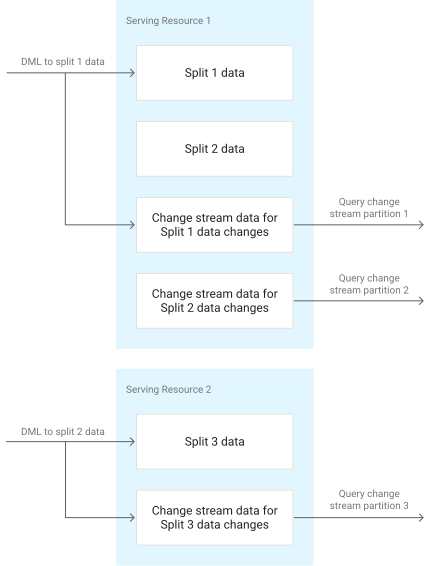
Spanner scales by dynamically splitting and merging data based
on database load and size, and distributing splits across serving resources.
To enable change streams writes and reads to scale, Spanner
splits and merges the internal change stream storage along with the database
data, automatically avoiding [hotspots](https://docs.cloud.google.com/spanner/docs/schema-design.md.txt). To support
reading change stream records in near real-time as database writes scale, the
Spanner API is designed for a change stream to be queried
concurrently using change stream partitions. Change stream partitions map to
change stream data splits that contain the change stream records. A change
stream's partitions change dynamically over time and are correlated to how
Spanner dynamically splits and merges the database data.
A change stream partition contains records for an immutable key range for a
specific time range. Any change stream partition can split into one or more
change stream partitions, or be merged with other change stream partitions. When
these split or merge events happen, child partitions are created to capture the
changes for their respective immutable key ranges for the next time range. In
addition to data change records, a change stream query returns child partition
records to notify readers of new change stream partitions that need to be
queried, as well as heartbeat records to indicate forward progress when no
writes have occurred recently.
When querying a particular change stream partition, the change records are
returned in commit timestamp order. Each change record is returned exactly
once. Across change stream partitions, change record ordering is not guaranteed.
Change records for a particular primary key are returned only on one
partition for a particular time range.
Due to the parent-child partition lineage, in order to process changes for a
particular key in commit timestamp order, records returned from child
partitions should be processed only after records from all parent
partitions have been processed.
## Change stream read functions and query syntax
### GoogleSQL
To query change streams, use the
[`ExecuteStreamingSql`](https://docs.cloud.google.com/spanner/docs/reference/rpc/google.spanner.v1.md.txt#google.spanner.v1.Spanner.ExecuteStreamingSql)
API. Spanner automatically creates a special read function
along with the change stream. The read function provides access to the
change stream's records. The read function naming convention is
`READ_change_stream_name`.
Assuming a change stream `SingersNameStream` exists in the database, the
query syntax for GoogleSQL is the following:
```googlesql
SELECT ChangeRecord
FROM READ_SingersNameStream (
start_timestamp,
end_timestamp,
partition_token,
heartbeat_milliseconds,
read_options
)
```
The read function accepts the following arguments:
| Argument name | Type | Required? | Description |
|---|---|---|---|
| `start_timestamp` | `TIMESTAMP` | Required | Specifies that records with `commit_timestamp` greater than or equal to `start_timestamp` should be returned. The value must be within the change stream retention period, and should be less than or equal to the current time, and greater than or equal to the timestamp of the change stream's creation. |
| `end_timestamp` | `TIMESTAMP` | Optional (Default: `NULL`) | Specifies that records with a `commit_timestamp` less than or equal to `end_timestamp` should be returned. The value must be within the change stream retention period and greater or equal than the `start_timestamp`. The query finishes either after returning all `ChangeRecords` up to the `end_timestamp` or when you terminate the connection. If `end_timestamp` is set to `NULL` or isn't specified, the query continues execution until all `ChangeRecords` are returned or until you terminate the connection. |
| `partition_token` | `STRING` | Optional (Default: `NULL`) | Specifies which change stream partition to query, based on the content of [child partitions records](https://docs.cloud.google.com/spanner/docs/change-streams/details.md.txt#child-partitions-records). If `NULL` or not specified, this means the reader is querying the change stream for the first time, and has not obtained any specific partition tokens to query from. |
| `heartbeat_milliseconds` | `INT64` | Required | Determines how frequently a heartbeat `ChangeRecord` is returned in case there are no transactions committed in this partition.
The value must be between `100` (100 milliseconds) and `300,000` (five minutes). |
| `read_options` | `ARRAY` | Optional (Default: `NULL`) | Adds read options reserved for future use. The only permitted value is `NULL`. |
We recommend making a helper method for building the text of the
read function query and binding parameters to it, as shown in the following
example.
### Java
```java
private static final String SINGERS_NAME_STREAM_QUERY_TEMPLATE =
"SELECT ChangeRecord FROM READ_SingersNameStream"
+ "("
+ " start_timestamp => @startTimestamp,"
+ " end_timestamp => @endTimestamp,"
+ " partition_token => @partitionToken,"
+ " heartbeat_milliseconds => @heartbeatMillis"
+ ")";
// Helper method to conveniently create change stream query texts and
// bind parameters.
public static Statement getChangeStreamQuery(
String partitionToken,
Timestamp startTimestamp,
Timestamp endTimestamp,
long heartbeatMillis) {
return Statement.newBuilder(SINGERS_NAME_STREAM_QUERY_TEMPLATE)
.bind("startTimestamp")
.to(startTimestamp)
.bind("endTimestamp")
.to(endTimestamp)
.bind("partitionToken")
.to(partitionToken)
.bind("heartbeatMillis")
.to(heartbeatMillis)
.build();
}
```
### PostgreSQL
To query change streams, use the
[`ExecuteStreamingSql`](https://docs.cloud.google.com/spanner/docs/reference/rpc/google.spanner.v1.md.txt#google.spanner.v1.Spanner.ExecuteStreamingSql)
API. Spanner automatically creates a special read function
along with the change stream. The read function provides access to the
change stream's records. The read function naming convention is
`spanner.read_json_change_stream_name`.
Assuming a change stream `SingersNameStream` exists in the database, the
query syntax for PostgreSQL is the following:
```postgresql
SELECT *
FROM "spanner"."read_json_SingersNameStream" (
start_timestamp,
end_timestamp,
partition_token,
heartbeat_milliseconds,
read_options
)
```
The read function accepts the following arguments:
| Argument name | Type | Required? | Description |
|---|---|---|---|
| `start_timestamp` | `timestamp with time zone` | Required | Specifies that change records with `commit_timestamp` greater than or equal to `start_timestamp` should be returned. The value must be within the change stream retention period, and should be less than or equal to the current time, and greater than or equal to the timestamp of the change stream's creation. |
| `end_timestamp` | `timestamp with time zone` | Optional (Default: `NULL`) | Specifies that change records with `commit_timestamp` less than or equal to `end_timestamp` should be returned. The value must be within the change stream retention period and greater or equal than the `start_timestamp`. The query finishes either after returning all change records up to the `end_timestamp` or until you terminate the connection. If `NULL`, the query continues execution until all change records are returned or until you terminate the connection. |
| `partition_token` | `text` | Optional (Default: `NULL`) | Specifies which change stream partition to query, based on the content of [child partitions records](https://docs.cloud.google.com/spanner/docs/change-streams/details.md.txt#child-partitions-records). If `NULL` or not specified, this means the reader is querying the change stream for the first time, and has not obtained any specific partition tokens to query from. |
| `heartbeat_milliseconds` | `bigint` | Required | Determines how frequently a heartbeat `ChangeRecord` is returned when there are no transactions committed in this partition. The value must be between `100` (100 milliseconds) and `300,000` (five minutes). |
| `read_options` | `text[]` | Optional (Default: `NULL`) | Adds read options reserved for future use. The only permitted value is `NULL`. |
We recommend making a helper method for building the text of the
read function and binding parameters to it, as shown in the following
example.
### Java
```java
private static final String SINGERS_NAME_STREAM_QUERY_TEMPLATE =
"SELECT * FROM \"spanner\".\"read_json_SingersNameStream\""
+ "($1, $2, $3, $4, null)";
// Helper method to conveniently create change stream query texts and
// bind parameters.
public static Statement getChangeStreamQuery(
String partitionToken,
Timestamp startTimestamp,
Timestamp endTimestamp,
long heartbeatMillis) {
return Statement.newBuilder(SINGERS_NAME_STREAM_QUERY_TEMPLATE)
.bind("p1")
.to(startTimestamp)
.bind("p2")
.to(endTimestamp)
.bind("p3")
.to(partitionToken)
.bind("p4")
.to(heartbeatMillis)
.build();
}
```
## Change streams record format
### GoogleSQL
The change streams read function returns a single `ChangeRecord` column of
type `ARRAY>`. In each row, this array always contains a single
element.
The array elements have the following type:
```googlesql
STRUCT <
data_change_record ARRAY>,
heartbeat_record ARRAY>,
child_partitions_record ARRAY>
>
```
There are three fields in this `STRUCT`: `data_change_record`,
`heartbeat_record` and `child_partitions_record`, each of type
`ARRAY>`. In any row that the change stream read function
returns, only one of these three fields contains a value; the others two
are empty or `NULL`. These array fields contain, at most, one element.
The following sections examine each of these three record types.
### PostgreSQL
The change streams read function returns a single `ChangeRecord` column of
type `JSON` with the following structure:
```json
{
"data_change_record" : {},
"heartbeat_record" : {},
"child_partitions_record" : {}
}
```
There are three possible keys in this object: `data_change_record`,
`heartbeat_record` and `child_partitions_record`, the corresponding value
type is `JSON`. In any row that the change stream read function returns,
only one of these three keys exists.
The following sections examine each of these three record types.
### Data change records
A data change record contains a set of changes to a table with the
same modification type (insert, update, or delete) committed at the same
commit timestamp in one change stream partition for the same
transaction. Multiple data change records can be returned for the same
transaction across multiple change stream partitions.
All data change records have `commit_timestamp`, `server_transaction_id`,
and `record_sequence` fields, which together determine the order in the change
stream for a stream record. These three fields are sufficient to derive
the ordering of changes and provide external consistency.
Note that multiple transactions can have the same commit timestamp if
they touch non-overlapping data. The `server_transaction_id` field
offers the ability to distinguish which set of changes (potentially
across change stream partitions) were issued within the same
transaction. Pairing it with the `record_sequence` and
`number_of_records_in_transaction` fields lets you buffer and order
all the records from a particular transaction, as well.
The fields of a data change record include the following:
### GoogleSQL
| Field | Type | Description |
|---|---|---|
| `commit_timestamp` | `TIMESTAMP` | Indicates the timestamp in which the change was committed. |
| `record_sequence` | `STRING` | Indicates the sequence number for the record within the transaction. Sequence numbers are unique and monotonically increasing (but not necessarily contiguous) within a transaction. Sort the records for the same `server_transaction_id` by `record_sequence` to reconstruct the ordering of the changes within the transaction. Spanner might optimize this ordering for better performances and it might not always match the original ordering that you provide. |
| `server_transaction_id` | `STRING` | Provides a globally unique string that represents the transaction in which the change was committed. The value should only be used in the context of processing change stream records and is not correlated with the transaction id in Spanner's API. |
| `is_last_record_in_transaction_in_partition` | `BOOL` | Indicates whether this is the last record for a transaction in the current partition. |
| `table_name` | `STRING` | Name of the table affected by the change. |
| `value_capture_type` | `STRING` | Describes the value capture type that was specified in the change stream configuration when this change was captured. The value capture type can be one of the following: - `OLD_AND_NEW_VALUES` - `NEW_ROW` - `NEW_VALUES` - `NEW_ROW_AND_OLD_VALUES` By default, it is `OLD_AND_NEW_VALUES`. For more information, see [value capture types](https://docs.cloud.google.com/spanner/docs/change-streams.md.txt#value-capture-type). |
| `column_types` | ```json [ { "name": "STRING", "type": { "code": "STRING" }, "is_primary_key": BOOLEAN "ordinal_position": NUMBER }, ... ] ``` | Indicates the name of the column, the column type, whether it is a primary key, and the position of the column as defined in the schema (`ordinal_position`). The first column of a table in the schema would have an ordinal position of `1`. The column type may be nested for array columns. The format matches the type structure described in the [Spanner API reference](https://docs.cloud.google.com/spanner/docs/reference/rest/v1/Type.md.txt). |
| `mods` | ```json [ { "keys": {"STRING" : "STRING"}, "new_values": { "STRING" : "VALUE-TYPE", [...] }, "old_values": { "STRING" : "VALUE-TYPE", [...] }, }, [...] ] ``` | Describes the changes that were made, including the primary key values, the old values, and the new values of the changed or tracked columns. The availability and content of the old and new values depends on the configured `value_capture_type`. The `new_values` and `old_values` fields only contain the non-key columns. |
| `mod_type` | `STRING` | Describes the type of change. One of `INSERT`, `UPDATE`, or `DELETE`. |
| `number_of_records_in_transaction` | `INT64` | Indicates the number of data change records that are part of this transaction across all change stream partitions. |
| `number_of_partitions_in_transaction` | `INT64` | Indicates the number of partitions that return data change records for this transaction. |
| `transaction_tag` | `STRING` | Indicates the [Transaction tag](https://docs.cloud.google.com/spanner/docs/introspection/troubleshooting-with-tags.md.txt#transaction_tags) associated with this transaction. |
| `is_system_transaction` | `BOOL` | Indicates whether the transaction is a system transaction. |
### PostgreSQL
| Field | Type | Description |
|---|---|---|
| `commit_timestamp` | `STRING` | Indicates the timestamp at which the change was committed. |
| `record_sequence` | `STRING` | Indicates the sequence number for the record within the transaction. Sequence numbers are unique and monotonically increasing (but not necessarily contiguous) within a transaction. Sort the records for the same `server_transaction_id` by `record_sequence` to reconstruct the ordering of the changes within the transaction. |
| `server_transaction_id` | `STRING` | Provides a globally unique string that represents the transaction in which the change was committed. The value should only be used in the context of processing change stream records and is not correlated with the transaction id in Spanner's API |
| `is_last_record_in_transaction_in_partition` | `BOOLEAN` | Indicates whether this is the last record for a transaction in the current partition. |
| `table_name` | `STRING` | Indicates the name of the table affected by the change. |
| `value_capture_type` | `STRING` | Describes the value capture type that was specified in the change stream configuration when this change was captured. The value capture type can be one of the following: - `OLD_AND_NEW_VALUES` - `NEW_ROW` - `NEW_VALUES` - `NEW_ROW_AND_OLD_VALUES` By default, it is `OLD_AND_NEW_VALUES`. For more information, see [value capture types](https://docs.cloud.google.com/spanner/docs/change-streams.md.txt#value-capture-type). |
| `column_types` | ```json [ { "name": "STRING", "type": { "code": "STRING" }, "is_primary_key": BOOLEAN "ordinal_position": NUMBER }, ... ] ``` | Indicates the name of the column, the column type, whether it's a primary key, and the position of the column as defined in the schema (`ordinal_position`). The first column of a table in the schema would have an ordinal position of `1`. The column type may be nested for array columns. The format matches the type structure described in the [Spanner API reference](https://docs.cloud.google.com/spanner/docs/reference/rest/v1/Type.md.txt). |
| `mods` | ```json [ { "keys": {"STRING" : "STRING"}, "new_values": { "STRING" : "VALUE-TYPE", [...] }, "old_values": { "STRING" : "VALUE-TYPE", [...] }, }, [...] ] ``` | Describes the changes that were made, including the primary key values, the old values, and the new values of the changed or tracked columns. The availability and content of the old and new values depends on the configured `value_capture_type`. The `new_values` and `old_values` fields only contain the non-key columns. |
| `mod_type` | `STRING` | Describes the type of change. One of `INSERT`, `UPDATE`, or `DELETE`. |
| `number_of_records_in_transaction` | `INT64` | Indicates the number of data change records that are part of this transaction across all change stream partitions. |
| `number_of_partitions_in_transaction` | `NUMBER` | Indicates the number of partitions that return data change records for this transaction. |
| `transaction_tag` | `STRING` | Indicates the [Transaction tag](https://docs.cloud.google.com/spanner/docs/introspection/troubleshooting-with-tags.md.txt#transaction_tags) associated with this transaction. |
| `is_system_transaction` | `BOOLEAN` | Indicates whether the transaction is a system transaction. |
#### Example data change record
A pair of example data change records follow. They describe a single transaction
where there is a transfer between two accounts. The two accounts are in separate
change stream partitions.
```json
"data_change_record": {
"commit_timestamp": "2022-09-27T12:30:00.123456Z",
// record_sequence is unique and monotonically increasing within a
// transaction, across all partitions.
"record_sequence": "00000000",
"server_transaction_id": "6329047911",
"is_last_record_in_transaction_in_partition": true,
"table_name": "AccountBalance",
"column_types": [
{
"name": "AccountId",
"type": {"code": "STRING"},
"is_primary_key": true,
"ordinal_position": 1
},
{
"name": "LastUpdate",
"type": {"code": "TIMESTAMP"},
"is_primary_key": false,
"ordinal_position": 2
},
{
"name": "Balance",
"type": {"code": "INT"},
"is_primary_key": false,
"ordinal_position": 3
}
],
"mods": [
{
"keys": {"AccountId": "Id1"},
"new_values": {
"LastUpdate": "2022-09-27T12:30:00.123456Z",
"Balance": 1000
},
"old_values": {
"LastUpdate": "2022-09-26T11:28:00.189413Z",
"Balance": 1500
},
}
],
"mod_type": "UPDATE", // options are INSERT, UPDATE, DELETE
"value_capture_type": "OLD_AND_NEW_VALUES",
"number_of_records_in_transaction": 2,
"number_of_partitions_in_transaction": 2,
"transaction_tag": "app=banking,env=prod,action=update",
"is_system_transaction": false,
}
```
```json
"data_change_record": {
"commit_timestamp": "2022-09-27T12:30:00.123456Z",
"record_sequence": "00000001",
"server_transaction_id": "6329047911",
"is_last_record_in_transaction_in_partition": true,
"table_name": "AccountBalance",
"column_types": [
{
"name": "AccountId",
"type": {"code": "STRING"},
"is_primary_key": true,
"ordinal_position": 1
},
{
"name": "LastUpdate",
"type": {"code": "TIMESTAMP"},
"is_primary_key": false,
"ordinal_position": 2
},
{
"name": "Balance",
"type": {"code": "INT"},
"is_primary_key": false,
"ordinal_position": 3
}
],
"mods": [
{
"keys": {"AccountId": "Id2"},
"new_values": {
"LastUpdate": "2022-09-27T12:30:00.123456Z",
"Balance": 2000
},
"old_values": {
"LastUpdate": "2022-01-20T11:25:00.199915Z",
"Balance": 1500
},
},
...
],
"mod_type": "UPDATE", // options are INSERT, UPDATE, DELETE
"value_capture_type": "OLD_AND_NEW_VALUES",
"number_of_records_in_transaction": 2,
"number_of_partitions_in_transaction": 2,
"transaction_tag": "app=banking,env=prod,action=update",
"is_system_transaction": false,
}
```
The following data change record is an example of a record with the value
capture type `NEW_VALUES`. Note that only new values are populated.
Only the `LastUpdate` column was modified, so only that column
was returned.
```json
"data_change_record": {
"commit_timestamp": "2022-09-27T12:30:00.123456Z",
// record_sequence is unique and monotonically increasing within a
// transaction, across all partitions.
"record_sequence": "00000000",
"server_transaction_id": "6329047911",
"is_last_record_in_transaction_in_partition": true,
"table_name": "AccountBalance",
"column_types": [
{
"name": "AccountId",
"type": {"code": "STRING"},
"is_primary_key": true,
"ordinal_position": 1
},
{
"name": "LastUpdate",
"type": {"code": "TIMESTAMP"},
"is_primary_key": false,
"ordinal_position": 2
}
],
"mods": [
{
"keys": {"AccountId": "Id1"},
"new_values": {
"LastUpdate": "2022-09-27T12:30:00.123456Z"
},
"old_values": {}
}
],
"mod_type": "UPDATE", // options are INSERT, UPDATE, DELETE
"value_capture_type": "NEW_VALUES",
"number_of_records_in_transaction": 1,
"number_of_partitions_in_transaction": 1,
"transaction_tag": "app=banking,env=prod,action=update",
"is_system_transaction": false
}
```
The following data change record is an example of a record with the value
capture type `NEW_ROW`. Only the `LastUpdate`
column was modified, but all tracked columns are returned.
```json
"data_change_record": {
"commit_timestamp": "2022-09-27T12:30:00.123456Z",
// record_sequence is unique and monotonically increasing within a
// transaction, across all partitions.
"record_sequence": "00000000",
"server_transaction_id": "6329047911",
"is_last_record_in_transaction_in_partition": true,
"table_name": "AccountBalance",
"column_types": [
{
"name": "AccountId",
"type": {"code": "STRING"},
"is_primary_key": true,
"ordinal_position": 1
},
{
"name": "LastUpdate",
"type": {"code": "TIMESTAMP"},
"is_primary_key": false,
"ordinal_position": 2
},
{
"name": "Balance",
"type": {"code": "INT"},
"is_primary_key": false,
"ordinal_position": 3
}
],
"mods": [
{
"keys": {"AccountId": "Id1"},
"new_values": {
"LastUpdate": "2022-09-27T12:30:00.123456Z",
"Balance": 1000
},
"old_values": {}
}
],
"mod_type": "UPDATE", // options are INSERT, UPDATE, DELETE
"value_capture_type": "NEW_ROW",
"number_of_records_in_transaction": 1,
"number_of_partitions_in_transaction": 1,
"transaction_tag": "app=banking,env=prod,action=update",
"is_system_transaction": false
}
```
The following data change record is an example of a record with the value
capture type `NEW_ROW_AND_OLD_VALUES`. Only the `LastUpdate` column was
modified, but all tracked columns are returned. This value capture type captures
the new value and old value of `LastUpdate`.
```json
"data_change_record": {
"commit_timestamp": "2022-09-27T12:30:00.123456Z",
// record_sequence is unique and monotonically increasing within a
// transaction, across all partitions.
"record_sequence": "00000000",
"server_transaction_id": "6329047911",
"is_last_record_in_transaction_in_partition": true,
"table_name": "AccountBalance",
"column_types": [
{
"name": "AccountId",
"type": {"code": "STRING"},
"is_primary_key": true,
"ordinal_position": 1
},
{
"name": "LastUpdate",
"type": {"code": "TIMESTAMP"},
"is_primary_key": false,
"ordinal_position": 2
},
{
"name": "Balance",
"type": {"code": "INT"},
"is_primary_key": false,
"ordinal_position": 3
}
],
"mods": [
{
"keys": {"AccountId": "Id1"},
"new_values": {
"LastUpdate": "2022-09-27T12:30:00.123456Z",
"Balance": 1000
},
"old_values": {
"LastUpdate": "2022-09-26T11:28:00.189413Z"
}
}
],
"mod_type": "UPDATE", // options are INSERT, UPDATE, DELETE
"value_capture_type": "NEW_ROW_AND_OLD_VALUES",
"number_of_records_in_transaction": 1,
"number_of_partitions_in_transaction": 1,
"transaction_tag": "app=banking,env=prod,action=update",
"is_system_transaction": false
}
```
### Heartbeat records
When a heartbeat record is returned, it indicates that all changes with
`commit_timestamp` less than or equal to the heartbeat record's
`timestamp` have been returned, and future data records in this
partition must have higher commit timestamps than that returned by the
heartbeat record. Heartbeat records are returned when there are no data
changes written to a partition. When there are data changes written to
the partition, `data_change_record.commit_timestamp` can be used instead
of `heartbeat_record.timestamp` to tell that the reader is making forward
progress in reading the partition.
You can use heartbeat records returned on partitions to synchronize
readers across all partitions. Once all readers have received either a
heartbeat greater than or equal to some timestamp `A` or have received data or
child partition records greater than or equal to timestamp `A`, the readers know
they have received all records committed at or before that timestamp `A` and can
start processing the buffered records---for example, sorting the cross-partition
records by timestamp and grouping them by `server_transaction_id`.
A heartbeat record contains only one field:
### GoogleSQL
| Field | Type | Description |
|---|---|---|
| `timestamp` | `TIMESTAMP` | Indicates the heartbeat record's timestamp. |
### PostgreSQL
| Field | Type | Description |
|---|---|---|
| `timestamp` | `STRING` | Indicates the heartbeat record's timestamp. |
#### Example heartbeat record
An example heartbeat record, communicating that all records with timestamps
less or equal than this record's timestamp have been returned:
```json
heartbeat_record: {
"timestamp": "2022-09-27T12:35:00.312486Z"
}
```
### Child partition records
Child partition records returns information about child partitions: their
partition tokens, the tokens of their parent partitions, and the
`start_timestamp` that represents the earliest timestamp that the child
partitions contain change records for. Records whose commit timestamps
are immediately prior to the `child_partitions_record.start_timestamp` are
returned in the current partition. After returning all the
child partition records for this partition, this query returns with
a success status, indicating all records have been returned for this
partition.
The fields of a child partition record includes the following:
### GoogleSQL
| Field | Type | Description |
|---|---|---|
| `start_timestamp` | `TIMESTAMP` | Indicates that the data change records returned from child partitions in this child partition record have a commit timestamp greater than or equal to `start_timestamp`. When querying a child partition, the query should specify the child partition token and a `start_timestamp` greater than or equal to `child_partitions_token.start_timestamp`. All child partitions records returned by a partition have the same `start_timestamp` and the timestamp always falls between the query's specified `start_timestamp` and `end_timestamp`. |
| `record_sequence` | `STRING` | Indicates a monotonically increasing sequence number that can be used to define the ordering of the child partition records when there are multiple child partition records returned with the same `start_timestamp` in a particular partition. The partition token, `start_timestamp` and `record_sequence` uniquely identify a child partition record. |
| `child_partitions` | ``` [ { "token" : "STRING", "parent_partition_tokens" : ["STRING"] } ] ``` | Returns a set of child partitions and their associated information. This includes the partition token string used to identify the child partition in queries, as well as the tokens of its parent partitions. |
### PostgreSQL
| Field | Type | Description |
|---|---|---|
| `start_timestamp` | `STRING` | Indicates that the data change records returned from child partitions in this child partition record have a commit timestamp greater than or equal to `start_timestamp`. When querying a child partition, the query should specify the child partition token and a `start_timestamp` greater than or equal to `child_partitions_token.start_timestamp`. All child partitions records returned by a partition have the same `start_timestamp` and the timestamp always falls between the query's specified `start_timestamp` and `end_timestamp`. |
| `record_sequence` | `STRING` | Indicates a monotonically increasing sequence number that can be used to define the ordering of the child partition records when there are multiple child partition records returned with the same `start_timestamp` in a particular partition. The partition token, `start_timestamp` and `record_sequence` uniquely identify a child partition record. |
| `child_partitions` | ``` [ { "token": "STRING", "parent_partition_tokens": ["STRING"], }, [...] ] ``` | Returns an array of child partitions and their associated information. This includes the partition token string used to identify the child partition in queries, as well as the tokens of its parent partitions. |
#### Example child partition record
The following is an example of a child partition record:
```json
child_partitions_record: {
"start_timestamp": "2022-09-27T12:40:00.562986Z",
"record_sequence": "00000001",
"child_partitions": [
{
"token": "child_token_1",
// To make sure changes for a key is processed in timestamp
// order, wait until the records returned from all parents
// have been processed.
"parent_partition_tokens": ["parent_token_1", "parent_token_2"]
}
],
}
```
## Change streams query workflow
Run change stream queries using the
[`ExecuteStreamingSql`](https://docs.cloud.google.com/spanner/docs/reference/rpc/google.spanner.v1.md.txt#%0Agoogle.spanner.v1.Spanner.ExecuteStreamingSql) API, with a single-use
[read-only
transaction](https://docs.cloud.google.com/spanner/docs/transactions#read-only_transactions) and a
strong [timestamp bound](https://docs.cloud.google.com/spanner/docs/timestamp-bounds.md.txt). The change
stream read function lets you specify the `start_timestamp` and
`end_timestamp` for the time range of interest. All change records
within the retention period are accessible using the strong read-only
timestamp bound.
All other
[`TransactionOptions`](https://docs.cloud.google.com/spanner/docs/reference/rest/v1/TransactionOptions.md.txt)
are invalid for change stream queries. In addition,
if `TransactionOptions.read_only.return_read_timestamp` is set to `true`,
a special value of `kint64max - 1` is returned in the `Transaction`
message that describes the transaction, instead of a valid read
timestamp. This special value should be discarded and not used for any
subsequent queries.
Each change stream query can return any number of rows, each containing
either a data change record, heartbeat record, or child partitions
record. There is no need to set a deadline for the request.
### Example change stream query workflow
The streaming query workflow begins with issuing the very first change stream
query by specifying the `partition_token` to `NULL`. The query needs to specify
the read function for the change stream, start and end timestamp of interest,
and the heartbeat interval. When the `end_timestamp` is `NULL`, the query keeps
returning data changes until the partition ends.
### GoogleSQL
```googlesql
SELECT ChangeRecord FROM READ_SingersNameStream (
start_timestamp => "2022-05-01T09:00:00Z",
end_timestamp => NULL,
partition_token => NULL,
heartbeat_milliseconds => 10000
);
```
### PostgreSQL
```postgresql
SELECT *
FROM "spanner"."read_json_SingersNameStream" (
'2022-05-01T09:00:00Z',
NULL,
NULL,
10000,
NULL
) ;
```
Process data records from this query until all child partition records are
returned. In the following example, two child partition records and three
partition tokens are returned, then the query terminates. Child partition
records from a specific query always shares the same `start_timestamp`.
```json
child_partitions_record: {
"record_type": "child_partitions",
"start_timestamp": "2022-05-01T09:00:01Z",
"record_sequence": "1000012389",
"child_partitions": [
{
"token": "child_token_1",
// Note parent tokens are null for child partitions returned
// from the initial change stream queries.
"parent_partition_tokens": [NULL]
}
{
"token": "child_token_2",
"parent_partition_tokens": [NULL]
}
],
}
```
```json
child_partitions_record: {
"record_type": "child_partitions",
"start_timestamp": "2022-05-01T09:00:01Z",
"record_sequence": "1000012390",
"child_partitions": [
{
"token": "child_token_3",
"parent_partition_tokens": [NULL]
}
],
}
```
To process changes after `2022-05-01T09:00:01Z`, create three new queries and
run them in parallel. Used together, the three queries return data changes for
the same key range their parent covers. Always set the `start_timestamp` to the
`start_timestamp` in the same child partition record and use the same
`end_timestamp` and heartbeat interval to process the records consistently
across all queries.
### GoogleSQL
```googlesql
SELECT ChangeRecord FROM READ_SingersNameStream (
start_timestamp => "2022-05-01T09:00:01Z",
end_timestamp => NULL,
partition_token => "child_token_1",
heartbeat_milliseconds => 10000
);
```
```googlesql
SELECT ChangeRecord FROM READ_SingersNameStream (
start_timestamp => "2022-05-01T09:00:01Z",
end_timestamp => NULL,
partition_token => "child_token_2",
heartbeat_milliseconds => 10000
);
```
```googlesql
SELECT ChangeRecord FROM READ_SingersNameStream (
start_timestamp => "2022-05-01T09:00:01Z",
end_timestamp => NULL,
partition_token => "child_token_3",
heartbeat_milliseconds => 10000
);
```
### PostgreSQL
```postgresql
SELECT *
FROM "spanner"."read_json_SingersNameStream" (
'2022-05-01T09:00:01Z',
NULL,
'child_token_1',
10000,
NULL
);
```
```postgresql
SELECT *
FROM "spanner"."read_json_SingersNameStream" (
'2022-05-01T09:00:01Z',
NULL,
'child_token_2',
10000,
NULL
);
```
```postgresql
SELECT *
FROM "spanner"."read_json_SingersNameStream" (
'2022-05-01T09:00:01Z',
NULL,
'child_token_3',
10000,
NULL
);
```
The query on `child_token_2` finishes after returning another child partition
record. This record indicates that a new partition is covering changes for both
`child_token_2` and `child_token_3` starting at `2022-05-01T09:30:15Z`. The
exact same record is returned by the query on `child_token_3`, because both are
the parent partitions of the new `child_token_4`. To ensure a strict ordered
processing of data records for a particular key, the query on `child_token_4`
must start after all the parents have finished. In this case, the parents are
`child_token_2` and `child_token_3`. Only create one query for each child
partition token. The query workflow design should appoint one parent to wait and
schedule the query on `child_token_4`.
```json
child_partitions_record: {
"record_type": "child_partitions",
"start_timestamp": "2022-05-01T09:30:15Z",
"record_sequence": "1000012389",
"child_partitions": [
{
"token": "child_token_4",
"parent_partition_tokens": ["child_token_2", "child_token_3"],
}
],
}
```
### GoogleSQL
```googlesql
SELECT ChangeRecord FROM READ_SingersNameStream(
start_timestamp => "2022-05-01T09:30:15Z",
end_timestamp => NULL,
partition_token => "child_token_4",
heartbeat_milliseconds => 10000
);
```
### PostgreSQL
```postgresql
SELECT *
FROM "spanner"."read_json_SingersNameStream" (
'2022-05-01T09:30:15Z',
NULL,
'child_token_4',
10000,
NULL
);
```
Find examples of handling and parsing change stream records in the Apache Beam
SpannerIO Dataflow connector on
[GitHub](https://github.com/apache/beam/tree/master/sdks/java/io/google-cloud-platform/src/main/java/org/apache/beam/sdk/io/gcp/spanner/changestreams).