This document is part of a series that provides key information and guidance
related to planning and performing Oracle® 11g/12c database migrations to
[Cloud SQL for PostgreSQL](https://docs.cloud.google.com/sql/docs/postgres.md.txt)
version 12. In addition to the
[introductory setup part](https://docs.cloud.google.com/solutions/setting-up-cloud-sql-for-postgresql-for-production.md.txt),
the series includes the following parts:
- Migrating Oracle users to Cloud SQL for PostgreSQL: Terminology and functionality (this document)
- [Migrating Oracle users to Cloud SQL for PostgreSQL: Data types, users, and tables](https://docs.cloud.google.com/solutions/migrating-oracle-users-to-cloud-sql-for-postgresql-data-types.md.txt)
- [Migrating Oracle users to Cloud SQL for PostgreSQL: Queries, stored procedures, functions, and triggers](https://docs.cloud.google.com/solutions/migrating-oracle-users-to-cloud-sql-for-postgresql-queries.md.txt)
- [Migrating Oracle users to Cloud SQL for PostgreSQL: Security, operations, monitoring, and logging](https://docs.cloud.google.com/solutions/migrating-oracle-users-to-cloud-sql-for-postgresql-security.md.txt)
- [Migrating Oracle Database users and schemas to Cloud SQL for PostgreSQL](https://docs.cloud.google.com/solutions/migrating-oracle-database-to-cloud-sql-for-postgresql.md.txt)
## Terminology
This section details the similarities and differences in database terminology
between Oracle and Cloud SQL for PostgreSQL. It reviews and compares core
aspects of each of the database platforms. The comparison distinguishes between
Oracle versions 11g and 12c, due to architectural differences (for example,
Oracle 12c introduces the multi-tenant feature). The
Cloud SQL for PostgreSQL version referenced here is 12.
This section emphasizes the main terminology differences between Oracle and
Cloud SQL for PostgreSQL. A low-level description is detailed later in this
document.
| **Oracle 11g** | **Description** | **Cloud SQL for PostgreSQL** | **Key differences** |
|---|---|---|---|
| **instance** | A single Oracle 11g instance can hold only one database. | **instance** | One Cloud SQL for PostgreSQL instance holds exactly one database cluster. A database cluster is a collection of databases that is stored in a common data area. |
| **database** | A database qualifies as a single instance (the name of the database is identical to the instance name). | **database** | Multiple or single databases serve multiple applications. |
| **schema** | Schema and users are identical because both are considered to be the owners of database objects (a user can be created without specifying or being allocated to a schema). | **schema** | A database contains one or more schemas. Objects such as tables are contained within schemas. The same object name could be used in different schemas within the same database without conflict. |
| **user** | Identical to schema because both are owners of database objects---for example, instance → database → schemas/users → database objects. | **role** | A role can be either a database user or a group of database users, depending on how it is set up. It can own database objects such as tables.
Roles are scoped to an entire database cluster, and it is possible to grant membership of a role to another role. |
| **role** | Defined set of database permissions that can be chained as a group and can be assigned to database users | | |
| **admin/** **SYSTEM users** | Oracle administrator users with the highest level of access: `SYS SYSTEM` | **cloudsqlsuperuser** | Cloud SQL for PostgreSQL comes with the default `postgres` user. This user is part of the `cloudsqlsuperuser` role, and has the following attributes (privileges): `CREATEROLE`, `CREATEDB`, and `LOGIN`.
Because Cloud SQL for PostgreSQL is a managed service, it restricts access to certain system procedures and tables that require advanced privileges. Therefore, the `postgres` user does not have the `SUPERUSER` or `REPLICATION` attributes. You cannot create or have access to users with `superuser` attributes. |
| **dictionary/** **metadata** | Oracle uses the following metadata tables: `USER_TableName ALL_TableName DBA_TableName` | **dictionary/** **metadata** | Cloud SQL for PostgreSQL uses the ANSI-standard `INFORMATION_SCHEMA` to provide dictionary and metadata information. |
| **system dynamic views** | Oracle dynamic views: ``` V$ViewName ``` | **system** **dynamic views** | Cloud SQL for PostgreSQL has the following dynamic statistics views: `pg_stat_ViewName` `pg_statio_ViewName` |
| **tablespace** | The primary logical storage structures of Oracle databases; each tablespace can hold one or more data files. | **tablespace** | In Cloud SQL for PostgreSQL, data files are stored together in a database cluster's data directory `PGDATA` using a predefined directory structure. Tablespaces in Cloud SQL for PostgreSQL provide a mechanism to define custom locations in the file system where data files can be stored.
Because Cloud SQL for PostgreSQL is a managed service, Google Cloud manages the underlying file system of the host machine for you. You cannot create new tablespaces on Cloud SQL for PostgreSQL. |
| **data files** | The physical elements of an Oracle database that hold the data and are defined under a specific tablespace.
A single data file is defined by the initial size and max size and can hold data for multiple tables.
Oracle data files use the `.dbf` suffix (not mandatory). | **data files** | Cloud SQL for PostgreSQL stores each database in a database cluster in its own subdirectory. Each table and index within a database is stored in a separate file in that subdirectory. |
| **system tablespace** | Contains the data dictionary tables and views objects for the entire Oracle database. | **Does not exist** | Data dictionary tables and views objects are stored in `INFORMATION_SCHEMA` in a database cluster's data directory `PGDATA` by using a predefined directory structure. |
| **temporary tablespace** | Contains schema objects valid for the duration of a session; in addition, it supports running operations that cannot fit in server memory. | **temporary files** | Temporary files are used to store running operations that cannot fit in server memory. These files are stored in a directory called `pgsql_tmp` and are created only while the SQL statement is executing. |
| **Undo tablespace** | A special type of system-permanent tablespace used by Oracle to manage rollback operations when running the database in automatic undo management mode (default). | **Does not exist** | To allow for rollback operations, Cloud SQL for PostgreSQL retains rows that are updated or deleted within the table's data file itself. [Vacuuming](https://www.postgresql.org/docs/12/routine-vacuuming.html) is the process of recovering or reusing disk space occupied by updated or deleted rows. |
| **ASM** | Oracle Automatic Storage Management is an integrated, high-performance database file system and disk manager all done automatically by an Oracle database configured with ASM. | **Not supported** | Cloud SQL for PostgreSQL relies on the OS file system to store data files and does not have an Oracle ASM equivalent. However, [Cloud SQL for PostgreSQL](https://docs.cloud.google.com/sql) supports many features that provide storage automation, such as automatic storage increases, performance, and scalability. |
| **tables/views** | User-created fundamental database objects. | **tables/views** | Identical to Oracle. |
| **materialized views** | Defined with specific SQL statements and can be manually or automatically refreshed based on specific configurations. | **materialized views** | Materialized views work similarly to Oracle. They are refreshed manually using `REFRESH MATERIALIZED VIEW` statements. |
| **sequence** | Oracle unique-value generator. | **sequence** | Similar to Oracle. |
| **synonym** | Oracle database objects that serve as alternative identifiers for other database objects. | **Not supported** | Cloud SQL for PostgreSQL does not offer synonyms; as a workaround, views can be used while setting the appropriate permissions. |
| **partitioning** | Oracle provides many partitioning solutions for splitting large tables into smaller managed pieces. | **partitioning** | Cloud SQL for PostgreSQL supports both Oracle style's declarative partitioning and [partitioning using inheritance](https://www.postgresql.org/docs/12/ddl-partitioning.html#DDL-PARTITIONING-IMPLEMENTATION-INHERITANCE), allowing greater partitioning flexibilities. |
| **Flashback database** | Oracle proprietary feature that can be used to initialize an Oracle database to a previously defined time, allowing you to query or restore data that was modified or corrupted by mistake. | **Not supported** | For an alternative solution, you can use Cloud SQL backups and [point-in-time recovery](https://docs.cloud.google.com/sql/docs/postgres/backup-recovery/pitr.md.txt) to restore a database to a previous state (for example, restoring before a table drop). |
| **sqlplus** | Oracle command-line interface that lets you query and manage the database instance. | **psql** | Cloud SQL for PostgreSQL--equivalent command line-interface for querying and managing. Can be connected from any client with the appropriate permissions to Cloud SQL. |
| **PL/SQL** | Oracle extended procedural language to ANSI SQL. | **PL/pgSQL** | Cloud SQL for PostgreSQL has its own procedural language called PL/pgSQL, which is similar to Oracle's PL/SQL in many aspects. For a summary of the main differences between the two languages, see [Porting from Oracle PL/SQL](https://www.postgresql.org/docs/12/plpgsql-porting.html). |
| **package \& package body** | Oracle-specific functionality to group stored procedures and functions under the same logical reference. | Not supported | Cloud SQL for PostgreSQL organizes functions using schemas. |
| **stored procedures \& functions** | Uses PL/SQL to implement code functionality. | **Stored procedures \& functions** | Cloud SQL for PostgreSQL supports the implementation of stored procedures and functions using a variety of programming languages such as PL/pgSQL and C. |
| **trigger** | Oracle object used to control DML implementation over tables. | **trigger** | Similar to Oracle. |
| **PFILE/SPFILE** | Oracle instance- and database-level parameters are kept in a binary file known as the `SPFILE` (in previous versions, the file was called `PFILE`), which can be used as a text file for setting parameters manually. | **Cloud SQL for PostgreSQL database flags** | You can set or modify Cloud SQL for PostgreSQL parameters through the [database flags](https://docs.cloud.google.com/sql/docs/postgres/flags.md.txt) utility. |
| **SGA/PGA/** **AMM** | Oracle memory parameters that control memory allocation to the database instance. | **A variety of memory-related parameters** | Cloud SQL for PostgreSQL has its own memory parameters. Some similar parameters are `shared_buffers`, `temp_buffers` and `work_mem`. In Cloud SQL for PostgreSQL, these parameters are predefined by the chosen instance type, and the value changes accordingly. You can adjust [some of these parameters](https://docs.cloud.google.com/sql/docs/postgres/flags.md.txt) by using the database flags utility. |
| **buffer cache** | Reduces SQL I/O operations by retrieving cached data from the buffer cache. Memory parameters can be managed at the database level and at the session level through query hints. | **Similar functionality** | Cloud SQL for PostgreSQL's buffer cache size is controlled by the `shared_buffer` parameter, which is not exposed in Cloud SQL. Cloud SQL provides a [memory usage metric](https://docs.cloud.google.com/monitoring/api/metrics_gcp.md.txt), which is used to right-size the instance. |
| **database hints** | Oracle ability to provide controlled impact to SQL statements that will influence the optimizer behavior to gain better performance. Oracle has more than 50 different database hints. | **Not supported** | Cloud SQL for PostgreSQL does not support database hints. To a limited degree, you can control Cloud SQL for PostgreSQL's query planner by using [explicit JOIN syntax](https://www.postgresql.org/docs/12/explicit-joins.html). |
| **RMAN** | Oracle Recovery Manager utility. Used to take database backups with extended functionality to support multiple disaster recovery scenarios and more (cloning, etc.). | **Cloud SQL for PostgreSQL backup** | Cloud SQL for PostgreSQL offers two methods for applying full [backups](https://docs.cloud.google.com/sql/docs/postgres/backup-recovery/backups.md.txt): on-demand and automated backups. |
| **Data Pump** **(EXPDP/** **IMPDP)** | Oracle dump generation utility that can be used for many features, such as export/import, database backup (at the schema or object level), schema metadata, generate schema SQL files and more. | **Cloud SQL for PostgreSQL export/import** | Cloud SQL for PostgreSQL offers two [export/import](https://docs.cloud.google.com/sql/docs/postgres/import-export/exporting) formats to and from Cloud Storage buckets: SQL and CSV.
Alternatively, you can connect to the database instance by using export/import utilities such as [pg_dump](https://www.postgresql.org/docs/12/app-pgdump.html). |
| **SQL\*Loader** | Tool that lets you upload data from external files such as text files, CSV files, and more. | **psql `\copy`** | The `\copy` command in the psql client lets you load text, CSV, or binary files (Oracle supports additional file formats) into a database table with a corresponding structure. |
| **Data Guard** | Oracle disaster recovery solution using a standby instance, enabling users to perform `READ` operations from the standby instance. | **Cloud SQL for PostgreSQL high availability and replication** | To achieve disaster recovery or high availability, Cloud SQL for PostgreSQL offers the failover replica [architecture](https://docs.cloud.google.com/sql/docs/postgres/high-availability.md.txt) and for read-only operations (`READ`/`WRITE` separation) using the [Read Replica](https://docs.cloud.google.com/sql/docs/postgres/replication.md.txt). |
| **Active Data Guard/ GoldenGate** | Oracle's main replication solutions, which can serve multiple purposes such as Standby (DR), Read-Only instance, Bi-Directional replication (multi-master), data warehousing, and more. | **Cloud SQL for PostgreSQL Read Replica** | Cloud SQL for PostgreSQL [Read Replica](https://docs.cloud.google.com/sql/docs/postgres/replication.md.txt) to implement clustering with READ/WRITE separation. Currently, there is no support for multi-master configuration, such as GoldenGate BI-Directional replication, or heterogeneous replication. |
| **RAC** | Oracle Real Application Cluster. Oracle proprietary clustering solution for providing high availability by deploying multiple database instances with a single storage unit. | **Not supported** | Cloud SQL for PostgreSQL does not support a multi-master architecture. Cloud SQL for PostgreSQL does offer high availability through a standby instance and increased read scalability through read replicas. |
| **Grid/Cloud Control (OEM)** | Oracle software for managing and monitoring databases and other related services in a web application format. This tool is useful for real-time database analysis to understand high workloads. | **Google Cloud console,** **Cloud Monitoring** | Use Cloud SQL for PostgreSQL for monitoring, including detailed time- and resource-based graphs. Also use Cloud Monitoring to hold specific Cloud SQL for PostgreSQL monitoring metrics and log analysis for advanced monitoring capabilities. |
| **REDO logs** | Oracle transaction logs that consist of two (or more) pre-allocated defined files that store all data modifications as they occur. The redo log's main purpose is to protect the database in case of an instance failure. | **WAL Logs** | Cloud SQL for PostgreSQL uses [Write-Ahead Logging (WAL)](https://www.postgresql.org/docs/12/wal-intro.html) so that changes to data files are flushed to permanent storage to allow crash recovery. |
| **archive logs** | Archive logs provide support for backup and replication operations and more. Oracle writes to archive logs (if enabled) after each redo log switch operation. | **WAL archiving** | Cloud SQL for PostgreSQL implementation of WAL logs retention. WAL archiving is used and enabled with [point-in-time recovery](https://docs.cloud.google.com/sql/docs/postgres/backup-recovery/pitr.md.txt). |
| **control file** | The Oracle control file holds information about the database, such as data files, redo log names, locations, the current log sequence number, and information about the instance checkpoint. | `PGDATA and pg_control` | Cloud SQL for PostgreSQL architecture doesn't share a concept that is equivalent to an Oracle control file. Database-related files are organized in a directory commonly referred to as `PGDATA`. WAL information related to records and checkpoints is stored in `pg_control`. |
| **System Change Number (SCN)** | The SCN marks a specific point in time in an Oracle database. | **Log Sequence Number (LSN)** | Cloud SQL for PostgreSQL's equivalent is the LSN. Just like SCNs, LSNs increase monotonically over time. |
| **AWR** | Oracle AWR (Automatic Workload Repository) is a verbose report that provides detailed information about Oracle database instance performance and is considered a DBA tool for performance diagnostics. | **statistics collector** | Cloud SQL for PostgreSQL doesn't have a report equivalent to Oracle AWR, but PostgreSQL gathers performance data collected by [statistics collector](https://www.postgresql.org/docs/12/monitoring-stats.html). The collected statistics are exposed through `pg_stat_*` and `pg_statio_*` views. |
| `DBMS_SCHEDULER` | Oracle utility used to set and time predefined operations**.** | **Not supported** | Cloud SQL for PostgreSQL does not provide a built-in scheduling utility.
Google Cloud provides [Cloud Scheduler](https://docs.cloud.google.com/scheduler), which lets you schedule database tasks such as exports. |
| **Transparent data encryption** | Encrypts data stored on disks as data-at-rest protection. | **Cloud SQL Advanced Encryption Standard** | Cloud SQL for PostgreSQL uses the 256-bit [Advanced Encryption Standard (AES-256)](https://docs.cloud.google.com/sql/faq.md.txt#encryption-manage-rest) for protecting data at-rest and in-transit. |
| **Advanced compression** | To improve the database storage footprint, reduce storage costs, and improve database performance, Oracle provides data (tables/indexes) advanced compression capabilities. | **TOAST** | While not directly comparable to Oracle advanced compression, Cloud SQL for PostgreSQL uses an infrastructure called [TOAST](https://www.postgresql.org/docs/12/storage-toast.html) to automatically and transparently compress variable-length data that is too large to fit in a single data page. |
| **SQL Developer** | Oracle's free SQL GUI for managing and running SQL and PL/SQL statements. | **pgAdmin** | Cloud SQL for PostgreSQL's free SQL GUI for managing and running SQL and PostgreSQL code statements. |
| **Alert log** | Oracle's main log for general database operations and errors. | **PostgreSQL error reporting and logging** | Use Cloud Logging's [Logs Viewer](https://docs.cloud.google.com/sql/docs/postgres/instance-info.md.txt#mysqllogs) to inspect PostgreSQL error logs. |
| **DUAL table** | Oracle special table for retrieving pseudo-column values such as `SYSDATE` or `USER`. | **Does not exist** | Cloud SQL for PostgreSQL allows `FROM` clauses to be omitted from SQL statements. For example:
`SELECT NOW();` is a valid statement in PostgreSQL. |
| **external table** | Oracle lets users create external tables having the source data on files outside the database. | **Not supported** | As a managed service, Cloud SQL for PostgreSQL does not expose the underlying file system of the host running the database instance.
As a workaround, you can import the source data into a PostgreSQL table for querying the data. |
| **Listener** | Oracle network process tasked with listening for incoming database connections. | **Cloud SQL Authorized networks** | Cloud SQL for PostgreSQL accepts connections from remote sources once allowed in the Cloud SQL [authorized networks](https://docs.cloud.google.com/sql/docs/postgres/connect-external-app#proxy) configuration page. |
| **TNSNAMES** | Oracle network configuration file that defines database addresses for establishing connections by using connection aliases. | **Does not exist** | Cloud SQL for PostgreSQL accepts external connections using the Cloud SQL instance connection name or [private](https://docs.cloud.google.com/sql/docs/postgres/configure-private-ip)/[public](https://docs.cloud.google.com/sql/docs/postgres/configure-ip.md.txt) IP address. [Cloud SQL Proxy](https://docs.cloud.google.com/sql/docs/postgres/sql-proxy.md.txt) is an additional secure access method to connect to Cloud SQL for PostgreSQL without having to allow specific IP addresses or configure SSL. |
| **Instance default port** | 1521 | **Instance default port** | 5432 |
| **Database link** | Oracle schema objects which can be used to interact with local/remote database objects. | **Foreign Data Wrapper (FDW)** | The [postgres_fdw](https://docs.cloud.google.com/sql/docs/postgres/extensions.md.txt#postgres_fdw) extension in Cloud SQL for PostgreSQL allows tables from other ("foreign") PostgreSQL databases to be exposed as "foreign" tables in the current database. Those tables then are available for use, almost as if they were local tables. |
### Differences in terminology between Oracle 12c and Cloud SQL for PostgreSQL
| **Oracle 12c** | **Description** | **Cloud SQL for PostgreSQL** | **Key differences** |
|---|---|---|---|
| **Instance** | The multi-tenant ability introduced in Oracle 12c allows an instance to hold multiple databases as pluggable databases (PDBs), as opposed to Oracle 11g, where an Oracle instance can host a single database. | **Instance** | One Cloud SQL for PostgreSQL instance holds exactly one database cluster. A database cluster is a collection of databases that is stored in a common data area. |
| **CDB** | A multitenant container database (CDB) can support one or more PDBs, while CDB global objects (affects all PDBs) can be created, such as roles. | **PostgreSQL instance** | The Cloud SQL for PostgreSQL instance is comparable to the Oracle CDB. Both provide a system layer for the hosted databases. |
| **PDB** | PDBs (pluggable databases) can be used to isolate services and applications from one another and can be used as a portable collection of schemas. | **PostgreSQL databases/** **schemas** | A Cloud SQL for PostgreSQL database can serve multiple services and applications as well as many database users. |
| **Session sequences** | Starting with Oracle 12c, sequences can be created at the session level (return unique values only within a session) or at the global level (for example, when using temporary tables). | **Temporary sequence** | Temporary sequence is created for the current database session and is automatically dropped on session exit. |
| **Identity columns** | The Oracle 12c `IDENTITY` type generates a sequence and associates it with a table column without the need to manually create a separate sequence object. | **SERIAL column** | By defining a column's data type as SERIAL, Cloud SQL for PostgreSQL automatically creates a sequence and populates the column value using that sequence when new rows are inserted into the table. |
| **Sharding** | Oracle sharding is a solution in which one Oracle database is partitioned into multiple smaller databases (shards) to allow scalability, availability, and geo-distribution for OLTP environments. | **Not supported (as a feature)** | Cloud SQL for PostgreSQL does not have an equivalent sharding feature. Sharding can be implemented using Cloud SQL for PostgreSQL (as the data platform) with a supporting application layer. |
| **In-memory database** | Oracle provides a suite of features which can improve database performance for OLTP as well as for mixed workloads. | **Not supported** | Cloud SQL for PostgreSQL does not have an equivalent feature built-in. However, you can use our managed Redis service, [Memorystore](https://docs.cloud.google.com/memorystore), as an alternative. |
| **Redaction** | As part of Oracle's advanced security features, redaction can perform column masking to prevent sensitive data from being retrieved by users and applications. | **Not supported** | Cloud SQL for PostgreSQL does not have an equivalent feature built-in. However, [Sensitive Data Protection](https://docs.cloud.google.com/dlp) can be leveraged to de-identify sensitive data. |
## Functionality
Although Oracle 11g/12c and Cloud SQL for PostgreSQL databases are built on
different architectures (infrastructure and extended procedural languages), they
both share the same fundamental aspects of a relational database system. They
support database objects, multi-user concurrency workloads, and transactions
with ACID properties. They also manage locking contentions with multiple levels
of isolation (based on the needs of the application), and they serve ongoing
application requirements for both Online Transactional Processing (OLTP)
operations and Online Analytical Processing (OLAP).
The following section provides an overview of some of the main functional
differences between Oracle and Cloud SQL for PostgreSQL. In some cases,
where it's deemed necessary to highlight the differences, the section includes
detailed technical comparisons.
### Creating and viewing existing databases
| **Oracle 11g/12c** | **Cloud SQL for PostgreSQL 12** |
|---|---|
| You usually create databases, and view existing ones, by using the Oracle [Database Creation Assistant (DBCA)](https://docs.oracle.com/cd/B28359_01/server.111/b28310/create002.htm#ADMIN12479) utility. Manually created databases or instances require that you specify additional parameters:
`SQL> CREATE DATABASE ORADB USER SYS IDENTIFIED BY password USER SYSTEM IDENTIFIED BY password EXTENT MANAGEMENT LOCAL DEFAULT TEMPORARY TABLESPACE temp UNDO TABLESPACE undotbs1 DEFAULT TABLESPACE users;` | Use a statement of the form `CREATE DATABASE Name;`, as in this example:
`postgres=> CREATE DATABASE PGSQLDB;` |
| **Oracle 12c** | **Cloud SQL for PostgreSQL 12** |
| In Oracle 12c, you can create PDBs from the seed, either from a container database (CDB) template or by cloning a PDB from an existing PDB. You use several parameters:
`SQL> CREATE PLUGGABLE DATABASE PDB ADMIN USER usr IDENTIFIED BY passwd ROLES = (dba) DEFAULT TABLESPACE sales DATAFILE '/disk1/ora/dbs/db/db.dbf' SIZE 250M AUTOEXTEND ON FILE_NAME_CONVERT = ('/disk1/oracle/dbs/pdbseed/', '/disk1/oracle/dbs/salespdb/') STORAGE (MAXSIZE 2G) PATH_PREFIX = '/disk1/oracle/dbs/salespdb/';` | Use a statement of the form `CREATE DATABASE Name;`, as in this example:
`postgres=> CREATE DATABASE PGSQLDB;` |
| List all PDBs:
`SQL> SHOW is PDBS;` | List all existing databases:
`postgres=> \list` |
| Connect to a different PDB:
`SQL> ALTER SESSION SET CONTAINER=pdb;` | Connect to a different database:
`postgres=> \connect databaseName;` Or:
`postgres=> \c databaseName` |
| Open or close a specific PDB (open/read-only):
`SQL> ALTER PLUGGABLE DATABASE pdb CLOSE;` | Not supported for a single database.
All databases are under the same Cloud SQL for PostgreSQL instance; thus, all databases are all up or all down. |
### Managing a database through the Google Cloud console
- In the Google Cloud console, go to
**Databases\>SQL\>Instance\>(Select your PostgreSQL Instance)\>Databases**.

### Data dictionary and dynamic views
Oracle databases provide a data dictionary along with dynamic performance views
(`V$` Views) that facilitate a variety of database maintenance and monitoring
tasks. The data dictionary stores all information that is used to manage the
objects in the database, while dynamic performance views contain a lot of
information related to the performance of the database. These views are
continuously updated while the database is running.
In contrast, PostgreSQL provides several metadata catalogs which serve a
similar purpose to Oracle's data dictionary and dynamic performance views:
- **System catalog:** Metadata about all database objects.
- **Statistic collection views:** Reporting on PostgreSQL's activities.
- **Information schema views:** Metadata about all database objects reported according to ANSI SQL standard.
### Viewing metadata and system dynamic views
This section provides an overview of some of the most common metadata tables
and system dynamic views used in Oracle and their corresponding database objects
in Cloud SQL for PostgreSQL version 12.
Oracle provides hundreds of system metadata tables and views (in certain system
schemas, for example, `SYS` or `SYSTEM` ), while PostgreSQL holds only several
dozen. For each case, there can be more than one database object, serving a
specific purpose.
Oracle provides several levels of metadata objects, each requiring different
privileges:
- `USER_TableName`: viewable by the user.
- `ALL_TableName`: viewable by all users.
- `DBA_TableName`: viewable only by users with the DBA privilege, such as `SYS` and `SYSTEM`.
For dynamic performance views, Oracle uses the `V$/GV$` prefixes. By contrast,
Cloud SQL for PostgreSQL metadata and views reside in `information_schema`
and `pg_catalog` schemas.
| **Metadata type** | **Oracle table/view** | **Cloud SQL for PostgreSQL table/view/query** |
|---|---|---|
| **Open sessions** | `V$SESSION` | `pg_catalog.pg_stat_activity` |
| **Running transactions** | `V$TRANSACTION` | Not supported. As a workaround, `pg_locks` provides a list of open transactions that hold one or more locks. |
| **Database objects** | `DBA_OBJECTS` | `pg_catalog.pg_class` |
| **Tables** | `DBA_TABLES` | `pg_catalog.pg_tables` |
| **Table columns** | `DBA_TAB_COLUMNS` | `pg_catalog.pg_attribute` |
| **Table and column privileges** | `TABLE_PRIVILEGES DBA_COL_PRIVS ROLE_TAB_PRIVS` | `information_schema.table_privileges information_schema.column_privileges` |
| **Partitions** | `DBA_TAB_PARTITIONS DBA_TAB_SUBPARTITIONS` | `pg_catalog.pg_partitioned_table` |
| **Views** | `DBA_VIEWS` | `pg_catalog.pg_views` |
| **Constraints** | `DBA_CONSTRAINTS` | `pg_catalog.pg_constraint` |
| **Indexes** | `DBA_INDEXES DBA_PART_INDEXES` | `pg_catalog.pg_index` |
| **Materialized views** | `DBA_MVIEWS` | `pg_catalog.pg_matviews` |
| **Stored procedures** | `DBA_PROCEDURES` | `pg_catalog.pg_proc` |
| **Stored functions** | `DBA_PROCEDURES` | `pg_catalog.pg_proc` |
| **Triggers** | `DBA_TRIGGERS` | `pg_catalog.pg_trigger` |
| **Users** | `DBA_USERS` | `pg_catalog.pg_user` |
| **User privileges** | `DBA_SYS_PRIVS DBA_ROLE_PRIVS SESSION_PRIVS` | `pg_catalog.pg_roles` |
| **Jobs/** **scheduler** | `DBA_JOBS DBA_JOBS_RUNNING DBA_SCHEDULER_JOBS DBA_SCHEDULER_JOB_LOG` | Not supported. |
| **Tablespaces** | `DBA_TABLESPACES` | `pg_catalog.pg_tablespace` |
| **Data files** | `DBA_DATA_FILES` | Not supported. |
| **Synonyms** | `DBA_SYNONYMS` | Not supported. |
| **Sequences** | `DBA_SEQUENCES` | `pg_catalog.pg_sequence` |
| **Database links** | `DBA_DB_LINKS` | `pg_catalog.pg_foreign_server` |
| **Statistics** | `DBA_TAB_STATISTICS DBA_TAB_COL_STATISTICS DBA_SQLTUNE_STATISTICS DBA_CPU_USAGE_STATISTICS` | `pg_catalog.pg_stats pg_catalog.pg_statistic pg_catalog.pg_stat_database pg_catalog.pg_stat_all_tables pg_catalog.pg_stat_all_indexes pg_catalog.pg_statio_all_tables pg_catalog.pg_statio_all_indexes pg_catalog.pg_statio_all_sequences` |
| **Locks** | `DBA_LOCK DBA_DDL_LOCKS DBA_DML_LOCKS V$SESSION_BLOCKERS V$LOCKED_OBJECT` | `pg_catalog.pg_locks` |
| **Database parameters** | `V$PARAMETER V$NLS_PARAMETERS SHOW PARAMETER ` | `pg_catalog.pg_settings show ` |
| **Segments** | `DBA_SEGMENTS` | Not supported. |
| **Roles** | `DBA_ROLES DBA_ROLE_PRIVS USER_ROLE_PRIVS` | `pg_catalog.pg_roles` |
| **Session history** | `V$ACTIVE_SESSION_HISTORY DBA_HIST_*` | Not supported. |
| **Version** | `V$VERSION` | `select version();` |
| **Wait events** | `V$WAITCLASSMETRIC V$WAITCLASSMETRIC_HISTORY V$WAITSTAT V$WAIT_CHAINS` | Not supported. |
| **SQL tuning and** **analyzing** | `V$SQL V$SQLAREA V$SESS_IO V$SYSSTAT V$STATNAME V$OSSTAT V$ACTIVE_SESSION_HISTORY V$SESSION_WAIT V$SESSION_WAIT_CLASS V$SYSTEM_WAIT_CLASS V$LATCH V$SYS_OPTIMIZER_ENV V$SQL_PLAN V$SQL_PLAN_STATISTICS` | Not supported. |
| **Instance** **memory tuning** | `V$SGA V$SGASTAT V$SGAINFO V$SGA_CURRENT_RESIZE_OPS V$SGA_RESIZE_OPS V$SGA_DYNAMIC_COMPONENTS V$SGA_DYNAMIC_FREE_MEMORY V$PGASTAT` | Not built into Cloud SQL for PostgreSQL. Use the [pg_buffercache](https://www.postgresql.org/docs/12/pgbuffercache.html) extension to examine the shared buffer cache in real time. |
### System parameters
Both Oracle and Cloud SQL for PostgreSQL databases can be specifically
configured to achieve certain functionality beyond the default configuration. To
alter configuration parameters in Oracle, certain administration permissions are
required (primarily the `SYS/SYSTEM` user permissions).
The following is an example of altering the Oracle configuration by using the
`ALTER SYSTEM` statement. In this example, the user changes the "maximum
attempts for failed logins" parameter at the `spfile` configuration level only
(with the modification valid only after after a reboot):
```sql
SQL> ALTER SYSTEM SET SEC_MAX_FAILED_LOGIN_ATTEMPTS=2 SCOPE=spfile;
```
In the next example, the user is requesting to view the Oracle parameter
value:
```sql
SQL> SHOW PARAMETER SEC_MAX_FAILED_LOGIN_ATTEMPTS;
```
The output is similar to the following:
```
NAME TYPE VALUE
--- --- ---
sec_max_failed_login_attempts integer 2
```
The Oracle parameter modification works in three scopes:
- **SPFILE** : Parameter modifications are written to the Oracle `spfile`, with an instance reboot required for the parameter to take effect.
- **MEMORY**: Parameter modifications are applied in the memory layer only while no static parameter change is allowed.
- **BOTH**: Parameter modifications are applied in both the server parameter file and in the instance memory, where no static parameter change is allowed.
#### Cloud SQL for PostgreSQL configuration flags
You can modify the Cloud SQL for PostgreSQL system parameters by using the
[configuration flags](https://docs.cloud.google.com/sql/docs/postgres/flags.md.txt)
in the Google Cloud console, the gcloud CLI, or CURL. See the
[complete list of all parameters](https://docs.cloud.google.com/sql/docs/postgres/flags.md.txt#list-flags-postgres)
supported by Cloud SQL for PostgreSQL that you can alter.
PostgreSQL parameters can be divided into several scopes:
- **Dynamic parameters:** Can be altered at run time.
- **Database parameters:** Apply to only a specific database within a PostgreSQL instance.
- **Role parameters:** Apply to only a specific database role.
- **Static parameters:** Require an instance reboot to take effect.
- **Session parameters:** Can be altered at the session level for the current session lifetime only, isolated from other sessions.
- **Global parameters:** Will have a global effect on all current and future sessions.
#### Examples of altering Cloud SQL for PostgreSQL parameters
### Console
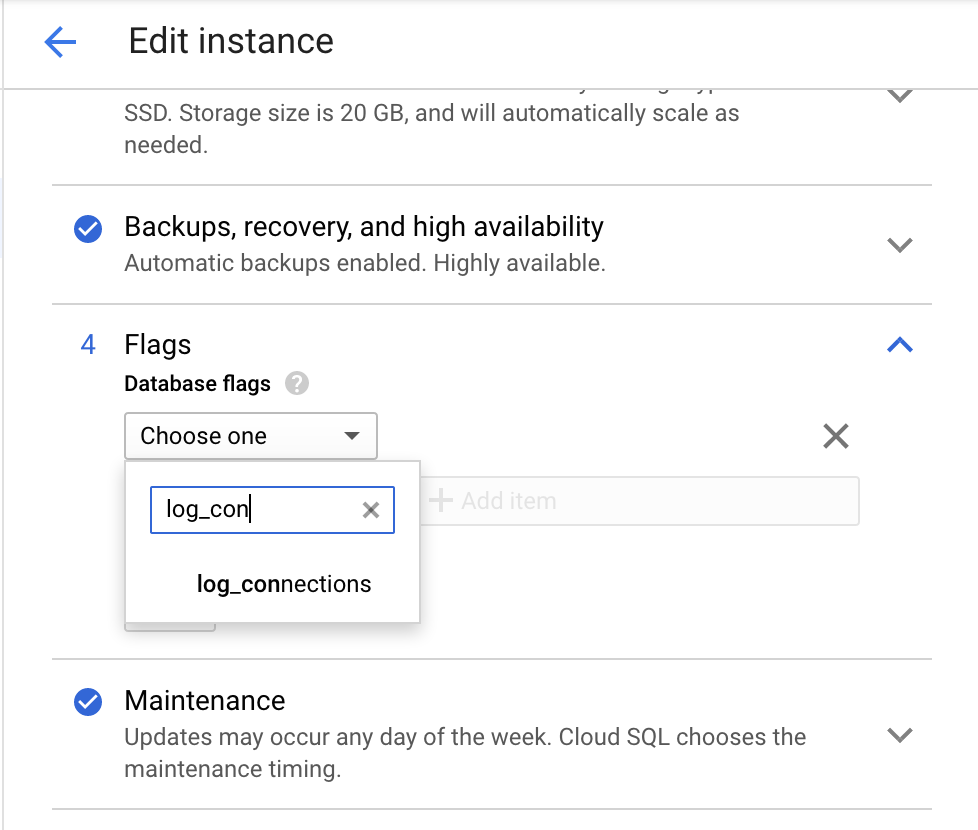
Use the Google Cloud console to enable the `log_connections` parameter.
1. Go to the **Edit instance** page of Cloud Storage.
[Go to Instances](https://console.cloud.google.com/sql/instances)
2. Under **Flags** , click **Add item** and search for `log_connections` as
in the following screenshot.
### gcloud
- Use the gcloud CLI to enable the `log_connections` parameter:
```
gcloud sql instances patch INSTANCE_NAME \
--database-flags log_connections=on
```
The output is the following:
```
WARNING: This patch modifies database flag values, which may require
your instance to be restarted. Check the list of supported flags -
/sql/docs/postgres/flags - to see if your
instance will be restarted when this patch is submitted.
Do you want to continue (Y/n)?
```
### Cloud SQL for PostgreSQL
Set `timezone` at the session level. This alteration stays in effect for the
current session and holds for the session lifetime only.
1. Show `timezone` configuration parameter:
```sql
postgres=> SHOW timezone;
```
You see the following output, where `timezone` is `set to UTC`:
```
TimeZone
---
UTC
(1 row)
```
2. Set `timezone` to UTC-9:
```sql
postgres=> SET timezone='UTC-9';
```
3. Show `timezone` configuration parameter:
```sql
postgres> SHOW timezone;
```
You see the following output, where `timezone` is set to `UTC-9`:
```
TimeZone
---
UTC-9
(1 row)
```
### Transactions and isolation levels
This section describes the main differences in transaction execution and
isolation levels between Oracle and Cloud SQL for PostgreSQL.
#### Commit mode
Oracle works by default in non-autocommit mode, where each DML transaction must
be determined with `COMMIT`/`ROLLBACK` statements. One of the fundamental
differences between Oracle and PostgreSQL is that PostgreSQL implicitly issues a
`COMMIT` after each command that does not follow `START TRANSACTION` (or
`BEGIN`). This is also known by some other database engines as autocommit.
Although autocommit is enabled by default, it can be disabled at the session
level using `SET AUTOCOMMIT OFF`.
#### Isolation levels
The ANSI/ISO SQL standard (SQL:92) defines four levels of isolation. Each level
provides a different approach for handling concurrent execution of database
transactions:
- **Read Uncommitted:** A currently processed transaction can see uncommitted data made by the other transaction. If a rollback is performed, all data is restored to its previous state.
- **Read Committed:** A transaction only sees data changes that were committed, uncommitted changes ("dirty reads") are not possible.
- **Repeatable Read:** A transaction can view changes made by the other transaction only after both transactions issued a `COMMIT` or both are rolled-back.
- **Serializable:** The strictest/strongest isolation level. This level locks on all records that are accessed, and locks the resource so that records cannot be appended to the table.
Transaction isolation levels manage the visibility of changed data as seen by
other running transactions. Also, when the same data is accessed by several
concurrent transactions, the selected level of transaction isolation affects the
way different transactions interact.
Oracle supports the following isolation levels:
- Read Committed (default)
- Serializable
- Read-Only (not a part of the ANSI/ISO SQL standard (SQL:92)
Oracle MVCC (Multiversion Concurrency Control):
- Oracle uses the MVCC mechanism to provide automatic read consistency across the entire database and all sessions.
- Oracle relies on the System Change Number (SCN) of the current transaction to obtain a consistent view of the database; therefore, all database queries only return data committed with respect to the SCN at the time of query execution.
- Isolation levels can be changed at the transaction and session levels.
Here's an example of setting isolation levels:
```sql
-- Transaction Level
SQL> SET TRANSACTION ISOLATION LEVEL READ COMMITTED;
SQL> SET TRANSACTION ISOLATION LEVEL SERIALIZABLE;
SQL> SET TRANSACTION READ ONLY;
-- Session Level
SQL> ALTER SESSION SET ISOLATION_LEVEL = SERIALIZABLE;
SQL> ALTER SESSION SET ISOLATION_LEVEL = READ COMMITTED;
```
Cloud SQL for PostgreSQL supports the following four
[transaction isolation levels](https://www.postgresql.org/docs/12/transaction-iso.html)
specified in the ANSI SQL:92 standard:
- Read Uncommitted (equivalent to Read Committed)
- Read Committed (default)
- Repeatable Read
- Serializable
The Cloud SQL for PostgreSQL default isolation level is `READ COMMITTED`.
These isolation levels can be altered at `SESSION` level, at `TRANSACTION` level
and at `INSTANCE` level.
To verify current isolation levels both at `TRANSACTION` and `SESSION` levels,
use the following statement:
```sql
postgres=> SELECT CURRENT_SETTING('TRANSACTION_ISOLATION');
```
The output is the following:
```
current_setting
---
read committed
(1 row)
```
You can modify the isolation level syntax as follows:
```sql
SET [SESSION CHARACTERISTICS AS] TRANSACTION ISOLATION LEVEL [ REPEATABLE READ | READ COMMITTED | READ UNCOMMITTED | SERIALIZABLE]
```
And you can modify the isolation level at SESSION level:
```sql
postgres=> SET SESSION CHARACTERISTICS AS TRANSACTION ISOLATION LEVEL REPEATABLE READ;
-- Verify
postgres=> SELECT CURRENT_SETTING('TRANSACTION_ISOLATION');
```
The output is the following:
```
current_setting
---
repeatable read
(1 row)
```
The isolation level at `INSTANCE` levels is controlled using the
[database flag](https://docs.cloud.google.com/sql/docs/postgres/flags.md.txt#postgres-d)
`default_transaction_isolation`. You can verify the this by using the following
statement:
```sql
postgres=> SHOW DEFAULT_TRANSACTION_ISOLATION;
```
The output is the following:
```
default_transaction_isolation
---
repeatable read
(1 row)
```
## What's next
- Explore more about [Cloud SQL for PostgreSQL](https://docs.cloud.google.com/sql/docs/postgres/users.md.txt) user accounts.
- Explore reference architectures, diagrams, and best practices about Google Cloud. Take a look at our [Cloud Architecture Center](https://docs.cloud.google.com/architecture).