# Hierarchical service activation overview
> [!WARNING]
>
> **Preview
> --- Hierarchical service activation**
>
>
> This feature is
>
> subject to the "Pre-GA Offerings Terms" in the General Service Terms section of the
> [Service Specific
> Terms](https://docs.cloud.google.com/terms/service-terms#1).
>
> Pre-GA features are available "as is" and might have limited support.
>
> For more information, see the
> [launch stage descriptions](https://cloud.google.com/products/#product-launch-stages).
Hierarchical service activation is a Service Usage feature that provides greater control over
managing [public and private services](https://docs.cloud.google.com/service-usage/docs/public-vs-private.md.txt)
across your organization's
[resource hierarchy](https://docs.cloud.google.com/resource-manager/docs/cloud-platform-resource-hierarchy.md.txt).
Its declarative policy model streamlines managing dependencies and services at
scale.
To learn how to use the feature, see
[Manage service enablement](https://docs.cloud.google.com/service-usage/docs/hierarchical-service-activation/manage-enablement.md.txt).
## Inheriting service enablement policies
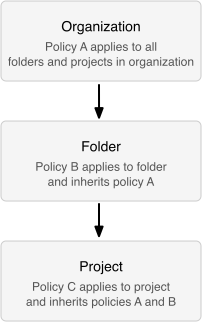
Hierarchical service activation lets you set service enablement policies at different levels
of the Google Cloud resource hierarchy. Policies set at a higher level are
inherited by all child resources. You only need to enable a service at the
highest common level.
This simplifies managing services across a large number of projects and supports
consistent policy enforcement. For example, you can ensure that all projects
under a folder or organization adhere to a baseline set of enabled services, and
reduce the need for project-level configuration.
You can set service enablement policies at the following levels:
- Policies set at the **organization** level apply to all folders and projects within the organization.
- Policies set at the **folder** level apply to all sub-folders and projects within the folder.
- Policies set at the **project** level inherit from parent folders and the organization.
### Organization policy
While hierarchical service activation lets you enable or disable services, the
[Organization Policy Service](https://docs.cloud.google.com/resource-manager/docs/organization-policy/overview)
complements this by providing centralized control over how services can be used.
Once a service is enabled, you can use organization policies to enforce
constraints on its configuration, such as restricting the physical location of
newly created resources or limiting which service accounts can be used. This
lets you establish compliance guardrails, ensuring that even after a service is
enabled, its usage adheres to your organization's governance requirements.
## Key concepts
To manage service enablement, you should understand these key concepts of the
hierarchical service activation declarative policy model.
### Consumer policy
The [`ConsumerPolicy`](https://docs.cloud.google.com/service-usage/docs/reference/rest/v2beta/consumerPolicies.md.txt#resource:-consumerpolicy)
is a Service Usage API resource found at each level of the Google Cloud
resource hierarchy. This resource, always named `default`, contains the
`enableRules` that define which services are enabled. Instead of
enabling or disabling a specific service, you can modify the `ConsumerPolicy`
resource. When a service name is in its list, the service is enabled at that
hierarchy level. This declarative approach simplifies managing service states.
### Effective policy
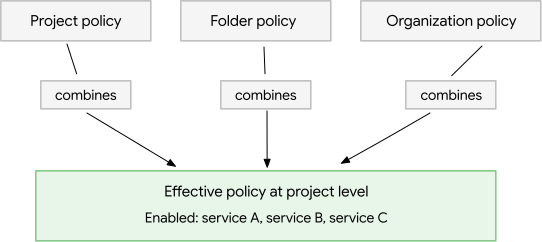
The `EffectivePolicy` is a Service Usage API resource found at each level of
the Google Cloud resource hierarchy. The effective policy shows which
services are enabled for a resource. It combines the resource's `ConsumerPolicy`
with the policies of all its ancestors. This gives you a complete view of all
enabled services and where their enablement originated.
### Service dependencies
Many Google Cloud services need other services to function. When
you enable a service using hierarchical service activation, its required dependencies are
automatically added to the `ConsumerPolicy`. A *service dependency group*
contains these relied-on services, which you can inspect to better understand
and manage them.
## Transitioning from a previous Service Usage version
Hierarchical service activation works with previous Service Usage versions. You can use
hierarchical service activation features, like enabling services at the folder or
organization level, without changing existing project-level settings. Services
enabled at the project level will continue to work. The hierarchical model adds
to these settings. A project's effective policy will be the result of policies
set at the project level combined with policies inherited from folders and the
organization.
For example, if `compute.googleapis.com` was enabled at the project level using
a previous Service Usage version, the service remains enabled. It is unaffected
by any subsequent enablements made at the folder or organization level using
hierarchical service activation. Conversely, if you enable `compute.googleapis.com` at the
folder level, the service is effectively enabled for all projects in that folder.
## What's next
- To enable and disable services, see [Manage service enablement](https://docs.cloud.google.com/service-usage/docs/hierarchical-service-activation/manage-enablement.md.txt).
- To manage policies, see [Manage consumer policies](https://docs.cloud.google.com/service-usage/docs/hierarchical-service-activation/manage-consumer-policies.md.txt).
- To inspect service dependencies, see [List service dependencies](https://docs.cloud.google.com/service-usage/docs/hierarchical-service-activation/list-dependencies.md.txt).