# Isolation for Cloud Service Mesh
> [!WARNING]
>
> **Preview**
>
>
> This product or feature is
>
> subject to the "Pre-GA Offerings Terms" in the General Service Terms section
> of the [Service Specific
> Terms](https://docs.cloud.google.com/terms/service-terms#1).
>
> Pre-GA products and features are available "as is" and might have limited support.
>
> For more information, see the
> [launch stage descriptions](https://cloud.google.com/products/#product-launch-stages).
This page shows you how to configure your service mesh with
better request isolation for your backend service by creating an isolation
config.
This feature provides additional isolation support for the backends of your
services to prevent cross-region overflow.
By default, Cloud Service Mesh uses the
[waterfall by region](https://docs.cloud.google.com/service-mesh/v1.26/docs/service-routing/advanced-load-balancing-overview.md.txt#balance-trafic-backends)
algorithm to decide where your user traffic should be routed to. With this
algorithm, Cloud Service Mesh routes traffic
to the closest region until the backends are running at their configured
capacity limit. After that, traffic will start to overflow into a region that is
further away.
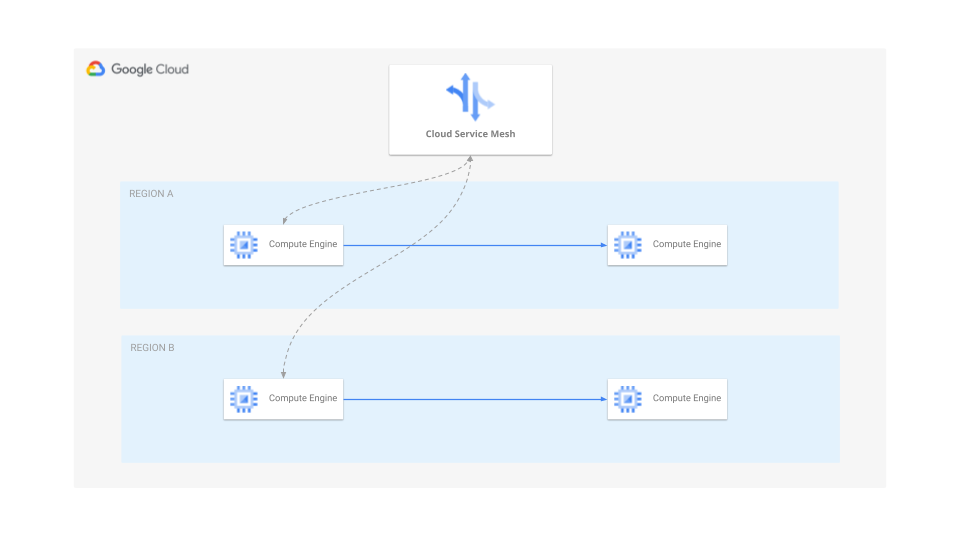
With this feature, based on your frontend region and configuration of isolation,
traffic is limited to the closest or local region and won't overflow if the
closest region is running out of capacity. This help you prevent potential
cascading failures and limit potential outages in the same region. You otherwise
still manage your service config at the global level.
Whether or not to use this feature depends on your actual use cases and you
should carefully explore the following considerations before using it:
- If your backends in a region are overloaded, Cloud Service Mesh may still send additional traffic to them even if backends in other regions can handle the traffic. This means each individual region is more likely to overload due to additional traffic and you need to plan accordingly.
- Your traffic is still routed with a global control plane. This means there is still a chance of globally coordinated failures across multiple regions.
- This feature is configured with the [serviceLbPolicy resource](https://docs.cloud.google.com/load-balancing/docs/service-lb-policy.md.txt). All restrictions still apply.
- With the **STRICT** isolation mode, requests fail if there are no serving backends in the same region.
There are two scenarios after applying this feature:
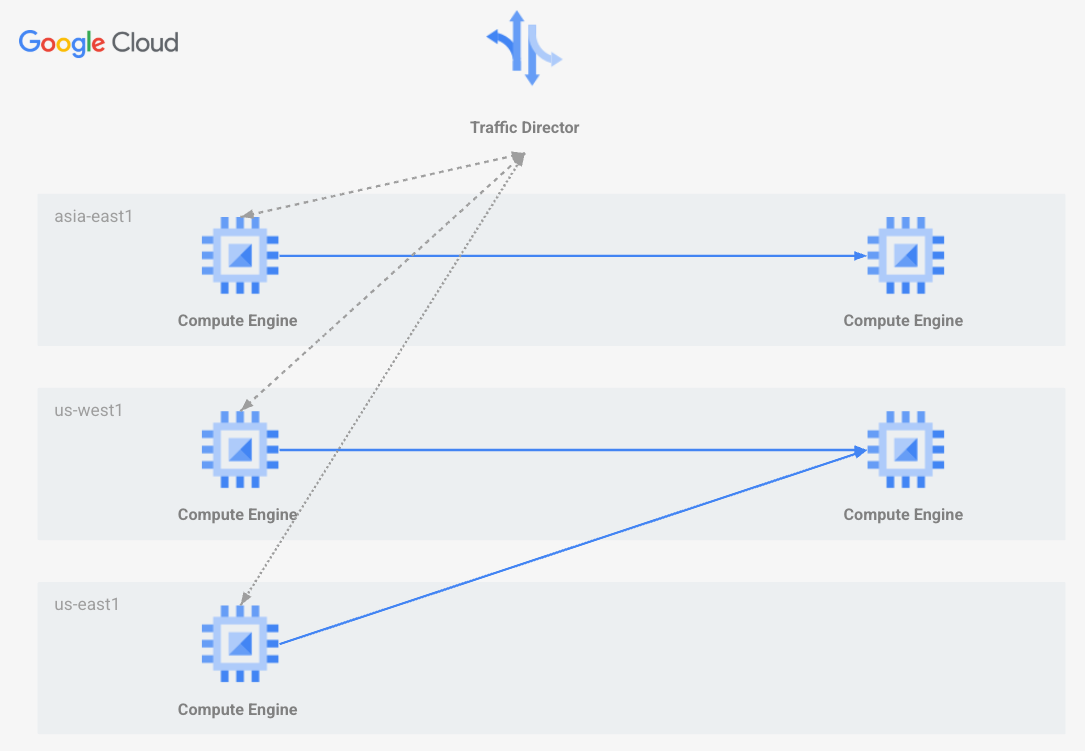
### Nearest Isolation
Nearest Regional Isolation is where a frontend with collocated backends will
be isolated to only that region. If no backend available is in the local
location, it will be connected to the backend region while optimizing network
latency.
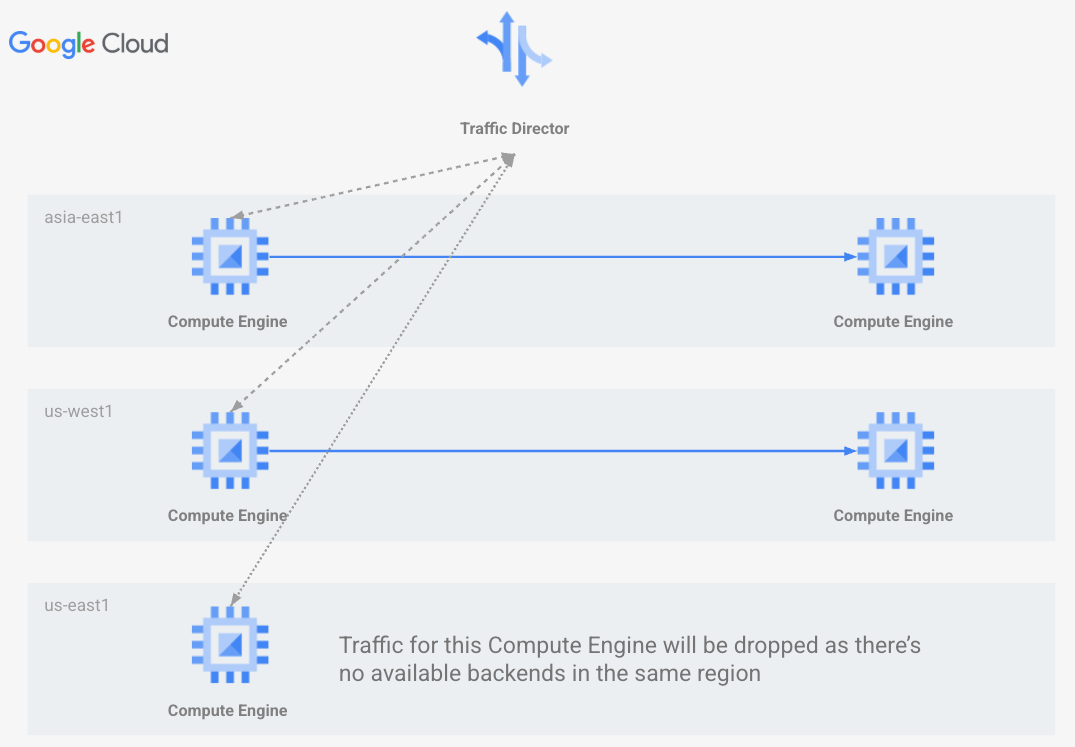
### Strict Isolation
Strict Regional Isolation is where frontend locations can only reach backends
within the local region. Frontends without serving backends in the local
region will drop all their traffic.
## Enabling isolation
### gcloud
Perform the following steps to create an isolation config using
Google Cloud CLI.
1. Run the following command to create a `serviceLbPolicy`:
```bash
gcloud network-services service-lb-policies create my-isolation-policy \
--isolation-config-granularity=REGION \
--isolation-config-mode=ISOLATION_MODE \
--location=global
```
Replace ISOLATION_MODE with one of the following options:
1. **NEAREST**: Traffic is sent to the nearest region.
2. **STRICT**: Traffic fails if no serving backends are available in the same region as the frontend.
If not explicitly provided, **NEAREST** is the default value. Note that you
can only specify this field if the `--isolation-granularity` flag is also
set.
Alternatively, if you have an existing policy, update it with the following
command:
```bash
gcloud network-services service-lb-policies update POLICY_NAME \
--isolation-config-granularity=REGION \
--isolation-config-mode=ISOLATION_MODE \
--location=global
```
Replace POLICY_NAME with the name of your existing policy.
2. Once a `serviceLbPolicy` resource is created or updated, attach it to your
`backendService` resource:
```bash
gcloud compute backend-services update BACKEND_SERVICE_NAME \
‐‐service-lb-policy POLICY_URL
```
Replace BACKEND_SERVICE_NAME with the name of your Backend Service.
## Disable isolation
To disable this feature, you have two options:
1. Set the `isolationConfigs` to unspecified.
2. Remove `ServiceLbPolicy` from the service if it is the only feature you enabled with this policy
### Set `isolationConfigs` to unspecified
Run the following command to set the `isolationConfigs` to unspecified:
```bash
gcloud network-services service-lb-policies update my-isolation-policy \
--isolation-config-granularity=unspecified \
--isolation-config-mode=unspecified \
--location=global
```
### Remove `ServiceLbPolicy` from the service
Run the following command to remove the `ServiceLbPolicy`:
```bash
gcloud network-services service-lb-policies delete my-isolation-policy --location=global
```
## Supportability, Diagnosis, and Troubleshooting
This section describes potential issues after turning on this feature.
### Backends overloaded
This feature provides isolation support, and thus traffic won't be shifted to a
remote region if the local region is full. So some of your backends could be
overloaded if this feature is turned on. If this is not the behavior you are
looking for, consider turning off this feature. You can also consider
[enabling autoscaling](https://docs.cloud.google.com/kubernetes-engine/docs/how-to/horizontal-pod-autoscaling.md.txt)
to handle backend overloads better.
### Traffic was shifted
This feature prevents capacity based traffic overflow. So if your backends were
overloaded before turning this feature on, traffic may already have been shifted
to a remote region. In that case, turning this feature on could cause these
traffic to be shifted back.
### Traffic was not shifted
This feature prevents capacity based traffic overflow. So if your backends were
not overloaded before turning this feature on, it is likely that the closest
region is capable of handling all the traffic. In that case, turning this feature
on may not cause traffic shifts in the short term.
### Traffic was shifted after backends are added to or removed from a region
When this feature is turned on, traffic may be shifted if new backends are added
to a region. This is expected as Cloud Service Mesh will try to route traffic
to these backends to optimize the overall network latency. Similarly when the
last backends are removed, Cloud Service Mesh will start sending traffic to a
remote region. This is also an expected behavior.
### Requests failed
If **STRICT** isolation mode is enabled and there are no backends serving in the
same region as the frontend, traffic is expected to fail. If it is not your
intended behavior, make sure you have backends in each of the regions
where you expect traffic to be sent.