# List Route resources
> [!NOTE]
> **Note:** This guide only supports Cloud Service Mesh with Google Cloud APIs and does not support Istio APIs. For more information see, [Cloud Service Mesh overview](https://docs.cloud.google.com/service-mesh/v1.25/docs/overview.md.txt).
This document is for mesh administrators using the service routing APIs
to configure service meshes.
In the service routing API model, `Route` resources are attached to `Mesh` or
`Gateway` resources. In its configuration, the `Mesh` or `Gateway` resource
references one or more `Route` resources.
If you are the owner of a `Mesh` or `Gateway` resource, you can list the `Route`
resources attached to the `Mesh` or `Gateway`.
Each `Mesh` or `Gateway` resource has synthetic child collection of `RouteView`
resources. Each `RouteView` corresponds to a single `Route`. `RouteView` objects
are created alongside `Route` objects.
In the following diagram, the `RouteView` for `Gateway` A consists of the
`TCPRoute` resources from Project A. The `RouteView` for `Gateway` B comprises
the `HTTPRoute` resources from Project B and `GRPCRoute` resources from
Project C.
[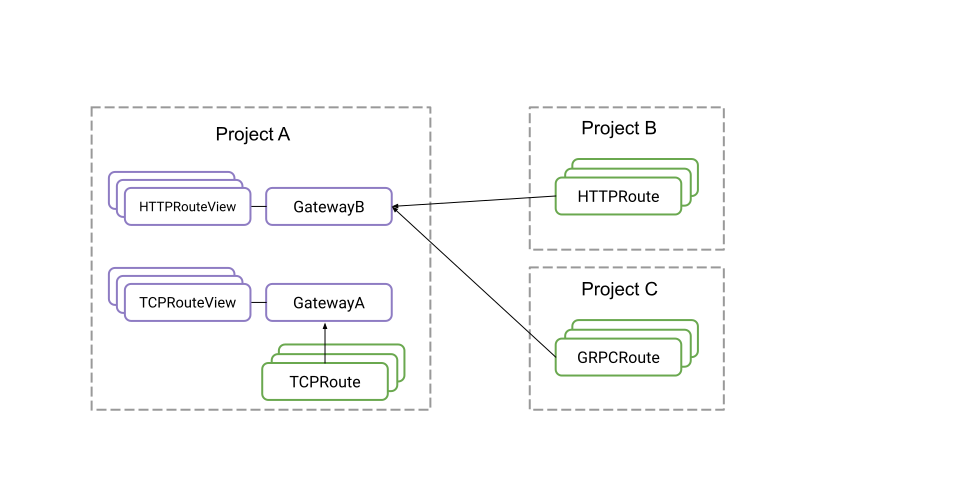](https://docs.cloud.google.com/static/service-mesh/v1.25/docs/images/routeview.svg) The relationships among the \`Route\`, \`Routeview\`, and \`Gateway\` resources.(click to enlarge)
This feature is scoped to the `Mesh` or `Gateway` level. A `RouteView` for a
`Gateway` or `Mesh` lists routes attached to that `Gateway` or `Mesh` and not
all the routes attached to the associated scope.
To list the `RouteView` resources, issue the following command:
```
gcloud alpha network-services route-views list \
--location=global \
--[mesh | gateway]=[ MESH_NAME | GATEWAY_NAME ]
```
To get more information on the Route itself, issue the following command:
```
gcloud alpha network-services route-views describe --route-view=ROUTEVIEW_FULLNAME
```
A common workflow would be be listing the `RouteViews` for a Mesh or Gateway
then describing each for a full overview of the attached Routes.
> [!NOTE]
> **Note:** Google Cloud CLI wraps two endpoints for convenience. When you use the API directly, the specific `Mesh` or `Gateway` endpoint and associated requests must be used for the appropriate parent(`Mesh` or `Gateway`).
You cannot create, update, or delete `RouteView` resources. They are created,
updated, and deleted when their corresponding `Route` resources are created,
updated, and deleted.
## Troubleshooting
> [!IMPORTANT]
> **Important:** RouteViews were backfilled for existing resources as 'best effort' and will continue to self-heal during the course of normal HttpRoute, GrpcRoute, TcpRoute, and TlsRoute update operations. Routes not updated on or before 2024-08-20 may not be reflected with RouteViews for projects with certain security configurations.
If the route-views commands fail to list RouteViews for routes such as
`Listed 0 items.` or not listing all known routes:
- Verify that the Mesh or Gateway used in the `route-views list` are referenced within the Route's `meshes` or `gateways` fields, respectively using:
-
```bash
gcloud network-services [http-routes|grpc-routes|tcp-routes|tls-routes] describe \
--location global ROUTE_ID
```
- For customers with many resources, create a support ticket for assistance.
- Manually Trigger an update for your Route/s
- Reimporting the route
1.
```bash
gcloud network-services http-routes export my-route --location=global \
--destination=export.yaml
```
2.
```bash
gcloud network-services http-routes import my-route --location=global \
--source=export.yaml
```
- For customers using the generated NetworkServices client, call appropriate NetworkServices.Update\*Route API.
- Modify description to trigger Terraform automation.
## What's next
- For information about how service routing works, read [Service routing overview](https://docs.cloud.google.com/service-mesh/v1.25/docs/service-routing/service-routing-overview.md.txt)
- For information about the service routing APIs, read the documentation for the [network services APIs](https://docs.cloud.google.com/service-mesh/v1.25/docs/reference/network-services/rest.md.txt).