[Video](https://www.youtube.com/watch?v=h0BnA7R8vg4)
*Pseudonymization* is a de-identification technique that replaces sensitive data
values with cryptographically generated *tokens*. Pseudonymization is widely
used in industries like finance and healthcare to help reduce the risk of data
in use, narrow compliance scope, and minimize the exposure of sensitive data
to systems while preserving data utility and accuracy.
Sensitive Data Protection supports three pseudonymization techniques of
de-identification, and generates tokens by applying [one of three cryptographic
transformation methods](https://docs.cloud.google.com/sensitive-data-protection/docs/pseudonymization#supported-methods) to original sensitive data values.
Each original sensitive value is then replaced with its corresponding token.
Pseudonymization is sometimes referred to as *tokenization* or *surrogate
replacement*.
Pseudonymization techniques enable either *one-way* or *two-way* tokens. A
one-way token has been transformed irreversibly, while a two-way token can be
reversed. Because the token is created using symmetric encryption, the same
cryptographic key that can generate new tokens can also reverse tokens. For
situations in which you don't need reversibility, you can use one-way tokens
that use secure hashing mechanisms.
It's helpful to understand how pseudonymization can help protect sensitive data
while allowing your business operations and analytical workflows easy access to
and use of the data they need. This topic explores the concept of
pseudonymization and the three cryptographic methods to transform data that
Sensitive Data Protection supports.
For instructions on how to implement these pseudonymization methods and for more
examples of using Sensitive Data Protection, see [De-identifying sensitive
data](https://docs.cloud.google.com/sensitive-data-protection/docs/deidentify-sensitive-data).
## When to use pseudonymization
The following are some common use cases:
- **Preserve referential integrity across analytical datasets**: Replace customer IDs and primary keys with consistent cryptographic tokens so teams can join and aggregate tables in BigQuery without exposing sensitive identifiers.
- **Reduce compliance and audit scope**: Replace credit card numbers and personally identifiable information (PII) with format-preserving tokens to narrow PCI DSS or HIPAA compliance boundaries in downstream applications.
- **Safeguard test and development environments**: Replicate production databases to lower-tier development environments with tokenized fields. This approach allows developers to test applications with realistic data structures without accessing live customer records.
- **Enable secure reversibility for authorized workflows**: Use two-way encryption (such as AES-SIV or FPE) with keys stored in Cloud Key Management Service so that only authenticated and privileged backend services can de-tokenize the original values when legally required.
- **Enforce irreversible data masking with cryptographic hashing**: Generate one-way HMAC-SHA-256 digests. This method is suitable when cross-record correlation is required for statistical analysis but restoring the original plaintext must remain computationally infeasible.
## Supported cryptographic methods in Sensitive Data Protection
Sensitive Data Protection supports three pseudonymization techniques, all of which
use cryptographic keys. Following are the available methods:
- **Deterministic encryption using AES-SIV:** An input value is replaced with a value that has been encrypted using the [AES-SIV](https://tools.ietf.org/html/rfc5297) encryption algorithm with a cryptographic key, encoded using base64, and then prepended with a surrogate annotation, if specified. This method produces a hashed value, so it does not preserve the character set or the length of the input value. Encrypted, hashed values can be re-identified using the original cryptographic key and the entire output value, including surrogate annotation. Learn more about [the format of values tokenized using AES-SIV
encryption](https://docs.cloud.google.com/sensitive-data-protection/docs/pseudonymization#aes-siv).
- **Format preserving encryption:** An input value is replaced with a value that has been encrypted using the [FPE-FFX](https://en.wikipedia.org/wiki/Format-preserving_encryption) encryption algorithm with a cryptographic key, and then prepended with a surrogate annotation, if specified. By design, both the character set and the length of the input value are preserved in the output value. Encrypted values can be re-identified using the original cryptographic key and the entire output value, including surrogate annotation. (For some important considerations around using this encryption method, see [Format preserving
encryption](https://docs.cloud.google.com/sensitive-data-protection/docs/pseudonymization#fpe-ffx) later in this topic.)
- **Cryptographic hashing:** An input value is replaced with a value that has been encrypted and hashed using [Hash-based Message Authentication Code
(HMAC)-Secure Hash Algorithm
(SHA)-256](https://tools.ietf.org/html/rfc4634) on the input value with a cryptographic key. The hashed output of the transformation is always the same length and can't be re-identified. Learn more about [the
format of values tokenized using cryptographic
hashing](https://docs.cloud.google.com/sensitive-data-protection/docs/pseudonymization#cryptographic-hashing).
These pseudonymization methods are summarized in the following table. Table
rows are explained following the table.
| | **Deterministic encryption using AES-SIV** | **Format preserving encryption** | **Cryptographic hashing** |
|---|---|---|---|
| **Encryption type** | [AES-SIV](https://tools.ietf.org/html/rfc5297) | [FPE-FFX](https://en.wikipedia.org/wiki/Format-preserving_encryption) | [HMAC-SHA-256](https://tools.ietf.org/html/rfc4634) |
| **Supported input values** | At least 1 char long; no character set limitations. | At least 2 chars long; must be encoded as ASCII. | Must be a string or an integer value. |
| **Surrogate annotation** | Optional. | Optional. | N/A |
| **Context tweak** | Optional. | Optional. | N/A |
| **Character set and length preserved** | ✗ | ✓ | ✗ |
| **Reversible** | ✓ | ✓ | ✗ |
| **Referential integrity** | ✓ | ✓ | ✓ |
- **Encryption type:** The kind of encryption used in the de-identification transformation.
- **Supported input values:** Minimum requirements for input values.
- **Surrogate annotation:** A user-specified annotation that is prepended to encrypted values to provide context to users and to provide information for Sensitive Data Protection to use in the re-identification of a de-identified value. A surrogate annotation is required for re-identification of unstructured data. It is optional when transforming a column of structured data or tabular data with a [`RecordTransformation`](https://docs.cloud.google.com/sensitive-data-protection/docs/reference/rest/v2/organizations.deidentifyTemplates#recordtransformations).
- **Context tweak:** A reference to a data field that "tweaks" the input value so that identical input values can be de-identified to different output values. The context tweak is optional when transforming a column of structured data or tabular data with a `RecordTransformation`. To learn more, see [Using context tweaks](https://docs.cloud.google.com/sensitive-data-protection/docs/pseudonymization.md.txt#context-tweaks).
- **Character set and length preserved:** Whether a de-identified value is made up of the same set of characters as the original value, and whether the length of the de-identified value matches that of its original value.
- **Reversible:** Can be re-identified using the cryptographic key, surrogate annotation, and any context tweak.
- **Referential integrity:** [Referential
integrity](https://en.wikipedia.org/wiki/Referential_integrity) allows for records to maintain their relationship to one another even after having their data individually de-identified. Given the same [crypto
key](https://docs.cloud.google.com/sensitive-data-protection/docs/pseudonymization#using-crypto-keys) and [context tweak](https://docs.cloud.google.com/sensitive-data-protection/docs/pseudonymization.md.txt#context-tweaks), a table of data will be replaced with the same obfuscated form each time it is transformed, which ensures that connections between values (and, with structured data, records) are preserved, even across tables.
## How tokenization works in Sensitive Data Protection
The basic process of tokenization is the same for all three methods that
Sensitive Data Protection supports.
**Step 1: Sensitive Data Protection selects data to tokenize.** The most common way
to do this is to use a built-in or custom [infoType
detector](https://docs.cloud.google.com/sensitive-data-protection/docs/concepts-infotypes) to match on the desired sensitive data
values. If you are scanning [structured
data](https://docs.cloud.google.com/sensitive-data-protection/docs/inspecting-structured-text) (such as a BigQuery table),
you can also perform tokenization on entire columns of data using [record
transformations](https://docs.cloud.google.com/sensitive-data-protection/docs/reference/rest/v2/organizations.deidentifyTemplates#DeidentifyTemplate.RecordTransformations).
For more information about the two categories of transformations---infoType
and record transformations---see [De-identification
transformations](https://docs.cloud.google.com/sensitive-data-protection/docs/deidentify-sensitive-data#de-identification_transformations).
**Step 2: Using a cryptographic key, Sensitive Data Protection encrypts each input
value.** You can provide this key in one of three ways:
- By wrapping it using Cloud Key Management Service (Cloud KMS). (For maximum security, Cloud KMS is the preferred method.)
- By using a transient key, which Sensitive Data Protection generates at the time of de-identification and then discards. A transient key only keeps integrity per API request. If you need integrity or plan to re-identify this data, do not use this key type.
- Directly in raw text form. (Not recommended.)
For more details, see the [Using cryptographic keys](https://docs.cloud.google.com/sensitive-data-protection/docs/pseudonymization.md.txt#using-crypto-keys)
section, later in this topic.
**Step 3 (Cryptographic hashing and deterministic encryption with AES-SIV only):
Sensitive Data Protection encodes the encrypted value using base64.** With
cryptographic hashing, this encoded, encrypted value is the token, and the
process continues with Step 6. With deterministic encryption using AES-SIV, this
encoded, encrypted value is the surrogate value, which is just one component of
the token. The process continues with Step 4.
**Step 4 (Format preserving and deterministic encryption with AES-SIV only):
Sensitive Data Protection adds an optional surrogate annotation to the encrypted
value.** The surrogate annotation helps identify encrypted surrogate values by
prepending them with a descriptive string that you define. For example, without
an annotation you might not be able to tell apart a de-identified phone number
and a de-identified Social Security or other identification number. In addition,
to re-identify values in unstructured data that have been de-identified using
either format preserving encryption or deterministic encryption, you must
specify a surrogate annotation. (Surrogate annotations are not required when
transforming a column of structured, or tabular, data with a
[`RecordTransformation`](https://docs.cloud.google.com/sensitive-data-protection/docs/reference/rest/v2/organizations.deidentifyTemplates#recordtransformations).)
**Step 5 (Format preserving and deterministic encryption with AES-SIV of
structured data only): Sensitive Data Protection can use optional context from
another field to "tweak" the token generated.** This enables you to change the
scope of the token. For example, suppose you have a database of marketing
campaign data that includes email addresses and you want to generate unique
tokens for the same email address "tweaked" by the campaign ID. This would allow
someone to join data for the same user within the same campaign but not across
different campaigns. If a context tweak is used to create the token, then this
context tweak is also required for the de-identification transformations to be
reversed. Format preserving and deterministic encryption using AES-SIV support
contexts. Learn more about [using context tweaks](https://docs.cloud.google.com/sensitive-data-protection/docs/pseudonymization.md.txt#using-context-tweaks).
> [!NOTE]
> **Note:** For more information about the format of tokenized values, including surrogate annotations and contexts, see the next section, "Tokenized value comparison."
**Step 6: Sensitive Data Protection replaces the original value with the
de-identified value.**
## Tokenized value comparison
This section demonstrates how typical tokens look after being de-identified
using each of the three methods discussed in this topic. The example sensitive
data value is a North American telephone number (`1-206-555-0123`).
### Deterministic encryption using AES-SIV
With de-identification using deterministic encryption and AES-SIV, an input
value (and, optionally, any specified context tweak) is encrypted using AES-SIV
with a cryptographic key, encoded using base64, and then optionally prepended
with a surrogate annotation, if specified. This method does not preserve the
character set (or "alphabet") of the input value. In order to generate printable
output, the resulting value is encoded in base64.
The resulting token, assuming a surrogate infoType has been specified, is in
the form:
```
SURROGATE_INFOTYPE(SURROGATE_VALUE_LENGTH):SURROGATE_VALUE
```
The following annotated diagram shows an example token---the output of a
de-identification operation using deterministic encryption with AES-SIV on the
value `1-206-555-0123`. The optional surrogate infoType has been set to
`NAM_PHONE_NUMB`:
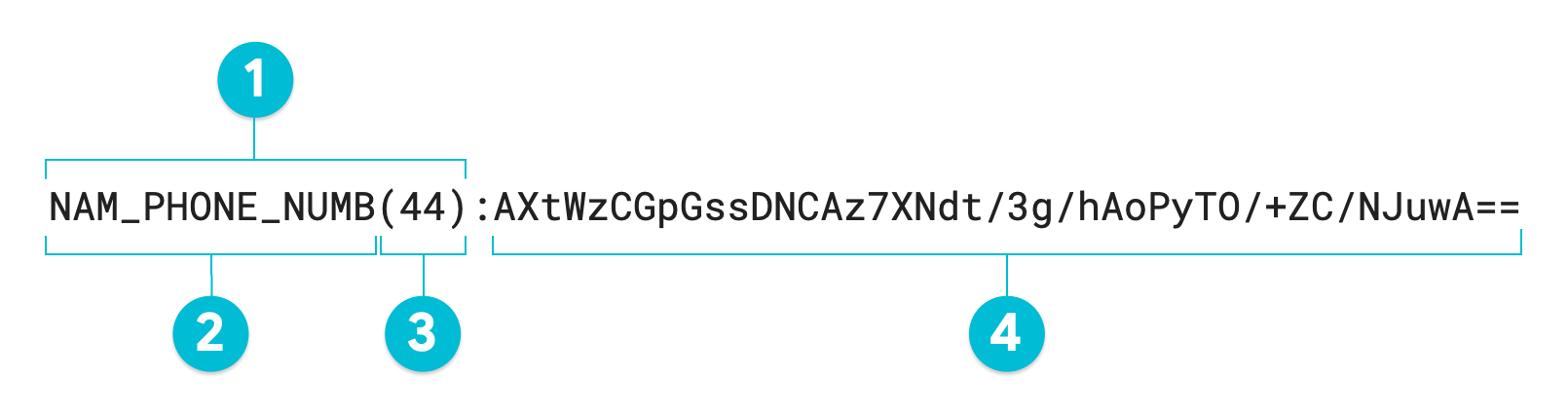
1. Surrogate annotation
2. Surrogate infoType (defined by user)
3. Character length of transformed value
4. Surrogate (transformed) value
If you do not specify a surrogate annotation, the resulting token is equal to
the transformed value, or #4 in the annotated diagram. To re-identify
unstructured data, this entire token is required, including the surrogate
annotation. When transforming structured data such as a table, the surrogate
annotation is optional; Sensitive Data Protection can perform both
de-identification and re-identification on an entire column using a
[`RecordTransformation`](https://docs.cloud.google.com/sensitive-data-protection/docs/reference/rest/v2/organizations.deidentifyTemplates#recordtransformations)
without a surrogate annotation.
### Format preserving encryption
With de-identification using format preserving encryption, an input value (and,
optionally, any specified context tweak) is encrypted using the FFX mode of
format preserving encryption ("FPE-FFX") with a cryptographic key, and then
optionally prepended with a surrogate annotation, if specified.
Unlike the other methods of tokenization described in this topic, the output
surrogate value is the same length as the input value, and it is not encoded
using base64. You define the character set---or "alphabet"---that
the encrypted value is comprised of. There are three ways to specify the
alphabet for Sensitive Data Protection to use in the output value:
- Use one of four enumerated values that represent the four most common character sets/alphabets.
- Use a radix value, which specifies the size of the alphabet. Specifying the minimum radix value of `2` results in an alphabet that consists of just `0` and `1`. Specifying the maximum radix value of `95` results in an alphabet that includes all numeric characters, upper-case alpha characters, lower-case alpha characters, and symbol characters.
- Build an alphabet by listing the exact characters to use. For example, specifying `1234567890-*` would result in a surrogate value that is made up of only numbers, hyphens, and asterisks.
**Important:** When choosing to use the format preserving
encryption (FPE) method of de-identification, ensure that both the original
values you're transforming and the size of the alphabet you've specified for
transformed values to use (the radix) are of sufficient length to prevent
reverse engineering of the secure output. In situations where the number of
possible character strings is small, either increase the radix of the
alphabet or use a [context tweak](https://docs.cloud.google.com/sensitive-data-protection/docs/pseudonymization.md.txt#context-tweaks).
In addition, although the length of the transformed value is preserved
thanks to the lack of authentication and initialization vector, FPE provides
fewer security guarantees compared to other deterministic encryption
methods such as [deterministic encryption with AES-SIV](https://docs.cloud.google.com/sensitive-data-protection/docs/pseudonymization.md.txt#aes-siv).
The following table lists four common character sets by each one's enumerated
value
([`FfxCommonNativeAlphabet`](https://docs.cloud.google.com/sensitive-data-protection/docs/reference/rest/v2/organizations.deidentifyTemplates#ffxcommonnativealphabet)),
radix value, and list of the set's characters. The final row lists the full
character set, which corresponds to the maximum radix value.
| Alphabet/character set name | Radix | Character list |
|---|---|---|
| `NUMERIC` | `10` | `0123456789` |
| `HEXADECIMAL` | `16` | `0123456789ABCDEF` |
| `UPPER_CASE_ALPHA_NUMERIC` | `36` | `0123456789ABCDEFGHIJKLMNOPQRSTUVWXYZ` |
| `ALPHA_NUMERIC` | `62` | `0123456789ABCDEFGHIJKLMNOPQRSTUVWXYZabcdefghijklmnopqrstuvwxyz` |
| - | `95` | ``0123456789ABCDEFGHIJKLMNOPQRSTUVWXYZabcdefghijklmnopqrstuvwxyz~`!@#$%^&*()_-+={[}]|\:;"'<,>.?/`` |
The resulting token, assuming a surrogate infoType has been specified, is in the
form:
```
SURROGATE_INFOTYPE(SURROGATE_VALUE_LENGTH):SURROGATE_VALUE
```
The following annotated diagram is the output of a Sensitive Data Protection
de-identification operation using format preserving encryption on the value
`1-206-555-0123` using a radix of `95`. The optional surrogate infoType has
been set to `NAM_PHONE_NUMB`:
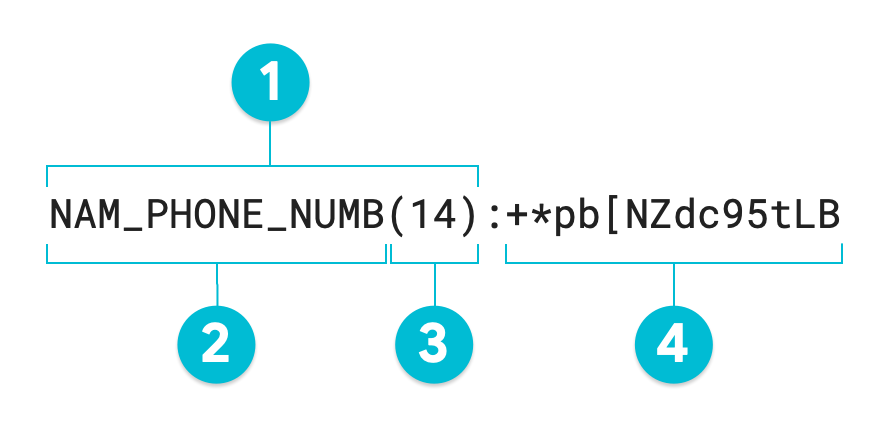
1. Surrogate annotation
2. Surrogate infoType (defined by user)
3. Character length of transformed value
4. Surrogate (transformed) value---same length as input value
If you do not specify a surrogate annotation, the resulting token is equal to
the transformed value, or #4 in the annotated diagram. To re-identify
unstructured data, this entire token is required, including the surrogate
annotation. When transforming structured data such as a table, the surrogate
annotation is optional; Sensitive Data Protection can perform both
de-identification and re-identification on an entire column using a
[`RecordTransformation`](https://docs.cloud.google.com/sensitive-data-protection/docs/reference/rest/v2/organizations.deidentifyTemplates#recordtransformations)
without a surrogate.
> [!NOTE]
> **Note:** By design, FPE-FFX preserves the length and character set of the input text. This means that it lacks authentication and an initialization vector, which would cause a length expansion in the output token. Other methods like deterministic encryption using AES-SIV provide these stronger security guarantees and are recommended for tokenization use cases unless length and character set preservation are strict requirements---for example, for backward compatibility with a legacy data system.
### Cryptographic hashing
With de-identification using cryptographic hashing, an input value is hashed
using HMAC-SHA-256 with a cryptographic key, and then encoded using base64. The
de-identified value is always a uniform length, depending on the size of the key.
Unlike the other tokenization methods discussed in this topic, cryptographic
hashing creates a one-way token. That is, de-identification using cryptographic
hashing can't be reversed.
Following is the output of a de-identification operation using cryptographic
hashing on the value `1-206-555-0123`. This output is a base64-encoded
representation of the hashed value:
```
XlTCv8h0GwrCZK+sS0T3Z8txByqnLLkkF4+TviXfeZY=
```
## Using cryptographic keys
There are three options for cryptographic keys that you can use with the
cryptographic de-identification methods in Sensitive Data Protection:
- **Cloud KMS wrapped cryptographic key** : This is the most secure
type of cryptographic key available to use with the Sensitive Data Protection
de-identification methods. A Cloud KMS wrapped key consists of a
128-, 192-, or 256-bit cryptographic key that has been encrypted using
another key. You provide the first cryptographic key, which is then wrapped
using a Cloud Key Management Service-stored cryptographic key. These kinds of keys are
stored in Cloud KMS for later re-identification. For more
information on creating and wrapping a key for the purpose of
de-identification and re-identification, see
[Quickstart: De-identifying and re-identifying sensitive text](https://docs.cloud.google.com/sensitive-data-protection/docs/inspect-sensitive-text-de-identify.md.txt).
> [!IMPORTANT]
> **Note:** When you use Cloud KMS for cryptographic operations, [charges apply](https://cloud.google.com/kms/pricing). In addition, when you use a [Cloud HSM](https://docs.cloud.google.com/kms/docs/hsm.md.txt) key or a [Cloud EKM](https://docs.cloud.google.com/kms/docs/ekm.md.txt) key, you consume Cloud KMS quota on the project that contains the key. In contrast, if you're using a software Cloud KMS key with Sensitive Data Protection, no quota values apply. For more information, see [Quotas](https://docs.cloud.google.com/kms/quotas.md.txt) in the Cloud KMS documentation.
- **Transient cryptographic key**: A transient cryptographic key is generated
by Sensitive Data Protection at the time of de-identification, and then
discarded. For this reason, do not use a transient cryptographic key with
any cryptographic de-identification method that you want to reverse.
Transient cryptographic keys only keep integrity per API request. If you
need integrity across more than one API request or plan to re-identify your
data, do not use this key type.
- **Unwrapped cryptographic key**: An unwrapped key is a raw base64-encoded
128-, 192-, or 256-bit cryptographic key that you provide inside the
de-identification request to the DLP API. You are responsible
for keeping these kinds of cryptographic keys safe for later
re-identification. Because of the risk of accidentally leaking the key,
these types of keys are not recommended. These keys can be useful for
testing, but for production workloads a Cloud KMS wrapped
cryptographic key is recommended instead.
To learn more about the available options when using cryptographic keys, see
[`CryptoKey`](https://docs.cloud.google.com/sensitive-data-protection/docs/reference/rest/v2/organizations.deidentifyTemplates#cryptokey)
in DLP API reference.
## Using context tweaks
By default, all the cryptographic transformation methods of de-identification
have referential integrity, whether output tokens are one-way or two-way. That
is, given the same cryptographic key, an input value is always transformed to
the same encrypted value. In situations where repetitive data or data patterns
might occur, the risk of re-identification increases. To instead make it so that
the same input value is always transformed to a different encrypted value, you
can specify a unique *context tweak*.
You specify a context tweak (named simply a
[`context`](https://docs.cloud.google.com/sensitive-data-protection/docs/reference/rest/v2/organizations.deidentifyTemplates#cryptoreplaceffxfpeconfig)
in the DLP API) when transforming tabular data, since the tweak is
effectively a pointer to a data column, such as an identifier.
Sensitive Data Protection uses the value in the field specified by the context
tweak when encrypting the input value. To ensure that the encrypted value is
always a unique value, specify a column for the tweak that contains unique
identifiers.
Consider this simple example. The following table shows several medical records,
some of which include duplicate patient IDs.
> [!NOTE]
> **Note:** This example is used to illustrate how context tweaks work and should not otherwise be considered a best practice for how to use Sensitive Data Protection.
| record_id | patient_id | icd10_code |
|---|---|---|
| 5437 | 43789 | E11.9 |
| 5438 | 43671 | M25.531 |
| 5439 | 43789 | N39.0, I25.710 |
| 5440 | 43766 | I10 |
| 5441 | 43766 | I10 |
| 5442 | 42989 | R07.81 |
| 5443 | 43098 | I50.1, R55 |
| ... | ... | ... |
If you instruct Sensitive Data Protection to de-identify the patient IDs in the
table, it de-identifies repeat patient IDs to the same values by default, as
shown in the following table. For instance, both instances of the patient ID
"43789" are de-identified to "47222." (The `patient_id` column shows the
token values after pseudonymization using FPE-FFX and does not include
surrogate annotations. See [Format preserving encryption](https://docs.cloud.google.com/sensitive-data-protection/docs/pseudonymization.md.txt#fpe-ffx) for more
information.)
| record_id | patient_id | icd10_codes |
|---|---|---|
| 5437 | 47222 | E11.9 |
| 5438 | 82160 | M25.531 |
| 5439 | 47222 | N39.0, I25.710 |
| 5440 | 04452 | I10 |
| 5441 | 04452 | I10 |
| 5442 | 47826 | R07.81 |
| 5443 | 52428 | I50.1, R55 |
| ... | ... | ... |
This means that the scope of the referential integrity is across the entire
dataset.
To narrow the scope so that you avoid this behavior, specify a context tweak.
You can specify any column as a context tweak, but to guarantee that each
de-identified value is unique, specify a column for which every value is unique.
Suppose you want to see whether the same patient shows up per `icd10_codes`
value but not if the same patient shows up in different `icd10_codes` values. To
do this, you'd specify the `icd10_codes` column as the context tweak.
This is the table after de-identifying the `patient_id` column using the
`icd10_codes` column as a context tweak:
| record_id | patient_id | icd10_codes |
|---|---|---|
| 5437 | 18954 | E11.9 |
| 5438 | 33068 | M25.531 |
| 5439 | 76368 | N39.0, I25.710 |
| 5440 | 29460 | I10 |
| 5441 | 29460 | I10 |
| 5442 | 23877 | R07.81 |
| 5443 | 96129 | I50.1, R55 |
| ... | ... | ... |
Note that the fourth and fifth de-identified `patient_id` values (29460) are the
same because not only were the original `patient_id` values identical, both
rows' `icd10_codes` values were identical as well. Since you needed to run
analysis with consistent patient IDs within the scope of the `icd10_codes`
value, this behavior is what you're looking for.
To completely sever referential integrity between `patient_id` values and
`icd10_codes` values, you can instead use the `record_id` column as a context
tweak:
| record_id | patient_id | icd10_code |
|---|---|---|
| 5437 | 15826 | E11.9 |
| 5438 | 61722 | M25.531 |
| 5439 | 34424 | N39.0, I25.710 |
| 5440 | 02875 | I10 |
| 5441 | 52549 | I10 |
| 5442 | 17945 | R07.81 |
| 5443 | 19030 | I50.1, R55 |
| ... | ... | ... |
Note that each de-identified `patient_id` value in the table is now unique.
To learn how to use context tweaks in the DLP API, note the usage
of `context` in the following transformation method reference topics:
- Format preserving encryption: [`CryptoReplaceFfxFpeConfig`](https://docs.cloud.google.com/sensitive-data-protection/docs/reference/rest/v2/organizations.deidentifyTemplates#cryptoreplaceffxfpeconfig)
- Deterministic encryption using AES-SIV: [`CryptoDeterministicConfig`](https://docs.cloud.google.com/sensitive-data-protection/docs/reference/rest/v2/organizations.deidentifyTemplates#cryptodeterministicconfig)
- Date shifting: [`DateShiftConfig`](https://cloud.google.com/sensitive-data-protection/docs/reference/rest/v2/organizations.deidentifyTemplates#dateshiftconfig)
## What's next
- Work through [an end-to-end example that demonstrates how to create a wrapped key,
tokenize content, and re-identify tokenized content](https://docs.cloud.google.com/sensitive-data-protection/docs/inspect-sensitive-text-de-identify).
- Look through [code samples that demonstrate how to tokenize sensitive data](https://docs.cloud.google.com/sensitive-data-protection/docs/transformations-reference.md.txt#crypto).
- Learn how to [de-identify data using the
DLP API](https://docs.cloud.google.com/sensitive-data-protection/docs/deidentify-sensitive-data).