This page describes and compares two Sensitive Data Protection services that
help you understand your data and enable data governance workflows: the
[discovery service](https://docs.cloud.google.com/sensitive-data-protection/docs/learn-about-your-data#discovery) and the [inspection
service](https://docs.cloud.google.com/sensitive-data-protection/docs/learn-about-your-data#inspection).
## Sensitive data discovery
The discovery service monitors data across your organization.
This service runs continuously and automatically discovers, classifies, and
profiles data. Discovery can help you understand the
location and nature of the data you're storing, including data resources that
you might not be aware of. Unknown data (sometimes called *shadow data*)
typically doesn't undergo the same level of data governance and risk management
as known data.
You configure discovery at various scopes. You can
set different profiling schedules for different subsets of your data. You
can also exclude subsets of data that you don't need to profile.
### Discovery scan output: data profiles
The output of a discovery scan is a set of [*data
profiles*](https://docs.cloud.google.com/sensitive-data-protection/docs/data-profiles) for each data resource in scope. For
example, a discovery scan of BigQuery or Cloud SQL data generates
data profiles at the project, table, and column levels.
A data profile contains metrics and insights about the profiled resource. It
includes the data classifications (or
[*infoTypes*](https://docs.cloud.google.com/sensitive-data-protection/docs/infotypes-reference)), sensitivity levels, data
risk levels, data size, data shape, and other elements that describe the nature
of the data and its *data security posture* (how secure the data is). You can
use data profiles to make informed decisions about how to protect your
data---for example, by setting access policies on the table.
Consider a BigQuery column called `ccn`, where each row contains a
unique credit card number and there are no null values. The generated
column-level data profile will have the following details:
| Display name | Value |
|---|---|
| `Field ID` | `ccn` |
| `Data risk` | `High` |
| `Sensitivity` | `High` |
| `Data type` | `TYPE_STRING` |
| `Policy tags` | `No` |
| `Free text score` | `0` |
| `Estimated uniqueness` | `High` |
| `Estimated null proportion` | `Very low` |
| `Last profile generated` | `DATE_TIME` |
| `Predicted infoType` | `CREDIT_CARD_NUMBER` |
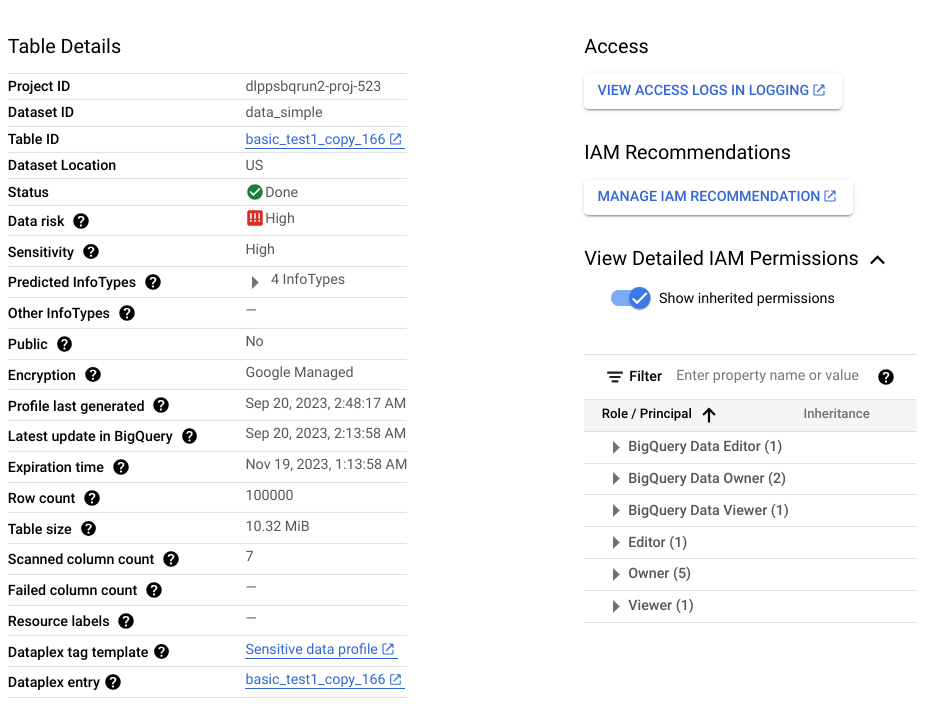
Additionally, this column-level profile is part of a [table-level
profile](https://docs.cloud.google.com/sensitive-data-protection/docs/metrics-reference#table-data-profile), which provides
insights like the data location, encryption status, and whether the table is
shared publicly. In the Google Cloud console, you can also view the
Cloud Logging entries for the table and the IAM principals
with roles for the table.
For a full list of metrics and insights available in data profiles, see [Metrics
reference](https://docs.cloud.google.com/sensitive-data-protection/docs/metrics-reference).
### When to use discovery
When you plan your data risk management approach, we recommend that you start
with discovery. The discovery service helps you get a broad view of
your data and enable [alerting](https://docs.cloud.google.com/sensitive-data-protection/docs/dp-receive-pubsub-messages),
[reporting](https://docs.cloud.google.com/sensitive-data-protection/docs/analyze-data-profiles), and
[remediation](https://docs.cloud.google.com/sensitive-data-protection/docs/data-profiles-remediation) of issues.
The following are some common use cases:
- **Gain broad visibility across cloud environments**: Continuously scan and profile all data assets across an organization, folder, or project without creating individual scan jobs.
- **Uncover shadow data and unmanaged repositories**: Detect newly created or unclassified tables and buckets that lack proper governance or access controls.
- **Prioritize security initiatives with risk scoring**: Focus remediation and protection resources on data repositories identified with high sensitivity and high data risk scores.
- **Identify candidates for deep inspection** : Identify tables and storage buckets with high [free text
scores](https://docs.cloud.google.com/sensitive-data-protection/docs/metrics-reference#free-text-score) containing unstructured comments or reviews that require granular scanning.
## Sensitive data inspection
The inspection service performs an exhaustive scan of a single resource
to locate each individual instance of sensitive data. An inspection produces a
*finding* for each detected instance.
[Inspection jobs](https://docs.cloud.google.com/sensitive-data-protection/docs/creating-job-triggers) provide a rich set of
configuration options to help you pinpoint the data you want to inspect. For
example, you can turn on sampling to limit the data to be inspected to a certain
number of rows (for BigQuery data) or certain file types (for
Cloud Storage data). You can also target a specific timespan in which
the data was created or modified.
Unlike discovery, which continuously monitors your data, an inspection is an
on-demand operation. However, you can schedule recurring inspection jobs called
*job triggers*.
### Inspection scan output: findings
Each finding includes details like the location of the detected instance, its
potential infoType, and the certainty (also called
[*likelihood*](https://docs.cloud.google.com/sensitive-data-protection/docs/likelihood)) that the finding matches the
infoType. Depending on your settings, you can also get the actual string that
the finding pertains to; this string is called a *quote* in
Sensitive Data Protection.
For a full list of details included in an inspection finding, see
[`Finding`](https://docs.cloud.google.com/sensitive-data-protection/docs/reference/rpc/google.privacy.dlp.v2#finding).
### When to use inspection
The following are some common use cases:
- **Scan unstructured text and freeform fields**: Locate every specific instance of personally identifiable information (PII) within customer comments, feedback forms, support tickets, and document repositories.
- **Perform point-in-time compliance audits on a single resource**: Generate a detailed finding report recording the exact byte and row locations of all sensitive items within a targeted table or bucket.
- **Inspect hybrid and multi-cloud data streams**: Stream payloads directly from on-premises servers, ETL pipelines, or external clouds to generate centralized finding reports in Google Cloud.
- **Trigger automated quarantine and alerting workflows**: Publish detected findings to Pub/Sub or save them directly to BigQuery tables to drive event-driven remediation.
### When not to use inspection
Inspecting a resource isn't useful if both of the following conditions apply.
A discovery scan can help you decide if an inspection scan is needed.
- You have only structured data in the resource. That is, there are no columns of freeform data, like user comments or reviews.
- You already know the infoTypes stored in that resource.
For example, suppose that data profiles from a discovery scan indicate that a
certain BigQuery table doesn't have columns with unstructured
data but has a column of unique credit card numbers. In this case, inspecting
for credit card numbers in the table isn't useful. An inspection will produce a
finding for each item in the column. If you have 1 million rows and each row
contains 1 credit card number, an inspection job will produce 1 million findings
for the `CREDIT_CARD_NUMBER` infoType. In this example, the inspection isn't
needed because the discovery scan already indicates that the
column contains unique credit card numbers.
## Data residency, processing, and storage
Both discovery and inspection support data residency
requirements:
- The discovery service processes your data where it resides and stores the generated data profiles in the same region or multi-region as the profiled data. For more information, see [Data residency
considerations](https://docs.cloud.google.com/sensitive-data-protection/docs/data-profiles#data-residency).
- When inspecting data within a Google Cloud storage system, the inspection service processes your data in the same region where the data resides and stores the inspection job in that region. When inspecting data through a hybrid job or through a [`content`](https://docs.cloud.google.com/sensitive-data-protection/docs/reference/rest/v2/projects.locations.content) method, the inspection service lets you specify where it should process your data. For more information, see [How data is
stored](https://docs.cloud.google.com/sensitive-data-protection/docs/data-security#how-data-is-stored).
## Comparison summary: discovery and inspection services
| | Discovery | Inspection |
|---|---|---|
| Benefits | - Continuous visibility across an organization, folder, or project. - Helps identify the resources containing sensitive, high-risk, and unstructured data. For a full list of insights, see [Metrics reference](https://docs.cloud.google.com/sensitive-data-protection/docs/metrics-reference). - Helps uncover unknown data (or *shadow data*). | - On-demand inspection of a single resource. - Identifies each instance of sensitive data in the inspected resource. |
| Cost | - Running a [cost estimation](https://docs.cloud.google.com/sensitive-data-protection/docs/estimate-org-folder): Free - Consumption mode: US$0.03 per GB or the price of 3 TB, whichever is lower - Subscription mode (reserved capacity): US$2,500 per subscription unit
10 TB costs approximately US$300 per month in consumption mode. | - Up to 1 GB: Free - 1 GB to 50 TB: US$1.00 per GB - 50 TB to 500 TB: US$0.75 per GB - Over 500 TB: US$0.60 per GB
10 TB costs approximately US$10,000 per scan. |
| Supported data sources | BigLake BigQuery Cloud Run functions environment variables Cloud Run service revision environment variables Cloud SQL Cloud Storage Vertex AI Amazon S3 Azure Blob Storage | BigQuery Cloud Storage Datastore Hybrid (any source)[^1^](https://docs.cloud.google.com/sensitive-data-protection/docs/learn-about-your-data#hybrid-pricing) |
| Supported scopes | - A Google Cloud organization, folder, project, or data resource - All supported assets available to the AWS connector, account, or S3 bucket - All supported assets available to the Azure connector, subscription, or Azure Blob Storage container | A single BigQuery table, Cloud Storage bucket, or Datastore kind. |
| Built-in inspection templates | Yes | Yes |
| [Built-in](https://docs.cloud.google.com/sensitive-data-protection/docs/infotypes-reference) and [custom](https://docs.cloud.google.com/sensitive-data-protection/docs/creating-custom-infotypes) infoTypes | Yes | Yes |
| Scan output | High-level overview (data profiles) of all supported data. | Concrete findings of sensitive data in the inspected resource. |
| Save results to BigQuery | Yes | Yes |
| Send to Knowledge Catalog as aspects | [Yes](https://docs.cloud.google.com/sensitive-data-protection/docs/add-aspects) | No |
| Publish results to Security Command Center | [Yes](https://docs.cloud.google.com/sensitive-data-protection/docs/send-profiles-to-scc) | [Yes](https://docs.cloud.google.com/sensitive-data-protection/docs/sending-results-to-scc) |
| Publish findings to Google Security Operations | [Yes](https://docs.cloud.google.com/chronicle/docs/detection/usecase-dlp-high-risk-user-download) for organization-level and folder-level discovery | No |
| Publish to Pub/Sub | [Yes](https://docs.cloud.google.com/sensitive-data-protection/docs/dp-receive-pubsub-messages) | Yes |
| Data residency support | [Yes](https://docs.cloud.google.com/sensitive-data-protection/docs/data-profiles#data-residency) | [Yes](https://docs.cloud.google.com/sensitive-data-protection/docs/data-security#how-data-is-stored) |
^1^ Hybrid inspection has a different
pricing model. For more information, see [Inspection of data from any source](https://docs.cloud.google.com/sensitive-data-protection/pricing#hybrid-pricing).
## What's next
- Explore [recommended strategies for mitigating data
risk](https://docs.cloud.google.com/sensitive-data-protection/docs/best-practices-for-mitigating-data-risk) (next document in this series)