This document describes how to use the Cloud Data Loss Prevention API to detect sensitive text and
objects in an image. Sensitive Data Protection returns the
location of any sensitive data that it detects.
> [!NOTE]
> **Notes:** Sensitive Data Protection can inspect
> many image types for sensitive data, including JPEG, BMP, PNG, SVG, and TIFF.
> For multi-page TIFF images, see [Inspect a multi-page
> TIFF image](https://docs.cloud.google.com/sensitive-data-protection/docs/inspecting-images#inspect-tiff).
> Sensitive Data Protection can also inspect other file formats such as PDF, DOCX,
> XLSX, and PPTX, but may generate mixed findings---including byte offsets
> and bounding boxes---depending on the contents of each specific file. For
> more information, see [Supported file
> types](https://docs.cloud.google.com/sensitive-data-protection/docs/supported-file-types).
>
> Inspecting files using the method described in this document is subject to
> file size limits. For larger files, consider using Sensitive Data Protection to
> [scan a storage repository](https://docs.cloud.google.com/sensitive-data-protection/docs/inspecting-storage.md.txt) containing the
> files. To learn more about file size limits and Sensitive Data Protection, see
> [Usage limits](https://docs.cloud.google.com/sensitive-data-protection/limits.md.txt).
Given an image as input, Sensitive Data Protection detects sensitive data
in the image. The output of an inspection operation includes the detected
[infoTypes](https://docs.cloud.google.com/sensitive-data-protection/docs/infotypes-reference.md.txt), the
[likelihood](https://docs.cloud.google.com/sensitive-data-protection/docs/likelihood.md.txt) of the match, and pixel
coordinates and length values that indicate the areas within which
Sensitive Data Protection found the sensitive data. The coordinates at the bottom
left corner of an image are `(0,0)`.
## Inspect an image for all default infoTypes
To inspect an image for sensitive data, you submit a base64-encoded image to the
[`content.inspect`](https://docs.cloud.google.com/sensitive-data-protection/docs/reference/rest/v2/projects.content/inspect.md.txt)
method. If you don't specify specific information types (*infoTypes*)
to search for, Sensitive Data Protection
searches for the most common infoTypes.
To inspect an image for all default infoTypes, follow these steps:
1. Encode the image as base64.
2. Submit a request to the `content.inspect` method of the DLP API. The request requires only the base64-encoded image.
For example, consider this image of a document.
[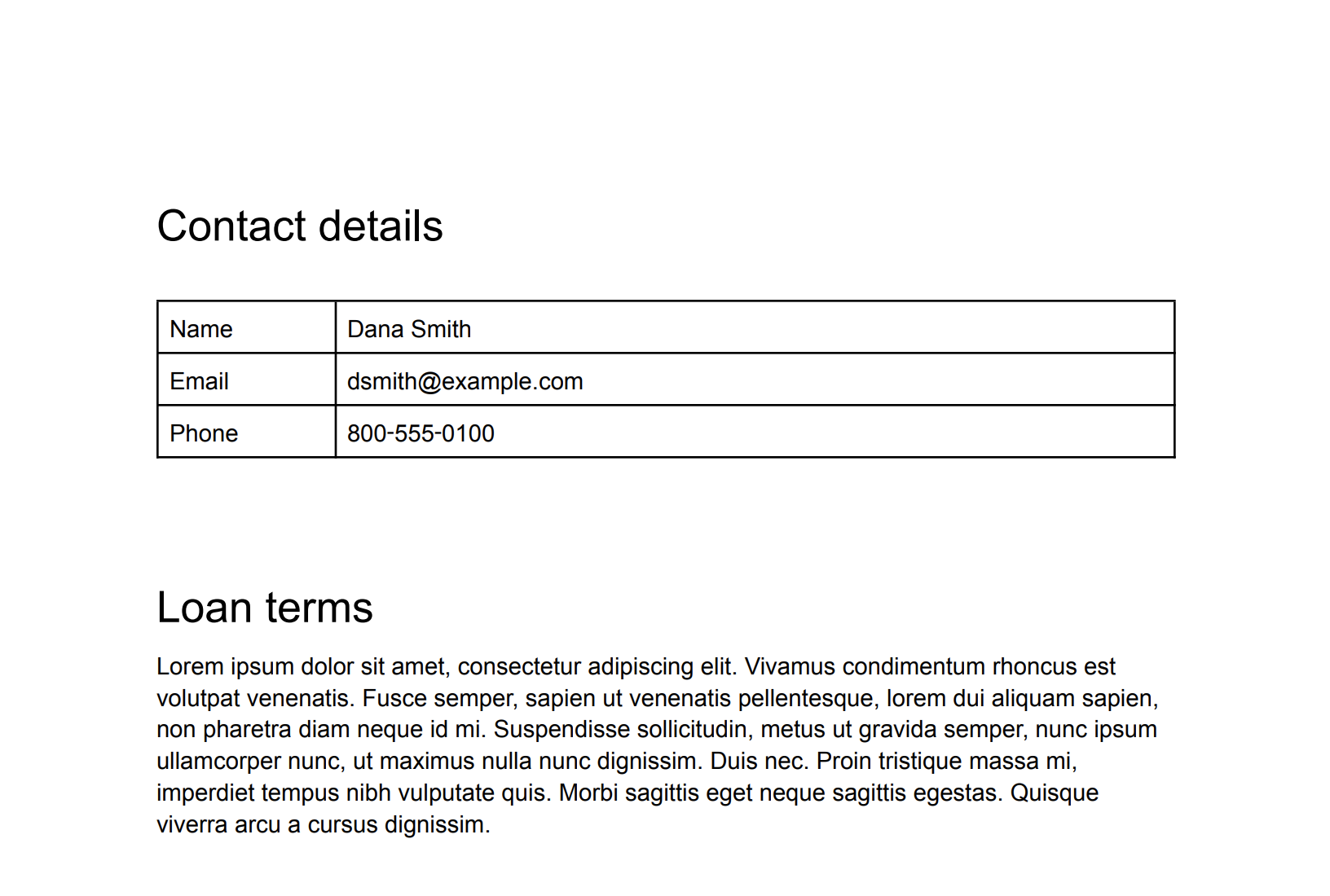](https://docs.cloud.google.com/static/sensitive-data-protection/docs/images/original-text.png) Original image (click to enlarge).
> [!IMPORTANT]
> **Important:** The code on this page requires that you first set up a Sensitive Data Protection client. For more information about installing and creating a Sensitive Data Protection client, see [Sensitive Data Protection client libraries](https://docs.cloud.google.com/sensitive-data-protection/docs/reference/libraries). (Sending JSON to Sensitive Data Protection REST endpoints does not require a client library.)
### C#
To learn how to install and use the client library for Sensitive Data Protection, see
[Sensitive Data Protection client libraries](https://docs.cloud.google.com/sensitive-data-protection/docs/libraries.md.txt).
To authenticate to Sensitive Data Protection, set up Application Default Credentials.
For more information, see
[Set up authentication for a local development environment](https://docs.cloud.google.com/docs/authentication/set-up-adc-local-dev-environment.md.txt).
```c#
using System;
using System.IO;
using System.Linq;
using Google.Api.Gax.ResourceNames;
using Google.Cloud.Dlp.V2;
using Google.Protobuf;
public class InspectImageForSensitiveDataWithInfoTypes
{
public static InspectContentResponse InspectImage(
string projectId,
string filePath)
{
// Instantiate dlp client.
var dlp = DlpServiceClient.Create();
// Construct the content item.
var contentItem = new ContentItem
{
ByteItem = new ByteContentItem
{
Type = ByteContentItem.Types.BytesType.ImagePng,
Data = ByteString.FromStream(new FileStream(filePath, FileMode.Open))
}
};
// Construct the request.
var request = new InspectContentRequest
{
ParentAsLocationName = new LocationName(projectId, "global"),
Item = contentItem,
InspectConfig = new InspectConfig
{
IncludeQuote = true,
InfoTypes =
{
new InfoType { Name = "PHONE_NUMBER" },
new InfoType { Name = "EMAIL_ADDRESS" },
new InfoType { Name = "PERSON_NAME" }
}
}
};
// Call the API.
var response = dlp.InspectContent(request);
// Inspect the response.
var resultFindings = response.Result.Findings;
Console.WriteLine($"Findings: {resultFindings.Count}\n");
foreach (var f in resultFindings)
{
var data = from location in f.Location.ContentLocations
from b in location.ImageLocation.BoundingBoxes
select new { b.Height, b.Width, b.Top, b.Left };
Console.WriteLine("Info type: " + f.InfoType.Name);
Console.WriteLine("\tImageLocations: " + string.Join(',', data));
Console.WriteLine("\tQuote: " + f.Quote);
Console.WriteLine("\tLikelihood: " + f.Likelihood + "\n");
}
return response;
}
}
```
### Go
To learn how to install and use the client library for Sensitive Data Protection, see
[Sensitive Data Protection client libraries](https://docs.cloud.google.com/sensitive-data-protection/docs/libraries.md.txt).
To authenticate to Sensitive Data Protection, set up Application Default Credentials.
For more information, see
[Set up authentication for a local development environment](https://docs.cloud.google.com/docs/authentication/set-up-adc-local-dev-environment.md.txt).
```go
import (
"context"
"fmt"
"io"
"os"
dlp "cloud.google.com/go/dlp/apiv2"
"cloud.google.com/go/dlp/apiv2/dlppb"
)
// inspectImageFileAllInfoTypes inspects a image for sensitive data with infoTypes
func inspectImageFileAllInfoTypes(w io.Writer, projectID, inputPath string) error {
// projectId := "your-project-id"
// inputPath := "your-input-path"
ctx := context.Background()
// Initialize a client once and reuse it to send multiple requests. Clients
// are safe to use across goroutines. When the client is no longer needed,
// call the Close method to cleanup its resources.
client, err := dlp.NewClient(ctx)
if err != nil {
return err
}
// Closing the client safely cleans up background resources.
defer client.Close()
// read the image file
data, err := os.ReadFile(inputPath)
if err != nil {
return err
}
// Create and send the request.
req := &dlppb.InspectContentRequest{
Parent: fmt.Sprintf("projects/%s/locations/global", projectID),
Item: &dlppb.ContentItem{
// Specify the content to be inspected.
DataItem: &dlppb.ContentItem_ByteItem{
ByteItem: &dlppb.ByteContentItem{
Type: dlppb.ByteContentItem_IMAGE_JPEG,
Data: data,
},
},
},
}
// Send the request.
resp, err := client.InspectContent(ctx, req)
if err != nil {
return fmt.Errorf("InspectContent: %w", err)
}
// Process the results.
fmt.Fprintf(w, "Findings: %d\n", len(resp.Result.Findings))
for _, f := range resp.Result.Findings {
fmt.Fprintf(w, "\tQuote: %s\n", f.Quote)
fmt.Fprintf(w, "\tInfo type: %s\n", f.InfoType.Name)
fmt.Fprintf(w, "\tLikelihood: %s\n", f.Likelihood)
}
return nil
}
```
### Java
To learn how to install and use the client library for Sensitive Data Protection, see
[Sensitive Data Protection client libraries](https://docs.cloud.google.com/sensitive-data-protection/docs/libraries.md.txt).
To authenticate to Sensitive Data Protection, set up Application Default Credentials.
For more information, see
[Set up authentication for a local development environment](https://docs.cloud.google.com/docs/authentication/set-up-adc-local-dev-environment.md.txt).
```java
import com.google.cloud.dlp.v2.DlpServiceClient;
import com.google.privacy.dlp.v2.ByteContentItem;
import com.google.privacy.dlp.v2.ByteContentItem.BytesType;
import com.google.privacy.dlp.v2.ContentItem;
import com.google.privacy.dlp.v2.Finding;
import com.google.privacy.dlp.v2.InspectContentRequest;
import com.google.privacy.dlp.v2.InspectContentResponse;
import com.google.privacy.dlp.v2.LocationName;
import com.google.protobuf.ByteString;
import java.io.FileInputStream;
import java.io.IOException;
class InspectImageFileAllInfoTypes {
public static void main(String[] args) throws IOException {
// TODO(developer): Replace these variables before running the sample.
String projectId = "my-project-id";
String inputPath = "src/test/resources/sensitive-data-image.jpeg";
inspectImageFileAllInfoTypes(projectId, inputPath);
}
static void inspectImageFileAllInfoTypes(String projectId, String inputPath) throws IOException {
// Initialize client that will be used to send requests. This client only needs to be created
// once, and can be reused for multiple requests. After completing all of your requests, call
// the "close" method on the client to safely clean up any remaining background resources.
try (DlpServiceClient dlp = DlpServiceClient.create()) {
// Specify the content to be inspected.
ByteString fileBytes = ByteString.readFrom(new FileInputStream(inputPath));
ByteContentItem byteItem =
ByteContentItem.newBuilder().setType(BytesType.IMAGE_JPEG).setData(fileBytes).build();
// Construct the Inspect request to be sent by the client.
// Do not specify the type of info to inspect.
InspectContentRequest request =
InspectContentRequest.newBuilder()
.setParent(LocationName.of(projectId, "global").toString())
.setItem(ContentItem.newBuilder().setByteItem(byteItem).build())
.build();
// Use the client to send the API request.
InspectContentResponse response = dlp.inspectContent(request);
// Parse the response and process results.
System.out.println("Findings: " + response.getResult().getFindingsCount());
for (Finding f : response.getResult().getFindingsList()) {
System.out.println("\tQuote: " + f.getQuote());
System.out.println("\tInfo type: " + f.getInfoType().getName());
System.out.println("\tLikelihood: " + f.getLikelihood());
}
}
}
}
```
### Node.js
To learn how to install and use the client library for Sensitive Data Protection, see
[Sensitive Data Protection client libraries](https://docs.cloud.google.com/sensitive-data-protection/docs/libraries.md.txt).
To authenticate to Sensitive Data Protection, set up Application Default Credentials.
For more information, see
[Set up authentication for a local development environment](https://docs.cloud.google.com/docs/authentication/set-up-adc-local-dev-environment.md.txt).
```javascript
// Imports the Google Cloud Data Loss Prevention library
const DLP = require('@google-cloud/dlp');
const mime = require('mime');
const fs = require('fs');
// Instantiates a client
const dlp = new DLP.DlpServiceClient();
// The project ID to run the API call under
// const projectId = 'my-project';
// Image Path
// const imagePath = './test.jpeg';
async function inspectImageFileAllType() {
let fileBytes = null;
let fileTypeConstant = null;
try {
// Load Image
fileTypeConstant =
['image/jpeg', 'image/bmp', 'image/png', 'image/svg'].indexOf(
mime.getType(imagePath)
) + 1;
fileBytes = Buffer.from(fs.readFileSync(imagePath)).toString('base64');
} catch (error) {
console.error(error.message);
return;
}
// Specify the content to be inspected.
const item = {
byteItem: {
type: fileTypeConstant,
data: fileBytes,
},
};
// Construct the Inspect request to be sent by the client.
// Do not specify the type of info to inspect.
const request = {
parent: `projects/${projectId}/locations/global`,
item: item,
inspectConfig: {
includeQuote: true,
},
};
// Use the client to send the API request.
const [response] = await dlp.inspectContent(request);
// Print findings.
const findings = response.result.findings;
if (findings.length > 0) {
console.log(`Findings: ${findings.length}\n`);
findings.forEach(finding => {
console.log(`InfoType: ${finding.infoType.name}`);
console.log(`\tQuote: ${finding.quote}`);
console.log(`\tLikelihood: ${finding.likelihood} \n`);
});
} else {
console.log('No findings.');
}
}
inspectImageFileAllType();
```
### PHP
To learn how to install and use the client library for Sensitive Data Protection, see
[Sensitive Data Protection client libraries](https://docs.cloud.google.com/sensitive-data-protection/docs/libraries.md.txt).
To authenticate to Sensitive Data Protection, set up Application Default Credentials.
For more information, see
[Set up authentication for a local development environment](https://docs.cloud.google.com/docs/authentication/set-up-adc-local-dev-environment.md.txt).
```php
use Google\Cloud\Dlp\V2\ByteContentItem;
use Google\Cloud\Dlp\V2\ByteContentItem\BytesType;
use Google\Cloud\Dlp\V2\Client\DlpServiceClient;
use Google\Cloud\Dlp\V2\ContentItem;
use Google\Cloud\Dlp\V2\InspectContentRequest;
use Google\Cloud\Dlp\V2\Likelihood;
/**
* Inspect image for sensitive data with infoTypes.
* To inspect an image for sensitive data, you submit a base64-encoded image to the Cloud DLP API's
* content.inspect method. Unless you specify information types (infoTypes) to search for, Cloud DLP
* searches for the most common infoTypes.
*
* @param string $projectId The Google Cloud project id to use as a parent resource.
* @param string $inputPath The image path to inspect.
*/
function inspect_image_all_infotypes(
// TODO(developer): Replace sample parameters before running the code.
string $projectId,
string $inputPath = './test/data/test.png'
): void {
// Instantiate a client.
$dlp = new DlpServiceClient();
// Get the bytes of the file.
$fileBytes = (new ByteContentItem())
->setType(BytesType::IMAGE_PNG)
->setData(file_get_contents($inputPath));
$parent = "projects/$projectId/locations/global";
// Specify what content you want the service to Inspect.
$item = (new ContentItem())
->setByteItem($fileBytes);
// Run request.
$inspectContentRequest = (new InspectContentRequest())
->setParent($parent)
->setItem($item);
$response = $dlp->inspectContent($inspectContentRequest);
// Print the results.
$findings = $response->getResult()->getFindings();
if (count($findings) == 0) {
printf('No findings.' . PHP_EOL);
} else {
printf('Findings:' . PHP_EOL);
foreach ($findings as $finding) {
printf(' Info type: %s' . PHP_EOL, $finding->getInfoType()->getName());
printf(' Likelihood: %s' . PHP_EOL, Likelihood::name($finding->getLikelihood()));
}
}
}
```
### Python
To learn how to install and use the client library for Sensitive Data Protection, see
[Sensitive Data Protection client libraries](https://docs.cloud.google.com/sensitive-data-protection/docs/libraries.md.txt).
To authenticate to Sensitive Data Protection, set up Application Default Credentials.
For more information, see
[Set up authentication for a local development environment](https://docs.cloud.google.com/docs/authentication/set-up-adc-local-dev-environment.md.txt).
```python
import google.cloud.dlp
def inspect_image_file_all_infotypes(
project: str,
filename: str,
include_quote: bool = True,
) -> None:
"""Uses the Data Loss Prevention API to analyze strings for protected data in image file.
Args:
project: The Google Cloud project id to use as a parent resource.
filename: The path to the file to inspect.
include_quote: Boolean for whether to display a quote of the detected
information in the results.
Returns:
None; the response from the API is printed to the terminal.
"""
# Instantiate a client.
dlp = google.cloud.dlp_v2.DlpServiceClient()
# Construct the byte_item, containing the image file's byte data.
with open(filename, mode="rb") as f:
byte_item = {"type_": "IMAGE", "data": f.read()}
# Convert the project id into a full resource id.
parent = f"projects/{project}"
# Call the API.
response = dlp.inspect_content(
request={
"parent": parent,
"inspect_config": {"include_quote": include_quote},
"item": {"byte_item": byte_item},
}
)
# Print out the results.
print("Findings: ", response.result.findings.count)
if response.result.findings:
for finding in response.result.findings:
print(f"Quote: {finding.quote}")
print(f"Info type: {finding.info_type.name}")
print(f"Likelihood: {finding.likelihood}")
else:
print("No findings.")
```
### REST
**Important:** Before sending this request, use a base64 utility to encode the image into ASCII text data, and then replace the `BASE64_ENCODED_IMAGE` placeholder with the base64-encoded image. Most development environments contain a native `base64` utility. To encode an image file:
- Linux: `base64 input.jpg > output.txt`
- macOS: `base64 -i input.jpg -o output.txt`
- PowerShell: `[Convert]::ToBase64String([IO.File]::ReadAllBytes("./input.jpg")) > output.txt`
To inspect this image for default infoTypes, send the following JSON to
the [`content.inspect`](https://docs.cloud.google.com/sensitive-data-protection/docs/reference/rest/v2/projects.content/inspect.md.txt) method:
```json
{
"item": {
"byteItem": {
"data": "BASE64_ENCODED_IMAGE",
"type": "IMAGE_PNG"
}
}
}
```
The output is similar to the following:
```json
{
"result": {
"findings": [
{
"infoType": {
"name": "PERSON_NAME",
"sensitivityScore": {
"score": "SENSITIVITY_MODERATE"
}
},
"likelihood": "LIKELY",
"location": {
"contentLocations": [
{
"imageLocation": {
"boundingBoxes": [
{
"top": 383,
"left": 419,
"width": 82,
"height": 38
},
{
"top": 383,
"left": 494,
"width": 91,
"height": 37
}
]
}
}
]
},
"createTime": "2025-05-22T20:27:03.730Z",
"findingId": "2025-05-22T20:27:03.731510Z4997664074931396457"
},
{
"infoType": {
"name": "EMAIL_ADDRESS",
"sensitivityScore": {
"score": "SENSITIVITY_MODERATE"
}
},
"likelihood": "VERY_LIKELY",
"location": {
"contentLocations": [
{
"imageLocation": {
"boundingBoxes": [
{
"top": 445,
"left": 390,
"width": 357,
"height": 48
}
]
}
}
]
},
"createTime": "2025-05-22T20:27:03.728Z",
"findingId": "2025-05-22T20:27:03.731538Z284444825812417100"
},
{
"infoType": {
"name": "PHONE_NUMBER",
"sensitivityScore": {
"score": "SENSITIVITY_MODERATE"
}
},
"likelihood": "VERY_LIKELY",
"location": {
"contentLocations": [
{
"imageLocation": {
"boundingBoxes": [
{
"top": 515,
"left": 404,
"width": 223,
"height": 34
}
]
}
}
]
},
"createTime": "2025-05-22T20:27:03.729Z",
"findingId": "2025-05-22T20:27:03.731544Z7910624062018243126"
},
{
"infoType": {
"name": "PERSON_NAME",
"sensitivityScore": {
"score": "SENSITIVITY_MODERATE"
}
},
"likelihood": "UNLIKELY",
"location": {
"contentLocations": [
{
"imageLocation": {
"boundingBoxes": [
{
"top": 798,
"left": 473,
"width": 81,
"height": 45
}
]
}
}
]
},
"createTime": "2025-05-22T20:27:03.730Z",
"findingId": "2025-05-22T20:27:03.731551Z2345136870450870227"
},
{
"infoType": {
"name": "PERSON_NAME",
"sensitivityScore": {
"score": "SENSITIVITY_MODERATE"
}
},
"likelihood": "UNLIKELY",
"location": {
"contentLocations": [
{
"imageLocation": {
"boundingBoxes": [
{
"top": 837,
"left": 1166,
"width": 46,
"height": 45
}
]
}
}
]
},
"createTime": "2025-05-22T20:27:03.730Z",
"findingId": "2025-05-22T20:27:03.731557Z6725780456697828166"
},
{
"infoType": {
"name": "PERSON_NAME",
"sensitivityScore": {
"score": "SENSITIVITY_MODERATE"
}
},
"likelihood": "UNLIKELY",
"location": {
"contentLocations": [
{
"imageLocation": {
"boundingBoxes": [
{
"top": 915,
"left": 453,
"width": 141,
"height": 43
}
]
}
}
]
},
"createTime": "2025-05-22T20:27:03.730Z",
"findingId": "2025-05-22T20:27:03.731562Z7328853308213386463"
},
{
"infoType": {
"name": "PERSON_NAME",
"sensitivityScore": {
"score": "SENSITIVITY_MODERATE"
}
},
"likelihood": "UNLIKELY",
"location": {
"contentLocations": [
{
"imageLocation": {
"boundingBoxes": [
{
"top": 915,
"left": 1180,
"width": 105,
"height": 43
}
]
}
}
]
},
"createTime": "2025-05-22T20:27:03.730Z",
"findingId": "2025-05-22T20:27:03.731569Z5618332947461439057"
}
]
}
}
```
In this example, Sensitive Data Protection found the following infoTypes, though
its [match confidence](https://docs.cloud.google.com/sensitive-data-protection/docs/likelihood.md.txt) for each one varies:
- `PERSON_NAME`
- `EMAIL_ADDRESS`
- `PHONE_NUMBER`
See the [JSON quickstart](https://docs.cloud.google.com/sensitive-data-protection/docs/quickstart-json) for
more information about using the DLP API with JSON.
Be aware that Sensitive Data Protection often uses multiple boxes to
indicate where a single instance of sensitive data is in the image.
## Inspect an image for specific infoTypes
To inspect an image for only certain sensitive data types, specify
their corresponding built-in infoTypes.
> [!NOTE]
> **Note:** You can also inspect for data matching your [custom infoType
> detectors](https://docs.cloud.google.com/sensitive-data-protection/docs/creating-custom-infotypes).
To inspect an image for specific infoTypes, follow these steps:
1. Encode the image as base64.
2. Submit a request to the [`content.inspect`](https://docs.cloud.google.com/sensitive-data-protection/docs/reference/rest/v2/projects.content/inspect.md.txt) method of the DLP API. The request must include the following:
- The base64-encoded image.
- One or more [infoType detectors](https://docs.cloud.google.com/sensitive-data-protection/docs/infotypes-reference.md.txt).
> [!IMPORTANT]
> **Important:** The code on this page requires that you first set up a Sensitive Data Protection client. For more information about installing and creating a Sensitive Data Protection client, see [Sensitive Data Protection client libraries](https://docs.cloud.google.com/sensitive-data-protection/docs/reference/libraries). (Sending JSON to Sensitive Data Protection REST endpoints does not require a client library.)
### C#
To learn how to install and use the client library for Sensitive Data Protection, see
[Sensitive Data Protection client libraries](https://docs.cloud.google.com/sensitive-data-protection/docs/libraries.md.txt).
To authenticate to Sensitive Data Protection, set up Application Default Credentials.
For more information, see
[Set up authentication for a local development environment](https://docs.cloud.google.com/docs/authentication/set-up-adc-local-dev-environment.md.txt).
```c#
using System;
using System.IO;
using System.Linq;
using Google.Api.Gax.ResourceNames;
using Google.Cloud.Dlp.V2;
using Google.Protobuf;
public class InspectImageForSensitiveDataWithListedInfoTypes
{
public static InspectContentResponse InspectImage(
string projectId,
string filePath)
{
// Instantiate dlp client.
var dlp = DlpServiceClient.Create();
// Construct the content item by providing the image file and its type.
var contentItem = new ContentItem
{
ByteItem = new ByteContentItem
{
Type = ByteContentItem.Types.BytesType.ImagePng,
Data = ByteString.FromStream(new FileStream(filePath, FileMode.Open))
}
};
// Specify the type of info the inspection will look for.
var infoTypes = new InfoType[]
{
new InfoType { Name = "PHONE_NUMBER" },
new InfoType { Name = "EMAIL_ADDRESS" },
new InfoType { Name = "US_SOCIAL_SECURITY_NUMBER" }
};
// Construct the Inspect config.
var inspectConfig = new InspectConfig
{
InfoTypes = { infoTypes },
IncludeQuote = true
};
// Construct the request.
var request = new InspectContentRequest
{
ParentAsLocationName = new LocationName(projectId, "global"),
InspectConfig = inspectConfig,
Item = contentItem
};
// Call the API.
InspectContentResponse response = dlp.InspectContent(request);
// Inspect the response.
var resultFindings = response.Result.Findings;
Console.WriteLine($"Findings: {resultFindings.Count}");
foreach (var f in resultFindings)
{
var data = from location in f.Location.ContentLocations
from b in location.ImageLocation.BoundingBoxes
select new { b.Height, b.Width, b.Top, b.Left };
Console.WriteLine("Info type: " + f.InfoType.Name);
Console.WriteLine("\tQuote: " + f.Quote);
Console.WriteLine("\tImageLocations: " + string.Join(",", data));
Console.WriteLine("\tLikelihood: " + f.Likelihood);
}
return response;
}
}
```
### Go
To learn how to install and use the client library for Sensitive Data Protection, see
[Sensitive Data Protection client libraries](https://docs.cloud.google.com/sensitive-data-protection/docs/libraries.md.txt).
To authenticate to Sensitive Data Protection, set up Application Default Credentials.
For more information, see
[Set up authentication for a local development environment](https://docs.cloud.google.com/docs/authentication/set-up-adc-local-dev-environment.md.txt).
```go
import (
"context"
"fmt"
"io"
"os"
dlp "cloud.google.com/go/dlp/apiv2"
"cloud.google.com/go/dlp/apiv2/dlppb"
)
// inspectImageFileListedInfoTypes inspects an image for sensitive data listed infoTypes.
func inspectImageFileListedInfoTypes(w io.Writer, projectID, filePath string) error {
// projectId := "my-project-id"
// filePath := "testdata/image.jpg"
ctx := context.Background()
// Initialize a client once and reuse it to send multiple requests. Clients
// are safe to use across goroutines. When the client is no longer needed,
// call the Close method to cleanup its resources.
client, err := dlp.NewClient(ctx)
if err != nil {
return err
}
// Closing the client safely cleans up background resources.
defer client.Close()
// Read a image file
data, err := os.ReadFile(filePath)
if err != nil {
return err
}
// Specify the type and content to be inspected.
item := &dlppb.ContentItem{
DataItem: &dlppb.ContentItem_ByteItem{
ByteItem: &dlppb.ByteContentItem{
Type: dlppb.ByteContentItem_IMAGE_JPEG,
Data: data,
},
},
}
// Construct the configuration for the Inspect request.
inspectConfig := &dlppb.InspectConfig{
InfoTypes: []*dlppb.InfoType{
{Name: "PHONE_NUMBER"},
{Name: "EMAIL_ADDRESS"},
{Name: "US_SOCIAL_SECURITY_NUMBER"},
},
IncludeQuote: true,
}
// Construct the Inspect request to be sent by the client.
req := &dlppb.InspectContentRequest{
Parent: fmt.Sprintf("projects/%s/locations/global", projectID),
Item: item,
InspectConfig: inspectConfig,
}
// Send the request.
resp, err := client.InspectContent(ctx, req)
if err != nil {
return err
}
// Process the results.
fmt.Fprintf(w, "Findings: %d\n", len(resp.Result.Findings))
for _, f := range resp.Result.Findings {
fmt.Fprintf(w, "\tQuote: %s\n", f.Quote)
fmt.Fprintf(w, "\tInfo type: %s\n", f.InfoType.Name)
fmt.Fprintf(w, "\tLikelihood: %s\n", f.Likelihood)
}
return nil
}
```
### Java
To learn how to install and use the client library for Sensitive Data Protection, see
[Sensitive Data Protection client libraries](https://docs.cloud.google.com/sensitive-data-protection/docs/libraries.md.txt).
To authenticate to Sensitive Data Protection, set up Application Default Credentials.
For more information, see
[Set up authentication for a local development environment](https://docs.cloud.google.com/docs/authentication/set-up-adc-local-dev-environment.md.txt).
```java
import com.google.cloud.dlp.v2.DlpServiceClient;
import com.google.privacy.dlp.v2.ByteContentItem;
import com.google.privacy.dlp.v2.ByteContentItem.BytesType;
import com.google.privacy.dlp.v2.ContentItem;
import com.google.privacy.dlp.v2.Finding;
import com.google.privacy.dlp.v2.InfoType;
import com.google.privacy.dlp.v2.InspectConfig;
import com.google.privacy.dlp.v2.InspectContentRequest;
import com.google.privacy.dlp.v2.InspectContentResponse;
import com.google.privacy.dlp.v2.LocationName;
import com.google.protobuf.ByteString;
import java.io.FileInputStream;
import java.io.IOException;
import java.util.ArrayList;
import java.util.List;
class InspectImageFileListedInfoTypes {
public static void main(String[] args) throws IOException {
// TODO(developer): Replace these variables before running the sample.
String projectId = "my-project-id";
String inputPath = "src/test/resources/sensitive-data-image.jpeg";
inspectImageFileListedInfoTypes(projectId, inputPath);
}
static void inspectImageFileListedInfoTypes(String projectId, String inputPath)
throws IOException {
// Initialize client that will be used to send requests. This client only needs to be created
// once, and can be reused for multiple requests. After completing all of your requests, call
// the "close" method on the client to safely clean up any remaining background resources.
try (DlpServiceClient dlp = DlpServiceClient.create()) {
// Specify the content to be inspected.
ByteString fileBytes = ByteString.readFrom(new FileInputStream(inputPath));
ByteContentItem byteItem =
ByteContentItem.newBuilder().setType(BytesType.IMAGE_JPEG).setData(fileBytes).build();
// Specify the type of info the inspection will look for.
List infoTypes = new ArrayList<>();
// See https://cloud.google.com/dlp/docs/infotypes-reference for complete list of info types
for (String typeName :
new String[] {"US_SOCIAL_SECURITY_NUMBER", "EMAIL_ADDRESS", "PHONE_NUMBER"}) {
infoTypes.add(InfoType.newBuilder().setName(typeName).build());
}
// Construct the configuration for the Inspect request.
InspectConfig inspectConfig = InspectConfig.newBuilder().addAllInfoTypes(infoTypes).build();
// Construct the Inspect request to be sent by the client.
InspectContentRequest request =
InspectContentRequest.newBuilder()
.setParent(LocationName.of(projectId, "global").toString())
.setItem(ContentItem.newBuilder().setByteItem(byteItem).build())
.setInspectConfig(inspectConfig)
.build();
// Use the client to send the API request.
InspectContentResponse response = dlp.inspectContent(request);
// Parse the response and process results.
System.out.println("Findings: " + response.getResult().getFindingsCount());
for (Finding f : response.getResult().getFindingsList()) {
System.out.println("\tQuote: " + f.getQuote());
System.out.println("\tInfo type: " + f.getInfoType().getName());
System.out.println("\tLikelihood: " + f.getLikelihood());
}
}
}
}
```
### Node.js
To learn how to install and use the client library for Sensitive Data Protection, see
[Sensitive Data Protection client libraries](https://docs.cloud.google.com/sensitive-data-protection/docs/libraries.md.txt).
To authenticate to Sensitive Data Protection, set up Application Default Credentials.
For more information, see
[Set up authentication for a local development environment](https://docs.cloud.google.com/docs/authentication/set-up-adc-local-dev-environment.md.txt).
```javascript
// Imports the Google Cloud Data Loss Prevention library
const DLP = require('@google-cloud/dlp');
const mime = require('mime');
const fs = require('fs');
// Instantiates a client
const dlp = new DLP.DlpServiceClient();
// The project ID to run the API call under
// const imagePath = './test.pdf';
// InfoTypes
const infoTypes = [
{name: 'PHONE_NUMBER'},
{name: 'EMAIL_ADDRESS'},
{name: 'US_SOCIAL_SECURITY_NUMBER'},
];
async function inspectImageFileListedInfoTypes() {
let fileBytes = null;
let fileTypeConstant = null;
try {
// Load Image
fileTypeConstant =
['image/jpeg', 'image/bmp', 'image/png', 'image/svg'].indexOf(
mime.getType(imagePath)
) + 1;
fileBytes = Buffer.from(fs.readFileSync(imagePath)).toString('base64');
} catch (error) {
console.log(error);
return;
}
// Specify item to inspect
const item = {
byteItem: {
type: fileTypeConstant,
data: fileBytes,
},
};
// Specify inspect configuration to match information with mentioned infotypes.
const inspectConfig = {
infoTypes: infoTypes,
includeQuote: true,
};
// Combine configurations into a request for the service.
const request = {
parent: `projects/${projectId}/locations/global`,
inspectConfig: inspectConfig,
item: item,
};
// Use the client to send the request.
const [response] = await dlp.inspectContent(request);
// Print Findings
const findings = response.result.findings;
if (findings.length > 0) {
console.log(`Findings: ${findings.length}\n`);
findings.forEach(finding => {
console.log(`InfoType: ${finding.infoType.name}`);
console.log(`\tQuote: ${finding.quote}`);
console.log(`\tLikelihood: ${finding.likelihood} \n`);
});
} else {
console.log('No findings.');
}
}
inspectImageFileListedInfoTypes();
```
### PHP
To learn how to install and use the client library for Sensitive Data Protection, see
[Sensitive Data Protection client libraries](https://docs.cloud.google.com/sensitive-data-protection/docs/libraries.md.txt).
To authenticate to Sensitive Data Protection, set up Application Default Credentials.
For more information, see
[Set up authentication for a local development environment](https://docs.cloud.google.com/docs/authentication/set-up-adc-local-dev-environment.md.txt).
```php
use Google\Cloud\Dlp\V2\ByteContentItem;
use Google\Cloud\Dlp\V2\ByteContentItem\BytesType;
use Google\Cloud\Dlp\V2\Client\DlpServiceClient;
use Google\Cloud\Dlp\V2\ContentItem;
use Google\Cloud\Dlp\V2\InfoType;
use Google\Cloud\Dlp\V2\InspectConfig;
use Google\Cloud\Dlp\V2\InspectContentRequest;
use Google\Cloud\Dlp\V2\Likelihood;
/**
* Inspect an image for sensitive data with listed infoTypes.
* If you want to inspect an image for only certain sensitive data types, specify their corresponding
* built-in infoTypes.
*
* @param string $projectId The Google Cloud project id to use as a parent resource.
* @param string $inputPath The image path to inspect.
*/
function inspect_image_listed_infotypes(
// TODO(developer): Replace sample parameters before running the code.
string $projectId,
string $inputPath = './test/data/test.png'
): void {
// Instantiate a client.
$dlp = new DlpServiceClient();
// Get the bytes of the file.
$fileBytes = (new ByteContentItem())
->setType(BytesType::IMAGE_PNG)
->setData(file_get_contents($inputPath));
$parent = "projects/$projectId/locations/global";
// Specify what content you want the service to Inspect.
$item = (new ContentItem())
->setByteItem($fileBytes);
// Create inspect config configuration.
$inspectConfig = (new InspectConfig())
// The infoTypes of information to match.
->setInfoTypes([
(new InfoType())->setName('PHONE_NUMBER'),
(new InfoType())->setName('EMAIL_ADDRESS'),
(new InfoType())->setName('US_SOCIAL_SECURITY_NUMBER')
]);
// Run request.
$inspectContentRequest = (new InspectContentRequest())
->setParent($parent)
->setInspectConfig($inspectConfig)
->setItem($item);
$response = $dlp->inspectContent($inspectContentRequest);
// Print the results.
$findings = $response->getResult()->getFindings();
if (count($findings) == 0) {
printf('No findings.' . PHP_EOL);
} else {
printf('Findings:' . PHP_EOL);
foreach ($findings as $finding) {
printf(' Info type: %s' . PHP_EOL, $finding->getInfoType()->getName());
printf(' Likelihood: %s' . PHP_EOL, Likelihood::name($finding->getLikelihood()));
}
}
}
```
### Python
To learn how to install and use the client library for Sensitive Data Protection, see
[Sensitive Data Protection client libraries](https://docs.cloud.google.com/sensitive-data-protection/docs/libraries.md.txt).
To authenticate to Sensitive Data Protection, set up Application Default Credentials.
For more information, see
[Set up authentication for a local development environment](https://docs.cloud.google.com/docs/authentication/set-up-adc-local-dev-environment.md.txt).
```python
from typing import List
import google.cloud.dlp
def inspect_image_file_listed_infotypes(
project: str,
filename: str,
info_types: List[str],
include_quote: bool = True,
) -> None:
"""Uses the Data Loss Prevention API to analyze strings in an image for
data matching the given infoTypes.
Args:
project: The Google Cloud project id to use as a parent resource.
filename: The path of the image file to inspect.
info_types: A list of strings representing infoTypes to look for.
A full list of info type categories can be fetched from the API.
include_quote: Boolean for whether to display a matching snippet of
the detected information in the results.
"""
# Instantiate a client.
dlp = google.cloud.dlp_v2.DlpServiceClient()
# Prepare info_types by converting the list of strings into a list of
# dictionaries.
info_types = [{"name": info_type} for info_type in info_types]
# Construct the configuration dictionary.
inspect_config = {
"info_types": info_types,
"include_quote": include_quote,
}
# Construct the byte_item, containing the image file's byte data.
with open(filename, mode="rb") as f:
byte_item = {"type_": "IMAGE", "data": f.read()}
# Convert the project id into a full resource id.
parent = f"projects/{project}"
# Call the API.
response = dlp.inspect_content(
request={
"parent": parent,
"inspect_config": inspect_config,
"item": {"byte_item": byte_item},
}
)
# Print out the results.
if response.result.findings:
for finding in response.result.findings:
print(f"Info type: {finding.info_type.name}")
if include_quote:
print(f"Quote: {finding.quote}")
print(f"Likelihood: {finding.likelihood} \n")
else:
print("No findings.")
```
### REST
**Important:** Before sending this request, use a base64 utility to encode the image into ASCII text data, and then replace the `BASE64_ENCODED_IMAGE` placeholder with the base64-encoded image. Most development environments contain a native `base64` utility. To encode an image file:
- Linux: `base64 input.jpg > output.txt`
- macOS: `base64 -i input.jpg -o output.txt`
- PowerShell: `[Convert]::ToBase64String([IO.File]::ReadAllBytes("./input.jpg")) > output.txt`
Consider the original image from the previous section. To inspect for only email
addresses and telephone numbers, send the following JSON to the
[`content.inspect`](https://docs.cloud.google.com/sensitive-data-protection/docs/reference/rest/v2/projects.content/inspect.md.txt) method.
```json
{
"item": {
"byteItem": {
"data": "BASE64_ENCODED_IMAGE",
"type": "IMAGE_PNG"
}
},
"inspectConfig": {
"infoTypes": [
{
"name": "PHONE_NUMBER"
},
{
"name": "EMAIL_ADDRESS"
}
]
}
}
```
The output is similar to the following:
```json
{
"result": {
"findings": [
{
"infoType": {
"name": "EMAIL_ADDRESS",
"sensitivityScore": {
"score": "SENSITIVITY_MODERATE"
}
},
"likelihood": "VERY_LIKELY",
"location": {
"contentLocations": [
{
"imageLocation": {
"boundingBoxes": [
{
"top": 445,
"left": 390,
"width": 357,
"height": 48
}
]
}
}
]
},
"createTime": "2025-05-22T20:59:48.653Z",
"findingId": "2025-05-22T20:59:48.654873Z3907900286477341146"
},
{
"infoType": {
"name": "PHONE_NUMBER",
"sensitivityScore": {
"score": "SENSITIVITY_MODERATE"
}
},
"likelihood": "VERY_LIKELY",
"location": {
"contentLocations": [
{
"imageLocation": {
"boundingBoxes": [
{
"top": 515,
"left": 404,
"width": 223,
"height": 34
}
]
}
}
]
},
"createTime": "2025-05-22T20:59:48.653Z",
"findingId": "2025-05-22T20:59:48.654914Z7486984971818202511"
}
]
}
}
```
See the [JSON quickstart](https://docs.cloud.google.com/sensitive-data-protection/docs/quickstart-json) for more information about
using the DLP API with JSON.
## Inspect an image for sensitive objects
To inspect an image for sensitive objects, specify the built-in object infoType
detectors in the request.
> [!NOTE]
> **Note:** When the Sensitive Data Protection detects an object infoType, the inspection result doesn't include a [`quote`](https://docs.cloud.google.com/sensitive-data-protection/docs/reference/rest/v2/InspectResult.md.txt#Finding.FIELDS.quote) for the detected object.
To inspect an image for specific object infoTypes, follow these steps:
1. Encode the image as base64.
2. Submit a request to the [`content.inspect`](https://docs.cloud.google.com/sensitive-data-protection/docs/reference/rest/v2/projects.content/inspect.md.txt) method of the DLP API. The request must include the following:
- The base64-encoded image.
- One or more [object infoType
detectors](https://docs.cloud.google.com/sensitive-data-protection/docs/infotypes-reference#objects-images).
For example, consider the following image.
[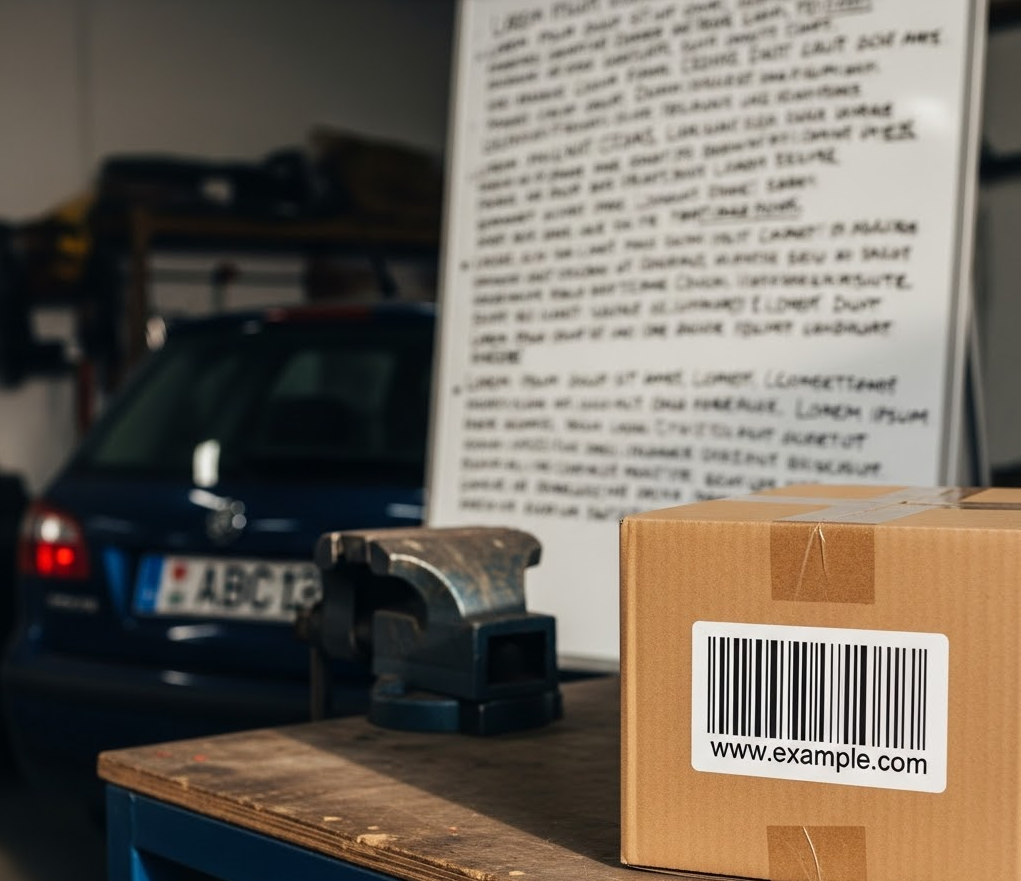](https://docs.cloud.google.com/static/sensitive-data-protection/docs/images/objects-in-image.png) AI-generated image that contains a barcode, license plate, and whiteboard (click to enlarge).
**Important:** Before sending this request, use a base64 utility to encode the image into ASCII text data, and then replace the `BASE64_ENCODED_IMAGE` placeholder with the base64-encoded image. Most development environments contain a native `base64` utility. To encode an image file:
- Linux: `base64 input.jpg > output.txt`
- macOS: `base64 -i input.jpg -o output.txt`
- PowerShell: `[Convert]::ToBase64String([IO.File]::ReadAllBytes("./input.jpg")) > output.txt`
To inspect this image for specific object infoTypes, send the following JSON to
the [`content.inspect`](https://docs.cloud.google.com/sensitive-data-protection/docs/reference/rest/v2/projects.content/inspect.md.txt) method:
```json
{
"item": {
"byteItem": {
"data": "BASE64_ENCODED_IMAGE",
"type": "IMAGE_PNG"
}
},
"inspectConfig": {
"infoTypes": [
{
"name": "OBJECT_TYPE/BARCODE"
},
{
"name": "OBJECT_TYPE/LICENSE_PLATE"
},
{
"name": "OBJECT_TYPE/WHITEBOARD"
}
]
}
}
```
The output is similar to the following:
```json
{
"result": {
"findings": [
{
"infoType": {
"name": "OBJECT_TYPE/WHITEBOARD",
"sensitivityScore": {
"score": "SENSITIVITY_LOW"
}
},
"likelihood": "LIKELY",
"location": {
"contentLocations": [
{
"imageLocation": {
"boundingBoxes": [
{
"left": 427,
"width": 561,
"height": 678
}
]
}
}
]
},
"createTime": "2025-05-22T22:25:09.564718Z",
"findingId": "2025-05-22T22:25:09.564721Z3400818180961962648"
},
{
"infoType": {
"name": "OBJECT_TYPE/LICENSE_PLATE",
"sensitivityScore": {
"score": "SENSITIVITY_MODERATE"
}
},
"likelihood": "LIKELY",
"location": {
"contentLocations": [
{
"imageLocation": {
"boundingBoxes": [
{
"top": 554,
"left": 137,
"width": 187,
"height": 70
}
]
}
}
]
},
"createTime": "2025-05-22T22:25:09.564752Z",
"findingId": "2025-05-22T22:25:09.564753Z2359274424382836782"
},
{
"infoType": {
"name": "OBJECT_TYPE/BARCODE",
"sensitivityScore": {
"score": "SENSITIVITY_LOW"
}
},
"likelihood": "LIKELY",
"location": {
"contentLocations": [
{
"imageLocation": {
"boundingBoxes": [
{
"top": 569,
"left": 666,
"width": 306,
"height": 274
}
]
}
}
]
},
"createTime": "2025-05-22T22:25:09.564762Z",
"findingId": "2025-05-22T22:25:09.564762Z1655085669963455621"
}
]
}
}
```
See the [JSON quickstart](https://docs.cloud.google.com/sensitive-data-protection/docs/quickstart-json) for
more information about using the DLP API with JSON.
## Inspect a multi-page TIFF image
Sensitive Data Protection can inspect TIFF images, including multi-page TIFF images
that have up to 50 pages. It inspects every page of the image
and returns the findings from all pages in a single response.
To inspect a TIFF image, follow these steps:
1. Encode the TIFF image as base64.
2. Submit a request to the [`content.inspect`](https://docs.cloud.google.com/sensitive-data-protection/docs/reference/rest/v2/projects.content/inspect.md.txt) method of the DLP API. In the request, set the [`type`](https://docs.cloud.google.com/sensitive-data-protection/docs/reference/rest/v2/ByteContentItem.md.txt#BytesType) of the byte item to `IMAGE_TIFF`.
**Important:** Before sending this request, use a base64 utility to encode the image into ASCII text data, and then replace the `BASE64_ENCODED_IMAGE` placeholder with the base64-encoded image. Most development environments contain a native `base64` utility. To encode an image file:
- Linux: `base64 input.jpg > output.txt`
- macOS: `base64 -i input.jpg -o output.txt`
- PowerShell: `[Convert]::ToBase64String([IO.File]::ReadAllBytes("./input.jpg")) > output.txt`
For example, to inspect a TIFF image for default infoTypes, send the following
JSON request body to the
[`content.inspect`](https://docs.cloud.google.com/sensitive-data-protection/docs/reference/rest/v2/projects.content/inspect.md.txt) method:
```json
{
"item": {
"byteItem": {
"data": "BASE64_ENCODED_IMAGE",
"type": "IMAGE_TIFF"
}
}
}
```
In the response, the
[`imageLocation`](https://docs.cloud.google.com/sensitive-data-protection/docs/reference/rest/v2/InspectResult.md.txt#ImageLocation) of each finding
includes a `pageNumber` field that identifies the page that contains the
finding. Page numbers start at 0. The output is similar to the following:
```json
{
"result": {
"findings": [
{
"infoType": {
"name": "EMAIL_ADDRESS",
"sensitivityScore": {
"score": "SENSITIVITY_MODERATE"
}
},
"likelihood": "LIKELY",
"location": {
"contentLocations": [
{
"imageLocation": {
"boundingBoxes": [
{
"top": 213,
"left": 128,
"width": 345,
"height": 40
}
],
"pageNumber": 1
}
}
]
},
"createTime": "2026-10-23T10:15:03.730Z",
"findingId": "2026-10-23T10:15:03.731510Z4997664074931396457"
}
]
}
}
```
In this example, Sensitive Data Protection found an `EMAIL_ADDRESS` on the second
page of the image.
Consider the following points when you inspect TIFF images:
- A TIFF image can have up to 50 pages. If a TIFF image has more pages, the request fails. For more information, see [TIFF scanning
limits](https://docs.cloud.google.com/sensitive-data-protection/limits#tiff-limits).
- [Image-based exclusion rules and adjustment
rules](https://docs.cloud.google.com/sensitive-data-protection/docs/creating-custom-infotypes-rules)---`ExcludeByImageFindings` and `AdjustByImageFindings`---aren't supported for TIFF images. If your inspection configuration includes these rules, the request fails.
- You can inspect TIFF images, but you can't [redact
them](https://docs.cloud.google.com/sensitive-data-protection/docs/redacting-sensitive-data-images).
- As with other image types, you can inspect TIFF images only in [locations that
support image scanning](https://docs.cloud.google.com/sensitive-data-protection/docs/locations#image-limitations).
## Code examples
Following is sample code in several languages that demonstrates how to
use Sensitive Data Protection to inspect an image for sensitive data.
> [!IMPORTANT]
> **Important:** The code on this page requires that you first set up a Sensitive Data Protection client. For more information about installing and creating a Sensitive Data Protection client, see [Sensitive Data Protection client libraries](https://docs.cloud.google.com/sensitive-data-protection/docs/reference/libraries). (Sending JSON to Sensitive Data Protection REST endpoints does not require a client library.)
### C#
To learn how to install and use the client library for Sensitive Data Protection, see
[Sensitive Data Protection client libraries](https://docs.cloud.google.com/sensitive-data-protection/docs/libraries.md.txt).
To authenticate to Sensitive Data Protection, set up Application Default Credentials.
For more information, see
[Set up authentication for a local development environment](https://docs.cloud.google.com/docs/authentication/set-up-adc-local-dev-environment.md.txt).
```c#
using System;
using System.Collections.Generic;
using System.IO;
using System.Linq;
using Google.Api.Gax.ResourceNames;
using Google.Cloud.Dlp.V2;
using Google.Protobuf;
public class InspectImage
{
public static InspectContentResponse Inspect(
string projectId,
string filePath,
IEnumerable infoTypes = null)
{
// Instantiate dlp client.
var dlp = DlpServiceClient.Create();
// Construct the content item by setting the type of image and data to be inspected.
var contentItem = new ContentItem
{
ByteItem = new ByteContentItem
{
Type = ByteContentItem.Types.BytesType.ImagePng,
Data = ByteString.FromStream(new FileStream(filePath, FileMode.Open))
}
};
// Construct the Inspect config by specifying the type of info to be inspected.
var inspectConfig = new InspectConfig
{
InfoTypes =
{
infoTypes ?? new InfoType[]
{
new InfoType { Name = "PHONE_NUMBER" },
new InfoType { Name = "EMAIL_ADDRESS" },
new InfoType { Name = "CREDIT_CARD_NUMBER" }
}
},
IncludeQuote = true
};
// Construct the request.
var request = new InspectContentRequest
{
ParentAsLocationName = new LocationName(projectId, "global"),
InspectConfig = inspectConfig,
Item = contentItem
};
// Call the API.
InspectContentResponse response = dlp.InspectContent(request);
// Inspect the response.
var resultFindings = response.Result.Findings;
Console.WriteLine($"Findings: {resultFindings.Count}\n");
// Print the results.
foreach (var f in resultFindings)
{
var data = from location in f.Location.ContentLocations
from b in location.ImageLocation.BoundingBoxes
select new { b.Height, b.Width, b.Top, b.Left };
Console.WriteLine("Info type: " + f.InfoType.Name);
Console.WriteLine("\tQuote: " + f.Quote);
Console.WriteLine("\tImageLocations: " + string.Join(",", data));
Console.WriteLine("\tLikelihood: " + f.Likelihood);
}
return response;
}
}
```
### Go
To learn how to install and use the client library for Sensitive Data Protection, see
[Sensitive Data Protection client libraries](https://docs.cloud.google.com/sensitive-data-protection/docs/libraries.md.txt).
To authenticate to Sensitive Data Protection, set up Application Default Credentials.
For more information, see
[Set up authentication for a local development environment](https://docs.cloud.google.com/docs/authentication/set-up-adc-local-dev-environment.md.txt).
```go
import (
"context"
"fmt"
"io"
"os"
dlp "cloud.google.com/go/dlp/apiv2"
"cloud.google.com/go/dlp/apiv2/dlppb"
)
// inspectImageFile inspects an image file for sensitive data
func inspectImageFile(w io.Writer, projectID, filePath string) error {
// projectId := "my-project-id"
// filePath := "inspect/testdata/test.png"
ctx := context.Background()
// Initialize a client once and reuse it to send multiple requests. Clients
// are safe to use across goroutines. When the client is no longer needed,
// call the Close method to cleanup its resources.
client, err := dlp.NewClient(ctx)
if err != nil {
return err
}
// Closing the client safely cleans up background resources.
defer client.Close()
// Read a image file
data, err := os.ReadFile(filePath)
if err != nil {
return err
}
// Specify the type and content to be inspected.
item := &dlppb.ContentItem{
DataItem: &dlppb.ContentItem_ByteItem{
ByteItem: &dlppb.ByteContentItem{
Type: dlppb.ByteContentItem_IMAGE,
Data: data,
},
},
}
// Construct the configuration for the Inspect request.
inspectConfig := &dlppb.InspectConfig{
InfoTypes: []*dlppb.InfoType{
{Name: "PHONE_NUMBER"},
{Name: "EMAIL_ADDRESS"},
{Name: "CREDIT_CARD_NUMBER"},
},
IncludeQuote: true,
}
// Construct the Inspect request to be sent by the client.
req := &dlppb.InspectContentRequest{
Parent: fmt.Sprintf("projects/%s/locations/global", projectID),
Item: item,
InspectConfig: inspectConfig,
}
// Send the request.
resp, err := client.InspectContent(ctx, req)
if err != nil {
return err
}
// Process the results.
fmt.Fprintf(w, "Findings: %d\n", len(resp.Result.Findings))
for _, f := range resp.Result.Findings {
fmt.Fprintf(w, "\tQuote: %s\n", f.Quote)
fmt.Fprintf(w, "\tInfo type: %s\n", f.InfoType.Name)
fmt.Fprintf(w, "\tLikelihood: %s\n", f.Likelihood)
}
return nil
}
```
### Java
To learn how to install and use the client library for Sensitive Data Protection, see
[Sensitive Data Protection client libraries](https://docs.cloud.google.com/sensitive-data-protection/docs/libraries.md.txt).
To authenticate to Sensitive Data Protection, set up Application Default Credentials.
For more information, see
[Set up authentication for a local development environment](https://docs.cloud.google.com/docs/authentication/set-up-adc-local-dev-environment.md.txt).
```java
import com.google.cloud.dlp.v2.DlpServiceClient;
import com.google.privacy.dlp.v2.ByteContentItem;
import com.google.privacy.dlp.v2.ByteContentItem.BytesType;
import com.google.privacy.dlp.v2.ContentItem;
import com.google.privacy.dlp.v2.Finding;
import com.google.privacy.dlp.v2.InfoType;
import com.google.privacy.dlp.v2.InspectConfig;
import com.google.privacy.dlp.v2.InspectContentRequest;
import com.google.privacy.dlp.v2.InspectContentResponse;
import com.google.privacy.dlp.v2.LocationName;
import com.google.protobuf.ByteString;
import java.io.FileInputStream;
import java.io.IOException;
import java.util.ArrayList;
import java.util.List;
public class InspectImageFile {
public static void main(String[] args) throws Exception {
// TODO(developer): Replace these variables before running the sample.
String projectId = "your-project-id";
String filePath = "path/to/image.png";
inspectImageFile(projectId, filePath);
}
// Inspects the specified image file.
public static void inspectImageFile(String projectId, String filePath) throws IOException {
// Initialize client that will be used to send requests. This client only needs to be created
// once, and can be reused for multiple requests. After completing all of your requests, call
// the "close" method on the client to safely clean up any remaining background resources.
try (DlpServiceClient dlp = DlpServiceClient.create()) {
// Specify the type and content to be inspected.
ByteString fileBytes = ByteString.readFrom(new FileInputStream(filePath));
ByteContentItem byteItem =
ByteContentItem.newBuilder().setType(BytesType.IMAGE).setData(fileBytes).build();
ContentItem item = ContentItem.newBuilder().setByteItem(byteItem).build();
// Specify the type of info the inspection will look for.
List infoTypes = new ArrayList<>();
// See https://cloud.google.com/dlp/docs/infotypes-reference for complete list of info types
for (String typeName : new String[] {"PHONE_NUMBER", "EMAIL_ADDRESS", "CREDIT_CARD_NUMBER"}) {
infoTypes.add(InfoType.newBuilder().setName(typeName).build());
}
// Construct the configuration for the Inspect request.
InspectConfig config =
InspectConfig.newBuilder().addAllInfoTypes(infoTypes).setIncludeQuote(true).build();
// Construct the Inspect request to be sent by the client.
InspectContentRequest request =
InspectContentRequest.newBuilder()
.setParent(LocationName.of(projectId, "global").toString())
.setItem(item)
.setInspectConfig(config)
.build();
// Use the client to send the API request.
InspectContentResponse response = dlp.inspectContent(request);
// Parse the response and process results.
System.out.println("Findings: " + response.getResult().getFindingsCount());
for (Finding f : response.getResult().getFindingsList()) {
System.out.println("\tQuote: " + f.getQuote());
System.out.println("\tInfo type: " + f.getInfoType().getName());
System.out.println("\tLikelihood: " + f.getLikelihood());
}
}
}
}
```
### Node.js
To learn how to install and use the client library for Sensitive Data Protection, see
[Sensitive Data Protection client libraries](https://docs.cloud.google.com/sensitive-data-protection/docs/libraries.md.txt).
To authenticate to Sensitive Data Protection, set up Application Default Credentials.
For more information, see
[Set up authentication for a local development environment](https://docs.cloud.google.com/docs/authentication/set-up-adc-local-dev-environment.md.txt).
```javascript
// Imports the Google Cloud Data Loss Prevention library
const DLP = require('@google-cloud/dlp');
const mime = require('mime');
const fs = require('fs');
// Instantiates a client
const dlp = new DLP.DlpServiceClient();
// The project ID to run the API call under
// const imagePath = './test.jpeg';
// InfoTypes
const infoTypes = [
{name: 'PHONE_NUMBER'},
{name: 'EMAIL_ADDRESS'},
{name: 'CREDIT_CARD_NUMBER'},
];
async function inspectImageFile() {
let fileBytes = null;
let fileTypeConstant = null;
try {
// Load Image
fileTypeConstant =
['image/jpeg', 'image/bmp', 'image/png', 'image/svg'].indexOf(
mime.getType(imagePath)
) + 1;
fileBytes = Buffer.from(fs.readFileSync(imagePath)).toString('base64');
} catch (error) {
console.log(error);
return;
}
// Specify item to inspect
const item = {
byteItem: {
type: fileTypeConstant,
data: fileBytes,
},
};
// Specify inspect configuration to match information with mentioned infotypes.
const inspectConfig = {
infoTypes: infoTypes,
includeQuote: true,
};
// Combine configurations into a request for the service.
const request = {
parent: `projects/${projectId}/locations/global`,
inspectConfig: inspectConfig,
item: item,
};
// Use the client to send the request.
const [response] = await dlp.inspectContent(request);
// Print Findings
const findings = response.result.findings;
if (findings.length > 0) {
console.log(`Findings: ${findings.length}\n`);
findings.forEach(finding => {
console.log(`InfoType: ${finding.infoType.name}`);
console.log(`\tQuote: ${finding.quote}`);
console.log(`\tLikelihood: ${finding.likelihood} \n`);
});
} else {
console.log('No findings.');
}
}
inspectImageFile();
```
### PHP
To learn how to install and use the client library for Sensitive Data Protection, see
[Sensitive Data Protection client libraries](https://docs.cloud.google.com/sensitive-data-protection/docs/libraries.md.txt).
To authenticate to Sensitive Data Protection, set up Application Default Credentials.
For more information, see
[Set up authentication for a local development environment](https://docs.cloud.google.com/docs/authentication/set-up-adc-local-dev-environment.md.txt).
```php
use Google\Cloud\Dlp\V2\ByteContentItem;
use Google\Cloud\Dlp\V2\ByteContentItem\BytesType;
use Google\Cloud\Dlp\V2\Client\DlpServiceClient;
use Google\Cloud\Dlp\V2\ContentItem;
use Google\Cloud\Dlp\V2\InfoType;
use Google\Cloud\Dlp\V2\InspectConfig;
use Google\Cloud\Dlp\V2\InspectContentRequest;
use Google\Cloud\Dlp\V2\Likelihood;
/**
* @param string $projectId
* @param string $filepath
*/
function inspect_image_file(string $projectId, string $filepath): void
{
// Instantiate a client.
$dlp = new DlpServiceClient();
// Get the bytes of the file
$fileBytes = (new ByteContentItem())
->setType(BytesType::IMAGE_PNG)
->setData(file_get_contents($filepath));
// Construct request
$parent = "projects/$projectId/locations/global";
$item = (new ContentItem())
->setByteItem($fileBytes);
$inspectConfig = (new InspectConfig())
// The infoTypes of information to match
->setInfoTypes([
(new InfoType())->setName('PHONE_NUMBER'),
(new InfoType())->setName('EMAIL_ADDRESS'),
(new InfoType())->setName('CREDIT_CARD_NUMBER')
])
// Whether to include the matching string
->setIncludeQuote(true);
// Run request
$inspectContentRequest = (new InspectContentRequest())
->setParent($parent)
->setInspectConfig($inspectConfig)
->setItem($item);
$response = $dlp->inspectContent($inspectContentRequest);
// Print the results
$findings = $response->getResult()->getFindings();
if (count($findings) == 0) {
print('No findings.' . PHP_EOL);
} else {
print('Findings:' . PHP_EOL);
foreach ($findings as $finding) {
print(' Quote: ' . $finding->getQuote() . PHP_EOL);
print(' Info type: ' . $finding->getInfoType()->getName() . PHP_EOL);
$likelihoodString = Likelihood::name($finding->getLikelihood());
print(' Likelihood: ' . $likelihoodString . PHP_EOL);
}
}
}
```
### Python
To learn how to install and use the client library for Sensitive Data Protection, see
[Sensitive Data Protection client libraries](https://docs.cloud.google.com/sensitive-data-protection/docs/libraries.md.txt).
To authenticate to Sensitive Data Protection, set up Application Default Credentials.
For more information, see
[Set up authentication for a local development environment](https://docs.cloud.google.com/docs/authentication/set-up-adc-local-dev-environment.md.txt).
```python
import google.cloud.dlp
def inspect_image_file(
project: str,
filename: str,
include_quote: bool = True,
) -> None:
"""Uses the Data Loss Prevention API to analyze strings for
protected data in image file.
Args:
project: The Google Cloud project id to use as a parent resource.
filename: The path to the file to inspect.
include_quote: Boolean for whether to display a quote of the detected
information in the results.
"""
# Instantiate a client.
dlp = google.cloud.dlp_v2.DlpServiceClient()
# Prepare info_types by converting the list of strings into a list of
# dictionaries.
info_types = ["PHONE_NUMBER", "EMAIL_ADDRESS", "CREDIT_CARD_NUMBER"]
info_types = [{"name": info_type} for info_type in info_types]
# Construct the configuration for the Inspect request.
inspect_config = {
"info_types": info_types,
"include_quote": include_quote,
}
# Construct the byte_item, containing the image file's byte data.
with open(filename, mode="rb") as f:
byte_item = {"type_": "IMAGE", "data": f.read()}
# Convert the project id into a full resource id.
parent = f"projects/{project}/locations/global"
# Call the API.
response = dlp.inspect_content(
request={
"parent": parent,
"inspect_config": inspect_config,
"item": {"byte_item": byte_item},
}
)
# Parse the response and process results.
if response.result.findings:
for finding in response.result.findings:
print(f"Quote: {finding.quote}")
print(f"Info type: {finding.info_type.name}")
print(f"Likelihood: {finding.likelihood}")
else:
print("No findings.")
```
## Try it out
You can try each of these examples out yourself---or experiment with your
own images---in the API Explorer on the reference page for
`content.inspect`:
[Go to API Explorer](https://docs.cloud.google.com/sensitive-data-protection/docs/reference/rest/v2/projects.content/inspect.md.txt?apix=true)
> [!NOTE]
> **Tip:** For experiments with non-sensitive materials, it's sufficient to uncheck **Google OAuth 2.0** and enter `projects/testff` in the **parent** field.
## What's next
- Learn more about [image inspection and redaction](https://docs.cloud.google.com/sensitive-data-protection/docs/concepts-image-redaction.md.txt).
- Learn how to [redact sensitive data from images](https://docs.cloud.google.com/sensitive-data-protection/docs/redacting-sensitive-data-images.md.txt).