This page describes the sensitive data discovery service. This service
continuously monitors your data, classifies it, and shows you where sensitive
and high-risk data reside. Discovering and classifying sensitive data is an
important element of a strong [cloud data security and risk
management](https://docs.cloud.google.com/sensitive-data-protection/docs/evaluate-data-risk-management-needs) strategy.
The Sensitive Data Protection discovery service (sometimes called *data
profiler* ) continuously monitors the data resources in your organization,
folder, or project. It classifies the data into
[infoTypes](https://docs.cloud.google.com/sensitive-data-protection/docs/infotypes-reference.md.txt), and assesses the data
sensitivity and risk levels. This service generates data profiles, which provide
insights and metrics about your data. You can send data profiles to other
Google Cloud services, like Security Command Center and Knowledge Catalog, to take
advantage of the insights that the profiles provide.
> [!IMPORTANT]
> **Disclaimer:** Sensitive Data Protection does its best to accurately assess the customer data but cannot commit to 100% accuracy across all scenarios. Each customer is responsible for independently evaluating their own particular use of the services as appropriate to support their legal and compliance obligations.
[Video](https://www.youtube.com/watch?v=8Fwm5q9g3Tk)
## How it works
The sensitive data discovery process involves the following high-level steps:
1. You enable sensitive data discovery by creating a [discovery scan
configuration](https://docs.cloud.google.com/sensitive-data-protection/docs/data-profiles#scan-configuration) (also
called a *data profile configuration*) that is scoped to an organization,
folder, or project. In the scan configuration, you can set filters to
specify subsets of data that you want to profile or skip. You can also set
the profiling schedule.
In the scan configuration, you also set the [inspection
template](https://docs.cloud.google.com/sensitive-data-protection/docs/data-profiles#inspection-template) to use. The inspection template is where you
specify the types of sensitive data (also called
[*infoTypes*](https://docs.cloud.google.com/sensitive-data-protection/docs/infotypes-reference.md.txt)) that
Sensitive Data Protection must scan for.
You can also enable
[*actions*](https://docs.cloud.google.com/sensitive-data-protection/docs/enable-discovery-actions.md.txt) that you want
Sensitive Data Protection to take after each scan. For example, you can
configure an action that sends a Pub/Sub notification whenever there
is a change in the sensitivity level of a data profile.
2. Within the scope of the configuration, Sensitive Data Protection scans
all supported data resources for sensitive information and context that are
specified as infoTypes in your configuration. Sensitive Data Protection
analyzes your data based on your scan configuration and inspection template.
3. Sensitive Data Protection generates data profiles, which provide metrics
and insights about your data. In Sensitive Data Protection, this process
is called *data profiling*. The types of profiles generated depend on
the type of data that Sensitive Data Protection scanned.
- If you profile data stored in BigQuery or Cloud SQL,
Sensitive Data Protection generates the following:
- One [table data
profile](https://docs.cloud.google.com/sensitive-data-protection/docs/metrics-reference#table-data-profile) for each table.
- One [column data
profile](https://docs.cloud.google.com/sensitive-data-protection/docs/metrics-reference#column-data-profile) for each column in the table.
- One [project data
profile](https://docs.cloud.google.com/sensitive-data-protection/docs/metrics-reference#project-data-profile) for each project scanned. This profile aggregates insights and metrics from all data profiles in the project.
- If you profile data stored in Cloud Storage or a storage service
in other clouds, Sensitive Data Protection generates the following:
- One [file store data
profile](https://docs.cloud.google.com/sensitive-data-protection/docs/metrics-reference#file-store-data-profile) for each bucket.
- One project data profile for each project scanned. This profile aggregates insights and metrics from all data profiles in the project.
4. Sensitive Data Protection performs any actions that you enabled in your
discovery scan configuration.
5. As long as the discovery scan configuration is active,
Sensitive Data Protection automatically profiles data that you add or
modify.
Sensitive Data Protection reprofiles data as described in [Frequency of data profile
generation](https://docs.cloud.google.com/sensitive-data-protection/docs/data-profiles#scan-frequency). You can customize the profiling frequency in your scan configuration by [creating a schedule](https://docs.cloud.google.com/sensitive-data-protection/docs/profile-org-folder.md.txt#manage-schedules).
To force the discovery service to reprofile your data, see [Force a reprofile
operation](https://docs.cloud.google.com/sensitive-data-protection/docs/manage-data-profiles#force-reprofile).
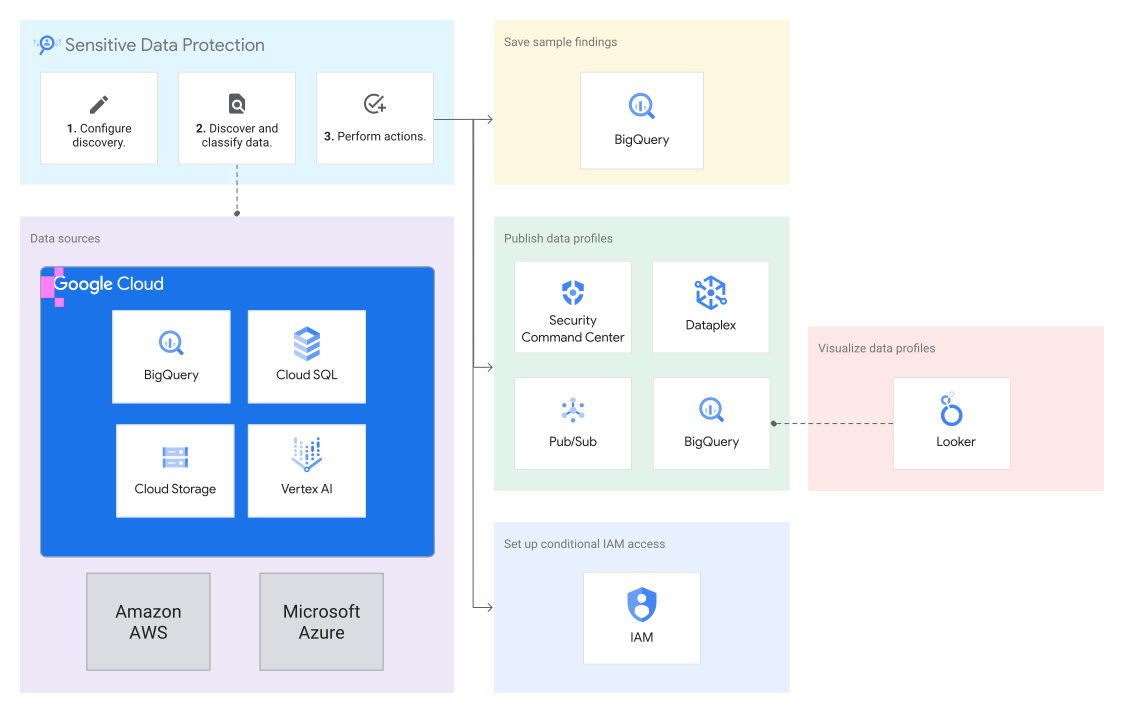
## Data profiles
Each *data profile* is a set of insights and metadata that the
discovery service gathers from scanning a [supported
resource](https://docs.cloud.google.com/sensitive-data-protection/docs/data-profiles#supported-resources). Insights include the predicted
[infoTypes](https://docs.cloud.google.com/sensitive-data-protection/docs/infotypes-reference.md.txt) and the
[calculated data risk and sensitivity
levels](https://docs.cloud.google.com/sensitive-data-protection/docs/sensitivity-risk-calculation) of your
data. Use these insights to make informed decisions about how you protect,
share, and use your data.
Data profiles are generated at various levels of detail. For example, when you
profile BigQuery data, profiles are generated at the project,
table, and column levels.
The following image shows a list of column-level data profiles. Click the image
to enlarge it.
[](https://docs.cloud.google.com/static/sensitive-data-protection/docs/images/column-data-profiles.png)
For a list of insights and metadata included in each data profile, see
[Metrics reference](https://docs.cloud.google.com/sensitive-data-protection/docs/metrics-reference.md.txt).
For more information about the Google Cloud resource hierarchy, see
[Resource hierarchy](https://docs.cloud.google.com/resource-manager/docs/cloud-platform-resource-hierarchy.md.txt).
## Types of sensitive data discovery
This section describes the types of discovery operations that you can perform
and the supported data resources.
### Discovery for BigQuery and BigLake
When you profile BigQuery data,
data profiles are generated at the project, table, and column levels. After
profiling a BigQuery table, you can further investigate the
findings by [performing a deep
inspection](https://docs.cloud.google.com/sensitive-data-protection/docs/manage-data-profiles#create-inspection-job).
Sensitive Data Protection profiles tables that are supported by the
[BigQuery Storage Read API](https://docs.cloud.google.com/bigquery/docs/reference/storage.md.txt), including the
following:
- Standard BigQuery tables
- [Table snapshots](https://docs.cloud.google.com/bigquery/docs/table-snapshots-intro.md.txt)
- BigLake tables stored in Cloud Storage
The following aren't supported:
- [BigQuery Omni](https://docs.cloud.google.com/bigquery/docs/omni-introduction.md.txt) tables.
- Tables where the serialized data size of individual rows exceed the [maximum serialized data size](https://docs.cloud.google.com/bigquery/quotas.md.txt#storage-limits) that the BigQuery Storage Read API supports---128 MB.
- Non-BigLake external tables, like Google Sheets.
For information about how to profile BigQuery data, see the
following:
- [Profile BigQuery data in a single
project](https://docs.cloud.google.com/sensitive-data-protection/docs/profile-project)
- [Profile BigQuery data in an organization or
folder](https://docs.cloud.google.com/sensitive-data-protection/docs/profile-org-folder)
For more information about BigQuery, see the
[BigQuery documentation](https://docs.cloud.google.com/bigquery/docs.md.txt).
### Discovery for Cloud SQL
When you profile Cloud SQL data, data profiles are generated at
the project, table, and column levels. Before discovery can begin,
you need to provide the connection details for each Cloud SQL instance
to be profiled.
For information about how to profile Cloud SQL data, see the
following:
- [Profile Cloud SQL data in a single
project](https://docs.cloud.google.com/sensitive-data-protection/docs/profile-project-cloud-sql)
- [Profile Cloud SQL data in an organization or
folder](https://docs.cloud.google.com/sensitive-data-protection/docs/profile-org-folder-cloud-sql)
For more information about Cloud SQL, see the [Cloud SQL
documentation](https://docs.cloud.google.com/sql/docs).
### Discovery for Cloud Storage
When you profile Cloud Storage data, data profiles are generated at the
bucket level. Sensitive Data Protection groups the detected files into [file
clusters](https://docs.cloud.google.com/sensitive-data-protection/docs/supported-file-types#file_clusters)
and provides a summary for each cluster.
For information about how to profile Cloud Storage data, see the
following:
- [Profile Cloud Storage data in a single
project](https://docs.cloud.google.com/sensitive-data-protection/docs/profile-project-cloud-storage)
- [Profile Cloud Storage data in an organization or
folder](https://docs.cloud.google.com/sensitive-data-protection/docs/profile-org-folder-cloud-storage)
For more information about Cloud Storage, see the
[Cloud Storage documentation](https://docs.cloud.google.com/storage/docs.md.txt).
### Discovery for Vertex AI
When you profile a Vertex AI resource,
Sensitive Data Protection generates a file store data profile or a table
data profile, depending on where your training data is stored:
Cloud Storage or BigQuery.
For more information, see the following:
- [Sensitive data discovery for
Vertex AI](https://docs.cloud.google.com/sensitive-data-protection/docs/discovery-for-vertex-ai)
- [Profile Vertex AI data in a single
project](https://docs.cloud.google.com/sensitive-data-protection/docs/profile-project-vertex-ai)
- [Profile Vertex AI data in an organization or
folder](https://docs.cloud.google.com/sensitive-data-protection/docs/profile-org-folder-vertex-ai)
For more information about Vertex AI, see the
[Vertex AI documentation](https://docs.cloud.google.com/vertex-ai/docs).
### Discovery for other cloud providers
When you profile S3 data, data profiles are generated at
the bucket level. When you profile Azure Blob Storage data, data
profiles are generated at the container level.
In both cases, Sensitive Data Protection groups the detected files into
[file
clusters](https://docs.cloud.google.com/sensitive-data-protection/docs/supported-file-types#file_clusters)
and provides a summary for each cluster.
For more information, see the following:
- [Sensitive data discovery for Amazon S3
data](https://docs.cloud.google.com/sensitive-data-protection/docs/discovery-for-amazon-s3)
- [Profile Azure Blob Storage
data](https://docs.cloud.google.com/sensitive-data-protection/docs/profile-azure-blob-storage)
### Cloud Run environment variables
The discovery service can detect the presence of
[secrets](https://docs.cloud.google.com/sensitive-data-protection/docs/infotypes-reference.md.txt#credentials_and_secrets) in
Cloud Run functions and Cloud Run service revision environment variables,
and send any findings to Security Command Center. No data profiles are generated.
For more information, see [Report secrets in environment variables to
Security Command Center](https://docs.cloud.google.com/sensitive-data-protection/docs/secrets-discovery).
## Roles required to configure and view data profiles
The following sections list the required user roles, categorized according to
their purpose. Depending on how your organization is set up, you might decide to
have different people perform different tasks. For example, the person who
configures data profiles might be different from the person who regularly monitors
them.
### Roles required to work with data profiles at the organization or folder level
These roles let you configure and view data profiles at the organization or
folder level.
Make sure these roles are granted to the proper people at the organization
level. Alternatively, your Google Cloud administrator can
[create custom roles](https://docs.cloud.google.com/iam/docs/creating-custom-roles.md.txt) that only have the
relevant permissions.
| Purpose | Predefined role | Relevant permissions |
|---|---|---|
| Create a discovery scan configuration and view data profiles | DLP Administrator (`roles/dlp.admin`) | - dlp.columnDataProfiles.list - dlp.fileStoreProfiles.list - dlp.inspectTemplates.create - dlp.jobs.create - dlp.jobs.list - dlp.jobTriggers.create - dlp.jobTriggers.list - dlp.projectDataProfiles.list - dlp.tableDataProfiles.list |
| Create a project to be used as the service agent container^[1](https://docs.cloud.google.com/sensitive-data-protection/docs/data-profiles.md.txt#create-service-agent-container-footnote)^ | Project Creator (`roles/resourcemanager.projectCreator`) | - resourcemanager.organizations.get - resourcemanager.projects.create |
| Grant discovery access^[2](https://docs.cloud.google.com/sensitive-data-protection/docs/data-profiles.md.txt#grant-discovery-access-footnote)^ | One of the following: - Organization Administrator (`roles/resourcemanager.organizationAdmin`) - Security Admin (`roles/iam.securityAdmin`) | - resourcemanager.organizations.getIamPolicy - resourcemanager.organizations.setIamPolicy |
| View data profiles (read-only) | DLP Data Profiles Reader (`roles/dlp.dataProfilesReader`) | - dlp.columnDataProfiles.list - dlp.fileStoreProfiles.list - dlp.projectDataProfiles.list - dlp.tableDataProfiles.list |
| View data profiles (read-only) | DLP Reader (`roles/dlp.reader`) | - dlp.jobs.list - dlp.jobTriggers.list |
^1^ If you don't have the Project Creator (`roles/resourcemanager.projectCreator`) role, you can still create a scan configuration, but the [service agent
container](https://docs.cloud.google.com/sensitive-data-protection/docs/data-profiles#service-agent-container) that you use must be an existing project.
^2^ If you don't have the Organization Administrator (`roles/resourcemanager.organizationAdmin`) or Security Admin (`roles/iam.securityAdmin`) role, you can still create a scan configuration. After you create the scan configuration, someone in your organization who has one of these roles must [grant discovery access to the
service agent](https://docs.cloud.google.com/sensitive-data-protection/docs/grant-data-profiling-access).
### Roles required to work with data profiles at the project level
These roles let you configure and view data profiles at the project level.
Make sure these roles are granted to the proper people at the project
level. Alternatively, your Google Cloud administrator can
[create custom roles](https://docs.cloud.google.com/iam/docs/creating-custom-roles.md.txt) that only have the
relevant permissions.
| Purpose | Predefined role | Relevant permissions |
|---|---|---|
| Configure and view data profiles | DLP Administrator (`roles/dlp.admin`) | - dlp.columnDataProfiles.list - dlp.fileStoreProfiles.list - dlp.inspectTemplates.create - dlp.jobs.create - dlp.jobs.list - dlp.jobTriggers.create - dlp.jobTriggers.list - dlp.projectDataProfiles.list - dlp.tableDataProfiles.list |
| View data profiles (read-only) | DLP Data Profiles Reader (`roles/dlp.dataProfilesReader`) | - dlp.columnDataProfiles.list - dlp.fileStoreProfiles.list - dlp.projectDataProfiles.list - dlp.tableDataProfiles.list |
| View data profiles (read-only) | DLP Reader (`roles/dlp.reader`) | - dlp.jobs.list - dlp.jobTriggers.list |
## Sensitive data discovery scan configuration
A *discovery scan configuration* (sometimes called *discovery configuration* or
*scan configuration*) specifies how Sensitive Data Protection should profile
your data. It includes the following settings:
- [Scope](https://docs.cloud.google.com/sensitive-data-protection/docs/data-profiles.md.txt#scope) (organization, folder, or project) of the discovery operation
- [Type of
resource](https://docs.cloud.google.com/sensitive-data-protection/docs/data-profiles#supported-resources) to profile
- [Inspection
templates](https://docs.cloud.google.com/sensitive-data-protection/docs/data-profiles#inspection-template) to use
- [Scan
frequency](https://docs.cloud.google.com/sensitive-data-protection/docs/data-profiles#scan-frequency)
- Specific subsets of data that should be included in or excluded from discovery
- [Actions](https://docs.cloud.google.com/sensitive-data-protection/docs/concepts-actions.md.txt#supported_operations) that you want Sensitive Data Protection to take after discovery---for example, which Google Cloud services to publish the profiles to
- [Service
agent](https://docs.cloud.google.com/sensitive-data-protection/docs/data-profiles#service-agent-container) to use for discovery operations
For information about how to create an organization-level or project-level
discovery scan configuration, see the following pages:
| Discovery type | Create an organization-level scan configuration | Create a project-level scan configuration^1^ |
|---|---|---|
| Discovery for BigQuery data | [Profile BigQuery data in an organization or folder](https://docs.cloud.google.com/sensitive-data-protection/docs/profile-org-folder.md.txt) | [Profile BigQuery data in a single project](https://docs.cloud.google.com/sensitive-data-protection/docs/profile-project.md.txt) |
| Discovery for Cloud SQL data | [Profile Cloud SQL data in an organization or folder](https://docs.cloud.google.com/sensitive-data-protection/docs/profile-org-folder-cloud-sql.md.txt) | [Profile Cloud SQL data in a single project](https://docs.cloud.google.com/sensitive-data-protection/docs/profile-project-cloud-sql.md.txt) |
| Discovery for Cloud Storage data | [Profile Cloud Storage data in an organization or folder](https://docs.cloud.google.com/sensitive-data-protection/docs/profile-org-folder-cloud-storage.md.txt) | [Profile Cloud Storage data in a single project](https://docs.cloud.google.com/sensitive-data-protection/docs/profile-project-cloud-storage.md.txt) |
| Discovery for Vertex AI data | [Profile Vertex AI data in an organization or folder](https://docs.cloud.google.com/sensitive-data-protection/docs/profile-org-folder-vertex-ai.md.txt) | [Profile Vertex AI data in a single project](https://docs.cloud.google.com/sensitive-data-protection/docs/profile-project-vertex-ai.md.txt) |
| Discovery for Amazon S3 data | [Discovery for Amazon S3 data](https://docs.cloud.google.com/sensitive-data-protection/docs/profile-amazon-s3.md.txt) | Not applicable |
| Discovery for Azure Blob Storage data | [Discovery for Azure Blob Storage data](https://docs.cloud.google.com/sensitive-data-protection/docs/profile-azure-blob-storage.md.txt) | Not applicable |
| Secrets discovery (no profiles generated) | [Configure secrets discovery at the organization level](https://docs.cloud.google.com/sensitive-data-protection/docs/secrets-discovery.md.txt#org) | [Configure secrets discovery at the project level](https://docs.cloud.google.com/sensitive-data-protection/docs/secrets-discovery.md.txt#project) |
^1^ Not suitable for customers who have an organization-level discovery
subscription, such as one provided through Security Command Center
### Scan configuration scopes
You can create a scan configuration at the following levels:
- Organization
- Folder
- Project
- Single data resource
At the organization and folder levels, if two or more active scan configurations
have the same project in their scope, Sensitive Data Protection determines which
scan configuration can generate profiles for that project. For more information,
see [Overriding scan
configurations](https://docs.cloud.google.com/sensitive-data-protection/docs/data-profiles#overriding-scan-configs) on this page.
A project-level scan configuration can always profile the target project and
does not compete with other configurations at the level of the parent folder or
organization.
A [single-resource scan
configuration](https://docs.cloud.google.com/sensitive-data-protection/docs/discovery-test-mode) is intended
to help you explore and test profiling on a single data resource.
### Scan configuration location
The first time you create a scan configuration, you specify where you want
Sensitive Data Protection to store it. All subsequent scan
configurations that you create are stored in that same region.
For example, if you create a scan configuration for Folder A and store it in the
`us-west1` region, then any scan configuration that you later create for any
other resource is also stored in that region.
Metadata about the data to be profiled is copied to the same region
as your scan configurations, but the data itself isn't
moved or copied. For more information, see [Data residency
considerations](https://docs.cloud.google.com/sensitive-data-protection/docs/data-profiles#data-residency).
## Inspection template
An *inspection template* specifies what information
types (or *infoTypes* ) Sensitive Data Protection looks for while scanning
your data. Here, you provide a combination of [built-in infoTypes](https://docs.cloud.google.com/sensitive-data-protection/docs/infotypes-reference.md.txt)
and optional [custom infoTypes](https://docs.cloud.google.com/sensitive-data-protection/docs/creating-custom-infotypes.md.txt).
You can also provide a [likelihood](https://docs.cloud.google.com/sensitive-data-protection/docs/likelihood.md.txt) level to
narrow down what Sensitive Data Protection considers to be a match. You can
add rule sets to exclude unwanted findings or include additional findings.
By default, if you change an inspection template that your scan configuration
uses, the changes are applied only to future scans. Your action doesn't
cause a reprofile operation on your data.
If you want inspection template changes to trigger reprofile operations on the
affected data, add or update a schedule in your scan configuration, and turn on
the option to reprofile the data when the inspection template changes. For more
information, see [Frequency of data profile generation](https://docs.cloud.google.com/sensitive-data-protection/docs/data-profiles.md.txt#scan-frequency).
> [!IMPORTANT]
> **Note:** We regularly improve our detection algorithm. If we find that your organization or project would benefit from a new improvement that we implement, we might automatically regenerate your data profiles and redo the [actions in your scan
> configuration](https://docs.cloud.google.com/sensitive-data-protection/docs/profile-org-folder#manage-scan-outcome). You won't incur Sensitive Data Protection charges for this operation. However, because we will redo the actions, you might incur charges for your use of other Google Cloud services. For example, if you configured Sensitive Data Protection to save the data profiles to BigQuery, you might incur BigQuery charges.
You must have an inspection template in each region where you have data to be
profiled. If you want to use a single template for multiple regions, you can use
a template that is stored in the `global` region. If organizational
policies prevent you from creating an inspection template in the `global` region, then
you must set a dedicated inspection template for each region. For more
information, see [Data
residency considerations](https://docs.cloud.google.com/sensitive-data-protection/docs/data-profiles#data-residency).
Inspection templates are a core component of the Sensitive Data Protection platform.
Data profiles use the same inspection templates that you can use across all
Sensitive Data Protection services. For more information on inspection templates,
see [Templates](https://docs.cloud.google.com/sensitive-data-protection/docs/concepts-templates.md.txt).
## Service agent container and service agent
When you create a scan configuration for your organization or for a folder,
Sensitive Data Protection
requires you to provide a service agent container. A *service agent container*
is a Google Cloud project that Sensitive Data Protection uses to track
billed charges related to organization- and folder-level profiling operations.
The service agent container contains a *service agent*, which
Sensitive Data Protection uses to profile data on your behalf. You need a service
agent to authenticate to Sensitive Data Protection and other APIs. Your service
agent must have all the required permissions to access and profile your data.
The service agent's ID is in the following format:
service-PROJECT_NUMBER@dlp-api.iam.gserviceaccount.com
Here, the PROJECT_NUMBER is the numerical identifier of the service
agent container.
When setting the service agent container, you can choose an existing project.
If the project you select contains a service agent, Sensitive Data Protection
grants the required IAM permissions
to that service agent. If the project doesn't have a service agent,
Sensitive Data Protection creates one and automatically grants data profiling
permissions to it.
Alternatively, you can choose to have Sensitive Data Protection
automatically create the service agent container and service agent.
Sensitive Data Protection automatically grants data profiling permissions to the
service agent.
In both cases, if Sensitive Data Protection fails to grant data profiling
access to your service agent, it shows an
[error](https://docs.cloud.google.com/sensitive-data-protection/docs/troubleshoot-data-profiles.md.txt#data-profiling-access)
when you [view the scan configuration details](https://docs.cloud.google.com/sensitive-data-protection/docs/manage-scan-configurations.md.txt#view-config).
For project-level scan configurations, you don't need a service agent
container. The project you're profiling serves the service agent
container's purpose. To run profiling operations, Sensitive Data Protection uses
that project's own service agent.
## Data profiling access at the organization or folder level
When you [configure sensitive data
discovery](https://docs.cloud.google.com/sensitive-data-protection/docs/manage-scan-configurations#create) at the
organization or folder level, Sensitive Data Protection attempts to automatically
grant data profiling access to your service agent. However, if you don't have
the [permissions to grant discovery access](https://docs.cloud.google.com/sensitive-data-protection/docs/data-profiles.md.txt#user-roles-org-folder),
Sensitive Data Protection can't do this action on your behalf. Someone with those
permissions in your organization, such as a Google Cloud administrator, must
[grant data profiling access to your service
agent](https://docs.cloud.google.com/sensitive-data-protection/docs/grant-data-profiling-access).
## Frequency of data profile generation
After you create a discovery scan configuration for a particular resource,
Sensitive Data Protection performs an initial scan, profiling the data in
the scope of your scan configuration.
After the initial scan, Sensitive Data Protection continuously monitors the
profiled resource. Data added in the resource is
automatically profiled shortly after it is added.
### Default reprofiling frequency
The default reprofiling frequency differs depending on the [discovery
type](https://docs.cloud.google.com/sensitive-data-protection/docs/data-profiles#discovery-type) of your scan configuration:
- BigQuery profiling: for each table, wait 30 days and then reprofile the table if it has changes in the schema, table rows, or inspection template.
- Cloud SQL profiling: for each table, wait 30 days and then reprofile the table if it has changes in the schema or inspection template.
- Vertex AI profiling: for each resource, wait 30 days and then reprofile the resource if the inspection template has changes.
- File store profiling: for each file store in Google Cloud or in other clouds,
wait 30 days and then reprofile the file store if the inspection template has
changes.
Sensitive Data Protection uses the term *file store* to
refer to a file storage bucket or container.
### Customizing the reprofiling frequency
In your scan configuration, you can customize the reprofiling frequency by
creating one or more schedules for different subsets of your data.
The following reprofiling frequencies are available:
- **Do not reprofile**: Never reprofile after the initial profiles are generated.
- **Reprofile daily**: Wait 24 hours before reprofiling.
- **Reprofile weekly**: Wait 7 days before reprofiling.
- **Reprofile monthly**: Wait 30 days before reprofiling.
### Reprofiling on a schedule
In your scan configuration, you can specify whether a subset of data should be
reprofiled regularly regardless of whether the data underwent changes.
The frequency you set specifies how much time must pass between profiling
operations. For example, if you set the frequency to weekly,
Sensitive Data Protection profiles a data resource seven days after it was
last profiled.
### Reprofiling on update
In your scan configuration, you can specify events that can trigger
reprofiling operations. Examples of such events are inspection template updates.
When you select these events, the schedule you set specifies the longest time
Sensitive Data Protection waits for updates to accumulate before it
reprofiles your data. If no applicable changes---like schema changes or
inspection template changes---occur within your specified period, no data is
reprofiled. When the next applicable change occurs, the affected data is
reprofiled at the next opportunity, which is determined by various factors (such
as the available machine capacity or the [subscription units
purchased](https://docs.cloud.google.com/sensitive-data-protection/pricing#discovery-subscription-mode-pricing)).
Sensitive Data Protection then starts waiting for updates to accumulate again
according to your set schedule.
For example, suppose your scan configuration is set to reprofile monthly on
schema change. The data profiles were first created on day 0. No schema changes
occur by day 30, so no data is reprofiled. On day 35, the first schema change
occurs. Sensitive Data Protection reprofiles the updated data at the next
opportunity. The system then waits another 30 days for schema updates to
accumulate before it reprofiles any updated data.
From the time reprofiling begins, it can take up to 24 hours for the operation
to complete. If the delay lasts longer than 24 hours and you're in subscription
pricing mode, confirm whether you have [remaining capacity for the
month](https://cloud.google.com/sensitive-data-protection/pricing#subscription-monitoring).
For example scenarios, see [Data profiling pricing examples](https://cloud.google.com/sensitive-data-protection/pricing#dp-pricing-examples).
To force the discovery service to reprofile your data, see [Force a reprofile
operation](https://docs.cloud.google.com/sensitive-data-protection/docs/manage-data-profiles#force-reprofile).
> [!IMPORTANT]
> **Note:** We regularly improve our detection algorithm. If we find that your organization or project would benefit from a new improvement that we implement, we might automatically regenerate your data profiles and redo the [actions in your scan
> configuration](https://docs.cloud.google.com/sensitive-data-protection/docs/profile-org-folder#manage-scan-outcome). You won't incur Sensitive Data Protection charges for this operation. However, because we will redo the actions, you might incur charges for your use of other Google Cloud services. For example, if you configured Sensitive Data Protection to save the data profiles to BigQuery, you might incur BigQuery charges.
## Discovery performance
The time it takes to profile your data varies depending on several factors,
including, but not limited to, the following:
- Number of data resources being profiled
- Sizes of the data resources
- For tables, the number of columns
- For tables, the data types in the columns
Therefore,
Sensitive Data Protection's performance in a past inspection or profiling task
isn't indicative of how it will perform in future profiling tasks.
## Retention of data profiles
Sensitive Data Protection retains the latest version of a data profile
indefinitely. When Sensitive Data Protection reprofiles a data resource, the system
replaces that data resource's existing profiles with new ones.
Deleting a data profile [forces the system to
reprofile](https://docs.cloud.google.com/sensitive-data-protection/docs/manage-data-profiles#force-reprofile)
the source data, unless you exclude it from your discovery configuration.
For information on how Sensitive Data Protection charges for profiling data, see
[Discovery pricing](https://cloud.google.com/sensitive-data-protection/pricing#data_profiling_pricing).
If you want to explore data profiles, join them with other data sources, or keep a
record of the changes they undergo, consider saving the data profiles to
BigQuery when you
[configure sensitive data
discovery](https://docs.cloud.google.com/sensitive-data-protection/docs/manage-scan-configurations#create). You choose
which
BigQuery dataset to save the profiles to, and you control the
table expiration policy for that dataset.
## Override scan configurations
You can create only one scan configuration for each combination of
[scope](https://docs.cloud.google.com/sensitive-data-protection/docs/data-profiles.md.txt#scope) and [discovery type](https://docs.cloud.google.com/sensitive-data-protection/docs/data-profiles.md.txt#discovery-type). For example, you can
create only one organization-level scan configuration for
BigQuery data profiling and one organization-level scan
configuration for secrets discovery. Similarly, you can create only one
project-level scan configuration for BigQuery data profiling and
one project-level scan configuration for secrets discovery.
If two or more active scan configurations have the same project and discovery
type in their scope, the following rules apply:
- Among organization-level and folder-level scan configurations, the one that is closest to the project will be able to run discovery for that project. This rule applies even if a project-level scan configuration with the same discovery type also exists.
- Sensitive Data Protection treats project-level scan configurations independently of organization-level and folder-level configurations. A scan configuration that you create at the project level can't override one that you create for a parent folder or organization.
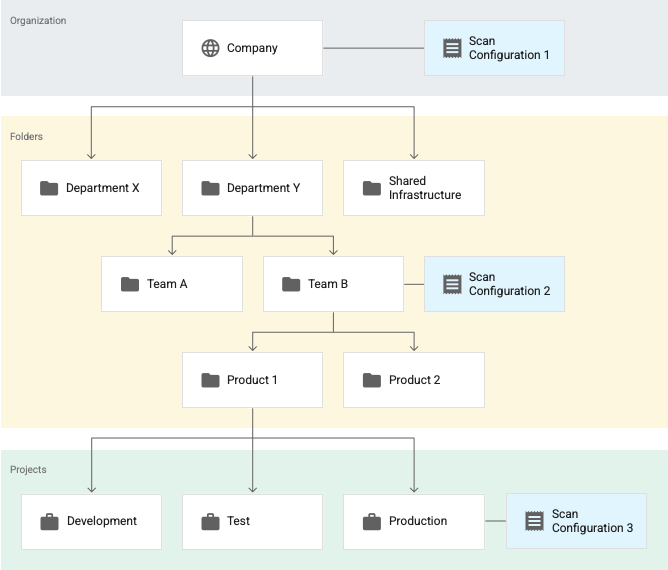
Consider the following example, where there are three active scan configurations.
Assume that all of these scan configurations are for BigQuery
data profiling.
[](https://docs.cloud.google.com/static/sensitive-data-protection/docs/images/resource-hierarchy-with-config_2x.png)
Here, **Scan configuration 1** applies to the entire organization,
**Scan configuration 2** applies to the **Team B** folder, and **Scan
configuration 3** applies to the **Production** project. In this example:
- Sensitive Data Protection profiles all tables in projects that aren't in the **Team B** folder according to **Scan configuration 1**.
- Sensitive Data Protection profiles all tables in projects in the **Team B** folder---including tables in the **Production** project---according to **Scan configuration 2**.
- Sensitive Data Protection profiles all tables in the **Production** project according to **Scan configuration 3**.
In this example, Sensitive Data Protection generates two sets of
profiles for the **Production** project---one set for each of the following scan
configurations:
- Scan configuration 2
- Scan configuration 3
However, even though there are two sets of profiles for the same project, you
don't see them all together in your dashboard. You only see the profiles that
were generated in the resource---organization, folder, or project---and
region that you're viewing.
For more information on Google Cloud's resource hierarchy, see
[Resource hierarchy](https://docs.cloud.google.com/resource-manager/docs/cloud-platform-resource-hierarchy.md.txt).
## Data profile snapshots
Each data profile includes a snapshot of the scan configuration and the
inspection template that were used to generate it. You can use this snapshot to
check the settings that you used to generate a particular data profile.
## Data residency considerations
Data residency considerations differ depending on whether you are scanning
Google Cloud data or data from [other cloud
providers](https://docs.cloud.google.com/sensitive-data-protection/docs/data-profiles#data-residency-other-clouds).
### Data residency considerations for Google Cloud data
This section applies only to sensitive data discovery for Google Cloud
resources. For data residency considerations related to resources from other
cloud providers, see [Data residency
considerations for data from other cloud providers](https://docs.cloud.google.com/sensitive-data-protection/docs/data-profiles#data-residency-other-clouds) on this page.
Sensitive Data Protection is designed to support [data residency](https://docs.cloud.google.com/assured-workloads/docs/concept-data-residency). If you must comply
with data residency requirements, consider the following points:
#### Regional inspection templates
This section applies only to sensitive data discovery for Google Cloud
resources. For data residency considerations related to resources from other
cloud providers, see [Data residency
considerations for data from other cloud providers](https://docs.cloud.google.com/sensitive-data-protection/docs/data-profiles#data-residency-other-clouds) on this page.
Sensitive Data Protection processes your data
in the same region where that data is stored. That is, your data doesn't leave
its current region.
Furthermore, an inspection template can only be used to profile data that
resides in the same region as that template. For example, if you configure
discovery to use an inspection template that is stored in the `us-west1`
region, Sensitive Data Protection can only profile data in that region.
You can set a dedicated inspection template for each region where you have data.
If you provide an inspection template that's stored in the `global` region,
Sensitive Data Protection uses that template for data in regions with no
dedicated inspection template.
> [!NOTE]
> **Note:** If you don't include an inspection template that's stored in the `global` region, Sensitive Data Protection can't profile data in regions that don't have a dedicated inspection template. For those data resources, profiling fails with an error.
The following table provides example scenarios:
| Scenario | Support |
|---|---|
| Scan data in the `us` region using an inspection template from the `us` region. | Supported |
| Scan data in the `global` region using an inspection template from the `us` region. | Not supported |
| Scan data in the `us` region using an inspection template from the `global` region. | Supported |
| Scan data in the `us` region using an inspection template from the `us-east1` region. | Not supported |
| Scan data in the `us-east1` region using an inspection template from the `us` region. | Not supported |
| Scan data in the `us` region using an inspection template from the `asia` region. | Not supported |
#### Data profile configuration
This section applies only to sensitive data discovery for Google Cloud
resources. For data residency considerations related to resources from other
cloud providers, see [Data residency
considerations for data from other cloud providers](https://docs.cloud.google.com/sensitive-data-protection/docs/data-profiles#data-residency-other-clouds) on this page.
When Sensitive Data Protection creates data profiles, it takes a snapshot of your
scan configuration and inspection template and stores them in each [table data
profile](https://docs.cloud.google.com/sensitive-data-protection/docs/metrics-reference#table-data-profile)
or [file store data
profile](https://docs.cloud.google.com/sensitive-data-protection/docs/metrics-reference#file-store-data-profile).
If you configure discovery to use an inspection template from the `global`
region, then Sensitive Data Protection copies that template to any region that has
data to be profiled. Similarly, it copies the scan configuration to those
regions.
Consider this example: Project A contains Table 1. Table 1 is
in the `us-west1` region; the scan configuration is in the `us-west2` region;
and the inspection template is in the `global` region.
When Sensitive Data Protection scans Project A, it creates data profiles for
Table 1 and stores them in the `us-west1` region. Table 1's table data profile
contains copies of the scan configuration and the inspection template used in
the profiling operation.
If you don't want your inspection template to be copied to other regions,
don't configure Sensitive Data Protection to scan data in those regions.
#### Regional storage of data profiles
This section applies only to sensitive data discovery for Google Cloud
resources. For data residency considerations related to resources from other
cloud providers, see [Data residency
considerations for data from other cloud providers](https://docs.cloud.google.com/sensitive-data-protection/docs/data-profiles#data-residency-other-clouds) on this page.
Sensitive Data Protection processes your data in the region
or multi-region where they reside and stores the generated data profiles in the
same region or multi-region.
To [view data
profiles](https://docs.cloud.google.com/sensitive-data-protection/docs/manage-data-profiles#view_the_data_profiles)
in the Google Cloud console, you must first select the region where they reside. If
you have data in multiple regions, then you must switch regions to view each set
of profiles.
> [!TIP]
> **Tip:** If you want a centralized view of all your data profiles, then turn on the **Save data profile copies to BigQuery** option when you [configure sensitive data
> discovery](https://docs.cloud.google.com/sensitive-data-protection/docs/manage-scan-configurations#create). There, you specify a single BigQuery dataset to store your profiles. You can then query them all together. In this case, the data profiles from various regions are stored together in one BigQuery dataset, in the region where that dataset resides.
#### Unsupported regions
This section applies only to sensitive data discovery for Google Cloud
resources. For data residency considerations related to resources from other
cloud providers, see [Data residency
considerations for data from other cloud providers](https://docs.cloud.google.com/sensitive-data-protection/docs/data-profiles#data-residency-other-clouds) on this page.
If you have data in a [region](https://docs.cloud.google.com/sensitive-data-protection/docs/locations.md.txt) that
Sensitive Data Protection doesn't support, then the discovery service skips those
data resources and shows an error when you [view the data
profiles](https://docs.cloud.google.com/sensitive-data-protection/docs/manage-data-profiles#view_the_data_profiles).
#### Multi-regions
Sensitive Data Protection treats a [multi-region](https://docs.cloud.google.com/sensitive-data-protection/docs/locations.md.txt#multi-regions) as one
region, and not a collection of regions. For example, the `us` multi-region
and the `us-west1` region are treated as two separate regions as far as data
residency is concerned.
#### Zonal resources
Sensitive Data Protection is a regional and multi-regional service; it
doesn't distinguish between zones. For a supported zonal resource like a
Cloud SQL instance, the data is processed in its current region, but
not necessarily its current zone. For example, if a Cloud SQL instance
is stored in the `us-central1-a` zone, Sensitive Data Protection
processes and stores the data profiles in the `us-central1` region.
For general information about Google Cloud locations, see [Geography and
regions](https://docs.cloud.google.com/docs/geography-and-regions).
### Data residency considerations for data from other cloud providers
Consider the following when you plan to profile data from
other cloud providers:
- The data profiles are stored alongside the discovery scan configuration. In contrast, when you profile Google Cloud data, the profiles are stored in the same region as the data to be profiled.
- If you store your inspection template in the `global` region, an in-memory copy of that template is read in the region where you store the discovery scan configuration.
- Your data is not modified. An in-memory copy of your data is read in the region where you store the discovery scan configuration. However, Sensitive Data Protection makes no guarantees about where the data passes through after it reaches the public internet. The data is encrypted with SSL.
## Compliance
For information on how Sensitive Data Protection handles your data and helps you
meet compliance requirements, see [Data security](https://docs.cloud.google.com/sensitive-data-protection/docs/data-security.md.txt).
## What's next
- Read the Identity \& Security blog post [Automatic data risk management for
BigQuery using
Sensitive Data Protection](https://cloud.google.com/blog/products/identity-security/google-launches-automatic-dlp-for-bigquery).
- Learn how to [estimate data profiling cost](https://docs.cloud.google.com/sensitive-data-protection/docs/estimate-org-folder.md.txt).
- Learn how to [configure sensitive data
discovery](https://docs.cloud.google.com/sensitive-data-protection/docs/manage-scan-configurations#create).
- Learn about how Sensitive Data Protection [calculates the data risk and
sensitivity levels when profiling your data](https://docs.cloud.google.com/sensitive-data-protection/docs/sensitivity-risk-calculation).
- Learn how to [remediate discovery findings](https://docs.cloud.google.com/sensitive-data-protection/docs/best-practices-for-mitigating-data-risk.md.txt).
- Learn how to [troubleshoot issues with the data profiler](https://docs.cloud.google.com/sensitive-data-protection/docs/troubleshoot-data-profiles.md.txt).