[*L*-diversity](https://docs.cloud.google.com/sensitive-data-protection/docs/concepts-risk-analysis.md.txt#about-l-diversity) is a property of a
dataset and an extension of *k* -anonymity that measures the diversity of
sensitive values for each column in which they occur. A dataset has
*l* -diversity if, for every set of rows with identical quasi-identifiers, there
are at least *l* distinct values for each sensitive attribute.
You can compute the *l* -diversity value based on one or more columns, or fields,
of a dataset. This topic demonstrates how to compute *l* -diversity values for a
dataset using Sensitive Data Protection. For more information about *l* -diversity or risk
analysis in general, see the [risk analysis concept
topic](https://docs.cloud.google.com/sensitive-data-protection/docs/concepts-risk-analysis) before continuing on.
> [!IMPORTANT]
> **Note:** Prematurely canceling an operation midway through a job still incurs costs for the portion of the job that was completed. For more information about billing, see [Sensitive Data Protection pricing](https://cloud.google.com/sensitive-data-protection/pricing).
## Before you begin
Before continuing, be sure you've done the following:
1. [Sign in](https://accounts.google.com/Login) to your Google Account.
2. In the Google Cloud console, on the project selector page, select or create a Google Cloud project.
[Go to the project selector](https://console.cloud.google.com/projectselector2/home/dashboard)
3. Make sure that billing is enabled for your Google Cloud project. [Learn how to confirm billing is enabled for your
project.](https://docs.cloud.google.com/billing/docs/how-to/modify-project)
4. Enable Sensitive Data Protection.
[Enable Sensitive Data Protection](https://console.cloud.google.com/apis/enableflow?apiid=dlp.googleapis.com)
5. Select a BigQuery dataset to analyze. Sensitive Data Protection calculates the *l*-diversity metric by scanning a BigQuery table.
6. Determine a sensitive field identifier (if applicable) and at least one quasi-identifier in the dataset. For more information, see [Risk
analysis terms and techniques](https://docs.cloud.google.com/sensitive-data-protection/docs/concepts-risk-analysis#risk_analysis_terms_and_techniques).
## Compute l-diversity
Sensitive Data Protection performs risk analysis whenever a risk analysis
job runs. You must create the job first, either by using the
Google Cloud console, sending a DLP API request, or using a
Sensitive Data Protection client library.
> [!IMPORTANT]
> **Important:** The code on this page requires that you first set up a Sensitive Data Protection client. For more information about installing and creating a Sensitive Data Protection client, see [Sensitive Data Protection client libraries](https://docs.cloud.google.com/sensitive-data-protection/docs/reference/libraries). (Sending JSON to Sensitive Data Protection REST endpoints does not require a client library.)
### Console
1. In the Google Cloud console, go to the **Create risk analysis** page.
[Go to Create risk analysis](https://console.cloud.google.com/security/sensitive-data-protection/create/riskAnalysisJob;source=7)
2. In the **Choose input data** section,
specify the BigQuery table to scan by entering the project
ID of the project containing the table, the dataset ID of the table, and
the name of the table.
3. Under **Privacy metric to compute** , select **l-diversity**.
4. In the **Job ID** section, you can optionally give the job a custom
identifier and select [a resource location](https://docs.cloud.google.com/sensitive-data-protection/docs/specifying-location.md.txt)
in which Sensitive Data Protection will process your data. When you're done,
click **Continue**.
5. In the **Define fields** section, you specify [sensitive fields and
quasi-identifiers](https://docs.cloud.google.com/sensitive-data-protection/docs/concepts-risk-analysis#risk_analysis_terms_and_techniques)
for the *l*-diversity risk job. Sensitive Data Protection accesses the
metadata of the BigQuery table you specified in the previous
step and attempts to populate the list of fields.
1. Select the appropriate checkbox to specify a field as either a sensitive field (S) or quasi-identifier (QI). You must select 1 sensitive field and at least 1 quasi-identifier.
2. If Sensitive Data Protection isn't able to populate the fields, click **Enter field name** to manually enter one or more fields and set each one as sensitive field or quasi-identifier. When you're done, click **Continue**.
6. In the **Add actions** section, you can add optional
[actions](https://docs.cloud.google.com/sensitive-data-protection/docs/concepts-actions.md.txt) to perform when the risk job is
complete. The available options are:
> [!IMPORTANT]
> **Important:** Be aware that running a risk analysis job may persist some of the [quote](https://docs.cloud.google.com/sensitive-data-protection/docs/quote.md.txt) values of the selected quasi-identifiers to the risk analysis job results. These quote values are used to build the histogram and output tables.
- **Save to BigQuery**: Saves the results of the risk analysis scan to a BigQuery table.
- **Publish to Pub/Sub** : Publishes a notification to a
[Pub/Sub topic](https://docs.cloud.google.com/pubsub/docs/publisher.md.txt).
> [!NOTE]
> **Note:** If there are configuration or permission issues with the Pub/Sub topic, Sensitive Data Protection retries sending the Pub/Sub notification for up to two weeks. After two weeks, the notification is discarded.
- **Notify by email** : Sends you an email with results.
When you're done, click **Create**.
The *l*-diversity risk analysis job starts immediately.
### C#
To learn how to install and use the client library for Sensitive Data Protection, see
[Sensitive Data Protection client libraries](https://docs.cloud.google.com/sensitive-data-protection/docs/libraries.md.txt).
To authenticate to Sensitive Data Protection, set up Application Default Credentials.
For more information, see
[Set up authentication for a local development environment](https://docs.cloud.google.com/docs/authentication/set-up-adc-local-dev-environment.md.txt).
```c#
using Google.Api.Gax.ResourceNames;
using Google.Cloud.Dlp.V2;
using Google.Cloud.PubSub.V1;
using Newtonsoft.Json;
using System;
using System.Collections.Generic;
using System.Linq;
using System.Threading;
using System.Threading.Tasks;
using static Google.Cloud.Dlp.V2.Action.Types;
using static Google.Cloud.Dlp.V2.PrivacyMetric.Types;
public class RiskAnalysisCreateLDiversity
{
public static object LDiversity(
string callingProjectId,
string tableProjectId,
string datasetId,
string tableId,
string topicId,
string subscriptionId,
IEnumerable quasiIds,
string sensitiveAttribute)
{
var dlp = DlpServiceClient.Create();
// Construct + submit the job
var ldiversityConfig = new LDiversityConfig
{
SensitiveAttribute = new FieldId { Name = sensitiveAttribute },
QuasiIds = { quasiIds }
};
var config = new RiskAnalysisJobConfig
{
PrivacyMetric = new PrivacyMetric
{
LDiversityConfig = ldiversityConfig
},
SourceTable = new BigQueryTable
{
ProjectId = tableProjectId,
DatasetId = datasetId,
TableId = tableId
},
Actions =
{
new Google.Cloud.Dlp.V2.Action
{
PubSub = new PublishToPubSub
{
Topic = $"projects/{callingProjectId}/topics/{topicId}"
}
}
}
};
var submittedJob = dlp.CreateDlpJob(
new CreateDlpJobRequest
{
ParentAsProjectName = new ProjectName(callingProjectId),
RiskJob = config
});
// Listen to pub/sub for the job
var subscriptionName = new SubscriptionName(callingProjectId, subscriptionId);
var subscriber = SubscriberClient.CreateAsync(subscriptionName).Result;
// SimpleSubscriber runs your message handle function on multiple
// threads to maximize throughput.
var done = new ManualResetEventSlim(false);
subscriber.StartAsync((PubsubMessage message, CancellationToken cancel) =>
{
if (message.Attributes["DlpJobName"] == submittedJob.Name)
{
Thread.Sleep(500); // Wait for DLP API results to become consistent
done.Set();
return Task.FromResult(SubscriberClient.Reply.Ack);
}
else
{
return Task.FromResult(SubscriberClient.Reply.Nack);
}
});
done.Wait(TimeSpan.FromMinutes(10)); // 10 minute timeout; may not work for large jobs
subscriber.StopAsync(CancellationToken.None).Wait();
// Process results
var resultJob = dlp.GetDlpJob(
new GetDlpJobRequest
{
DlpJobName = DlpJobName.Parse(submittedJob.Name)
});
var result = resultJob.RiskDetails.LDiversityResult;
for (var bucketIdx = 0; bucketIdx < result.SensitiveValueFrequencyHistogramBuckets.Count; bucketIdx++)
{
var bucket = result.SensitiveValueFrequencyHistogramBuckets[bucketIdx];
Console.WriteLine($"Bucket {bucketIdx}");
Console.WriteLine($" Bucket size range: [{bucket.SensitiveValueFrequencyLowerBound}, {bucket.SensitiveValueFrequencyUpperBound}].");
Console.WriteLine($" {bucket.BucketSize} unique value(s) total.");
foreach (var bucketValue in bucket.BucketValues)
{
// 'UnpackValue(x)' is a prettier version of 'x.toString()'
Console.WriteLine($" Quasi-ID values: [{String.Join(',', bucketValue.QuasiIdsValues.Select(x => UnpackValue(x)))}]");
Console.WriteLine($" Class size: {bucketValue.EquivalenceClassSize}");
foreach (var topValue in bucketValue.TopSensitiveValues)
{
Console.WriteLine($" Sensitive value {UnpackValue(topValue.Value)} occurs {topValue.Count} time(s).");
}
}
}
return result;
}
public static string UnpackValue(Value protoValue)
{
var jsonValue = JsonConvert.DeserializeObject>(protoValue.ToString());
return jsonValue.Values.ElementAt(0).ToString();
}
}
```
### Go
To learn how to install and use the client library for Sensitive Data Protection, see
[Sensitive Data Protection client libraries](https://docs.cloud.google.com/sensitive-data-protection/docs/libraries.md.txt).
To authenticate to Sensitive Data Protection, set up Application Default Credentials.
For more information, see
[Set up authentication for a local development environment](https://docs.cloud.google.com/docs/authentication/set-up-adc-local-dev-environment.md.txt).
```go
import (
"context"
"fmt"
"io"
"strings"
"time"
dlp "cloud.google.com/go/dlp/apiv2"
"cloud.google.com/go/dlp/apiv2/dlppb"
"cloud.google.com/go/pubsub"
)
// riskLDiversity computes the L Diversity of the given columns.
func riskLDiversity(w io.Writer, projectID, dataProject, pubSubTopic, pubSubSub, datasetID, tableID, sensitiveAttribute string, columnNames ...string) error {
// projectID := "my-project-id"
// dataProject := "bigquery-public-data"
// pubSubTopic := "dlp-risk-sample-topic"
// pubSubSub := "dlp-risk-sample-sub"
// datasetID := "nhtsa_traffic_fatalities"
// tableID := "accident_2015"
// sensitiveAttribute := "city"
// columnNames := "state_number", "county"
ctx := context.Background()
client, err := dlp.NewClient(ctx)
if err != nil {
return fmt.Errorf("dlp.NewClient: %w", err)
}
defer client.Close()
// Create a PubSub Client used to listen for when the inspect job finishes.
pubsubClient, err := pubsub.NewClient(ctx, projectID)
if err != nil {
return err
}
defer pubsubClient.Close()
// Create a PubSub subscription we can use to listen for messages.
// Create the Topic if it doesn't exist.
t := pubsubClient.Topic(pubSubTopic)
topicExists, err := t.Exists(ctx)
if err != nil {
return err
}
if !topicExists {
if t, err = pubsubClient.CreateTopic(ctx, pubSubTopic); err != nil {
return err
}
}
// Create the Subscription if it doesn't exist.
s := pubsubClient.Subscription(pubSubSub)
subExists, err := s.Exists(ctx)
if err != nil {
return err
}
if !subExists {
if s, err = pubsubClient.CreateSubscription(ctx, pubSubSub, pubsub.SubscriptionConfig{Topic: t}); err != nil {
return err
}
}
// topic is the PubSub topic string where messages should be sent.
topic := "projects/" + projectID + "/topics/" + pubSubTopic
// Build the QuasiID slice.
var q []*dlppb.FieldId
for _, c := range columnNames {
q = append(q, &dlppb.FieldId{Name: c})
}
// Create a configured request.
req := &dlppb.CreateDlpJobRequest{
Parent: fmt.Sprintf("projects/%s/locations/global", projectID),
Job: &dlppb.CreateDlpJobRequest_RiskJob{
RiskJob: &dlppb.RiskAnalysisJobConfig{
// PrivacyMetric configures what to compute.
PrivacyMetric: &dlppb.PrivacyMetric{
Type: &dlppb.PrivacyMetric_LDiversityConfig_{
LDiversityConfig: &dlppb.PrivacyMetric_LDiversityConfig{
QuasiIds: q,
SensitiveAttribute: &dlppb.FieldId{
Name: sensitiveAttribute,
},
},
},
},
// SourceTable describes where to find the data.
SourceTable: &dlppb.BigQueryTable{
ProjectId: dataProject,
DatasetId: datasetID,
TableId: tableID,
},
// Send a message to PubSub using Actions.
Actions: []*dlppb.Action{
{
Action: &dlppb.Action_PubSub{
PubSub: &dlppb.Action_PublishToPubSub{
Topic: topic,
},
},
},
},
},
},
}
// Create the risk job.
j, err := client.CreateDlpJob(ctx, req)
if err != nil {
return fmt.Errorf("CreateDlpJob: %w", err)
}
fmt.Fprintf(w, "Created job: %v\n", j.GetName())
// Wait for the risk job to finish by waiting for a PubSub message.
// This only waits for 10 minutes. For long jobs, consider using a truly
// asynchronous execution model such as Cloud Functions.
ctx, cancel := context.WithTimeout(ctx, 10*time.Minute)
defer cancel()
err = s.Receive(ctx, func(ctx context.Context, msg *pubsub.Message) {
// If this is the wrong job, do not process the result.
if msg.Attributes["DlpJobName"] != j.GetName() {
msg.Nack()
return
}
msg.Ack()
time.Sleep(500 * time.Millisecond)
j, err := client.GetDlpJob(ctx, &dlppb.GetDlpJobRequest{
Name: j.GetName(),
})
if err != nil {
fmt.Fprintf(w, "GetDlpJob: %v", err)
return
}
h := j.GetRiskDetails().GetLDiversityResult().GetSensitiveValueFrequencyHistogramBuckets()
for i, b := range h {
fmt.Fprintf(w, "Histogram bucket %v\n", i)
fmt.Fprintf(w, " Size range: [%v,%v]\n", b.GetSensitiveValueFrequencyLowerBound(), b.GetSensitiveValueFrequencyUpperBound())
fmt.Fprintf(w, " %v unique values total\n", b.GetBucketSize())
for _, v := range b.GetBucketValues() {
var qvs []string
for _, qv := range v.GetQuasiIdsValues() {
qvs = append(qvs, qv.String())
}
fmt.Fprintf(w, " QuasiID values: %s\n", strings.Join(qvs, ", "))
fmt.Fprintf(w, " Class size: %v\n", v.GetEquivalenceClassSize())
for _, sv := range v.GetTopSensitiveValues() {
fmt.Fprintf(w, " Sensitive value %v occurs %v times\n", sv.GetValue(), sv.GetCount())
}
}
}
// Stop listening for more messages.
cancel()
})
if err != nil {
return fmt.Errorf("Recieve: %w", err)
}
return nil
}
```
### Java
To learn how to install and use the client library for Sensitive Data Protection, see
[Sensitive Data Protection client libraries](https://docs.cloud.google.com/sensitive-data-protection/docs/libraries.md.txt).
To authenticate to Sensitive Data Protection, set up Application Default Credentials.
For more information, see
[Set up authentication for a local development environment](https://docs.cloud.google.com/docs/authentication/set-up-adc-local-dev-environment.md.txt).
```java
import com.google.api.core.SettableApiFuture;
import com.google.cloud.dlp.v2.DlpServiceClient;
import com.google.cloud.dlp.v2.DlpServiceSettings;
import com.google.cloud.pubsub.v1.AckReplyConsumer;
import com.google.cloud.pubsub.v1.MessageReceiver;
import com.google.cloud.pubsub.v1.Subscriber;
import com.google.privacy.dlp.v2.Action;
import com.google.privacy.dlp.v2.Action.PublishToPubSub;
import com.google.privacy.dlp.v2.AnalyzeDataSourceRiskDetails.LDiversityResult;
import com.google.privacy.dlp.v2.AnalyzeDataSourceRiskDetails.LDiversityResult.LDiversityEquivalenceClass;
import com.google.privacy.dlp.v2.AnalyzeDataSourceRiskDetails.LDiversityResult.LDiversityHistogramBucket;
import com.google.privacy.dlp.v2.BigQueryTable;
import com.google.privacy.dlp.v2.CreateDlpJobRequest;
import com.google.privacy.dlp.v2.DlpJob;
import com.google.privacy.dlp.v2.FieldId;
import com.google.privacy.dlp.v2.GetDlpJobRequest;
import com.google.privacy.dlp.v2.LocationName;
import com.google.privacy.dlp.v2.PrivacyMetric;
import com.google.privacy.dlp.v2.PrivacyMetric.LDiversityConfig;
import com.google.privacy.dlp.v2.RiskAnalysisJobConfig;
import com.google.privacy.dlp.v2.Value;
import com.google.privacy.dlp.v2.ValueFrequency;
import com.google.pubsub.v1.ProjectSubscriptionName;
import com.google.pubsub.v1.ProjectTopicName;
import com.google.pubsub.v1.PubsubMessage;
import java.io.IOException;
import java.util.Arrays;
import java.util.List;
import java.util.concurrent.ExecutionException;
import java.util.concurrent.TimeUnit;
import java.util.concurrent.TimeoutException;
import java.util.stream.Collectors;
import org.threeten.bp.Duration;
@SuppressWarnings("checkstyle:AbbreviationAsWordInName")
class RiskAnalysisLDiversity {
public static void main(String[] args) throws Exception {
// TODO(developer): Replace these variables before running the sample.
String projectId = "your-project-id";
String datasetId = "your-bigquery-dataset-id";
String tableId = "your-bigquery-table-id";
String topicId = "pub-sub-topic";
String subscriptionId = "pub-sub-subscription";
calculateLDiversity(projectId, datasetId, tableId, topicId, subscriptionId);
}
public static void calculateLDiversity(
String projectId, String datasetId, String tableId, String topicId, String subscriptionId)
throws ExecutionException, InterruptedException, IOException {
// Initialize client that will be used to send requests. This client only needs to be created
// once, and can be reused for multiple requests. After completing all of your requests, call
// the "close" method on the client to safely clean up any remaining background resources.
DlpServiceSettings.Builder dlpServiceSettingsBuilder = DlpServiceSettings.newBuilder();
dlpServiceSettingsBuilder
.getDlpJobSettings()
.setRetrySettings(
dlpServiceSettingsBuilder
.getDlpJobSettings()
.getRetrySettings()
.toBuilder()
.setTotalTimeout(Duration.ofSeconds(600))
.build());
try (DlpServiceClient dlpServiceClient =
DlpServiceClient.create(dlpServiceSettingsBuilder.build())) {
// Specify the BigQuery table to analyze
BigQueryTable bigQueryTable =
BigQueryTable.newBuilder()
.setProjectId(projectId)
.setDatasetId(datasetId)
.setTableId(tableId)
.build();
// These values represent the column names of quasi-identifiers to analyze
List quasiIds = Arrays.asList("Age", "Mystery");
// This value represents the column name to compare the quasi-identifiers against
String sensitiveAttribute = "Name";
// Configure the privacy metric for the job
FieldId sensitiveAttributeField = FieldId.newBuilder().setName(sensitiveAttribute).build();
List quasiIdFields =
quasiIds.stream()
.map(columnName -> FieldId.newBuilder().setName(columnName).build())
.collect(Collectors.toList());
LDiversityConfig ldiversityConfig =
LDiversityConfig.newBuilder()
.addAllQuasiIds(quasiIdFields)
.setSensitiveAttribute(sensitiveAttributeField)
.build();
PrivacyMetric privacyMetric =
PrivacyMetric.newBuilder().setLDiversityConfig(ldiversityConfig).build();
// Create action to publish job status notifications over Google Cloud Pub/
ProjectTopicName topicName = ProjectTopicName.of(projectId, topicId);
PublishToPubSub publishToPubSub =
PublishToPubSub.newBuilder().setTopic(topicName.toString()).build();
Action action = Action.newBuilder().setPubSub(publishToPubSub).build();
// Configure the risk analysis job to perform
RiskAnalysisJobConfig riskAnalysisJobConfig =
RiskAnalysisJobConfig.newBuilder()
.setSourceTable(bigQueryTable)
.setPrivacyMetric(privacyMetric)
.addActions(action)
.build();
// Build the request to be sent by the client
CreateDlpJobRequest createDlpJobRequest =
CreateDlpJobRequest.newBuilder()
.setParent(LocationName.of(projectId, "global").toString())
.setRiskJob(riskAnalysisJobConfig)
.build();
// Send the request to the API using the client
DlpJob dlpJob = dlpServiceClient.createDlpJob(createDlpJobRequest);
// Set up a Pub/Sub subscriber to listen on the job completion status
final SettableApiFuture done = SettableApiFuture.create();
ProjectSubscriptionName subscriptionName =
ProjectSubscriptionName.of(projectId, subscriptionId);
MessageReceiver messageHandler =
(PubsubMessage pubsubMessage, AckReplyConsumer ackReplyConsumer) -> {
handleMessage(dlpJob, done, pubsubMessage, ackReplyConsumer);
};
Subscriber subscriber = Subscriber.newBuilder(subscriptionName, messageHandler).build();
subscriber.startAsync();
// Wait for job completion semi-synchronously
// For long jobs, consider using a truly asynchronous execution model such as Cloud Functions
try {
done.get(15, TimeUnit.MINUTES);
} catch (TimeoutException e) {
System.out.println("Job was not completed after 15 minutes.");
return;
} finally {
subscriber.stopAsync();
subscriber.awaitTerminated();
}
// Build a request to get the completed job
GetDlpJobRequest getDlpJobRequest =
GetDlpJobRequest.newBuilder().setName(dlpJob.getName()).build();
// Retrieve completed job status
DlpJob completedJob = dlpServiceClient.getDlpJob(getDlpJobRequest);
System.out.println("Job status: " + completedJob.getState());
System.out.println("Job name: " + dlpJob.getName());
// Get the result and parse through and process the information
LDiversityResult ldiversityResult = completedJob.getRiskDetails().getLDiversityResult();
List histogramBucketList =
ldiversityResult.getSensitiveValueFrequencyHistogramBucketsList();
for (LDiversityHistogramBucket result : histogramBucketList) {
for (LDiversityEquivalenceClass bucket : result.getBucketValuesList()) {
List quasiIdValues =
bucket.getQuasiIdsValuesList().stream()
.map(Value::toString)
.collect(Collectors.toList());
System.out.println("\tQuasi-ID values: " + String.join(", ", quasiIdValues));
System.out.println("\tClass size: " + bucket.getEquivalenceClassSize());
for (ValueFrequency valueFrequency : bucket.getTopSensitiveValuesList()) {
System.out.printf(
"\t\tSensitive value %s occurs %d time(s).\n",
valueFrequency.getValue().toString(), valueFrequency.getCount());
}
}
}
}
}
// handleMessage injects the job and settableFuture into the message reciever interface
private static void handleMessage(
DlpJob job,
SettableApiFuture done,
PubsubMessage pubsubMessage,
AckReplyConsumer ackReplyConsumer) {
String messageAttribute = pubsubMessage.getAttributesMap().get("DlpJobName");
if (job.getName().equals(messageAttribute)) {
done.set(true);
ackReplyConsumer.ack();
} else {
ackReplyConsumer.nack();
}
}
}
```
### Node.js
To learn how to install and use the client library for Sensitive Data Protection, see
[Sensitive Data Protection client libraries](https://docs.cloud.google.com/sensitive-data-protection/docs/libraries.md.txt).
To authenticate to Sensitive Data Protection, set up Application Default Credentials.
For more information, see
[Set up authentication for a local development environment](https://docs.cloud.google.com/docs/authentication/set-up-adc-local-dev-environment.md.txt).
```javascript
// Import the Google Cloud client libraries
const DLP = require('@google-cloud/dlp');
const {PubSub} = require('@google-cloud/pubsub');
// Instantiates clients
const dlp = new DLP.DlpServiceClient();
const pubsub = new PubSub();
// The project ID to run the API call under
// const projectId = 'my-project';
// The project ID the table is stored under
// This may or (for public datasets) may not equal the calling project ID
// const tableProjectId = 'my-project';
// The ID of the dataset to inspect, e.g. 'my_dataset'
// const datasetId = 'my_dataset';
// The ID of the table to inspect, e.g. 'my_table'
// const tableId = 'my_table';
// The name of the Pub/Sub topic to notify once the job completes
// TODO(developer): create a Pub/Sub topic to use for this
// const topicId = 'MY-PUBSUB-TOPIC'
// The name of the Pub/Sub subscription to use when listening for job
// completion notifications
// TODO(developer): create a Pub/Sub subscription to use for this
// const subscriptionId = 'MY-PUBSUB-SUBSCRIPTION'
// The column to measure l-diversity relative to, e.g. 'firstName'
// const sensitiveAttribute = 'name';
// A set of columns that form a composite key ('quasi-identifiers')
// const quasiIds = [{ name: 'age' }, { name: 'city' }];
async function lDiversityAnalysis() {
const sourceTable = {
projectId: tableProjectId,
datasetId: datasetId,
tableId: tableId,
};
// Construct request for creating a risk analysis job
const request = {
parent: `projects/${projectId}/locations/global`,
riskJob: {
privacyMetric: {
lDiversityConfig: {
quasiIds: quasiIds,
sensitiveAttribute: {
name: sensitiveAttribute,
},
},
},
sourceTable: sourceTable,
actions: [
{
pubSub: {
topic: `projects/${projectId}/topics/${topicId}`,
},
},
],
},
};
// Create helper function for unpacking values
const getValue = obj => obj[Object.keys(obj)[0]];
// Run risk analysis job
const [topicResponse] = await pubsub.topic(topicId).get();
const subscription = await topicResponse.subscription(subscriptionId);
const [jobsResponse] = await dlp.createDlpJob(request);
const jobName = jobsResponse.name;
console.log(`Job created. Job name: ${jobName}`);
// Watch the Pub/Sub topic until the DLP job finishes
await new Promise((resolve, reject) => {
const messageHandler = message => {
if (message.attributes && message.attributes.DlpJobName === jobName) {
message.ack();
subscription.removeListener('message', messageHandler);
subscription.removeListener('error', errorHandler);
resolve(jobName);
} else {
message.nack();
}
};
const errorHandler = err => {
subscription.removeListener('message', messageHandler);
subscription.removeListener('error', errorHandler);
reject(err);
};
subscription.on('message', messageHandler);
subscription.on('error', errorHandler);
});
setTimeout(() => {
console.log(' Waiting for DLP job to fully complete');
}, 500);
const [job] = await dlp.getDlpJob({name: jobName});
const histogramBuckets =
job.riskDetails.lDiversityResult.sensitiveValueFrequencyHistogramBuckets;
histogramBuckets.forEach((histogramBucket, histogramBucketIdx) => {
console.log(`Bucket ${histogramBucketIdx}:`);
console.log(
`Bucket size range: [${histogramBucket.sensitiveValueFrequencyLowerBound}, ${histogramBucket.sensitiveValueFrequencyUpperBound}]`
);
histogramBucket.bucketValues.forEach(valueBucket => {
const quasiIdValues = valueBucket.quasiIdsValues
.map(getValue)
.join(', ');
console.log(` Quasi-ID values: {${quasiIdValues}}`);
console.log(` Class size: ${valueBucket.equivalenceClassSize}`);
valueBucket.topSensitiveValues.forEach(valueObj => {
console.log(
` Sensitive value ${getValue(valueObj.value)} occurs ${
valueObj.count
} time(s).`
);
});
});
});
}
await lDiversityAnalysis();
```
### PHP
To learn how to install and use the client library for Sensitive Data Protection, see
[Sensitive Data Protection client libraries](https://docs.cloud.google.com/sensitive-data-protection/docs/libraries.md.txt).
To authenticate to Sensitive Data Protection, set up Application Default Credentials.
For more information, see
[Set up authentication for a local development environment](https://docs.cloud.google.com/docs/authentication/set-up-adc-local-dev-environment.md.txt).
```php
use Google\Cloud\Dlp\V2\Action;
use Google\Cloud\Dlp\V2\Action\PublishToPubSub;
use Google\Cloud\Dlp\V2\BigQueryTable;
use Google\Cloud\Dlp\V2\Client\DlpServiceClient;
use Google\Cloud\Dlp\V2\CreateDlpJobRequest;
use Google\Cloud\Dlp\V2\DlpJob\JobState;
use Google\Cloud\Dlp\V2\FieldId;
use Google\Cloud\Dlp\V2\GetDlpJobRequest;
use Google\Cloud\Dlp\V2\PrivacyMetric;
use Google\Cloud\Dlp\V2\PrivacyMetric\LDiversityConfig;
use Google\Cloud\Dlp\V2\RiskAnalysisJobConfig;
use Google\Cloud\PubSub\PubSubClient;
/**
* Computes the l-diversity of a column set in a Google BigQuery table.
*
* @param string $callingProjectId The project ID to run the API call under
* @param string $dataProjectId The project ID containing the target Datastore
* @param string $topicId The name of the Pub/Sub topic to notify once the job completes
* @param string $subscriptionId The name of the Pub/Sub subscription to use when listening for job
* @param string $datasetId The ID of the dataset to inspect
* @param string $tableId The ID of the table to inspect
* @param string $sensitiveAttribute The column to measure l-diversity relative to, e.g. "firstName"
* @param string[] $quasiIdNames Array columns that form a composite key (quasi-identifiers)
*/
function l_diversity(
string $callingProjectId,
string $dataProjectId,
string $topicId,
string $subscriptionId,
string $datasetId,
string $tableId,
string $sensitiveAttribute,
array $quasiIdNames
): void {
// Instantiate a client.
$dlp = new DlpServiceClient();
$pubsub = new PubSubClient();
$topic = $pubsub->topic($topicId);
// Construct risk analysis config
$quasiIds = array_map(
function ($id) {
return (new FieldId())->setName($id);
},
$quasiIdNames
);
$sensitiveField = (new FieldId())
->setName($sensitiveAttribute);
$statsConfig = (new LDiversityConfig())
->setQuasiIds($quasiIds)
->setSensitiveAttribute($sensitiveField);
$privacyMetric = (new PrivacyMetric())
->setLDiversityConfig($statsConfig);
// Construct items to be analyzed
$bigqueryTable = (new BigQueryTable())
->setProjectId($dataProjectId)
->setDatasetId($datasetId)
->setTableId($tableId);
// Construct the action to run when job completes
$pubSubAction = (new PublishToPubSub())
->setTopic($topic->name());
$action = (new Action())
->setPubSub($pubSubAction);
// Construct risk analysis job config to run
$riskJob = (new RiskAnalysisJobConfig())
->setPrivacyMetric($privacyMetric)
->setSourceTable($bigqueryTable)
->setActions([$action]);
// Listen for job notifications via an existing topic/subscription.
$subscription = $topic->subscription($subscriptionId);
// Submit request
$parent = "projects/$callingProjectId/locations/global";
$createDlpJobRequest = (new CreateDlpJobRequest())
->setParent($parent)
->setRiskJob($riskJob);
$job = $dlp->createDlpJob($createDlpJobRequest);
// Poll Pub/Sub using exponential backoff until job finishes
// Consider using an asynchronous execution model such as Cloud Functions
$attempt = 1;
$startTime = time();
do {
foreach ($subscription->pull() as $message) {
if (
isset($message->attributes()['DlpJobName']) &&
$message->attributes()['DlpJobName'] === $job->getName()
) {
$subscription->acknowledge($message);
// Get the updated job. Loop to avoid race condition with DLP API.
do {
$getDlpJobRequest = (new GetDlpJobRequest())
->setName($job->getName());
$job = $dlp->getDlpJob($getDlpJobRequest);
} while ($job->getState() == JobState::RUNNING);
break 2; // break from parent do while
}
}
print('Waiting for job to complete' . PHP_EOL);
// Exponential backoff with max delay of 60 seconds
sleep(min(60, pow(2, ++$attempt)));
} while (time() - $startTime < 600); // 10 minute timeout
// Print finding counts
printf('Job %s status: %s' . PHP_EOL, $job->getName(), JobState::name($job->getState()));
switch ($job->getState()) {
case JobState::DONE:
$histBuckets = $job->getRiskDetails()->getLDiversityResult()->getSensitiveValueFrequencyHistogramBuckets();
foreach ($histBuckets as $bucketIndex => $histBucket) {
// Print bucket stats
printf('Bucket %s:' . PHP_EOL, $bucketIndex);
printf(
' Bucket size range: [%s, %s]' . PHP_EOL,
$histBucket->getSensitiveValueFrequencyLowerBound(),
$histBucket->getSensitiveValueFrequencyUpperBound()
);
// Print bucket values
foreach ($histBucket->getBucketValues() as $percent => $valueBucket) {
printf(
' Class size: %s' . PHP_EOL,
$valueBucket->getEquivalenceClassSize()
);
// Pretty-print quasi-ID values
print(' Quasi-ID values:' . PHP_EOL);
foreach ($valueBucket->getQuasiIdsValues() as $index => $value) {
print(' ' . $value->serializeToJsonString() . PHP_EOL);
}
// Pretty-print sensitive values
$topValues = $valueBucket->getTopSensitiveValues();
foreach ($topValues as $topValue) {
printf(
' Sensitive value %s occurs %s time(s).' . PHP_EOL,
$topValue->getValue()->serializeToJsonString(),
$topValue->getCount()
);
}
}
}
break;
case JobState::FAILED:
printf('Job %s had errors:' . PHP_EOL, $job->getName());
$errors = $job->getErrors();
foreach ($errors as $error) {
var_dump($error->getDetails());
}
break;
case JobState::PENDING:
print('Job has not completed. Consider a longer timeout or an asynchronous execution model' . PHP_EOL);
break;
default:
print('Unexpected job state. Most likely, the job is either running or has not yet started.');
}
}
```
### Python
To learn how to install and use the client library for Sensitive Data Protection, see
[Sensitive Data Protection client libraries](https://docs.cloud.google.com/sensitive-data-protection/docs/libraries.md.txt).
To authenticate to Sensitive Data Protection, set up Application Default Credentials.
For more information, see
[Set up authentication for a local development environment](https://docs.cloud.google.com/docs/authentication/set-up-adc-local-dev-environment.md.txt).
```python
import concurrent.futures
from typing import List
import google.cloud.dlp
from google.cloud.dlp_v2 import types
import google.cloud.pubsub
def l_diversity_analysis(
project: str,
table_project_id: str,
dataset_id: str,
table_id: str,
topic_id: str,
subscription_id: str,
sensitive_attribute: str,
quasi_ids: List[str],
timeout: int = 300,
) -> None:
"""Uses the Data Loss Prevention API to compute the l-diversity of a
column set in a Google BigQuery table.
Args:
project: The Google Cloud project id to use as a parent resource.
table_project_id: The Google Cloud project id where the BigQuery table
is stored.
dataset_id: The id of the dataset to inspect.
table_id: The id of the table to inspect.
topic_id: The name of the Pub/Sub topic to notify once the job
completes.
subscription_id: The name of the Pub/Sub subscription to use when
listening for job completion notifications.
sensitive_attribute: The column to measure l-diversity relative to.
quasi_ids: A set of columns that form a composite key.
timeout: The number of seconds to wait for a response from the API.
Returns:
None; the response from the API is printed to the terminal.
"""
# Create helper function for unpacking values
def get_values(obj: types.Value) -> int:
return int(obj.integer_value)
# Instantiate a client.
dlp = google.cloud.dlp_v2.DlpServiceClient()
# Convert the project id into a full resource id.
topic = google.cloud.pubsub.PublisherClient.topic_path(project, topic_id)
parent = f"projects/{project}/locations/global"
# Location info of the BigQuery table.
source_table = {
"project_id": table_project_id,
"dataset_id": dataset_id,
"table_id": table_id,
}
# Convert quasi id list to Protobuf type
def map_fields(field: str) -> dict:
return {"name": field}
quasi_ids = map(map_fields, quasi_ids)
# Tell the API where to send a notification when the job is complete.
actions = [{"pub_sub": {"topic": topic}}]
# Configure risk analysis job
# Give the name of the numeric column to compute risk metrics for
risk_job = {
"privacy_metric": {
"l_diversity_config": {
"quasi_ids": quasi_ids,
"sensitive_attribute": {"name": sensitive_attribute},
}
},
"source_table": source_table,
"actions": actions,
}
# Call API to start risk analysis job
operation = dlp.create_dlp_job(request={"parent": parent, "risk_job": risk_job})
def callback(message: google.cloud.pubsub_v1.subscriber.message.Message) -> None:
if message.attributes["DlpJobName"] == operation.name:
# This is the message we're looking for, so acknowledge it.
message.ack()
# Now that the job is done, fetch the results and print them.
job = dlp.get_dlp_job(request={"name": operation.name})
print(f"Job name: {job.name}")
histogram_buckets = (
job.risk_details.l_diversity_result.sensitive_value_frequency_histogram_buckets # noqa: E501
)
# Print bucket stats
for i, bucket in enumerate(histogram_buckets):
print(f"Bucket {i}:")
print(
" Bucket size range: [{}, {}]".format(
bucket.sensitive_value_frequency_lower_bound,
bucket.sensitive_value_frequency_upper_bound,
)
)
for value_bucket in bucket.bucket_values:
print(
" Quasi-ID values: {}".format(
map(get_values, value_bucket.quasi_ids_values)
)
)
print(f" Class size: {value_bucket.equivalence_class_size}")
for value in value_bucket.top_sensitive_values:
print(
" Sensitive value {} occurs {} time(s)".format(
value.value, value.count
)
)
subscription.set_result(None)
else:
# This is not the message we're looking for.
message.drop()
# Create a Pub/Sub client and find the subscription. The subscription is
# expected to already be listening to the topic.
subscriber = google.cloud.pubsub.SubscriberClient()
subscription_path = subscriber.subscription_path(project, subscription_id)
subscription = subscriber.subscribe(subscription_path, callback)
try:
subscription.result(timeout=timeout)
except concurrent.futures.TimeoutError:
print(
"No event received before the timeout. Please verify that the "
"subscription provided is subscribed to the topic provided."
)
subscription.close()
```
### REST
To run a new risk analysis job to compute *l* -diversity, send a request to the
[`projects.dlpJobs`](https://docs.cloud.google.com/sensitive-data-protection/docs/reference/rest/v2/projects.dlpJobs/list.md.txt)
resource, where PROJECT_ID indicates your [project
identifier](https://docs.cloud.google.com/resource-manager/docs/creating-managing-projects#identifying_projects):
```
https://dlp.googleapis.com/v2/projects/PROJECT_ID/dlpJobs
```
The request contains a
[`RiskAnalysisJobConfig`](https://docs.cloud.google.com/sensitive-data-protection/docs/reference/rest/v2/projects.dlpJobs.md.txt#DlpJob.RiskAnalysisJobConfig)
object, which is composed of the following:
- A
[`PrivacyMetric`](https://docs.cloud.google.com/sensitive-data-protection/docs/reference/rest/v2/projects.dlpJobs.md.txt#privacymetric)
object. This is where you specify that you're calculating *l* -diversity by
including an
[`LDiversityConfig`](https://docs.cloud.google.com/sensitive-data-protection/docs/reference/rest/v2/projects.dlpJobs.md.txt#ldiversityconfig)
object.
- A [`BigQueryTable`](https://docs.cloud.google.com/sensitive-data-protection/docs/reference/rest/v2/BigQueryTable.md.txt)
object. Specify the BigQuery table to scan by including all of
the following:
- `projectId`: The project ID of the project containing the table.
- `datasetId`: The dataset ID of the table.
- `tableId`: The name of the table.
- A set of one or more
[`Action`](https://docs.cloud.google.com/sensitive-data-protection/docs/reference/rest/v2/Action.md.txt)
objects, which represent actions to run, in the order given, at the
completion of the job. Each `Action` object can contain one of the
following actions:
- [`SaveFindings`](https://docs.cloud.google.com/sensitive-data-protection/docs/reference/rest/v2/Action.md.txt#SaveFindings) object: Saves the results of the risk analysis scan to a BigQuery table.
- [`PublishToPubSub`](https://docs.cloud.google.com/sensitive-data-protection/docs/reference/rest/v2/Action.md.txt#PublishToPubSub)
object:
[Publishes a notification to a Pub/Sub topic](https://docs.cloud.google.com/pubsub/docs/publisher.md.txt).
> [!NOTE]
> **Note:** If there are configuration or permission issues with the Pub/Sub topic, Sensitive Data Protection retries sending the Pub/Sub notification for up to two weeks. After two weeks, the notification is discarded.
- [`JobNotificationEmails`](https://docs.cloud.google.com/sensitive-data-protection/docs/reference/rest/v2/InspectJobConfig.md.txt#JobNotificationEmails)
object: Sends you an email with results.
Within the
[`LDiversityConfig`](https://docs.cloud.google.com/sensitive-data-protection/docs/reference/rest/v2/projects.dlpJobs.md.txt#ldiversityconfig)
object, you specify the following:
> [!IMPORTANT]
> **Important:** Be aware that running a risk analysis job may persist some of the [quote](https://docs.cloud.google.com/sensitive-data-protection/docs/quote.md.txt) values of the selected quasi-identifiers to the risk analysis job results. These quote values are used to build the histogram and output tables.
- `quasiIds[]`: A set of quasi-identifiers ([`FieldId`](https://docs.cloud.google.com/sensitive-data-protection/docs/reference/rest/v2/FieldId.md.txt) objects) that indicate how equivalence classes are defined for the *l* -diversity computation. As with `KAnonymityConfig`, when you specify multiple fields, they are considered a single composite key.
- `sensitiveAttribute`: Sensitive field ([`FieldId`](https://docs.cloud.google.com/sensitive-data-protection/docs/reference/rest/v2/FieldId.md.txt) object) for computing the *l*-diversity value.
As soon as you send a request to the DLP API, it starts the risk
analysis job.
## List completed risk analysis jobs
You can view a list of the risk analysis jobs that have been run in the current
project.
### Console
To list running and previously run risk analysis jobs in the
Google Cloud console, do the following:
1. In the Google Cloud console, open Sensitive Data Protection.
[Go to Sensitive Data Protection](https://console.cloud.google.com/security/sensitive-data-protection;source=7)
2. Click the **Jobs \& job triggers** tab at the top of the page.
3. Click the **Risk jobs** tab.
The risk job listing appears.
### Protocol
To list running and previously run risk analysis jobs, send a GET request to
the
[`projects.dlpJobs`](https://docs.cloud.google.com/sensitive-data-protection/docs/reference/rest/v2/projects.dlpJobs/list.md.txt)
resource. Adding a job type filter (`?type=RISK_ANALYSIS_JOB`) narrows the
response to only risk analysis jobs.
```
https://dlp.googleapis.com/v2/projects/PROJECT_ID/dlpJobs?type=RISK_ANALYSIS_JOB
```
The response you receive contains a JSON representation of all current and
previous risk analysis jobs.
## View l-diversity job results
Sensitive Data Protection in the Google Cloud console features built-in
visualizations for completed *l* -diversity jobs. After following the
instructions in the previous section, from the risk analysis job listing, select
the job for which you want to view results. Assuming the job has run
successfully, the top of the **Risk analysis details** page looks like this:
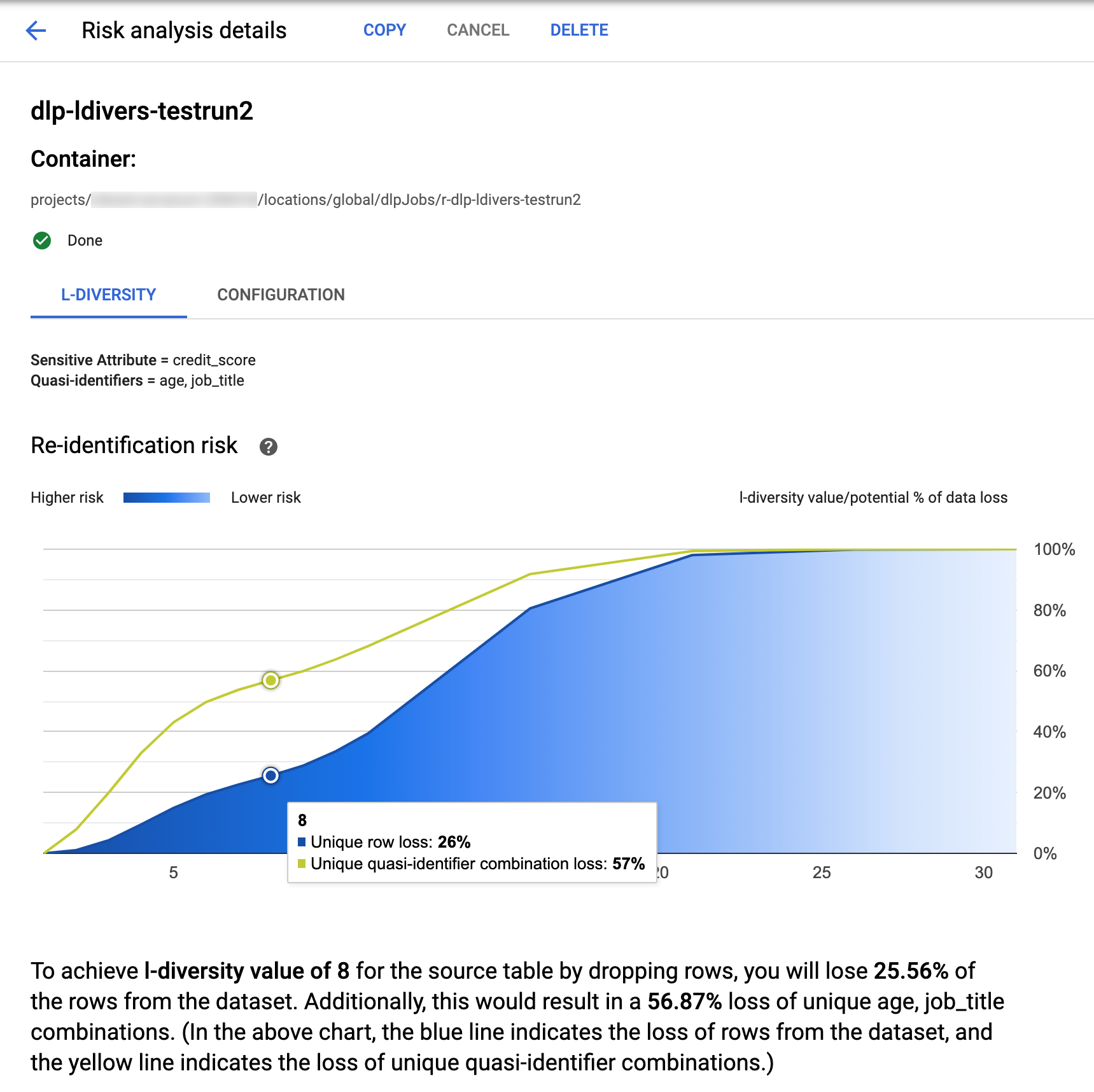
At the top of the page is information about the *l* -diversity risk job,
including its job ID and, under **Container**, its resource location.
To view the results of the *l* -diversity calculation, click the **L-diversity**
tab. To view the risk analysis job's configuration, click the **Configuration**
tab.
The **L-diversity** tab first lists the sensitive value and the
quasi-identifiers used to calculate *l*-diversity.
### Risk chart
The **Re-identification risk** chart plots, on the *y* -axis, the potential
percentage of data loss for both unique rows and unique quasi-identifier
combinations to achieve, on the *x* -axis, an *l*-diversity value. The chart's
color also indicates risk potential. Darker shades of blue indicate a higher
risk, while lighter shades indicate less risk.
Higher *l* -diversity values indicate less diversity of values, which can make a
dataset less re-identifiable and more secure. To achieve higher *l* -diversity
values, however, you would need to remove higher percentages of the total rows
and higher unique quasi-identifier combinations, which might decrease the
utility of the data. To see a specific potential percentage loss value for a
certain *l*-diversity value, hover your cursor over the chart. As shown in the
screenshot, a tooltip appears on the chart.
To view more detail about a specific *l*-diversity value, click the
corresponding data point. A detailed explanation is shown under the chart and a
sample data table appears further down the page.
### Risk sample data table
The second component to the risk job results page is the sample data table. It
displays quasi-identifier combinations for a given target *l*-diversity value.
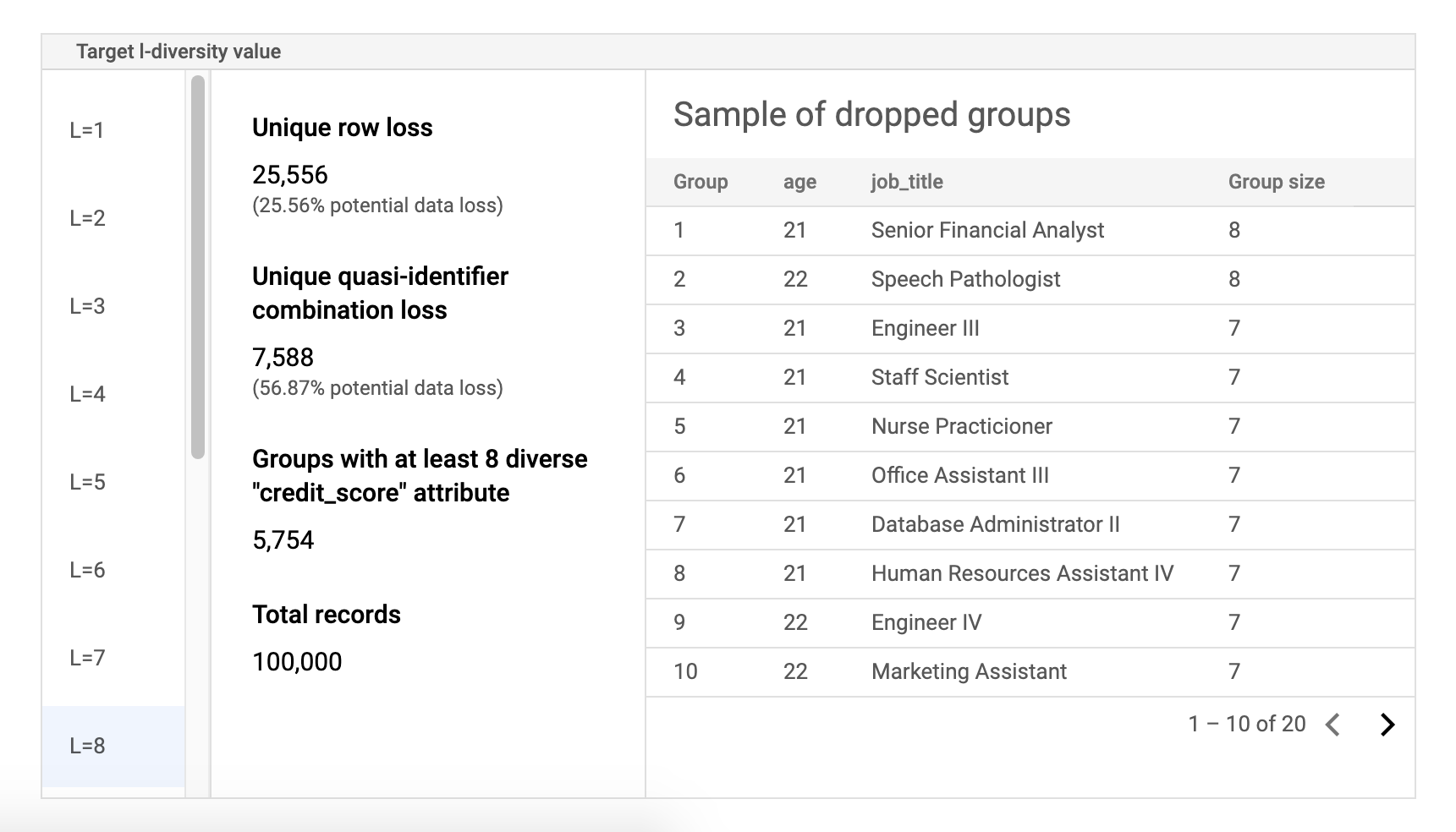
The first column of the table lists the k-anonymity values. Click an
*l*-diversity value to view corresponding sample data that would need to be
dropped to achieve that value.
The second column displays the respective potential data loss of unique rows and
quasi-identifier combinations to achieve the selected *l* -diversity value, as
well as the number of groups with at least *l* sensitive attributes and the
total number of records.
The last column displays a sample of groups that share a quasi-identifier
combination, along with the number of records that exist for that combination.
## Retrieve job details using REST
To retrieve the results of the *l* -diversity risk analysis job using the REST
API, send the following GET request to the
[`projects.dlpJobs`](https://docs.cloud.google.com/sensitive-data-protection/docs/reference/rest/v2/projects.dlpJobs/get.md.txt)
resource. Replace PROJECT_ID with your project ID and
JOB_ID with the identifier of the job you want to obtain results for.
The job ID was returned when you started the job, and can also be retrieved by
[listing all jobs](https://docs.cloud.google.com/sensitive-data-protection/docs/compute-l-diversity.md.txt#list-jobs).
```
GET https://dlp.googleapis.com/v2/projects/PROJECT_ID/dlpJobs/JOB_ID
```
The request returns a JSON object containing an instance of the job. The results
of the analysis are inside the `"riskDetails"` key, in an
[`AnalyzeDataSourceRiskDetails`](https://docs.cloud.google.com/sensitive-data-protection/docs/reference/rest/v2/projects.dlpJobs.md.txt#DlpJob.AnalyzeDataSourceRiskDetails)
object. For more information, see the API reference for the
[`DlpJob`](https://docs.cloud.google.com/sensitive-data-protection/docs/reference/rest/v2/projects.dlpJobs.md.txt#DlpJob)
resource.
## What's next
- Learn how to calculate the [*k*-anonymity](https://docs.cloud.google.com/sensitive-data-protection/docs/compute-k-anonymity.md.txt) value for a dataset.
- Learn how to calculate the [*k*-map](https://docs.cloud.google.com/sensitive-data-protection/docs/compute-k-map.md.txt) value for a dataset.
- Learn how to calculate the [*δ*-presence](https://docs.cloud.google.com/sensitive-data-protection/docs/compute-d-presence.md.txt) value for a dataset.