> [!NOTE]
> Premium and Enterprise (Deprecated) [service tiers](https://docs.cloud.google.com/security-command-center/docs/service-tiers.md.txt)
> [!CAUTION]
> The Security Command Center Enterprise service tier will shut down on May 21, 2027. If your organization uses the Enterprise service tier, then the organization will automatically move to the Premium service tier on or after May 21, 2027. Contact your account representative or a [Google Cloud sales specialist](https://cloud.google.com/contact) if you have questions.
This page provides an overview of Virtual Machine Threat Detection.
## Overview
Virtual Machine Threat Detection is a built-in service of Security Command Center. This service scans
virtual machines to detect potentially malicious applications, such as
cryptocurrency mining software, kernel-mode rootkits, and malware running in
compromised cloud environments.
VM Threat Detection is part of the Security Command Center threat detection
suite and is designed to complement the existing capabilities of
[Event Threat Detection](https://docs.cloud.google.com/security-command-center/docs/concepts-event-threat-detection-overview.md.txt) and
[Container Threat Detection](https://docs.cloud.google.com/security-command-center/docs/concepts-container-threat-detection-overview.md.txt).
VM Threat Detection findings are high-severity threats that we recommend you fix
immediately. You can [view VM Threat Detection findings](https://docs.cloud.google.com/security-command-center/docs/how-to-use-vm-threat-detection.md.txt#review_findings) in
Security Command Center.
For organizations enrolled in Security Command Center Premium,
VM Threat Detection scans are automatically enabled. If needed, you can
disable the service or enable the service at the project level. For more information,
see [Enable or disable VM Threat Detection](https://docs.cloud.google.com/security-command-center/docs/how-to-use-vm-threat-detection.md.txt#enable-disable).
## How VM Threat Detection works
VM Threat Detection is a managed service that scans enabled Compute Engine
projects and virtual machine (VM) instances to detect potentially malicious applications
running in VMs, such as cryptocurrency mining software and kernel-mode rootkits.
The following figure is a simplified illustration showing how
VM Threat Detection's analysis engine ingests metadata from [VM guest
memory](https://docs.cloud.google.com/compute/docs/images/guest-environment) and writes findings to
Security Command Center.
[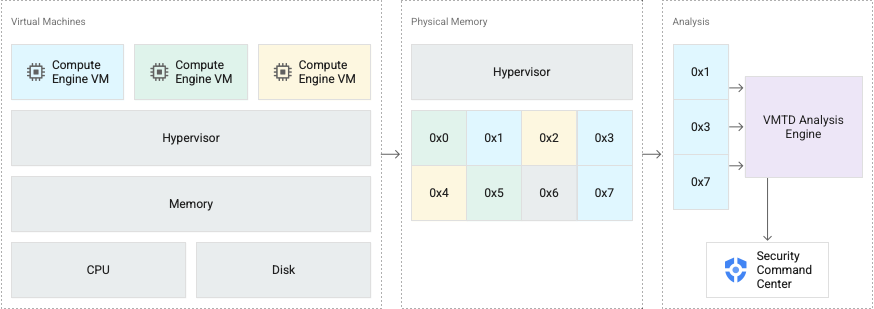](https://docs.cloud.google.com/static/security-command-center/images/vmtd_data_path.png) Simplified data path for Virtual Machine Threat Detection
VM Threat Detection is built into Google Cloud's hypervisor, a secure
platform that creates and manages all Compute Engine VMs.
VM Threat Detection periodically performs scans from the hypervisor into the
memory of a running guest VM without pausing operation of the guest. It also
periodically scans disk clones. Because this service operates from outside the
guest VM instance, it doesn't require guest agents or special configuration of
the guest operating system, and it's resistant to countermeasures used by
sophisticated malware. No CPU cycles are used inside the guest VM, and network
connectivity isn't required. Security teams don't need to update signatures or
manage the service.
### How cryptocurrency mining detection works
Powered by Google Cloud's
threat detection rules, VM Threat Detection analyzes
information about software running on VMs, including a list of application
names, per-process CPU usage, hashes of memory pages, CPU hardware performance
counters, and information about executed machine code to determine whether
any application
matches known cryptocurrency mining signatures. When possible, VM Threat Detection then
determines the running process associated with the detected signature matches
and includes information about that process in the finding.
### How kernel-mode rootkit detection works
VM Threat Detection infers the type of operating system running on the VM and
uses that information to determine the kernel code, read-only data regions, and
other kernel data structures in memory. VM Threat Detection applies various
techniques to determine if those regions are tampered with, by comparing them to
precomputed hashes that are expected for the kernel image and verifying the
integrity of important kernel data structures.
### How malware detection works
VM Threat Detection takes short-lived clones of your VM's persistent disk,
without disrupting your workloads, and scans the disk clones. This service
analyzes executable files on the VM to determine whether any files match known
malware signatures. The [generated finding](https://docs.cloud.google.com/security-command-center/docs/concepts-vm-threat-detection-overview.md.txt#malware-threat-findings) contains
information about the file and the malware signatures detected.
## Multicloud features
> [!WARNING]
>
> **Preview**
>
>
> This feature is
>
> subject to the "Pre-GA Offerings Terms" in the General Service Terms section of the
> [Service Specific
> Terms](https://docs.cloud.google.com/terms/service-terms#1).
>
> Pre-GA features are available "as is" and might have limited support.
>
> For more information, see the
> [launch stage descriptions](https://cloud.google.com/products/#product-launch-stages).
Outside of Google Cloud, [malware detection](https://docs.cloud.google.com/security-command-center/docs/concepts-vm-threat-detection-overview.md.txt#how-malware-detection-works)
is also available for Amazon Elastic Compute Cloud (EC2) VMs.
To scan AWS VMs, you must be a Security Command Center Enterprise customer and you
must first [enable VM Threat Detection for
AWS](https://docs.cloud.google.com/security-command-center/docs/enable-vmtd-aws).
You can enable this feature at the organization level only. During scanning,
VM Threat Detection uses resources on both Google Cloud and on AWS.
## Scan frequency
For memory scanning, VM Threat Detection scans each VM instance
immediately after the
instance is created. In addition, VM Threat Detection scans each VM instance every 30 minutes.
- For cryptocurrency mining detection, VM Threat Detection generates one finding per process, per VM, per day. Each finding includes only the threats associated with the process that is identified by the finding. If VM Threat Detection finds threats but can't associate them with any process, then, for each VM, VM Threat Detection groups all of the unassociated threats into a single finding that it generates once per 24-hour period. For any threats that persist longer than 24 hours, VM Threat Detection generates new findings once every 24 hours.
- For kernel-mode rootkit detection, VM Threat Detection generates one finding per category, per VM, every three days.
For persistent disk scanning, which detects the presence of known malware, VM Threat Detection
scans each VM instance at least daily.
If you activate the Premium tier of Security Command Center,
VM Threat Detection scans are automatically enabled. If needed, you can
disable the service and/or enable the service at the project level. For more information,
see [Enable or disable VM Threat Detection](https://docs.cloud.google.com/security-command-center/docs/how-to-use-vm-threat-detection.md.txt#enable-disable).
## Findings
This section describes the threat findings that VM Threat Detection generates.
VM Threat Detection has the following threat detections.
### Cryptocurrency mining threat findings
VM Threat Detection detects the following finding categories through hash matching or YARA rules.
| Category | Module | Description |
|---|---|---|
| #### `Execution: Cryptocurrency Mining Hash Match` | `CRYPTOMINING_HASH` | Matches memory hashes of running programs against known memory hashes of cryptocurrency mining software. Findings are classified as **High** severity by default. |
| #### `Execution: Cryptocurrency Mining YARA Rule` | `CRYPTOMINING_YARA` | Matches memory patterns, such as proof-of-work constants, known to be used by cryptocurrency mining software. Findings are classified as **High** severity by default. |
| #### `Execution: Cryptocurrency Mining Combined Detection` | - `CRYPTOMINING_HASH` - `CRYPTOMINING_YARA` | Identifies a threat that was detected by both the `CRYPTOMINING_HASH` and `CRYPTOMINING_YARA` modules. For more information, see [Combined detections](https://docs.cloud.google.com/security-command-center/docs/how-to-use-vm-threat-detection.md.txt#combined_detections). Findings are classified as **High** severity by default. |
[VM Threat Detection cryptocurrency mining threat findings]
### Kernel-mode rootkit threat findings
VM Threat Detection analyzes kernel integrity at run time to detect common evasion techniques
that are used by malware.
The `KERNEL_MEMORY_TAMPERING`
module detects threats by doing a hash comparison on the
kernel code and kernel read-only data memory of a virtual machine.
The `KERNEL_INTEGRITY_TAMPERING` module detects threats by checking
the integrity of important kernel data structures.
| Category | Module | Description |
|---|---|---|
| Rootkit |||
| #### `Defense Evasion: Rootkit` | - `KERNEL_MEMORY_TAMPERING` - `KERNEL_INTEGRITY_TAMPERING` | A combination of signals matching a known kernel-mode rootkit is present. To receive findings of this category, make sure both modules are enabled. Findings are classified as **High** severity by default. |
| Kernel memory tampering |||
| #### `Defense Evasion: Unexpected kernel read-only data modification` | `KERNEL_MEMORY_TAMPERING` | Unexpected modifications of kernel read-only data memory are present. Findings are classified as **High** severity by default. |
| Kernel integrity tampering |||
| #### `Defense Evasion: Unexpected ftrace handler` | `KERNEL_INTEGRITY_TAMPERING` | `ftrace` points are present with callbacks pointing to regions that are not in the expected kernel or module code range. Findings are classified as **High** severity by default. |
| #### `Defense Evasion: Unexpected interrupt handler` | `KERNEL_INTEGRITY_TAMPERING` | Interrupt handlers that aren't in the expected kernel or module code regions are present. Findings are classified as **High** severity by default. |
| #### `Defense Evasion: Unexpected kernel modules` | `KERNEL_INTEGRITY_TAMPERING` | Kernel code pages that are not in the expected kernel or module code regions are present. Findings are classified as **High** severity by default. |
| #### `Defense Evasion: Unexpected kprobe handler` | `KERNEL_INTEGRITY_TAMPERING` | `kprobe` points are present with callbacks pointing to regions that are not in the expected kernel or module code range. Findings are classified as **High** severity by default. |
| #### `Defense Evasion: Unexpected processes in runqueue` | `KERNEL_INTEGRITY_TAMPERING` | Unexpected processes in the scheduler run queue are present. Such processes are in the run queue, but not in the process task list. Findings are classified as **High** severity by default. |
| #### `Defense Evasion: Unexpected system call handler` | `KERNEL_INTEGRITY_TAMPERING` | System call handlers that aren't in the expected kernel or module code regions are present. Findings are classified as **High** severity by default. |
[VM Threat Detection kernel-mode rootkit threat findings]
### Malware threat findings
VM Threat Detection detects the following finding categories by scanning a VM's persistent disk
for known malware.
| Category | Module | Description | Supported cloud provider |
|---|---|---|---|
| `Malware: Malicious file on disk` | `MALWARE_DISK_SCAN_YARA_AWS` | Scans persistent disks in Amazon EC2 VMs and matches signatures that are used by known malware. Findings are classified as **Medium** severity by default. | AWS |
| `Malware: Malicious file on disk (YARA)` | `MALWARE_DISK_SCAN_YARA` | Scans persistent disks in Compute Engine VMs and matches signatures that are used by known malware. Findings are classified as **Medium** severity by default. | Google Cloud |
[VM Threat Detection malware threat findings]
## Scanning VMs in VPC Service Controls perimeters
Before VM Threat Detection can scan VMs in VPC Service Controls perimeters, you must
add ingress and egress rules in each perimeter that you want to scan. For more
information, see [Allow VM Threat Detection to access VPC Service Controls
perimeters](https://docs.cloud.google.com/security-command-center/docs/vmtd-allow-access-vpcsc).
## Limitations
VM Threat Detection supports Compute Engine
[VM instances](https://docs.cloud.google.com/compute/docs/instances.md.txt), with the following limitations:
- Limited support for [Windows VMs](https://docs.cloud.google.com/compute/docs/images/os-details.md.txt#windows_server):
- For cryptocurrency mining detection, VM Threat Detection primarily focuses
on Linux binaries and has limited coverage of cryptocurrency miners that run
on Windows.
- For kernel-mode rootkit detection, VM Threat Detection
supports only Linux operating systems.
- No support for Compute Engine VMs that use
[Confidential VM](https://docs.cloud.google.com/confidential-computing/confidential-vm/docs/about-cvm).
Confidential VM instances use cryptography to protect the contents of
memory as it moves in and out of the CPU. Thus, VM Threat Detection can't
scan them.
- No support for VMs that use Arm-based processors.
- Disk scanning limitations:
- Persistent disks that are encrypted with [customer-supplied encryption
keys](https://docs.cloud.google.com/docs/security/encryption/customer-supplied-encryption-keys) (CSEK)
or [customer-managed encryption keys](https://docs.cloud.google.com/kms/docs/cmek.md.txt) (CMEK) are not
supported.
- Only `vfat`, `ext2`, and `ext4` partitions are scanned.
- VM Threat Detection requires the [Security Center Service
Agent](https://docs.cloud.google.com/security-command-center/docs/access-control-org#service-agent) to be able to list
the VMs in the projects and clone the disks to Google-owned projects. Some
[organization policy
constraints](https://docs.cloud.google.com/resource-manager/docs/organization-policy/org-policy-constraints)---such
as `constraints/compute.storageResourceUseRestrictions`---can interfere
with such operations. In this case, VM Threat Detection scanning might not
work.
As a solution, we recommend adding the `google.com` organization,
using the organization ID `433637338589`, to the allowlist
policies. The following is an example of how to allowlist the organization:
```yaml
name: organizations/Org-A/policies/compute.storageResourceUseRestrictions
spec:
rules:
-- values:
allowedValues:
- under:organizations/433637338589
```
For more information, see [Organization Policy overview](https://docs.cloud.google.com/organization-policy/overview.md.txt#organization_policy).
- VM Threat Detection relies on the capabilities of Google Cloud's
hypervisor and Compute Engine. Thus, VM Threat Detection can't run in
on-premises environments or in other public cloud environments.
## Privacy and security
VM Threat Detection accesses the disk clones and memory of a running VM for
analysis. The service analyzes only what is necessary to detect threats.
Contents of the VM memory and disk clones are used as inputs in the
VM Threat Detection risk analysis pipeline. The data is encrypted in transit and
processed by automated systems. During processing, data is safeguarded by
Google Cloud's security control systems.
For monitoring and debugging purposes, VM Threat Detection stores basic
diagnostic and statistical information about projects the service protects.
VM Threat Detection scans VM memory contents and disk clones in their
respective regions.
However, the resulting findings and metadata (such as project and organization
numbers) might be stored outside those regions.
For more information about how Security Command Center handles your data, see [Data
and infrastructure security
overview](https://docs.cloud.google.com/security-command-center/docs/concepts-data-security-overview).
## What's next
- Learn how to [use VM Threat Detection](https://docs.cloud.google.com/security-command-center/docs/how-to-use-vm-threat-detection.md.txt).
- Learn how to [enable VM Threat Detection for
AWS](https://docs.cloud.google.com/security-command-center/docs/enable-vmtd-aws).
- Learn how to [allow VM Threat Detection to scan VMs in VPC Service Controls
perimeters](https://docs.cloud.google.com/security-command-center/docs/vmtd-allow-access-vpcsc).
- Learn how to [inspect a VM for signs of kernel memory
tampering](https://docs.cloud.google.com/security-command-center/docs/investigate-vmtd-kernel-tampering-findings).
- Learn how to [respond to Compute Engine threat
findings](https://docs.cloud.google.com/security-command-center/docs/respond-compute-engine-threats).
- Refer to the [Threat findings index](https://docs.cloud.google.com/security-command-center/docs/threat-findings-index.md.txt).