> [!NOTE]
> **Note:** For new SAP NetWeaver deployments, instead of using Bare Metal Solution servers, we recommend that you use Compute Engine C3 or C4 machine types.
>
> For information about C3 and C4 machine types, see
> [General-purpose machine family for
> Compute Engine](https://docs.cloud.google.com/compute/docs/general-purpose-machines).
Bare Metal Solution offers [*bare-metal*](https://en.wikipedia.org/wiki/Bare-metal_server)
servers that are certified by SAP for SAP NetWeaver. With Bare Metal Solution,
you can run SAP NetWeaver with Oracle databases.
Bare Metal Solution is a managed solution that provides purpose-built
bare-metal servers and related infrastructure in regional extensions that
are co-located and connected to Google Cloud through a managed,
high-performance connection with a low-latency network fabric.
This guide covers only those aspects of Bare Metal Solution that are
unique or relevant to SAP NetWeaver and SAP applications in a
Bare Metal Solution environment.
For information about running SAP NetWeaver on Compute Engine
instances, which includes
SAP applications that run in the *hybrid* architecture that is described
in the [Supported architectures](https://docs.cloud.google.com/sap/docs/netweaver-on-bms-planning.md.txt#supported_architectures) section, see
the [SAP NetWeaver planning guide](https://docs.cloud.google.com/sap/docs/netweaver-planning-guide.md.txt).
For a full description of Bare Metal Solution, see [Bare Metal Solution](https://docs.cloud.google.com/bare-metal/docs.md.txt).
For information from SAP about SAP support for applications on
Bare Metal Solution, see
[SAP Note 3000343 - SAP Applications on Google Cloud: Supported Products on
Google Cloud Bare Metal Solutions](https://launchpad.support.sap.com/#/notes/3000343).
## Your responsibilities in a Bare Metal Solution environment
As described in the Bare Metal Solution documentation, after
Google Cloud configures and provides the servers to you,
you assume responsibility for
licensing, installation, and maintenance of any software,
such as SAP NetWeaver, the SAP applications, and the database software.
For more information about your responsibilities in the Bare Metal Solution
environment, see [Your responsibilities in a Bare Metal Solution environment](https://cloud.google.com/bare-metal/docs/bms-planning#your_responsibilities_in_a_environment).
## Supported architectures
With database servers running on Bare Metal Solution, subject to the
requirements of the database server, you can use the
following application server architectures:
- A *hybrid* application architecture, in which the database server runs in the Bare Metal Solution environment, but your SAP application servers run on Google Cloud. Because of its flexibility and lower cost, a hybrid architecture is recommended.
- An *all-metal* application architecture, in which all of your application servers run in the same Bare Metal Solution environment as the database server. Consider an all-metal architecture if your workload requires a lower latency between the database and the applications than the Partner Interconnect connection can provide, or if the database server requires the application servers to run on the same platform.
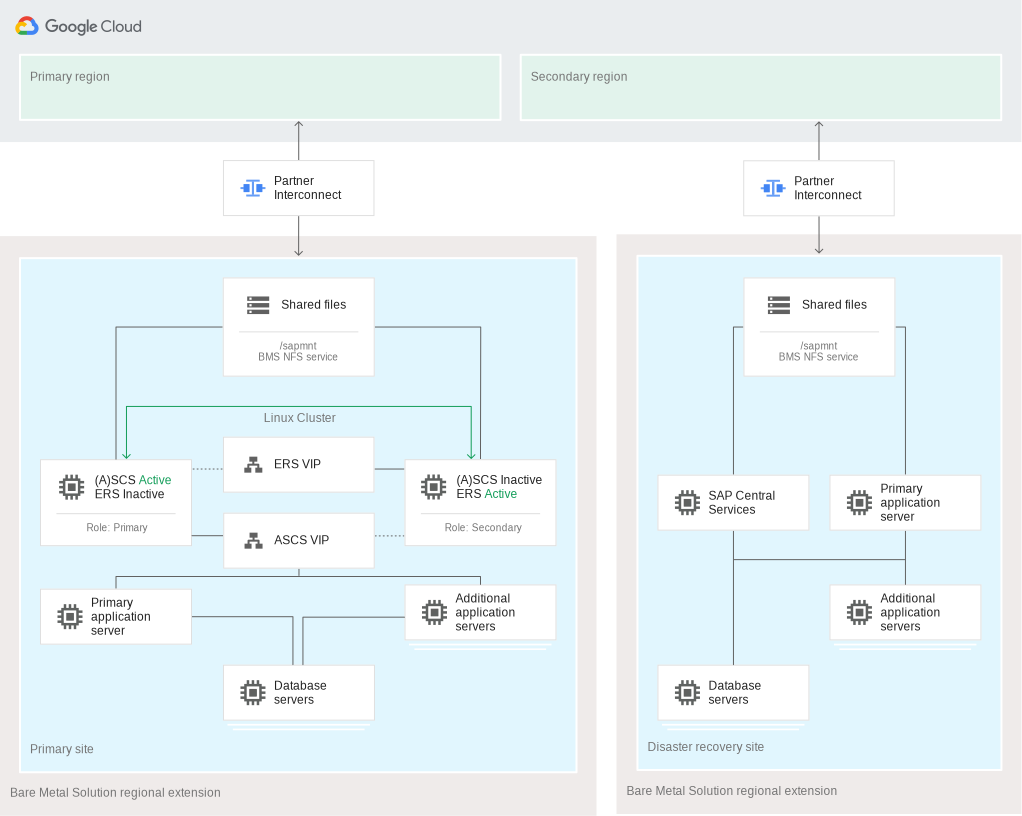
The following diagram shows an all-metal application
server architecture. At the primary site, both the application servers and
the database server run in the same Bare Metal Solution
regional extension. A second regional regional extension hosts a
disaster recovery site, which contains both the application servers and
the database server. You can use the servers at the DR site for other
purposes until you need them for recovery. Any replication between
the primary and disaster recovery sites passes through the
Google Cloud network.
## Regional availability
The Bare Metal Solution servers that are certified for SAP applications
are available only in Bare Metal Solution region extensions, which are not
available for every Google Cloud region. For the full list
of regions that have a Bare Metal Solution region extension, see
[Bare Metal Solution regional availability](https://docs.cloud.google.com/bare-metal/docs/bms-planning.md.txt#regional_availability).
## Certified machine types
The following table shows the Bare Metal Solution servers that SAP has
certified for use with SAP NetWeaver.
To check the regional availability of Bare Metal Solution
regional extensions, see [Regional availability](https://docs.cloud.google.com/bare-metal/docs/bms-planning.md.txt#regional_availability).
SAP lists the certified Bare Metal Solution servers for SAP NetWeaver
in the
[SAP Note 3000343 - SAP Applications on Google Cloud: Supported Products on
Google Cloud Bare Metal Solutions](https://launchpad.support.sap.com/#/notes/3000343).
> [!NOTE]
> **Note:** For new SAP NetWeaver deployments, instead of using Bare Metal Solution servers, we recommend that you use Compute Engine C3 or C4 machine types.
>
> For information about C3 and C4 machine types, see
> [General-purpose machine family for
> Compute Engine](https://docs.cloud.google.com/compute/docs/general-purpose-machines).
The following table lists the Bare Metal Solution servers that you can use
to run SAP NetWeaver based applications:
| Bare Metal Solution server | CPU cores | vCPUs | Sockets | Memory | CPU platform |
|---|---|---|---|---|---|
| **General-purpose server** ||||||
| `o2-standard-16-metal` | 8 | 16 | 2 | 192 GB | Intel Cascade Lake |
| `o2-standard-32-metal` | 16 | 32 | 2 | 384 GB | Intel Cascade Lake |
| `o2-standard-48-metal` | 24 | 48 | 2 | 768 GB | Intel Cascade Lake |
| `o2-standard-112-metal` | 56 | 112 | 2 | 1.5 TB | Intel Cascade Lake |
| **High-memory general-purpose server** ||||||
| `o2-highmem-224-metal` | 112 | 224 | 4 | 3 TB | Intel Cascade Lake |
## Certified operating systems
The following table shows the Red Hat Enterprise Linux (RHEL) and SUSE Linux
Enterprise Server (SLES) operating systems that are certified by SAP for production
use with SAP NetWeaver on Bare Metal Solution servers, and their availability. If you
need an OS that does not appear in the following table, then contact
[Google Cloud Sales](https://cloud.google.com/contact).
| Operating system | Version certified by SAP | Availability for SAP NetWeaver on Bare Metal Solution |
|---|---|---|
| **RHEL for SAP** | 7.6 | No |
| **RHEL for SAP** | 7.7 | No |
| **RHEL for SAP** | 7.9 | No |
| **RHEL for SAP** | 8.0 | No |
| **RHEL for SAP** | 8.1 | Yes. The image code is `RHEL81SAP`. |
| **RHEL for SAP** | 8.2 | No, but you can upgrade to it from 8.1. |
| **RHEL for SAP** | 8.4 | No, but you can upgrade to it from 8.1. |
| **RHEL for SAP** | 8.6 | No, but you can upgrade to it from 8.1. |
| **RHEL for SAP** | 9.0 | No. Contact [Google Cloud Sales](https://cloud.google.com/contact). |
| **SLES for SAP** | 12 SP4 | No |
| **SLES for SAP** | 12 SP5 | Yes. The image code is `SLES12SP5SAP`. |
| **SLES for SAP** | 15 | No |
| **SLES for SAP** | 15 SP1 | No |
| **SLES for SAP** | 15 SP2 | Yes. The image code is `SLES12SP5SAP`. |
| **SLES for SAP** | 15 SP3 | No, but you can upgrade to it from 15 SP2. |
| **SLES for SAP** | 15 SP4 | No, but you can upgrade to it from 15 SP2. |
For more information from SAP about the certified operating systems, see
[SAP Note 3000343 - SAP Applications on Google Cloud: Supported Products on
Google Cloud Bare Metal Solutions](https://launchpad.support.sap.com/#/notes/3000343).
## Databases
To run SAP applications with either
extra-large SAP HANA instances (up to 24 TB) or with Oracle database servers,
use Compute Engine bare metal machine types such as X4.
For more information, see:
- [Bare Metal Solution for Oracle](https://cloud.google.com/bare-metal)
- [Bare metal machine types for SAP HANA](https://docs.cloud.google.com/sap/docs/sap-hana-planning-guide.md.txt#bare-metal-machines-for-hana)
## Storage
When you place your order for Bare Metal Solution servers, you also
order the amount of block and file storage that you need.
For more information about the Bare Metal Solution storage options, see:
- [Storage](https://docs.cloud.google.com/bare-metal/docs/bms-planning.md.txt#storage)
- [Understand NFS file storage for Bare Metal Solution](https://docs.cloud.google.com/bare-metal/docs/bms-nfs.md.txt#understand-nfs-for-bare-metal-solution)
### Volume layout
After you receive your Bare Metal Solution server, you need to configure
the required `/usr/sap` and `/sapmnt` volumes. On Linux, you also need to
format and mount the swap disk.
### Storage amount
When calculating the amount of storage you need, include storage for backups
and snapshots of your data.
## Backups
Use Cloud Storage for persistent storage of your SAP NetWeaver backups.
You can use the following backup solutions in the Bare Metal Solution
environment:
- Backup and DR Service for all Bare Metal Solution systems, application, and database servers.
- Third-party backup solutions that SAP supports.
## Snapshots
With Bare Metal Solution, you can request local disk snapshots.
Snapshots are local copies only and multi-regional replication is not supported.
By default, Bare Metal Solution takes daily snapshots of the boot disk
and operating system LUN at no cost. The daily snapshots are retained
for seven days.
You can order snapshots of other volumes, but you need to request them
when you order your Bare Metal Solution servers. You must also
order any storage that is required to store snapshots of other volumes.
## Networking
The networking infrastructure and setup for an SAP deployment is basically
the same as it is for other workloads on Bare Metal Solution. This
section covers only those aspects of networking that are unique or
relevant to an SAP NetWeaver deployment on Bare Metal Solution.
Enabling your Cloud Interconnect connection and configuring access
to the internet and to the Google Cloud APIs
are covered in the Bare Metal Solution documentation.
You need to set up your DNS server and access to an NTP server yourself.
For more information, see [Bare Metal Solution networking](https://docs.cloud.google.com/bare-metal/docs/bms-planning.md.txt#bms-networking).
### NTP
> [!NOTE]
> **Note:** You are responsible for setting up access to a network time protocol (NTP) server for your Bare Metal Solution servers to synchronize time across your SAP landscape.
You can use the Google Cloud NTP server or you can use an
NTP server of your choosing.
The steps for configuring access to the Google Cloud NTP server
for Bare Metal Solution servers are similar to those for
Compute Engine, but you need to set up private access to
the Google Cloud APIs first.
For the Compute Engine procedure for setting up access
to the Google Cloud NTP server, see [Set up network time
protocol (NTP) for instances](https://docs.cloud.google.com/compute/docs/instances/managing-instances#configure-ntp).
## IAM service accounts
Before an application that runs on a Bare Metal Solution server
can access Google Cloud products or services, you need to create
an Identity and Access Management (IAM) *service account* in your Google Cloud
project for authentication and access management.
When you create the service account, you create a key for authentication
and you grant roles to the service account to manage access to
Google Cloud resources.
If you set up a high-availability configuration for SAP NetWeaver on Linux,
you need to create a service account for the [`fence_gce` agent](https://docs.cloud.google.com/sap/docs/netweaver-on-bms-planning.md.txt#the_fence_gce_fencing_agent), the Google Cloud
fencing device that is included with Linux distributions from Red Hat and SUSE.
You store the service account key on your Bare Metal Solution server
and specify the path to the key when you configure the agent.
For more information about authenticating applications and managing their
access to Google Cloud resources, see the information about service
accounts, roles, and permissions in [IAM overview](https://docs.cloud.google.com/iam/docs/overview.md.txt).
## Maintenance
Google Cloud coordinates the scheduling of planned maintenance on
your Bare Metal Solution servers with you and does not proceed without
your approval.
If Google Cloud needs to perform any urgent, unplanned maintenance,
we will notify you as soon as reasonably possible to avoid or minimize
any disruption to your SAP applications.
## Monitoring
For support and monitoring, Google Cloud provides the *Agent for SAP*,
for SAP workloads running on Compute Engine instances and
Bare Metal Solution servers.
As mandated by SAP, to get support from SAP and to enable SAP to meet its
service-level agreements (SLAs), you must install Google Cloud's Agent for SAP
on all Compute Engine instances and Bare Metal Solution servers
that run any SAP system. For more information on the support prerequisites,
see
[SAP Note 2456406 - SAP on Google Cloud Platform: Support Prerequisites](https://launchpad.support.sap.com/#/notes/2456406).
**Version 3.16 (latest)** of Google Cloud's Agent for SAP is the
successor of Google Cloud's monitoring agent for SAP NetWeaver version 2,
monitoring agent for SAP HANA version 2, and the Cloud Storage Backint agent for SAP HANA. Therefore, in
addition to the collection of metrics, version 3.16 (latest) of
Google Cloud's Agent for SAP includes the optional feature:
*Backint based backup and recovery for SAP HANA*.
You can opt in to these features that enable products and services such
as [Workload Manager](https://docs.cloud.google.com/workload-manager/docs/overview.md.txt)
for your SAP workloads.
For SAP systems running on a Bare Metal Solution server,
Google Cloud's Agent for SAP is required when you run SAP NetWeaver connected to any
of the following databases:
- SAP Adaptive Server Enterprise (ASE)
- SAP MaxDB
- IBM Db2
> [!NOTE]
> **Note:** Oracle databases are not supported with Google Cloud's Agent for SAP on Bare Metal Solution servers.
> [!NOTE]
> **Note:** SAP Host Agent, with the `saposcol program`, is required on any host that is running an SAP system. SAP Host Agent is installed automatically during the installation of new SAP system instances with SAP kernel 7.20 or higher. For more information, see [SAP Host Agent](https://help.sap.com/docs/SAP%20Host%20Agent/8661d17ee5c047a887f686b33e990ede/e817cfb89dbc4d799825c94da59c7867.html).
You install Google Cloud's Agent for SAP
on the host alongside the SAP system. For instructions about how to install
and configure the agent, validate your installation, and verify that the
agent is running as expected,
see
[Install the agent on a Bare Metal Solution server](https://docs.cloud.google.com/sap/docs/agent-for-sap/latest/install-config-on-bms.md.txt).
Google Cloud's Agent for SAP is supported on Bare Metal Solution servers
running Linux. Installing Google Cloud's Agent for SAP is not supported on
Bare Metal Solution servers running Windows.
If you use the following RHEL or SLES "for SAP" OS images that Google Cloud
provides, then Google Cloud's Agent for SAP is packaged with the OS images:
- RHEL: all "for SAP" images
- SLES: SLES 15 SP4 for SAP and later versions
## High availability
For a high-availability cluster on Bare Metal Solution, you use
two identical servers in the same Bare Metal Solution regional extension
and the Pacemaker cluster resource manager that is provided by your
Linux operating system vendor.
Both RHEL and SLES Linux distributions include the `fence_gce` fencing agent,
which can reset Bare Metal Solution servers to avoid split brain scenarios.
### High-availability clusters for SAP NetWeaver on Bare Metal Solution
Configure clustering or a suitable high-availability solution for your
business critical workloads. On Linux, we recommend Pacemaker clustering
for SAP NetWeaver high-availability configurations.
With the following requirements and recommendations, set up your
high-availability cluster on Bare Metal Solution by following the
instructions that your operating system vendor provides:
- For the floating virtual IP addresses, you can use the standard IPaddr2 cluster resource, which uses address resolution updates in combination with Bare Metal Solution networking.
- For fencing, you have two options: network-based fencing and, if supported by your operating system, storage-based fencing.
- For network-based fencing, you must use the Google Cloud fence agent, `fence_gce`, that is provided with your Linux operating system. The `fence_gce` agent issues a Google Cloud API request to reset failed Bare Metal Solution servers in an HA cluster.
- For storage-based fencing (SBD) on operating systems that support it, such as SUSE Linux Enterprise Server (SLES), you need to order additional shared storage for the required volumes, which is attached to both servers as a multi-path Fiber Channel device. For more information about storage-based fencing, consult the [SUSE high-availability guides](https://documentation.suse.com/sbp/all/).
- For shared file storage for volumes like the `/sapmnt`, you can use the [NFS file-sharing solution](https://docs.cloud.google.com/bare-metal/docs/bms-nfs.md.txt) that is available to order with your Bare Metal Solution servers or you can use the Pacemaker cluster to configure a self-managed NFS cluster service.
### Fencing with SBD and shared block storage
For fencing in high-availability clusters for SAP HANA in Bare Metal Solution,
Google Cloud recommends using SBD with shared block storage for
communication.
#### Software watchdog requirement for SBD fencing
Bare Metal Solution requires SBD fencing mechanisms to use a
software-based watchdog.
Not all operating systems support a software-based watchdog in cloud
environments.
For example, Red Hat does not support a software watchdog in cloud
environments. For more information, see
[Support Policies for RHEL High Availability Clusters - `sbd` and `fence_sbd`](https://access.redhat.com/articles/2800691).
SUSE supports a software-based watchdog (`softdog`) with
SBD fencing. For more information, see the SUSE documentation for your
version of SLES. For example, for SLES 15 SP3, see
[Using the Software Watchdog (softdog)](https://documentation.suse.com/sle-ha/15-SP3/html/SLE-HA-all/cha-ha-storage-protect.html#sec-ha-storage-protect-sw-watchdog).
#### Request shared block storage for SBD fencing when you place your Bare Metal Solution order
To ensure that your shared block storage is properly configured to support
SBD fencing, inform your Google Cloud sales representative
when you place your order for Bare Metal Solution servers, that you intend to
configure a high-availability cluster with SBD fencing. When your servers
are provisioned, three 50 GB volumes are added for the SBD message exchange
between the servers. These volumes are used exclusively by the SBD service.
#### Configuration instructions for SBD fencing
To configure an SBD fencing mechanism, follow the configuration guide provided
by your operating system vendor.
Google Cloud provides guidance only for identifying and validating the
storage devices that are required for SBD fencing. For more information,
see [Validate the block storage devices for SBD fencing](https://docs.cloud.google.com/sap/docs/netweaver-on-bms-deployment.md.txt#sbd-fencing-validate-devices).
### Fencing with the `fence_gce` agent
Your RHEL or SLES operating system includes the `fence_gce` agent,
which you can use if your operating system does not support a software-based
watchdog with SBD fencing.
If your operating system supports a software watchdog with SBD fencing,
then use SBD fencing instead of the `fence_gce` agent.
#### IAM permissions that are required by the `fence_gce` agent
When the `fence_gce` fencing agent initiates a failover, the agent calls the
Bare Metal Solution API to reset the failed Bare Metal Solution server.
For authentication and authorization when the agent accesses the API, you
need to provide an IAM service account for the agent in your
Google Cloud project and you need to store the key for the
service account on the Bare Metal Solution server.
The service account must include the `baremetalsolution.service.resetInstance`
permission, which is included in the predefined IAM roles
`roles/baremetalsolution.editor` and `roles/baremetalsolution.admin`.
For more information about the Bare Metal Solution API and its associated
IAM roles, see the [Bare Metal Solution API reference](https://docs.cloud.google.com/bare-metal/docs.md.txt).
#### Configuring the `fence_gce` agent
You enable and configure the `fence_gce` agent when you define the
resources for a high-availability cluster.
**Note:** The `fence_gce` agent in earlier versions of RHEL or SLES might not include support for Bare Metal Solution.
For more information about configuring the `fence_gce` agent, including how to
confirm that your agent supports Bare Metal Solution, see
[Configure the `fence_gce` agent](https://docs.cloud.google.com/sap/docs/netweaver-on-bms-deployment.md.txt#configure_the_fencing_device).
## Disaster recovery
A disaster recovery setup for an SAP system that runs in the
Bare Metal Solution environment requires two Bare Metal Solution
server configurations, each in a different Bare Metal Solution
regional extension.
For system refreshes, use a backup and restore method. Snapshots
are not supported.
### Selecting a recovery site
Select a Google Cloud region for your recovery site that:
- Includes a Bare Metal Solution regional extension.
- Is as close to the primary site as possible.
- Is different than the region of the primary site.
For the availability of Bare Metal Solution regional extensions,
see [Regional availability](https://docs.cloud.google.com/sap/docs/netweaver-on-bms-planning.md.txt#netweaver_bms_availability).
## Ordering
Bare Metal Solution servers are special order items that must be ordered
before you need them.
Unlike Compute Engine virtual machines, you cannot order or
provision Bare Metal Solution servers for SAP NetWeaver through the
Google Cloud console. You need to contact Google Cloud Sales.
### Preparing to order
Before you place your order, you need to determine the requirements of
your SAP workload for the Bare Metal Solution environment.
The Google Cloud Sales representative that takes your
order can help you do this.
### Receiving your order
When your servers are ready, Google Cloud notifies you. The
notification includes the IP address and credentials that you need to log on
your server.
As soon as you log on, confirm that your order is correct and that everything,
including the server, operating system, and storage, is configured correctly.
If everything is correct, you can prepare to install SAP NetWeaver.
For more information about ordering a Bare Metal Solution server for
SAP NetWeaver, contact [Google Cloud Sales](https://cloud.google.com/contact).
For additional networking information that your order will require, see
[Required networking information for your Bare Metal Solution order](https://docs.cloud.google.com/bare-metal/docs/bms-planning.md.txt#bms-reqrd-ntwk-info).
## Support
For issues with Google Cloud infrastructure or services, contact Customer Care. You can find the contact information on the
[Support Overview page](https://console.cloud.google.com/support)
in the Google Cloud console. If Customer Care determines that a problem
resides in your SAP systems, then you are referred to SAP Support.
For SAP product-related issues, log your support request with
[SAP support](https://support.sap.com/support-programs-services/about/getting-started.html).
SAP evaluates the support ticket and, if it appears to be a Google Cloud
infrastructure issue, then SAP transfers that ticket to the appropriate
Google Cloud component in its system: `BC-OP-LNX-GOOGLE` or
`BC-OP-NT-GOOGLE`.
### Support requirements
Before you can receive support for SAP systems and the
Bare Metal Solution
infrastructure and services that they use, you must meet the minimum
support plan requirements.
For more information about the minimum support requirements for SAP on
Google Cloud, see:
- [Getting support for SAP on Google Cloud](https://docs.cloud.google.com/sap/docs/getting-support.md.txt)
- [SAP Note 2456406 - SAP on Google Cloud Platform: Support Prerequisites](https://launchpad.support.sap.com/#/notes/2456406) (An SAP user account is required)
## What's next
- For implementation and configuration tasks, see [Deploying SAP NetWeaver
on Bare Metal Solution](https://docs.cloud.google.com/sap/docs/netweaver-on-bms-deployment).