- [SAP BTP edition v1.1](https://docs.cloud.google.com/sap/docs/abap-sdk/btp/latest/implement-gcs-sap-content-repository)
- [On-premises or any cloud edition v1.15](https://docs.cloud.google.com/sap/docs/abap-sdk/on-premises-or-any-cloud/latest/implement-gcs-sap-content-repository.md.txt)
This document describes how to implement [Cloud Storage](https://docs.cloud.google.com/storage)
as a content repository for SAP, by using the on-premises or any cloud edition of ABAP SDK for Google Cloud.
Cloud Storage can handle your
SAP-related data storage needs for storing various file types such as PDFs and images,
and for archiving business data.
By storing your SAP documents and archiving your business data in
Cloud Storage, you can achieve a scalable and cost-effective solution
while maintaining compatibility with your SAP workflows.
When using Cloud Storage as a content repository, you can store
documents with a maximum file size of 5 TB. This is the limit for individual
uploads to a Cloud Storage [bucket](https://docs.cloud.google.com/storage/docs/buckets.md.txt)
on Google Cloud.
## Data flow diagram
The following diagram shows how documents and business data in SAP systems
are archived to Cloud Storage by using the ABAP SDK for Google Cloud.
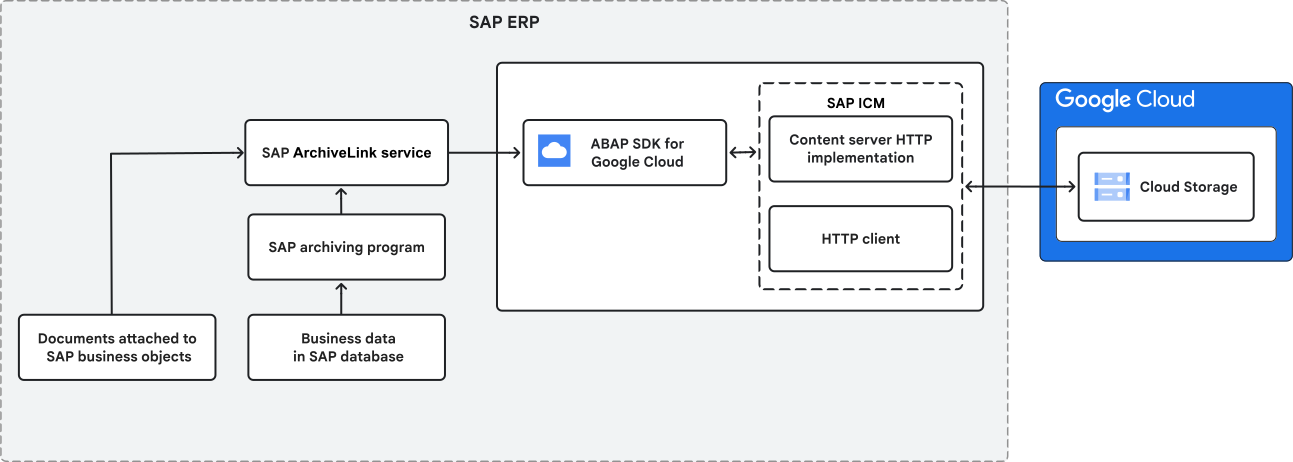
As shown in the preceding diagram, the data flow from SAP to Google Cloud
includes the following components:
- **Documents attached to business objects**: This represents the documents attached
to business objects that you want to store, such as invoice attachments.
- **Business data in SAP**: This represents the business data that
you want to archive from your SAP ERP system.
- **SAP archiving program**: This is the program within SAP that handles the process
of moving business data from SAP database to the storage.
- **SAP ArchiveLink service**: The SAP ArchiveLink service acts as the bridge
between the SAP system and Cloud Storage for moving documents
and business data.
- **ABAP SDK for Google Cloud**: The SDK enables communication between the SAP system
and Google Cloud. It provides the necessary functions to interact
with Google Cloud APIs.
- **SAP Internet Communication Manager (ICM)**: This is a component of the SAP
NetWeaver Application Server that handles network communication.
It acts as a gateway for HTTP-based requests.
- **Cloud Storage**: This is the cloud-based object storage service
provided by Google Cloud, where the documents and business data
are stored.
## Security
When you archive your SAP data, your data is transmitted securely to
Cloud Storage through the Cloud Storage API. This communication is protected
by using HTTPS encryption and OAuth-based authentication. Subsequently, TLS
encryption ensures your data remains secure during its
complete journey over the internet.
Once on Google Cloud, encryption at rest safeguards your stored data,
whether it's on disks or in backup media. By default, Google manages the
encryption keys, providing a baseline level of protection for your data at rest.
While Google manages default encryption keys, you can also use
[Cloud Key Management Service](https://docs.cloud.google.com/kms/docs.md.txt) to create and manage your own encryption
keys for enhanced control.
On Cloud Storage, you can further secure your archived data and
tamper-proof it from human modification by implementing access control
through IAM. Provide only the necessary service accounts with `WRITE`
and `READ` permissions. If you require human viewing, then extend strict
`VIEW` or `READ` permissions on the Cloud Storage bucket.
Ensure that IAM best practices are followed by granting
least privileged access. Only give the permissions that are absolutely necessary
for a user or service account to perform its specific tasks.
## Pricing
The ABAP SDK for Google Cloud, which is free to install and use, includes a
subpackage that lets you implement Cloud Storage as a content
repository for SAP.
However, you're responsible for the costs that you incur based
on the data volume in Cloud Storage.
For information about Cloud Storage pricing, see [Pricing](https://cloud.google.com/storage/pricing).
## Set up Cloud Storage as a content repository for SAP
This section explains the steps to configure Cloud Storage as a
content repository for your SAP systems.
### Enable the Cloud Storage API
Enable the Cloud Storage API in your Google Cloud project.
For information about how to enable Google Cloud APIs, see [Enabling APIs](https://docs.cloud.google.com/apis/docs/getting-started.md.txt#enabling_apis).
### Create Cloud Storage buckets
Your SAP data is stored within Cloud Storage buckets.
To create a storage bucket, navigate to
[Creating storage buckets](https://docs.cloud.google.com/storage/docs/creating-buckets.md.txt#console) and
follow the provided instructions. Make sure to select the appropriate storage
class for your data. For a comprehensive overview of
the available storage classes in Cloud Storage, see [Storage classes](https://docs.cloud.google.com/storage/docs/storage-classes.md.txt).
For best practices related to creating and managing storage buckets, see [Bucket naming guidelines](https://docs.cloud.google.com/storage/docs/buckets.md.txt#naming) and [Bucket locations](https://docs.cloud.google.com/storage/docs/locations.md.txt).
### Install the SDK
When you install the latest version of the on-premises or any cloud edition of ABAP SDK for Google Cloud, the
subpackage for implementing Cloud Storage as a content repository
is installed for you. For information about how to
install the SDK, see [Install and configure the on-premises or any cloud edition of ABAP SDK for Google Cloud](https://docs.cloud.google.com/sap/docs/abap-sdk/on-premises-or-any-cloud/latest/install-config.md.txt).
If you're already using version 1.9 or earlier of the on-premises or any cloud edition of ABAP SDK for Google Cloud,
then update your SDK to the latest version. For more information,
see [Update ABAP SDK for Google Cloud](https://docs.cloud.google.com/sap/docs/abap-sdk/on-premises-or-any-cloud/latest/install-config.md.txt#abap-sdk-update).
This feature is only available with the on-premises or any cloud edition of ABAP SDK for Google Cloud.
### Set up authentication
Once you set up authentication to access Google Cloud APIs in your
on-premises or any cloud edition of ABAP SDK for Google Cloud, you use the same authentication method to
access the Cloud Storage API. For information about how to set up
authentication in the on-premises or any cloud edition of ABAP SDK for Google Cloud, see [Authentication overview](https://docs.cloud.google.com/sap/docs/abap-sdk/on-premises-or-any-cloud/latest/authentication.md.txt).
Make a note of the client key that you've created as part of the authentication
setup. You use this client key when configuring Cloud Storage
as a content repository.
#### Required IAM roles
Ensure that the dedicated service account for API access that you've configured
in the client key configuration has access to the Cloud Storage bucket.
The service account configured in the client key configuration must
have the following IAM roles:
- [Storage Object Creator (`roles/storage.objectCreator`)](https://docs.cloud.google.com/storage/docs/access-control/iam-roles.md.txt#standard-roles)
- [Storage Admin (`roles/storage.admin`)](https://docs.cloud.google.com/storage/docs/access-control/iam-roles.md.txt#standard-roles)
### Create a background user
For implementing Cloud Storage as a content repository for SAP,
the SDK is shipped with the SICF HTTP handler class `/GOOG/CL_CONTENT_REPO_GCS`.
To invoke the SICF HTTP handler class `/GOOG/CL_CONTENT_REPO_GCS` during runtime, you need
to create a background user.
To create a background user, do the following:
1. Create a background user. For information about how to create a background user, see [Creating a Background User](https://help.sap.com/docs/SAP_NETWEAVER_731_BW_ABAP/c6e6d078ab99452db94ed7b3b7bbcccf/c0ca673cffbb4c34e10000000a11402f.html?&version=7.31.22).
2. Provide the user ID: `ARCHIVEUSER`.
3. Set an initial password for the background user.
Make a note of the user ID and password for later use.
### Create an SICF node for SAP ArchiveLink service
An SICF node is required for SAP ArchiveLink service to establish the communication
link between SAP and Cloud Storage.
To create an SICF node, do the following:
1. In SAP GUI, open the transaction `SICF`.
2. Navigate to the appropriate location where you want to create a new node.
3. Right-click the parent node and select **New Sub-element**.
4. Enter a name for your SAP ArchiveLink service, for example, `gcs_archivelink`.
5. Double-click the newly created service to access its properties.
6. Go to the **Logon Data** tab.
7. In the **Procedure** field, select **Required with Logon Data**.
8. Provide the background user `ARCHIVEUSER` and password for the background user that you've created in the [Create a background user](https://docs.cloud.google.com/sap/docs/abap-sdk/on-premises-or-any-cloud/latest/implement-gcs-sap-content-repository.md.txt#create-background-user) section.
9. Go to the **Handler list** tab.
10. To configure the HTTP handler class for the content repository, enter `/GOOG/CL_CONTENT_REPO_GCS`.
11. Save the new entry.
### Create a content repository definition
Create a content repository definition for your Cloud Storage integration.
To create a content repository definition, do the following:
1. In SAP GUI, open the transaction `OAC0`.
2. Click **New Entries**.
3. Enter a name for your content repository.
4. Enter a description for your content repository.
5. In the **Document area** field, select **ARCHIVELINK**.
6. In the **Storage type** field, select **HTTP content server**.
7. In the **Version no.** field, enter your content server version number.
8. In the **HTTP server** field, enter the HTTP hostname of your SAP system.
9. In the **Port number** field, enter the HTTP port of your SAP system. If you're using an HTTPS port, then enter that port number in the **SSL port number** field.
10. In the **HTTP Script** field, enter the name of the SICF node with its path,
which you created for the SAP ArchiveLink service, for example, `sap/bc/gcs_archivelink`.
This information is used for internal communication between your SAP application
and the content server SICF node.
11. Save the new entry.
### Configure the content repository for Cloud Storage
Configure the connection parameters that let your SAP system interact
with Cloud Storage as its content repository.
To configure the content repository, do the following:
1.
In SAP GUI, execute the transaction code `/GOOG/SDK_IMG`.
Alternatively, execute the transaction code `SPRO`, and then click **SAP Reference IMG**.
2. Click **ABAP SDK for Google Cloud \> Basic Settings \> Content Repository: Configuration**.
3. Click **New Entries**.
4. Enter values for the following fields:
| Field | Data type | Description |
|---|---|---|
| **Content repository** | String | The name of the content repository definition. For more information, see [Create a content repository definition](https://docs.cloud.google.com/sap/docs/abap-sdk/on-premises-or-any-cloud/latest/implement-gcs-sap-content-repository.md.txt#create-content-repository-definition). |
| **Google Cloud Key Name** | String | The client key that you've configured for authentication to Google Cloud during the [authentication setup](https://docs.cloud.google.com/sap/docs/abap-sdk/on-premises-or-any-cloud/latest/authentication.md.txt). |
| **Cloud Storage bucket** | String | The name of the Cloud Storage bucket name, where you want to store your SAP data. |
| **Data file naming convention** | String | The file naming convention for data files stored in the Cloud Storage bucket name. Select one of the following options: - **Store data file as `DOC_ID`-data** - **Store data file as data** |
5. Save the new entry.
Your content repository is ready. You can use the configured
content repository for storing documents and for archiving business data for the
use cases that are supported by SAP.
> [!WARNING]
> **Warning:** Before you start using the content repository, carefully consider your **Cloud Storage bucket** and **data file naming convention**. Don't modify these fields once the repository is in use. If you change these fields after the repository becomes active, then you lose access to your data that is already stored in the repository.
## Use cases
You can use Cloud Storage as a content repository for the
following use cases.
### Store documents
To store the documents attached to business objects in a Cloud Storage bucket,
in transaction `OAC3`, select the relevant business object, and configure the
content repository that you
created in the [Create a content repository definition](https://docs.cloud.google.com/sap/docs/abap-sdk/on-premises-or-any-cloud/latest/implement-gcs-sap-content-repository.md.txt#create-content-repository-definition) section.
For information about how to configure content repositories for storing
documents attached to business objects, see the SAP documentation [How to configure the Archivelink scenario](https://help.sap.com/docs/SUPPORT_CONTENT/dkm/3362958786.html).
### Archive data
To archive business data in a Cloud Storage bucket,
use the SAP Archive Administration (`SARA`) transaction to configure the
content repository
that you created in the [Create a content repository definition](https://docs.cloud.google.com/sap/docs/abap-sdk/on-premises-or-any-cloud/latest/implement-gcs-sap-content-repository.md.txt#create-content-repository-definition) section.
For information about how to configure content repositories
for archiving business data, see the SAP documentation [Archive Administration](https://help.sap.com/docs/SAP_NETWEAVER_701/6d959e106c4b1014abf6a2d0866f632c/4d8c7842910b154ee10000000a42189e.html).
## Enhancement exits
When implementing Cloud Storage as a content repository for SAP, you can use
enhancement points where you can insert code to add custom features.
> [!IMPORTANT]
> **Important:** You assume the responsibility for any custom code written within the implementation of these enhancement points. We strongly recommend that you test your custom code thoroughly in a non-production environment before deploying it to production. Google Cloud does not provide support for custom features.
The following table lists the functions that the enhancement points support,
the methods, and the class that contains the enhancement point.
| Function | Class | Method | Spot | Option |
|---|---|---|---|---|
| Additional preprocessing in the `DOC_SEARCH` method | `/GOOG/CL_CONTENT_REPO_GCS` | `DOC_SEARCH` | `/GOOG/ES_CONTENT_REPO_GCS` | `/GOOG/POST_PROCESS_DOC_SEARCH` |
| Additional preprocessing in the `APPEND` method | `/GOOG/CL_CONTENT_REPO_GCS` | `APPEND` | `/GOOG/ES_CONTENT_REPO_GCS` | `/GOOG/PRE_PROCESS_APPEND` |
| Additional post processing after the `APPEND` method | `/GOOG/CL_CONTENT_REPO_GCS` | `APPEND` | `/GOOG/ES_CONTENT_REPO_GCS` | `/GOOG/POST_PROCESS_APPEND` |
| Additional preprocessing in the `PROCESS_CREATE` method | `/GOOG/CL_CONTENT_REPO_GCS` | `PROCESS_CREATE` | `/GOOG/ES_CONTENT_REPO_GCS` | `/GOOG/PRE_PROCESS_CREATE` |
| Additional post processing in the `PROCESS_CREATE` method | `/GOOG/CL_CONTENT_REPO_GCS` | `PROCESS_CREATE` | `/GOOG/ES_CONTENT_REPO_GCS` | `/GOOG/POST_PROCESS_CREATE` |
| Additional preprocessing in the `PROCESS_CREATE_POST` method | `/GOOG/CL_CONTENT_REPO_GCS` | `PROCESS_CREATE_POST` | `/GOOG/ES_CONTENT_REPO_GCS` | `/GOOG/PRE_PROCESS_CREATE_POST` |
| Additional post processing in the `PROCESS_CREATE_POST` method | `/GOOG/CL_CONTENT_REPO_GCS` | `PROCESS_CREATE_POST` | `/GOOG/ES_CONTENT_REPO_GCS` | `/GOOG/POST_PROCESS_CREATE_POST` |
| Additional post processing in the `PROCESS_GET` method | `/GOOG/CL_CONTENT_REPO_GCS` | `PROCESS_GET` | `/GOOG/ES_CONTENT_REPO_GCS` | `/GOOG/POST_PROCESS_GET` |
| Additional preprocessing in the `PROCESS_UPDATE` method | `/GOOG/CL_CONTENT_REPO_GCS` | `PROCESS_UPDATE` | `/GOOG/ES_CONTENT_REPO_GCS` | `/GOOG/PRE_PROCESS_UPDATE` |
| Additional post processing in the `PROCESS_UPDATE` method | `/GOOG/CL_CONTENT_REPO_GCS` | `PROCESS_UPDATE` | `/GOOG/ES_CONTENT_REPO_GCS` | `/GOOG/POST_PROCESS_UPDATE` |
| Additional preprocessing in the `PROCESS_UPDATE_POST` method | `/GOOG/CL_CONTENT_REPO_GCS` | `PROCESS_UPDATE_POST` | `/GOOG/ES_CONTENT_REPO_GCS` | `/GOOG/PRE_PROCESS_UPDATE_POST` |
| Additional post processing in the `PROCESS_UPDATE_POST` method | `/GOOG/CL_CONTENT_REPO_GCS` | `PROCESS_UPDATE_POST` | `/GOOG/ES_CONTENT_REPO_GCS` | `/GOOG/POST_PROCESS_UPDATE_POST` |
| Additional post processing after deletion | `/GOOG/CL_CONTENT_REPO_GCS` | `PROCESS_DELETE` | `/GOOG/ES_CONTENT_REPO_GCS` | `/GOOG/POST_PROCESS_DELETE` |
## Get support
If you need help resolving problems with the on-premises or any cloud edition of ABAP SDK for Google Cloud, then do
the following:
- Refer to the [on-premises or any cloud edition of ABAP SDK for Google Cloud troubleshooting guide](https://docs.cloud.google.com/sap/docs/abap-sdk/on-premises-or-any-cloud/latest/troubleshooting.md.txt).
- Ask your questions and discuss ABAP SDK for Google Cloud with the community
on
[Cloud Forums](https://discuss.google.dev/tags/c/google-cloud/14/abap-sdk).
- Collect all available [diagnostic information](https://docs.cloud.google.com/sap/docs/abap-sdk/on-premises-or-any-cloud/latest/getting-support-diag-info.md.txt)
and contact Cloud Customer Care. For information about contacting
Customer Care, see [Getting support for SAP on Google Cloud](https://docs.cloud.google.com/sap/docs/getting-support.md.txt).
## Community resources
You can explore the following community resources for implementing
Cloud Storage as a content repository for SAP:
- If you've previously implemented a Cloud Storage content repository solution by using the [standalone resource available on GitHub](https://github.com/GoogleCloudPlatform/abap-sdk-sample-archivelink-content-repository), then we recommend that you migrate to the fully supported, Generally Available (GA) version described in this document. For details on how to migrate from your existing GitHub-based implementation to the GA version, see the [migration guide on GitHub](https://github.com/GoogleCloudPlatform/abap-sdk-sample-archivelink-content-repository/blob/main/Migration%20Guide%20for%20Content%20Repository%20from%20Open%20Source%20to%20GA%20Version.pdf).
- [Archive SAP data to Cloud Storage: DEMO 1](https://www.youtube.com/watch?v=-DAt2N-q98o)
- [Archive SAP data to Cloud Storage: DEMO 2](https://www.youtube.com/watch?v=_VgixubN0bU)